
Table of Contents
Don't have the time to read the entire post? Our human writers will be sad, but we understand. Summarize the post with your preferred LLM here instead.
This tutorial was written by Manish Hatwalne, a developer with a knack for demystifying complex concepts and translating "geek speak" into everyday language. Visit Manish's website to see more of his work!
Retrieval-Augmented Generation (RAG) has changed how we build AI applications. The pattern is elegant: store documents in a vector database, retrieve the most relevant ones for a user query, and let your LLM answer based on that context. It works great until someone asks your company chatbot about executive compensation and gets a detailed breakdown of the CEO's salary.
Here's the problem: when you convert documents to vectors, you lose the permissions that existed in the source systems. Your confidential salary data and public HR handbook become mathematical representations in high-dimensional space. The vector database only cares about semantic similarity, not whether Alice from engineering should see financial projections.
Traditional access control doesn't really help. Pre-filtering documents with metadata requires hardcoding permissions up front. Role-Based Access Control (RBAC) is too rigid for dynamic rules like "documents owned by the user, shared with them, or accessible through team membership".
This design can lead to dire consequences like enterprise knowledge bases leaking sensitive data across departments, or customer support AI exposing confidential details. Legal and compliance teams can't trust RAG systems that might surface privileged documents to unauthorized users.
In this tutorial, you'll learn how to solve the granular permission problem for RAG-based applications by integrating Relationship-Based Access Control (ReBAC) into a RAG pipeline using Descope. You'll build a practical demo that respects authorization for document ownership, team membership, and sharing relationships.
Understanding the authorization challenge
Most RAG tutorials cover embeddings, chunking strategies, and prompt engineering. Not many discuss "What if users shouldn't see certain documents?" If they do, they usually suggest filtering by metadata in the vector database. It sounds reasonable until you try to implement it.
Why post-retrieval filtering?
Why retrieve documents first, and filter after? Wouldn't it be cleaner to filter during the vector database query itself?
For simple cases like "show me only documents from the engineering department," it works fine. Both ChromaDB and Pinecone support metadata filtering. But this approach doesn't work when authorization becomes complex. Consider this rule:
"Alice can view documents she owns, OR documents shared with her, OR documents her team can access."
Try expressing that as a metadata filter. You'd need to store every user ID that might access each document. When Alice joins a new team, you'd be updating metadata across thousands of records. When someone shares a document with her, you'd be modifying that document's metadata. It doesn't scale, and it can't handle the dynamic permission changes that happen constantly in real organizations.
Post-retrieval filtering separates concerns cleanly. Your vector database does what it's good at: finding semantically relevant content. Your authorization service does what it's good at: computing who can access what based on relationships. The performance cost is negligible since you're only checking permissions on a handful of retrieved documents, not your entire database.
Why ReBAC?
Traditional RBAC assigns users to roles like "admin" or "viewer" with fixed permissions. This works for stable permission structures, but document permissions can be more complex. ReBAC models real-world relationships explicitly:
Ownership: "Alice owns this document" (a direct user-to-document relationship)
Team Membership: "Alice is a member of Team A, and Team A can access engineering specs" (a chain of relationships)
Sharing: "This document is shared with Bob" (ad-hoc permission)
If Alice joins the executive team, she instantly gets access to all executive documents without anyone touching individual document permissions. When someone shares a confidential report with her, that's a single relationship created in Descope, not a metadata update across your entire vector database. Authorization logic lives in one place, adapts to organizational changes automatically, and is fully auditable. You can ask, "Why does Sarah have access?" and trace the exact relationship path.
The proposed ReBAC with RAG Architecture
Here's how ReBAC fits into a secured RAG pipeline:
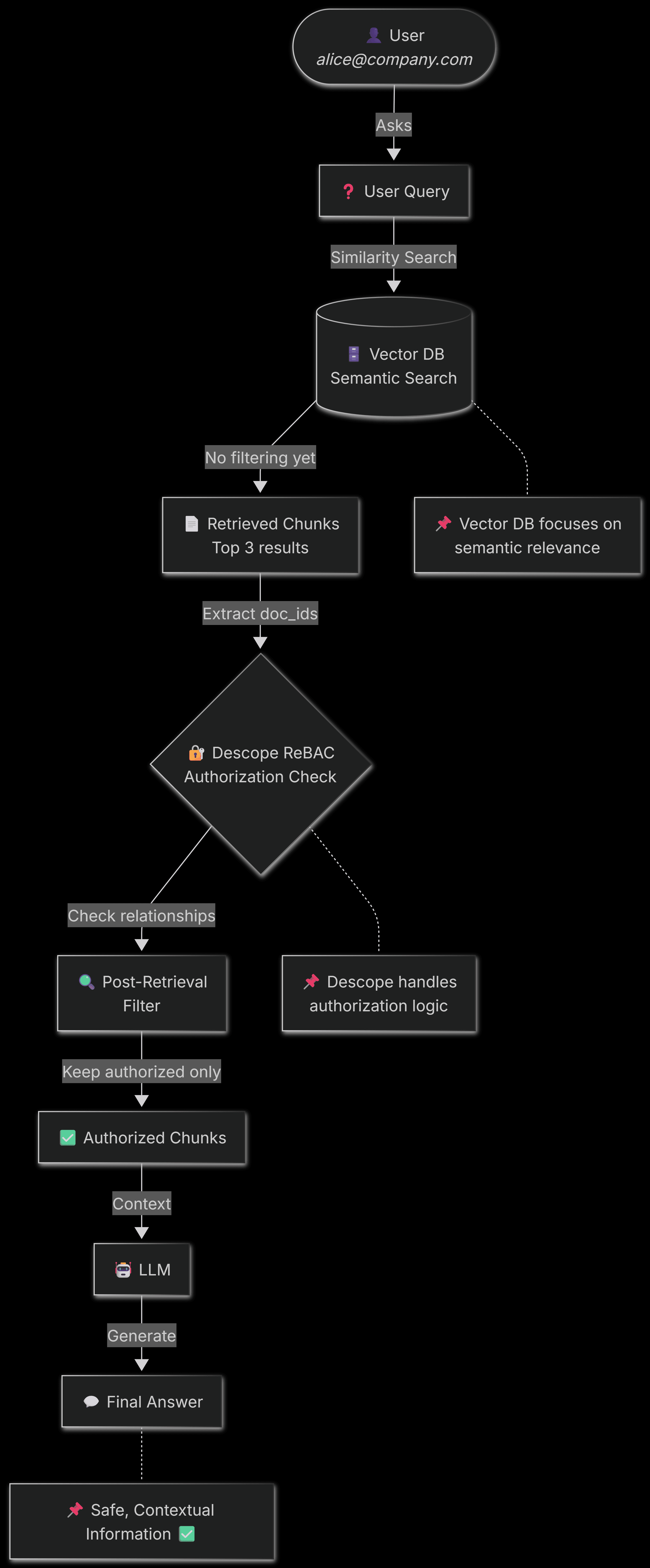
As you can see, authorization happens between retrieval and generation. Vector DB retrieves relevant documents based on semantic similarity. Descope checks if the user is actually allowed to see it based on relationships (ownership, team membership, sharing). Only authorized content reaches the LLM. If there's insufficient authorized content, the system returns an access denied message instead of hallucinating an answer from data the user shouldn't see.
This architecture keeps your vector database simple and fast while ensuring your RAG pipeline respects organizational permission boundaries.
Implementing ReBAC for your RAG pipeline with Descope
Let's build ReBAC for a RAG pipeline with Descope. We'll use ChromaDB and OpenAI GPT-4o-mini.
Prerequisites
Python 3.10 or higher
OpenAI API key: Get one here (Paid)
Descope account: Sign up for a free account
The basic RAG pipeline
To understand a real-life use case, consider an enterprise document chatbot. It answers questions using company knowledge bases: internal wikis, financial reports, HR policies, etc. Different employees should only see information relevant to their roles and team memberships.
Let's build a basic RAG pipeline to understand how it works and what needs to be protected. This demo uses ChromaDB for vector storage and OpenAI for answer generation, but you can very well use Pinecone for the vector database and Anthropic Claude or any other LLM for answer generation.
Sample enterprise documents
Organizations have hundreds (or thousands) of documents with different sensitivity levels. This demo includes six sample documents (with dummy data) that represent common enterprise content:
team_notes.txt: Sprint planning notes owned by Alice (Team A member)board_minutes.pdf: Confidential executive meeting minutesquarterly_report.pdf: Financial results (Executive and Finance teams)Eng_specs.md: Technical specifications for the engineering teamhr_handbook.pdf: Company policies accessible to all employeessalary_data.xlsx: Compensation data (HR and Executives only)
Each document can have associated metadata that describes ownership and access requirements, but here's the problem: this metadata won't automatically enforce authorization in your vector database.
Document loading in Chroma DB
ChromaDB stores vector embeddings, not full documents. That means you first need to extract text from formats like PDF, Excel, plain text, and Markdown, then load it into the vector database.
The DOCUMENT_METADATA lookup dictionary maps filenames to metadata like doc_id and title (you can add more metadata as well). This metadata is stored with each chunk, so you can trace it back to the original document later. This traceability is essential for authorization checks.
Note: If you’d like to understand how the demo code stores documents in the vector database (Chroma DB) along with their chunking and associated “collection” (classification or categorization), please refer to this document.
The unsecured RAG query function
Here is the most crucial part of the code: a RAG query on enterprise documents with your document chatbot (without authorization):
def query_rag(question: str, user_email: str) -> str:
    """Query the RAG pipeline (UNSECURED - no filtering)"""
    collection = chroma_client.get_collection(name="enterprise_docs")

    # Retrieve relevant chunks based on semantic similarity
    results = collection.query(
        query_texts=[question],
        n_results=3
    )

    retrieved_docs = results['documents'][0]
    retrieved_metadata = results['metadatas'][0]

    print(f"\nRetrieved {len(retrieved_docs)} chunks from:")
    for meta in retrieved_metadata:
        print(f"  - {meta['title']}")

    # Combine chunks into context
    context = "\n\n".join(retrieved_docs)

    # Generate answer using OpenAI LLM
    response = llm_client.chat.completions.create(
        model=llm_model,
        messages=[
            {
                "role": "system",
                "content": f"""You are a helpful assistant that answers questions based on the provided context.
Only use information from the context to answer. If the context doesn't contain relevant information, say so.

Context:
{context}"""
            },
            {
                "role": "user",
                "content": question
            }
        ],
        temperature=0.7,
        max_tokens=750
    )

    return response.choices[0].message.content
There's no check here to verify whether the user should see these documents. The user_email parameter isn't used for verification. ChromaDB retrieves the most relevant chunks based on the user question, and they are passed directly to the LLM, which will generate an appropriate answer. Any user can ask any question and receive information from any document.
Understanding the problem
Let's examine this security issue in action:
# Regular employee asking about executive compensation
query_rag(
    "What is the CEO's total compensation?",
    user_email="john@company.com"
)
Output:
The CEO's total compensation is $500,000, which includes a base salary of $325,000 and a bonus of $175,000.John is a regular employee (not a C-suite executive or an HR person) with no special privileges. He shouldn't see salary data, but the system retrieved it from the vector database and answered his question. The vector database found the most relevant chunks (which happened to be from a document that should've been restricted), and the LLM answered the question based on this context. There is no authorization in this entire pipeline.
This is the baseline problem that we're solving. The RAG pipeline works perfectly from a technical perspective: it found relevant information and generated a coherent answer. But from a security perspective, it's a disaster.
Let's fix it.
Descope ReBAC setup
A basic RAG pipeline retrieves documents purely based on semantic relevance. To add authorization, you must define who can see what and why. This is where Descope’s ReBAC helps with its Fine Grained Authorization (FGA). Instead of hardcoding permissions or managing complex role hierarchies, you model real organizational relationships such as ownership, team membership, and sharing. This setup code is in setup_descope.py, which creates the schema, users, and relationships.
Understanding ReBAC schema design
Descope uses Domain-Specific Language (DSL) to define authorization schemas. It describes the types of entities in your system and how they relate to each other. For the enterprise document chatbot, there are three core entity types:
user: Represents employees (Alice, Sarah, John, etc.)
Team: Represents groups like Engineering, Executive, HR
doc: Represents individual documents in the knowledge base
Defining the schema
Here's the associated schema in Descope's DSL format:
model AuthZ 1.0

type user

type Team
  relation member: user

type doc
  relation owner: user
  relation shared_with: user
  relation team: Team
  permission can_view: owner | shared_with | team.member
Here's what each piece does:
Type/Relation | Purpose |
|---|---|
Team.member: user | Teams have members who are users |
doc.owner: user | Documents have an owner |
doc.shared_with: user | Documents can be shared with specific users |
doc.team: Team | Documents are associated with teams |
permission can_view | User can view if: owner OR shared_with OR team.member |
The can_view permission is the authorization logic. The | operator means OR, and team.member is a traversal; it follows the relationship from the document to its team, then to the team's members. If Alice is a member of Engineering, and a document is associated with the Engineering team, Alice can view it through the team.member path.
Creating the schema in Descope
The schema gets saved to Descope via the management SDK:
def create_schema():
    """Define ReBAC schema in Descope using DSL format"""
    schema = """model AuthZ 1.0
        <The DSL schema defined above>
"""
    try:
        descope_client.mgmt.fga.save_schema(schema)
        print("  ✓ Schema defined successfully")
    except Exception as e:
        print(f"  → Schema error: {e}")
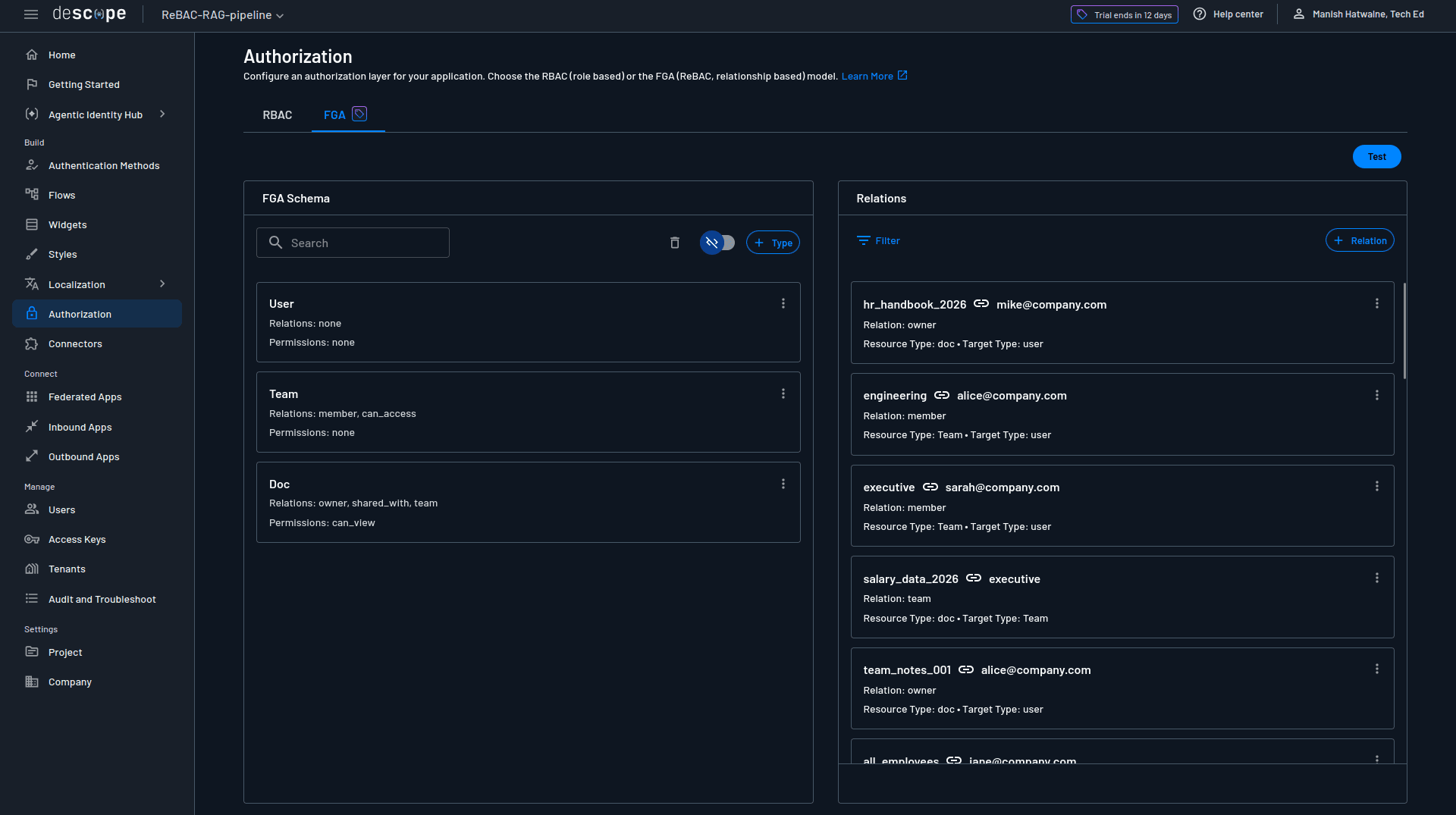
The save_schema() call parses the DSL and stores it in your Descope project. You can view and edit this schema later in the Descope Console under Authorization → FGA.
Creating test users
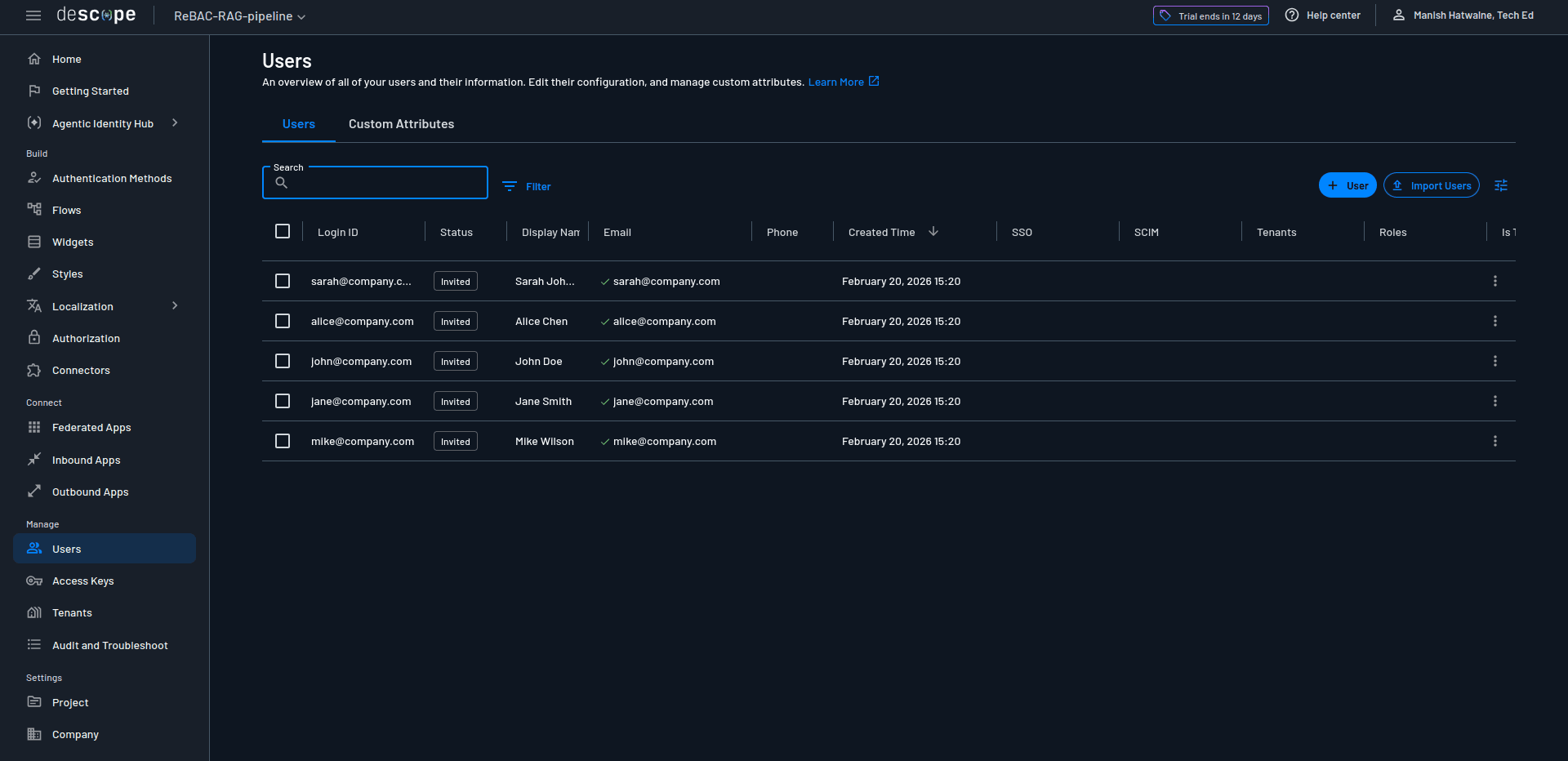
Before establishing relationships, you need users in Descope. For this demo, they're just identifiers (in real life, they'll be authenticated users):
users = [
    {"login_id": "alice@company.com", "email": "alice@company.com", "display_name": "Alice Chen"},
    {"login_id": "sarah@company.com", "email": "sarah@company.com", "display_name": "Sarah Johnson"},
    {"login_id": "john@company.com", "email": "john@company.com", "display_name": "John Doe"},
    {"login_id": "jane@company.com", "email": "jane@company.com", "display_name": "Jane Smith"},
    {"login_id": "mike@company.com", "email": "mike@company.com", "display_name": "Mike Wilson"}
]

for user_data in users:
    descope_client.mgmt.user.create(
        login_id=user_data["login_id"],
        email=user_data["email"],
        display_name=user_data["display_name"]
    )
The login_id and email serve as unique identifiers that you'll reference when creating relationships. These users can be viewed in Descope's user management system:
Establishing relationships
Relationships provide the actual authorization data that defines "Alice is a member of Team A" or "The executive team can access the salary data document." Relations follow this pattern:
resource → relation → targetFor example, the Team "engineering" has a "member" relation to the user "alice@company.com".
Here's the complete relationship setup showing team memberships, document ownership, and team access:
relations = []

# All employees are members of the all_employees team
for user_email in ["alice@company.com", "sarah@company.com", "john@company.com",
                   "jane@company.com", "mike@company.com"]:
    relations.append({
        "resource": "all_employees",
        "resourceType": "Team",
        "relation": "member",
        "target": user_email,
        "targetType": "user"
    })

# Specific team memberships
team_memberships = [
    ("engineering", "alice@company.com"),
    ("team_a", "alice@company.com"),
    ("executive", "sarah@company.com"),
    ("finance", "jane@company.com"),
    ("hr", "mike@company.com"),
]

for team, user in team_memberships:
    relations.append({
        "resource": team,
        "resourceType": "Team",
        "relation": "member",
        "target": user,
        "targetType": "user"
    })

# Document ownership
doc_owners = [
    ("team_notes_001", "alice@company.com"),
    ("board_minutes_001", "sarah@company.com"),
    ("quarterly_report_q4_2025", "jane@company.com"),
    ("eng_specs_auth_001", "alice@company.com"),
    ("hr_handbook_2026", "mike@company.com"),
    ("salary_data_2026", "mike@company.com"),
]

for doc, owner in doc_owners:
    relations.append({
        "resource": doc,
        "resourceType": "doc",
        "relation": "owner",
        "target": owner,
        "targetType": "user"
    })

# Team access to documents
team_access = [
    ("hr_handbook_2026", "all_employees"),
    ("team_notes_001", "team_a"),
    ("eng_specs_auth_001", "engineering"),
    ("board_minutes_001", "executive"),
    ("quarterly_report_q4_2025", "executive"),
    ("salary_data_2026", "executive"),
    ("quarterly_report_q4_2025", "finance"),
    ("salary_data_2026", "hr"),
]

for doc, team in team_access:
    relations.append({
        "resource": doc,
        "resourceType": "doc",
        "relation": "team",
        "target": team,
        "targetType": "Team"
    })
Notice that every employee is a member of all_employees. That's how company-wide documents like the HR handbook become accessible to everyone through a single team relationship rather than individual sharing grants.
Similarly, salary_data_2026 is associated with both the executive and hr teams. Sarah (the CEO) and Mike (an HR member) can both access it. John, who's only in all_employees, cannot.
Batch creating relations
All these relations get sent to Descope in a single batch operation:
try:
    descope_client.mgmt.fga.create_relations(relations)
    print(f"  ✓ Created {len(relations)} relations successfully")
except Exception as e:
    # If batch fails, create individually to see which already exist
    for relation in relations:
        try:
            descope_client.mgmt.fga.create_relations([relation])
        except Exception as e2:
            if "already exists" in str(e2).lower():
                print(f"  → Relation already exists")
            else:
                print(f"  ✗ Error: {e2}")
The batch operation is efficient, but if it fails (maybe you're re-running the setup script), the fallback creates relations one by one and gracefully handles duplicates.
You just need to run this setup once to define the authorization.
The following screenshot shows Descope's FGA page with configured authorization:
Verifying the authorization setup
After creating all relationships, verify that permissions work correctly:
test_cases = [
    ("alice@company.com", "team_notes_001", True),          # Alice owns this doc
    ("alice@company.com", "board_minutes_001", False),      # Alice not an executive
    ("sarah@company.com", "board_minutes_001", True),       # Sarah in executive team
    ("sarah@company.com", "salary_data_2026", True),        # Executive team can access
    ("john@company.com", "salary_data_2026", False),        # Regular employee denied
    ("john@company.com", "hr_handbook_2026", True),         # All employees can access
    ("jane@company.com", "quarterly_report_q4_2025", True), # Finance team can access
    ("mike@company.com", "salary_data_2026", True),         # HR team can access
]

for user, document, expected in test_cases:
    check_result = descope_client.mgmt.fga.check([{
        "resource": document,
        "resourceType": "doc",
        "relation": "can_view",
        "target": user,
        "targetType": "user"
    }])

    has_access = check_result[0]["allowed"]
    status = "✓" if has_access == expected else "✗"
    print(f"{status} {user} can_view {document}: {has_access}")
The check() function asks Descope: "Can this user view this document?". Descope evaluates the can_view permission by checking all three conditions (owner, shared_with, and team.member) and returns allowed: true or allowed: false.
Here's the output for these tests:
============================================================
Testing Authorization Checks
============================================================
✓ alice@company.com can_view team_notes_001: True (expected: True)
✓ alice@company.com can_view board_minutes_001: False (expected: False)
✓ sarah@company.com can_view board_minutes_001: True (expected: True)
✓ sarah@company.com can_view salary_data_2026: True (expected: True)
✓ john@company.com can_view salary_data_2026: False (expected: False)
✓ john@company.com can_view hr_handbook_2026: True (expected: True)
✓ jane@company.com can_view quarterly_report_q4_2025: True (expected: True)
✓ mike@company.com can_view salary_data_2026: True (expected: True)
If all tests pass, your ReBAC setup is complete. The authorization graph now represents real organizational structure: users belong to teams, teams have access to documents, and users own documents. The RAG pipeline will query this graph to filter retrieved chunks. That means you don't have any hardcoded permissions or metadata updates when team membership changes. You just define relationships that reflect how access actually works in companies.
Integrating Descope authorization
Now, let's enforce those ReBAC rules in the RAG pipeline. The integration happens at a specific point: after ChromaDB retrieves relevant chunks but before they're passed to the LLM. This post-retrieval filtering keeps the vector database fast while ensuring authorization happens centrally in Descope.
The authorization check function
This function takes a user email and a list of document IDs, then returns only the authorized ones:
def check_document_access(user_email: str, doc_ids: List[str]) -> Set[str]:
    """Check which documents the user can access using Descope ReBAC"""
    if not doc_ids:
        return set()

    # Prepare batch check for all documents
    relations_to_check = [
        {
            "resource": doc_id,
            "resourceType": "doc",
            "relation": "can_view",
            "target": user_email,
            "targetType": "user"
        }
        for doc_id in doc_ids
    ]

    # Batch check all permissions in one API call
    check_results = descope_client.mgmt.fga.check(relations_to_check)

    # Return set of authorized document IDs
    authorized_docs = {
        doc_ids[i] for i, result in enumerate(check_results)
        if result.get("allowed", False)
    }

    return authorized_docs
Batch checking ensures that instead of making separate API calls for each document, you send all checks in one request. Checking five documents takes the same time as checking one.
The secured RAG query function
Here's the authorization integration in the RAG query flow:
def query_rag_secured(question: str, user_email: str) -> str:
    """Query the RAG pipeline WITH ReBAC authorization"""
    collection = chroma_client.get_collection(name="enterprise_docs")

    # Step 1: Retrieve relevant chunks from ChromaDB (no filtering yet)
    results = collection.query(query_texts=[question], n_results=3)
    retrieved_docs = results['documents'][0]
    retrieved_metadata = results['metadatas'][0]

    # Step 2: Extract unique document IDs from retrieved chunks
    doc_ids = list(set(meta['doc_id'] for meta in retrieved_metadata))

    # Step 3: Check authorization with Descope (batch operation)
    authorized_doc_ids = check_document_access(user_email, doc_ids)

    # Step 4: Filter chunks to only authorized documents
    filtered_chunks = [
        chunk for chunk, meta in zip(retrieved_docs, retrieved_metadata)
        if meta['doc_id'] in authorized_doc_ids
    ]

    # Step 5: Handle insufficient access
    if len(filtered_chunks) < 1:
        return "I don't have access to sufficient information to answer this question."

    # Step 6: Generate answer using authorized chunks only
    context = "\n\n".join(filtered_chunks)
    response = llm_client.chat.completions.create(
        # The LLM code is same as the previous RAG query function
    )

    return response.choices[0].message.content
The critical difference from the unsecured version is steps 2-5. After retrieval, the function extracts document IDs from metadata, asks Descope which ones the user can access, and filters the chunks. If authorization filtering leaves no usable content, it returns an access denied message instead of passing unauthorized data to the LLM.
It's worth asking, "Why not filter directly in ChromaDB using metadata?" For simple team-based access, you absolutely could. Maybe store team names in metadata and filter by user membership. However, this approach quickly becomes limiting as authorization requirements change. ReBAC with Descope handles not just team membership, but also direct ownership ('Alice owns this document'), ad-hoc sharing ('shared with Bob'), permission inheritance, and complex relationship chains. More importantly, centralizing authorization in Descope creates a single source of truth for access control.
When permissions change, you update relationships in Descope, not in metadata across thousands of documents. When compliance asks 'Why does Sarah have access to this sensitive file?', Descope provides the complete relationship path. The architecture principle is clear: let your vector database handle semantic search, and let your authorization service tackle "who can see what and why" nuances. The performance cost of post-retrieval filtering is negligible (milliseconds to check a handful of documents), while the maintainability and auditability gains are substantial. However, in real life, you're likely to use a hybrid approach: ChromaDB metadata filtering for coarse-grained access (e.g., filter by groups), then apply Descope's ReBAC for fine-grained checks (ownership, sharing, inheritance).
Edge case handling
The threshold if len(filtered_chunks) < 1 prevents two bad outcomes:
Hallucination from insufficient context: If only fragments remain after filtering, the LLM might invent information.
Access leakage: Returning "I can't answer" is better than generating an answer that implies unauthorized content.
With larger chunk sizes (2000 characters in this demo), even a single chunk often contains enough context to answer questions. For smaller chunks, you might require a threshold of two or three.
Testing ReBAC with your RAG pipeline
Now, it's time to test secured ReBAC with your RAG pipeline. The interactive demo in rag_pipeline.py allows you to run both the unsecured and secured pipelines to see the difference. For the same queries, same documents, you'll see a completely different security posture.
Let's run the interactive demo:
python rag_pipeline.pyChoose option 3 (Both) to see the side-by-side comparison. The demo runs similar test scenarios through both pipelines, making the security problem and solution crystal clear.
Unsecured pipeline: the security problem
Without authorization checks, the RAG pipeline exposes sensitive data to anyone who asks the right question. Here's what happens when John (a regular employee) asks about executive compensation:
Question: What is the CEO's total compensation?
User: john@company.com

Answer:
The CEO's total compensation is $500,000, which includes a base salary of $325,000 and a bonus of $175,000.

⚠️ CRITICAL BREACH: Regular employee accessed executive salary data.
ChromaDB finds the most semantically relevant chunk (it contains exactly what the user asked), and the unsecured pipeline reveals confidential compensation information to an unauthorized user. This is disastrous for enterprise AI applications.
Secured pipeline: fine-grained authorization in action
Now watch what happens with Descope ReBAC enforcing access control (spoiler: only authorized content reaches the LLM).
Example 1: Blocking unauthorized access: John asks the same question about CEO compensation:
Question: What is the CEO's total compensation?
User: john@company.com

Checking authorization with Descope...
Authorized documents: 0/3

Answer:
❌ I don't have access to sufficient information to answer this question. You may not have permission to view the relevant documents.
ChromaDB still retrieved the salary data (it's the right information semantically), but it was dropped with Descope authorization. John isn't a member of the executive or hr teams, so the can_view permission evaluates to false. The system correctly denies access rather than leaking confidential information.
Example 2: Granting legitimate access: Sarah (CEO, member of executive team) asks about quarterly performance:
Question: What were the company's Q4 2025 financial results?
User: sarah@company.com

Checking authorization with Descope...
Authorized documents: 3/3
  ✓ 2026 Employee Compensation Data
  ✓ Board of Directors Meeting Minutes
  ✓ Q4 2025 Quarterly Financial Report

Answer:
Q4 2025 revenue reached $47.3M, representing 23% YoY growth.
Gross Profit is $32.1 million, up 27% from Q4 2024....
Sarah has legitimate access to both documents through her executive team membership. Descope authorizes everything, and the LLM generates a comprehensive answer from multiple sources. Authorization only enforces boundaries for restricted access.
Example 3: Partial filtering: Alice (Team A member) asks about team projects:
Question: What are the current team projects and their progress?
User: alice@company.com

Checking authorization with Descope...
Authorized documents: 1/3
  ✓ Team A Sprint 23 Notes

Answer:
Successfully migrated 80% of the authentication logic to the new OAuth 2.0 implementation. Dashboard Analytics feature is currently in code review...
ChromaDB retrieved board minutes document chunk(s) because they mention "projects" and "progress", which are semantically relevant to the query, but Alice is not authorized to read this document. Descope checked three documents and authorized one. The board minutes chunk got filtered out before reaching the LLM. Alice gets an accurate answer about her team's projects without seeing executive-level information.
Key insights from these tests:
Semantic search doesn't understand authorization: ChromaDB retrieves based on relevance, not permissions. It will happily return confidential documents if they match the query.
Post-retrieval filtering works: Despite ChromaDB retrieving unauthorized content, Descope blocks it before the LLM sees it. Users get accurate answers from authorized documents or clear denial for unauthorized queries.
Relationship-based access scales: Sarah's access to salary data comes from team membership, not hardcoded permissions. Add her to a new team, and she instantly gets access to all that team's documents. Remove her, and access revokes immediately.
You can run this demo yourself. Try different queries, add new users in setup_descope.py, or modify team memberships. Authorization (FGA) graph adapts without touching the RAG pipeline code or ChromaDB metadata. That's the real power of ReBAC.
Advanced considerations
The demo effectively implements a working authorization layer. However, production RAG systems need more, and Descope's ReBAC handles these challenges through features designed specifically for enterprise authorization needs.
Integration with existing identity systems
For this demo, users and relationships were created manually via the SDK to keep the setup simple. In production, Descope separates user management from authorization logic. User identities and group memberships sync automatically from your existing identity provider through SCIM provisioning, so when an employee joins or leaves in your corporate directory (Azure AD, Okta, Google Workspace, or any SAML/OIDC provider), Descope reflects those changes without manual intervention.
Team memberships can map to existing groups, so your Engineering team in Azure AD becomes the Engineering team in Descope’s authorization graph. Authorization relationships such as document ownership, team access permissions, and sharing rules are managed separately through Descope’s FGA API or Console. These relationships typically integrate with your application workflows: when a document is created in your system, your application establishes the ownership relationship in Descope; when it’s shared, your app adds the sharing relationship. Your identity provider remains the source of truth for who exists and which groups they belong to, while Descope handles what those users can access based on relationships you define.
Monitoring and auditing
Enterprise applications need to answer "who accessed what and when?" for compliance and security investigations. Descope provides audit logging that captures every authorization decision with the relationship path that granted or denied access. When Alice views engineering specs, Descope logs the check and shows it was authorized through Team A membership. When John's access to salary data gets denied, that denial is logged too. These audit logs integrate with Security Information and Event Management (SIEM) systems for real-time monitoring and provide compliance evidence for SOC 2, GDPR, or HIPAA frameworks.
Performance optimization through caching
Authorization checks add latency to your RAG pipeline. Descope's FGA cache addresses this with a local cache service that sits between your application and Descope's authorization service. It automatically syncs relationship and permission data, so checks run locally with minimal latency. In RAG systems, the same documents often get retrieved across multiple queries. When that happens, the cache serves results instantly without making a round-trip to Descope's API.
Dynamic relationship management
Real organizations change constantly. When you add (or remove) a member to any team in Descope, access is instantly granted (or revoked) to documents without hundreds of metadata updates. When a new quarterly report gets created and associated with the finance team, all finance team members can access it without individual grants. The authorization graph reflects organizational access in real-time, not a snapshot frozen in metadata.
Scaling authorization checks
In addition to FGA cache, Descope's Batch checking (as implemented in check_document_access()) allows you to authorize multiple documents in a single API call. Effectively, authorization checks add only about 5-20ms of latency to your RAG pipeline at scale, which is negligible compared to LLM generation time (500ms+) or embedding lookups.
To learn more, check out Adding Performant ReBAC to RAG Pipelines at Scale.
Conclusion
You've built an enterprise RAG pipeline that respects authorization boundaries. Starting from an unsecured baseline that leaked salary data to anyone who asked, you added Descope's ReBAC to enforce document-level access control through ownership, team membership, and sharing relationships. You built a chatbot that answers questions from company knowledge bases while ensuring employees only see information they're authorized to access. Authorization checks happen transparently between retrieval and generation, filtering unauthorized content before it reaches the LLM. When organizational structure changes (new team members are added, reassigned documents, updated policies), the authorization graph adapts automatically without touching your RAG pipeline code or vector database. The complete code from this tutorial is available on GitHub.
ReBAC is becoming essential for enterprise RAG systems. The moment you connect an LLM to internal documents, you create an attack surface where a well-crafted query can extract information that would be restricted in traditional applications. Static roles and hardcoded permissions don't scale when documents have dynamic ownership and ad-hoc sharing. Relationship-based authorization reflects how access actually works in organizations and enforces those rules where AI systems are most vulnerable: the boundary between retrieval and generation. Semantic search finds relevant content, and Descope ensures only authorized content gets used. That's how you can secure RAG in enterprise AI applications.
If you want to secure your RAG pipeline, sign up for a Descope's Forever Account to implement the authorization patterns from this tutorial. Explore more ReBAC use cases and advanced features in Descope's Google Drive example, and start building enterprise AI applications that respect permission boundaries from day one.