
Table of Contents
Don't have the time to read the entire post? Our human writers will be sad, but we understand. Summarize the post with your preferred LLM here instead.
This tutorial was written by Ahilya Kulkarni, a software developer and technical writer with a diverse portfolio spanning more than a decade. Connect with them on their LinkedIn to see more of their work!
Authentication is how applications confirm a user’s identity before granting access to protected APIs or data. Two of the most common approaches are basic authentication and JWT-based authentication—each with different strengths, tradeoffs, and ideal use cases.
These differences matter when choosing the right authentication approach for your architecture.
This guide breaks down basic authentication vs JWT authentication, including how each works, security considerations, scalability implications, and when to use one method over the other.
What is basic authentication?
While the term “basic authentication” may seem straightforward, it can refer to both general principles and a mechanism called “HTTP basic authentication.” This distinction is critical, as many devs looking for basic auth may not realize they’re referring to a predefined method.
HTTP authentication provides a framework for securing access to resources by verifying client credentials. In a general HTTP authentication framework, the client sends a request to a server, the server challenges the request, and the client provides relevant authentication information.
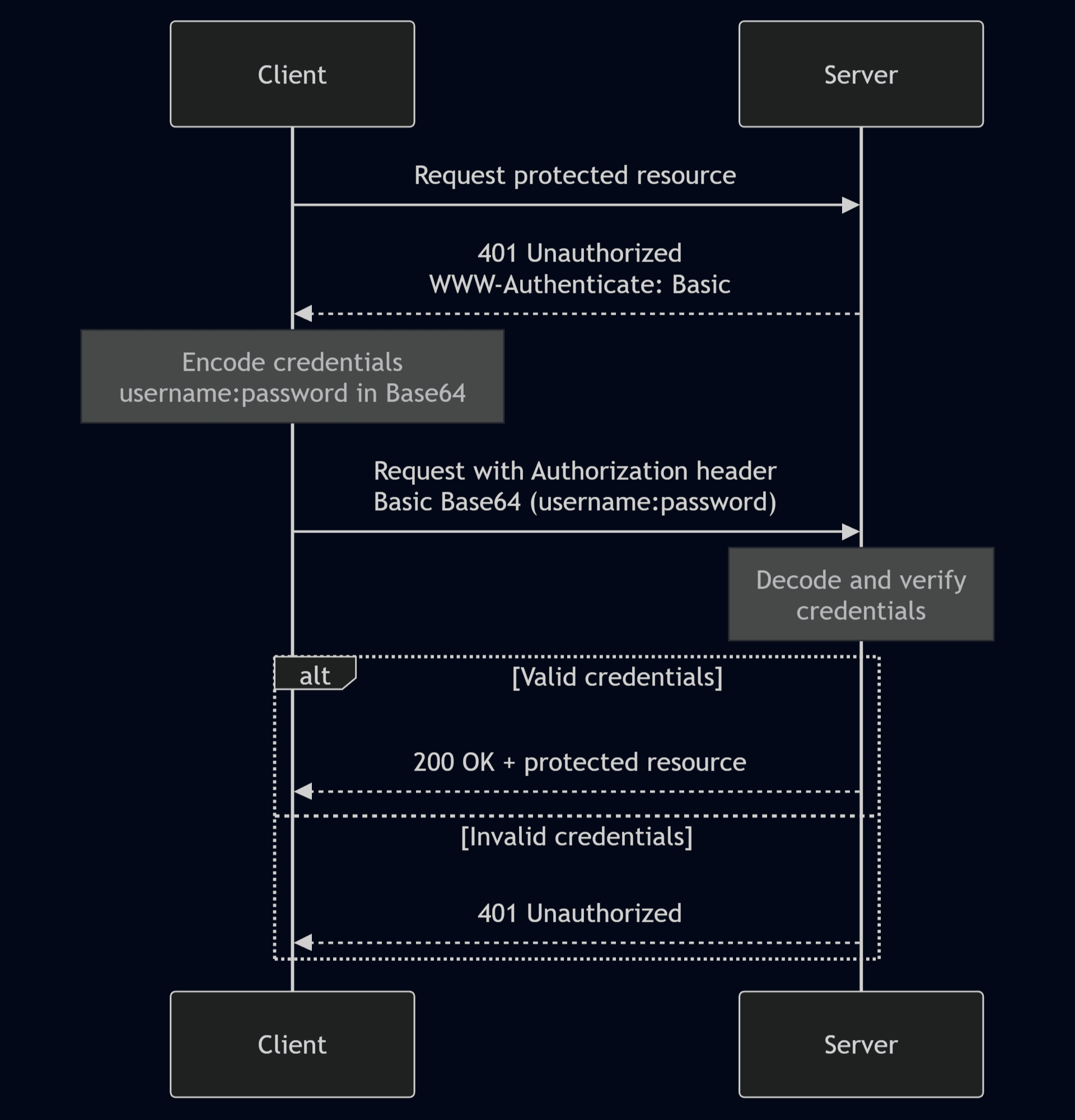
The basic authentication scheme, defined in RFC 7617, is one implementation of this framework. The following steps all apply in most iterations of basic authentication:
When a client requests a protected resource, the server responds to an unauthorized request with a
401 Unauthorizedstatus and aWWW-Authenticate: Basicheader.The client resends the request with an authorization header containing Base64-encoded credentials in the format
username:password.If the request is valid, the server grants access to the resource with
200 OK status; otherwise, it returns401 Unauthorized.
For example, if your username and password are foo and bar, the combination foo:bar is Base64 encoded as Zm9vOmJhcg==. In this case, the request header would look like this:
Authorization: Basic Zm9vOmJhcg==This general flow for basic authentication with these parameters looks something like this:
Here’s a simple Node.js example to illustrate how basic authentication works in practice:
const express = require('express');
const app = express();

// Basic Auth middleware
function basicAuth(req, res, next) {
  // Check for Authorization header
  const authHeader = req.headers.authorization;

  if (!authHeader || !authHeader.startsWith('Basic ')) {
    res.set('WWW-Authenticate', 'Basic realm="Protected Area"');
    return res.status(401).send('Authentication required');
  }

  // Decode credentials
  const base64Credentials = authHeader.split(' ')[1];
  const credentials = Buffer.from(base64Credentials, 'base64').toString('utf8');
  const [username, password] = credentials.split(':');

  // Validate credentials
  if (username === 'foo' && password === 'bar') {
    next();
  } else {
    res.set('WWW-Authenticate', 'Basic realm="Protected Area"');
    return res.status(401).send('Invalid authentication credentials');
  }
}

// Protected route
app.get('/api/protected', basicAuth, (req, res) => {
  res.json({ message: 'This is protected data' });
});

app.listen(3000, () => console.log('Server running on port 3000'));
Potential drawbacks of basic authentication
Basic auth works well in low-risk or controlled environments, but it has limitations that make it less suited for modern, large-scale applications:
Credentials are sent with every request. Even when transported over HTTPS, sending credentials repeatedly increases exposure risk.
Base64 encoding does not protect credentials. It obscures data but does not encrypt it, so credentials can be decoded if intercepted.
No native session or logout mechanism. Unless a client caches safely, users must reauthenticate with every request.
Limited built-in support for additional security layers. Features like MFA, device checks, or adaptive authentication aren’t supported natively and usually require extra tooling.
Because of these characteristics, basic auth is most commonly used in local development, staging environments, or internal systems behind strict network controls.
What is JWT-based authentication?
JWT-based authentication offers a more modern alternative to basic auth by issuing a signed token after login, rather than sending credentials with every request.
JWT-based authentication follows a similar process to the basic sequence detailed above. However, it uses a specific form of JavaScript Object Notation (JSON) for key communication throughout. This shift reduces repeated credential exposure and enables more flexible, scalable authentication flows.
A JSON Web Token (JWT) provides a compact, self-contained way to send identity and authorization information securely. JWT-based authentication uses these token properties to confirm user identity without repeatedly sending raw credentials.
A JWT includes three parts:
Header: The header specifies the token type (JWT) and signing algorithm (eg HS256).
Payload: The payload contains claims about the user and metadata in three types:
Registered: Predefined claims like issuer (iss) and expiration time (exp)
Public: Custom claims that can be shared between parties
Private: Custom claims defined for internal use
Signature: The signature verifies token integrity. It’s created by encoding the header and payload and signing them with a secret key (HMAC) or private key (RSA).
An example header looks like this:
{
  "alg": "HS256",
  "typ": "JWT"
}
An example payload looks like this:
{
  "sub": "1234567890",
  "name": "John Doe",
  "admin": true,
  "exp": 1718192000
}
And an example signature looks like this:
HMACSHA256(
  base64UrlEncode(header) + "." +
  base64UrlEncode(payload),
  secret)
Taken together, a complete JWT consists of three Base64-URL-encoded strings separated by dots, as in header.payload.signature. Here is what a complete JWT looks like:
eyJhbGciOiJIUzI1NiIsInR5cCI6IkpXVCJ9.eyJzdWIiOiIxMjM0NTY3ODkwIiwibmFtZSI6IkpvaG4gRG9lIiwiYWRtaW4iOnRydWUsImV4cCI6MTcxODE5MjAwMH0.CpEJCpqBYrqcLVWCctaxxQMayT5FmsEhZBB39zno2UcSeeing the full token helps illustrate how each encoded segment maps back to the header, payload, and signature components described above.
This structure provides stronger tamper resistance and reduces credential exposure compared to basic authentication, which is why many modern applications prefer JWTs. While it can be more complicated to set up, it’s often well worth it.
How JWT authentication works in practice
JWT-based authentication uses tokens instead of repeatedly transmitting credentials. The overall flow mirrors the basic auth sequence at a high level, but the mechanics differ because authentication happens once and the signed token carries the necessary identity information for subsequent requests. This enables more scalable, stateless sessions—especially in modern API-driven architectures.
The JWT authentication process typically includes three main steps:
Token issuance: When a user logs in with their credentials:
The server confirms the user’s identity and generates a JWT containing claims such as the user ID, roles, and token expiration.
The server signs the token using a secret or private key to prevent tampering.
The signed JWT is returned to the client.
Token storage: The client must store the JWT in a place accessible for future requests. Common options include:
Secure HTTP-only cookies (recommended) — resistant to XSS attacks and automatically included in requests.
Session storage — cleared when the tab closes.
Local storage — easier to access but vulnerable to XSS.
Token usage and validation: Once stored, JWTs are used as follows:
The client includes the JWT in the Authorization: Bearer <token> header for each request.
The server extracts the token, verifies its signature using the appropriate key, and checks its validity (expiration, claims, etc.).
If the token is valid, the request proceeds with the user’s permissions.
The JWT-based authentication process can be visualized like this:
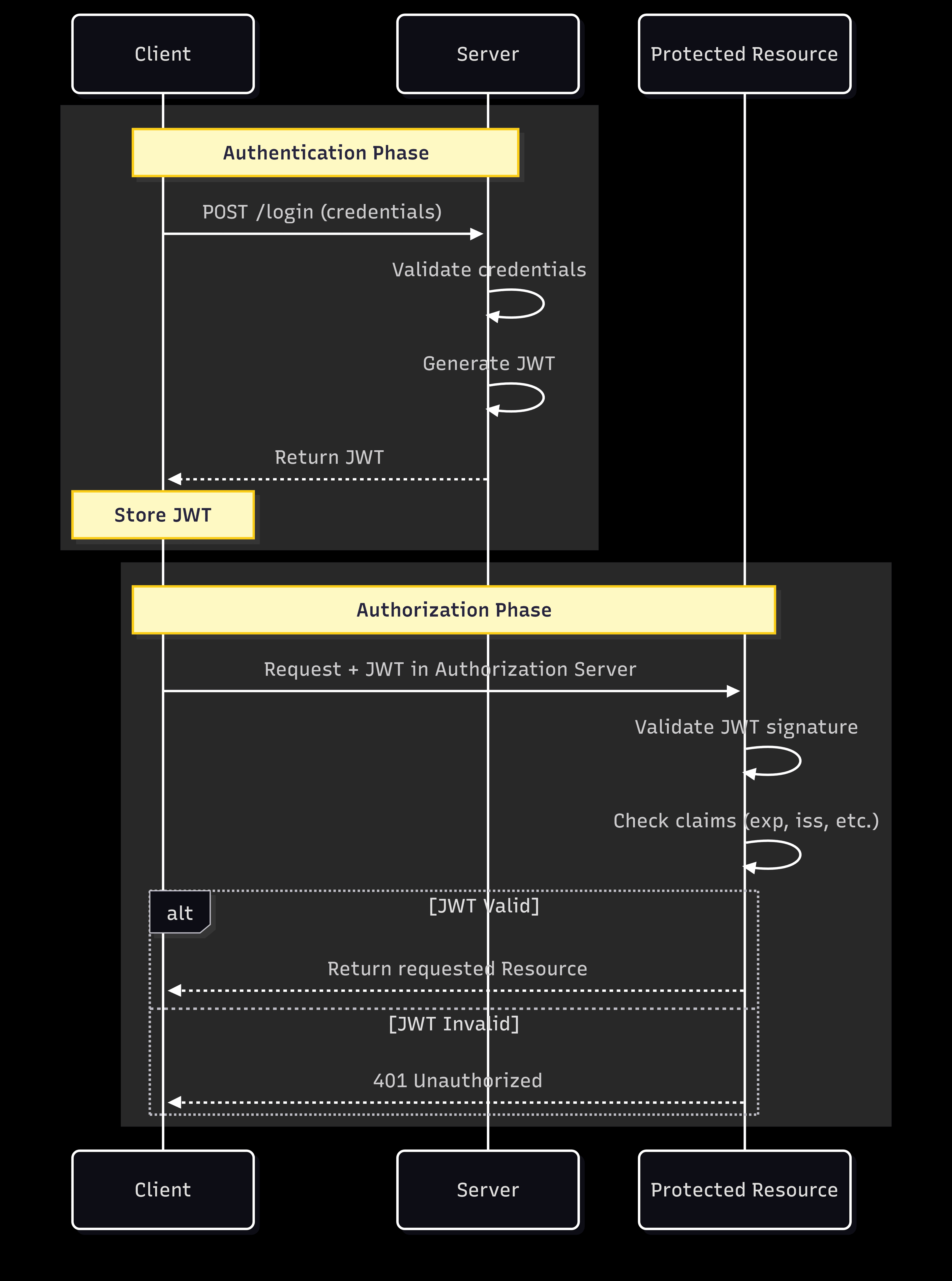
This illustration highlights the flow from login → token issuance → client storage → authenticated API requests. Because the server doesn’t need to re-check a database for every request, JWT validation is fast and scalable.
Below is a Node.js example that implements JWT-based authentication:
const express = require('express');
const jwt = require('jsonwebtoken');
const app = express();
app.use(express.json());

const JWT_SECRET = 'your-secret-key'; // In production, use env variables

// Login endpoint to issue JWT
app.post('/login', (req, res) => {
  const { username, password } = req.body;

  // Validate credentials (in production, check against database)
  if (username === 'foo' && password === 'bar') {
    // Create token with expiration
    const token = jwt.sign(
      { sub: '1234', username, roles: ['user'] },
      JWT_SECRET,
      { expiresIn: '1h' }
    );

    res.json({ token });
  } else {
    res.status(401).json({ error: 'Invalid credentials' });
  }
});

// JWT authentication middleware
function authenticateJWT(req, res, next) {
  const authHeader = req.headers.authorization;

  if (!authHeader || !authHeader.startsWith('Bearer ')) {
    return res.status(401).json({ error: 'Authentication required' });
  }

  const token = authHeader.split(' ')[1];

  try {
    const decoded = jwt.verify(token, JWT_SECRET);
    req.user = decoded;
    next();
  } catch (err) {
    return res.status(403).json({ error: 'Invalid or expired token' });
  }
}

// Protected route
app.get('/api/protected', authenticateJWT, (req, res) => {
  res.json({
    message: 'Protected data',
    user: req.user
  });
});

app.listen(3000, () => console.log('Server running on port 3000'));
As these examples illustrate, JWT-based authentication works similarly to basic auth conceptually but provides stronger tamper resistance, avoids repeated credential transmission, and supports more flexible session and authorization models—all of which are valuable for modern applications.
JWT-based auth and service-specificity
JWTs are typically specific to the service that issues them, since each service has its own signing key. This ensures that only the intended service can generate valid tokens and verify their authenticity.
Applications can also accept tokens from multiple issuers by validating each issuer’s public key. For example, a web app may let users authenticate with Google, Descope, or another identity provider, each generating a valid JWT with its own signing key and claims. In microservices architectures, services often issue their own JWTs for internal communication while also accepting user-facing tokens from a shared authentication service. This allows each service to enforce its own permission model while still trusting a central identity source.
Another example is integrations between an authentication provider like Descope and backend platforms such as Firebase or Supabase. In the sample application, Descope handles user login and issues a session JWT. The app then generates a new JWT signed with the Supabase secret and embeds the Descope user ID as a claim. Supabase validates this token to identify the user, enabling secure communication across both systems.
JWTs also support fine-grained permission control through scoped claims, making them especially useful in systems where different services or user groups require different access levels.
Basic authentication vs. JWT: Key factors
Basic authentication and JWT-based authentication differ at a technical level in how they handle credentials, secure requests, and support session behavior. The table below outlines the core architectural differences developers typically evaluate when comparing the two methods.
| Basic auth | JWT-based auth |
|---|---|---|
Security considerations | Repeated credential exposure; no true encryption; no built-in logout mechanism. | Enhanced security via signed, time-limited tokens; reduced credential exposure. |
Scalability & performance | Poor scaling due to inefficiency. | True statelessness and better response times. |
Implementation complexity | Simple to implement. | Slightly harder to implement, but support is available. |
These technical differences explain why JWTs are better suited for distributed, API-driven, or horizontally scaled systems, while basic authentication remains workable for simpler, controlled, or legacy environments. This section highlights the mechanics; the next section covers when to use each method based on real-world scenarios.
Security considerations
Security is a key difference between basic authentication and JWT-based authentication.
With basic authentication, credentials are sent with every request. Even over HTTPS, this repeated exposure increases risk if credentials are intercepted before TLS is enforced. Base64 encoding is not encryption, and basic auth has no built-in expiration or logout mechanism, making it harder to invalidate access after compromise.
With JWT-based authentication, credentials are exchanged once at login. The server issues a cryptographically signed token that can’t be altered without failing signature verification. JWTs also support expiration and short-lived tokens, reducing the impact of token theft.
As a result, JWT-based auth generally offers stronger protection for modern applications, while basic auth may still be appropriate for simpler or internal environments with lower security requirements.
Scalability and performance
Scalability is another area where basic authentication and JWT-based authentication differ.
With basic authentication, the server must validate credentials on every request. This repeated verification can become inefficient at scale, especially in distributed systems where each service may need access to the credential store.
Validation is stateless with JWT-based authentication. Servers can verify the token locally using the signing key instead of hitting a database or shared session store. This reduces overhead, improves response times, and makes horizontal scaling much simpler.
For high-traffic or microservices-based applications, JWTs generally provide better performance characteristics than basic auth.
Implementation complexity
Implementation effort is where basic authentication has a clear advantage.
Basic authentication is simple to set up and supported natively in most frameworks. It requires minimal configuration and works well for quick prototypes or legacy systems where adding new infrastructure isn’t feasible.
JWT-based authentication introduces more considerations—token signing, key storage, expiration policies, and secure client-side storage. However, modern libraries make this manageable, and the added setup provides more flexibility and control for production environments.
In general, basic auth is easier to implement, while JWT-based auth requires more upfront work but offers long-term benefits for modern applications.
When to use basic authentication vs JWT authentication
Basic authentication and JWT-based authentication differ most across security, scalability, and implementation effort. The table below summarizes the key factors developers typically evaluate:
Feature | Basic Authentication | JWT-based Authentication |
|---|---|---|
Credential handling | Sent with every request | One-time verification, then token-based |
Security level | Lower (Base64 encoded) | Higher (cryptographically signed) |
Scalability | Limited | Excellent for distributed systems |
Implementation | Simple | More complex but well supported |
Session management | No built-in expiration | Configurable expiration |
Logout mechanism | No standard mechanism | Token invalidation/expiration |
Basic authentication is most appropriate for the following scenarios:
Internal or legacy APIs where advanced authentication is unnecessary
Local development or testing environments before implementing other auth methods
Applications with low security requirements or that do not handle sensitive data
Internal tools with limited access and strict firewall policies
Simple API integrations where the client is trusted
Quick prototypes and proofs of concept where speed is important
JWT-based authentication is better suited for the following:
Production apps handling sensitive user data and requiring strong security guarantees
Distributed systems and microservices architectures requiring stateless authentication
Mobile applications that need offline access and secure token storage
Single-page applications (SPAs) that make frequent API calls
Multitenant systems requiring fine-grained access control through claims
Applications implementing single sign-on (SSO) across multiple domains or services
Systems with specific compliance requirements around authentication and authorization
High-traffic applications that need to scale horizontally without shared session storage
So, which one should you choose?
If you need stronger protection against credential theft, better scalability, or more flexible authorization, JWT-based authentication is typically the better choice. Basic authentication can work for internal or temporary use cases but isn’t ideal for long-term production environments.
Following best practices from NIST, OWASP, and major cloud providers can help you build a secure and reliable authentication strategy regardless of which method you choose.
Simplify your auth workflows
Ultimately, basic authentication and JWT-based authentication are two of the most common approaches to confirming user identity. Basic auth is simple to implement but can pose security and scalability limitations if used beyond controlled environments. JWT-based authentication offers a more flexible, scalable model with stronger protections, but requires slightly more setup and ongoing key management.
By considering factors such as credential exposure, encryption, token storage, and performance, you can choose the approach that best fits your project’s needs.
Whether you’re using basic auth, JWT-based auth, or a combination of both, a platform like Descope can help you build secure, user-friendly authentication flows without the heavy lift of maintaining them in-house. Explore passwordless options, session management, RBAC, and more through Descope’s no- and low-code tools.
Sign up for a Free Forever account to get started with Descope. Have questions about basic vs. JWT authentication or how to implement these approaches with our platform? Book time with our auth experts.