
Table of Contents
Don't have the time to read the entire post? Our human writers will be sad, but we understand. Summarize the post with your preferred LLM here instead.
This tutorial was written by Artem Oppermann, a research engineer with a focus on artificial intelligence and machine learning. Connect with him on his LinkedIn to see more of his work!
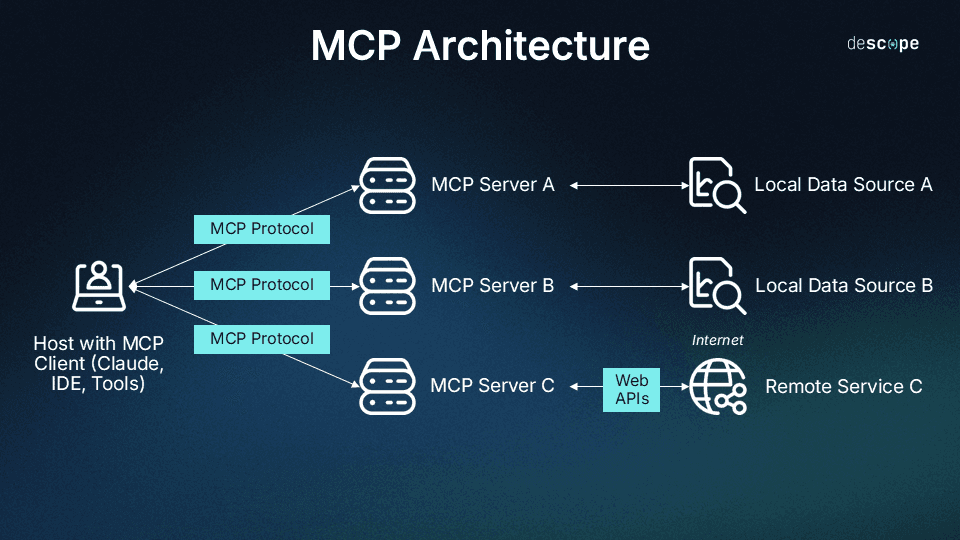
The Model Context Protocol (MCP) standardizes how large language models (LLMs) communicate with external systems through three core primitives: resources (access to data and content), tools (executable functions), and prompts (reusable templates and instructions).
MCP servers are implementations of this protocol. They act as connectors between AI assistants and specific platforms or services. Each server provides a set of tools and resources that enable the AI to interact with the respective platform's API in a standardized manner. With an MCP server, developers can easily access platforms like GitHub, Notion, Vercel, and many others without having to navigate countless APIs, SDKs, and configurations.
This guide introduces seven of the best MCP servers: Descope, GitHub, Vercel, Supabase, Notion, Box, and Firebase. You'll learn how you can use them for specific development scenarios, what features each server offers, how to integrate them into your workflow, and what automation potential they offer.
MCP server selection only adds value when it maps to your existing stack. Integrating a server your team doesn't actively use introduces complexity without productivity gains.
Not all MCP servers are interchangeable: frontend teams get the most from pairing Vercel and GitHub for deployment automation, while full-stack and backend developers benefit more from Supabase or Firebase for database management and backend queries.
Combining multiple MCP servers unlocks the most significant workflow gains: GitHub and Vercel can automate preview deployments after PR merges, while GitHub and Notion can keep documentation synchronized with actual code status.
Why MCP servers matter
Thanks to MCP servers, tasks such as submitting pull requests (PRs), triggering deployments, querying databases, and updating project documentation can be performed using natural language commands without leaving the integrated development environment (IDE). This way, MCP reduces context-switching, which leaves more time for creative problem-solving and actual code development. Furthermore, MCP enables developers to automate repetitive administrative tasks that typically consume significant development time, such as checking deployment status or searching for technical specifications in corporate document systems.
This guide introduces seven MCP servers: Descope, GitHub, Vercel, Supabase, Notion, Box, and Firebase. You'll learn how you can use them for specific development scenarios, what features each server offers, how to integrate them into your workflow, and what automation potential they offer.
Understanding MCP servers
MCP servers enable AI assistants to access external tools and data through standardized primitives. Developers no longer need to write separate integrations for each service. Instead of manually switching between GitHub for code reviews, Vercel for deployments, and Notion for documentation, developers can interact with all these platforms using natural language queries within the IDE. This eliminates constant context-switching and enables AI to orchestrate complex workflows spanning multiple tools.
MCP servers can be deployed in different ways. Some run locally on your machine, others remotely via the internet, and some require Docker. Your choice of client determines which servers you can use.
Compatibility and configuration considerations
Compatibility varies as MCP servers have different runtime requirements. Some require Node.js; others, Python. Meanwhile, community servers may rely on specific versions or additional system libraries. Official servers from platforms like Vercel or GitHub tend to offer broader client support because they are actively maintained for multiple environments. However, community servers may be geared toward specific setups. Understanding these delivery models and compatibility constraints upfront will save you from integration issues down the road.
Manual configuration is the traditional approach. This involves directly editing a configuration file, where the developer defines how the MCP server should run. The developer specifies the command (usually npx for npm packages or python for Python modules), the server package name, and any required environment variables, such as API tokens. Claude Desktop and tools such as Windsurf support this approach through files such as claude_desktop_config.json or mcp_config.json. This approach gives you complete control over server configuration and allows you to use servers from npm, PyPI, or custom executables. It requires understanding JSON syntax and manually managing updates.
Meanwhile, marketplace and app store approaches like Devin's MCP Marketplace simplify installation. Servers are browsed like apps and activated with one click, and dependencies are automatically resolved. This can significantly lower the barrier to entry. For teams that prioritize speed over customization, developers can use marketplace approaches to get new MCP servers up and running in minutes, compared to a longer manual configuration.
How to use MCP servers in your development environment
For deploying MCP servers within development environments, IDE integrations vary depending on the tool. Windsurf, for example, uses an mcp_config.json file in the project root; Cursor IDE offers built-in MCP support via the Settings; and other editors work on their own implementations. The advantage of this is that MCP servers become available directly in your usual development environment. This approach is particularly valuable because it keeps all your AI features within the IDE you are already working in, thus avoiding context-switching between different applications.
It is recommended to always check compatibility with your preferred client before integrating. The MCP documentation and the server's GitHub repositories provide information on runtime requirements and supported clients.
MCP server overview
The following servers have proven particularly valuable for modern development workflows. They cover key areas such as version control, deployment, databases, documentation, and enterprise file management.
Use Case | Deployment Type | Auth Method | Best For | |
|---|---|---|---|---|
Descope MCP | Identity management, auth configuration, docs search, debugging | Cloud / hosted remote MCP server | OAuth (Descope account) | Identity and auth management across Descope projects |
GitHub MCP | Repo access, PRs, issues, code workflows | Cloud / SaaS MCP server | OAuth (GitHub App tokens) | Dev workflows, CI/CD automation, codebase ops |
Vercel MCP | Deployments, project & app management | Cloud-native server | OAuth / Vercel tokens | Frontend teams shipping web apps |
Supabase MCP | Database ops, auth, storage, backend queries | Cloud + self-hostable | API keys + service roles | Backend + full-stack devs using PostgreSQL |
Firebase MCP | App backend services (DB, auth, hosting) | Cloud-managed (Google) | Google OAuth / service accounts | Mobile + serverless app development |
Notion MCP | Workspace docs, notes, knowledge access | Cloud SaaS integration | OAuth (Notion integration token) | Product teams managing docs + specs |
Box MCP | File storage, enterprise content management | Cloud enterprise SaaS | OAuth / enterprise SSO | Enterprise content + secure document workflows |
Now, let’s look more closely at the seven best MCP servers for developers.
1. Descope MCP (Official)
Authentication and identity configuration sit at the center of every application, but managing these disciplines typically requires navigating between console dashboards, API docs, and audit logs independently. For teams that use Descope as their identity platform, the Descope MCP Server consolidates that surface into a single conversational endpoint. Developers can inspect project configuration, search users, review auth flows, manage tenants, query audit logs from any MCP-compatible client without opening the Descope console.
The server is hosted at https://mcp.descope.com and supports all MCP-capable clients (e.g., Claude Desktop, Claude Code, Cursor, VS Code, Windsurf, ChatGPT, Codex, and Open Code). Authentication is handled interactively with the Descope MCP Server: the MCP client prompts the user to sign in with their Descope account, discovers available projects, and lets the user select the active project for the session.
What can you do with the Descope MCP Server?
The server exposes Descope’s Management API through natural language. Tool groups cover users, tenants, flows, access control, MCP server definitions, connection, auth keys, audit logs, and project settings. It also includes built-in documentation tools:
docs_searchruns semantic search across Descope documentation and SDK referencesdocs_ask_questionanswers grounded questions about Descope concepts, setup, and troubleshooting
These documentation capabilities are also available independently through the Descope Docs MCP server, which requires no authentication.
Sessions start in read-only mode. Search, listing, inspection, and audit queries are available immediately. Write operations, such as creating users, modifying flows, or updating tenant configuration, require explicit session elevation. The elevation process uses an out-of-band one-time password (OTP) confirmation, and the elevated write window is time-bounded. This means the AI assistant cannot make changes to your identity infrastructure unless you grant that ability for the session and confirm it outside the conversation.
Here's what that looks like in action: During an onboarding review, you might ask, “Which SSO connects are configured for the Acme tenant?”
The AI queries the Descope project and responds with the tenant’s configured providers, connection status, and any associated domains. You can follow up with, “Show me users in that tenant who haven’t logged in for 90 days.”
The AI uses the user search tools to filter by tenant and last login timestamp, returning a list with user IDs, email addresses, and their most recent activity. If you then want to take action, you can say, “Disable the three accounts that have been inactive the longest.” The server will prompt you to elevate the session, confirm via out-of-band OTP, and then execute the write operation.
This workflow is especially useful for identity administrators and security teams who need to audit configurations, investigate login failures, or validate that access control policies match their intended state. Developers building authentication into new applications can also use the documentation tools to look up SDK integration patterns, troubleshoot JWT validation errors, or plan migrations without switching to a browser.
Configuration is straightforward. Add http://mcp.descope.com as a remote MCP server in your client. The first time you connect, the client will prompt you to authenticate with your Descope account (or create one). No static API key or management key is required in the configuration file. Client-specific configuration steps can be found on the Descope MCP Server docs page.
2. GitHub MCP (Official)
GitHub is the backbone of modern software development. However, working with GitHub often requires developers to constantly switch between their IDE where they write code, the terminal for Git commands, and the browser. This fragmented workflow can cause cognitive overhead. Research shows that interruptions cost developers approximately twenty-three minutes of productive work each time they switch context, making these frequent transitions between tools a noticeable production drain. This is where the GitHub MCP server can help.
What can you do with the GitHub MCP server?
The MCP server supports virtually all key GitHub operations. It provides access to repositories, issues, PRs, and code reviews via AI tools, whether Claude Desktop, Cursor IDE, Windsurf, or another MCP-compatible client.
A major advantage is that these AI programming assistants can now interact seamlessly with GitHub via the MCP server. This allows them to, for example, directly retrieve code for context, push commits, create branches, and manage PRs. Developers don't have to manually switch between tools or copy and paste information. This represents a fundamental shift. Instead of developers acting as intermediaries between their AI assistant and GitHub, the AI can now directly access and modify repositories using standardized MCP primitives:
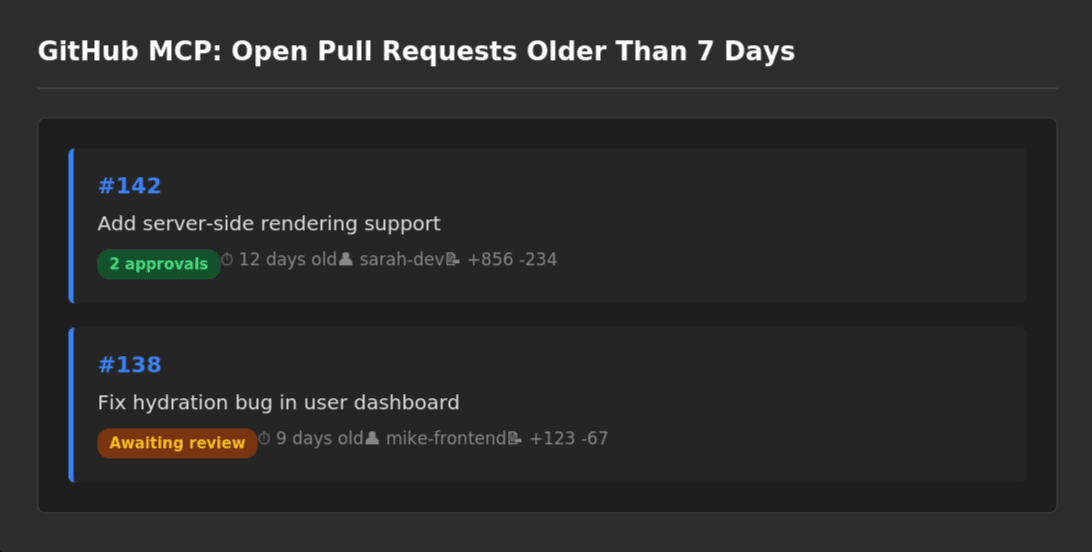
For example, instead of manually scrolling through dozens of open PRs, you can simply ask, "Show me all open PRs in my next-app repository that are older than 7 days."
The AI will use the GitHub MCP server, search the repository, and provide a clear list; for example, "PR #142 for SSR support (12 days old, 2 approvals), PR #138 with a hydration bug (9 days old, awaiting review), and PR #131 for dependency updates (14 days old, has conflicts)."
You can then intervene directly and respond, "Create an issue for the hydration bug from PR #138."
The AI will then generate an issue titled "Investigate hydration bug (from PR #138)," link to the PR, and extract relevant context from the discussion. This feature is especially valuable for project maintainers who need to create status reports on PRs, identify outdated PRs that require attention, or quickly prioritize issues without having to manually review each one. Developers often wait an average of four days for PR reviews, creating significant idle time and requiring frequent context switches. Overall, the MCP server eliminates the manual overhead of browser navigation while maintaining developers' focus on creative problem-solving rather than administrative tasks.
Configuration requires minimal effort. You simply generate a GitHub personal access token with the appropriate repository permissions (usually repo, read:org, and read:user) and then add it to the MCP client's configuration file. For example, in Windsurf, you add the following to the configuration file:
json
// mcp_config.json
{
  "mcpServers": {
    "github": {
      "command": "npx",
      "args": ["-y", "@modelcontextprotocol/server-github"],
      "env": {
        "GITHUB_PERSONAL_ACCESS_TOKEN": "ghp_your_token_here"
      }
    }
  }
}
3. Vercel MCP (Official)
In frontend development, manually pushing commits, waiting for continuous integration, continuous delivery (CI/CD) pipelines, and checking preview URLs can waste valuable time. For teams deploying multiple times per day, this adds up to hours spent context-switching and navigating deployment dashboards. The Vercel MCP server reduces this friction by letting you trigger deployments, check build status, and retrieve preview URLs directly from your IDE.
It's ideal for frontend-heavy workflows like Next.js projects, where CI/CD accelerates the development cycle and fosters creativity.
How does the Vercel MCP server fit into CI/CD workflows?
The server integrates Vercel's deployment pipeline directly into the AI workflow. This eliminates the need to monitor build progress across multiple browser tabs or wait for email notifications about deployment status.
What makes this server particularly powerful is its combination with other MCP servers. If you use GitHub MCP in parallel, the AI can automatically create a preview deployment after a PR merge and provide you with the URL. Additionally, it can analyze build errors from Vercel logs, identify the cause, and suggest fixes that can be committed directly in the code. This is true AI-powered DevOps that can eliminate the friction between development and deployment:
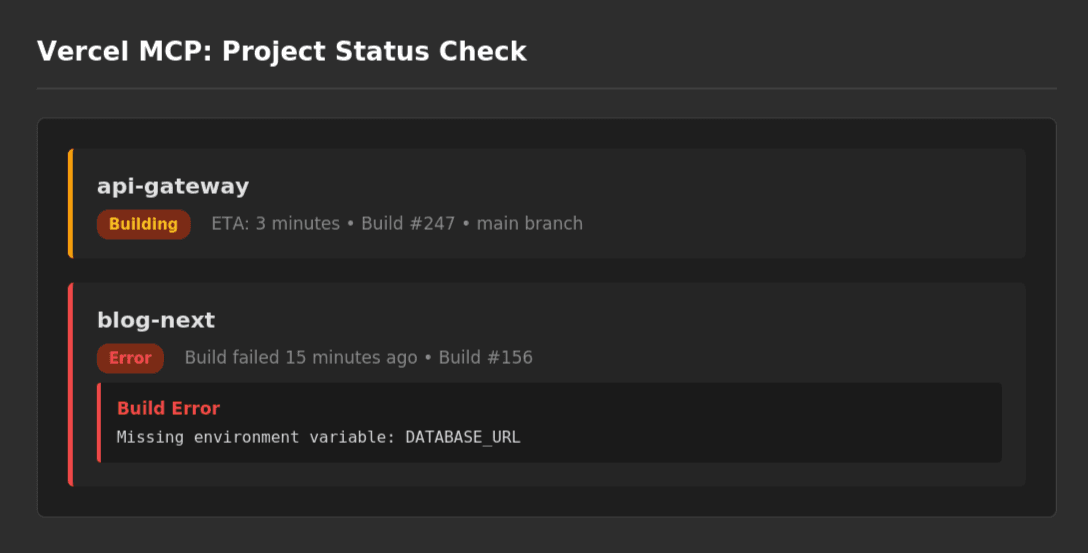
For example, you can ask, "List all my Vercel projects with production status."
Within seconds, you receive an overview of all active projects; for example, "portfolio-2024 is ready (deployed 2 hours ago), api-gateway is currently building (ETA 3 minutes), blog-next has an error (build failed due to a missing environment variable)."
If you then say, "Fix the blog-next issue and redeploy," the AI analyzes the logs, detects the missing DATABASE_URL, and asks if it should set the variable from your .env.local. After you confirm, it automatically starts a new deployment. You immediately receive the preview URL back without a single click in the Vercel dashboard.
All you need to set it up is a Vercel access token, which you can generate in seconds from your account settings. In Windsurf, for example, you create a mcp_config.json file in the project root and add your Vercel access token:
json
// mcp_config.json
{
 "mcpServers": {
   "vercel": {
     "command": "npx",
     "args": ["-y", "@modelcontextprotocol/server-vercel"],
     "env": {
       "VERCEL_ACCESS_TOKEN": "your_vercel_token"
     }
   }
 }
}
Related Reading: Drag & Drop Auth for Your Vercel Apps & MCP Servers
5. Supabase MCP (Official)
Databases are at the center of every application, but the traditional workflow associated with them is often tedious, involving opening the dashboard, writing SQL queries, and manually exporting and analyzing results. The Supabase MCP server eliminates this overhead. Developers can query database information in natural language, which the AI translates into optimized SQL queries and executes.
The Supabase MCP server offers numerous tools for database operations, ranging from read-only queries to data modification and deletion. Due to this wide range of functions, it is important to carefully assign permissions to these tools. Best practices are to scope access to a single project, enable read-only mode at the database level, and only expose the minimum feature set needed. Tools for modification or deletion queries should be accessible only to authorized users:
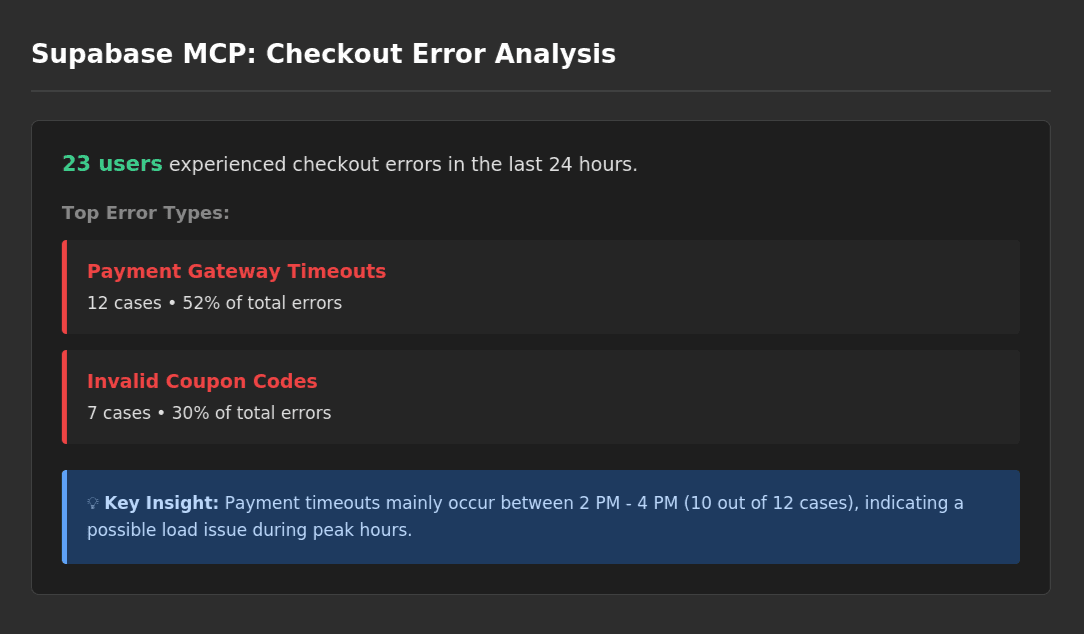
For example, in the e-commerce sector, you could ask the AI, "Show me all users who experienced a checkout error in the last 24 hours."
The AI uses the Supabase MCP server, queries the orders and error_logs tables, and delivers an analysis within seconds: "23 users are affected, with the top errors being payment gateway timeouts (12 cases), invalid coupon codes (7 cases), and stock unavailable errors (4 cases). Interestingly, the payment timeouts mainly occur between 2 p.m. and 4 p.m., which is an indication of a possible load problem."
At this point, you can intervene directly and say, "Write a migration script that adds a retry_count field to the orders table." The AI immediately generates a complete SQL script with an ALTER TABLE statement and an index for performance optimization.
This MCP server lets frontend developers query databases without writing SQL or opening separate dashboards. Instead of asking a backend engineer for user counts or recent orders, you can retrieve that data directly from your editor, without any context-switching. Junior developers can query data in Supabase using the MCP and AI without having to memorize complex SQL syntax. Moreover, experienced developers can work faster by skipping the manual process of writing queries.
The configuration requires your Supabase project URL and a service role key, which you store in the MCP server settings. In Windsurf, the setup uses Supabase's remote MCP endpoint:
json
// mcp_config.json
{
  "mcpServers": {
    "supabase": {
      "command": "npx",
      "args": [
        "-y",
        "mcp-remote",
        "https://mcp.supabase.com/mcp"
      ]
    }
  }
}
Authentication with Supabase MCP occurs via the remote endpoint. Upon initial connection, the developer is prompted to authenticate with their Supabase account. The MCP client saves the credentials for subsequent requests. Ensure that the required project permissions have been configured in the Supabase Dashboard before establishing a connection.
6. Firebase MCP (Official)
Firebase faces similar backend management challenges as Supabase. Here, developers must also query data, manage users, and monitor services.
However, Firebase's value proposition differs significantly. Both platforms offer managed backend services, such as databases, authentication, and serverless functions. Firebase's main advantage lies in its deep integration with the Google and Android ecosystem. Firebase provides tightly integrated services optimized for mobile development, such as Firebase Cloud Messaging for push notifications and built-in support for Android and iOS SDKs. For teams developing mobile applications or wanting to leverage Google Cloud services, the Firebase MCP offers unified access to this ecosystem.
The Firebase MCP server integrates these services into a conversational workflow. Instead of manually navigating between the Firebase console, Cloud Functions Dashboard, and Authentication Panel, developers can issue natural language queries that query multiple services simultaneously. For example, AI can link Cloud Firestore data with Firebase Authentication and deliver a consolidated response that combines user IDs, registration times, and email status. This eliminates the need to laboriously switch back and forth between tabs in the Firebase console:
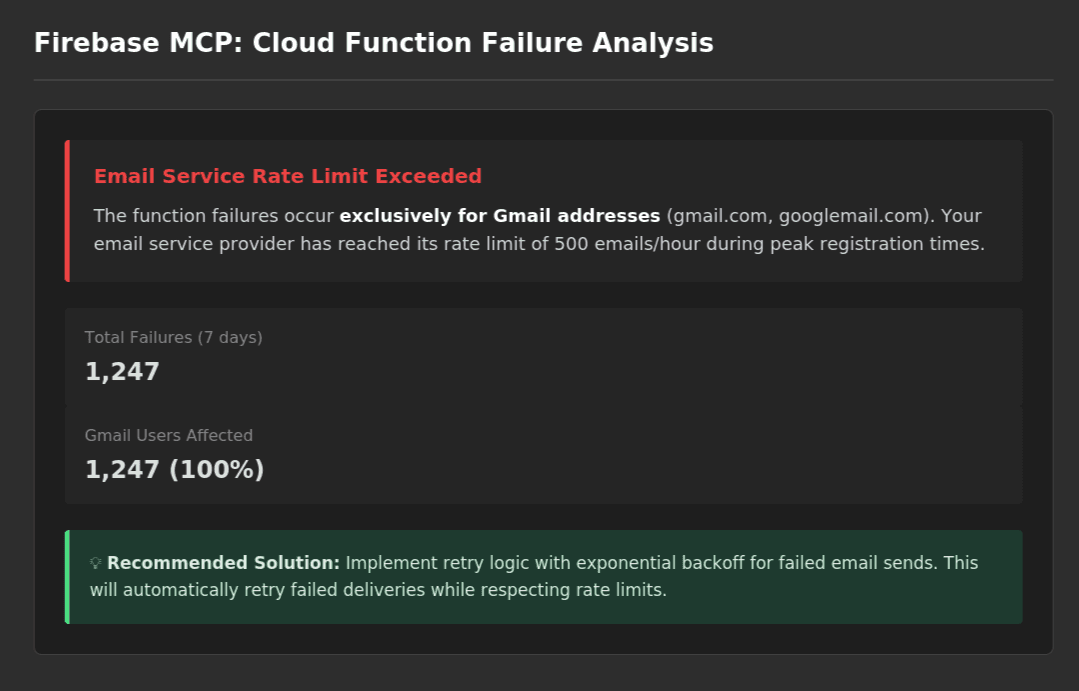
For developers using Cloud Functions, the server is particularly helpful for debugging as it provides unified access to function logs, execution context, and associated service data in a single query. For example, if a Cloud Function fails, the problem is often due to interactions between multiple Firebase services. With the MCP server, developers can query function logs or perform analysis for debugging without having to switch between different Firebase console panels.
For example, you can ask specific questions about potential bugs, such as "Why does the sendWelcomeEmail function fail for 20% of new users?"
The AI analyzes function logs, identifies that the errors occur only for Gmail addresses, and determines that the email service has reached a rate limit. Similarly, the AI may suggest a solution, such as implementing retry logic with exponential backoff, and offer to generate the code patch directly.
Configuration requires a Firebase Service Account JSON file, which you generate via the Firebase console. This file contains all the necessary credentials for secure access. In the Cursor IDE, the configuration looks like this:
json
// Cursor Settings (MCP Configuration)
{
  "mcpServers": {
    "firebase": {
      "command": "npx",
      "args": ["-y", "@modelcontextprotocol/server-firebase"],
      "env": {
        "FIREBASE_SERVICE_ACCOUNT_KEY": "/path/to/serviceAccountKey.json",
        "FIREBASE_PROJECT_ID": "your-project-id"
      }
    }
  }
}
When should developers choose Firebase MCP over Supabase MCP?
When it comes to Firebase vs. Supabase MCP, developers should base their choice around the existing ecosystem and their specific needs.
Firebase MCP is better suited to building or managing apps that rely on a fully managed Google ecosystem, especially for mobile or web apps with real-time data and authentication.
Supabase MCP is ideal for situations where control over the database is essential and when building full-stack apps that require flexible data modeling and queries. Developers who prefer SQL/Postgres may also favor Supabase MCP.
6. Notion MCP (Official)
Notion is the central knowledge base for many teams and serves as a single source of truth for project documentation, sprint planning, and task management. However, keeping documentation up-to-date during active development creates friction. According to McKinsey research, employees spend 1.8 hours per day, an average of 9.3 hours per week, searching for and gathering information. This means developers have to invest time navigating between code, commits, deployments, and documentation tools; manually updating task statuses; searching for project information; and ensuring that documentation reflects the current development status.
The Notion MCP server makes these manual synchronization tasks conversational. The AI can navigate workspaces, query databases, update task statuses, and create new entries using natural language commands. Developers can ask questions and make updates directly from their development environment without having to open Notion in a browser.
In a typical workflow, you may ask, "What are my tasks for today from the engineering board?"
The AI searches your Notion database and responds, "Fix authentication bug (High Priority, In Progress), Review API documentation (Medium, To Do), Update deployment guide (Medium, To Do), and Refactor user service (Low, Blocked – awaiting design)."
You get an instant view of pending work and blockers. After fixing the auth bug, you can skip opening Notion and just say, "Mark the auth bug as Done and add a note: 'Fixed session expiry logic, deployed to staging.'" The AI updates the task status and logs the note in Notion:

Notion MCP can also bridge the gap between code and documentation through contextual linking with other MCP servers. For example, project status in Notion can be compared with actual code commits from GitHub MCP, sprint goals can be linked with deployment history from Vercel MCP, or release notes can be automatically generated by retrieving closed GitHub issues and documenting them directly in Notion. This transforms Notion from a passive documentation tool into a productivity companion of the development workflow.
You set up the Notion MCP server using a Notion Integration Key, which you generate in the API section of your workspace:
json
// mcp_config.json (Windsurf)
{
  "mcpServers": {
    "notion": {
      "command": "npx",
      "args": ["-y", "@modelcontextprotocol/server-notion"],
      "env": {
        "NOTION_API_KEY": "secret_your_notion_integration_key"
      }
    }
  }
}
7. Box MCP (Official)
Enterprise file management is a challenge many developers are familiar with. Important documents are often buried in nested folder structures, and their access may require multiple authentication steps. Manually searching through PDFs, specifications, and contracts consumes substantial development time. According to the 2024 Stack Overflow Developer Survey, 61 percent of developers spend over thirty minutes a day searching for solutions and documentation.
In many companies, Box is the central platform for managing sensitive documents, such as technical specifications, contracts, compliance documentation, and architectural diagrams. The Box MCP server brings these documents into your AI workflow and allows you to search and retrieve document contents directly from your AI client instead of opening Box. The AI can summarize content, extract specific information, or compare multiple documents. It's particularly useful for technical documentation, such as API specifications or deployment guides, that need to be referenced frequently during development but are tedious to search for manually.
Consider this scenario: you're working on a payment integration and need the latest API specification. Instead of navigating through nested folders in Box, you ask, "Find the latest API spec for the payment service in our shared folder."
The AI locates Payment_API_Spec_v3.2.pdf and offers, "Should I summarize the most important endpoints?"
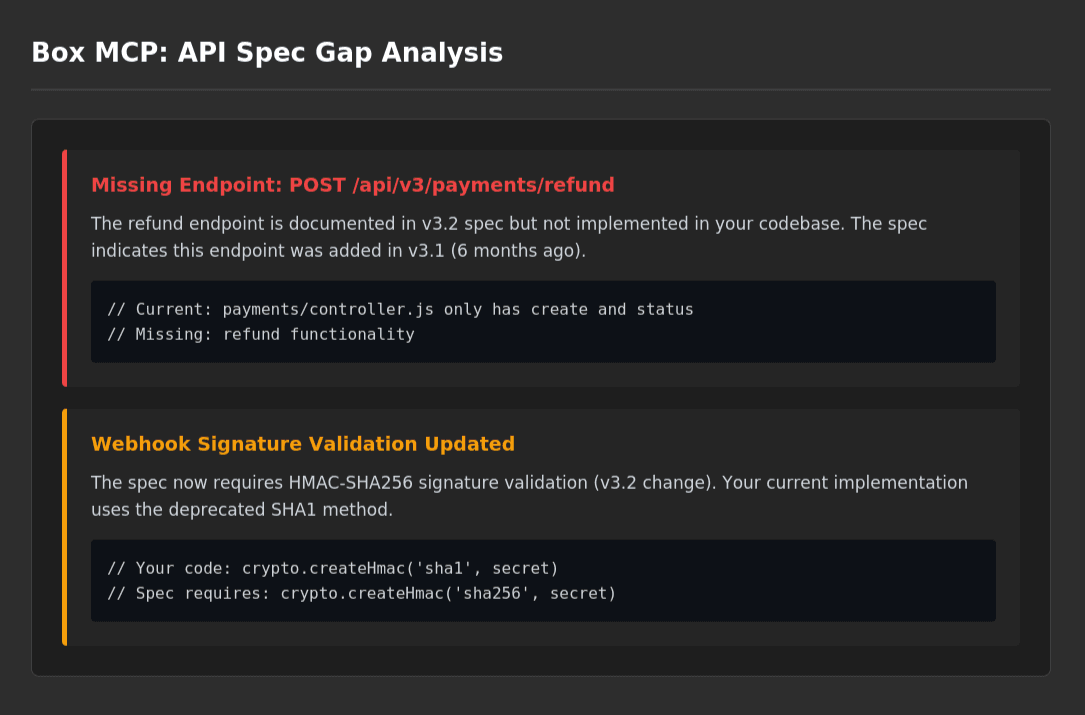
You can then take it further: "Yes, and compare it with our current implementation in api/payments."
The AI reads the PDF via Box MCP, analyzes the code via GitHub MCP, and delivers a gap analysis:
The Box MCP server can also bridge the gap between AI-supported workflows and secure document management by keeping the existing authorization structure. If you don't have access to a document, the AI doesn't either. Every interaction is logged and audit-compliant.
Compliance is an important factor for companies in regulated industries such as healthcare, finance, or government procurement, which must adhere to standards such as the General Data Protection Regulation (GDPR) or Health Insurance Portability and Accountability Act (HIPAA).
You can set up the Box MCP via OAuth credentials from the Box Developer Console. This requires a client ID, client secret, and developer token, which must be stored in your MCP configuration:
json
// Cursor IDE Settings (MCP Configuration)
{
  "mcpServers": {
    "box": {
      "command": "npx",
      "args": ["-y", "@modelcontextprotocol/server-box"],
      "env": {
        "BOX_CLIENT_ID": "your_client_id",
        "BOX_CLIENT_SECRET": "your_client_secret",
        "BOX_DEVELOPER_TOKEN": "your_dev_token"
      }
    }
  }
}
How to choose the best MCP server for your stack
Choosing the right MCP server depends primarily on what you want to achieve in your development workflow and what tools your company already uses. If your team doesn't use Box for document management or Firebase for backend services, these MCP servers won't add value, no matter how easy they are to configure. The key is to adapt the MCP servers to your existing stack and identify which recurring tasks could benefit most from AI integration.
The seven servers presented here offer different advantages depending on your role and workflow:
Choose This MCP Server For… | Why? | |
|---|---|---|
Descope MCP | Identity management and auth infrastructure | Descope MCP is useful for teams that manage authentication, authorization, and agentic identity through Descope. It provides conversational access to project configuration, user and tenant management, audit logs, and documentation, with security model that requires human confirmation for any write operation. |
GitHub MCP | Version control and code collaboration | GitHub MCP is very useful for all developers who regularly review PRs, manage issues, or coordinate with team members in repositories. It is especially valuable for maintainers and experienced developers who spend a lot of time on code reviews. |
Vercel MCP | Frontend deployment and CI/CD | Vercel MCP is suitable for front-end developers working with Next.js, React, or other modern JavaScript frameworks. It is useful for those who need to monitor deployments, check build status, and manage preview environments without leaving their IDE. |
Supabase MCP | Backend development and database operations | Supabase MCP is also useful for developers who work with managed backend services and require frequent access to PostgreSQL databases, authentication systems, real-time subscriptions, or edge functions. In particular, it is valuable for full-stack developers who want to check the database status, manage user authentication, debug real-time connections, or validate data integrity without having to switch between multiple dashboards. |
Firebase MCP | Firebase ecosystems | Firebase MCP is useful for teams that use the Firebase suite of services, such as Cloud Firestore, Firebase Authentication, and Cloud Functions, and want consolidated access to multiple Firebase features from their development environment. |
Notion MCP | Documentation and project management | Notion MCP is beneficial for teams that use Notion as their primary documentation platform. They can use Notion to synchronize task status, project notes, and technical documentation with actual development progress. |
Box MCP | Enterprise document management | Box MCP is designed for companies in regulated industries that require audit-proof document access. Teams can access technical specifications, compliance documentation, or contracts during development. |
Further productivity gains can be achieved by combining multiple MCP servers. For example, GitHub and Vercel can automate preview deployments after PR merges. GitHub and Notion can synchronize documentation with code status. Supabase or Firebase with GitHub can validate schema changes before deployment. When multiple servers work together in a single IDE, context switches are avoided across the entire development stack.
Further productivity gains can be achieved by combining multiple MCP servers. For example, GitHub and Vercel can automate preview deployments after PR merges. GitHub and Notion can synchronize documentation with code status. Supabase or Firebase with GitHub can validate schema changes before deployment. When multiple servers work together in a single IDE, context switches are avoided across the entire development stack.
Conclusion
MCP servers enable bidirectional connections between AI tools and platforms such as GitHub, Vercel, Supabase, Notion, Box, and Firebase. This transforms the way developers interact with their development ecosystem. Using MCP servers eliminates the constant context-switching that fragments modern development workflows. Instead of switching browser tabs, dashboards, and terminal windows, developers can now query deployment status, review PRs, analyze database patterns, and update documentation in natural language.
Frontend developers benefit most from the combination of Vercel and GitHub, while full-stack developers increase their productivity by using Supabase or Firebase for database management. Enterprise teams in regulated industries can use Box MCP for compliance documentation in addition to code repositories. All developers can benefit from leveraging Descope to manage the new identity and authorization challenges that accompany cross-tool AI workflows. For a deeper look at locking down these connections, see Descope's guide to MCP server security best practices.
Descope’s MCP server brings identity management into the same conversational workflow. Teams can inspect auth configurations, search users, review audit logs, and query documentation without leaving the IDE. For teams building or securing MCP servers, the Agentic Identity Hub provides protocol-compliant OAuth 2,1 authorization, per-tool scope enforcement, and credential management for AI agents. To learn more about how Descope handles authentication and identity for your AI agents and MCP servers, book a demo or sign up for your Forever Free account.