
Table of Contents
Don't have the time to read the entire post? Our human writers will be sad, but we understand. Summarize the post with your preferred LLM here instead.
Fraud prevention isn’t just about verifying users. It’s also about understanding the devices they use. Modern attackers often bypass identity verification using headless browsers, device spoofing, and automated tools. In fact, bots make up almost half of all internet traffic, highlighting the importance of being able to differentiate the good bots from the bad ones that are designed to mimic human behavior and evade detection during signup or login.
Descope’s connector with Fingerprint brings persistent device intelligence and bot detection directly into your authentication and user journey flows. Whether you’re defending against fake signups, automation abuse, or risky logins, the Descope Fingerprint connector helps developers build contextual, risk-aware identity journeys without adding friction for trusted users.
About Fingerprint
Fingerprint is a leading device intelligence platform that helps organizations stop fraud, block bots, and personalize experiences using accurate browser and device signals. Its device fingerprinting technology assigns a stable visitor ID that persists across incognito sessions, deleted cookies, VPNs, and browser configurations.
Fingerprint powers identity flows for global customers in fintech, e-commerce, SaaS, and more to enable:
Reliable visitor identification across sessions
Detection of automation and headless browsers
Bot scoring based on behavior, emulation signals, and IP data
Easy risk analysis with 20+ Smart Signals like virtual machine use or geolocation spoofing
Connector overview
The Descope connector with Fingerprint enables organizations to:
Use device intelligence to detect bots, flag headless browsers, and leverage anomaly scoring to inform decisions during signup and login.
Recognize returning devices across sessions using a persistent visitor ID to streamline authentication and account recovery.
Detect and respond to automation or spoofed environments by adding step-up authentication or routing to alternative flows.
Adjust user journeys based on device suspiciousness, which helps reduce risk without adding friction for trusted users.
Integrate Fingerprint client-side with minimal backend effort by passing the visitor ID into Descope Flows.
Combine Fingerprint signals with other risk tools—such as Forter, AbuseIPDB, and reCAPTCHA Enterprise—within Descope’s no-code workflow builder.

Use case: Stop fraudulent signups
Signup flows are a prime target for fraudsters seeking to exploit referral programs, flood platforms with spam, launch SMS pumping and stuffing attacks, or set the stage for downstream threats like credential stuffing and account takeover. These bad actors often use headless browsers, incognito sessions, or scripts in emulated environments to bypass traditional controls and overwhelm onboarding systems.
With the Descope Fingerprint connector, organizations can integrate industry-leading device intelligence and bot detection directly into the signup process before an account is created. The Descope Flow Template for Fingerprint Sign-in offers a prebuilt example of how to do this effectively, using Fingerprint’s persistent device ID and real-time signals to make risk-based decisions during signup.
When a user lands on a signup page, Fingerprint collects over 100 signals to generate a unique visitor ID tied to their device and environment. That ID is used in the Flow to retrieve rich metadata such as bot scores, headless detection, incognito flags, and IP reputation. These insights are then used to determine whether to allow the user through, add friction (such as an OTP verification), or block the attempt entirely.
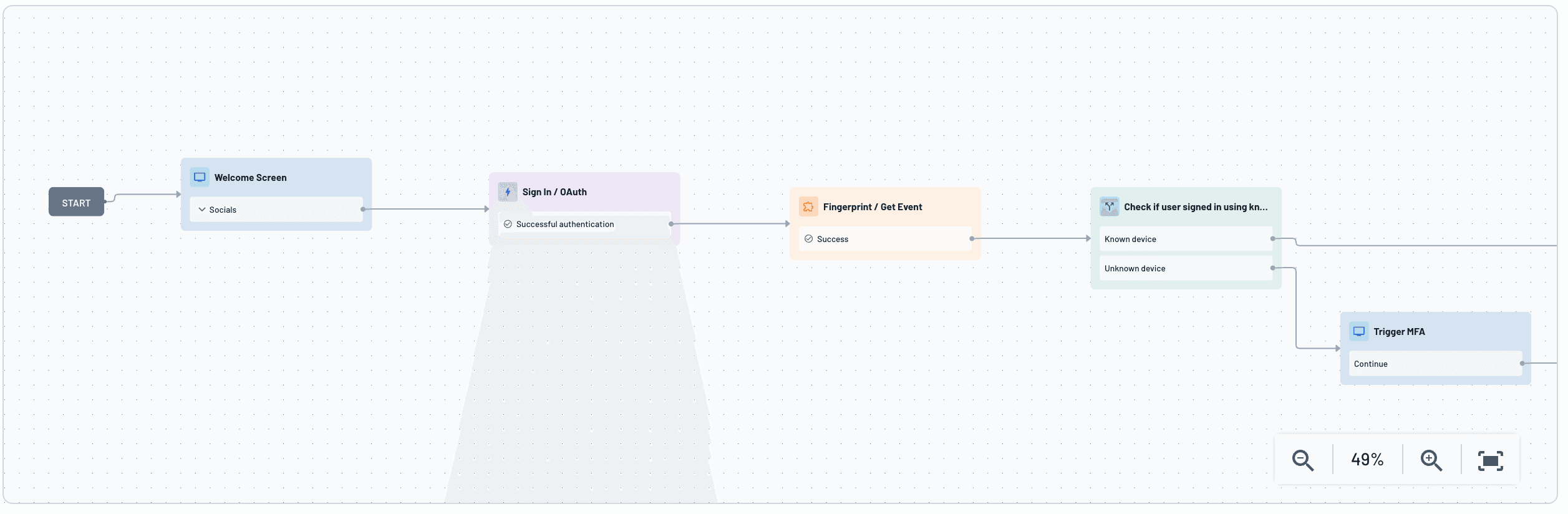
This setup allows organizations to block high-risk and automated signups before they reach the database, reducing fraud exposure and analytics pollution. At the same time, trusted users enjoy a frictionless experience without unnecessary verifications or delays. This logic is orchestrated visually in Descope Flows, so product and security teams can adjust thresholds, triggers, or actions without developer intervention.
By combining Fingerprint’s high-confidence device intelligence with Descope’s flexible authentication platform, businesses can protect their signup flows in an adaptive and invisible way for real users.
Use case: Adaptive authentication based on device trust
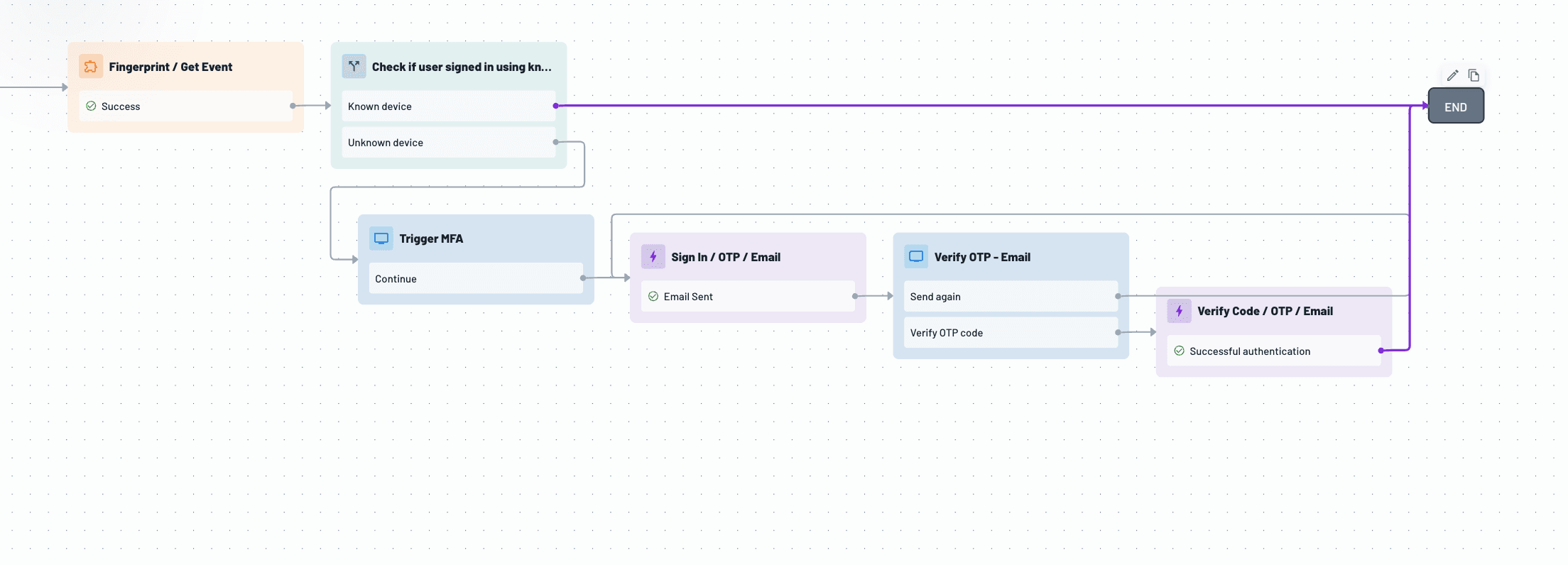
Not every login attempt carries the same risk, and treating them equally can frustrate legitimate users or leave gaps in protection. With the Descope Fingerprint connector, organizations can adapt their authentication experience in real time based on the trust level of the user’s device, reducing friction for known users while challenging suspicious ones.
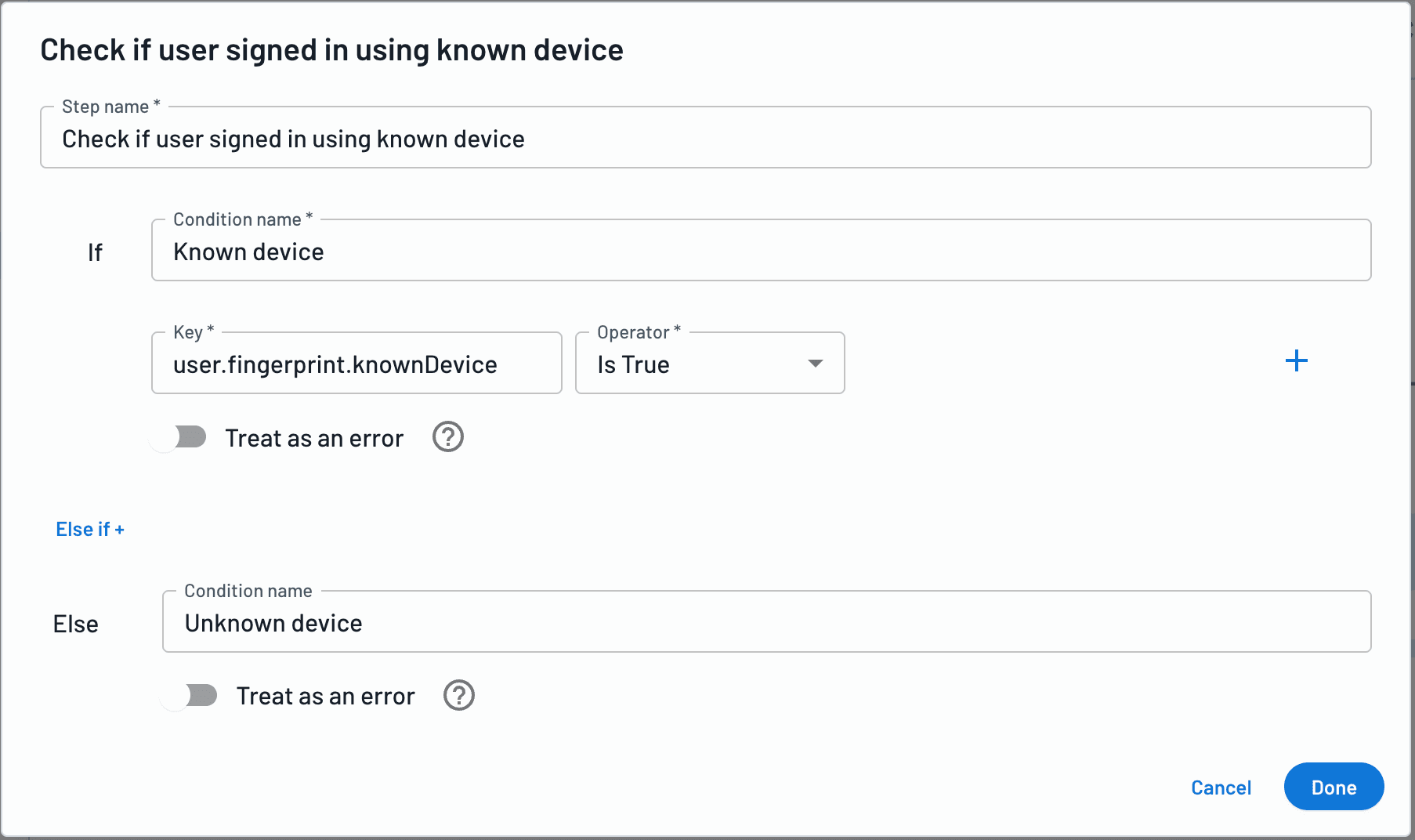
Using the persistent visitor ID and bot detection signals from Fingerprint, Descope Flows can distinguish between low-risk returning users and high-risk attempts from unknown devices or spoofed environments. For trusted devices, users can log in seamlessly without MFA. If the device is flagged as high risk (such as being associated with incognito mode, headless browsing, or automation), Descope can require additional verification, like an OTP, or even block the login attempt entirely. This adaptive authentication approach improves security without sacrificing user experience.
Conclusion
With Fingerprint and Descope, organizations gain a powerful combination of device-level visibility and identity orchestration. Together, they help you:
Prevent fake signups and bot abuse
Detect automation and device spoofing
Adapt authentication dynamically based on device risk
Deliver trusted users a seamless experience across sessions
Interested in learning more about fingerprinting capabilities in Descope? Check out our connector docs and fingerprinting guide. If you haven’t yet started your Descope journey, sign up for a Free Forever account and set up your own Fingerprint connector. To explore other connectors, visit our integrations page.