
Table of Contents
Don't have the time to read the entire post? Our human writers will be sad, but we understand. Summarize the post with your preferred LLM here instead.
Authorization looks like a solved problem until your product grows up. You ship with roles, add a few if user.role === "admin" checks, a middleware guard or two, and you're live. It works until a customer adds contractors that need to only see certain files, or asks why a user who owns a project can't share it with a teammate who holds the same role.
Role-based access control (RBAC) was never built for the nuanced, relationship-driven permissions that some modern applications need. And while relationship-based access control (ReBAC) picks up where RBAC leaves off, many organizations don’t upgrade until role explosion forces their hand.
Descope makes the road from RBAC to ReBAC simple, allowing you to transition iteratively and at your own pace. In this post, we’ll explore when RBAC becomes a limitation, how ReBAC works, ideal use cases, and the path to implementation.
When is RBAC not enough?
For a young app with a handful of user types and no per-resource sharing, RBAC is enough. But real authorization logic is about what relationship you have to a specific resource.
Scenario 1: The Manager who shouldn't see everything. A user is a Manager in your org. Under RBAC, "Manager" grants read access to all documents. If the document belongs to a different department, or a project they didn't join, that role grants too much. Your options are to fragment roles endlessly (Manager-Finance, Manager-Engineering, Manager-HR) or bolt attribute checks onto your role model.
Scenario 2: The Project Owner. A user created a project. They can invite collaborators, edit settings, delete it. Another user joined the same project later with the same Manager role. In RBAC, they look identical. But one owns the project and one joined it. That distinction has nowhere to go in a role model.
Scenario 3: The shared Google Doc. You share a document with a colleague as editor. They share a specific section with someone else as a commenter. That person can comment on that section but can't edit or share further. No role model captures this. The access depends on who shared what, with whom, at which scope.
Users expect contextual, relationship-driven access by default in any collaborative or multi-tenant app. RBAC was built for simpler access patterns.
What is ReBAC?
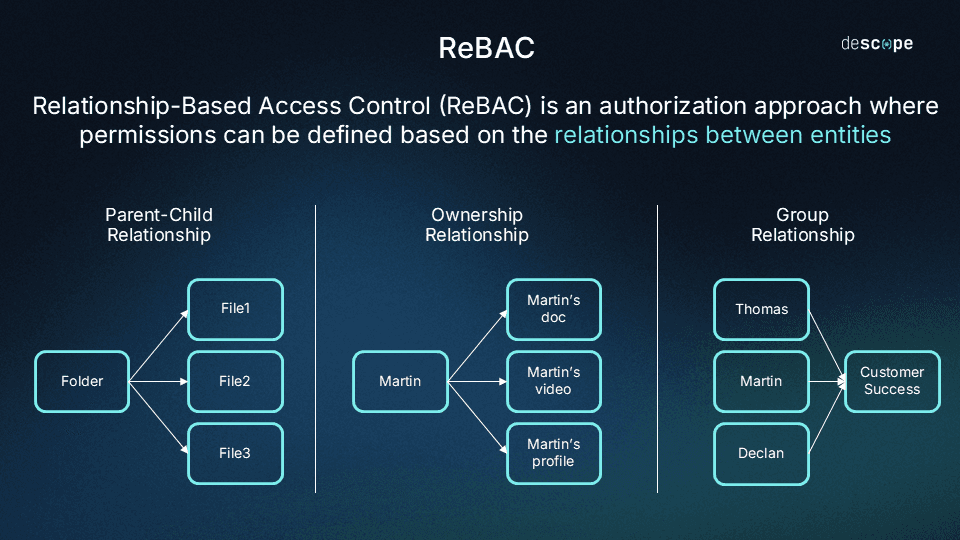
Relationship-based access control grants or denies access based on the relationships between users and resources, rather than static roles or attribute conditions.
ReBAC models your authorization logic as a schema of types and relations. Types define the entities in your system: users, documents, projects, teams, devices. Relations are named connections between a target (typically a user or group) and a resource: owner, editor, member, parent, viewer. An access check evaluates whether a relation (direct or implied through a chain of relations) exists between a target and a resource.
This schema-and-relations model lets ReBAC express permissions that RBAC cannot. Permissions can be inherited through relation chains, scoped to specific resource instances, and delegated in ways that stay bounded and auditable.
Modern ReBAC implementations trace back to Google’s Zanzibar, the authorization system behind Calendar, Drive, Maps, and YouTube. Zanzibar demonstrated that a global, consistent permission model built on typed relations could operate at massive scale with low latency, and its design shaped every major ReBAC system since.
How ReBAC compares to RBAC and ABAC
RBAC | ABAC | ReBAC | |
|---|---|---|---|
Access decision basis | Roles assigned to users | Attributes of the user, resource, and environment evaluated at request time | Named relationships between users and resources |
Granularity | Coarse; same role, same access for all resources of a given type | Fine; arbitrary attribute conditions can narrow access to any scope | Fine; access resolved per resource instance through direct and inherited relations |
Strengths | Simple to implement, easy to audit, low operational overhead | Highly flexible; captures context like time, location, and device | Structured and queryable; models hierarchies and delegation naturally |
Tradeoffs | Role explosion as resource-level and contextual requirements grow | Policy accumulation; ad-hoc if-then conditions become hard to reason, audit, or change | Requires upfront schema design; more complex than flat roles |
Best fit | Stable environments with flat user hierarchies and no per-resource sharing | Dynamic environments where access depends on context that roles and relationships can’t capture | Collaborative, multi-tenant, or hierarchical systems where access follows ownership, membership, and delegation |
RBAC (Role-Based Access Control) assigns permissions to roles and users to roles. It's coarse-grained by design, and works well when every user with a given role needs the same access to every resource of a given type. That fits early-stage apps with flat user hierarchies and no per-resource sharing.
ABAC (Attribute-Based Access Control) adds conditional logic: you evaluate attributes of the user, the resource, and the environment at request time. department == "legal" AND document.classification == "internal". ABAC is more expressive than RBAC and captures some relationship-like logic, but those policies accumulate fast. You end up with a sprawling engine of arbitrary if-then conditions that's hard to reason about, audit, or change.
ReBAC replaces ad-hoc attribute conditions with a structured, queryable schema of named relations. Instead of a policy like user can access document if user.team_id == document.team_id, you ask: does a member relation exist between this user and the team that has access to this document? The authorization logic stays in the schema, not scattered across service methods and middleware.
Ideal use cases for ReBAC
ReBAC is an excellent fit for scenarios where the important authorization question isnt’ “can editors edit documents” but “can Alice edit this document?” Fine-grained authorization (FGA) lets you trace the chain of direct and implied relations from target to resource, tying access decisions to specific resources instead of broad categories.
AI agents acting on behalf of users
Agentic AI systems that perform actions in Notion, Asana, HubSpot, or any connected app need permissions scoped to the user they're acting on behalf of. If Alice grants an agent access to her Asana projects, that agent should touch only the projects Alice owns or belongs to. ReBAC makes that delegation bounded: the agent inherits the relationship paths Alice delegated, without a custom role that approximates her permissions at a point in time.
Multi-agent workflows
This extends to multi-agent workflows where delegation is chained and tenant-scoped. If Agent A calls Agent B to retrieve data on behalf of User C within Tenant D, both agents need permissions bounded by that specific user-tenant relationship. ReBAC traces the delegation chain through explicit relations rather than minting a composite role for every possible agent-user-tenant combination.
AI-powered retrieval (RAG pipeline)
Retrieval-augmented generation (RAG) systems pull documents from a vector database and feed them to an LLM as context. The authorization problem is that the vector search returns results ranked by semantic similarity, not by whether the requesting user is allowed to see them. Pre-filtering (embedding access control metadata into the vector index) breaks down at scale, but ReBAC solves this problem with post-retrieval filtering. The vector database returns the most semantically relevant results, and a ReBAC service checks each result against the requesting user’s relationships before anything reaches the LLM.
B2B2C platforms
Platforms like Shopify or Substack serve merchants or publishers who in turn serve their own customers. A store admin sees their own orders, not another merchant's. A subscriber accesses publications they follow. A merchant employee has access scoped to that store, not the broader platform. The permission model follows ownership and membership at multiple levels: user > role-in-org > org > resources. That structure maps directly to a ReBAC schema of types and relations.
Collaborative SaaS and low-code tools
In Notion, Google Docs, Airtable, and Figma, access follows membership in a workspace, project, or team. Someone shared a page with you directly. You inherited access by joining a space. You're a commenter on this doc and an editor on that one. Each of those is a named relation between a target and a resource, sometimes implied through an intermediate type like a team or workspace. Representing all of that with roles requires an ever-expanding role list. ReBAC captures it as a schema of types and relations.
Healthcare and EHR systems
Healthcare authorization is layered. A doctor gets full access to their patients' records. A consulting specialist gets read-only access to a specific record for the duration of a referral. A family member gets proxy access explicitly granted by the patient. An insurer accesses only the claim-relevant data tied to a specific coverage relationship. Tracking all of that with roles and attributes means patching policy every time a relationship changes. ReBAC stores each grant as a named, time-bounded relationship and queries it directly at authorization time.
IoT and smart device ecosystems
In smart homes, office access systems, and industrial IoT, the same device is shared between users with different relationships to it. An owner adds or removes users. A guest gets temporary access to the front door but not the alarm panel. A contractor accesses a specific set of devices during a service window. A building manager covers all devices in their building, not adjacent ones. Those constraints are all relational: owner, guest, contractor, manager, each scoped to specific device instances. ReBAC stores and evaluates them the same way.
Watch: Fine-Grained Authorization for IoT
Implement ReBAC without rebuilding authorization
You don't need to rebuild your authorization model from scratch. The migration is incremental and you can start small.
Step 1: RBAC to hybrid RBAC/ABAC
Most teams arrive here by necessity. You have roles, but edge cases force attribute checks:
if (user.role === "editor" && document.ownerId === user.id) {
  // allow
}
It works for a while, then the checks accumulate. A new resource type lands, a customer asks for project-level sharing, an enterprise deal requires tenant isolation. Each new requirement adds another condition. You end up with something like this:
if (
  (user.role === "editor" && document.ownerId === user.id) ||
  (user.role === "manager" && user.departmentId === document.departmentId) ||
  (user.role === "admin") ||
  (document.sharedWith.includes(user.id) && document.sharePermission === "write")
) {
  // allow
}
Each branch is a one-off policy living in application code, and authorization logic spreads across controllers, middleware, and background jobs. You can't test it as a system and can't audit it easily. When a security review asks "who can access this document?", you're grepping through your codebase instead of querying an authorization layer.
When you see this pattern, your permission model has outgrown flat roles. The fix isn't more conditions—it's moving to a model where relationships are first-class.
Step 2: Introduce relationships
The transition starts with naming what's already there. Your code already encodes relationships—they're just buried in field comparisons and join queries. The goal is to surface them explicitly.
Instead of:
// buried in a service method
if (document.ownerId === user.id) { ... }
Create an explicit owner relation between user and document. Instead of:
// checking team membership via a join query
const isMember = await db.query(
  `SELECT 1 FROM team_members WHERE team_id = $1 AND user_id = $2`,
  [teamId, userId]
);
Store a member relation between user and team in your authorization layer.
How to model your relations
Think in three questions for each resource type:
Who can own or create instances of this resource?
Who can be added to this resource, and with what level of access?
Does access to this resource flow from membership in a parent resource (a workspace, org, or project)?
For a typical SaaS app, the schema looks like this:
model AuthZ 1.0

type user

type Team
  relation member: user

type Workspace
  relation admin: user | Team#member
  relation member: user | Team#member

  permission can_manage: admin
  permission can_access: member | can_manage

type Project
  relation owner: user | Team#member
  relation editor: user | Team#member
  relation viewer: user | Team#member
  relation parent: Workspace

  permission can_delete: owner
  permission can_edit: editor | parent.member | can_delete
  permission can_view: viewer | parent.member | can_edit

type Document
  relation owner: user | Team#member
  relation editor: user | Team#member
  relation commenter: user | Team#member
  relation viewer: user | Team#member
  relation parent: Project

  permission can_delete: owner
  permission can_edit: editor | parent.editor | can_delete
  permission can_comment: commenter | parent.editor | can_edit
  permission can_view: viewer | parent.viewer | can_comment
With this schema, "can Alice edit Document X?" resolves through multiple paths: a direct editor relation on the document, membership in a Team that holds the editor relation, or an editor relation on the parent Project. You define the rules once. The traversal handles every case automatically.
Start with the resources where permissions break down most: typically documents, projects, or tenants. Model the relationships that already exist implicitly in your data. Your authorization model becomes queryable and separate from your application logic.
Step 3: Transition to ReBAC with Descope
Descope helps you add relationship-based authorization to your existing stack without a full rewrite. Here's how to work through it.
Audit your current model
Pull every role definition, every attribute check in your codebase, and every resource type where access is instance-specific into a single place. You're looking for three things:
Roles that behave differently depending on which resource instance is involved
Inline attribute checks (
ownerId === user.id,departmentId === user.departmentId)Shared access patterns that live in join tables (
document_collaborators,project_members,team_users)
Each of these is a latent relationship waiting to be made explicit. That inventory becomes your relationship model.
Define your relationship schema in Descope
In Descope, you define your entity types and the named relationships between them. Relationships map directly to the access patterns you audited.
Descope uses its own DSL: model AuthZ 1.0 declares the schema version, type defines each entity, relation declares named connections between targets and resources, and permission defines computed access rules from those relations. In the example above, the Team#member notation means a team's members collectively hold that relation: a user gets editor access to a Document if they're individually listed as an editor, or if they belong to a Team that is. Dot notation (parent.editor) lets permissions traverse the hierarchy automatically.
Once the schema is defined, save it via the Console or SDK:
await descopeClient.management.fga.saveSchema(schema);Start with the entities where RBAC is already breaking down. You don't need to model your entire permission system on day one.
Migrate relationship data
Pull your existing data into Descope as relations. This is mostly a one-time ETL job:
project_memberstable >membertuples between users and projectsdocument.owner_idfield >ownertuple between user and documentteam_memberstable >membertuples between users and teamsuser.role === "admin">admintuple between user and workspace
Descope provides bulk-load APIs for the initial migration and real-time write APIs for ongoing relation management. Any time a user shares a document, joins a project, or gets promoted to admin, your application writes a relation to Descope alongside whatever it writes to your own database.
// when a user shares a document
await descopeClient.management.fga.createRelations([
  {
    resource: documentId,
    resourceType: "Document",
    relation: "editor",
    target: sharedWithUserId,
    targetType: "user",
  },
]);
Replace point-in-code checks with centralized queries
Swap out the scattered if blocks for a single call to Descope's authorization API:
Before:
if (
  (user.role === "editor" && document.ownerId === user.id) ||
  document.sharedWith.includes(user.id)
) {
  // allow edit
}
After:
const checks = await descopeClient.management.fga.check([
  {
    resource: documentId,
    resourceType: "Document",
    relation: "can_edit",
    target: userId,
    targetType: "user",
  },
]);

const allowed = checks[0].allowed;
Descope runs the traversal, and your application gets a boolean. The traversal logic (including inherited access through projects, workspaces, and teams) lives in Descope, not in your codebase.
You can batch multiple checks in a single call by passing more relations to the array. Descope returns a result for each, so one round-trip can authorize an entire page of resources.
For high-volume workloads, Descope offers an FGA Cache Proxy, a local caching service you run inside your cluster. It sits between your app and Descope's FGA service, syncs authorization data locally, and serves check calls from the cache rather than making a remote call each time. It also handles negative caching (denied results), so repeated unauthorized access attempts don't hit the API either.
If you want to use our FGA cache, you can deploy it in your own environment and simply point your SDK at the cache instance instead of Descope directly:
import DescopeClient from '@descope/node-sdk';

// Initialize client with FGA cache URL
const descopeClient = DescopeClient({
  projectId: '<Project ID>',
  managementKey: '<Management Key>', // Required for cache proxy
  fgaCacheUrl: 'https://10.0.0.4', // example FGA Cache Proxy URL, running inside the same backend cluster
});
If a result isn't cached or is stale, the proxy falls back to Descope automatically. For most production deployments with frequent authorization checks, running the cache proxy is worth it.
Roll out incrementally
Migrate one resource type at a time. A good order: start with the resource type that's causing the most support tickets or engineering pain, usually the one with the most bespoke if branches.
Before cutting over, run ReBAC checks in shadow mode: call Descope's API in parallel with your existing checks and log any discrepancies. Once the two agree consistently, remove the old checks and make Descope authoritative for that resource type.
// shadow mode
const legacyAllowed = checkLegacyPermission(user, document);

const checks = await descopeClient.management.fga.check([
  {
    resource: documentId,
    resourceType: "Document",
    relation: "can_edit",
    target: userId,
    targetType: "user",
  },
]);
const rebacAllowed = checks[0].allowed;

if (legacyAllowed !== rebacAllowed) {
  logger.warn("Permission mismatch", { userId, documentId, legacyAllowed, rebacAllowed });
}

// use legacy result until validated
return legacyAllowed;
Descope's model is additive. You layer relationships on top of existing role logic and remove the old checks once you've validated in production.
Starting the transition to ReBAC
The path from RBAC to ReBAC doesn't require a rewrite; it requires naming what's already there. Your application already encodes ownership, membership, and hierarchy in database fields and join tables. Descope FGA gives those implicit relationships a home: a central schema of types and relations that your application queries instead of reimplementing in every service.
Start small. Pick the resource type causing the most authorization pain, model its relations in Descope, and migrate one check at a time. The rest of your RBAC model stays in place until you're ready to move it.
Ready to start your migration? Sign up for a free Descope account and explore the FGA documentation to start defining your schema and relationships today. If you'd like to talk through your authorization model or migration strategy, book time with our team.