
Table of Contents
Don't have the time to read the entire post? Our human writers will be sad, but we understand. Summarize the post with your preferred LLM here instead.
As a developer, few projects create more pressure than migrating authentication systems. Authentication sits at the center of user experience and security, so even small errors can have serious consequences. A single misconfiguration can log everyone out, lock users out of the system entirely, or expose gaps in session management that impact uptime and trust.
Whether you are modernizing a legacy platform, moving from another authentication vendor, or consolidating multiple identity providers, the goal is to make the change invisible to your users while keeping access uninterrupted.
That is precisely what Descope Session Migration helps you achieve.
Session migration lets applications switch from their existing identity provider (IdP) to Descope without requiring users to log in again. Instead of forcing reauthentication, Descope verifies the existing session token, issues a new Descope session token for the same user, and keeps them signed in the entire time. Users do not experience any disruption on the front end, while your backend gains a modern and scalable authentication foundation.
Descope Session Migration is currently available for migrations from Auth0, with more IdPs planned down the line.
The importance of session migration
Authentication is often the first and most frequent interaction users have with any app. If a migration breaks that flow, users notice immediately, and the fallout can include lockouts, failed requests, a surge in support tickets, and revenue loss.
When an application switches from one IdP to another, such as during a migration from a legacy system or while modernizing authentication, existing session tokens often need to be replaced. In most cases, tokens issued by the old provider cannot be validated by the new one because they use different signing keys, issuers, claim formats, or token lifecycles. As a result, the new system has no way to trust the old token, which normally forces users to re-authenticate so the new IdP can issue a fresh session.
With Descope Session Migration, the token exchange happens automatically in the background. Descope validates the legacy token, maps it to the correct user, and issues a new session token instantly. This allows applications to transition to a new IdP while keeping users signed in and unaware of any change.
The result is a smoother experience that preserves trust and continuity while giving your team the freedom to modernize authentication.
How session migration works
Session migration securely exchanges user session tokens between your legacy provider and Descope.
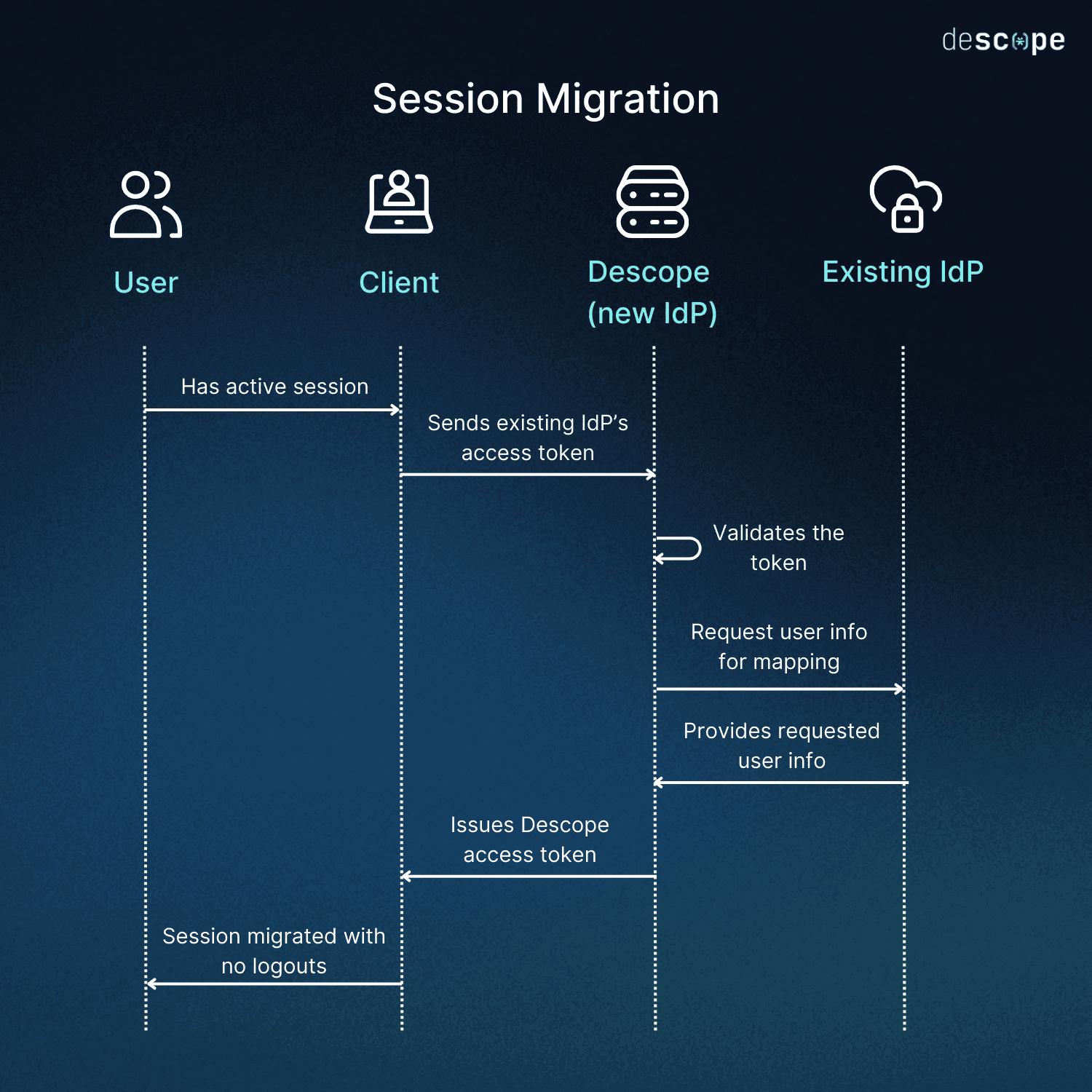
A user makes a request with an active session token from the existing authentication provider.
Your frontend sends that token to Descope through the SDK.
Descope validates the token, extracts the user identifier, and issues a new Descope session token for the same user.
The new token automatically replaces the old one, with no interruption to the session.
Your backend can validate both legacy and Descope tokens during the transition period. This dual-validation strategy enables you to roll out Descope gradually while users continue to interact with your app as usual.
Developers can implement session migration using Descope SDKs for React, Next.js, WebJS, Kotlin, or Swift. Once configured, the SDK automatically manages token storage and refresh.
This approach lets you migrate progressively and safely, converting legacy tokens into Descope sessions only as needed.
When to use session migration
Session migration is most valuable in real-world scenarios where user access needs to remain stable during backend changes. Below are a few potential scenarios where it solves major migration challenges.
Mobile apps with long-lived sessions
A mobile app may keep users signed in for months at a time. Switching to a new IdP would normally invalidate those long-lived tokens and force every user to log in again. With session migration, the app accepts the old token, exchanges it for a Descope session, and keeps users signed in without disruption.
Phased rollouts in enterprise or multi-tenant environments
Let’s say a large logistics platform needs to migrate regional teams gradually to a new authentication system. Some regions still rely on tokens from the legacy provider while others begin using the updated setup, which would typically cause inconsistent login behavior. With Descope Session Migration, the backend can validate both token types and replace the legacy sessions automatically as users interact with the platform.
Avoiding lockouts during vendor transitions
Let’s say an online travel booking site is undergoing a change in auth vendors–it risks invalidating all active user sessions during such a vendor change, which could lock travelers out mid-search or during checkout.
With session migration, the system validates old tokens and issues new Descope sessions automatically, ensuring customers stay logged in and able to complete bookings even while the authentication platform is being replaced.
Modernizing authentication often extends beyond user sessions. After streamlining login continuity, many teams also need to securely migrate system credentials and access keys. This is where secret migration comes in.
Beyond sessions: API key migration
User session migration is only part of a smooth transition to a new authentication platform. Many organizations also rely on long-lived API keys or access keys that power internal services, automation, or machine-to-machine workflows. Rotating or replacing these keys during a migration can create significant friction, especially when hundreds of services depend on them. A single forced rotation can break integrations, disrupt jobs, or require coordinated changes across multiple engineering teams.
To help reduce this operational burden, Descope provides a straightforward API key migration flow that lets teams import existing access keys directly into Descope and continue using them without interruption.
How API key migration works
Import existing keys: You can run a batch import request to the
v1/mgmt/accesskey/importendpoint using a valid management key. The request can include as many existing access keys as needed. Each imported key becomes known to Descope without requiring any changes to the services that depend on it.Exchange and use the key normally: Once imported, the cleartext value of the original access key works exactly the same as a regular Descope access key. Services continue sending the same key they already use, and Descope validates it just like any native key created by the platform.
API key migration allows teams to move access keys into the same single, centralized authentication platform that handles users. This improves key rotation practices, enhances observability, and reduces operational risk, all while keeping existing systems running without forced changes or downtime.
Session migration success story: GoodRx
GoodRx is the leading platform for medication savings in the U.S., used annually by nearly 30 million consumers and over one million healthcare professionals. In late 2024, they chose to move from their incumbent authentication provider to Descope for better developer experience, native mobile app authentication, and a more agile CIAM stack.
The GoodRx team wanted to migrate to Descope without forcing millions of users to log in again or causing lockouts during active sessions involving purchasing medications. Using session migration, GoodRx validated existing tokens, automatically issued new Descope tokens, and completed the transition for tens of millions of users without any downtime or disruption.
You can learn more about their experience in the GoodRx case study.
Tools to enable seamless migration
Descope Session Migration makes it possible to modernize authentication without interrupting user sessions. Applications can move from IdPs like Auth0 to Descope while keeping users signed in and experiences consistent. Session migration is one among many migration tools provided by Descope, including SSO migration, password migration, and API key migration, to help our customers move to Descope while making it feel invisible to their users.
If you are planning an identity provider migration, start by exploring the session migration documentation. If you are ready to try it yourself, sign up for a Free Forever account or book a demo with our team to see how easy it is to migrate sessions without disruption.