
Table of Contents
Don't have the time to read the entire post? Our human writers will be sad, but we understand. Summarize the post with your preferred LLM here instead.
Passwordless authentication is critical to minimizing the risks of password-related data breaches and improving the overall user experience for applications. Since April 2024, over 19 billion passwords have been exposed in data breaches, and a staggering 94% of these are reused or duplicated, increasing vulnerability to credential attacks.
Modern passwordless methods — like passkeys, biometric authentication via WebAuthn, and email or SMS-based magic links — remove the need for users to create or remember passwords while maintaining strong security controls.
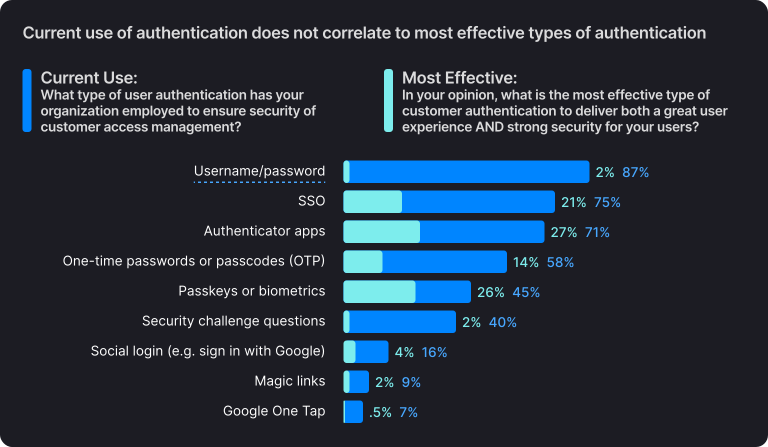
According to Descope’s 2025 State of Customer Identity report, 87% of organizations still use password-based authentication for their customer-facing applications, but only 2% consider it the most effective method to balance security and user experience. Meanwhile, 45% of respondents already offer passkeys or biometric login for customers, and another 27% plan to implement them within two years.
Below, we’ll dive into the top advantages of passwordless authentication and explore why passwordless methods are growing rapidly across industries.
#1 Improved security
Passwords are one of the most common targets for cyberattacks and data breaches. They can be easily guessed, stolen, or compromised through various methods such as:
So the biggest security benefit of passwordless authentication is the elimination of passwords as a potential vulnerability, thus reducing the risk of password-related security incidents.
Passwordless authentication can also offer stronger multi-factor authentication (MFA) mechanisms. MFA can significantly improve security by making it more difficult for attackers to gain unauthorized access even if they manage to steal one of the authentication factors.
It should be noted that different passwordless authentication methods have different levels of security. For instance, while SMS authentication can be compromised via attacks like SIM swapping and man-in-the-middle (MitM) attacks, biometric authentication based on standards like WebAuthn and FIDO2 is virtually unphishable.
#2 Lower long-term costs
While adopting passwordless authentication might require some upfront investment, it pays off in the long run.
Lower costs of security breaches – In the event of a security breach or cyber attack, the costs associated with remediation, legal fees, and damage to reputation can be substantial. With passwordless authentication, organizations can reduce the likelihood and impact of such incidents, resulting in lower long-term costs.
Better scalability – Passwordless authentication can be more scalable than traditional password-based authentication. This is because it eliminates the need for organizations to store and manage user credentials. As they grow and the number of users increases, passwordless authentication can help keep costs in check by providing a more streamlined authentication process.
Decreased support costs – Passwordless authentication can significantly reduce the number of support requests related to password resets and troubleshooting, which in turn reduces the burden on support teams and related operational costs.
Reduced customer acquisition and retention costs – Passwords are a well-known cause of user churn and drop-offs. In a study conducted by Baymard Institute, more than 18% of Amazon and ASOS users abandoned their cart due to forgotten passwords or clunky reset processes. Adopting passwordless authentication encourages users to return to your app by removing the friction and mental effort of remembering complex passwords.
Also Read: How Branch Reduced Auth-Related Support Tickets by 50% With Passkeys
#3 Compliance with regulatory bodies
Depending on your unique industry, you will likely be required to comply with the regulations protecting users’ sensitive account credentials against cybersecurity threats.
For example, the National Institute of Standards and Technology (NIST) Special Publication 800-63B requires organizations to implement industry-standard access controls to protect sensitive data environments. Such controls include password encryption, hashing, and multi-factor authentication.
Although these access controls are effective, passwordless authentication goes a step further. When combined with measures such as secure session management and automatic bot detection, passwordless authentication prevents broken authentication attacks from unfolding.
Also Read: What NYDFS Cybersecurity Compliance Means for Auth & MFA
#4 Better user experience
When developing any application that will meet users’ needs, user experience quality matters. Passwordless authentication contributes to the overall application UX, right from opening the app to navigating it and, finally, securely closing it.
Easier to set up
Passwordless authentication involves fewer steps to set up than the traditional password-based one. Unlike the cumbersome password setup process that often leaves users feeling frustrated, passwordless authentication simplifies user onboarding.
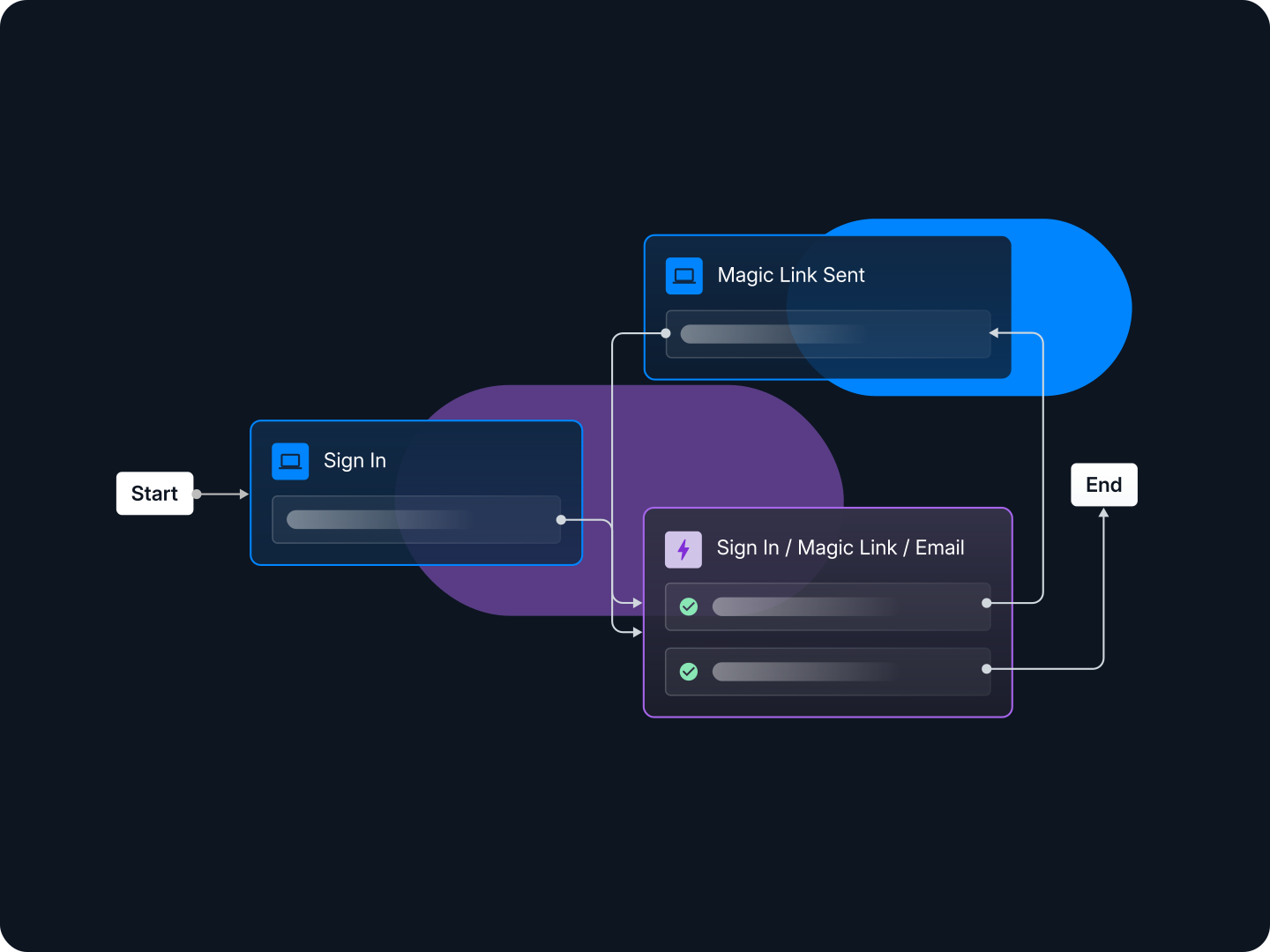
On the developer side, it may seem easier to add password-based authentication rather than learning standards such as OAuth, WebAuthn, and SAML to add other authentication methods. However, authentication platforms make it easy to add, modify and update authentication flows to applications. With access to low-code or drag-and-drop configuration tools, developers can visually design and iterate on these flows without disrupting production environments.
This makes it much easier to control how users first sign up to your business application.
Increased conversion rate
An application that provides a convenient and friendly UX translates into a much higher conversion rate. With passwordless authentication, users are less likely to be frustrated by the hurdles they typically face when signing up or logging in to password-based applications.
Ultimately, reducing cognitive load and friction during login helps users stay focused on what they came to do — engage with your product.
No need to remember multiple passwords
Most people use the same password or variations of it across multiple accounts. But since this is a poor security practice, applications go to great lengths to make users create unique, hard-to-guess passwords.
And what happens most often is that users forget their passwords, and then need to reset them – creating one more password to remember. Passwordless authentication changes this trend by completely removing the burden of remembering multiple passwords and simplifying the login experience for both customers and application developers.
Take full advantage of passwordless authentication
Passwords have defined the user login experience for decades, but they no longer meet modern security or usability expectations. Passwordless authentication represents a shift toward safer, faster, and more user-friendly digital access. It not only protects against credential-based threats but also improves customer trust and conversion by removing friction from everyday sign-ins.
For teams building or scaling applications, adopting passwordless authentication is a practical step toward stronger security and a better user experience—without increasing development overhead. Descope's passwordless authentication solution helps developers add a variety of passwordless methods to their applications using no / low code workflows. End users get frictionless, secure signup and login experiences and developers save time on building and maintaining custom auth code.
To experience the benefits of passwordless authentication first-hand, sign up for a Free Forever account or book a demo to explore what’s possible with Descope. Our drag & drop workflows, SDKs, and APIs make it easy for developers to add authentication and user management for any application.