
Table of Contents
Don't have the time to read the entire post? Our human writers will be sad, but we understand. Summarize the post with your preferred LLM here instead.
The majority of access requests in large organizations today come from non-human identities (NHIs): services, agents, API clients, and machine-to-machine tokens with real privileges. Oasis Security estimates the ratio of non-human to human identities has already reached 20:1, and that number is only climbing.
These identities touch production data, initiate transactions, and make decisions on behalf of users. But unlike humans, NHIs lack visibility.
Typical human sessions start and end cleanly, but agentic identities operate continuously. They dynamically register, request scopes, call APIs, refresh tokens, and can even persist after the authorizing user disappears.
The NHI lifecycle can feel like a black box, which is why auditing and monitoring agentic identities has become essential. Descope’s agentic identity hub offers visibility that will help you investigate, respond, and harden your systems. Through granular audit events, developers and operators can observe a discernable feedback loop: when new clients are registered, when consents expand, when external connections are made, and when policies are violated.
This blog walks through:
How the Agentic Identity Hub handles the lifecycle of an agentic identity.
How Descope audit events give developers and operators insight into every step of that lifecycle.
A concrete technical example: a Model Context Protocol (MCP) server integrating with Snowflake, demonstrating how the Agentic Identity Hub secures automation at scale.
The lifecycle of an agentic identity
To understand the audit surface, we first need to understand the constructs that define an agent’s lifecycle:
Registration: The agent is created and introduced into your system. It needs to identify itself and request permissions.
Consent: A user or tenant admin must approve what the agent is allowed to do on their behalf by granting scopes.
Connectivity: The agent connects to external systems to carry out its tasks.
Termination: When the agent is no longer needed, its credentials must be revoked and its access retired.
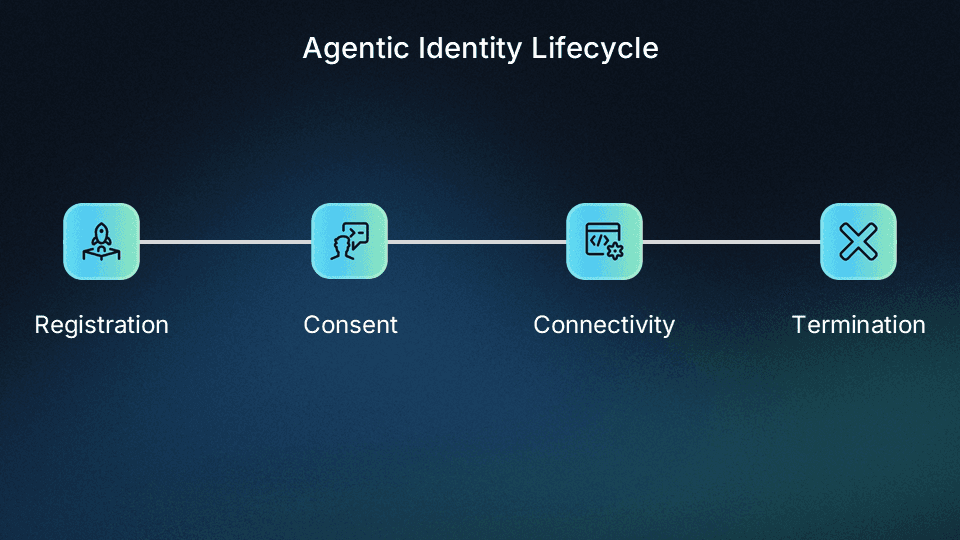
These stages are common across industries and implementations, whether you’re building in-house automations or externally accessible MCP servers. Descope’s Agentic Identity Hub provides constructs that map directly to this lifecycle:
MCP servers
Each MCP server registered in Descope acts as an independent OAuth provider, with its own scopes, consent flows, and policies. Descope serves as the authorization server, handling token issuance, validation, and client management on its behalf. When an MCP client connects, it first discovers the server's OAuth metadata, authenticates, and receives a token whose audience claim contains the MCP server's URL.
MCP clients
MCP clients are the agents and applications that authenticate into your MCP servers and request access to tools on behalf of a user or tenant. They’re dynamically registered (via Client ID Metadata Documents (CIMD) or Dynamic Client Registration (DCR)) or pre-registered, and they’re auditable from the moment they appear. Each client requests scopes and requires user or tenant admin consent to act on their behalf.
Connections
Connections represent secure links to external services, like Stripe, Salesforce, or Slack. Once configured, a Connection acts as a token vault for API keys and OAuth tokens. MCP clients never have to handle raw credentials directly—instead, they request access to the stored tokens at runtime.
For example, a Stripe Connection might hold a tenant's Stripe API key. An MCP client automating refunds would dynamically request access to that token to call the Stripe API, but only if the applicable policies allow.
Policies
Policies are the binding fabric between MCP clients and Connections. They define who (which MCP client) can access what (which Connection token) under what conditions. Policies enforce least privilege dynamically, ensuring each identity only gets what it needs to do its job.
Each of these pieces is dynamic. New MCP Clients often appear via CIMD or DCR. Consents are granted, expanded, and revoked. Connections are created, refreshed, and expired. Policies evolve and get more complex.
This fluidity is a feature, but it also creates volatility, and auditing is the stabilizing counterweight. By recording each change with context, Descope ensures you can replay the history of identity events, diagnose issues, and prevent silent drift.
Why monitoring and auditing matter
The scale of non-human identity usage creates three security and operational concerns:
Instruction correctness. Is the agent doing what the user or tenant actually asked? Or is it improvising because of a bad configuration, outdated consent, or even malicious injection?
Scope minimization. Does the agent have the minimal scopes required? Over-provisioned scopes create massive risk surfaces.
Feedback closure. Humans create natural audit trails: log in, take action, log out. Agents don’t. Without monitoring, an agent could run continuously, changing behavior over time without visibility.
Descope’s research shows 57% of CIAM decision makers are worried about AI agents sharing sensitive data with unauthorized users. Robust monitoring and auditing helps close that loop.
Auditing across the agentic AI lifecycle
With the lifecycle in mind, let’s look at how Descope’s auditing framework provides visibility at every stage.
Stage 1: Registration
When a new agent is registered, you need to be able to answer the most basic question: “Who is connecting to my system?"
MCP Clients often self-register dynamically via CIMD or DCR. These events are logged (
ThirdPartyApplicationCreated), showing app metadata, requested scopes, and verification status.Offboarding is equally important. If an MCP Client is deleted unexpectedly, Descope records a
ThirdPartyApplicationDeletedevent, giving teams immediate insight into whether offboarding was intentional or accidental.
Without these registration logs, agents could silently connect or disconnect, creating blind spots in your security posture.
Stage 2: Consent management
Once registered, agents request scopes and require user consent to act. Auditing consent evolution is critical.
For example, if a payroll integration requests read:payroll, but later an admin modifies consent to include write:payroll: “Who approved that escalation?”
If a payroll integration first requests
read:payrollbut later an admin addswrite:payroll, theThirdPartyAppConsentModifiedevent captures who approved that escalation.Historical consent logs help teams prove that sensitive access was explicitly authorized. For example, a healthcare SaaS platform integrating with Snowflake may need to show that no agent accessed tables containing PHI without explicit tenant consent. During a HIPAA audit, Descope’s logs can demonstrate that the
session:role:PHI_ACCESSscope was only granted after a tenant admin’s approval, and later revoked when the integration was offboarded.
Consent drift is where over-provisioning risks emerge. Without logs, you won’t see these changes happening over time.
Stage 3: Tool calling
Once an agent is active, it often needs to connect with third party integrations. An agent running inside your system may call APIs from Stripe or GitHub, or a tool from another MCP server. Auditing outbound connections means you can answer:
When was a connection to an external system added or removed?
Did a change in outbound configuration coincide with unexpected agent activity?
This level of traceability becomes crucial during incident response.
Stage 4: Policy enforcement and violations
Here’s where things get especially interesting. Descope’s policy engine not only enforces rules, but also logs when an agent tries to do something it shouldn’t. This is when configuration, consent, or role mappings drift in a way that makes the agent believe it can act, but the policy engine blocks it.
Here’s an example:
A user consents to
read:transactionsandwrite:transactions.The user later switches companies and no longer has the FinanceAdmin role.
The agent, unaware of this role change, later attempts to
write:transactions.The policy engine denies the request, and logs
OutboundAppAccessControlAccessDenied.
This tells you two things:
The agent was misconfigured (or manipulated) enough to attempt an unauthorized action.
The policy engine successfully blocked it, preventing damage.
Without logging, you wouldn’t know that something in your configuration stack caused an agent to overreach.
Example: Building an MCP server with Snowflake Tools
To make this concrete, let's walk through a full example: we'll build an MCP server that provides analytics and reporting for enterprises. One of its tools will securely connect to Snowflake to execute SQL queries while ensuring strong authentication, least-privilege access, and complete auditing.
Initialize an MCP server with Descope authentication
We'll start by securing our MCP server so only authorized clients can access its tools. Using FastMCP with the Descope auth provider, authentication is wired up in just a few lines:
import os
from fastmcp import FastMCP
from fastmcp.server.auth.providers.descope import DescopeProvider
from dotenv import load_dotenv

load_dotenv()

DESCOPE_PROJECT_ID = os.getenv("DESCOPE_PROJECT_ID")
CONFIG_URL = os.getenv("DESCOPE_CONFIG_URL")
SERVER_URL = os.getenv("SERVER_URL", "http://localhost:3000")

if not DESCOPE_PROJECT_ID:
    raise ValueError("DESCOPE_PROJECT_ID environment variable must be set")

# Create the Descope auth provider — handles OAuth discovery, DCR, and token validation
auth_provider = DescopeProvider(
    config_url=CONFIG_URL,
    base_url=SERVER_URL
)

# Create FastMCP server with Descope auth
mcp = FastMCP(name="Snowflake Analytics MCP Server", auth=auth_provider)

# Mount the MCP app
app = mcp.http_app(path="/mcp")

if __name__ == "__main__":
    import uvicorn
    uvicorn.run(app, host="localhost", port=3000)
The DescopeProvider handles OAuth 2.1 discovery, dynamic client registration, and JWT token validation automatically. Every request to /mcp must carry a valid token issued by Descope.
Configure the MCP server and consent flow
Next, configure your MCP server in Descope. You can enable client registration methods like CIMD and DCR with just a toggle:
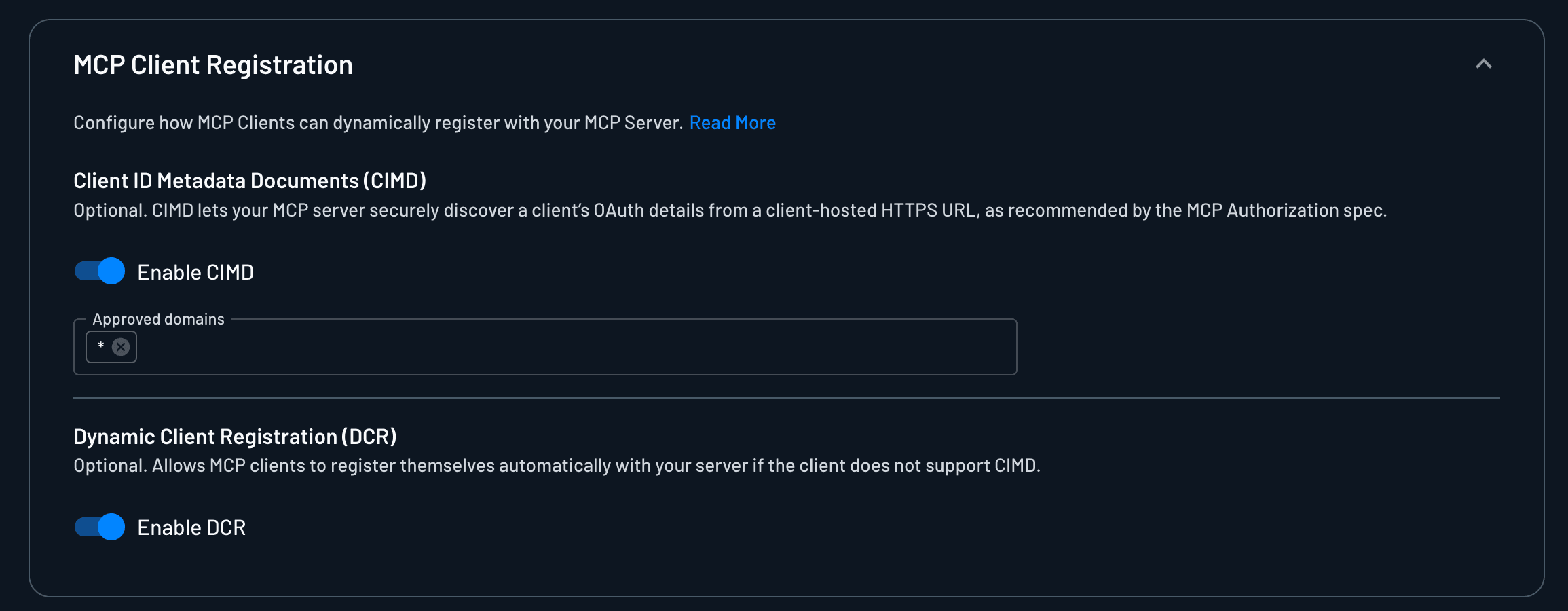
Then, you can define what scopes MCP clients are allowed to request. These scopes can later be mapped to scopes defined in external Connections, once those are configured:
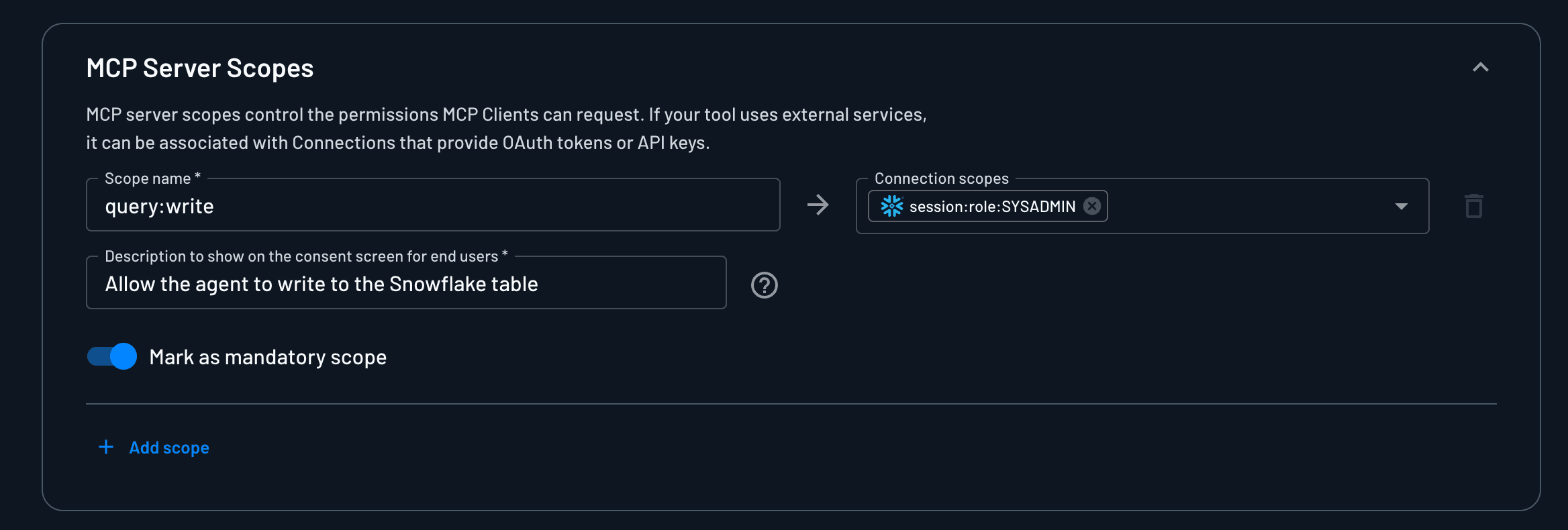
You can configure a consent flow, which ensures the MCP server only gains access to the scopes explicitly authorized by the tenant, enforcing least-privilege access.
Create and connect a Snowflake Connection
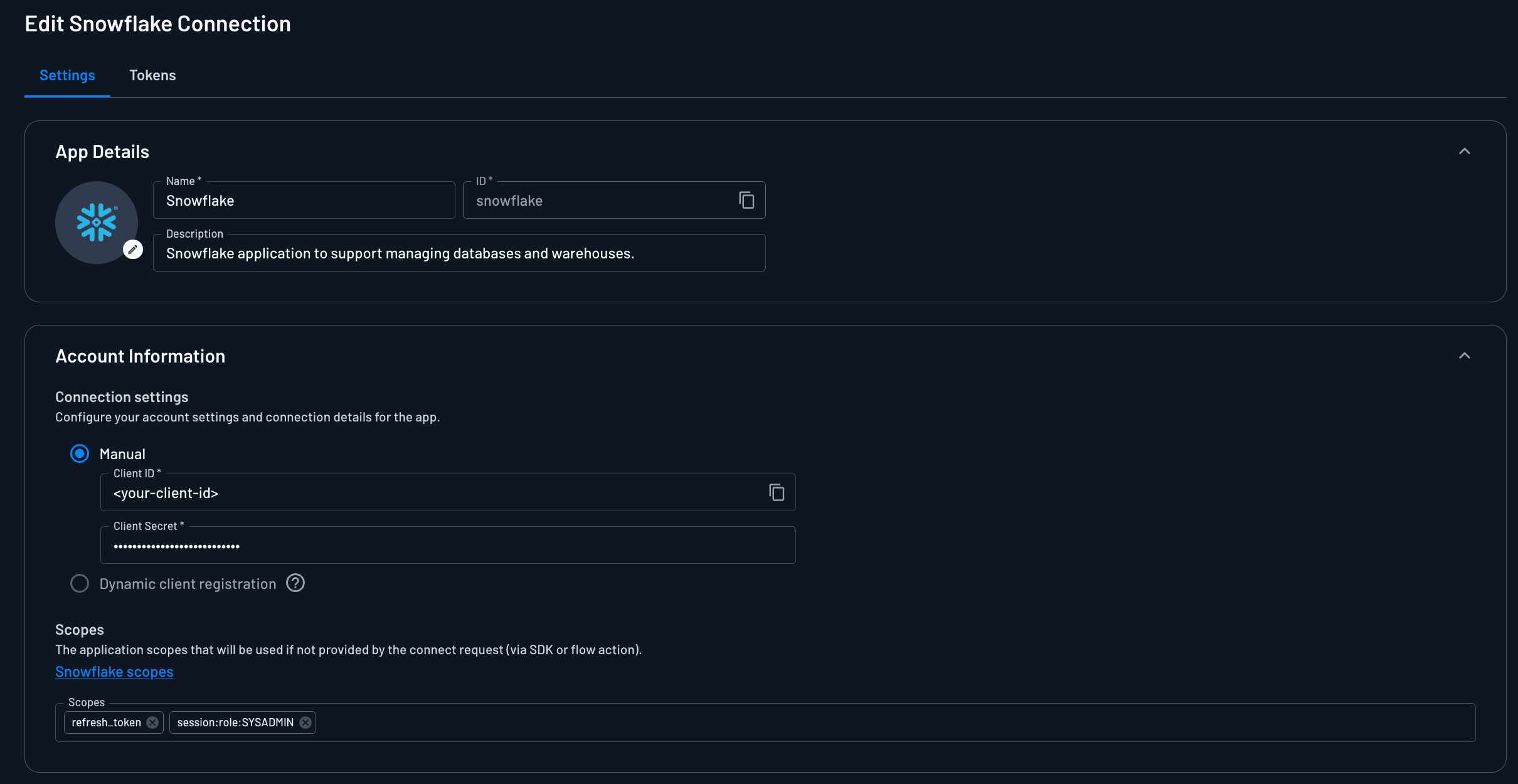
Instead of storing raw Snowflake credentials, the MCP server delegates access through Descope’s Outbound App Connect flow action:
Configure Snowflake as a Connection in Descope using the Snowflake Connection template with the refresh_token and session:role:SYSADMIN scopes.
Define access control policies
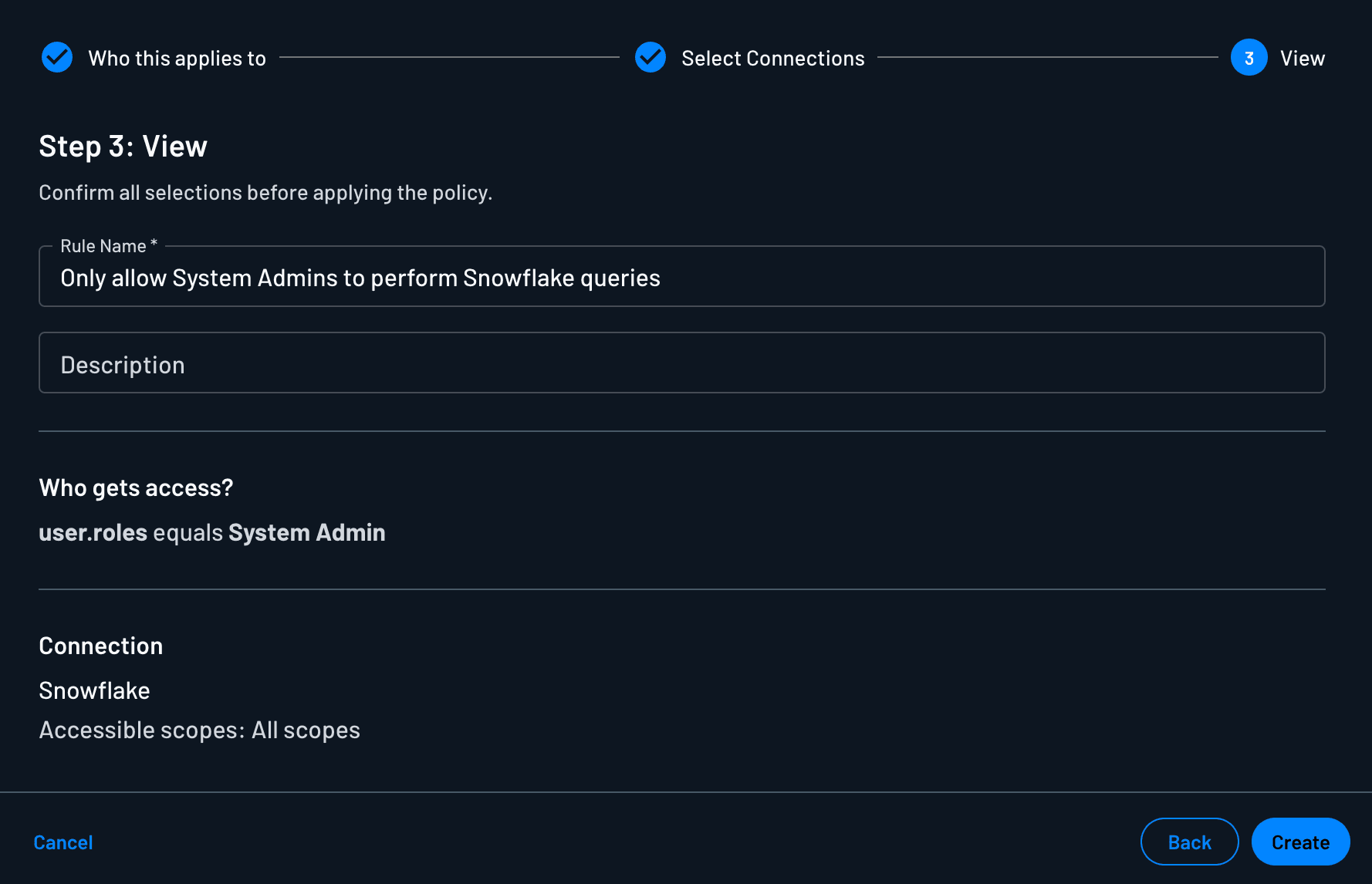
We will define a Policy dictating that dynamically registered clients can access tokens with the session:role:SYSADMIN scope only if they are acting on behalf of users with the System Admin role. This role can be assigned directly in Descope, or mapped from an SSO group when the user authenticates before providing consent.
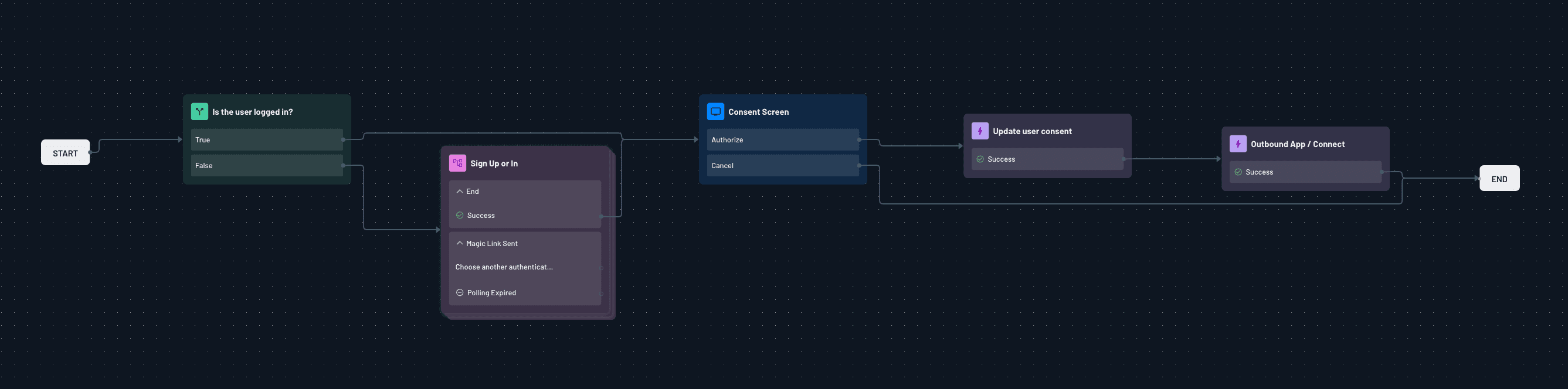
During the consent flow, after authenticating and delegating access to the agent:
The admin logs in via Snowflake’s OAuth screen.
The admin selects which Snowflake scopes to grant.
Descope receives and securely stores OAuth tokens for these scopes.
Add tool calling to MCP server
At runtime, the MCP server retrieves a Snowflake Connection token when the agent calls its tool. Here's the tool implementation—it validates authentication, checks for the required scope, then exchanges the agent's token for a scoped Snowflake credential:
import httpx
from fastmcp import FastMCP, Context
from fastmcp.server.auth import AccessToken

@mcp.tool
async def execute_snowflake_query(
    query: str,
    database: str,
    ctx: Context
) -> str:
    """Execute a SQL query on Snowflake.

    Args:
        query: SQL query to execute
        database: Target database name
    """
    # Require authentication
    access_token: AccessToken = ctx.get("access_token")
    if not access_token:
        return "Authentication required"

    # Validate required scope
    if "query:write" not in (access_token.scopes or []):
        return "Missing required scope: query:write"

    try:
        snowflake_token = await get_snowflake_token(access_token)
        results = await execute_snowflake_query_with_token(snowflake_token, query, database)
        return results
    except Exception as e:
        logger.error("Error executing Snowflake query: %s", e)
        return f"Failed to execute Snowflake query: {e}"
The get_snowflake_token() function exchanges the agent's token for a Snowflake Connection token. If the request violates any Connection Policy, Descope denies it at this stage and logs an OutboundAppAccessControlAccessDenied event:
async def get_snowflake_token(access_token: AccessToken) -> str:
    """Exchange the agent's access token for a Snowflake Connection token."""
    project_id = os.getenv("DESCOPE_PROJECT_ID")
    user_id = access_token.client_id  # Subject from the validated JWT

    if not user_id:
        raise ValueError("No user ID found in access token")

    return await exchange_connection_token(
        auth_token=access_token.token,
        connection_id="snowflake-connection",  # Connection identifier in Descope
        user_id=user_id,
        project_id=project_id
    )


async def exchange_connection_token(
    auth_token: str,
    connection_id: str,
    user_id: str,
    project_id: str
) -> str:
    """Call the Descope API to retrieve a Connection token."""
    async with httpx.AsyncClient() as client:
        response = await client.post(
            "https://api.descope.com/v1/mgmt/outbound/app/user/token/latest",
            headers={
                "Content-Type": "application/json",
                "Authorization": f"Bearer {project_id}:{auth_token}",
            },
            json={
                "appId": connection_id,
                "userId": user_id,
            },
        )

    if response.status_code != 200:
        raise RuntimeError(
            f"Failed to get connection token for {connection_id}: "
            f"{response.status_code} {response.text}"
        )

    token_data = response.json()
    access_token_value = token_data.get("token", {}).get("accessToken")

    if not access_token_value:
        raise RuntimeError(
            f"No access token returned from Descope connection API for {connection_id}"
        )

    return access_token_value
Audit the full lifecycle
Descope logs every step in the agent identity lifecycle:
ThirdPartyApplicationCreated: When the MCP client is registered.ThirdPartyAppConsentGranted: Which scopes were approved.OutboundAppCreated: When the Snowflake connection was established.OutboundAppAccessControlAccessDenied: When a rogue agent violates a policy.
With this, every access request is verifiable, and unauthorized sensitive actions like running destructive queries are blocked automatically.
Extending visibility with custom audit events
Descope gives you an extensive library of out-of-the-box (OOTB) audit events, covering client registrations, consent changes, token issuance, policy violations, and more. But these events only tell part of the story: they show what access was granted or blocked, not whether the agent successfully executed the action it was authorized to perform.
Custom audit events bridge that gap by letting you emit operational context alongside identity decisions. There are two main ways to do this:
Custom events within Flows
You can configure audit events inside a Descope Flow to record decisions and patterns during authentication or consent flows:
Track scope approval trends by comparing requested scopes with those approved by a user.
If you consistently see users deny certain scopes, this may indicate your scopes are too broad or misaligned with user expectations.
You can track these trends to refactor scope boundaries or provide better education around why a permission is necessary.
This turns audit logs into a feedback tool that helps refine your consent model over time, reducing friction and building trust.
Custom events from your backend
You can also log events directly from your backend when authorized actions execute — whether they succeed or fail.
When your MCP server successfully issues a refund through Stripe, it can send a
PaymentRefundSucceededevent.If an automated data sync job completes, it can trigger a
DataSyncCompletedevent tied to the MCP Client and user context that initiated it.A failed execution (
InvoiceGenerationFailed) can be logged with error details, enabling teams to correlate failures with authorization history.
This creates a unified log: your audit trail doesn’t just show who requested an action and why it was allowed, it can also show what actually happened.
Streaming and visualization
All OOTB and custom events can be streamed into your existing observability or analytics stack (S3, Datadog, Splunk, or other SIEM tools) where they can be combined with logs from other services. This enables you to:
Build dashboards to track agent behavior, consent friction, and action success rates.
Correlate identity activity with application telemetry, infrastructure metrics, and threat detection pipelines.
Create alerts for suspicious agent actions or unexpected permission changes.
Rather than being a silo, Descope’s audit trail feeds into a broader single source of truth, helping teams unify identity, security, and operational visibility in one place.
Conclusion
Agentic identities are multiplying, and their lifecycle is volatile by design. Without visibility, they become risks. With Descope’s agentic control plane, every registration, consent, connection, and violation becomes observable.
Whether it’s an MCP server talking to Stripe, an LLM plugin pulling from Snowflake, or a M2M client invoking healthcare APIs, the principle is the same: you can’t secure what you can’t see.
Descope’s auditing framework built on top of its Agentic Identity Hub gives you the visibility to not just see, but to understand, enforce, and evolve your agentic ecosystem with confidence. Sign up for a free Descope account to get started, or book a demo with our team if you have an active agentic identity project.