
Table of Contents
Don't have the time to read the entire post? Our human writers will be sad, but we understand. Summarize the post with your preferred LLM here instead.
The Model Context Protocol (MCP) is an open standard that defines how AI applications connect to external tools, data sources, and services. MCP clients inside AI apps send requests to MCP servers, which expose tools, resources, and prompts through one consistent interface. As a result, any compatible app can use any compatible server without a custom integration.
Anthropic released MCP as open source in November 2024. In December 2025, the Linux Foundation formed the Agentic AI Foundation (AAIF) with MCP as one of its founding projects, giving the protocol neutral, open governance.
Large language models (LLMs) like Claude, ChatGPT, Gemini, and Llama can write, research, and solve increasingly complex problems. On their own, though, they're isolated from real-world data and systems. MCP gives them a standard way to reach that data and act on it. It builds on existing function calling, so developers don't have to write a new integration for every combination of AI model and external system.
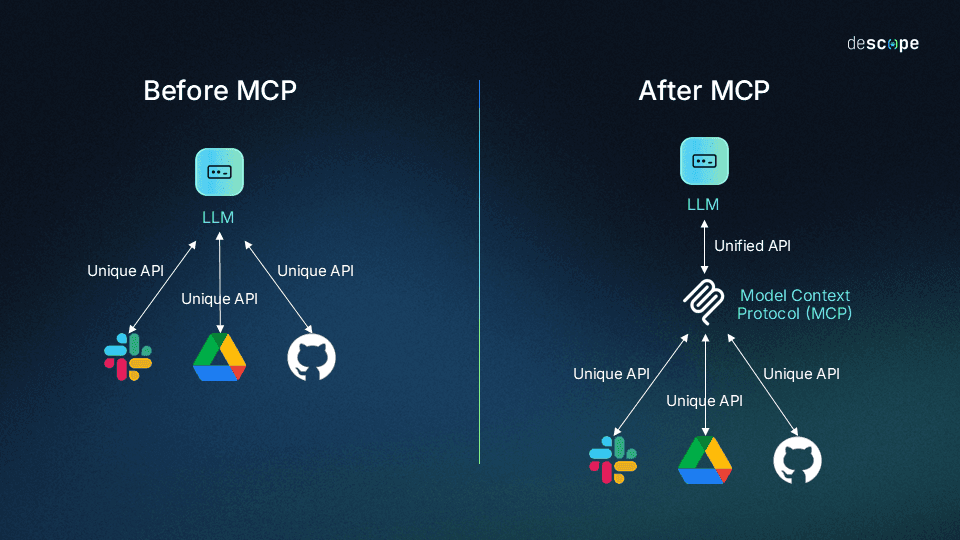
This guide explains how MCP works, how local and remote servers differ, and how authorization works for servers reached over HTTP. It also covers where MCP fits among other integration options and the security risks MCP deployments commonly face.
At a glance
MCP is an open standard that lets AI applications connect to external tools, data, and services through a client-server protocol built on JSON-RPC 2.0.
Each AI app and each tool implements MCP once, rather than building a custom integration for every pairing. This solves the NxM problem, where N represents LLMs and M represents each tool or data source.
MCP servers run on the user's machine, on a private network, or on the public internet, and servers reached over HTTP can use OAuth 2.1 to authorize clients.
Since the July 28, 2026 revision, MCP is stateless, and optional capabilities like interactive apps and enterprise-managed authorization live in extensions outside the core protocol.
MCP complements APIs, CLIs, Agent Skills, and the Agent2Agent (A2A) protocol rather than replacing (or being replaced by) them.
Quick facts about MCP
What it is | An open standard for connecting AI applications to external tools, data, and services |
Created by | Anthropic, open-sourced in November 2024 |
Governed by | The Agentic AI Foundation (Linux Foundation) |
Architecture | Hosts, clients, and servers exchanging JSON-RPC 2.0 messages |
Transports | • stdio for same-machine servers • Streamable HTTP for servers reached over a network |
What servers expose | Tools, resources, and prompts |
Authorization | • OAuth 2.1 for HTTP-based servers • Proof Key for Code Exchange (PKCE) • Protected Resource Metadata • Resource Indicators |
Main risks | • Unauthenticated servers • Local server compromise • Tool poisoning • Token passthrough • Over-broad scopes |
What problem does MCP solve?
MCP solves the "NxM" problem. Here N represents LLMs and M represents the tools and systems they need to reach. Without a shared protocol, every AI app needs its own integration with every tool, and the number of integration points grows with each new model or system.
For everyday users, this isolation means a constant "copy and paste tango": collecting information from various sources, feeding it into a chat interface, then carrying the output somewhere else. Some platforms have narrowed the gap. Several models offer AI-powered web search, and OpenAI's ChatGPT and Google's Gemini have added built-in app integrations. But those remain platform-specific solutions rather than universal standards.
For developers and enterprises, the NxM problem causes:
Redundant development efforts: Teams repeatedly solve the same integration issues for each new AI model or data source, starting from scratch every time.
Excessive maintenance: Tools, models, and APIs evolve, and without a standard, an integration can break whenever a tool updates or a model is deprecated.
Fragmented implementation: Different integrations handle similar functions in inconsistent ways, creating unpredictable results and confusing end users.
MCP doesn't discard the methods that came before it. It builds on function calling, the primary way LLMs call APIs, and standardizes it.
What’s the relationship between function calling and MCP?
Function calling (sometimes called "tool use") lets an LLM invoke predefined functions based on a user's request. Without MCP, developers define model-specific function schemas, implement handlers, and repeat the work for every model they support.
MCP standardizes that process. It defines a consistent way to describe tools across any AI system and gives clients a protocol for discovering and invoking them. Any compatible app can then use any compatible tool without custom integration code. Custom GPTs using GPT Actions offer similar capabilities within OpenAI's ecosystem; MCP brings them to any AI application, regardless of model vendor.
Also read: MCP vs. Function Calling
MCP architecture and core components
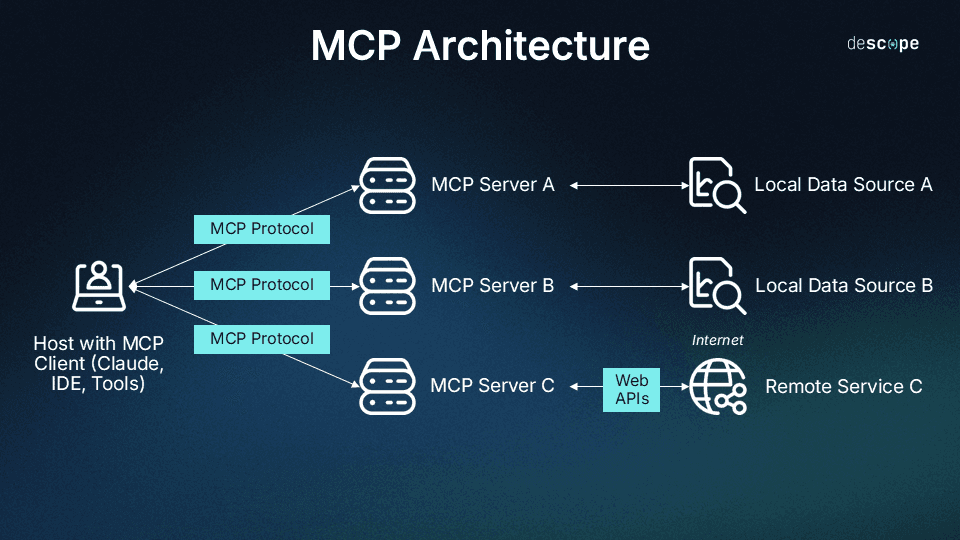
The Model Context Protocol uses a client-server architecture partially inspired by the Language Server Protocol (LSP), which helps different programming languages connect with a wide range of developer tools. Similarly, MCP aims to give AI applications a universal way to interact with external systems.
Core components
MCP architecture consists of four primary elements:
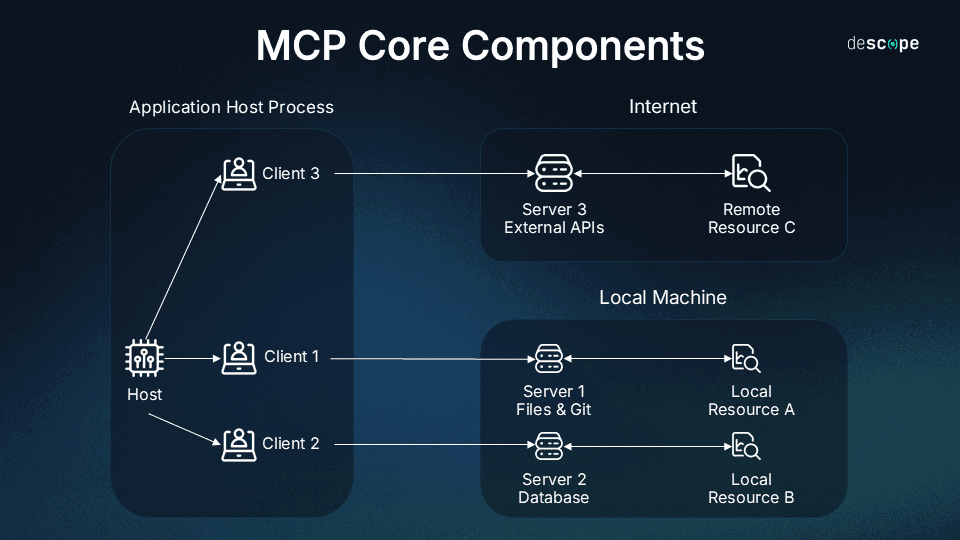
Host application: The application that houses the LLM, interacts with users, and initiates connections. Examples include Claude Desktop, AI-enhanced IDEs like Cursor, and web-based LLM chat interfaces.
MCP client: The component inside the host that manages connections to MCP servers and translates between the host's requirements and the protocol. One client can connect to many servers.
MCP server: A program that exposes specific capabilities to AI apps through MCP. Each server typically focuses on one integration point, like GitHub for repository access or a PostgreSQL database.
Transport layer: The communication mechanism between clients and servers. MCP supports two transports:
STDIO (Standard Input/Output): The client launches the server as a subprocess on the same machine and communicates through its input and output streams.
Streamable HTTP: The server runs as an independent process that can serve many clients over HTTP, whether on the same machine, a private network, or the public internet. As of the July 28, 2026 revision, Streamable HTTP is stateless. It also requires Mcp-Method and Mcp-Name headers on requests, so load balancers and gateways can route traffic without reading message bodies. An earlier HTTP+SSE transport has been deprecated since March 2025.
All communication in MCP uses JSON-RPC 2.0 as the underlying message standard, providing a standardized structure for requests, responses, and notifications.
How does MCP work?
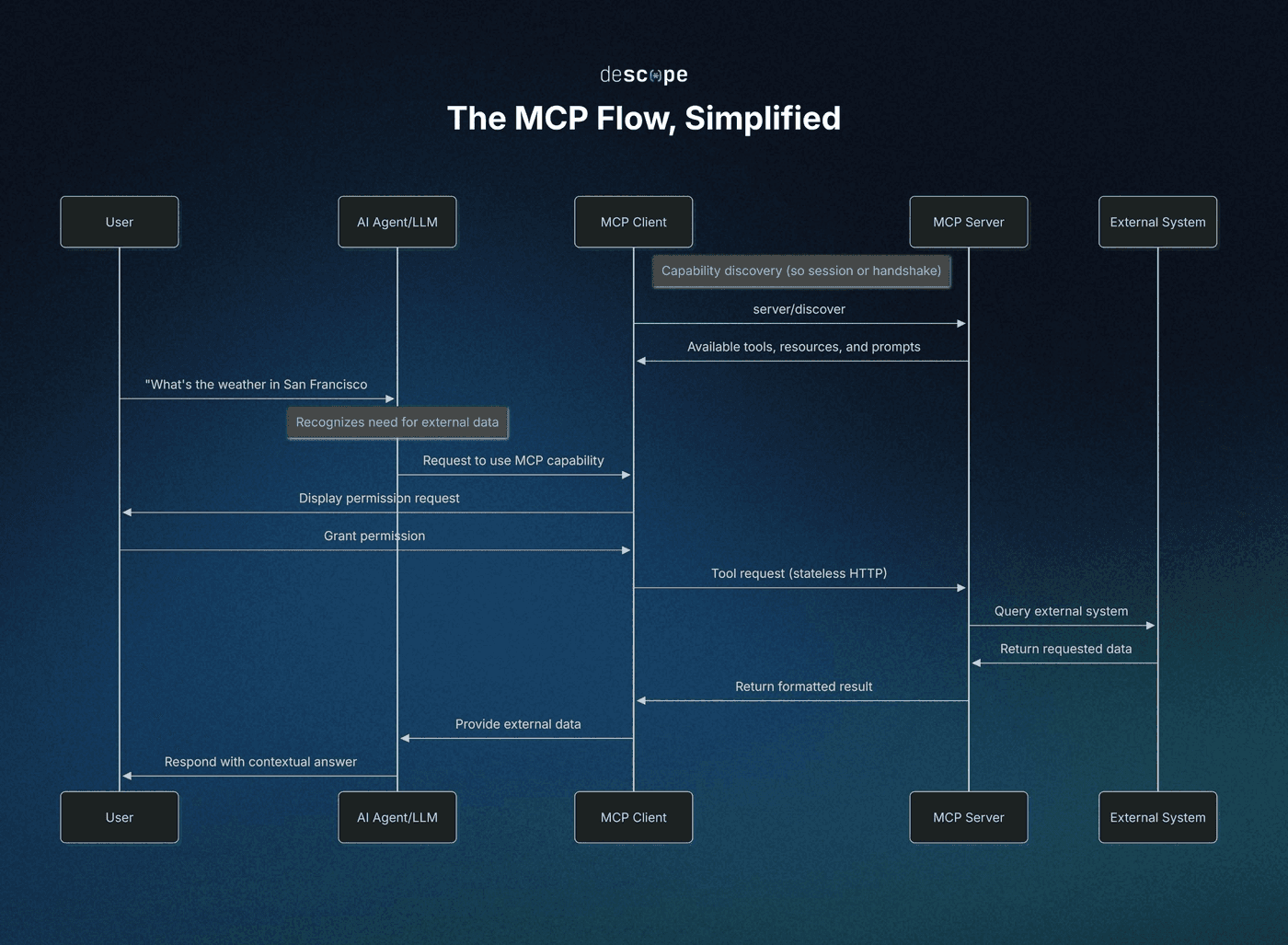
When a user asks an MCP-enabled host application to do something that requires outside data or actions, the client discovers what connected servers can do, calls the right capability, and hands the result back to the model.
Capability discovery
Before the July 2026 revision, MCP opened each connection with an initialization handshake that established a session and exchanged capabilities. The current specification removes both the handshake and sessions. Discovery now works like this:
Per-request metadata: Every client request carries its protocol version and client capabilities in its
_metafield (a reserved metadata object on each message), so any server instance can handle any request.Optional up-front discovery: Servers must implement the
server/discovermethod, which advertises their supported protocol versions, capabilities, and identity. Clients can call it before anything else, but aren't required to.Capability listing: Clients call
tools/list,resources/list, andprompts/listto see what a server offers. These results now carry caching hints (ttlMs, a freshness window in milliseconds), so clients don't need to re-fetch them on every request.
Servers that need to carry state across calls do it explicitly, by returning a handle from one tool that the model passes back as an argument to the next.
What happens when an AI app calls an MCP tool?
Say you ask Claude, "What's the weather like in San Francisco today?" Here's what happens:
Need recognition: Claude recognizes that answering requires real-time information that wasn't in its training data.
Tool selection: Claude identifies an MCP tool that can fulfill the request.
Permission request: The client asks whether you want to allow access to the tool.
Authorization (HTTP servers): If the weather server is reached over HTTP and requires authorization, and the client doesn't yet hold a valid token, it completes the flow described in How does MCP authorization work? before continuing.
Request: The client sends a
tools/callrequest to the server in the standard protocol format.External processing: The server does the work, such as querying a weather service, reading a file, or accessing a database.
Result return: The server returns the result in a standardized format.
Response generation: Claude incorporates the result and answers with current data.
Ideally, this all happens in seconds, and Claude appears to "know" information it couldn't have from its training data alone.
Asking the user for more information
Sometimes a server needs more input mid-task. For example, the GitHub MCP server might need to know which branch to commit to because the prompt didn't say. Elicitation handles this by letting the server request structured input from the user, validated against a JSON schema.
Under the 2026 specification, this works through the Multi Round-Trip Requests (MRTR) pattern rather than a server-initiated message. The server returns a result marked input_required along with the questions it needs answered, and the client retries the original request with the answers attached.
Deprecated capabilities
Three earlier features are deprecated as of the July 28, 2026 revision. They keep working during a deprecation window of at least 12 months, and the specification names a replacement for each:
Sampling: Let servers request LLM completions through the client's model. Its replacement is direct integration with LLM provider APIs.
Roots: Let clients expose filesystem boundaries to servers. Its replacement is passing directories or files through tool parameters, resource URIs, or server configuration.
Logging: Let servers send log messages to clients. Its replacement is logging to stderr for stdio servers, or OpenTelemetry.
What’s the difference between local and remote MCP servers?
An MCP server can run in one of four places, which determines who can connect to it and how access is controlled.
Deployment | Transport | Who can reach it | Authorization model |
|---|---|---|---|
Same machine, as a subprocess | stdio | The host application that launched it | Credentials from the local environment |
Same machine, HTTP | Streamable HTTP, bound to localhost | Processes on that machine | OAuth authorization and Origin header validation |
Private network | Streamable HTTP | Clients on the same network or VPN | Optional OAuth 2.1 |
Public internet | Streamable HTTP | Any client that can reach the endpoint | Optional OAuth 2.1 |
"Local" usually means the first two rows. Most local servers use stdio: the host application launches the server as a subprocess, and the server runs with the user's privileges and reads credentials from its environment. Local HTTP servers bind to localhost, and like all Streamable HTTP servers, they validate the Origin header on incoming requests, which keeps websites from reaching them through the user's browser.
Remote servers run as HTTP services that many clients can connect to, on a private network or the public internet. A server's network location limits who can connect to it, not what it can connect to, so a server on a private network can still call external APIs.
How does MCP authorization work?
The MCP specification defines an optional OAuth 2.1 authorization framework for HTTP-based servers. In it, the MCP server acts as an OAuth 2.1 resource server, and the MCP client acts as an OAuth client on the user's behalf. A separate authorization server handles login and issues tokens.
The authorization flow
This flow is separate from the initialization handshake removed in 2026. Protocol messages no longer need a setup exchange, but a client still obtains a token before calling a protected server:
Challenge: The client sends a request without a token. The server responds with 401 Unauthorized and a
WWW-Authenticateheader (the standard HTTP authentication challenge) that points to the server's Protected Resource Metadata and names the scopes the request needs.Resource discovery: The client fetches the server's Protected Resource Metadata (RFC 9728), which identifies the authorization server.
Authorization server discovery: The client retrieves the authorization server's metadata through RFC 8414 or OpenID Connect Discovery.
Client registration: The client identifies itself using a Client ID Metadata Document (CIMD), pre-registration, or Dynamic Client Registration (DCR). DCR is deprecated in favor of CIMD and kept for backward compatibility.
Authorization request: The client opens the user's browser with an authorization request that includes a PKCE challenge, the requested scopes, and a
resourceparameter (RFC 8707) naming the MCP server. The user logs in and consents.Code exchange: The authorization server redirects back with an authorization code and its issuer identifier. The client checks the issuer against the one it recorded (RFC 9207), then exchanges the code and PKCE verifier for an access token.
Authorized requests: The client sends the token in the
Authorizationheader on every request, and the server validates that the token was issued specifically for it.
For a deeper walkthrough, see Diving Into the MCP Authorization Specification and our breakdown of the July 2026 revision.
Token scoping and step-up authorization
Scopes define what a token allows an agent to do. MCP's authorization model starts agents with a minimal set of scopes and adds more as tasks require them, a pattern sometimes called progressive scoping:
Initial challenge: The server's 401 response names the scopes a request needs.
Baseline scopes: The
scopes_supportedlist in the server's metadata covers basic functionality.Step-up: When an agent attempts something its token doesn't cover, the server responds with a 403
insufficient_scopechallenge listing the scopes the operation needs. The client then requests a new token covering both its previous scopes and the new ones.
Tokens are also bound to their audience. The specification requires MCP servers to reject tokens that weren't issued for them and prohibits passing a client's token through to other services. For example, Descope issues tokens for an MCP server Resource with an aud claim (the audience claim) that includes the server's URL.
Delegated authority for agents
In the standard flow, the MCP client acts on behalf of the user who consented, and the agent never sees that user's credentials. Other delegation patterns build on that baseline:
Autonomous agents: Agents acting on their own behalf, like background jobs or CI pipelines, can use the client credentials flow through an official MCP extension.
Multi-hop requests: Because MCP prohibits token passthrough, an agent calling downstream services obtains a separate token for each destination. OAuth token exchange issues these while keeping the delegation chain verifiable.
Enterprise-governed access: Enterprise-Managed Authorization lets an organization's identity provider (IdP) decide which agents and servers employees can use.
Auditing agent actions
Audit trails record what an agent did and on whose behalf. MCP provides several building blocks:
Attribution: The client and server names sent with each message are self-reported, and the specification advises against using them for security decisions. Audit attribution typically comes from validated token claims instead, such as the subject, client ID, and any delegation chain.
Tracing: The specification reserves OpenTelemetry trace context keys in
_meta, so a single trace can follow a tool call from host to server to downstream service.Logging: With protocol-level Logging deprecated, OpenTelemetry is the recommended logging path.
Scope changes: The Security Best Practices guide also recommends logging scope elevation events with correlation IDs.
For an example at the identity layer, see Monitoring and Auditing Agentic Identities With Descope.
Core protocol vs. extensions
MCP separates a small required core from optional features and extensions. Every implementation must support the base protocol, versioning, and message patterns. Authorization, server features, client features, and utilities are optional components.
Extensions are optional additions that define capabilities beyond the core specification. Each has an identifier in the form vendor-prefix/extension-name, and official extensions use the io.modelcontextprotocol prefix. Clients and servers declare the extensions they support in their capabilities, and an extension is only used when both sides support it.
As of the July 2026 revision, the official extensions are:
Extension | What it does |
|---|---|
MCP Apps | Lets servers display interactive UI elements, such as charts, forms, and video players, inline within conversations |
Tasks | Supports long-running work, with clients polling for status instead of holding a request open |
OAuth Client Credentials | Provides machine-to-machine authentication with no interactive user login |
Enterprise-Managed Authorization | Centralizes MCP server access control through an organization's identity provider |
Enterprise-Managed Authorization (EMA) addresses a limitation of the core authorization flow at enterprise scale, where each employee individually authorizes each MCP server. Under EMA, IT manages access policy in one place, and revoking an employee's access at the IdP takes effect across every MCP client.
Underneath, EMA uses Cross-App Access (XAA). The IdP that signed the user in issues a short-lived signed assertion that this user, through this client, may reach this server. The client presents that assertion to the server's authorization server in exchange for a standard access token. For example, the Descope Agentic Identity Hub supports both validating and issuing these assertions.
Changes to the core protocol follow a formal deprecation policy with a minimum 12-month window, while extensions evolve on their own track. The extension support matrix tracks which clients implement each extension.
Where MCP fits among other options
MCP is one of several ways to give AI agents access to tools, knowledge, and other agents, and it's often used alongside them.
MCP vs. APIs: A REST API is built for developers writing deterministic code, while MCP is built for AI models choosing actions at runtime. Many MCP servers wrap existing APIs. Read more: API vs. MCP.
MCP vs. CLIs: Agents can run existing command-line tools directly, which is common for local development work. MCP adds standardized discovery and, for HTTP-based servers, per-user authorization. Read more: MCP vs. CLI.
MCP vs. Agent Skills: Agent Skills are folders of instructions, scripts, and resources, built around a SKILL.md file, that agents load on demand. Anthropic published the format as an open standard in December 2025. Skills teach an agent a procedure, while MCP connects it to live systems. For example, Descope Skills encode multi-step workflows like migrations, while the Descope MCP Server supplies current documentation and project state.
MCP vs. A2A: MCP connects an agent to tools and data, while the Agent2Agent (A2A) protocol connects agents to other agents. Google launched A2A in April 2025, and the project is now hosted by the Linux Foundation. Its v1.0 specification added signed Agent Cards, which let agents cryptographically verify each other's identity and metadata. The two protocols take different approaches to authentication, which we cover in our guide Comparing Auth Approaches in MCP and A2A.
MCP client and server ecosystem
As of July 2026, MCP's Tier 1 SDKs saw close to half a billion downloads a month, and the TypeScript and Python SDKs had each passed 1 billion total downloads. The official MCP Registry, which launched in preview in September 2025, provides a central, queryable catalog of public servers. Organizations can also run private sub-registries for their own teams.
Examples of MCP clients
Client | Type | Notes |
|---|---|---|
AI assistant | Anthropic's desktop app, with first-party MCP support | |
AI assistant | Connects to remote MCP servers through its apps directory and developer mode | |
Coding agent | Anthropic's command-line coding agent | |
Coding agent | OpenAI's coding agent, with support for HTTP-based MCP servers | |
Coding agent | Google's open-source terminal agent | |
AI-enhanced IDE | One-click MCP server installation | |
IDE | Added MCP support in June 2025 | |
IDE suite | MCP integration through AI Assistant since August 2025 | |
IDE | Exposes build, test, and preview tools to coding agents through MCP, starting with Xcode 26.3 | |
AI-enhanced IDE | MCP support through its Cascade agent | |
Code editor | Exposes MCP prompts as slash commands |
Agent frameworks like LangChain and Firebase Genkit also include MCP client support for developers building their own agents.
Examples of MCP servers
The ecosystem includes three kinds of public-facing servers:
Reference servers, maintained by the protocol's contributors
Official integrations, maintained by the companies that own each platform
Community servers, built by independent developers
Server | Type | What it does |
|---|---|---|
Reference | Reads, searches, and manipulates Git repositories | |
Reference | Reads, writes, and searches files within directories the user allows | |
Reference | Retrieves web content and converts HTML to Markdown for LLMs to process | |
Official integration | Reads documentation, inspects project configuration, manages users and tenants, configures authentication flows, and reviews audit logs | |
Official integration | Generates invoices, creates customers, and manages refunds through natural language requests | |
Official integration | Creates tables, queries data, deploys edge functions, and manages branches | |
Official integration | Uses more than 4,000 Apify Actors for web browsing, data scraping, and content crawling | |
Community | Sends and reads messages, with automatic server and channel discovery | |
Community | Manages containers, volumes, and images on local and remote Docker engines | |
Community | Lists and creates contacts, retrieves recent engagements, and manages companies |
Also read: The 7 Best MCP Servers for Developers
MCP security risks and mitigations
The MCP project maintains a Security Best Practices guide alongside the specification. The NSA's AI Security Center also published security design considerations for MCP in May 2026. The risks below (which appear in one or both of these documents) are widely documented, along with the mitigations the MCP guidance describes.
Unauthenticated servers: An HTTP-based server without authorization will serve any client that can reach it. Wiz Research's July 2026 analysis of internet-exposed MCP servers found that roughly 70% returned their full tool catalog to anonymous callers. Nearly all of them ran the 2024-11-05 protocol version, which predates authorization. The specification's OAuth 2.1 authorization for HTTP-based servers mitigates this, along with the server's own backend credentials being limited to what its tools need.
Local server compromise: Local servers run with the client's privileges. A malicious startup command in a client configuration, a malicious payload inside a server, or DNS rebinding against a localhost server can each lead to code execution or data exfiltration. In April 2026, OX Security reported command injection in several AI IDEs through their MCP configuration files. To mitigate this, clients show the exact command and require consent before running a new local server, and run local servers in sandboxes with minimal default privileges. Servers use stdio or restrict HTTP access with an authorization token or IPC mechanism.
Tool poisoning and prompt injection: Instructions hidden in tool descriptions or tool outputs can steer a model into unintended actions. In a "rug pull" variant, a tool's definition changes after a user approves it. A human in the loop who can deny tool invocations. Clients show which tools are exposed, indicate when tools are invoked, and prompt for confirmation on operations. See Understanding MCP Tool Poisoning Attacks.
Token passthrough: A server that accepts tokens issued for other services, or forwards a client's token downstream, bypasses audience checks and can create confused deputy problems. The mitigation is simple: Audience-bound tokens, as described in Token scoping and step-up authorization.
Over-broad scopes: A token granted every available scope up front gives an attacker who steals it broad access. The solution is a minimal initial scope set with step-up challenges for privileged operations, avoiding wildcard or catch-all scopes.
Server-side request forgery (SSRF): A malicious server can supply internal URLs during OAuth metadata discovery, such as private IP addresses or cloud metadata endpoints, and induce a client to request them. This is mitigated by using HTTPS for OAuth-related URLs, blocking private IP ranges, validating redirect targets, and routing outbound requests through an egress proxy.
State handle hijacking: Because MCP is stateless, servers that track state across calls issue handles that clients pass back as arguments. A guessed or stolen handle can expose another user's state. The defense is using random, expiring handles bound server-side to the authenticated user, with every request verified independently of the handle.
For more details on MCP risks and mitigations, see our guides on MCP Server Security Best Practices and the Top 6 MCP Vulnerabilities.
Staying ahead of the MCP development curve
MCP standardized how AI applications reach tools and data, giving developers a way out of the NxM problem. Since launch, the protocol has added progressive scoping and secure elicitation, and replaced DCR with CIMD as the recommended client registration method. The July 28, 2026 revision made the core stateless, introduced a formal deprecation policy, and moved capabilities like Tasks into an extensions framework alongside MCP Apps and Enterprise-Managed Authorization.
The Descope Agentic Identity Hub can act as the OAuth 2.1 authorization server for MCP servers, with CIMD and DCR registration, per-tool scopes, Cross-App Access, and audit logging. To try it, create a Free Forever Descope account or explore our MCP docs. For more developer updates from the world of authentication, access control, and AI, subscribe to our blog or follow us on LinkedIn.