
Table of Contents
Don't have the time to read the entire post? Our human writers will be sad, but we understand. Summarize the post with your preferred LLM here instead.
Hi, Descopers! We are delighted to announce the Descope MCP Server today. This remote MCP server connects your AI assistant to the Descope identity platform. It gives agents the ability to read documentation, inspect your project configuration, manage users and tenants, configure authentication flows, review audit logs, and make changes to your identity infrastructure, all through natural language and from a single session.
The server supports both sides of the authentication lifecycle from a single endpoint. Build-time work (searching documentation, designing flows, configuring project settings) and operate-time work (managing users, tenants, credentials, and audit logs) happen in the same session. The Descope MCP Server allows you to transition from planning and building to deploying and managing without any loss of context.
This guide covers how the server works, what it can do, and how to use it. We’ll cover:
How to connect and get started
The security model that governs read and write access
A walkthrough of every tool the server exposes
Example prompts organized by role and workflow
To connect now, add https://mcp.descope.com to your MCP client and sign in with your Descope account, or add the Descope MCP Server from Claude or ChatGPT. If you don’t already have a Descope account and are connecting from an IDE, your client will prompt you to create one.
Try this to get started: Connect to the Descope MCP Server, then enter “List all my projects.” Select one by entering “Select [Project Name].” From there you can ask for an audit, get remediation tips, or export a snapshot. The possibilities are endless!
Connecting to the Descope MCP Server
The Descope MCP Server is hosted by Descope. There is nothing to install or deploy locally apart from the MCP client of your choice. Connection instructions for popular clients can be found on the Descope MCP Server documentation page. Example images pictured in this document will use Claude Desktop, but you can use whichever MCP client you prefer.
After following the connection setup steps for your MCP client, you will either sign in or create a new Descope account (if connecting via IDE). Sessions are scoped to a single Descope company, determined at sign-in. Projects within that company are accessible from one session, but managing multiple companies requires separate connections. You do not need to have any existing projects to use the MCP server.
Once connected, you can interact in the same way you would work with any LLM-based environment: natural language. Describe what you need, and the assistant determines which tools to call and how to present the results.
Sessions start in read-only mode. If you want to make a change that requires write access, your agent will ask for permission to elevate the session. The write window is time-bounded and closes automatically, returning the session to read-only. If you still require write access after this window closes, you will need to elevate again.
To check the status of your session, whether it is elevated, and what project you are currently working on, you can ask for these details specifically or enter “whoami” for a full overview.
Tool overview
The Descope MCP Server exposes 23 tools, each named for the identity object or function it operates on. Tools are grouped into read and write variants. To see all the operations and tools, simply ask your agent for the full catalog.
Throughout this document, tool groupings are referred to as buckets. Each bucket contains at least one read tool, and many contain both read and write tools.
Tool | Purpose | Access |
|---|---|---|
list_operations | Discover the full operation catalog; list all operations by bucket, or fetch the input/output schema for a specific operation | Not applicable |
session | Manage session context: switch projects, check current identity, generate onboarding plans, and elevate to write mode | Not applicable |
project_read | View project configuration including JWT templates, lists, snapshots, and messaging localization | Read |
project_write | Update project settings, clone projects, manage JWT templates, lists, Descopers, and messaging localization | Write |
access_control_read | Query FGA schemas, roles, permissions, ReBAC relations, and run authorization checks and dry-runs | Read |
access_control_write | Create and update FGA schemas, roles, permissions, and relations; manage backups and resource details | Write |
agentic_read | View MCP server definitions, clients, and client secrets | Read |
agentic_write | Create, update, and delete MCP servers and clients; rotate client secrets | Write |
audits_read | Search audit events and analytics | Read |
auth_keys_read | View access key details and password settings | Read |
auth_keys_write | Create, search, and manage access keys; configure password settings; update JWTs; and impersonate users | Write |
flows_read | View flows, flow templates, themes, flow localization, and widgets | Read |
flows_write | Import and manage flows, themes, and flow localization; apply project themes | Write |
tenants_read | View tenants, tenant settings and SSO admin link state | Read |
tenants_write | Create and manage tenants, tenant settings, default roles and SSO admin links | Write |
connect_read | View SSO settings, IDP apps, inbound apps, outbound apps, and third-party apps | Read |
connect_write | Create and manage SSO applications (OIDC, SAML, WS-Fed), inbound/outbound apps, and SSO tenant settings | Write |
tests_read | Search test users | Read |
tests_write | Create and delete test users; generate test OTPs, magic links, and enchanted links | Write |
users_read | View user records, custom attributes, group membership, trusted devices, and auth history | Read |
users_write | Create, update, and delete users; manage credentials (passwords, passkeys, TOTP), and custom attributes | Write |
docs_search | Semantic search across Descope documentation and SDK references | Read |
docs_ask_question | Ask natural-language questions about Descope and get answers grounded in official documentation | Read |
Security model
The Descope MCP Server is designed around the reality that agents can sometimes be wrong, and it ensures that being wrong cannot silently cause lasting damage.
Sessions are read-only by default. Every read tool works the moment you connect and authenticate. You can inspect your entire identity environment, query audit logs, browse documentation, and review configurations without any risk of modifying production data.
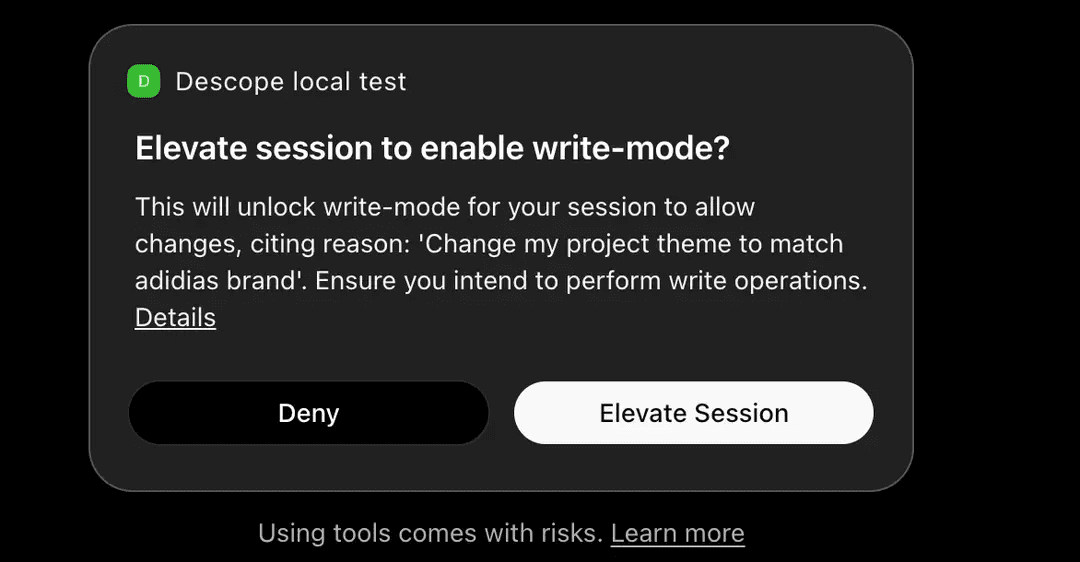
Write operations require human-confirmed elevation. When the agent needs to make a change, it follows a five-step elevation contract:
The agent identifies the bucket (tool), operation, and required parameters.
The agent builds the complete set of arguments for the write call.
The agent cites the exact bucket, operation, and target, then waits for your explicit approval.
Descope verifies the request directly with you via a one-time passcode delivered out-of-band. The agent never sees this OTP and has no way to intercept it.
The agent immediately executes the write operation
A compromised agent cannot complete step 4. The elevation path runs through a channel the agent does not control.
Write access expires automatically after 15 minutes. The session then reverts back to read-only. Continuing to make changes after the window closes requires going through the full elevation process again.
Sessions are company-scoped. Most Descope MCP Server users belong to a single company. To better reflect this operational reality, each session is bound to exactly one company at authentication time. For those users who work with multiple Descope companies, they may switch between them by reconnecting and reauthenticating.
Everything is logged. Auth-related MCP events are captured in the Descope audit log and queryable through the audit tool. Session elevation state is inspectable at any time.
Tool capabilities
This section covers what each bucket (tool group) does, what you can expect from its read and write actions, and best practices for using them. The full list of operations per tool can be found in the Appendix.
Session and discovery
session and list_operations are the foundation of every interaction with the Descope MCP Server. Both shape what happens before any other bucket gets called.
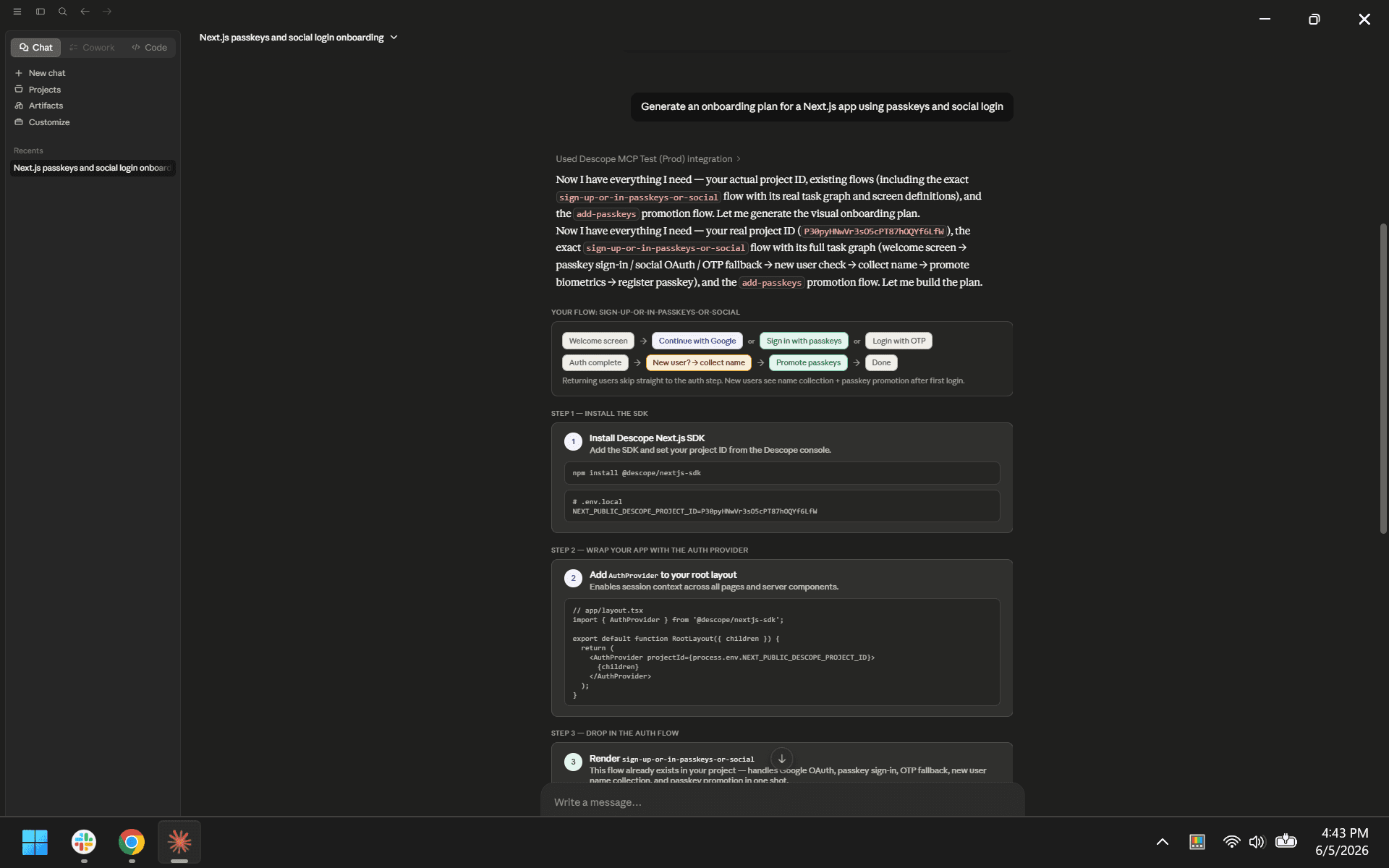
session manages the MCP session. This is the tool that elevates requests, provides session context, selects projects, and generates onboarding plans for a use case of your choosing.
Most of these actions are handled by the agent without you needing to name a specific operation. When you connect and select a project, the agent uses session to establish that context. When you open a new project, the agent calls session.getProjectStatus to assess the project’s state.
Example prompts:
“What project am I connected to, and am I elevated?”
“Show me every operation available in the
tenants_writebucket”“Generate an onboarding plan for a Next.js app using passkeys and social login”
Documentation
docs_search and docs_ask_question are the server’s learning and reference tools. Both are read-only and accept only query and question parameters.
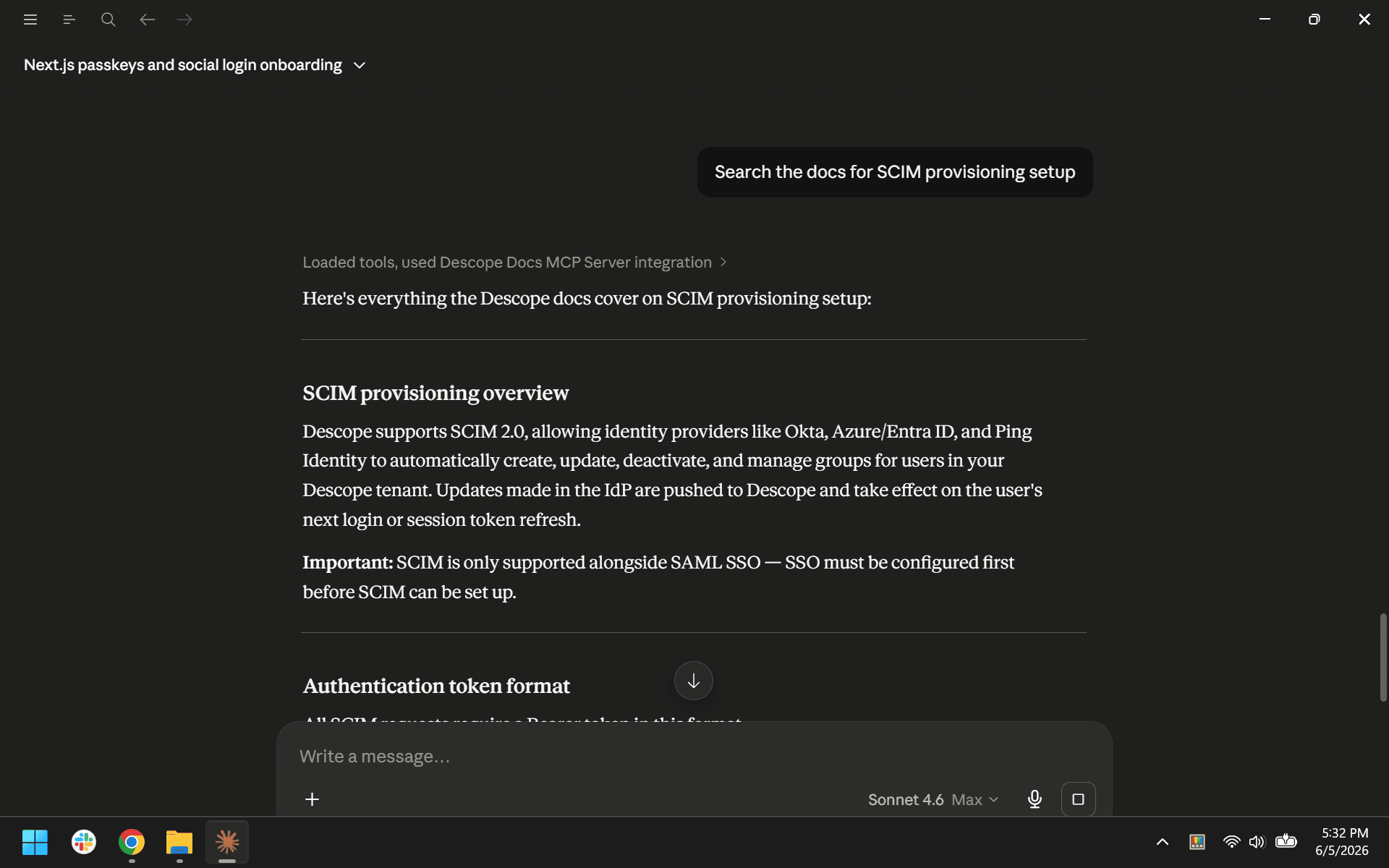
docs_search runs semantic search across Descope documentation, SDK references, and GitHub repositories. docs_ask_question returns a grounded answer to a natural-language question, scoped to implementation and integration queries. For questions about your project’s data (users, tenants, configuration), the agent reaches for the relevant bucket instead.
Example prompts:
“How do I add magic links to a React app with Descope?”
“Search the docs for SCIM provisioning setup”
Project
project_read and project_write manage project-level configuration: metadata, snapshots, JWT templates, IP and text lists, Descopers (an admin user of your company account), and messaging localization.
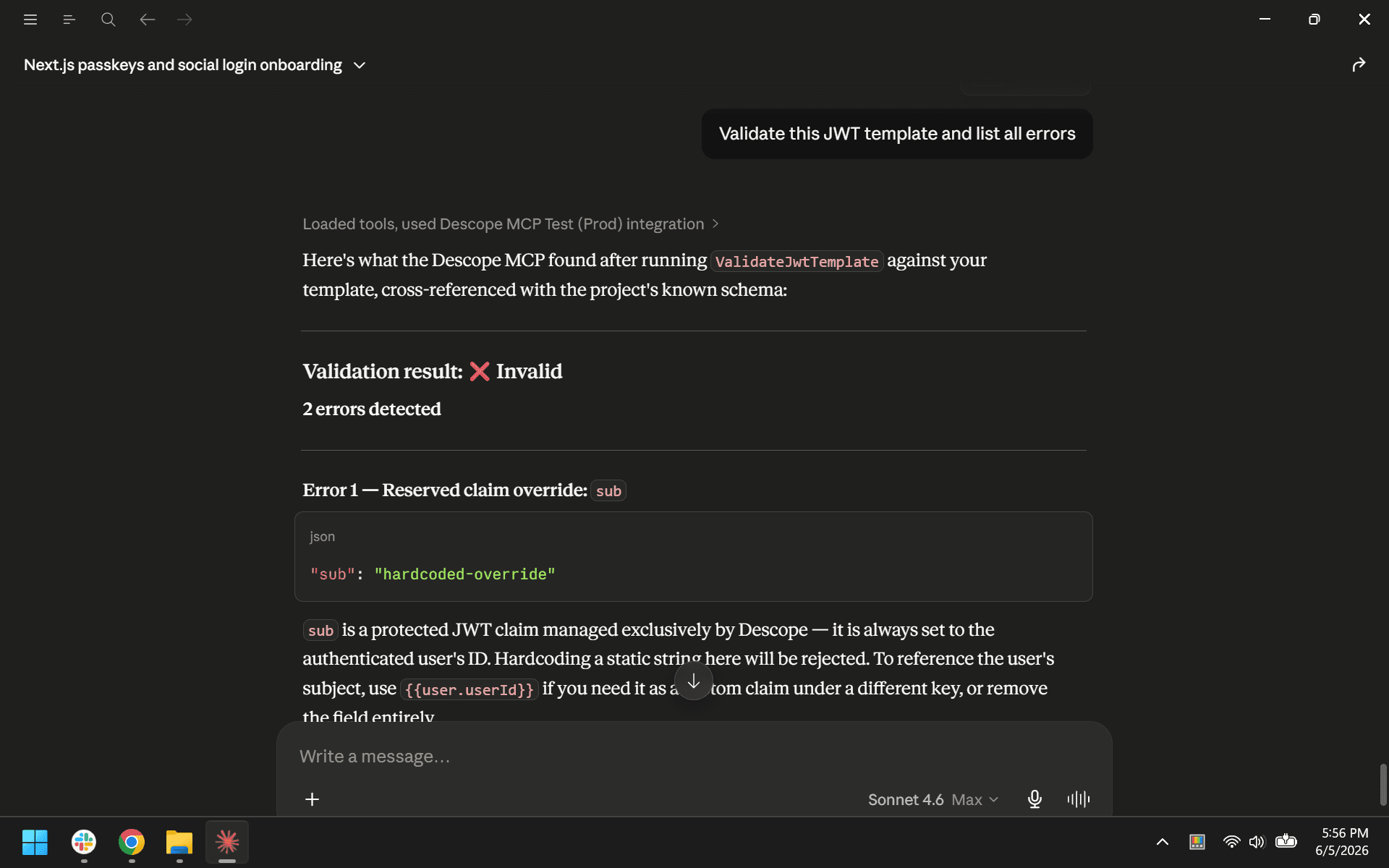
The read tool is useful for orientation and review. Exporting a snapshot gives you a portable version of the project’s current state. Validating a snapshot before importing it lets you preview the impact of a restore without committing. JWT template inspection helps you ensure token structure is valid before making changes.
The write tool is where project-level changes happen. Cloning a project is the standard way to create a staging or testing environment. Snapshot imports are the mechanism for environment replication and disaster recovery. List management (IP and text lists) is relevant for rate limiting, allowlisting, and blocking abusive traffic.
Example prompts:
“Export a snapshot of this project”
“Check whether 203.0.113.50 appears in any IP list”
“Validate this JWT template and list all errors”
Flows
flows_read and flows_write interact with Descope’s visual flow builder. Flows define what users experience during sign-up, login, account recovery, and step-up or multi-factor authentication.
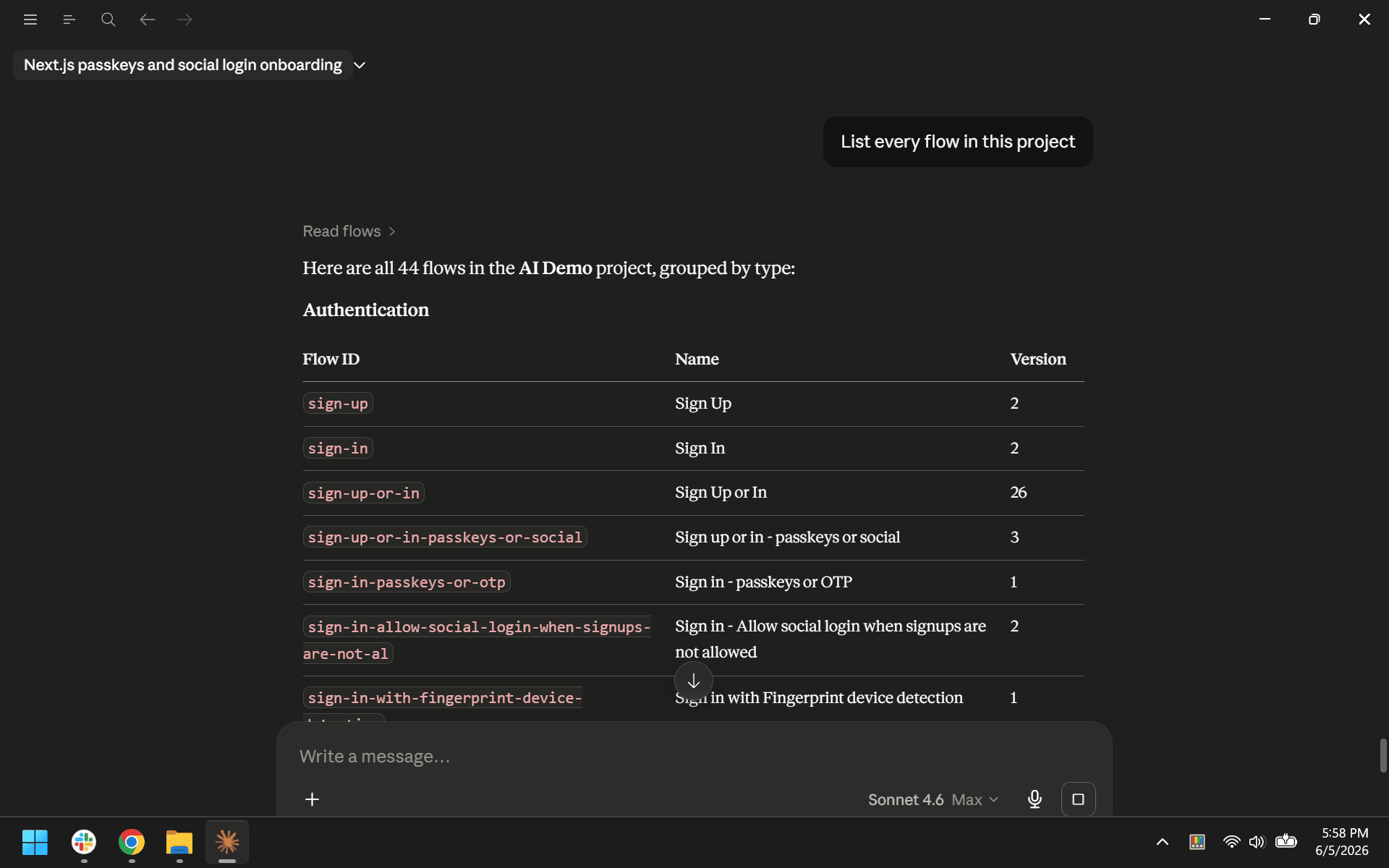
The read tool exports flow definitions, themes, localization, and widget configurations, and provides access to Descope’s template library with full detail retrieval. Reading flows is the fastest way to audit how authentication is currently configured in a project, and the template library provides pre-built starting points for common patterns.
The write tool imports flows and themes, deletes flows, and applies project-wide brand styling. Flow changes affect what end users see and how they authenticate, so reviewing the current configuration via flows_read before making write changes should be your first step.
Example prompts:
“What flow templates can I use for passkey enrollment?”
“Apply our brand theme to the project”
“List every flow in this project”
Users
users_read and users_write handle end-user records: profiles, credentials, group membership, authentication history, and custom attributes.
The read tool is where most support and investigation work starts. Looking up a user or reviewing their authentication log are immediate and require no write elevation.
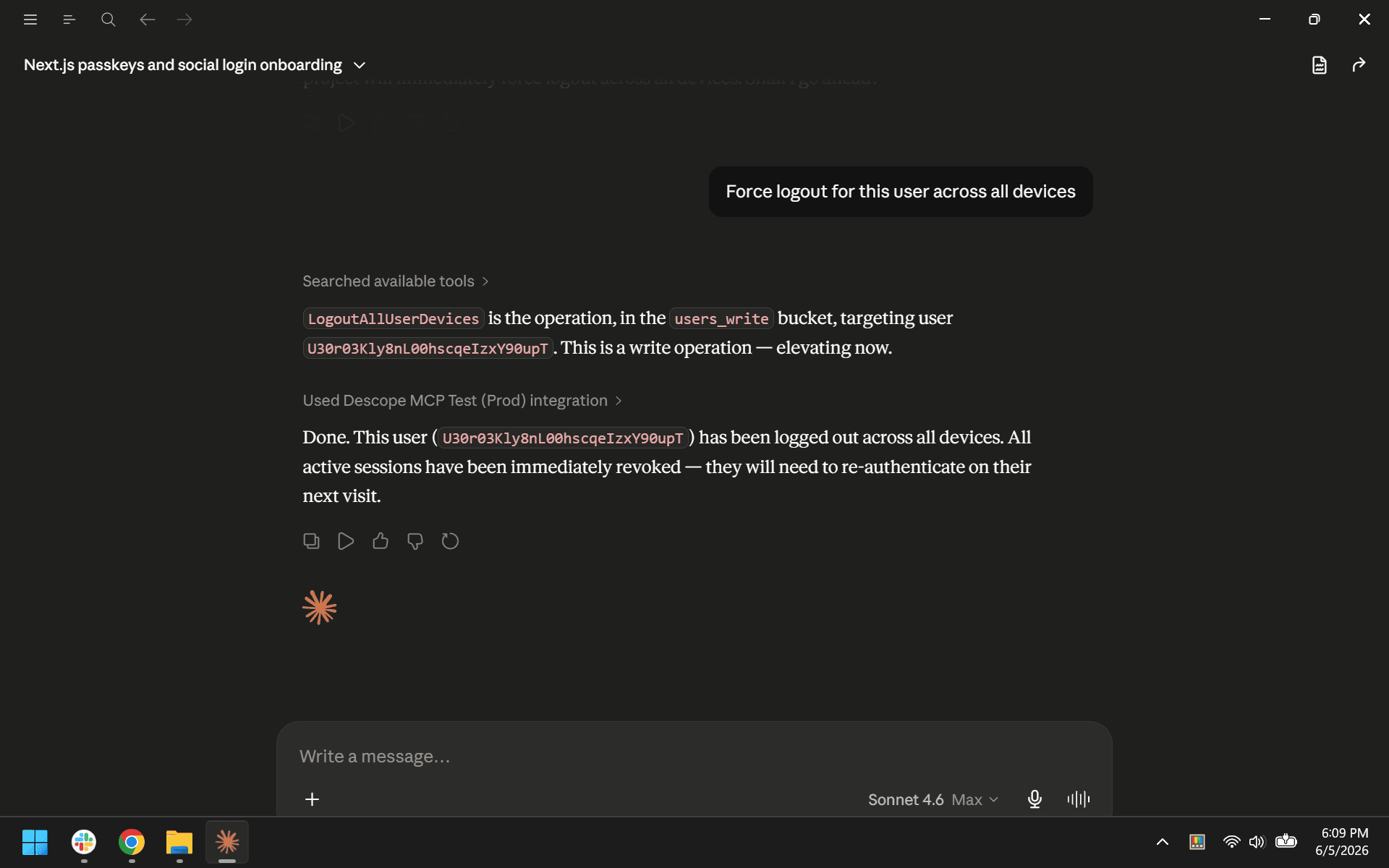
The write tool covers user lifecycle operations, credential management, and administrative action like forcing logout across all devices. Batch patching is available for bulk updates, which is useful for migrations and cleanup operations.
Example prompts:
“Find the user with email jane.doe@example.com and show me their auth history”
“Set a temporary password for this user so they’re prompted to reset on next login”
“Force logout for this user across all devices”
Tenants
tenants_read and tenants_write manage the B2B tenant lifecycle. Tenants in Descope represent organizational boundaries, with each typically mapping to a customer with its own user pool, SSO configuration, and roles.
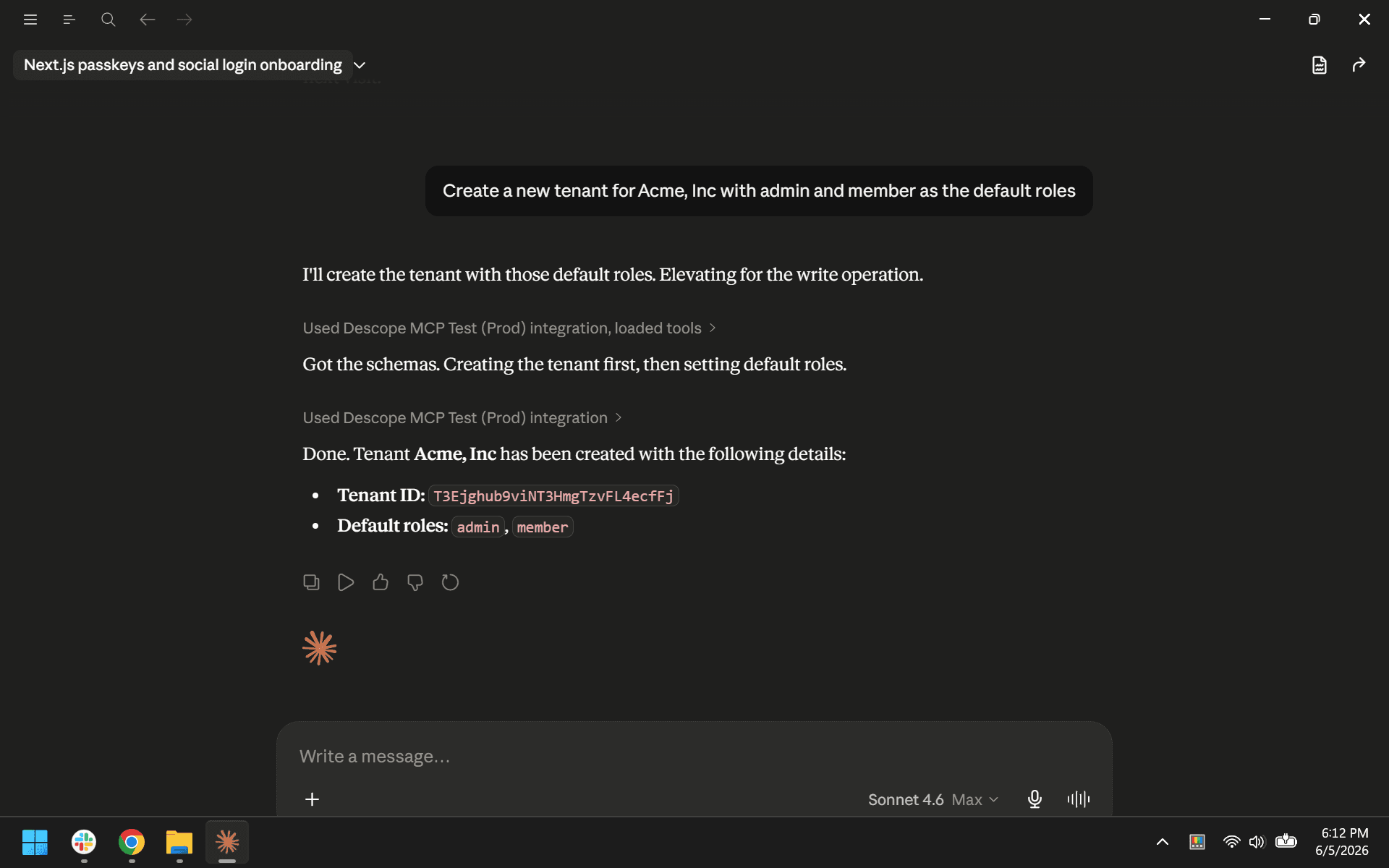
The read tool covers tenant search, settings inspection, and admin SSO link state. The write tool covers tenant creation, settings configuration, default role assignment, and a full admin SSO link workflow: generating, sending, and revoking configuration links.
Example prompts:
“Generate an admin SSO configuration link for Acme, Inc and send it”
“Create a new tenant for Acme, Inc with admin and member as the default roles”
Access control
access_control_read and access_control_write manage authorization configuration, covering both traditional role-based access control (RBAC) and fine-grained authorization (FGA).
The RBAC operations are straightforward: define permissions, group them into roles, and manage role assignments. Bulk operations are available for creating and updating roles and permissions at scale.
FGA operations are more involved. These support schema-based authorization models (relationship-based access control, or ReBAC) with typed relations and resources.
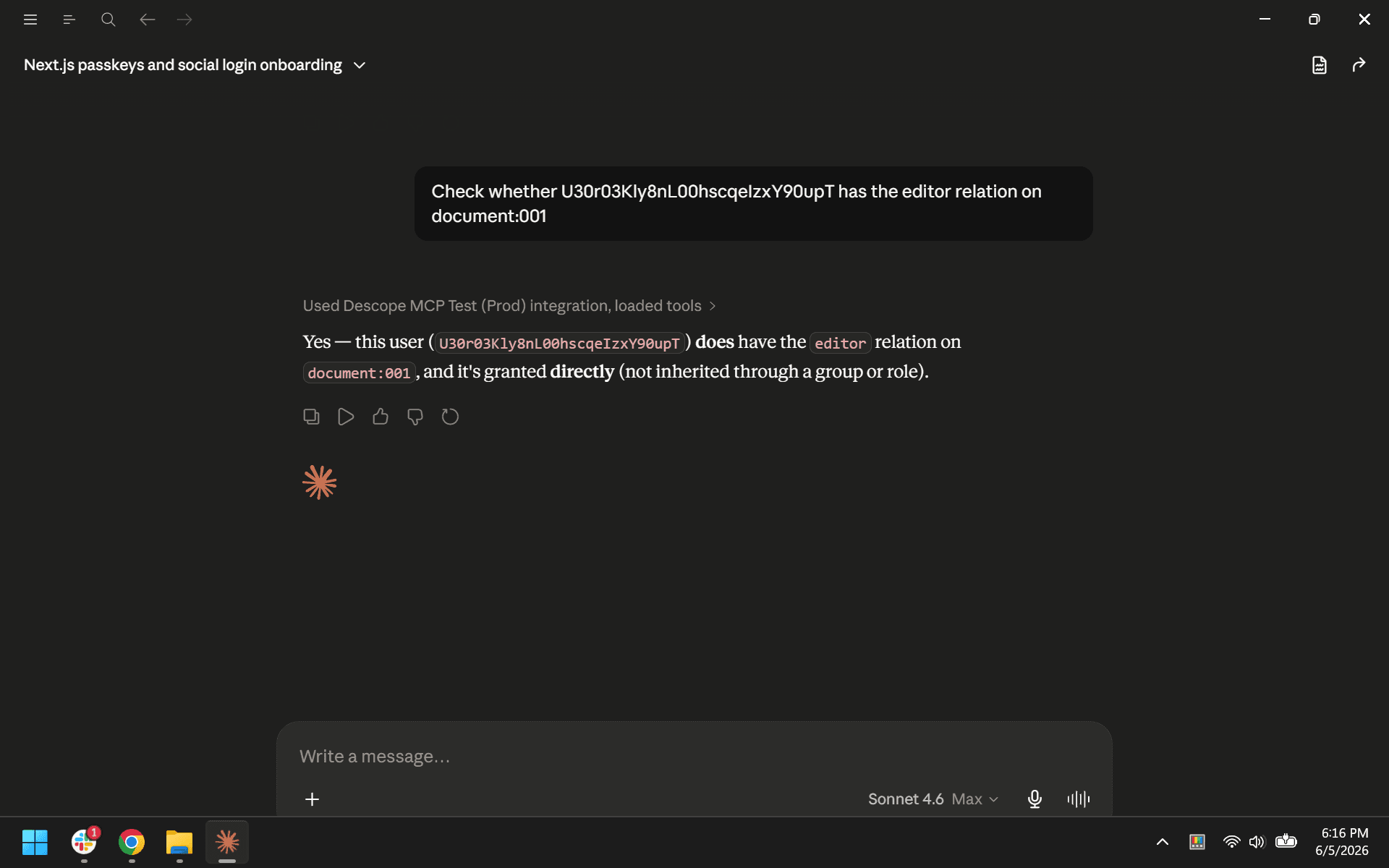
The read side retrieves and validates schemas, runs authorization checks, manages backups, and discovers mappable resources. The write side creates and modifies schemas and relations. DryRunSchema on the read side is particularly useful: it validates a proposed schema change and previews its impact without modifying anything.
Example prompts:
"Show me every role and what permissions each one grants"
"Dry run this updated schema and show me what would change"
"Check whether user X has the editor relation on document Y"
Auth keys
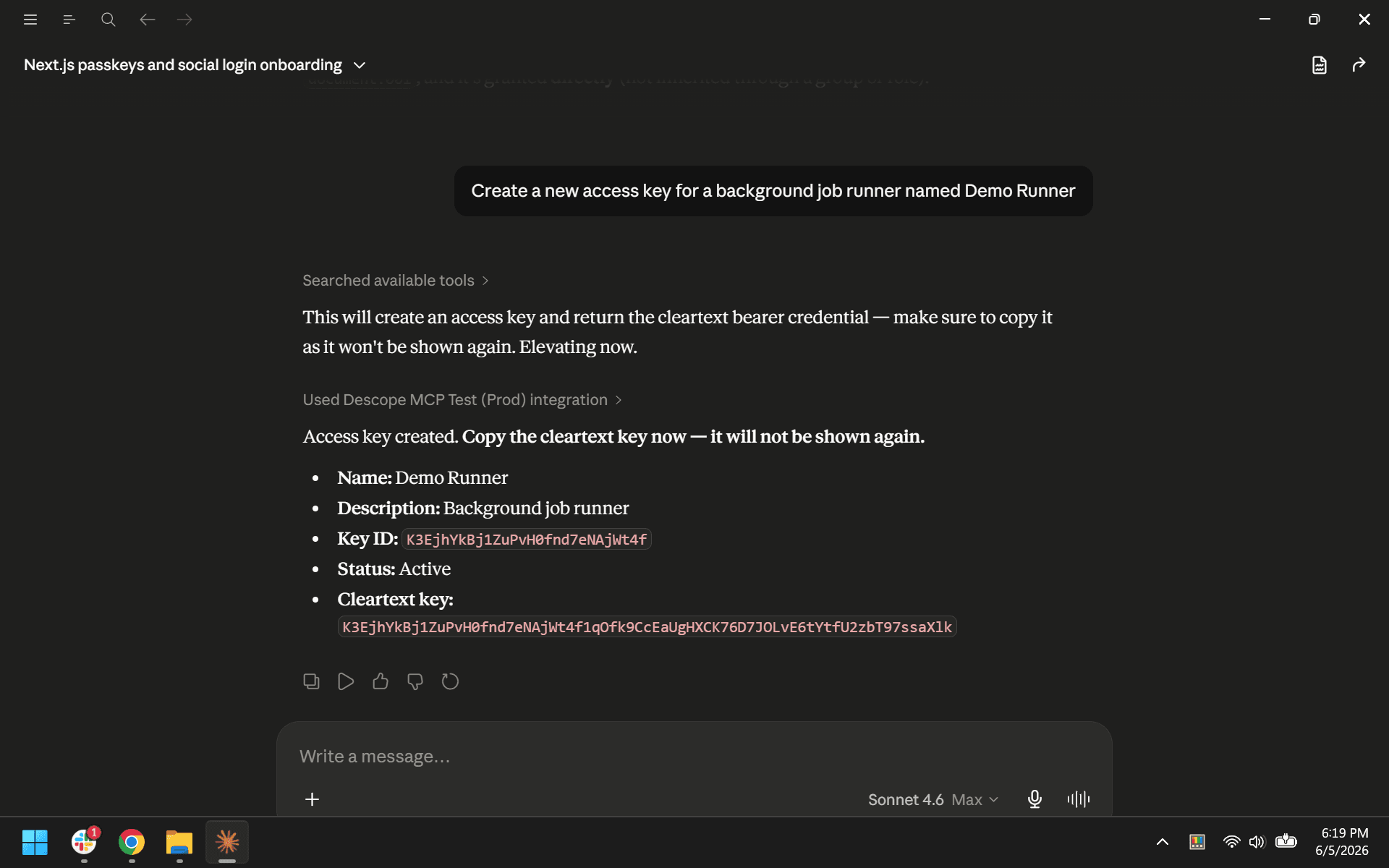
auth_keys_read and auth_keys_write handle machine-to-machine credentials and password configuration. The read tool is intentionally narrow: access key metadata (without bearer credentials) and tenant-level password settings. The write tool is broader, covering access key lifecycle, password configuration, JWT updates, and user impersonation.
Example prompts:
"What are the password settings for the Acme Corp tenant?"
"Create a new access key for a background job runner named X"
Connect
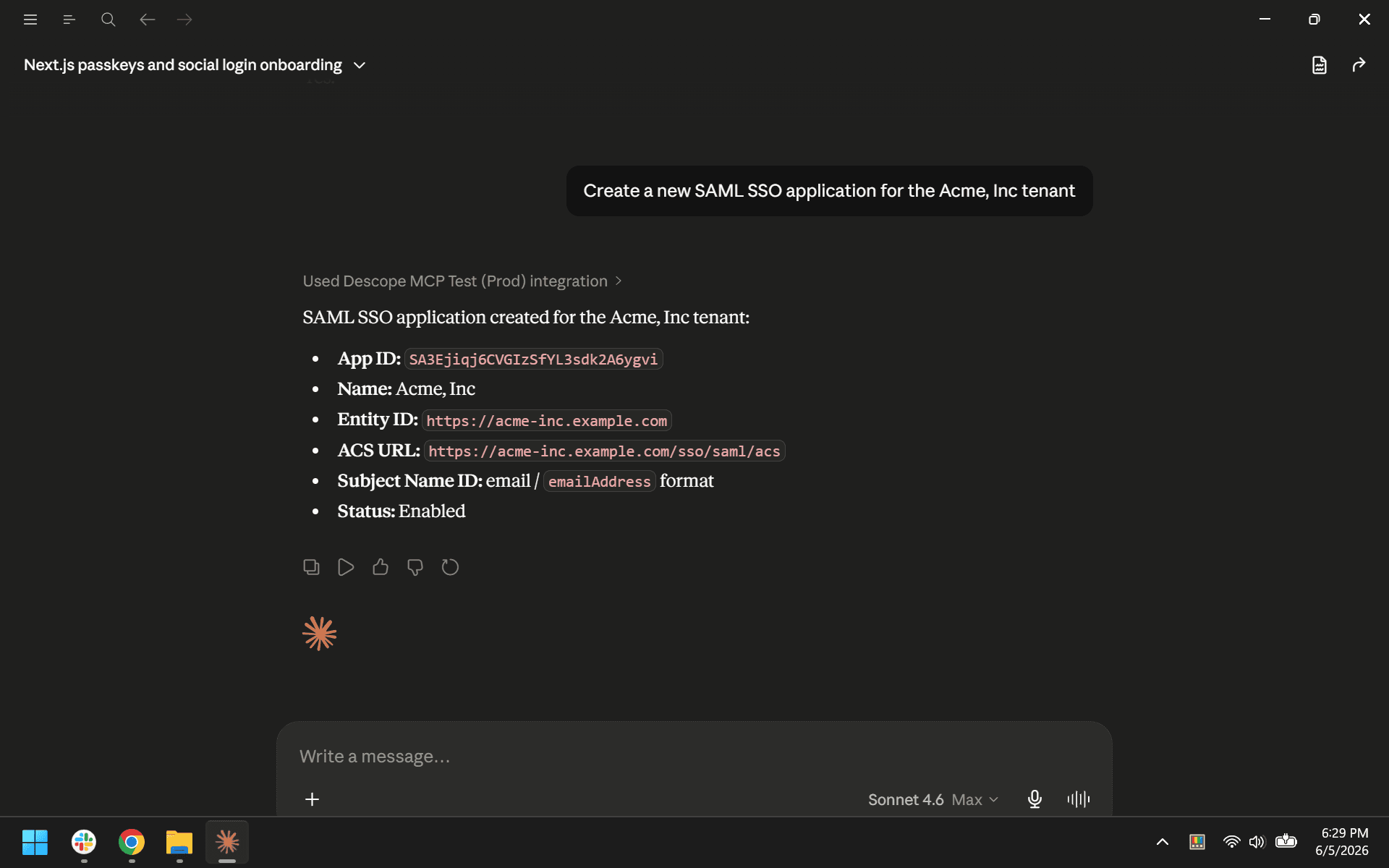
connect_read and connect_write manage SSO, inbound apps, and outbound apps. This is the broadest write tool in the server, and thus should be handled carefully.
The read tool covers SSO settings and applications across tenants, inbound app configurations and consent records, outbound app definitions and token state, and service provider configuration.
The write tool covers SSO application management across OIDC, SAML, and WS-Fed, inbound app lifecycle (including secret rotation and consent management), outbound app creation (directly, from templates, or from DCR presets), token and API key management, and SSO mapping recalculation.
Example prompts:
"Show me all SSO settings across tenants and whether they're OIDC or SAML"
"Which inbound apps are registered?"
"Create a new SAML SSO application for the Acme, Inc tenant"
Agentic
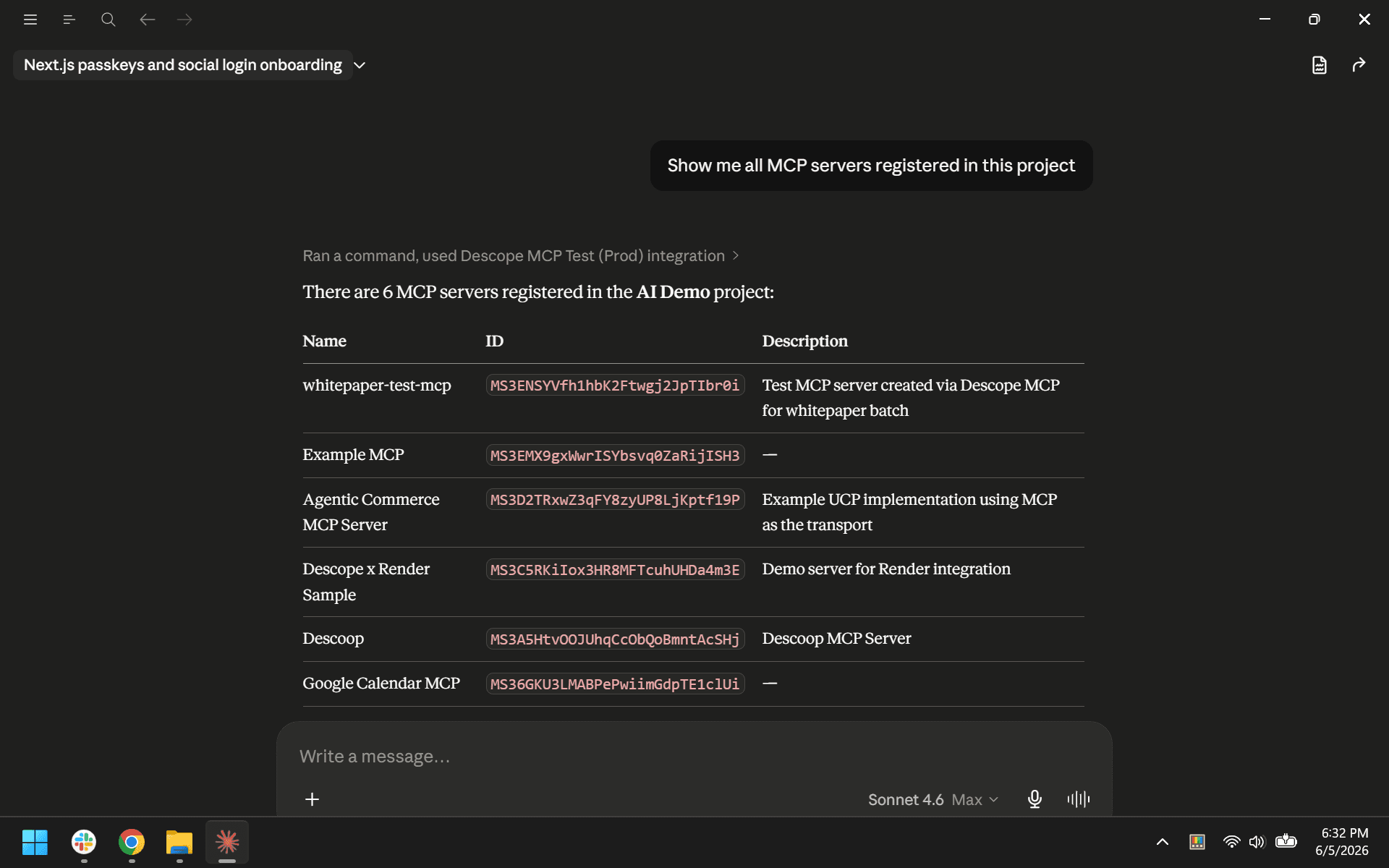
agentic_read and agentic_write manage MCP server definitions and MCP server clients within your Descope project.
The read tool lists and loads MCP server configurations and their associated clients, including client secret retrieval. The write tool creates, updates, and deletes MCP servers and their clients, and handles client registration and secret rotation.
Example prompts:
"Rotate the client secret for the staging MCP server client"
"Show me all MCP servers registered in this project"
Tests
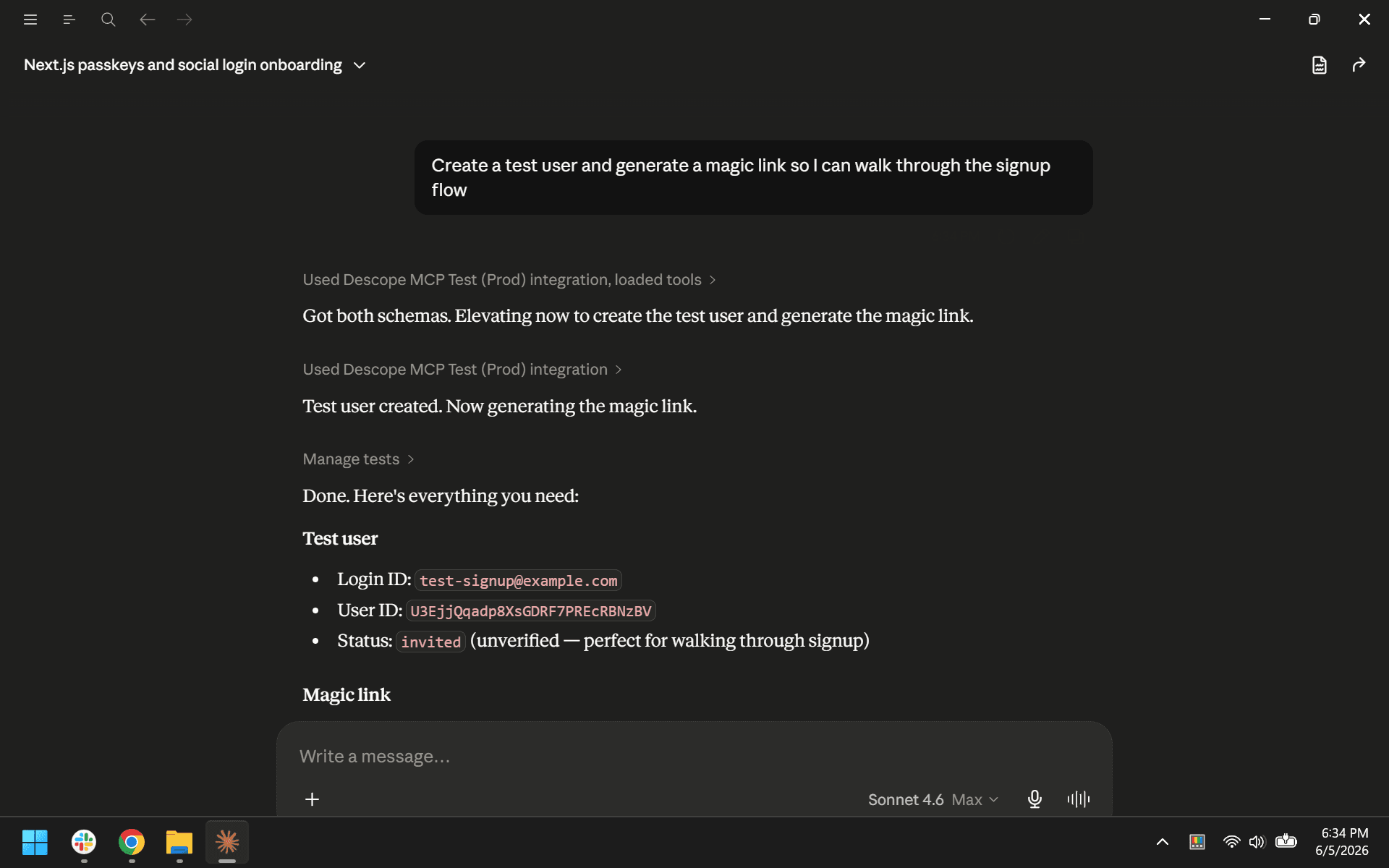
tests_read and tests_write manage test users and test authentication credentials. The read tool searches test users. The write tool creates and deletes them. Its credential generation action adds test OTPs, magic links, and enchanted links.
Example prompts:
"Delete all test users from this project"
"Create a test user and generate a magic link so I can walk through the signup flow"
Audits
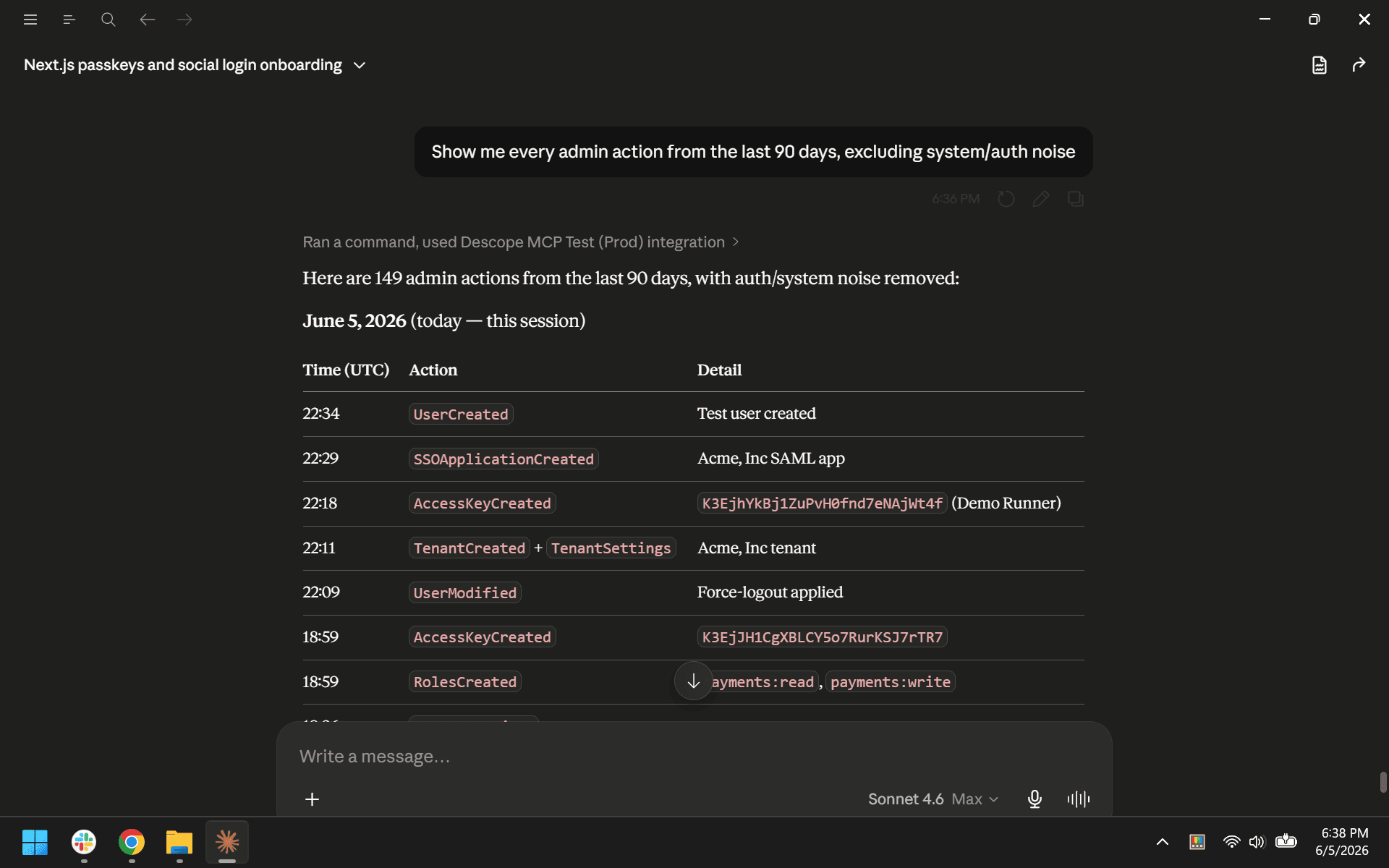
audits_read is read-only with no write counterpart. It provides audit event search and analytics queries, both available in every session without elevation.
The audit log captures authentication events, admin actions, configuration changes, and system events across the project. The analytics provide aggregated usage data. Together they form the primary source for proving compliance, investigating incidents, and monitoring operations.
Example prompts:
"What does the weekly authentication trend look like over the last quarter?”
"Show me every admin action from the last 90 days, excluding system/auth noise"
Role-based use cases
This section illustrates how different roles can engage with the Descope MCP Server and which buckets they reach for most often.
Developer
Developers tend to work across the full breadth of the server. A session might start with a documentation query about SDK integration, move into inspecting the project's current flow configuration, shift into creating a new flow and applying project branding, and end with a test user walking through the result.
Learning and getting unstuck
docs_search · docs_ask_question
Integration questions are often the first thing a developer brings to the MCP server. The documentation tools return grounded answers from Descope's docs, SDK references, and GitHub examples without touching project data.
"How do I implement passwordless sign-in with magic links in a Next.js app?"
"Show me the React SDK example for handling refresh tokens"
"What's the difference between Flows and the embedded SDK approach? When should I pick which?"
"Find the docs for Auth0 to Descope migration"
"How do I validate a Descope JWT in my Go backend?"
Building and iterating on auth flows
flows_read · flows_write · project_write
Once the design direction is clear, the server supports moving directly from inspecting existing flows to creating or modifying them. Flow templates provide pre-built starting points for common authentication patterns.
"Show me my current sign-up flow as JSON"
"Create a passwordless login flow with magic link and WebAuthn fallback"
"Create a sign-in flow with social login and magic link"
"Duplicate my prod sign-up flow into a staging project"
Styling and branding flows
flows_read · flows_write · project_read · project_write
Authentication screens are customer-facing UI. Theming and branding configuration ensures that login, signup, and recovery screens match the application's visual identity.
"Set the theme for my flows to match the styles from descope.com"
"Show me my current theme configuration"
"Create a custom dark theme with primary color #FF6B35 and secondary #1A1A2E"
"Update the logo across all my flows to https://cdn.acme.com/logo.svg"
"Set the headline font to Roboto and body font to Open Sans for all my flows"
"Copy the theme from my prod project to my staging project"
"Reset my flow theme to Descope defaults"
Backend services and machine-to-machine
auth_keys_read · auth_keys_write
Services, background jobs, and automated systems authenticate with Descope using access keys. Managing these credentials, including roles, rotation, and deactivation, is a regular part of maintaining a production deployment.
"Create an access key for my payments service scoped to the Acme tenant with admin and editor roles"
"List all access keys and their created timestamps"
"Rotate the access key for ci-deploy-bot. Generate a new one and disable the old"
"What roles does this access key have? I'm debugging a 403 in my backend"
Testing and local development
tests_read · tests_write
Test users exercise authentication flows without affecting real user data or production metrics. They can be created in bulk for integration test suites and cleaned up afterward.
"Create 20 test users with random emails and the test_ prefix"
"List my test users"
"Delete every test user with the prefix qa_"
"Delete all the test users from my project"
Agentic and AI agent integration
agentic_read · agentic_write · connect_read · connect_write
If your application provides services that AI agents consume, or if your agents connect to third-party tools that require identity, these tools manage the registration, configuration, and credentialing of those integrations.
"Register my AI copilot as an inbound app on Descope and give me the OAuth client ID and secret"
"Create an outbound app for Google Workspace so my agent can read Gmail on a user's behalf"
"Set up an MCP server config that exposes these three tools with these scopes"
"List the outbound apps connected to user alice@acme.com. What tokens do we have stored?"
"List all my outbound connections"
Project introspection
session · list_operations · project_read
Orientation and discovery. Useful when picking up a project you didn't set up, when working across multiple environments, or when you want to understand what the server can do.
"What project am I connected to?"
"Show me every operation this MCP server supports"
"Compare my staging and prod project settings. What's drifted?"
Product manager
PMs primarily work with read tools: audit analytics, user data, and flow configurations. Their sessions tend to be investigative, focused on understanding behavior and evaluating changes before committing to them.
User analytics and cohort understanding
audits_read · users_read
Understanding who is signing up, how they're authenticating, and whether they're staying. Descope captures the event data that makes these assessments possible through audit analytics.
"How many users signed up in the last 30 days, broken down by signup method?"
"What's the weekly trend in active users over the last quarter?"
"Show me users by signup source: social, email/password, SSO, magic link"
"Of the users who signed up last month, how many completed onboarding?"
"Of the users who signed up in March, how many are still active now?"
"Which tenants have the highest user growth this quarter?"
Flow performance and conversion
flows_read · audits_read
Evaluating how well authentication flows are performing. Conversion between flow steps, success rates across methods, and failure patterns all help identify where users are dropping off.
"Show me my current sign-up flow and walk me through each step"
"How many users start sign-up vs. complete it? What's my conversion rate?"
"Compare success rates between my magic-link flow and password flow"
"Pull the audit log for sign-up events in the last 7 days and find the failure pattern"
Flow experimentation
flows_read · flows_write · project_write
Trying out a new authentication method or flow variant before it reaches production. Cloning a flow or project creates a safe environment where changes can be tested without affecting live users.
"Clone my prod sign-up flow into a new variant with the CAPTCHA step removed"
"Create a new staging project that mirrors prod"
"Set up a B2B invitation flow for enterprise customers"
Staging and experimentation projects
project_read · project_write · flows_write
Managing staging environments for testing and validation. Applying a distinct theme to a staging project makes it visually obvious which environment you're working in.
"Create a new Descope project called acme-staging and copy the prod sign-up flow into it"
"List all my projects and which environment each one is"
"Compare project settings between staging and prod"
"Apply a visually distinct theme to my staging project"
Feature adoption
audits_read · users_read · tenants_read · connect_read
Tracking how users and tenants are adopting specific authentication features. Useful for measuring the impact of a rollout or identifying where adoption is lagging.
"How many tenants have enabled SSO?"
"How many users authenticate via social login vs. passwordless?"
"Which inbound and outbound apps are seeing the most use?"
"Track adoption of WebAuthn over the last 90 days"
Strategic context
docs_search · docs_ask_question
Understanding what patterns and capabilities Descope supports before deciding on a direction.
"What flow patterns does Descope recommend for B2B SaaS sign-up?"
"Find the docs on running flow A/B tests"
Platform and operations engineer
Platform engineers work most heavily with tenants, users, access control, and auth keys. Their sessions tend to involve more write operations than other roles, and they are the most likely to work through multi-step provisioning sequences.
Customer onboarding
tenants_write · connect_write · users_write
Onboarding a new B2B customer is one of the most complete sequences the server supports: creating the tenant, configuring SSO, and provisioning admin users, all in a single session with elevation confirmed at each write step.
"Create a new tenant called Globex Corp with domain globex.com and ‘enterprise plan’ as a custom attribute"
"Onboard these 10 new customers from this spreadsheet: create the tenant, set the domain, tag with their plan tier, and create the initial admin user"
"Set up SAML SSO for tenant Acme. Here's their IdP metadata URL"
"List every tenant and how many users each one has"
"Find tenants without SSO configured"
User provisioning and lifecycle
users_read · users_write
Day-to-day user management: inviting users to tenants, managing role assignments, handling credential resets, and cleaning up inactive accounts. Bulk operations are available for onboarding at scale.
"Invite alice@acme.com on tenant Acme as a TenantAdmin"
"Invite these 50 users for tenant Globex with the Editor role"
"Find the user alice@acme.com and show me which tenants and roles they have"
"Move user bob@acme.com from tenant Acme to tenant Acme-Holdings"
"Reset the passkey for user user_abc123. They lost their device"
"Bulk import these users from CSV into tenant Acme"
"Delete user qa_test_user@example.com"
Roles and permissions per tenant
access_control_read · access_control_write
Defining and maintaining the role and permission structure within each tenant. Cloning role structures between tenants with similar requirements avoids redundant manual setup.
"List the roles defined inside tenant Acme"
"Create a new role called BillingAdmin inside tenant Acme with permissions billing:read and billing:write"
"Clone the role structure from tenant Acme into tenant Globex"
"Show me every user with TenantAdmin in tenant Acme"
"Any roles in tenant Acme with no users? Any users with no roles?"
Tenant health and support
audits_read · users_read · tenants_read
Diagnosing issues within a specific tenant. Combining user data, authentication events, and tenant configuration in one session gives a complete picture of what's happening.
"Customer at tenant Globex says users can't log in. Pull recent auth events for that tenant and tell me what's wrong"
"Generate a tenant health report: user count, last-30-day logins, SSO status, and recent audit events"
Security and compliance lead
Security leads work primarily with read tools: audit logs, access control, auth keys, and session state. Most of their workflows run entirely in read-only mode, which means they can run comprehensive reviews without triggering elevation.
Threat detection and monitoring
audits_read
Identifying suspicious activity in authentication events. Spikes in failed logins, unusual geographic patterns, and abnormal MFA failure rates are signals that something may be wrong.
"Show me failed login attempts in the last 24 hours"
"Detect anomalies: spikes in failed logins, unusual geo logins, abnormal MFA failure rates"
"Has anyone tried to brute-force my admin account?"
"Find users who logged in from a new country in the last 7 days"
"Pull all suspicious sign-in events on tenant Acme this week"
Privileged access and RBAC review
access_control_read · users_read
Periodic review of who has access to what. Identifying overly broad roles, orphaned permissions, and dormant privileged accounts is standard security hygiene.
"List every user with the super_admin permission across all tenants"
"Audit my RBAC: any roles with overly broad scopes? Any orphaned permissions?"
"Show me roles that have admin-level permissions but are assigned to non-employees"
"Find permissions that no role uses, and roles that no user has"
"Who has access to /admin endpoints? Map every role and permission that grants it"
Credential hygiene
auth_keys_read · auth_keys_write
Access keys are long-lived by nature, which makes regular inventory and rotation important. Stale, overly scoped, or non-expiring credentials are common findings during security reviews.
"List all access keys: when each was created, last used, who created it, and what permissions it has"
"Find access keys not used in 60 or more days"
"Find access keys without an expiration set"
"Rotate every key created before this date"
Flow and policy hardening
flows_read
Reviewing authentication flows for security gaps. Flows that allow password-only login without MFA, lack rate limiting, or skip CAPTCHA may need hardening depending on the application's risk profile.
"Review my login flow for security gaps: missing MFA, weak rate limits, no CAPTCHA"
"Find tenants whose sign-in flow doesn't enforce MFA"
"Show me every flow that allows password-only authentication"
"Recommend hardening for my sign-up flow"
Compliance and audit evidence
audits_read · users_read · access_control_read · auth_keys_read
Producing evidence for periodic compliance reviews. The server can compile admin actions, privileged user inventories, credential states, and anomalous events across multiple tools in a single session.
"Generate my SOC2 quarterly evidence: all admin actions in Q1, every privileged user, every active service key with last-use timestamps, and any anomalous events"
"Build a user-access review report: every user, every role, last login. Formatted for our auditor"
"Who changed the production sign-up flow in the last 90 days? With timestamps and diffs"
"Generate an ISO 27001 access control evidence pack"
"List every project setting change in the last 30 days"
Incident response and forensics
audits_read · users_read · auth_keys_read · users_write · auth_keys_write
Investigating a security incident starts with the audit log and user records, then expands based on what the investigation surfaces. If containment is needed, the session elevates for targeted actions like forcing logout or deactivating compromised credentials.
"Build a full activity timeline for user alice@acme.com over the last 30 days: every auth event, role change, and key action"
"Customer reports their account was compromised. Pull every event for user_abc123 and identify the moment of compromise"
"Was the production project's session lifetime changed recently? If so, by whom and when?"
Project-level security posture
project_read · session
Reviewing the project's security configuration as a whole. Token lifetimes, redirect URIs, and other project-level settings affect the security posture of every flow and user in the project.
"Audit my Descope project settings against security best practices and prioritize what to fix"
"Are there any project-level settings like token lifetimes or redirect URIs that look risky?"
"Am I currently in elevated write mode? Show me the details of my session”
Cross-role workflows
Many tasks cross role boundaries, combining tools that no single role would typically use in isolation. These workflows demonstrate how the server's capabilities compose in a single session.
Customer support
users_read · audits_read · access_control_read · tenants_read · docs_search · users_write
A support engineer resolving a login issue needs user data, authentication history, and tenant context. If the issue requires a credential reset, the session elevates for a targeted write.
"Customer says they can't log in. Pull their user record, recent auth events, and role assignments. Then tell me what's wrong and how to fix it"
Migration from another identity provider
docs_search · docs_ask_question · users_write · tenants_write · access_control_write · flows_write · project_write
Migrating from another provider spans documentation, tenant provisioning, user import, role recreation, and flow design.
"I'm migrating from Auth0. Here's the export. Create matching tenants, import users with their attributes, recreate the roles, and set up an equivalent sign-up flow"
P.S. You can also use Descope Skills to make migrations from other auth providers a breeze.
Agentic app provisioning and governance
agentic_write · connect_write · access_control_write · audits_read
Standing up a new AI agent integration involves registering it, scoping its access, creating the role that governs user invocation, and establishing audit coverage.
"Stand up a new AI agent: register it as an inbound app, give it scoped access to these three outbound apps (Gmail, Slack, Calendar), and create the role that governs which users can invoke it"
New customer onboarding (full lifecycle)
tenants_write · users_write · access_control_write · flows_write · connect_write
Full customer onboarding combines tenant creation, SSO configuration, user provisioning, role assignment, and flow setup.
"Onboard Acme Corp: create the tenant, configure SAML SSO against this IdP, create the initial 5 admin users, create the TenantAdmin role, and assign it to them"
Compliance evidence package
audits_read · users_read · access_control_read · auth_keys_read
Producing compliance evidence combines audit history, user access data, role definitions, and credential inventory. This entire workflow runs in read-only mode.
"Build my quarterly SOC2 evidence: all admin actions, every privileged user, every active service key with its last-use timestamp, and any anomalous events"
User lifecycle visibility
users_read · users_write · audits_read
Managing inactive users spans user search, activity analysis, and targeted account actions.
"Find every user who hasn’t logged in within the last 30 days and disable them"
Self-service tenant admin
tenants_read · users_read · users_write · access_control_read · access_control_write
The MCP server can back an embedded admin copilot that gives customer admins natural-language access to manage their own tenant.
"Embed an admin copilot inside our app so customer admins can invite users, assign roles, and manage SSO via natural language"
Getting the most out of the Descope MCP Server
The Descope MCP Server is live at https://mcp.descope.com. It's also available on Claude and ChatGPT.
Connect it to your MCP client, sign in (or create) your Descope account, and start exploring your identity environment with natural language. Sessions are read-only by default, so feel free to browse and query without risk. When you’re ready to make changes, the server’s elevation contract keep you in control of every write operation.
Whether you’re building authentication for a new app, onboarding B2B customers, running a security audit, or just trying to find a quick answer from the docs, the MCP server puts your Descope projects in a single, conversational interface.
Connection instructions for specific clients can be found in our documentation.