
Table of Contents
Don't have the time to read the entire post? Our human writers will be sad, but we understand. Summarize the post with your preferred LLM here instead.
AI agents are increasingly capable of taking real-world actions on your behalf: reading files, sending emails, booking appointments, anything reachable through an API. But with that power comes a critical question: how does the agent prove it has your explicit, in-the-moment approval before doing something sensitive?
Browser redirects don't work inside a CLI agent. Storing your credentials in the agent's context is a security nightmare. What you actually need is a decoupled authentication flow that lets the agent pause, ask for human approval on a separate device, and then continue, without breaking its own execution loop.
That's exactly what Client-Initiated Backchannel Authentication (CIBA) is designed for. In this tutorial, we'll wire CIBA into a Claude Code agent with the following results:
A custom MCP server built with the Descope Python MCP SDK that signals when authentication is required
A Claude Code
PostToolUsehook that intercepts that signal, runs the full CIBA flow against Descope, and injects the resulting token back into the agent loopThe agent can then retry the tool with a valid, user-approved token
By the end, you'll have a working pattern for any tool that should require explicit human sign-off before executing.
What is CIBA, and why does it fit AI agents?
CIBA is an OAuth 2.0 extension that decouples where authentication is initiated from where the user approves it. In a normal OAuth flow, the user's browser gets redirected to a login page on the same device. CIBA breaks that assumption: the client (your agent) triggers an auth request on the backend, Descope sends the user an out-of-band notification (an email, push notification, etc.), and the user approves or denies from their own device.
For an AI agent, this is the right model:
The agent never needs a browser
The user gets a clear, explicit approval prompt for the exact action the agent wants permissions for
The agent can be blocked until the user approves, or time out gracefully
No credentials are ever shared with the agent
After the authorization request is initiated, the client polls Descope's /token endpoint at a pre-defined interval until the user approves.
A note on MCP standards: CIBA for agentic workflows is part of an active MCP Working Group discussion, but is not yet part of the official MCP auth extensions. The pattern in this tutorial is fully compliant with OAuth 2.1 and works today. It just isn't a formal MCP spec primitive yet.
The flow we're building
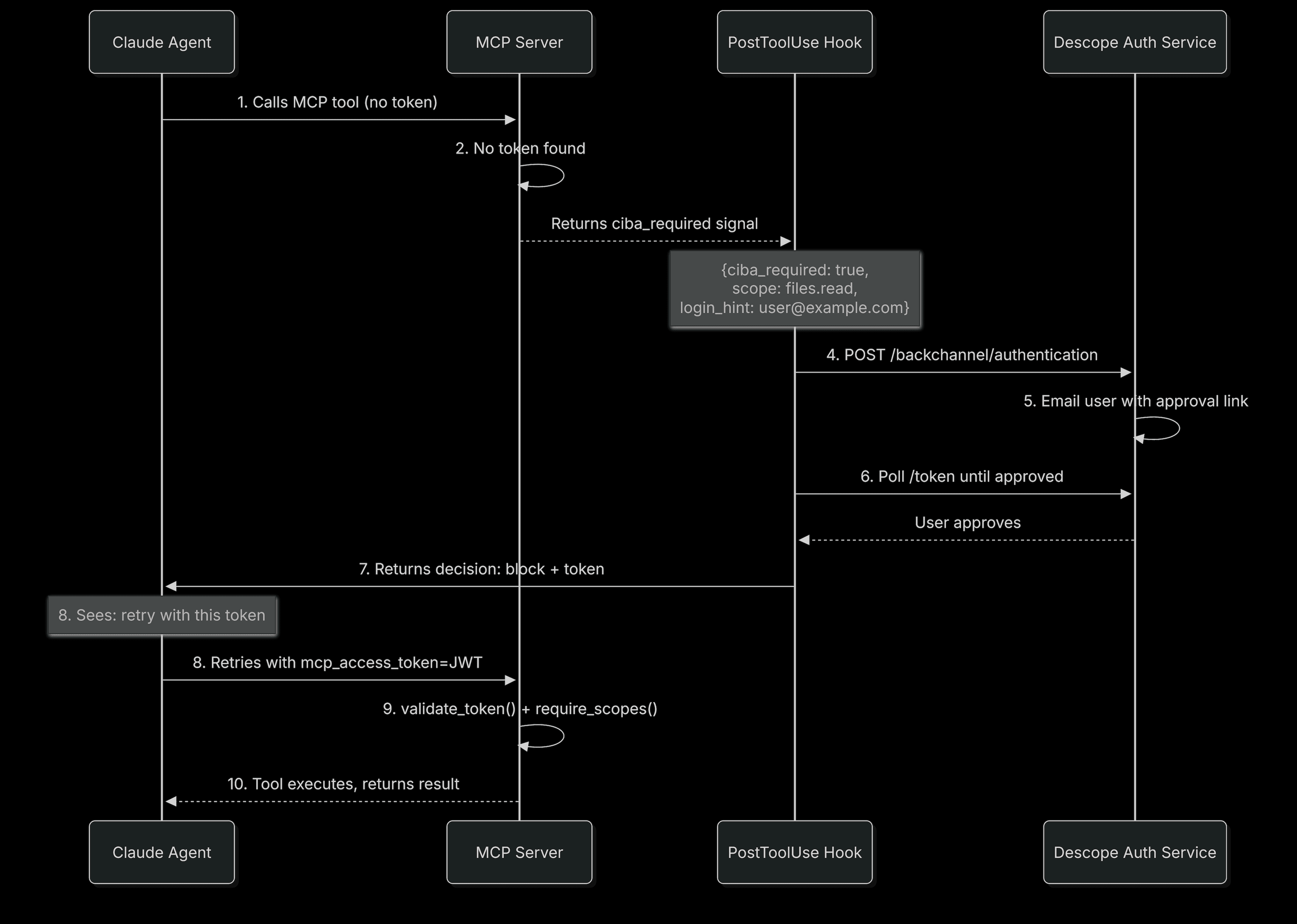
The agent calls a protected tool, the server signals that approval is needed, the hook runs the CIBA flow, and the tool call is replayed with the approved token:
Prerequisites
A Descope account (free tier works)
Python 3.9+
Claude Code installed and configured
Install the Python dependencies:
pip install descope-mcp fastmcp requests python-dotenv uvicornStep 1: Configure a Descope MCP server and client
Descope's Agentic Identity Hub separates the authorization server (Descope) from the resource server (your MCP server). You define scopes and clients in Descope; your server validates tokens against Descope's public keys at runtime.
Two things to set up: an MCP Server resource (which defines scopes and the token audience) and a Client (which defines grant types, including CIBA, and holds the credentials the hook will use).
Create the MCP server resource
Go to Resources in the Descope console.
Click + Resource, and choose MCP Server as the Resource type.
Set the MCP Server URL to the base URL of your endpoint, ending in
/mcp(e.g.,https://your-mcp-server.com/mcp). This value is embedded as the `aud` claim in every access token issued for your server.
Under MCP Server Scopes, add files.read with a user-facing description like "Allow the agent to read files on your behalf".
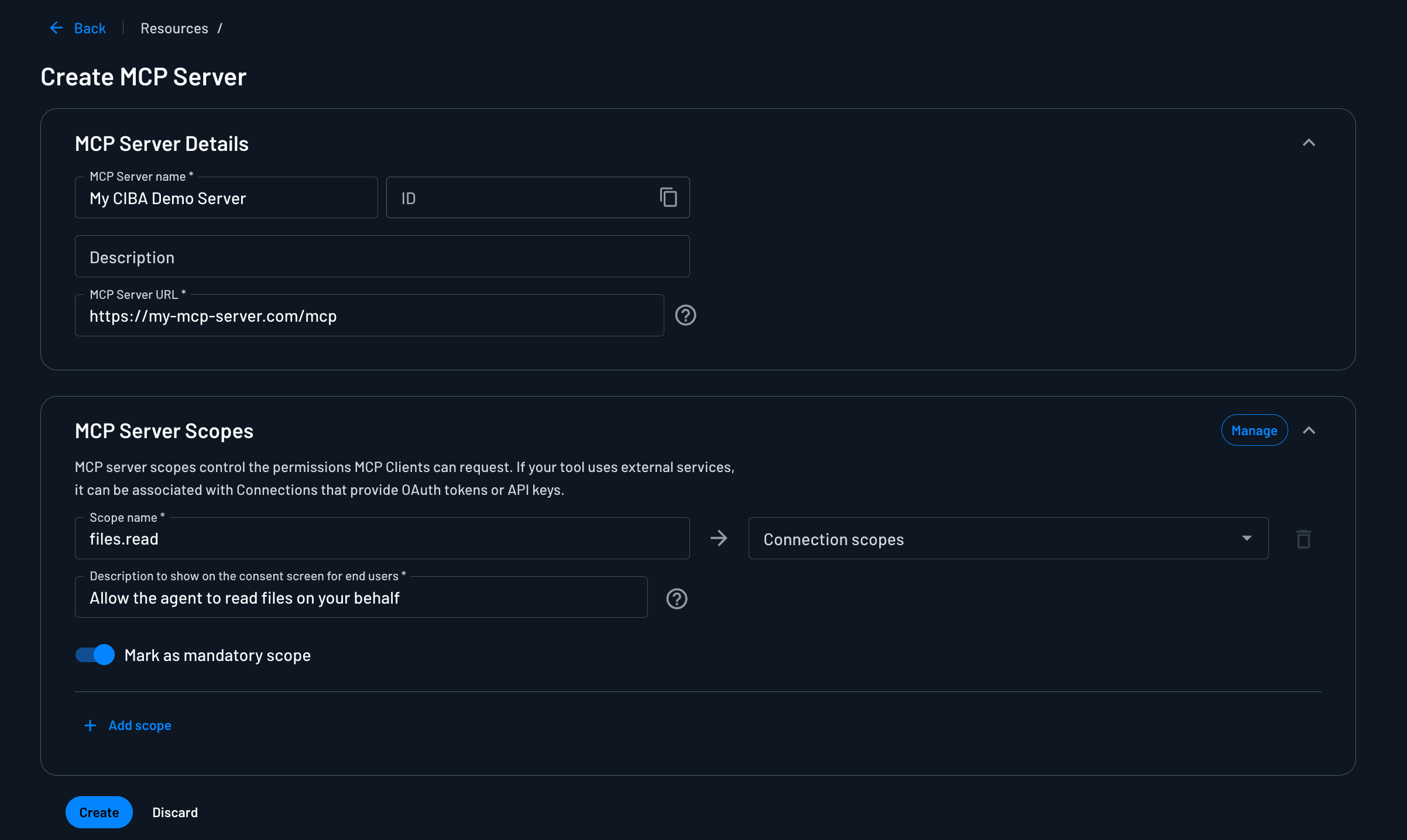
After hitting create, under Connection Information, save your Discovery URL. It looks like:
https://api.descope.com/v1/apps/agentic/<PROJECT_ID>/<MCP_SERVER_ID>/.well-known/openid-configurationCreate a client with CIBA enabled
In OAuth terms, a client's grant types express how that client is allowed to authenticate. Multiple clients can connect to the same MCP Server, some with only authorization_code (interactive MCP clients like Claude Desktop), and others with CIBA (your backend hook) or client_credentials (autonomous agents). Scopes and audience enforcement live on the MCP Server resource; how a client proves identity and gets user approval lives on the Client.
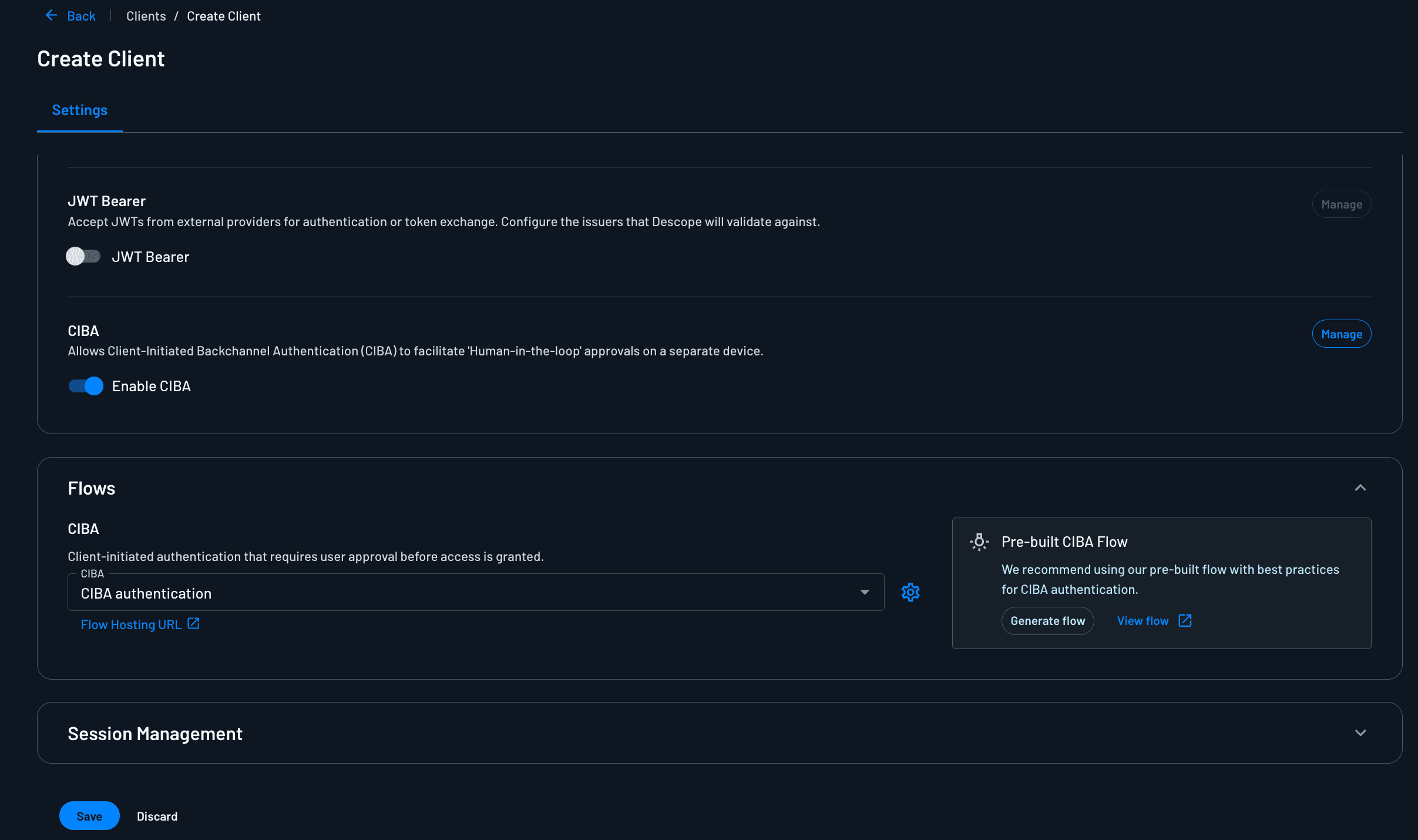
To configure a client with the CIBA grant type, go to Agentic Identity Hub > Clients and click + Client.
Give it a name (e.g.,
Claude Code Agent).Under Grant Types, enable CIBA.
Click Manage next to CIBA to configure:
Delivery method: Email (currently the only supported channel). Select your email connector and template, or use Descope's default.
Custom link expiration: How long the approval link stays valid (default 3 minutes; increase this if your users need more time).
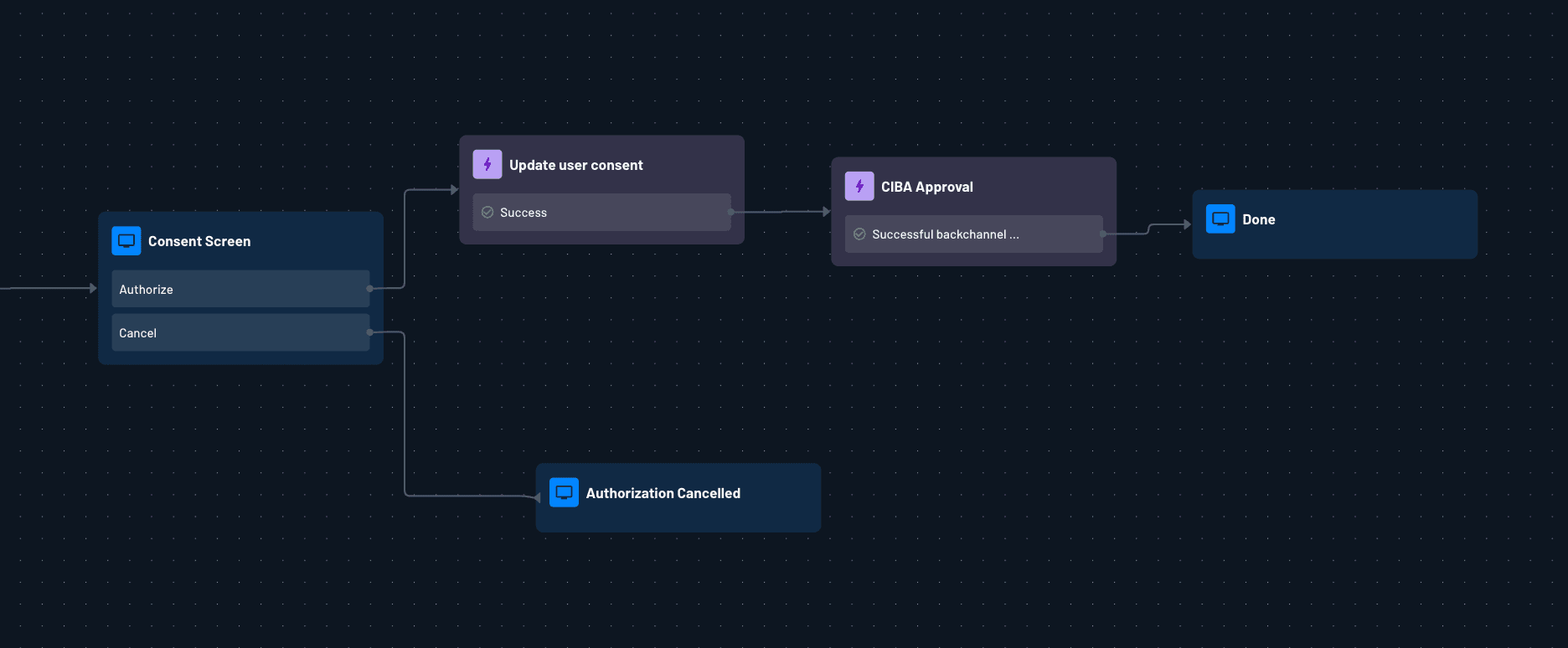
Under Flows > CIBA Flow, click Generate Flow to create the pre-built CIBA approval flow. The generated flow is a full Descope authentication + consent flow that runs when the user clicks the link in the approval email. Here's what it does:
CIBA User Code Verification: the first action in the flow verifies the CIBA user code embedded in the approval link, tying this session to the specific
auth_req_idyour hook initiated. The user must be authenticated before this step completes, so clicking the link without being signed in will prompt a login first.
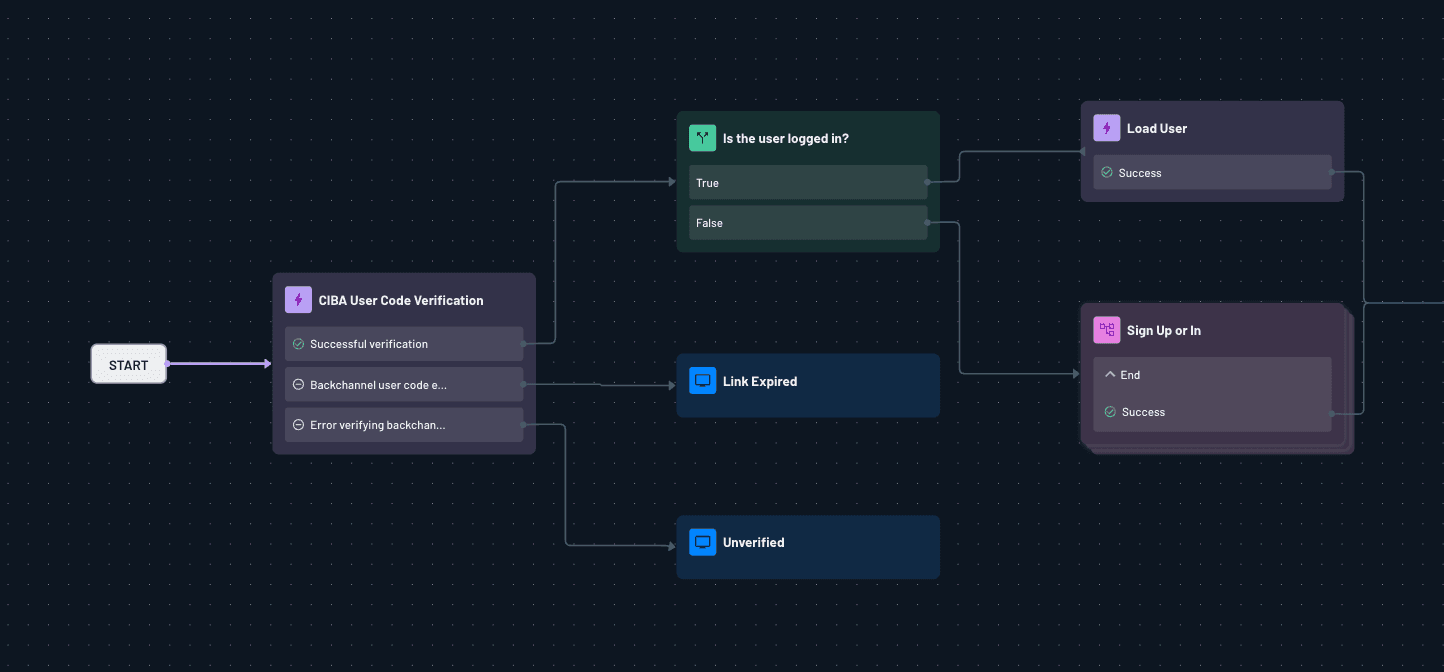
Approval screen: once authenticated, the user sees a consent screen that includes the binding message your hook sent (e.g., "Claude agent is requesting access: files.read"). They can approve or deny.
CIBA approval action: records the user's decision server-side. On approval, this completes the CIBA transaction and unblocks the
/tokenpoll. Your hook receives the access token on the next poll cycle. On denial, the transaction is rejected and the hook receivesaccess_denied.
Because the flow runs in Descope's Flow Builder, you can customize every step: swap in a different auth method, add a step-up MFA challenge for particularly sensitive scopes, or build a custom approval UI. The pre-built flow is a solid starting point for most use cases.
Save the client. Note the generated Client ID and Client Secret.
Use the Update MCP Server Client API to add
files.readas an allowed scope for your new Client to request.
Step 2: Having the MCP server signal when auth is needed
The MCP server does two things depending on whether the caller provides a valid token:
No token (first call): return a structured CIBA-required signal instead of executing the tool
Valid token (retry): validate it with Descope, check the required scope, then execute
The complete server fits in one file, shown below. The comment dividers mark three parts: the CIBA-required signal, the validate-scope-execute path, and a metadata endpoint that lets MCP clients discover the Descope authorization server.
# mcp_server.py
import os
from fastmcp import FastMCP
from starlette.applications import Starlette
from starlette.requests import Request
from starlette.responses import JSONResponse
from starlette.routing import Mount, Route
from descope_mcp import DescopeMCP, validate_token, require_scopes, InsufficientScopeError
from dotenv import load_dotenv

load_dotenv()

DESCOPE_WELL_KNOWN_URL = os.environ["DESCOPE_WELL_KNOWN_URL"]
DESCOPE_MANAGEMENT_KEY = os.environ["DESCOPE_MANAGEMENT_KEY"]  # Create one at https://app.descope.com/settings/company/managementkeys
MCP_SERVER_URL = os.environ["MCP_SERVER_URL"]  # e.g., https://your-mcp-server.com/mcp
REQUIRED_SCOPE = "files.read"

# Strip /.well-known/openid-configuration to get the auth server base URL,
# used in the OAuth protected metadata endpoint.
_AUTH_SERVER_BASE = DESCOPE_WELL_KNOWN_URL.removesuffix("/.well-known/openid-configuration")

# Initialize the Descope MCP SDK.

DescopeMCP(
    well_known_url=DESCOPE_WELL_KNOWN_URL,
    mcp_server_url=MCP_SERVER_URL,
    management_key=DESCOPE_MANAGEMENT_KEY,
)

mcp = FastMCP("secure-files")


@mcp.tool()
async def read_user_file(
    file_path: str,
    user_email: str,
    mcp_access_token: str = None,
) -> dict:
    """
    Read a file on behalf of the authenticated user.
    Requires the 'files.read' scope — CIBA will be triggered if no token is present.
    """

    # ── First call: no token ────────────────────────────────────────────────
    if not mcp_access_token:
        # Return a structured signal. The Claude Code hook will detect this,
        # run the CIBA flow, and ask Claude to retry with the approved token.
        return {
            "ciba_required": True,
            "scope": REQUIRED_SCOPE,
            "login_hint": user_email,
            "message": (
                f"Authentication required to access files. "
                f"A CIBA request will be sent to {user_email}."
            ),
        }

    # ── Retry: token present ────────────────────────────────────────────────
    try:
        # 1. Validate token (signature, expiry, audience)
        token_claims = validate_token(mcp_access_token)

        # 2. Enforce the required scope
        require_scopes(token_claims, [REQUIRED_SCOPE])

        # 3. Execute the tool
        with open(file_path, "r") as f:
            content = f.read()

        return {"success": True, "content": content}

    except InsufficientScopeError as e:
        return {"error": "insufficient_scope", "detail": str(e)}
    except FileNotFoundError:
        return {"error": "file_not_found", "path": file_path}
    except Exception as e:
        return {"error": "unexpected", "detail": str(e)}


# ── OAuth Protected Metadata ────────────────────────────────────────────────
# Served at /.well-known/oauth-protected-metadata so MCP clients can discover
# the Descope authorization server without any static file hosting.
async def oauth_protected_metadata(request: Request) -> JSONResponse:
    return JSONResponse({
        "resource": MCP_SERVER_URL,
        "authorization_servers": [_AUTH_SERVER_BASE],
        "bearer_methods_supported": ["header"],
        "scopes_supported": [REQUIRED_SCOPE],
    })


# ── ASGI app ────────────────────────────────────────────────────────────────
# Wrap the FastMCP HTTP transport app with the well-known route.

mcp_app = mcp.http_app(path="/mcp")
app = Starlette(
    routes=[
        Route("/.well-known/oauth-protected-metadata", oauth_protected_metadata),
        Mount("/", app=mcp_app),
    ],
    lifespan=mcp_app.lifespan,
)
That’s the entire resource server. It never runs the CIBA flow itself; it just signals that authentication is required and validates whatever token arrives on the retry. The flow itself lives in the hook.
Step 3: The Claude Code hook running the CIBA flow
Claude Code hooks fire at specific points in the agent lifecycle. We want PostToolUse. This fires after a tool call completes, lets us inspect the response, blocks Claude from acting on it, and injects new context instead.
MCP tools appear to hooks with the naming pattern mcp__<server_name>__<tool_name>, so we'll match mcp__secure-files__.* (or mcp__.* to cover all MCP tools generically).
Hook configuration
Add this to your .claude/settings.json:
{
  "hooks": {
    "PostToolUse": [
      {
        "matcher": "mcp__secure-files__.*",
        "hooks": [
          {
            "type": "command",
            "command": "python3 .claude/hooks/ciba_handler.py"
          }
        ]
      }
    ]
  }
}
The hook script
The handler does the rest of what’s needed: it reads the hook event from stdin, initiates the backchannel request, polls the token endpoint until the user responds, and replays the original tool call with the approved token.
# .claude/hooks/ciba_handler.py
"""
PostToolUse hook: intercepts CIBA-required signals from MCP servers.

When the MCP tool returns {"ciba_required": true, ...}, this hook:
  1. POSTs to Descope's backchannel authentication endpoint
  2. Polls the token endpoint until the user approves (or times out)
  3. Replays the original tool call directly with the approved token injected
  4. Returns decision: "block" with the real tool result, so Claude sees
     the outcome without ever seeing the JWT.
"""

import json
import os
import sys
import time

import requests
from dotenv import load_dotenv

load_dotenv()

DESCOPE_WELL_KNOWN_URL = os.environ["DESCOPE_WELL_KNOWN_URL"]  # same value as in mcp_server.py
DESCOPE_CLIENT_ID = os.environ["DESCOPE_CLIENT_ID"]            # Pre-registered client in AIH
DESCOPE_CLIENT_SECRET = os.environ["DESCOPE_CLIENT_SECRET"]
MCP_SERVER_URL = os.environ["MCP_SERVER_URL"]                  # used to replay the tool call

def _get_auth_endpoints() -> tuple[str, str]:
    resp = requests.get(DESCOPE_WELL_KNOWN_URL, timeout=10)
    resp.raise_for_status()
    config = resp.json()
    return config["backchannel_authentication_endpoint"], config["token_endpoint"]

BACKCHANNEL_AUTH_URL, TOKEN_URL = _get_auth_endpoints()
POLL_INTERVAL_SECONDS = 3
MAX_WAIT_SECONDS = 300  # 5 minutes


def main():
    # ── Read the hook event from stdin ──────────────────────────────────────
    event = json.load(sys.stdin)

    tool_name = event.get("tool_name", "")
    tool_output_raw = event.get("tool_output", "")

    # tool_output arrives as a string; try to parse it as JSON
    try:
        tool_output = json.loads(tool_output_raw)
    except (json.JSONDecodeError, TypeError):
        # Not JSON — not a CIBA signal, let the event pass through
        sys.exit(0)

    # ── Check for the CIBA signal ───────────────────────────────────────────
    if not tool_output.get("ciba_required"):
        sys.exit(0)  # Nothing to do

    scope = tool_output.get("scope", "openid")
    login_hint = tool_output.get("login_hint", "")

    sys.stderr.write(
        f"[ciba_handler] CIBA required for scope='{scope}', user='{login_hint}'\n"
    )

    # ── Step 1: Initiate backchannel authentication ─────────────────────────
    auth_response = requests.post(
        BACKCHANNEL_AUTH_URL,
        data={
            "client_id": DESCOPE_CLIENT_ID,
            "client_secret": DESCOPE_CLIENT_SECRET,
            "scope": f"openid {scope}",
            "login_hint": login_hint,
            "binding_message": f"Claude agent is requesting access: {scope}",
        },
        headers={"Content-Type": "application/x-www-form-urlencoded"},
    )

    if not auth_response.ok:
        error_msg = f"CIBA initiation failed: {auth_response.status_code} {auth_response.text}"
        sys.stderr.write(f"[ciba_handler] {error_msg}\n")
        # Block Claude from acting on the ciba_required response and surface the error
        print(json.dumps({"decision": "block", "reason": error_msg}))
        sys.exit(0)

    auth_data = auth_response.json()
    auth_req_id = auth_data["auth_req_id"]
    expires_in = auth_data.get("expires_in", MAX_WAIT_SECONDS)
    interval = auth_data.get("interval", POLL_INTERVAL_SECONDS)

    sys.stderr.write(
        f"[ciba_handler] CIBA request initiated (auth_req_id={auth_req_id}). "
        f"Approval email sent to {login_hint}. Polling...\n"
    )

    # ── Step 2: Poll the token endpoint ────────────────────────────────────
    deadline = time.time() + min(expires_in, MAX_WAIT_SECONDS)

    while time.time() < deadline:
        time.sleep(interval)

        token_response = requests.post(
            TOKEN_URL,
            data={
                "grant_type": "urn:openid:params:grant-type:ciba",
                "auth_req_id": auth_req_id,
                "client_id": DESCOPE_CLIENT_ID,
                "client_secret": DESCOPE_CLIENT_SECRET,
            },
            headers={"Content-Type": "application/x-www-form-urlencoded"},
        )

        if token_response.status_code == 200:
            tokens = token_response.json()
            access_token = tokens["access_token"]

            sys.stderr.write("[ciba_handler] CIBA approved! Replaying tool call with token...\n")

            # ── Step 3: Replay the tool call directly ───────────────────────
            # Extract the bare tool name from mcp__<server>__<tool>
            bare_tool_name = tool_name.split("__")[-1]

            # Inject the token into the original arguments
            retry_input = dict(event.get("tool_input", {}))
            retry_input["mcp_access_token"] = access_token

            mcp_response = requests.post(
                MCP_SERVER_URL,
                json={
                    "jsonrpc": "2.0",
                    "method": "tools/call",
                    "params": {"name": bare_tool_name, "arguments": retry_input},
                    "id": 1,
                },
                headers={
                    "Content-Type": "application/json",
                    "Accept": "application/json",
                },
            )

            # Block Claude's view of the CIBA signal and replace it with the
            # real tool result. The JWT never appears in Claude's context.
            print(json.dumps({
                "decision": "block",
                "reason": json.dumps(mcp_response.json().get("result", mcp_response.json())),
            }))
            return

        error_data = token_response.json()
        error_code = error_data.get("error", "")

        if error_code == "authorization_pending":
            # Still waiting for the user — keep polling
            continue
        elif error_code == "slow_down":
            interval += 2
            continue
        elif error_code in ("access_denied", "expired_token"):
            # User denied or the link expired
            print(json.dumps({
                "decision": "block",
                "reason": (
                    f"CIBA authentication was denied or expired (error: {error_code}). "
                    f"The tool cannot proceed without user approval."
                ),
            }))
            return
        else:
            # Unexpected error
            print(json.dumps({
                "decision": "block",
                "reason": f"CIBA polling failed with unexpected error: {error_data}",
            }))
            return

    # ── Timeout ─────────────────────────────────────────────────────────────
    print(json.dumps({
        "decision": "block",
        "reason": (
            "CIBA authentication timed out — the user did not approve the request "
            f"within {MAX_WAIT_SECONDS // 60} minutes. Please let the user know "
            "and try again when they're available."
        ),
    }))


if __name__ == "__main__":
    main()
A few things worth calling out:
The hook replays the tool call itself. Once the token is approved, the hook extracts tool_input from the event, injects mcp_access_token, and POSTs directly to the MCP server using JSON-RPC. It then returns decision: "block" with the real tool result as the reason. Claude sees the file contents, and it never sees the JWT. The credential stays entirely inside the hook process.
decision: "block" suppresses the original {"ciba_required": true} response and replaces it with whatever is in reason. Since we put the actual tool result there, Claude's view of the interaction is seamless: it called a tool and got a result, with no visible authentication detour.
The binding message ("Claude agent is requesting access: files.read") is shown to the user in the approval email alongside the approval link. It's what makes CIBA's "human-in-the-loop" aspect legible to your users.
Step 4: Project structure and running it
Below is the project structure:
your-project/
├── .env
├── .claude/
│   ├── settings.json          # hook configuration
│   └── hooks/
│       └── ciba_handler.py    # the PostToolUse hook
└── mcp_server.py              # your Descope-secured MCP server (HTTP transport)
And the .env:
# Paste from AIH → MCP Servers → Connection Information → Discovery URL
DESCOPE_WELL_KNOWN_URL=https://api.descope.com/v1/apps/agentic/<project_id>/<mcp_server_id>/.well-known/openid-configuration
DESCOPE_MANAGEMENT_KEY=your_management_key       # Descope console → Project → Management Keys
DESCOPE_CLIENT_ID=your_pre_registered_client_id  # AIH → Clients
DESCOPE_CLIENT_SECRET=your_pre_registered_client_secret
MCP_SERVER_URL=https://your-mcp-server.com/mcp   # must end in /mcp
Start the MCP server (deploy this wherever your server runs, like a VPS, Railway, Fly.io, etc.):
uvicorn mcp_server:app --host 0.0.0.0 --port 8000Register the server with Claude Code by adding it to ~/.claude.json (or your project's mcp.json). With HTTP transport, Claude Code connects to the running server by URL, with no command needed:
{
  "mcpServers": {
    "secure-files": {
      "type": "http",
      "url": "https://your-mcp-server.com/mcp"
    }
  }
}
Make the hook script executable:
chmod +x .claude/hooks/ciba_handler.pyNow run Claude Code and launch an agent to read the file:
claudeWhen the agent calls read_user_file, here's what you'll see:
Claude calls the tool with no token
The hook fires: you'll see
[ciba_handler] CIBA requiredin the terminalDescope sends an approval email to the
user_emailpassed in the tool argumentsThe hook polls, waiting for approval
The user clicks the link in the email and approves; the hook receives the token
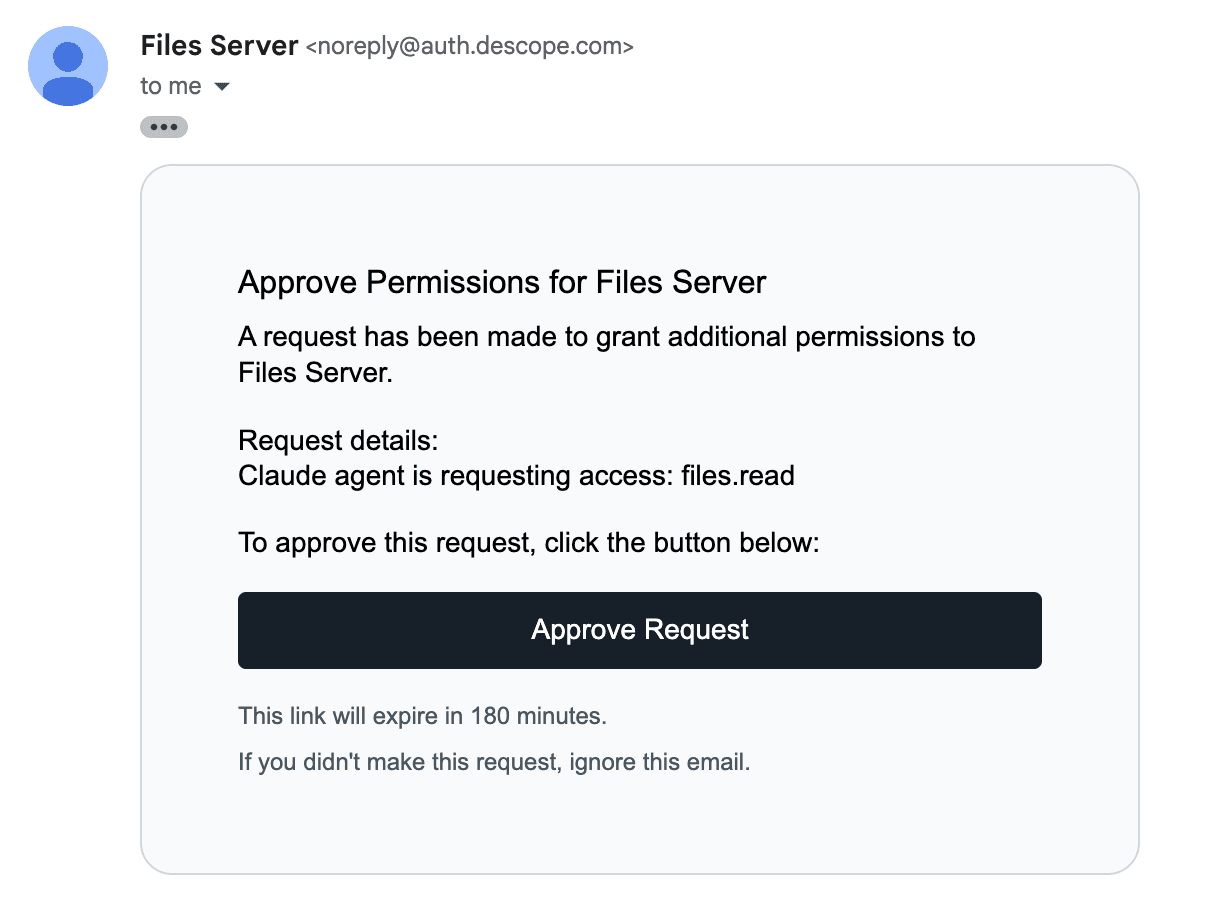
The hook replays the tool call directly to the MCP server with the token injected
Claude sees the file contents. The JWT never appears in its context
Why this pattern works well for production
The agent loop stays autonomous. Claude doesn't need special instructions to handle CIBA. The hook intercepts the signal, runs the full auth flow, replays the tool call, and surfaces the result. No prompt engineering required, and the JWT never touches Claude's context window.
The MCP server is the enforcement point. Even if someone tried to call your MCP server with a fabricated mcp_access_token, validate_token() and require_scopes() from the Descope Python MCP SDK will reject it.
Binding messages create accountability. Because every CIBA request includes a human-readable binding message, users get a clear record of what the agent tried to do. This is the "human-in-the-loop" design that security teams want before they'll greenlight agentic workflows in production.
Current gaps worth knowing
This pattern works, but it's worth being clear about where the edges are.
Agent polling can be aggressive. In the current setup, the hook polls the token endpoint on a fixed interval for the lifetime of the request. If an agent runs many tools in parallel, or retries frequently, this can generate a lot of backchannel requests. Depending on your authorization server's rate limits, that could become a problem. Longer-term, the right solution is policy-level enforcement at the authorization server: rules that block or throttle a client from initiating CIBA requests beyond a certain rate, before they even reach the polling stage.
CIBA has to be wired in at the client level. The pattern in this tutorial works because we control the hook. We can intercept the signal and run the CIBA flow ourselves. But mainstream MCP clients like Claude Desktop, Cursor, or ChatGPT don't support CIBA natively today. For this to become a first-class, seamless experience, those clients would need to handle CIBA out of the box: detect the backchannel auth requirement, manage polling, and surface the approval prompt to the user without any custom hook code. That's the direction the MCP Working Group is heading, and when it lands, the pattern here becomes the foundation for how it works everywhere.
Try it yourself
In this post, we wired together CIBA, Claude Code hooks, and Descope's Agentic Identity Hub to give AI agents a clean human-in-the-loop approval mechanism, without any prompt engineering or credential exposure. The hook intercepts, authenticates, replays, and returns the result transparently, and Descope handles the identity layer end-to-end.
Want to go further? The Descope Agentic Identity Hub brings CIBA, connections, consent management, and policy enforcement into a single identity layer for your MCP-powered agents. Sign up for free to get started, or join the conversation with other developers building agentic identity in our Slack community, AuthTown.