
Table of Contents
Don't have the time to read the entire post? Our human writers will be sad, but we understand. Summarize the post with your preferred LLM here instead.
Picture this scene: a Descope engineer is on a call with a customer who wants to better understand changes in their recent MCP usage. Traditionally, this would mean dropping off the call, opening BigQuery, searching, and pasting the answer into Slack. Instead, the engineer can prompt Claude, a server inside our network runs the query, and the customer gets an answer immediately.
This is all possible through a private MCP server wrapped around BigQuery, and it’s one of the more useful tools we’ve shipped internally. But the tool itself, as helpful as it is, will not be the focus of this article. I want to talk about how building it taught us where the work actually is.
Here’s the complete flow of what we built:
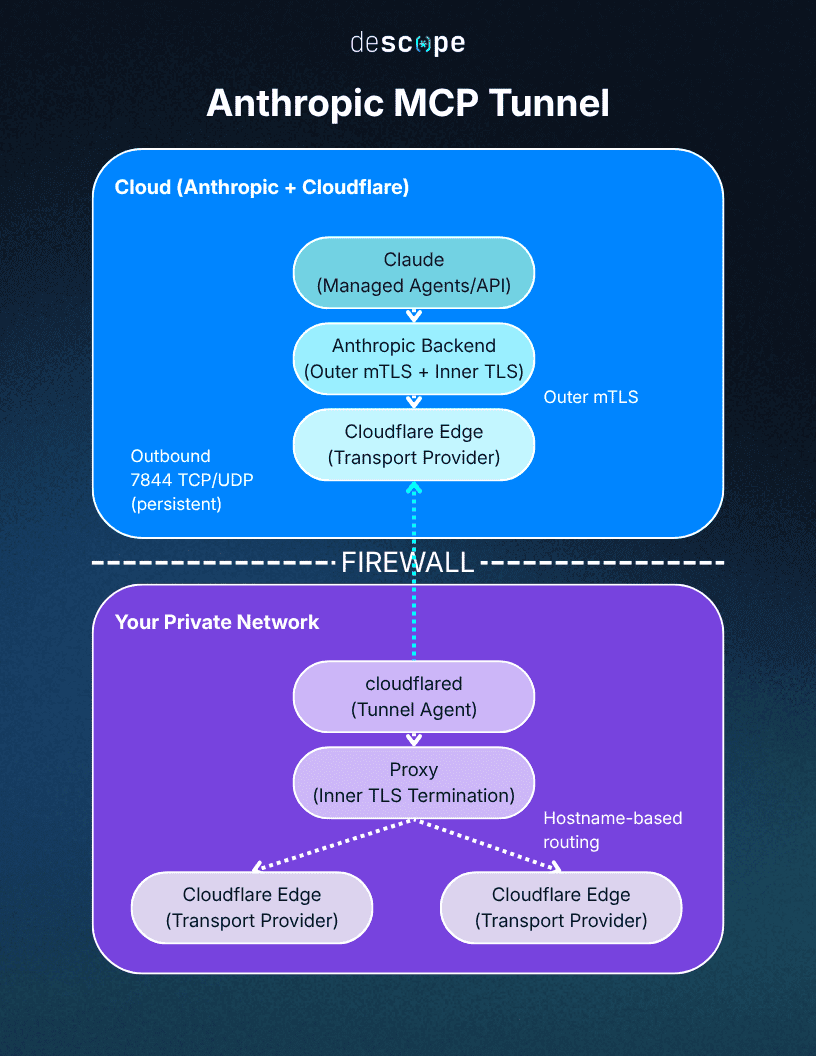
A CS engineer signs into Claude, which connects to our internal MCP server through an outbound-only tunnel.
The server validates the engineer’s identity through Descope and checks their scoped permissions.
Using that individual engineer’s own credentials, the server runs the query through BigQuery.
This is the story of how we built the parts that really matter (i.e., everything but the tools), using Anthropic’s MCP Tunnels to ensure customer data never touches the public internet.
Why MCP tools are easy, but MCP identity is not
Tools are the easy part. Every MCP gateway vendor will sell you a catalog of these, or you can spend an afternoon with Anthropic’s mcp-builder skill to scaffold it yourself. What’s hard is everything underneath the tools: who is this actually running as, what are they allowed to touch, where does the server live, and how does a hosted agent like Claude reach it without us punching a hole in our network.
Our main blocker with MCP gateways was that the identity model and where the server actually lives is either left to you or handled in a way that forfeits customer data isolation. What you end up with is usually a server someone else hosts and exposes, often querying on everyone's behalf through one shared service credential. That was a security model we couldn't accept, so we kept the architecture and built the tools ourselves.
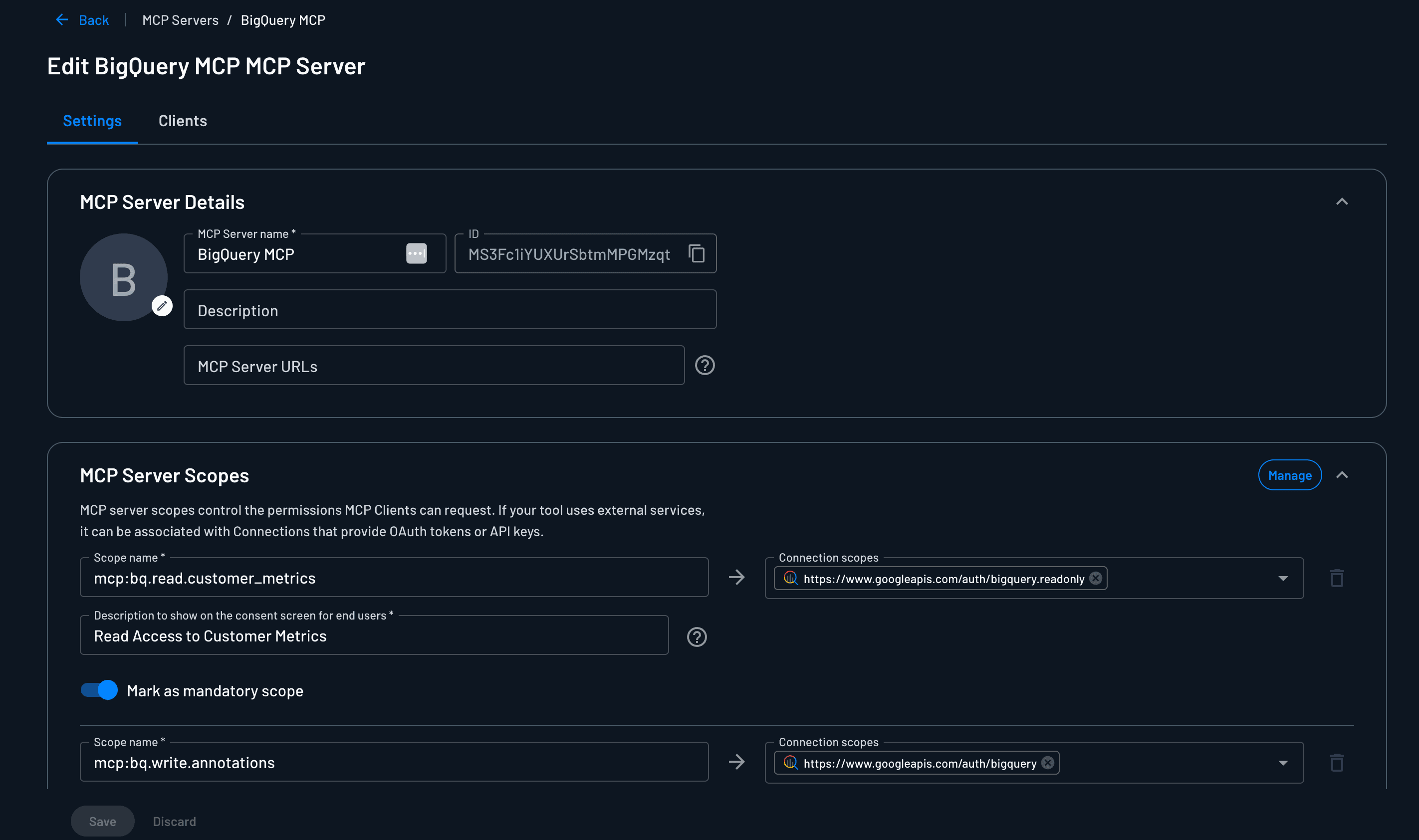
But just because they’re the “easy part” doesn’t mean tools aren’t key to the security equation. Building all the tools ourselves allowed us to create narrower, more purpose-built variants than if we’d gone with a gateway provider. For example, bq.read.customer_metrics runs the metrics query and nothing else. The model picks the tool, supplies the parameters, and never writes SQL. That closes off an entire risk category from the outset.
What the CS team gets out of this
Our CS engineers and FDEs spend a fair amount of time responding to customer questions, and the answers live in BigQuery. Before this, getting those answers meant context-switching into a SQL console mid-conversation, but now they can prompt Claude in plain language. The team can provide real-time insights into the SDK versions the customer uses, what sign-up methods are active, how the numbers compare to last month, and what their MCP usage looks like.
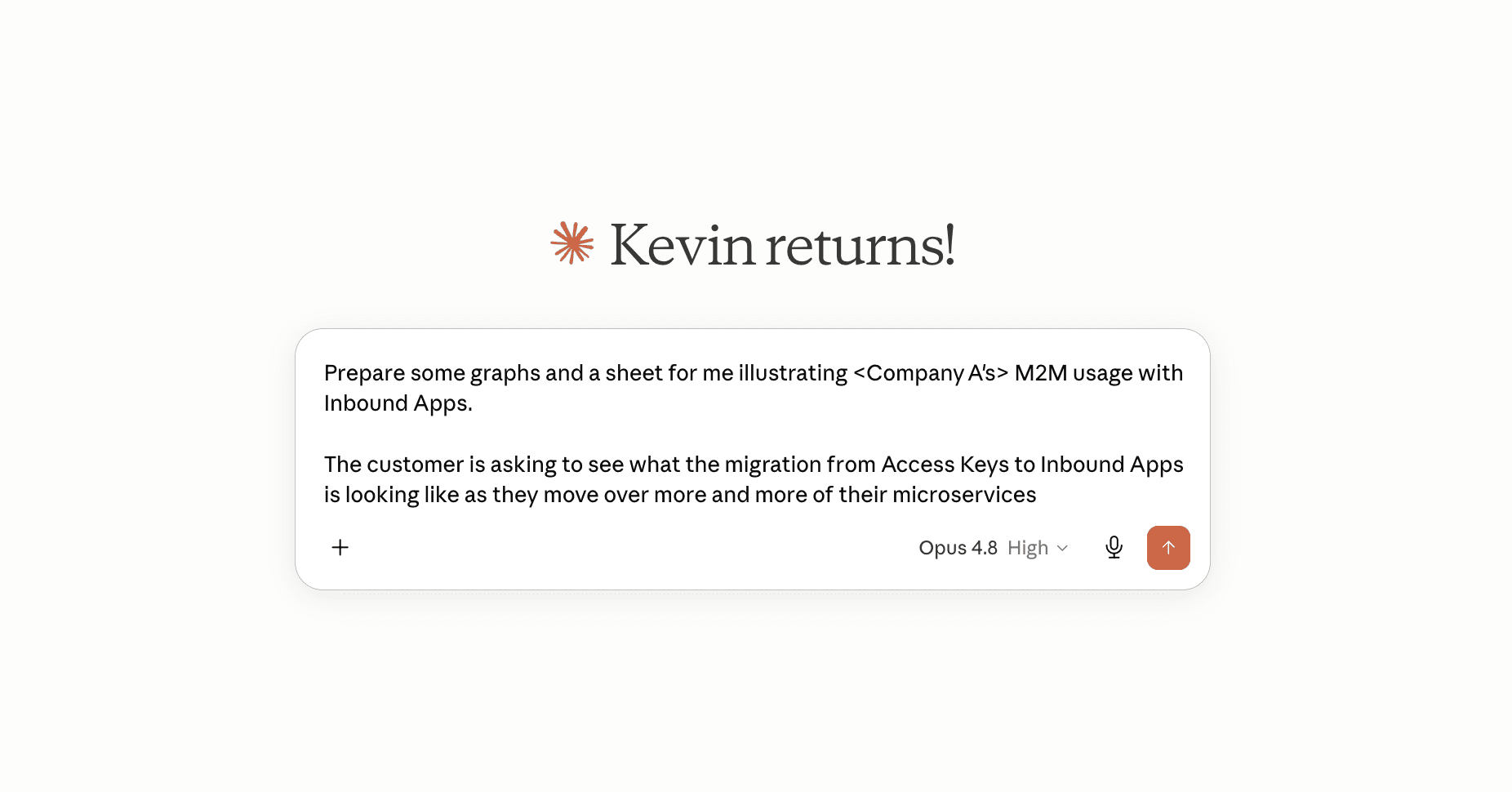
Because Claude handles the querying, the output isn’t an inert number in a chat window. Claude can build dashboards from the results, generate PDFs to drop into account reviews, and pull many metrics into a single summary before a renewal call. An engineer who asks Claude to “give me a one-pager on this customer’s adoption over the last quarter” gets a formatted artifact rather than flat query result.
How we secured our internal BigQuery MCP server
Because the server reads customer data, every layer assumes that data stays locked to the people allowed to see it. We used Descope as the MCP auth provider in front of the BigQuery server, handling the part of the MCP authorization spec that are easy to get wrong: advertising where the authorization server lives, registering Claude as a client, running the sign-in, issuing tokens bound to our specific server.
Our server’s responsibilities were just two things: validating the token Descope issued, and checking the scope before running a tool. Everything upstream of that, Descope owned.
The MCP server just checks tokens
When Claude first connects with no token, our server points it at Descope, and Descope runs the whole OAuth handshake: client registration, the sign-in, token issuance. The token comes back bound to our server specifically. From then on every tool call carries it, our server validates it, and that's the entire surface we had to maintain. We didn't write a single line of token-minting code.
Scopes go on the tool, not the server
A token that means "this user can talk to the server" isn't protecting anything. The thing worth gating is the individual tool call.
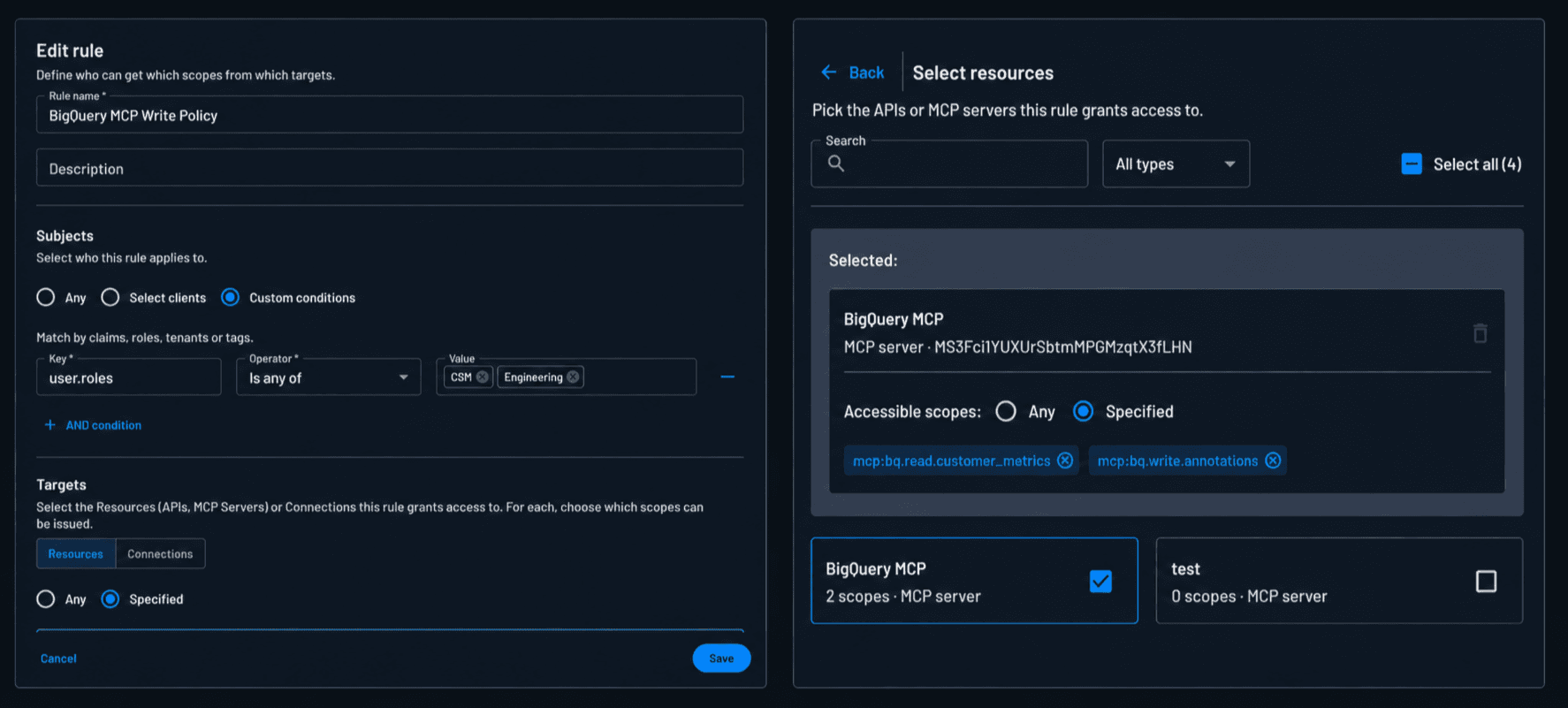
Our scopes are one-to-one with tools. mcp:bq.read.customer_metrics for the metrics reader, mcp:bq.write.annotations for the annotation writer. The server checks the scope at dispatch, before any BigQuery code runs. No scope, no call. OAuth on the front door is the checkbox, scope checks at the tool boundary are the control.
The workforce IdP decides who can get which scope
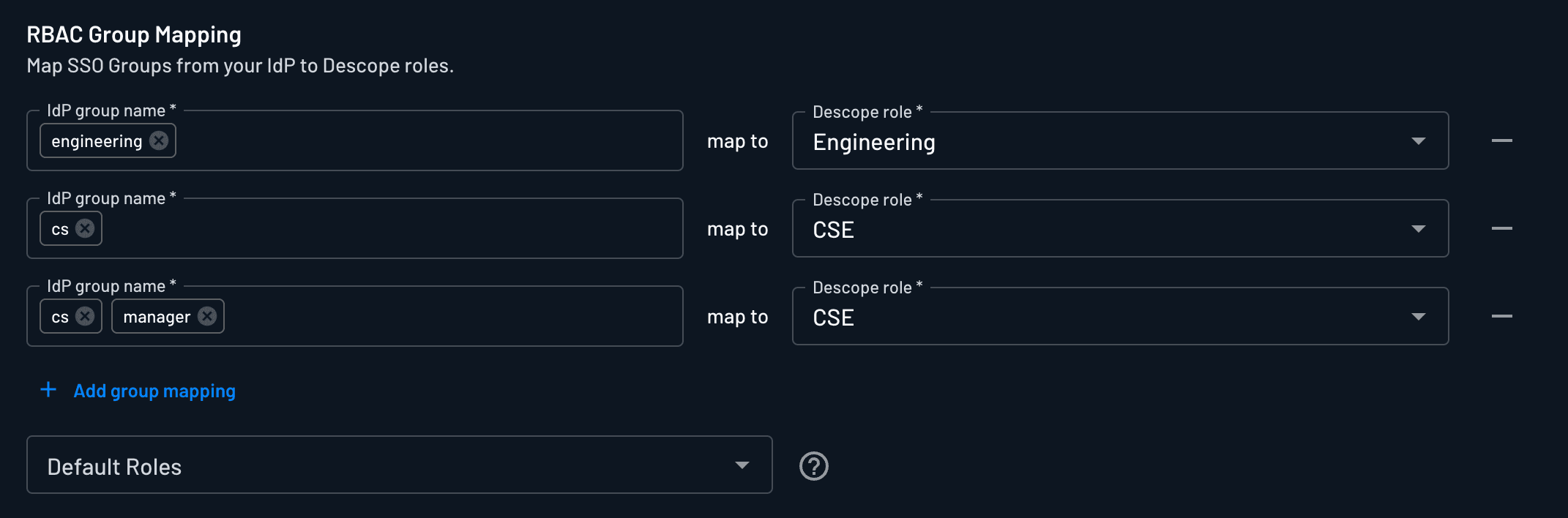
Descope federates to Google Workspace, our workforce identity provider (IdP). Your Workspace group becomes a Descope role, and the role decides which scopes you can even request.
CS Engineering sits in a group that gets read scopes on the customer-metrics tools. Someone outside that group doesn't get a token that can reach those tools at all. When an employee leaves, Workspace deprovisions them, the federation breaks, and their access dies at the next token refresh. We never built a second user directory.
The tool-to-connection mapping
The server knows who you are and which tools your role can touch. So how does it actually call BigQuery on your behalf?
The wrong answer is to give the server one BigQuery token that can read everything, and let the MCP scopes be the only thing standing between a user and the entire dataset. That collapses two different authorization questions into one, and it puts all of the weight on a layer that was never meant to carry it.
There are two questions here, and they belong to two different systems. The first is which tools a role can use. That’s ours (Descope’s) to answer. A CS engineer’s role lets them request read tools, but write tools are gated to CSMs. The write scope only gets issued if you’re in that group.
The second question is which tables, columns, and rows a given person is allowed to see. That belongs to BigQuery to answer. BigQuery has a fine-grained authorization (FGA) model built into its API, and we were never going to rebuild it inside Descope. There was no sense in owning a copy of something BigQuery maintains for free.
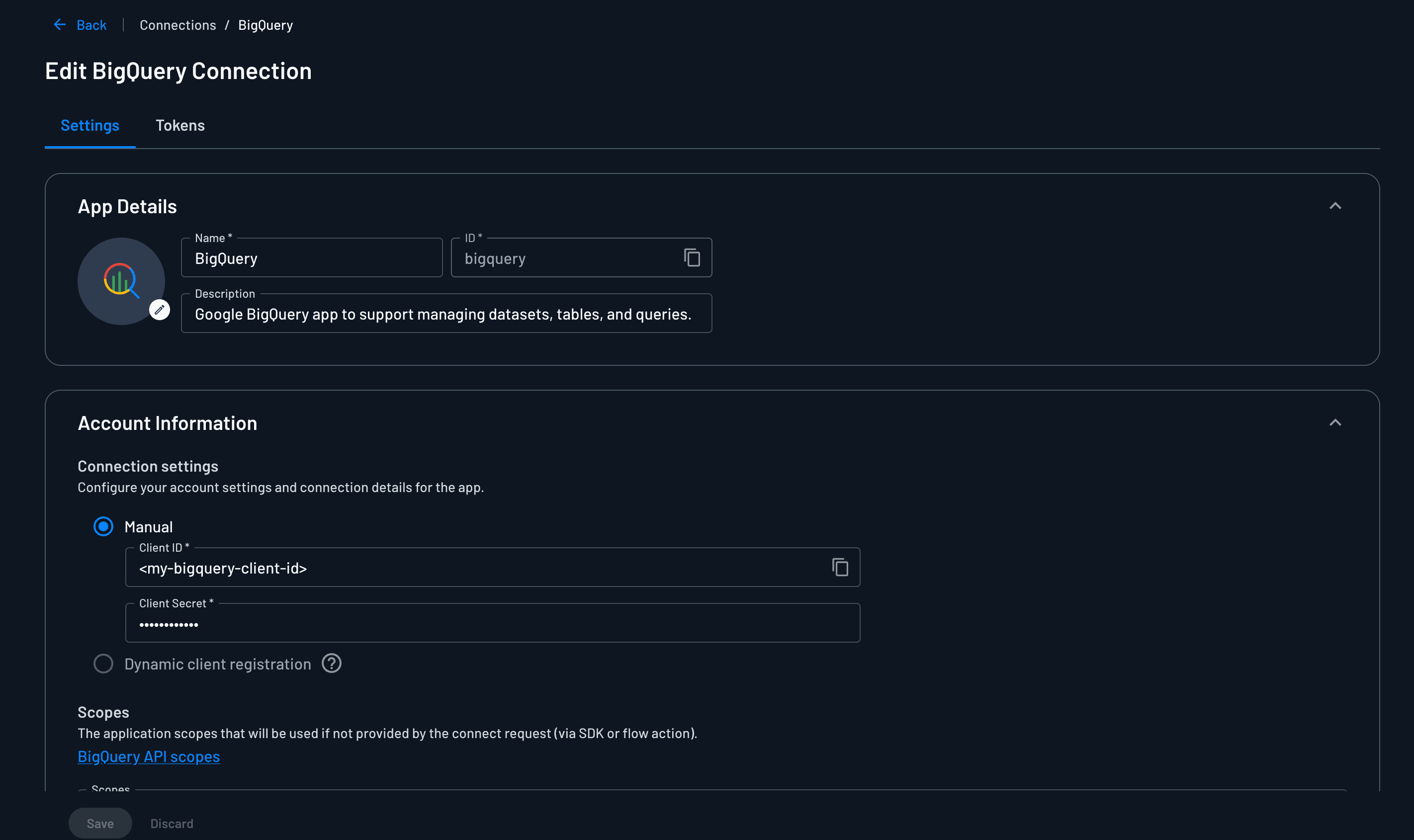
So the connection isn’t a service account with blanket access. It’s an OAuth token scoped to the individual user, which Descope vaults after a one-time BigQuery sign-in. When the server runs a query, it pulls that user’s token and BigQuery applies that user’s permissions. Descope answers “can this role use this tool.” BigQuery answers “can this person see this data.” The MCP scope picks the right kind of connection, read or write, and BigQuery’s own authorization takes over from there.
The agent operating on behalf of the user (instead of as a privileged service account) was the simplest way to get both checks without reimplementing either one. It also sidesteps a sync problem we were never going to win: our Workspace groups and BigQuery’s IAM roles don’t line up, and now they don’t have to. Each system enforces the part it owns.
How MCP Tunnels provides an outbound-only model
The first version of this setup was a Claude Plugin running on an engineer’s laptop. The auth model was already built and working with this approach: OAuth through Descope, per-user tokens, scoped permissions. When the team wanted centralized access from Claude.ai with logging and a single audit trail, we moved it to a remote MCP server. The auth ported over almost untouched.
What going remote changed was where the server lives and how Claude reaches it. This server reads customer data, and there’s no business reason for it to be reachable from the open internet (plus plenty of reasons for it not to be). But Claude.ai runs on Anthropic’s side, not ours, so we can’t just drop it inside our network.
The conventional fix would be opening an inbound port and allowlisting Anthropic’s IP ranges, which would mean firewall changes and chasing those ranges every time they rotate. Instead, we used Anthropic's MCP Tunnels.
I followed the quickstart more or less straight through: creating a tunnel in the Claude Console, generating a CA and server cert, dropping a docker-compose file that runs the Anthropic proxy (cloudflared) and our MCP server on the same Docker network.
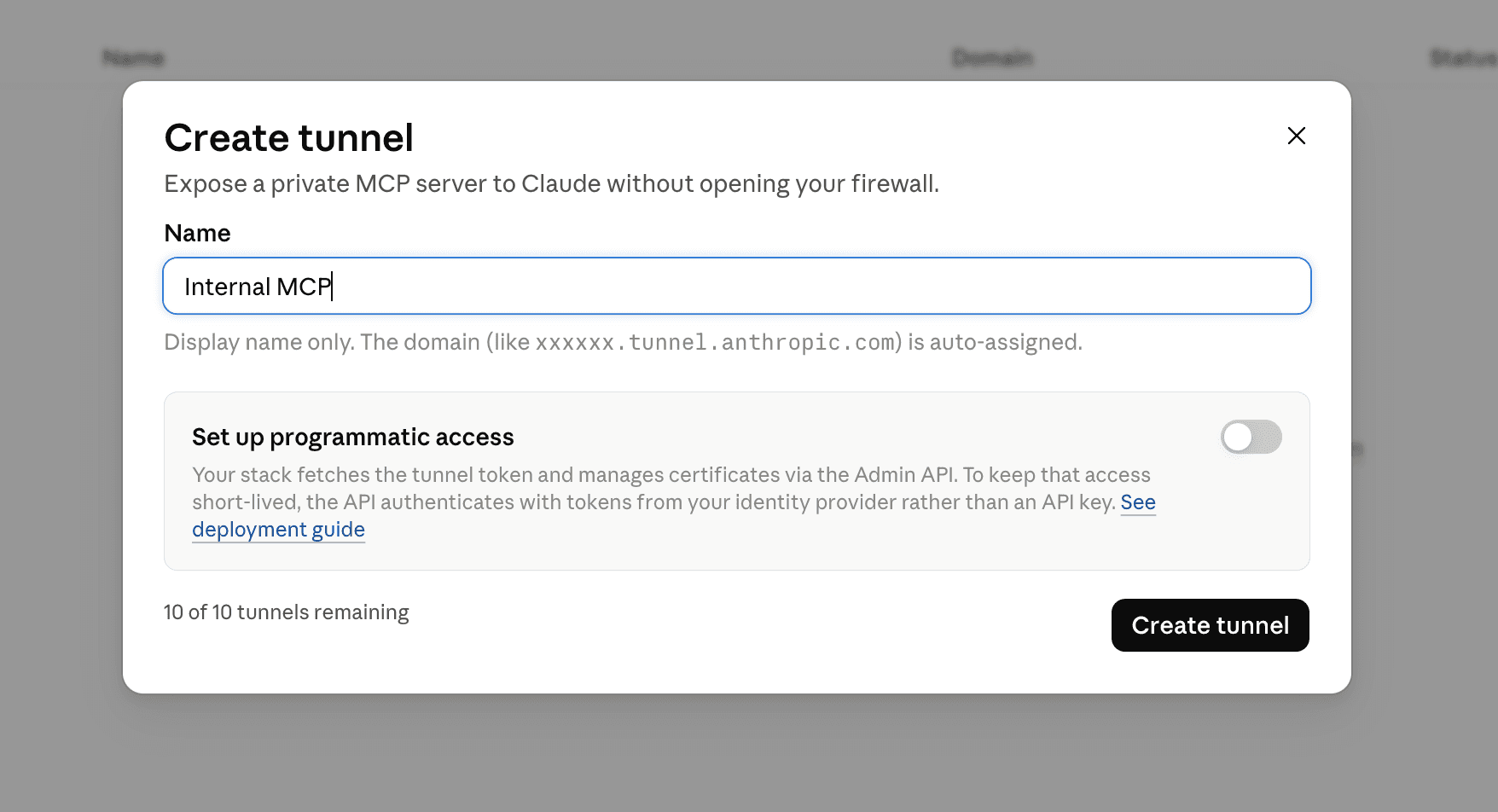
The mechanics are straightforward: cloudflared opens outbound-only connections to an Anthropic-managed edge, and a proxy terminates inner TLS, checks the upstream IP, and routes by hostname. The server stays private because there are no inbound ports, there’s no public hostname, and no need for allowlisting Anthropic’s IP ranges. Claude’s traffic gets through because our side opened the connection outward.
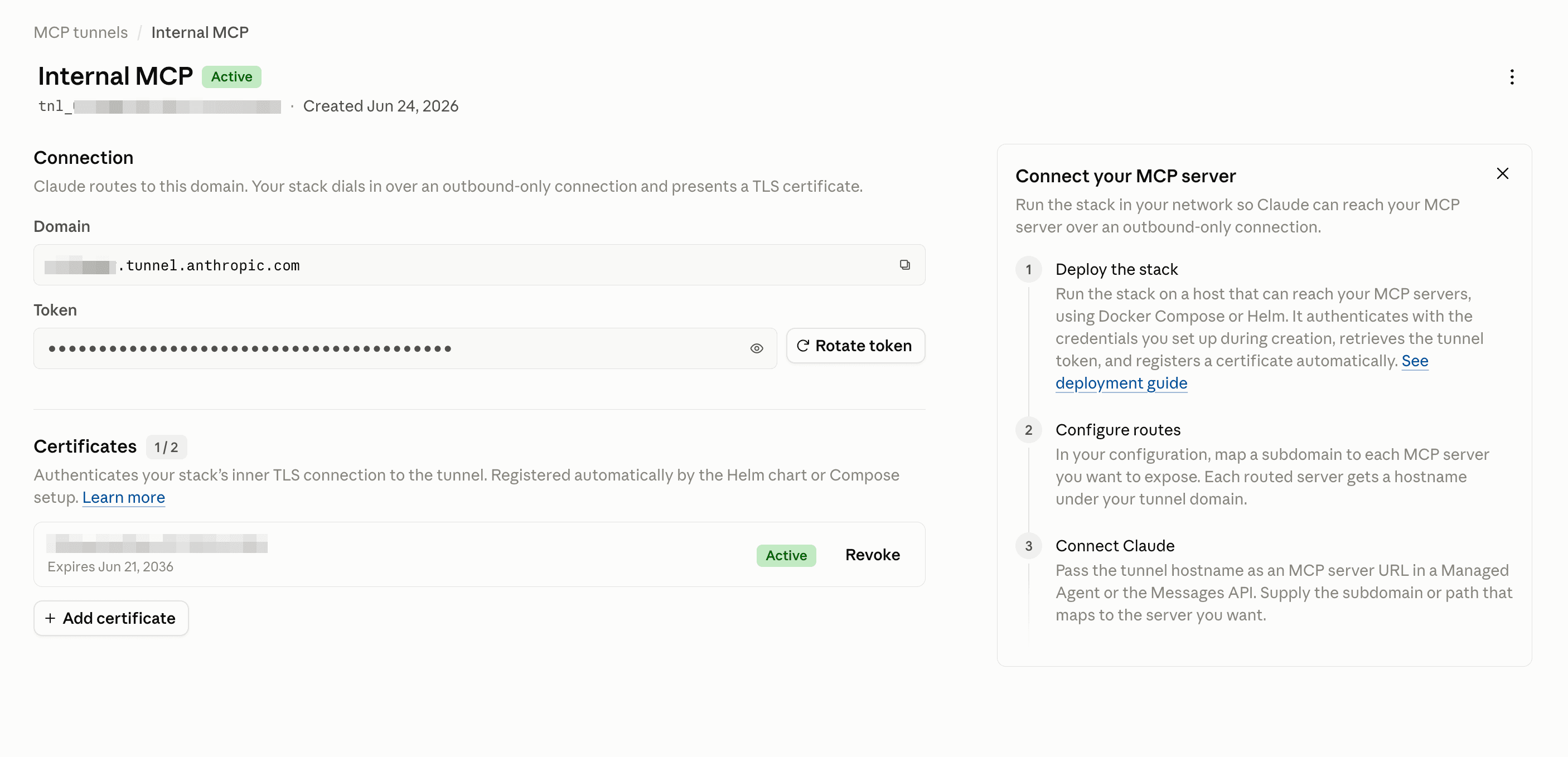
This outbound-only model is becoming the standard way hosted agents reach private infrastructure, so it’s not surprising OpenAI has released their own version as well. Outbound-only is the one option that asks nothing of your inbound firewall.
Putting it all together
Let’s return to the scenario I described at the start of this post: a Descope engineer and a customer, on a call, talking about their MCP usage trends. The engineer asks Claude to query this information, and Claude calls bq.read.customer_metrics.
The diagram below shows the steps in the flow:
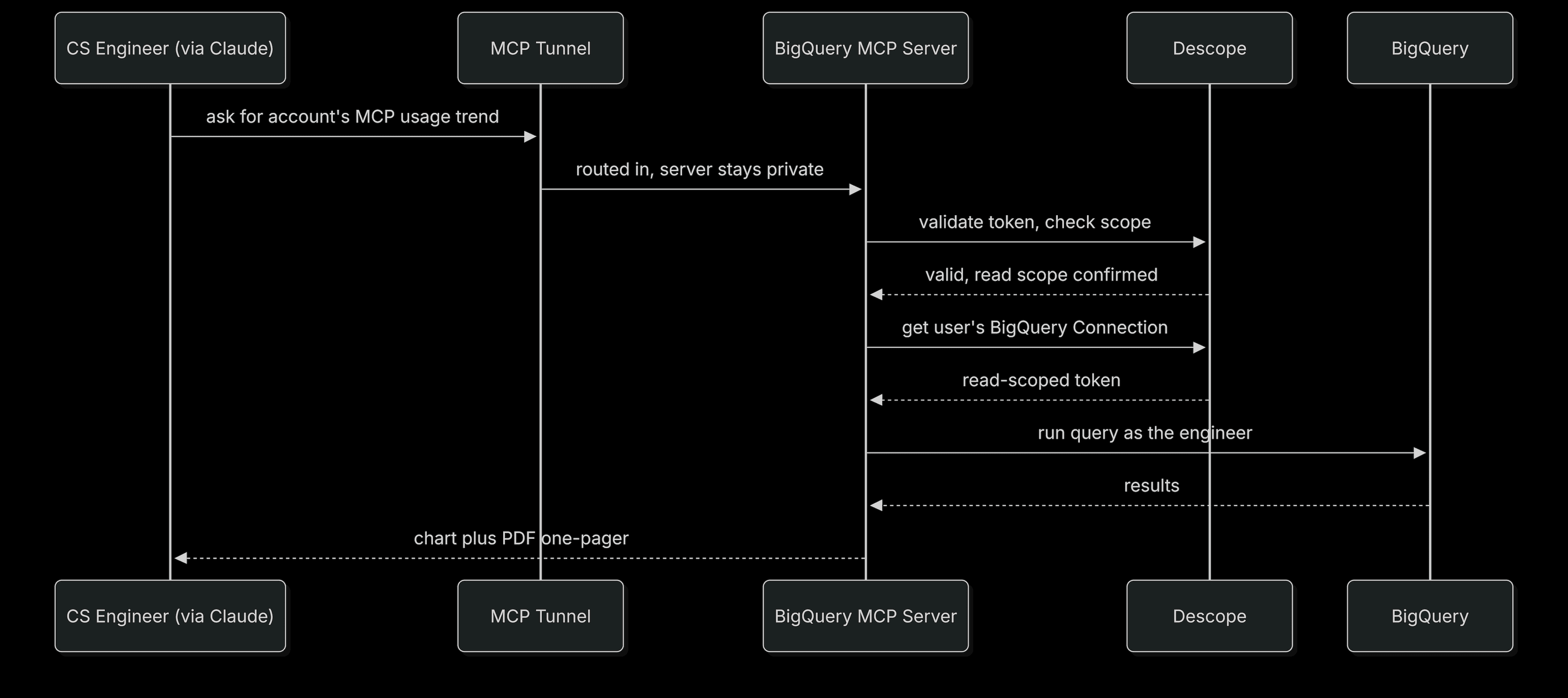
The request goes through the tunnel, into our network via cloudflared, through the proxy, to the server. The server checks the token, confirms the scope, finds the engineer's vaulted read Connection, pulls the token, and runs the query as them. If there's no Connection yet, the engineer signs in to BigQuery once and the next call runs.
All this happens while the customer is still talking. Claude turns the result into a chart, and because the engineer asked for it as a one-pager, into a PDF they can drop straight into the account notes.
Building with Descope and MCP Tunnels
The actual lift was small here. Descope’s infrastructure slots neatly into MCP auth, and MCP Tunnels provided the outbound-only fencing we needed to isolate customer data. Writing OAuth is nothing new to me, but the main drivers behind this project led to some genuine learnings.
We decided, deliberately, that this server stays inside the network, that only the CS team can reach it, that each person queries with their own access, and that every call is attributable. None of those are things a gateway tool catalog gives you, and none of them are things you want to improvise on top of customer data.
We’ve applied this same pattern to Shuni, our Claude-based coding agent. Shuni is also internal-only and tunneled. Much like the MCP server we just discussed, the vault holds GitHub tokens in the same way it holds BigQuery tokens here. You can read more about Shuni and how we designed a similar security model in our dedicated post.
To start building MCP auth into your own servers, sign up for a Free Forever Descope account and explore the MCP auth documentation. Got questions about securing internal tooling, or want to see how Descope’s Agentic Identity Hub can work for your organization? Book a demo with our team and join the AuthTown dev community to connect with like-minded builders.