
Table of Contents
Don't have the time to read the entire post? Our human writers will be sad, but we understand. Summarize the post with your preferred LLM here instead.
Hi, Descopers! We are delighted to announce identity support for autonomous agents in the Descope Agentic Identity Hub. Non-interactive agents without delegating users can now securely authenticate themselves and receive scoped, policy-backed access to resources. Background jobs, automated workflows, and bots now get dedicated, auditable identities and activity trails, helping organizations open up their product to autonomous agents as well as govern autonomous agents being used internally.
Sign up for Descope and visit our Agentic Identity Hub docs to get started.
For more on the Why, What, and How on identity support for autonomous agents, keep on reading!
The identity wild west of autonomous agents
An autonomous agent does work without a person watching each step. It calls backend APIs, invokes MCP tools, and reaches downstream services like Google or Slack to get a job done. Giving it an identity is harder than it looks, and organizations are accidentally employing identity anti-patterns in an effort to take these agents to production.
Using hard-coded secrets or long-lived, shared API keys for autonomous agents lead to insecure deployments that are prone to compromise. The impact of identity anti-patterns is already being felt:
Long-lived OAuth tokens were stolen in the widely reported Salesloft Drift incident
1.5 million API keys were leaked from Moltbook earlier this year
According to GitGuardian, 28.65 million new hardcoded secrets were added to public GitHub repositories in 2025, a 34% YoY increase.
Apart from security concerns, there is operational complexity. Managing autonomous agents without a clear identity model leads to secrets sprawl. If one agent calls five downstream services, it ends up with five long-lived credentials, and the developer is responsible for storing and rotating these credentials. In a multi-tenant product, a background agent working for one customer can't be allowed to touch another customer's data–tough to enforce if there’s no visibility into the agent’s identity and permissions.
Identity for autonomous agents
Adding to existing support for user-delegated agents, the Descope Agentic Identity Hub supports the full identity lifecycle for autonomous agents: registration, authentication, identity management, policy-based access, and revocation.
Register autonomous agents as OAuth Clients with dedicated client IDs and associated grant types (client credentials, JWT bearer)
Protect API and MCP endpoints as OAuth resource servers to enable secure, delegated access for autonomous agents
Store and broker credentials for autonomous agents to access downstream services (Slack, Gmail, Notion, etc.)
Define granular access policies that run during token issuance and exchange to ensure autonomous agents are never over-permissioned
View and stream detailed audit logs that cover what the agent did, which tools it accessed, whether it called other agents (delegation chaining), and so on.
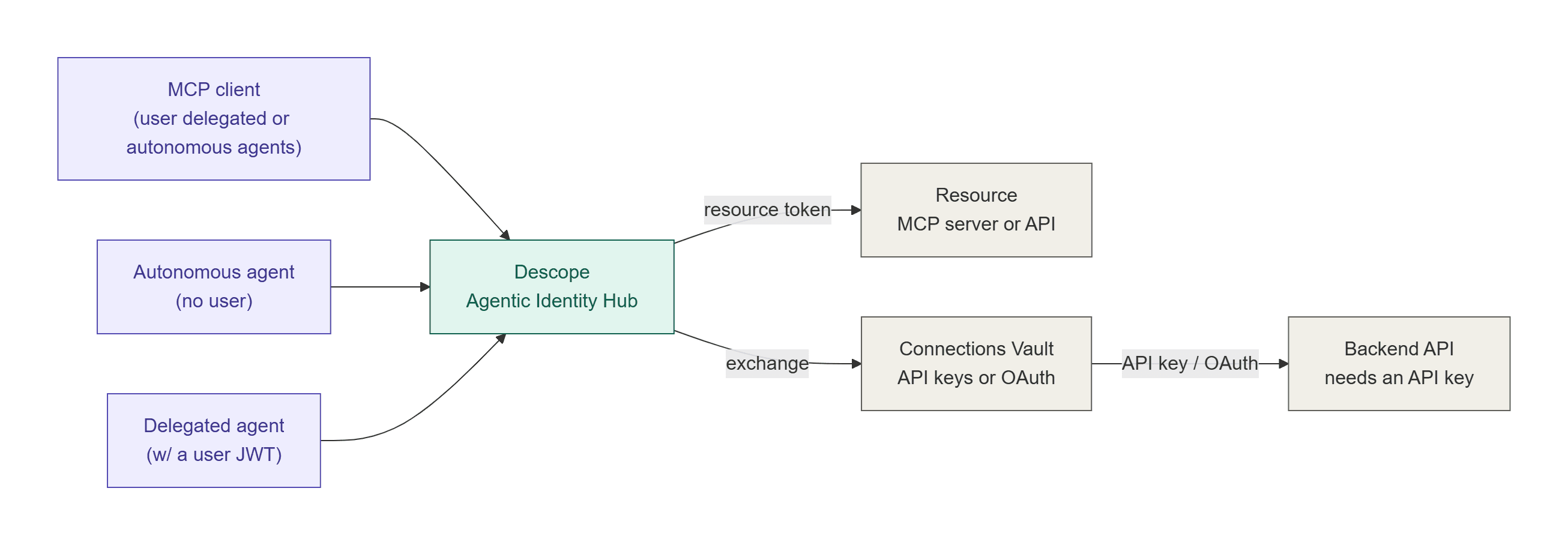
Consider an e-commerce platform with a non-interactive agent that runs at 2 AM every night to reconcile inventory across warehouses, flag anomalies, and post adjustments to your ERP. In this scenario, there's no human at the keyboard to click "approve" on an OAuth consent screen.
With autonomous agent support, the agent authenticates using a policy-backed non-interactive OAuth flow. Descope checks the policy ("this agent ID, from this IP range, between these hours, can access inventory and ERP scopes") and issues a token without human interaction. The agent does its job and disappears until tomorrow night, while all activity is audited and tracked.
Working example: n8n workflows against a BigQuery MCP server
Let’s say an organization runs an automation workflow in n8n that reads from BigQuery and another that writes to it. The write workflow can only be triggered by specific users in n8n. The correct way of modeling this scenario is for both to go through a single internal MCP server instead of each workflow carrying its own BigQuery credentials and its own copy of the tool definitions.
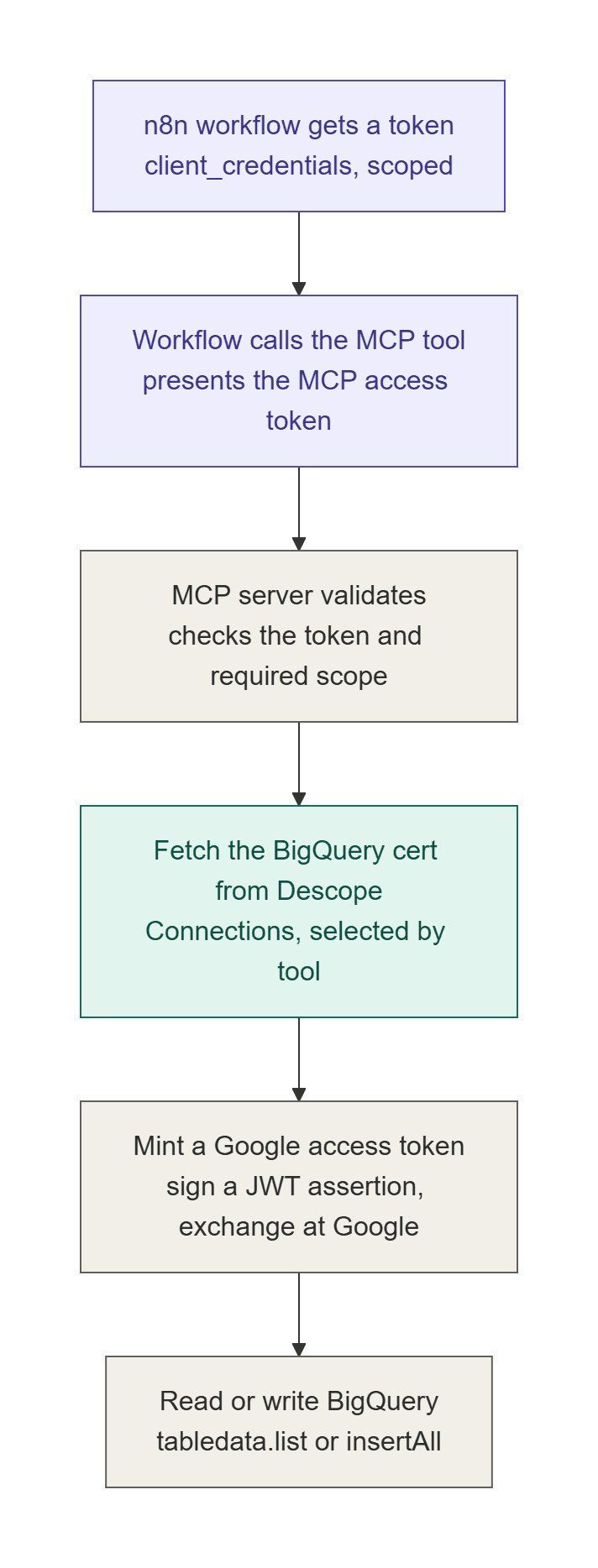
In this example, we will build a FastMCP server that talks to BigQuery and point the n8n workflows at it. The server authenticates its callers with Descope, enforces tool-level scopes, and fetches the BigQuery service account credential from Descope at call time. The agents never hold that credential, and the tools are defined once.
It’s worth noting that, in this example, the MCP access token only authorizes the call to the MCP tool. Downstream access to Google is obtained just-in-time, per request, using credentials stored in Descope. The token gets the agent through the front door, and the server fetches what it needs to do the actual work and discards it after.
Access the sample app on GitHub here.
Configure Descope
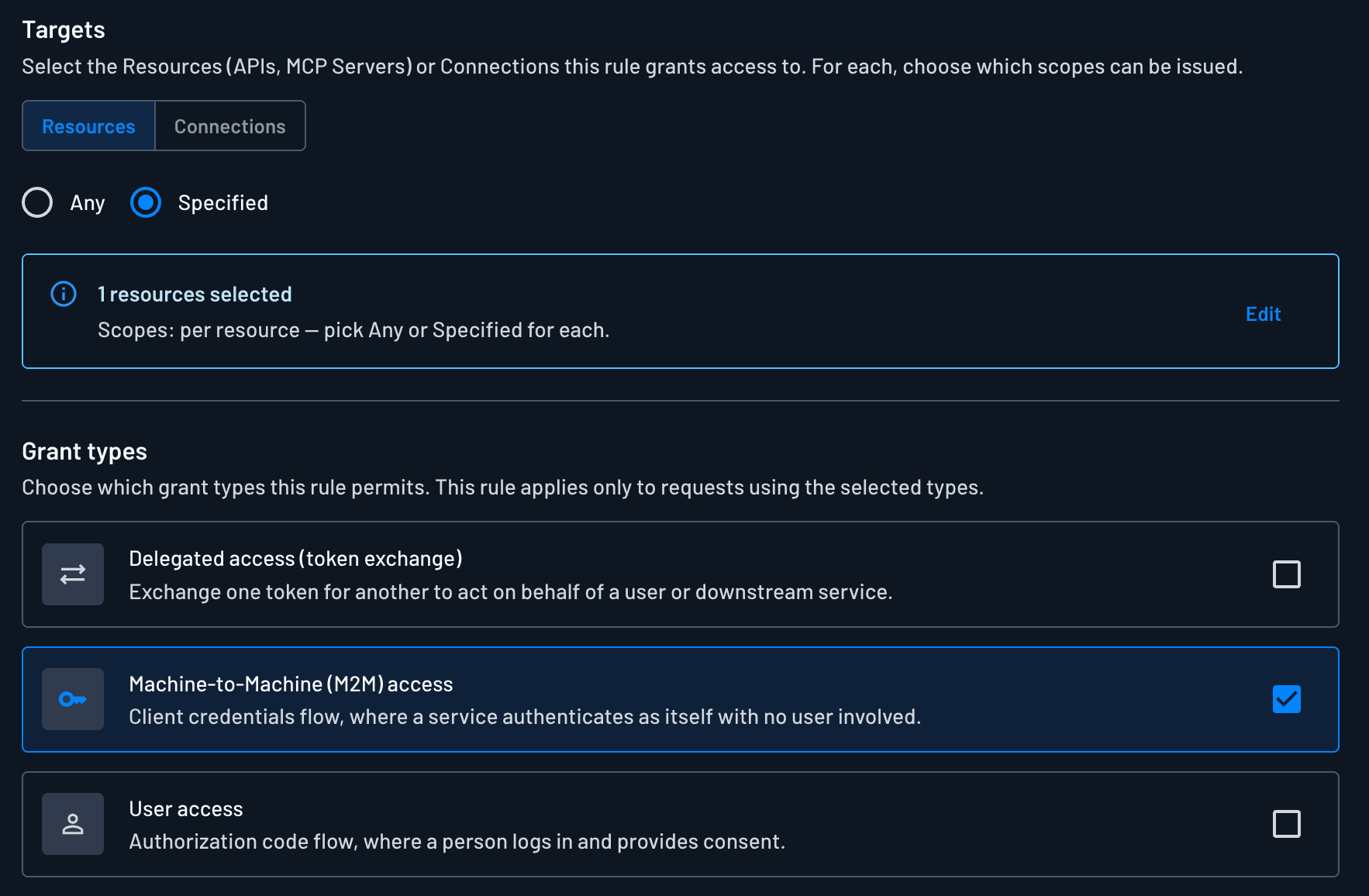
Define the MCP server as a Resource with two scopes,
mcp:bigquery.readandmcp:bigquery.write. These line up with the two tools the server exposes.Store the BigQuery service account credentials in Descope as two Connections,
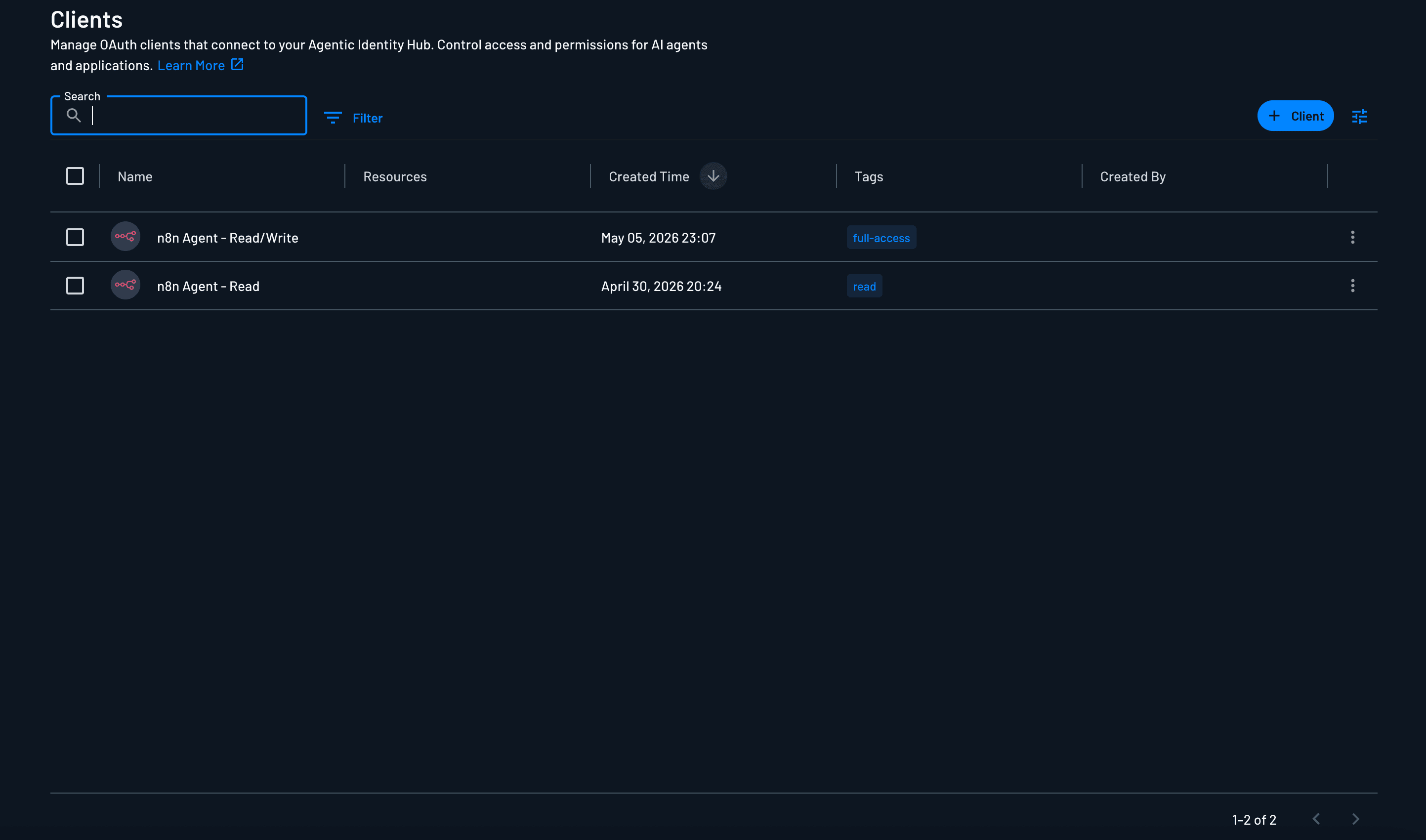
bigquery-read-certfor read access andbigquery-readwrite-certfor read and write. The service account private keys live here and nowhere else.Create one agentic Client per workflow, both using
client_credentials.
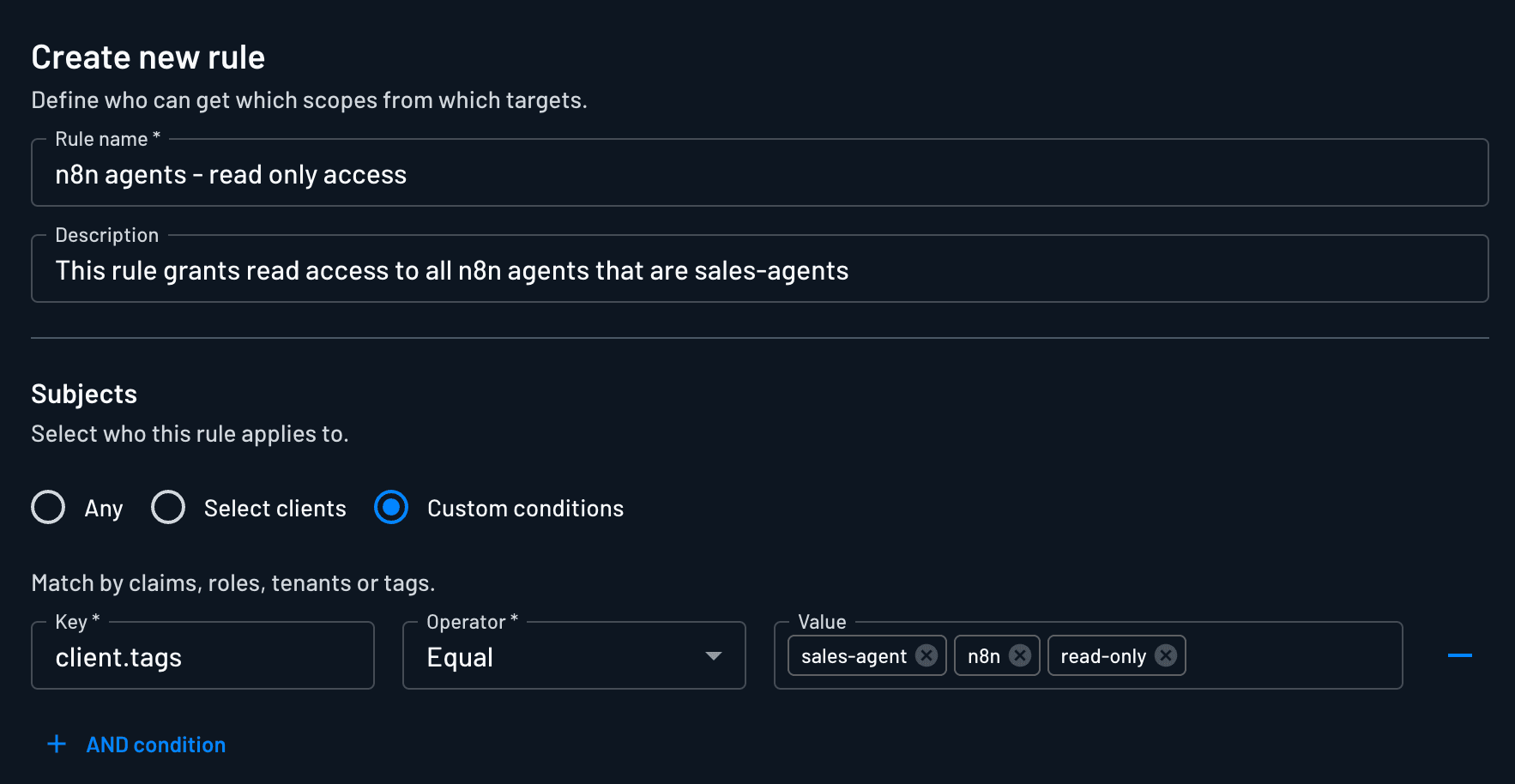
Use policy so the read workflow's client can request only
mcp:bigquery.readand the write workflow's client can requestmcp:bigquery.write. A workflow can't obtain a scope its client isn't allowed to request, so editing the workflow can't escalate it.
Configure n8n
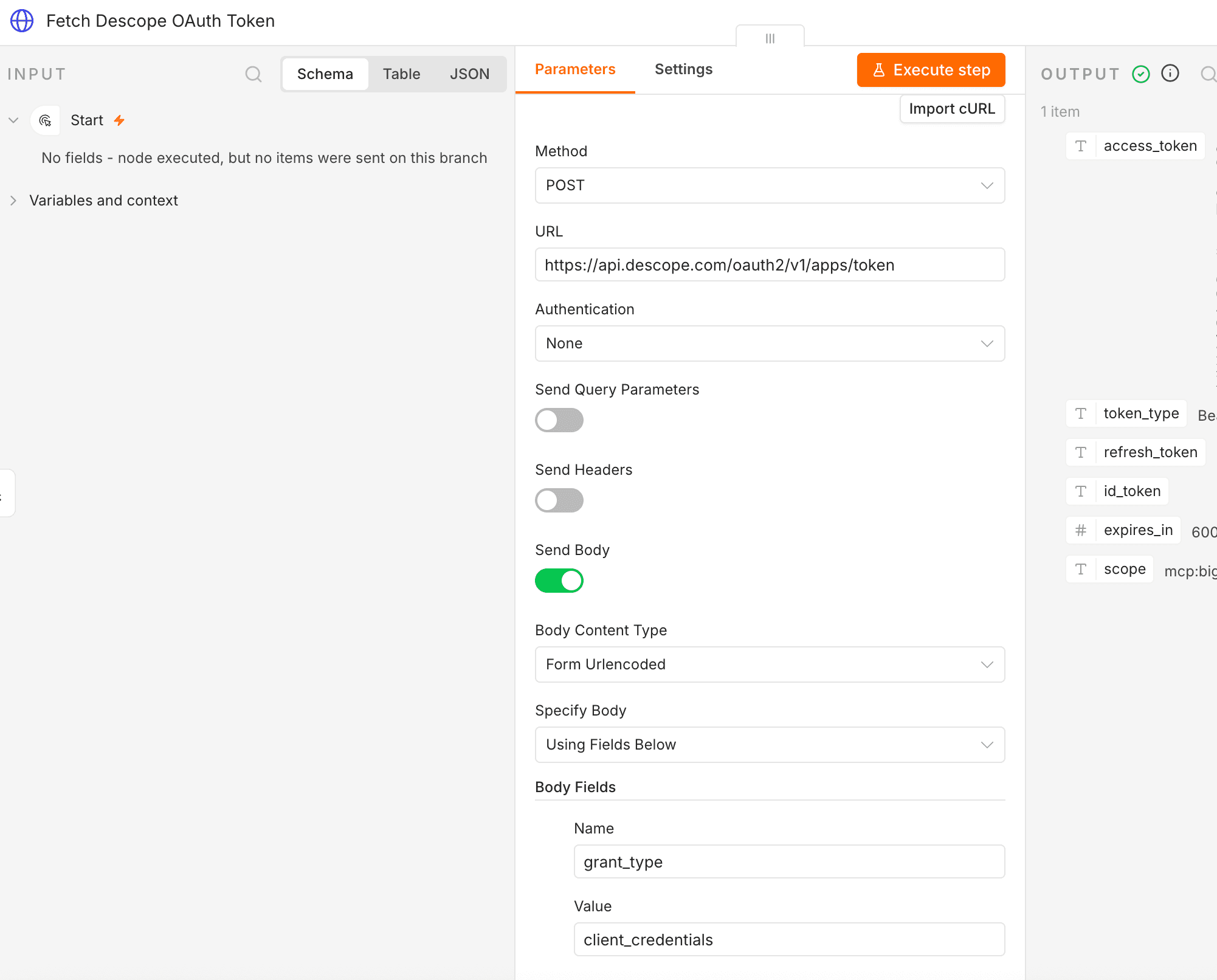
Point each workflow at the MCP server and have it authenticate with its client's ID and secret to get an access token. Gate the write workflow in n8n so only the users who should run it can trigger it.
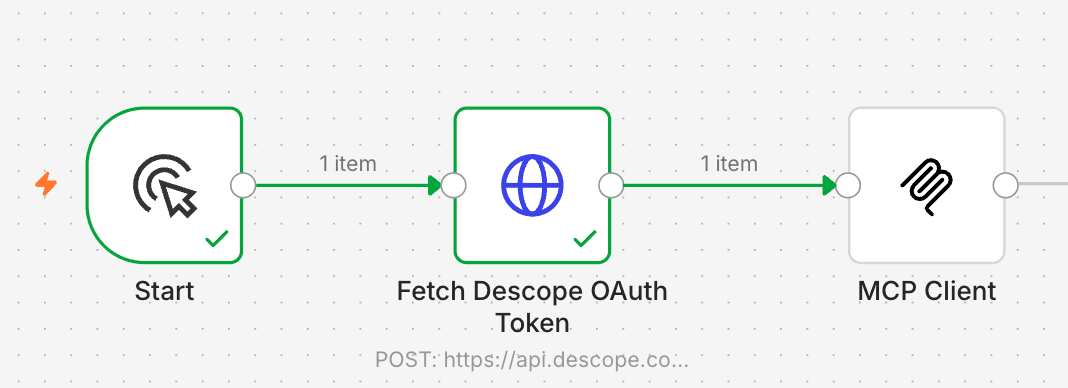
The n8n control decides who can start the workflow, and the Descope policy decides what the workflow's agent can do once it runs.
What the server does on each call
The logic lives in server.py. Every tool call runs the same sequence:
The MCP client calls a tool with its access token.
The server validates the token and the scope the tool requires.
It reads the caller's identity from the token's sub claim.
It calls the Descope Management API, POST /v1/mgmt/outbound/app/user/token, choosing the Connection by tool: bigquery_read uses bigquery-read-cert, bigquery_write uses bigquery-readwrite-cert.
It pulls the service account JSON out of the Descope response.
It signs a JWT assertion with the service account private key, using RS256.
It exchanges that assertion at Google's OAuth token endpoint for an access token.
It calls the BigQuery REST API with that token.
The BigQuery tools are defined once and can be exposed to as many workflows needed. The service account credentials are stored once, in Descope, instead of being copied into every workflow that needs BigQuery. The permissions for each workflow are a policy in Descope rather than something that needs to be maintained in n8n or in the server code.
Tool | Purpose | Required scope | Connection |
|---|---|---|---|
bigquery_read | Read rows (tabledata.list) | mcp:bigquery.read | bigquery-read-cert |
bigquery_write | Insert rows (insertAll) | mcp:bigquery.write | bigquery-readwrite-cert |
Conclusion
Autonomous agents and workflows can do wonders for productivity, but following poor identity practices while using them is a recipe for future regret. The Descope Agentic Identity Hub provides a holistic identity layer for autonomous agents, enabling them to authenticate via non-interactive OAuth flows and request delegated, policy-backed access to resources.
Sign up for Descope and start building identity journeys for autonomous agents today! Follow along with AI Launch Week here.