
Table of Contents
Don't have the time to read the entire post? Our human writers will be sad, but we understand. Summarize the post with your preferred LLM here instead.
The MCP auth spec is deliberately minimal. It defines what the authorization server needs to expose: endpoints, token format, PKCE requirements. It says nothing about what should happen between the user clicking “authorize” and the token being issued.
The orchestration layer is entirely your responsibility, and as MCP deployments scale, that layer gets complicated fast:
Which organization does the user get a token for when they belong to several?
Does the consent screen actually communicate what the agent is being authorized to do, and do users have real control over it?
Should a more sensitive scope require a second factor before consent is shown?
Does the token carry enough context for the MCP server to make a granular authorization decision at the tool level?
None of this is solved by the protocol alone. You need a layer between the authorization request and token issuance that can run conditional logic, call external systems, shape what ends up in the JWT, and give users a consent experience that reflects the actual stakes without pushing any of that complexity into your MCP server's application code.
This post walks through the patterns that come up as MCP deployments mature, and how to implement them using Descope Flows as the orchestration layer. The underlying requirement in each case is the same: meaningful control over what happens inside the OAuth process, not just at its edges.
If you’re unfamiliar with the basics of how Descope secures MCP servers, our MCP docs and the Agentic Identity Hub are excellent starting points.
How Flows fit into the MCP authorization handshake
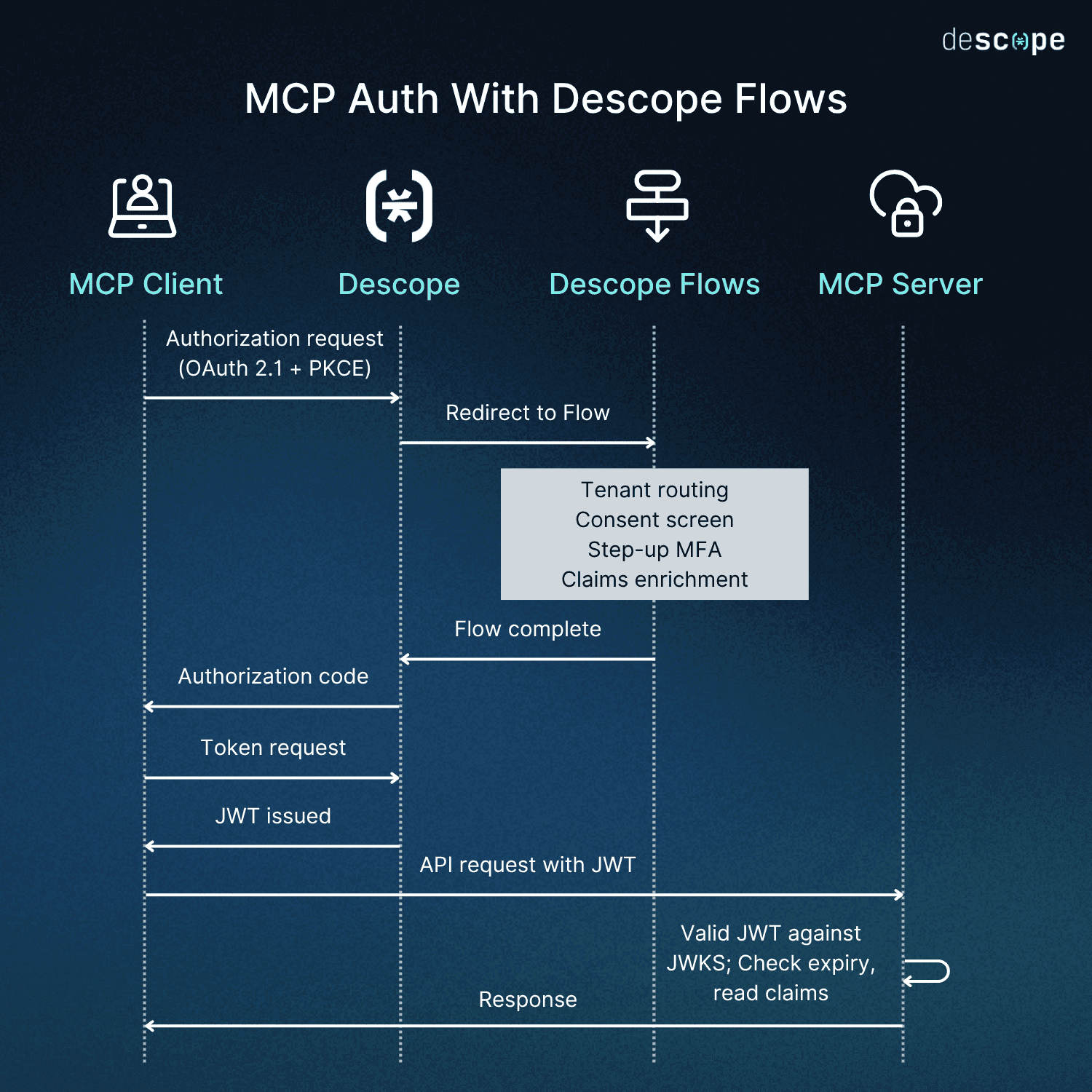
First, a quick orientation for readers who haven’t worked with Flows before: Descope Flows are a visual, low / no-code workflow builder for identity and user journeys. When you configure an MCP server with Descope as its authorization server, the Flow you’ve built runs as part of the standard OAuth process:
The MCP client initiates an authorization request
Descope executes the Flow as part of the authorization redirect
Whatever logic you’ve configured (org routing, MFA gates, consent customization, claims enrichment) runs before the token is issued
The MCP server on the other end sees a standard JWT. The user sees whatever authentication experience you designed. The complexity between those two endpoints is the Flow’s responsibility. When your MCP server points its .well-known/oauth-authorization-server metadata at Descope, your server’s involvement in auth orchestration ends there.
Your server doesn’t manage session state during auth. It doesn’t handle the redirect logic or MFA. It validates JWTs against Descope’s JWKS endpoint, checks expiry, reads claims. The entire orchestration layer belongs to the Flow.
A consent screen users can actually understand
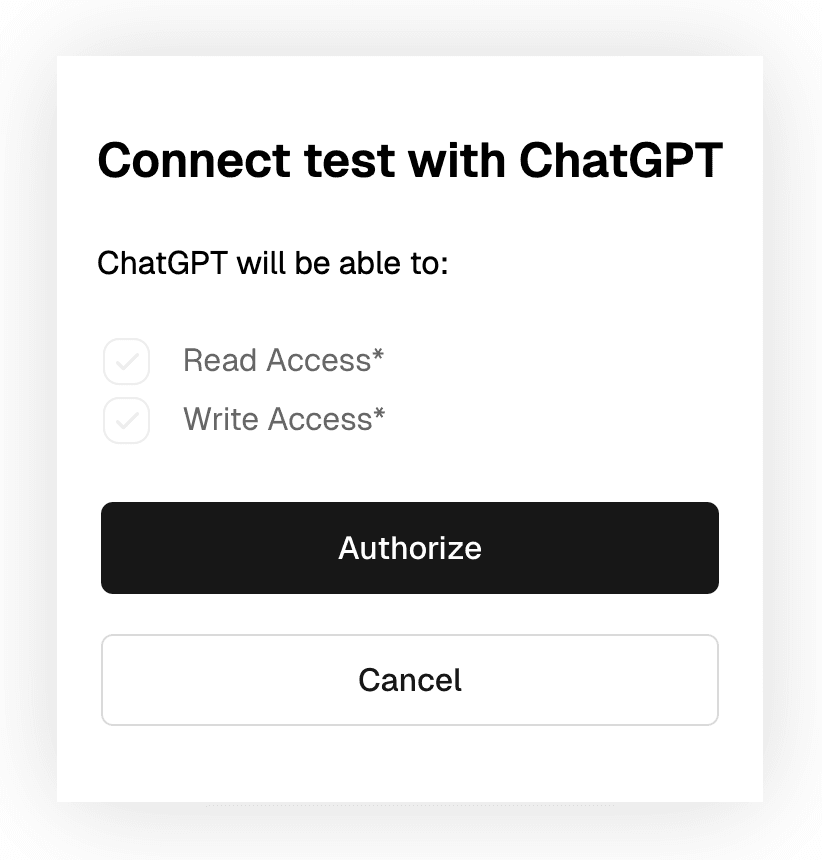
The default OAuth consent experience shows users a list of scopes. For developers, that's fine. For everyone else, "read:calendar" and "write:messages" don't communicate much about what an AI agent is actually being authorized to do.
This is worth getting right for two reasons. Scope descriptions should be written in plain language that explains what the agent can do, not the internal identifier your authorization server uses. And users should have granular control: if an agent requests five scopes, they should be able to grant three and decline two rather than facing an all-or-nothing decision.
With Descope Flows, scope display names and descriptions are configured in the console and surfaced automatically on the consent screen. Individual scopes are presented as selectable permissions, and the token reflects only what the user approved.
Multi-tenant routing and SSO
Enterprise users are rarely members of a single organization. A developer might have a personal workspace, a consulting-client tenant, and their primary employer’s company, all tied to the same email address. When their agent initiates an MCP authorization request, which org should the token represent?
Without explicit routing logic, the default is either wrong (first org found) or friction-heavy (a raw org picker with no context). Flows let you build the disambiguation directly into the authorization step. You can surface a branded tenant selector, pre-select based on context passed in the authorization request, or route automatically based on email domain.
The tenant the user selects populates the dct (Descope Current Tenant) claim in the issued JWT. This is a Descope-specific claim, not part of the OAuth standard, and it gives your MCP server a reliable, consistent signal for which organizational context the request operates under.
For more on how dct and other claims are structured in Descope JWTs, see the session management docs.
Because it’s under the same Flow, this is also where SSO enforcement enters the picture. Descope’s SSO Setup Suite lets each tenant configure its own identity providers (Okta, Azure AD, Google Workspace, etc.). When the user reaches the authentication step, the Flow’s SSO action detects which tenant they’ve selected and routes them to that tenant’s provider.
With this handled through Descope, there’s no conditional redirect logic in your server, and no hardcoded identity provider configuration. The Flow handles the routing, and the MCP server reads the dct claim to expose the right tools, enforce the right permissions, and apply the right role-based access for that tenant regardless of which SSO provider authenticated the user.
If the user later needs to switch tenants (for example, if they initially authorized under their employer but now needs their consulting-client context), they disconnect the MCP server and run through the authorization flow again. Fresh token, different tenant, no ambiguity about which context is active.
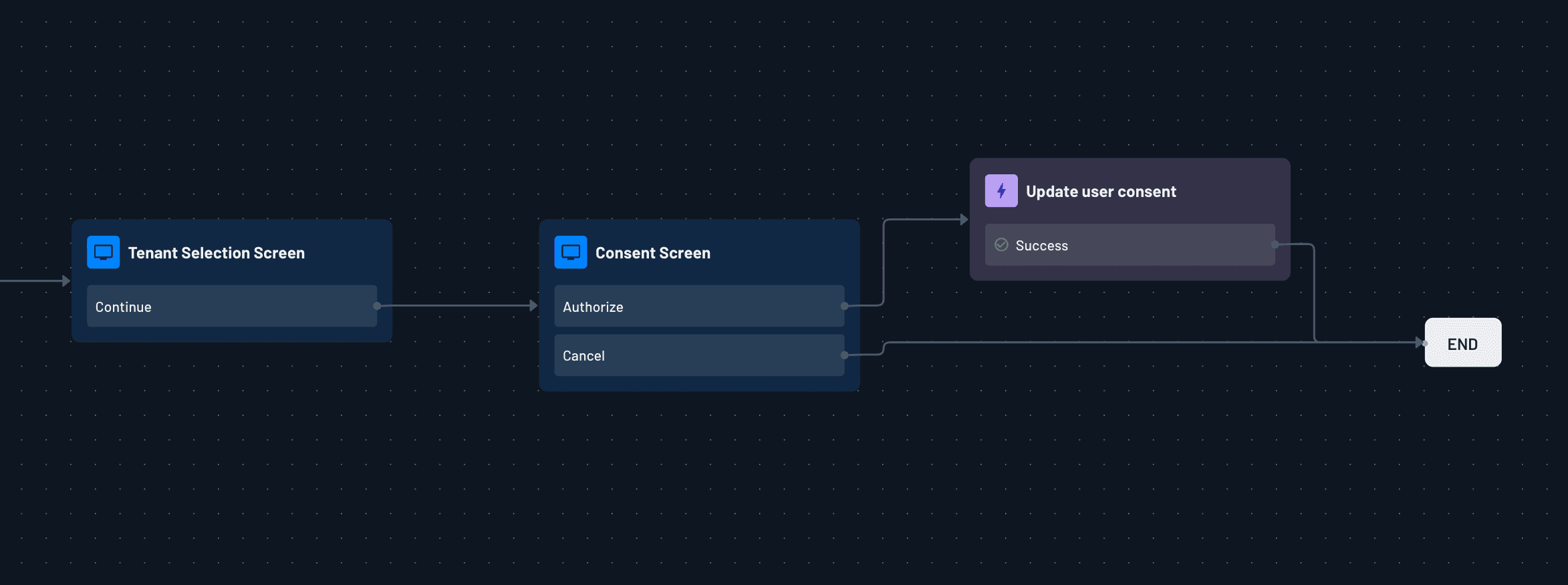
Here is what that end-to-end experience looks like in practice:
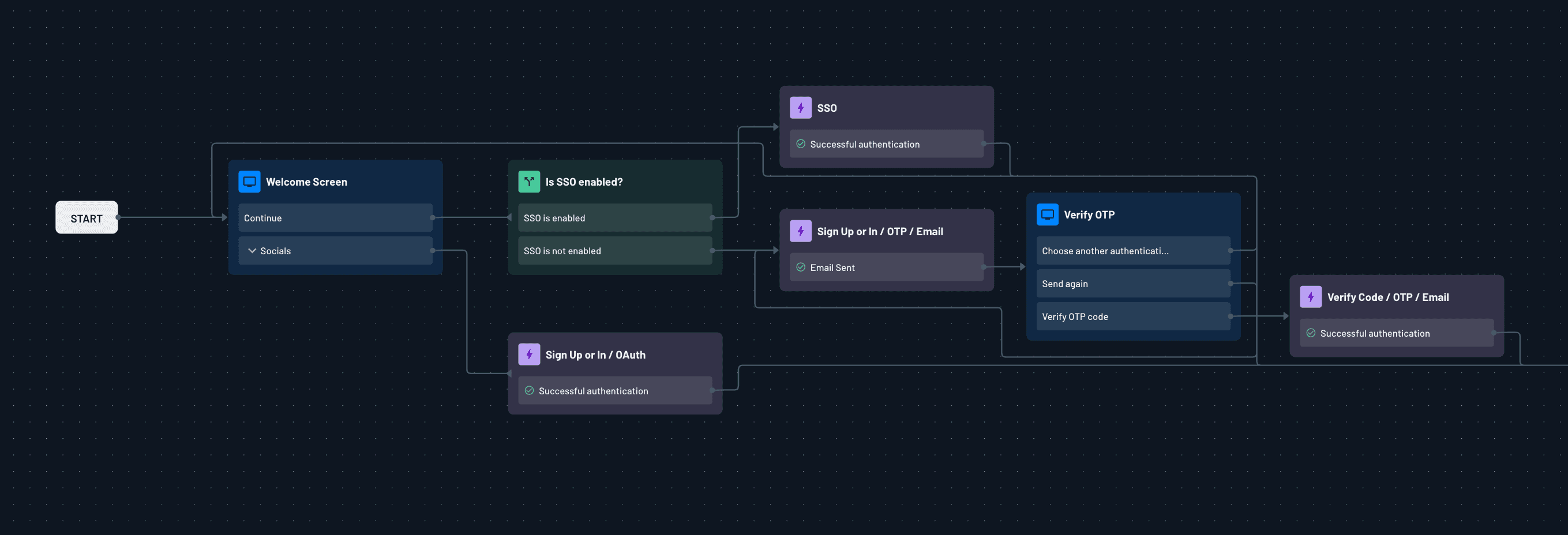
Once a user authenticates, the Flow routes them through SSO if it's enforced for their tenant, auto-discovered from their email domain. If the SSO action detects an enforced provider for that tenant, the user is sent directly to it without any additional prompts.
After authentication, the user selects which tenant they want the token to represent.
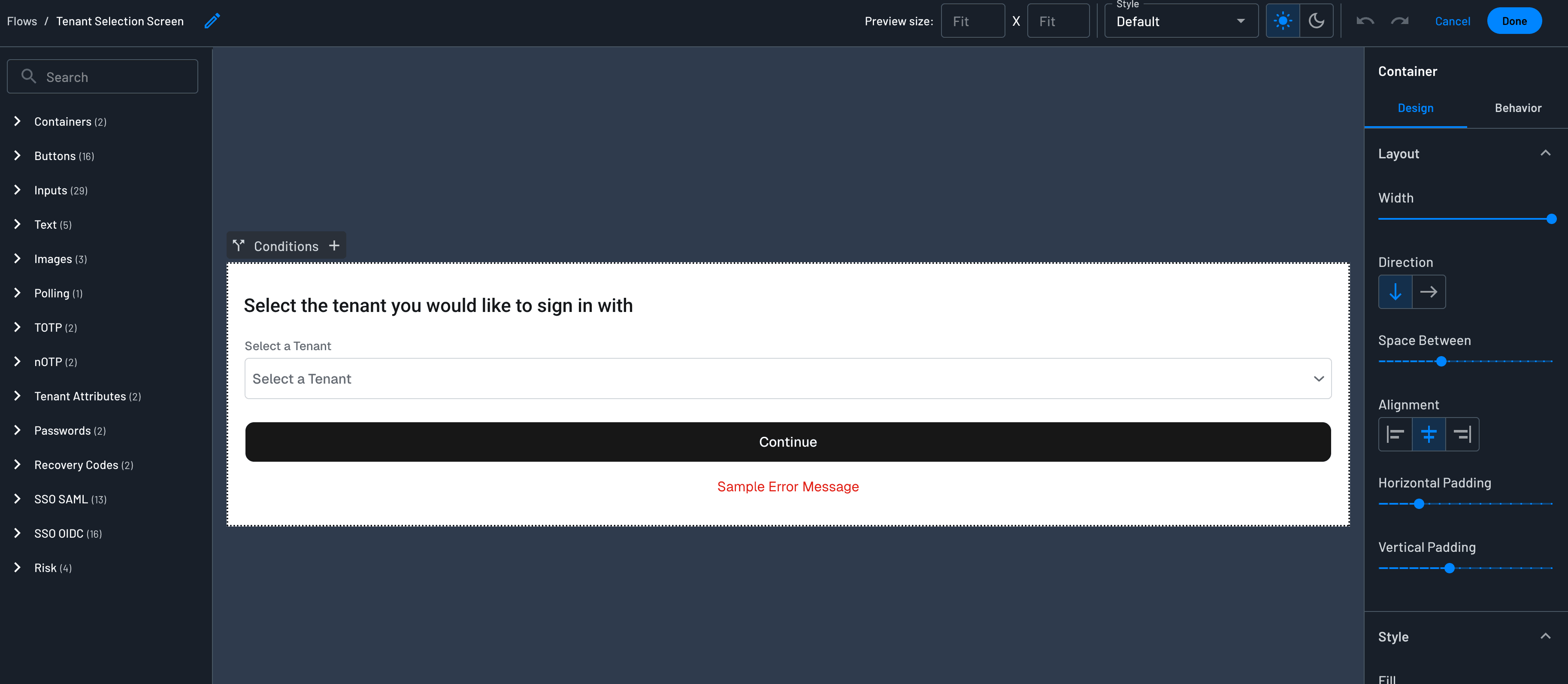
From there, the Flow moves to the consent screen, where the user approves the requested scopes. If your deployment requires tenant-level consent in addition to user-level consent, that can be configured as part of the same flow.
Scope-aware step-up MFA
Not all MCP scopes carry the same risk, and the authentication experience should reflect that difference. Reading calendar events isn’t typically sensitive. But sending emails on a user’s behalf, accessing financial records, or executing writes against a production database call for more vetting.
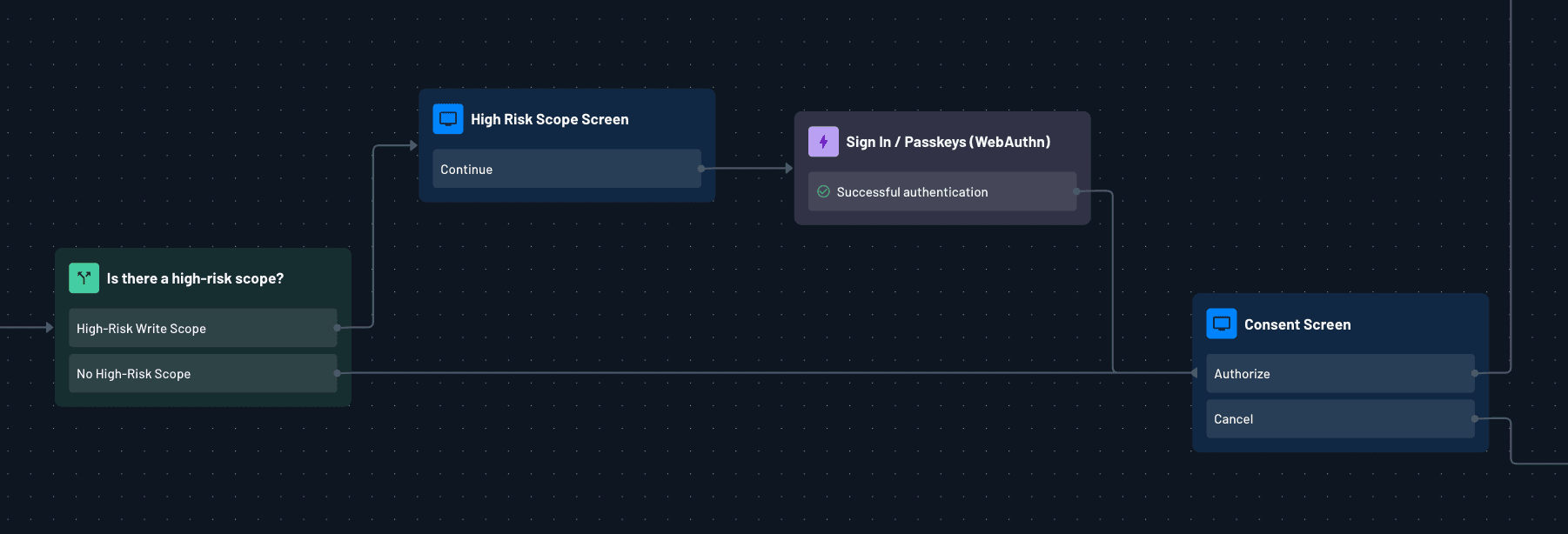
With scope-aware step-up authentication, the Flow inspects the scopes requested in the authorization URL. If they include something sensitive, it branches to require an additional factor before showing the consent screen.
The security argument in favor of this pattern is clear: high-risk operations should require stronger authentication. That’s true for virtually any environment. But there’s another consideration specific to agentic scenarios: users authorizing AI agents tend to pay less attention to scope implications than they would for a traditional app. An MFA challenge before a sensitive scope forces a pause in that process, which is useful precisely because it’s inconvenient. The user has to register, at least briefly, what they’re granting.
Both paths are condition branches in the Flow. You inspect the incoming scope, route to the appropriate challenge, or go straight to consent. The logic lives entirely in the Flow.
Enriching JWT claims with external data
The MCP server receiving your token doesn’t just check validity. It makes authorization decisions based on what’s inside the token: the user’s role, their entitlement set, their subscription tier, which specific tools they’re allowed to invoke, and so on.
That information almost never lives in the identity provider. It lives in your own systems. So how do we communicate this context to the MCP server?
Descope Flows support Generic HTTP connector steps that fire during the authentication process. Your Flow calls out to your own API, receives structured data back (roles, permissions, metadata, feature flags), and injects that data as custom claims in the JWT. By the time the token reaches your MCP server, it already carries everything needed for a granular authorization decision at the tool level. Because the claims are already embedded, there’s no need for a secondary API call at request time, and no token introspection round-trip.
For teams already using Descope’s policy engine for MCP scope authorization, claim enrichment via connectors gives you another layer of context. Policies can evaluate those custom claims alongside scopes, roles, and tenant attributes when deciding what ends up in the issued token.
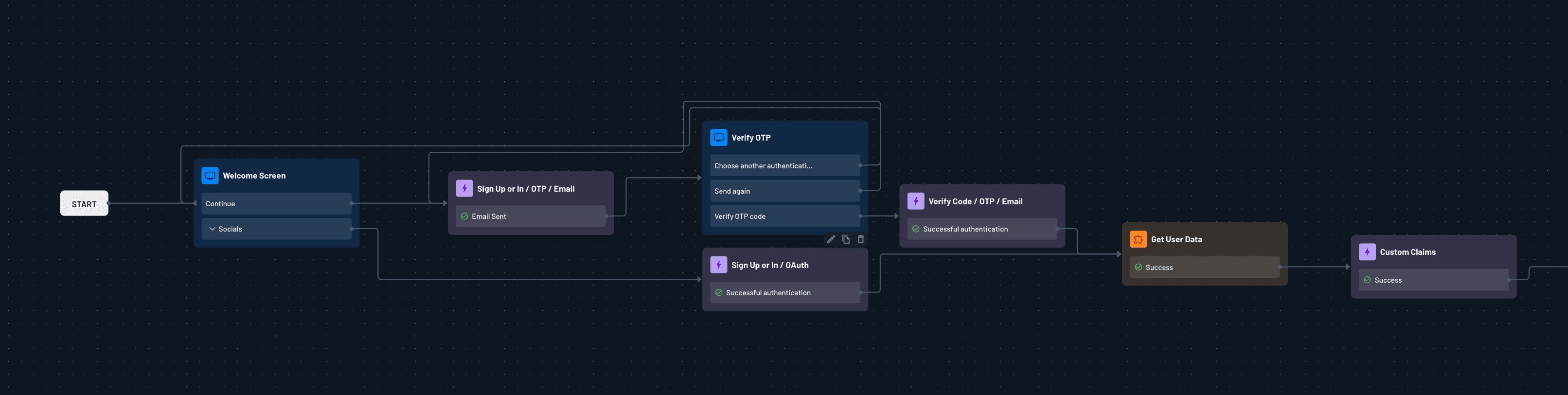
The connector response can also be routed into a Descope Connection instead of a JWT. You.com uses this pattern for its MCP server: when a user authorizes an agent for the first time, a connector step in the Flow calls a webhook that provisions a scoped API key and returns it. Descope stores the key in its token vault tied to that user, and the MCP server retrieves it when tools are invoked to call the You.com API on the user's behalf.
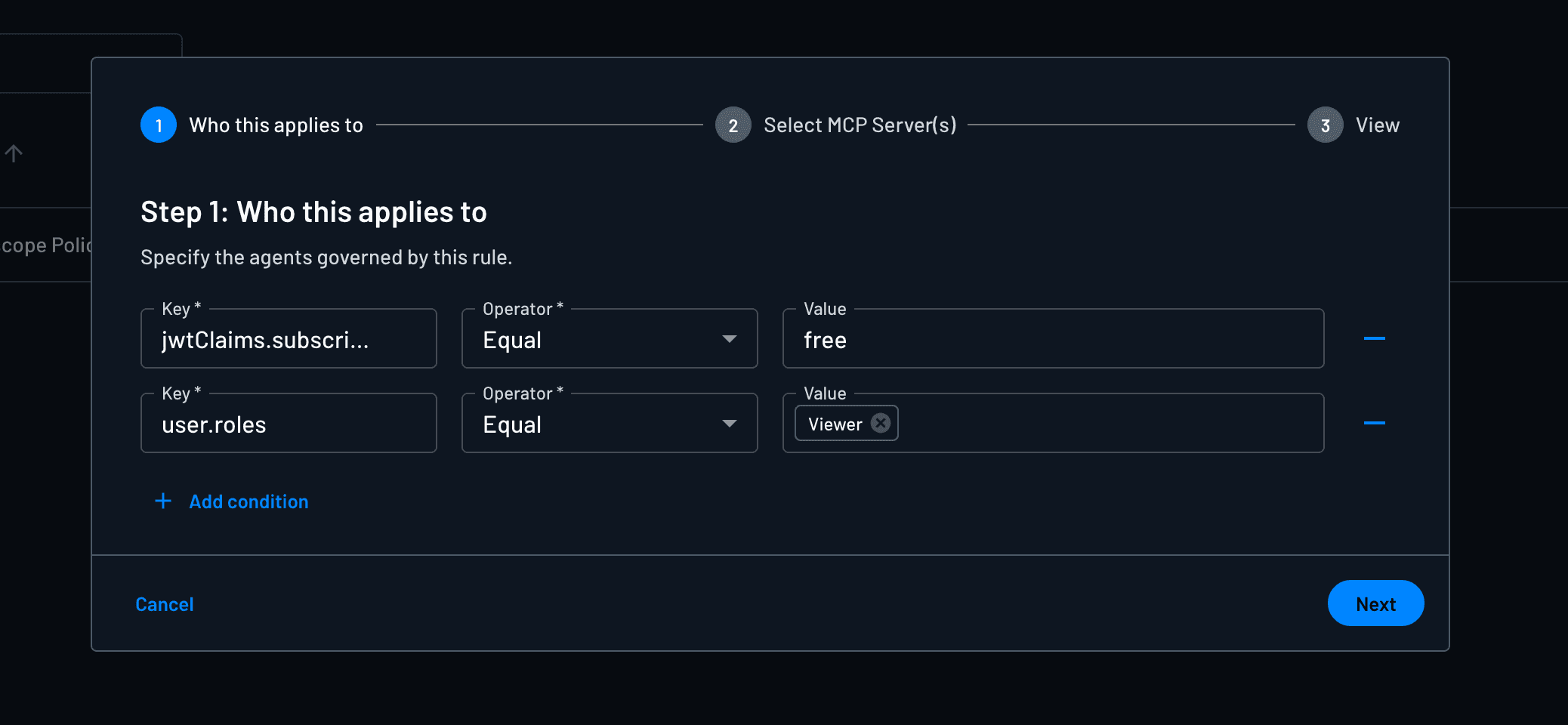
This same connector pattern extends to cases where the right answer isn’t adjusting the authentication experience but blocking token issuance entirely. For example, users on free tiers shouldn’t get tokens for enterprise-gated tools. Similarly, unverified accounts shouldn’t be able to grant scopes that require identity verification.
If a user shouldn't have access to a particular scope, Descope's policy engine handles that at the authorization server level. Policies evaluate JWT claims, tenant attributes, and user roles to determine which scopes can actually be granted, and if a scope isn't permitted for that user in that context, it simply won't make it into the token. For cases where you want to surface that to the user directly, the Flow can display a contextual error screen before the authorization completes rather than issuing a token with silently reduced scopes.
Adapting to MCP’s evolution without redeploying
The MCP ecosystem is still settling, and the spec is intentionally minimal, leaving implementation decisions to the builder. Client registration patterns like DCR and CIMD might appear mutually exclusive, for example, but a given deployment might call for both: DCR for controlled enterprise environments, CIMD for remote agents. The MCP auth spec itself continues to change as remote deployment patterns mature.
When your auth orchestration lives in a visual, low/no-code layer, you can absorb that unpredictability without touching your MCP server directly. You plug in a new flow, conditional logic, or custom claim with Descope Flows, and the changes are reflected without redeployment.
For teams just getting started, begin by creating a Free Forever Descope Account. Configure your MCP server in the Descope console, point your server’s .well-known metadata at Descope, and build your Flow. The Descope MCP Express SDK and Python MCP SDK sit on the resource server, handling token validation and scope enforcement on your behalf. The auth code you write remains zero-to-minimal.
Check out our MCP docs, the Agentic Identity Hub, and the AuthTown dev community to learn more about how Descope can secure your MCP’s server.