
Table of Contents
Don't have the time to read the entire post? Our human writers will be sad, but we understand. Summarize the post with your preferred LLM here instead.
Traditionally, AI responses are limited to text output in a chat window. That’s a limitation that actively hampers usability: sometimes a user needs to click a button, fill in a form, or see a map. MCP Apps close this functional gap, allowing a tool call to display an interactive interface that renders directly inside Claude or ChatGPT.
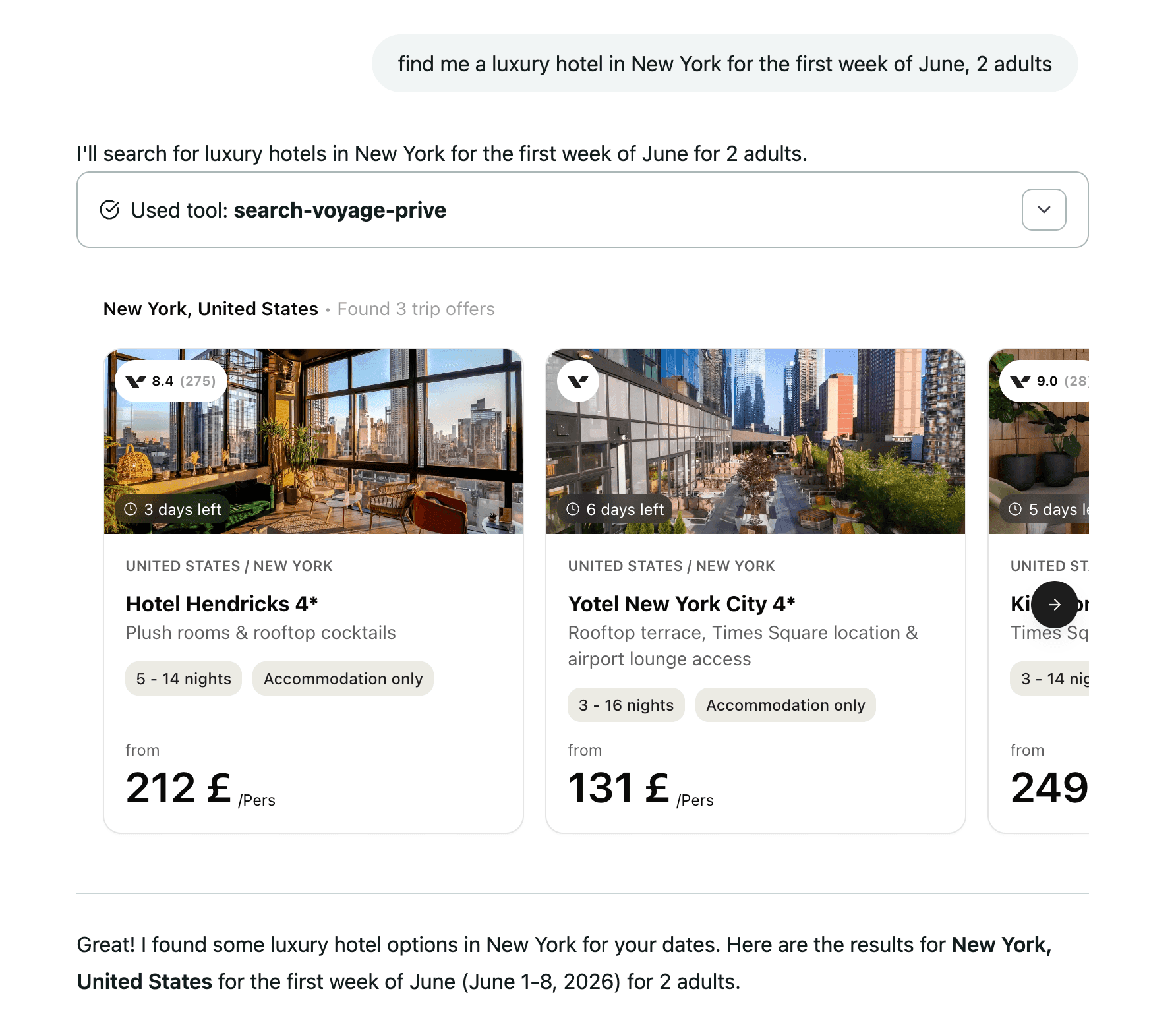
Voyage Privé's MCP app is a good example of this in action. If you ask for a luxury hotel room for two adults in New York for the first week of June, you get an actual results widget with a clickable map. Instead of digging through a wall of text, you can comfortably view property details and go straight into a booking with the dates and number of guests preserved.
The moment that interface needs to know who's using it, though, developers run into the same wall every MCP server hits: spec-compliant OAuth is non-trivial to build from scratch. Skybridge, a full-stack TypeScript framework for building MCP Apps, closes that gap with descopeProvider. Point it at your Descope project and your MCP App inherits a production-grade authorization server without your team needing to build any protocol plumbing.
How the integration works
Skybridge handles the MCP server, view rendering, and client compatibility, so you write React components instead of wiring up MCP transport by hand. descopeProvider extends that same philosophy to auth. Give it your MCP Server's Issuer URL from Descope, and Skybridge publishes the OAuth metadata Claude and ChatGPT need to discover Descope as an authorization server, verifies every access token Descope issues, and enforces scopes before a tool call runs.
Here’s what wiring it up looks like:
import { descopeProvider, Skybridge } from "skybridge/server";

export const app = new Skybridge({
  name: "auth-coffee",
  version: "0.0.1",
  oauth: descopeProvider({
    url: process.env.DESCOPE_MCP_SERVER_URL,
    scopes: [""],
  }),
  handler: (server) => {
    /* ... */
  },
});

export type AppType = typeof app;
Every request Skybridge routes to a tool call has already been through Descope's OAuth flow without any manual token parsing or separate library to verify the JWT yourself. Descope handles the consent screen, Dynamic Client Registration (DCR), and issuing the token in the first place.
A working MCP server in a few minutes
Setup follows the same flow as any other Skybridge auth integration.
Skybridge provides a reference implementation for this integration: auth-descope, a coffee shop finder that greets the authenticated user and surfaces their saved favorites. Run it, and Skybridge hands you a tunnel URL (which looks something like
https://tough-pants-worry-546.alpic.dev):
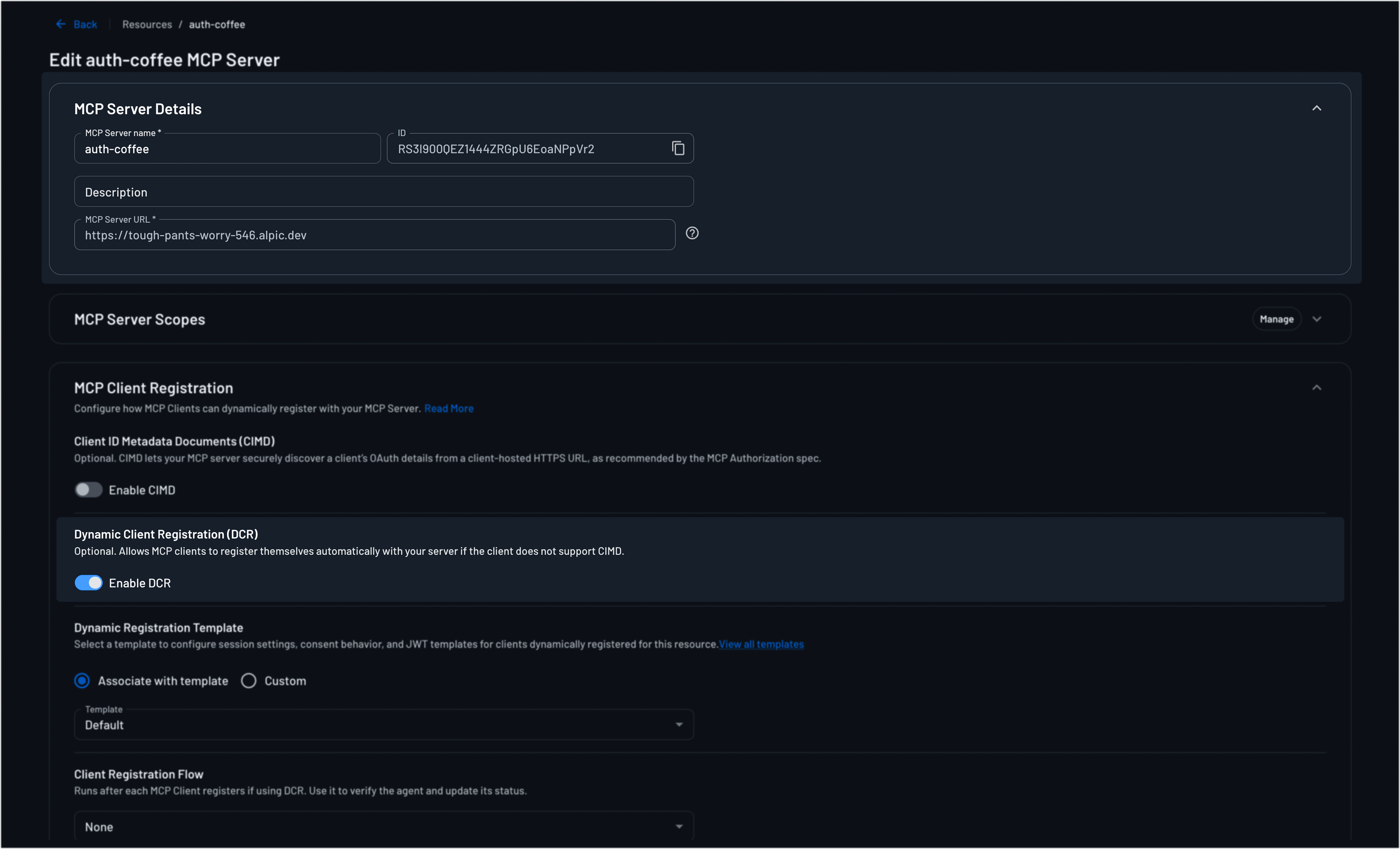
npx create-skybridge --example auth-descopeIn your Descope console, go to Resources and create a new MCP Server resource. Give it a name, and in the MCP Server URL field, paste the tunnel URL you get from running the Skybridge example.
Turn on Dynamic Client Registration under MCP Client Registration since
descopeProviderrequires it so Claude and ChatGPT can register themselves automatically instead of you registering each client manually. If you need to run with DCR disabled behind Alpic's DCR proxy, go withcustomProviderwithserverUrlinstead; Skybridge ships an auth-descope-alpic variant for that exact scenario.
Grab the Issuer URL from Connection Information. The Issuer looks like
https://api.descope.com/v1/apps/agentic/<projectId>/<mcpServerId>.descopeProviderparses the project ID out of that same string to set the token audience, so on a custom domain—where that segment isn't present—passaudienceexplicitly or the server will throw at startup. Drop the URL into your environment:
DESCOPE_MCP_SERVER_URL=https://api.descope.com/v1/apps/agentic/<projectId>/<mcpServerId>Restart and open it in Claude or ChatGPT. Your MCP App now runs behind a real OAuth 2.1 flow.
Why run it on Descope
Skybridge ships branded providers for several identity vendors, so the question that actually matters here isn't whether the auth works. It's whether what sits behind it is siloed or connected to everything else you need for identity.
If your company runs Descope for anything else, your MCP App plugs into the same unified identity layer: the same users, consent flows, and audit trails all live in one coherent auth universe. You won’t be standing up a secondary auth system to absorb what your day-one build can’t do, and you won’t have to reconcile two sets of user identities when someone signs in through Claude instead of your portal.
Beyond simply logging in, the Agentic Identity Hub covers the rest of what an agentic app ends up needing: inbound auth for the clients calling your MCP server, outbound token management for the third-party APIs your tools call on the user's behalf, and scope and policy enforcement across both. Those pieces would take months to build by hand when you eventually need them down the road, but Descope makes them plug-and-play simple.
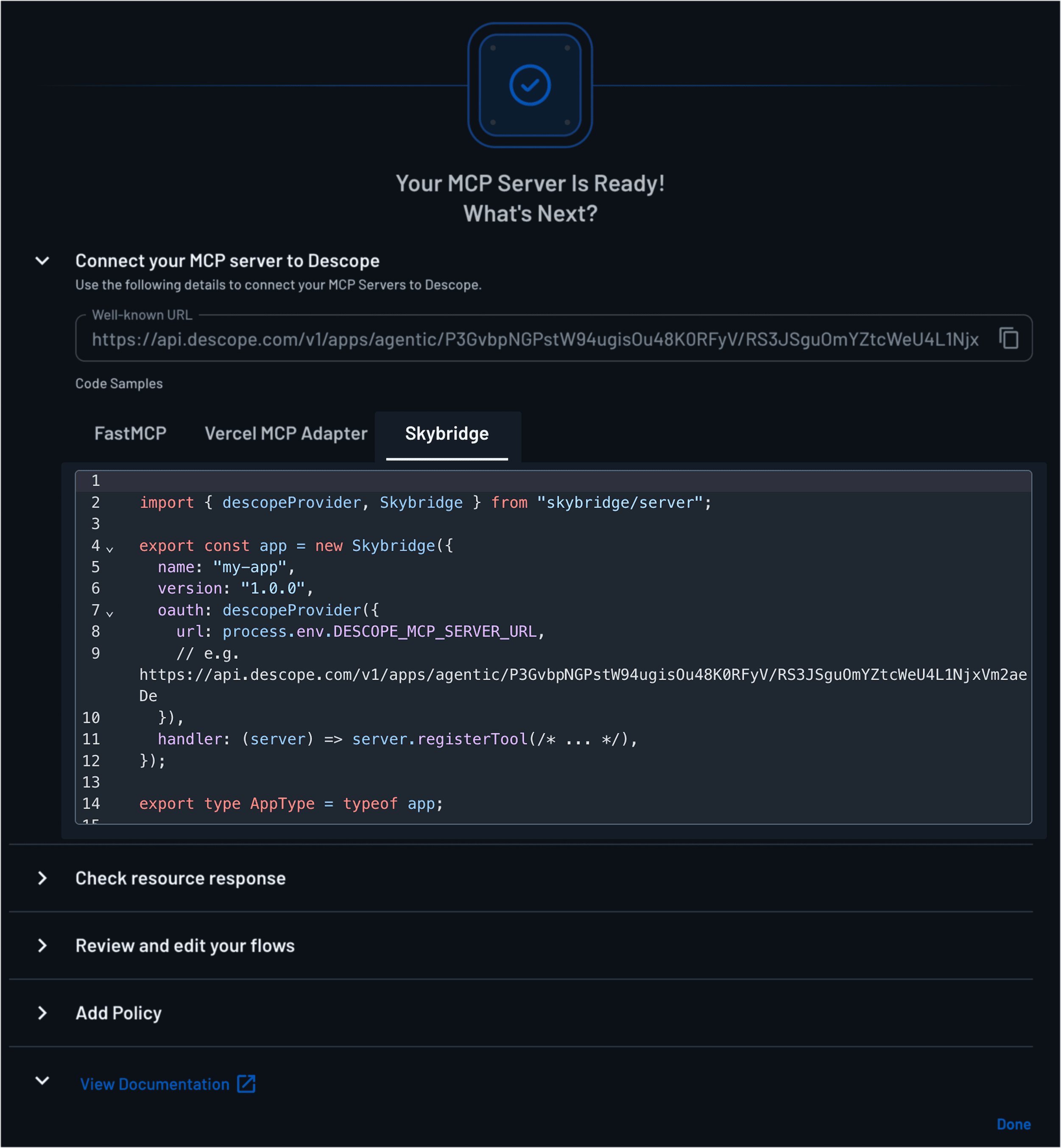
You can find the Skybridge integration on Descope’s console, too. Open any MCP Server resource, click Usage Samples, and you'll find a Skybridge tab next to FastMCP, pre-filled with your project's discovery URL.
Try it yourself
Create a free Descope project, point it at your tunnel URL, and you'll have a secure MCP App running in Claude or ChatGPT in a few minutes.
Want to learn more about Descope? Use our MCP server, join our AuthTown dev community, or explore the Agentic Identity Hub to see more AI use cases in action.