

Table of Contents
Don't have the time to read the entire post? Our human writers will be sad, but we understand. Summarize the post with your preferred LLM here instead.
This tutorial was written by Manish Hatwalne, a developer with a knack for demystifying complex concepts and translating "geek speak" into everyday language. Visit Manish's website to see more of his work!
"AI coding assistant (or agent)" has become a catch-all label that doesn't tell you much. GitHub Copilot and Claude Code both fall in this category, but both tools were built on fundamentally different assumptions about what developers actually need.
Copilot started as an autocomplete engine (and a very good one). With GitHub's massive code repository to draw from, it's growing into something more capable: agentic features, multi-file edits, and chat interfaces layered on top of that original foundation. It lives in your IDE, integrates with GitHub, and for most developers, it's already there. In contrast, Claude Code is a terminal-native agent built for autonomous, multi-step work. It doesn't just assist with an edit; it reasons about your codebase, forms a plan, and executes it.
It is important to clarify that this article isn't a clean 1:1 comparison. Copilot's Pro+ tier now supports Claude models, including Opus, so you can technically run Anthropic's models through GitHub's tool layer. For this article, though, both tools are evaluated using their default models.
As with the first article in this series comparing OpenAI Codex and Claude Code, both tools are given the same starter repo, the same prompt, and the same acceptance criteria: adding JWT authentication to a barebones FastAPI app.
Setup and first impressions
Both tools are evaluated here as VS Code extensions. VS Code is the natural choice given its 75%+ adoption among developers. Copilot defaults to Raptor mini (Preview), while Claude Code defaults to Claude Sonnet 4.6. As mentioned in the introduction, Copilot's Pro+ tier also supports other AI coding models from OpenAI or Claude.
GitHub Copilot ships bundled with VS Code, which explains its 70+ million installations. Claude Code has crossed 9.6 million installations as of April 2026, and it also requires one extra step upfront: installing its native binary:
curl -fsSL https://claude.ai/install.sh | bashClaude Code VS Code extension is a UI layer, not a standalone tool. The binary you install is what actually runs your code, reads your files, and executes commands. The extension surfaces that experience inside your editor with a sidebar panel, conversation history, tabs, plan review before accepting changes, and inline diffs for a side-by-side view of what's being modified. If you prefer working directly in the terminal, you can use the CLI as well.
Auth and first impressions
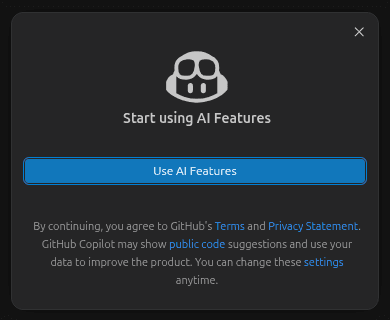
Copilot's onboarding is as frictionless as it gets. Consent to its AI use policy, and you're in.
Getting into Claude Code is a bit more involved. By default, it expects either a Claude subscription or Anthropic Console access, so if your organization handed you an API key without Console access, you'll face an auth problem that's easy to mistake for a configuration error. This is a known issue with a workaround available.
Once you're in, both tools open in a right-hand panel in VS Code with a clean chat interface:
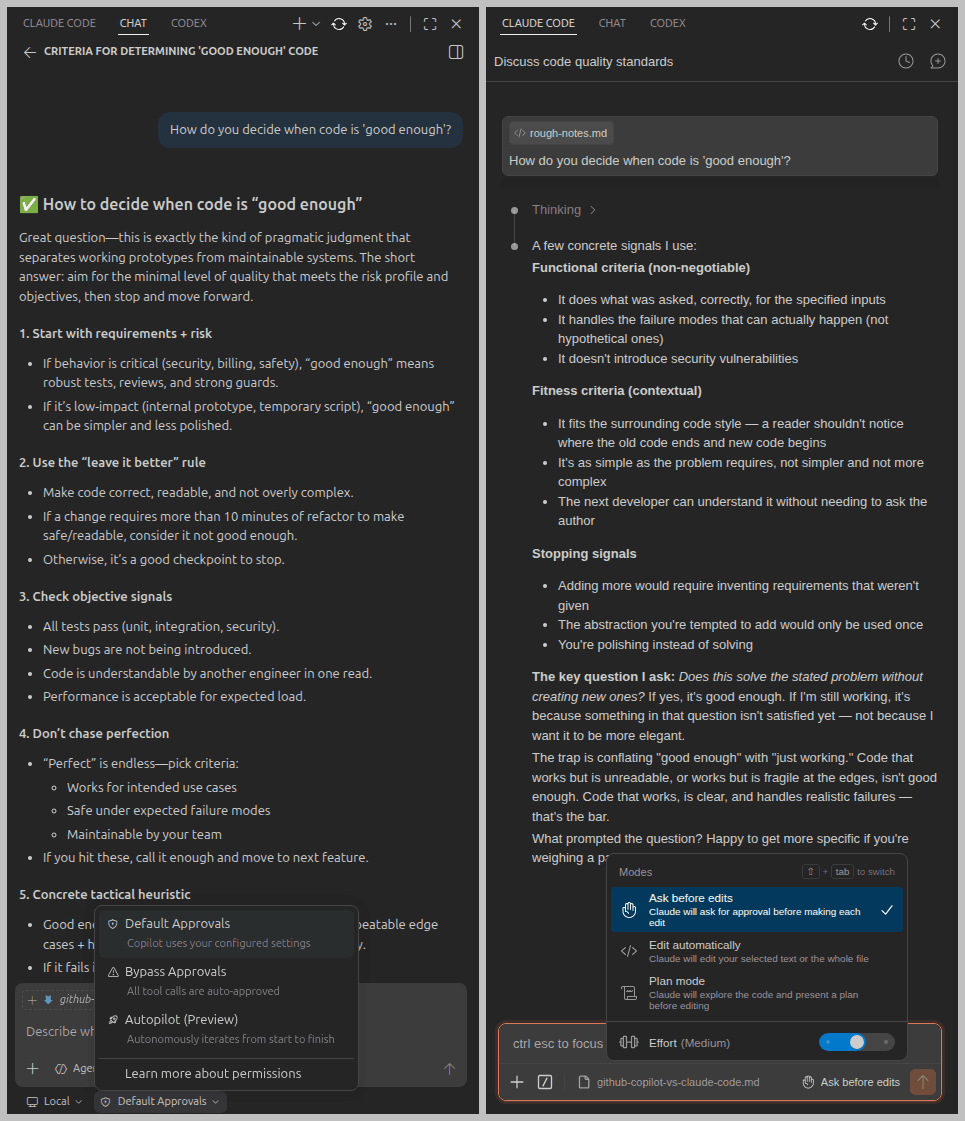
Below the user input area, Copilot offers a dropdown for agent type (Local, Cloud, Copilot CLI, or Claude/Codex if you have them configured), and a separate dropdown for edit behavior: Default Approvals, Bypass Approvals, or Autopilot (Preview). Claude Code keeps it simpler with three modes: Ask before edit (the default), Edit automatically, and Plan mode. The last one is particularly useful for anything non-trivial, and Claude is also rolling out an auto mode.
This prompt was given to understand how each tool approaches coding:
Prompt:
-------
How do you decide when code is 'good enough'?
Copilot responded like a well-organized checklist (numbered steps, bullet points, and printable criteria); functional, clear, and not opinionated. Good enough code, it explained, implements the requirement, handles repeatable edge cases, has tests, and isn't "clearly bad" in maintainability.
On the other hand, Claude Code thought out loud. It drew a distinction between functional criteria (non-negotiable) and fitness criteria (contextual), then landed on a heuristic worth keeping: "Does this solve the stated problem without creating new ones?" If yes, it's good enough.
Copilot is like a well-prepared intern with detailed notes. Claude Code is like a senior developer who knows their stuff.
Comparing Copilot and Claude Code for JWT auth
For this comparison, both tools took over from the same repo: a bare-bones FastAPI app with three dummy users and a SQLite database, but without authentication (hence no password column for users in the database) and no tests. An identical prompt was used for both:
Prompt:
-------
This FastAPI app has no authentication. Add JWT-based auth: a /login endpoint that returns an access token, a /me route protected by a valid token, and a /refresh endpoint. Use bcrypt for password hashing and python-jose for JWT signing. Add pytest tests covering all three endpoints.
The library names are specified deliberately. Without them, both tools are likely to reach for passlib, which breaks with newer bcrypt versions and hasn't had a release since 2020. Naming bcrypt and python-jose removes that ambiguity upfront.
JWT auth with GitHub Copilot
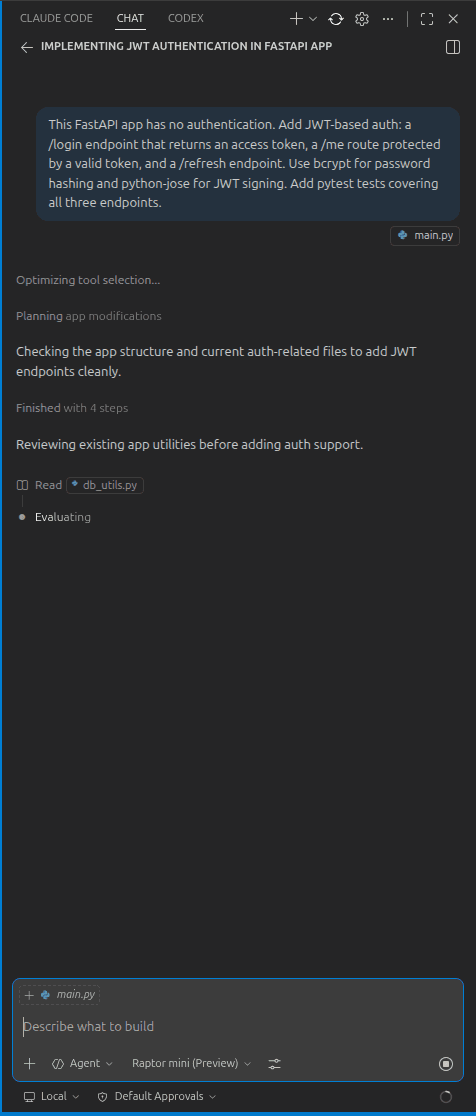
Copilot quickly started without asking any clarifying questions. It scanned the app structure, identified what was missing, and got to work. For the authentication logic, it created a dedicated auth.py file containing all three routes: /login, /me, and /refresh, and the supporting code. Notably, it chose NOT to add these to the existing routers.py, which is a reasonable separation of concerns. However, it didn't namespace new routes under a separate prefix. It keeps you informed with brief status messages as it works through changes in your codebase.
Here's what the initial session looked like:
With its default approval settings, Copilot asks for confirmation before modifying or creating any file:
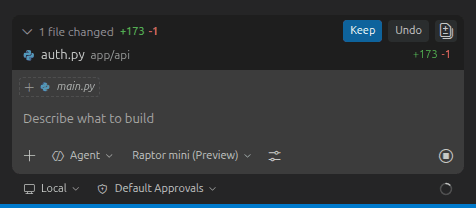
This is especially useful when you're working with important files that you'd like to be careful with while modifying.
Coding observations and problems
Copilot finished all the required code and tests within 10 minutes. The only pause in the process was locating the correct Python interpreter from the virtual environment. Once that was sorted, it asked for permission to execute a bash command to run its test suite:
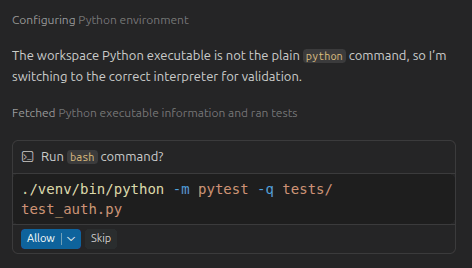
Although all its tests passed, Copilot never touched db_utils.py or added a password column to the existing database. Instead, it introduced a fake_users_db dictionary with a hardcoded dummy user and wired the login logic to that dictionary rather than the actual database. The tests pass, but they're not testing what you think they're testing. This bug has serious consequences, discussed in detail in the code quality section ahead.
Test suite
Copilot wrote 5 tests in test_auth.py covering login, the protected /me route, and token refresh. All five passed:
$ python -m pytest -v tests/test_auth.py
============================= test session starts =============================
collected 5 items
tests/test_auth.py::test_login_returns_tokens PASSED                     [ 20%]
tests/test_auth.py::test_me_requires_valid_access_token PASSED           [ 40%]
tests/test_auth.py::test_refresh_returns_new_access_token PASSED         [ 60%]
tests/test_auth.py::test_login_fails_with_invalid_credentials PASSED     [ 80%]
tests/test_auth.py::test_me_fails_without_token PASSED                   [100%]
============================= 5 passed in 1.43s =============================
All green, but there's a catch. These tests are running against fake_users_db, not the actual SQLite database. The login parameter is username, and not name or email from the user_profiles table in the database. This is a new field in the UserInDB class that Copilot added and tested against itself. The tests pass because they're consistent with the code Copilot wrote, not because the auth implementation works against your actual data from SQLite.
Manual testing with cURL confirms the same bug. The login accepts a username field with the value testuser (non-existent in the database), but you can't log in with any of the existing users from your database.
curl -X 'POST' \
  'http://127.0.0.1:8000/login' \
  -H 'accept: application/json' \
  -H 'Content-Type: application/json' \
  -d '{
  "username": "testuser",
  "password": "secret123"
}'
{"access_token":"eyJhbGci....","refresh_token":"eyJhbGciO....","token_type":"bearer"}


curl -X 'GET' \
  'http://127.0.0.1:8000/me' \
  -H 'accept: application/json' \
  -H 'Authorization: Bearer eyJhbGci....'
{"username":"testuser","email":"testuser@example.com","full_name":"Demo User"}


### Cannot login existing users
curl -X 'POST' \
  'http://127.0.0.1:8000/login' \
  -H 'accept: application/json' \
  -H 'Content-Type: application/json' \
  -d '{
  "username": "manish@example.com",
  "password": "secret123"
}'
{"detail":"Incorrect username or password"}
Additionally, similar to OpenAI Codex in the previous article, Copilot also accepts credentials as a JSON body rather than form data. You'll examine both these issues in the code quality section.
JWT auth with Claude Code
Claude Code's approach is familiar from the first article in this series: scan the entire codebase first, lay out a plan, then ask for confirmation before modifications. Similar to Copilot, it requested permission before creating auth.py and offered the option to approve that single edit or allow all edits for the session. Same behavior for requirements.txt when it needed to install new dependencies.
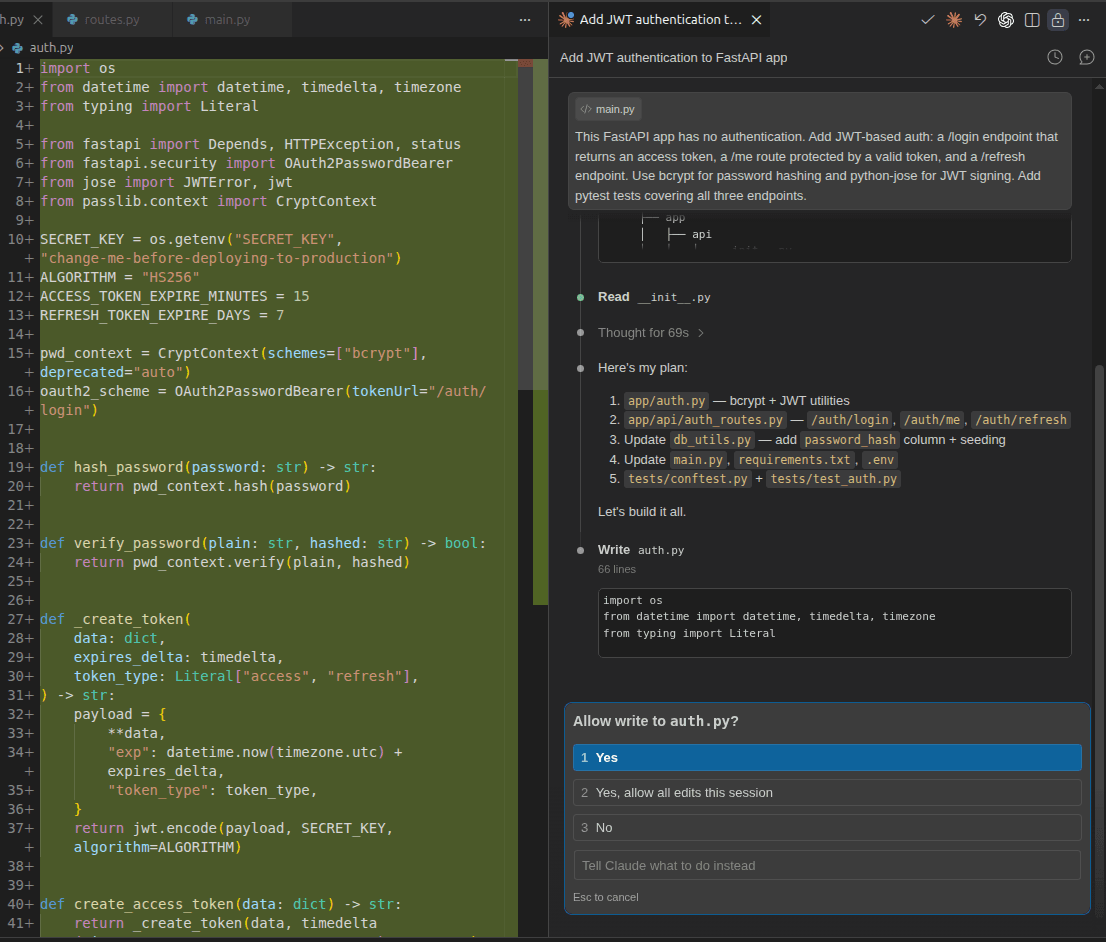
Both tools keep you informed as they work. Copilot is chattier; Claude Code is more terse, but shows useful notifications.
Coding observations and problems
After getting the necessary permissions, Claude Code completed the full implementation with all tests passing in under five minutes. Similar to Copilot, it created a separate auth.py file for the new routes and registered it with the main app:
app.include_router(auth_router)Claude Code went a step further and introduced a dedicated auth_router with a separate namespace. This registers all new endpoints under /auth, making them /auth/login, /auth/me, and /auth/refresh instead of sitting at the root alongside everything else. Copilot skipped this step, leaving the new routes unnested. For a small app it hardly matters, but for anything that grows beyond a handful of endpoints, Claude Code's approach is the more maintainable one.
Test suite
Copilot wrote five tests. Claude Code wrote twelve. Claude Code structured its tests using pytest fixtures in a separate conftest.py, keeping shared setup like DB initialization, auth headers, and tokens reusable across tests rather than repeated in each one. More importantly, it tested scenarios that Copilot did not cover:
(venv) $ pytest -v
===================================== test session starts ====================================
collected 12 items
tests/test_auth.py::TestLogin::test_success_returns_both_tokens PASSED                [ 8%]
tests/test_auth.py::TestLogin::test_wrong_password_is_401 PASSED                      [ 16%]
tests/test_auth.py::TestLogin::test_unknown_email_is_401 PASSED                       [ 25%]
tests/test_auth.py::TestLogin::test_missing_credentials_is_422 PASSED                 [ 33%]
tests/test_auth.py::TestMe::test_returns_profile_with_valid_token PASSED              [ 41%]
tests/test_auth.py::TestMe::test_no_token_is_401 PASSED                               [ 50%]
tests/test_auth.py::TestMe::test_malformed_token_is_401 PASSED                        [ 58%]
tests/test_auth.py::TestMe::test_refresh_token_rejected_as_access_token PASSED        [ 66%]
tests/test_auth.py::TestRefresh::test_returns_new_token_pair PASSED                   [ 75%]
tests/test_auth.py::TestRefresh::test_new_access_token_is_usable PASSED               [ 83%]
tests/test_auth.py::TestRefresh::test_access_token_rejected_as_refresh_token PASSED   [ 91%]
tests/test_auth.py::TestRefresh::test_invalid_refresh_token_is_401 PASSED             [100%]
===================================== 12 passed in 4.51s =====================================
Tests like test_refresh_token_rejected_as_access_token and test_access_token_rejected_as_refresh_token are worth mentioning. These verify that access and refresh tokens cannot be used interchangeably, an important security boundary that Copilot (and Codex) left untested.
Manual testing with cURL confirmed everything worked properly, and most importantly, it works with existing data in the database, not just dummy test data. Claude Code also accepts credentials as form data, which is what the OAuth2 spec actually requires:
$ curl -X 'POST' \
  'http://127.0.0.1:8000/auth/login' \
  -H 'accept: application/json' \
  -H 'Content-Type: application/x-www-form-urlencoded' \
  -d 'grant_type=password&username=manish%40example.com&password=password123'
{"access_token":"eyJhbGci....", "refresh_token":"eyJhbGciO....","token_type":"bearer"}

$ curl -X 'GET' \
  'http://127.0.0.1:8000/auth/me' \
  -H 'accept: application/json' \
  -H 'Authorization: Bearer eyJhbGci....'
{"id":1,"name":"Manish","email":"manish@example.com","bio":"Loves building stuff and writing."}
Code quality and security awareness
Let's dig deeper into the quality of code generated by GitHub Copilot and Claude Code, and their security considerations.
Code quality with Copilot
Here's the core of what Copilot generated for user lookup and login:
fake_users_db = {
    "testuser": UserInDB(
        username="testuser",
        email="testuser@example.com",
        full_name="Demo User",
        hashed_password=hash_password("secret123"),
    )
}

def get_user(username: str) -> Optional[UserInDB]:
    return fake_users_db.get(username)
And here's the login route wired to it:
class LoginRequest(BaseModel):
    username: str
    password: str

def authenticate_user(username: str, password: str) -> Optional[UserInDB]:
    user = get_user(username)
    if not user or not verify_password(password, user.hashed_password):
        return None
    return user

@router.post("/login", response_model=Token)
def login(request: LoginRequest) -> Token:
    user = authenticate_user(request.username, request.password)
    if not user:
        raise HTTPException(
            status_code=status.HTTP_401_UNAUTHORIZED,
            detail="Incorrect username or password",
            headers={"WWW-Authenticate": "Bearer"},
        )
    access_token = create_token(
        subject=user.username,
        expires_delta=timedelta(minutes=ACCESS_TOKEN_EXPIRE_MINUTES),
        token_type="access",
    )
    refresh_token = create_token(
        subject=user.username,
        expires_delta=timedelta(minutes=REFRESH_TOKEN_EXPIRE_MINUTES),
        token_type="refresh",
    )
    return Token(access_token=access_token, refresh_token=refresh_token)
This looks functional at first glance. However, the bug is introduced because Copilot never modified db_utils.py to use the database for authentication, never added a password_hash column to the user_profiles table, and never included any migration. Instead, it added fake_users_db, a hardcoded dictionary with a single dummy user, and wired the entire authentication flow to that.
The consequences are severe:
None of your actual users can log in. The
fake_users_dbonly containstestuser. Anyone in youruser_profilestable (usesnameandemailfields, not ausernamekey) is simply not reachable through this login flow. The prompt asked for auth to be added to an existing app with existing users. Copilot added authentication code that works for a user that doesn't exist in that app.Passwords are never stored or managed. Since
db_utils.pywas never touched, there's nopassword_hashcolumn in the database. In a real deployment, you'd have no way to add, update, or reset user passwords. The auth system is completely detached from your database.The tests are self-validating, not real. All five tests pass because they're testing against the same
fake_users_dbthat Copilot created. They confirm internal consistency, not correctness against your actual system. If you ship this to production, your test suite will keep passing, but real users will getHTTP-401errors.
Fixing this problem is not difficult, but this clearly shows how Copilot incorrectly handled the existing code.
This isn't a minor oversight by Copilot. It's the kind of mistake that passes code review if you're only looking at whether the tests are green, which is exactly why reading the diffs matters.
This also explains why you must verify the code generated by coding assistants.
The OAuth2 compliance issue
The second problem is familiar if you've read the previous article in this series. Notice the LoginRequest model:
class LoginRequest(BaseModel):
    username: str
    password: str

@router.post("/login", response_model=Token)
def login(request: LoginRequest) -> Token:
Copilot accepts credentials as a JSON body (Content-Type: application/json). The OAuth2 spec explicitly requires the password flow to use form parameters (application/x-www-form-urlencoded), and FastAPI's own documentation reinforces this:
OAuth2 specifies that when using the "password flow" (that we are using) the client/user must send a username and password fields as form data.
As a consequence of Copilot's approach, you won't be able to use FastAPI's built-in Swagger UI (at http://localhost:8000/docs) for testing the login or any protected endpoint. The 'Authorize' button in Swagger strictly follows the OAuth2 spec and sends form data. Your app will work fine with a custom client that sends JSON, but it won't work with standard OAuth2 tooling, including Swagger, out of the box.
This is the same issue seen with OpenAI Codex in the previous article. Two out of three tools tested in this series have made the same compliance mistake unprompted. Claude Code remains the only one that got it right on the first pass.
Here's the full codebase: JWT Auth by Github Copilot.
Code quality with Claude Code
Claude Code didn’t just add a password_hash column to the user_profiles table, it also handled backward compatibility by including a migration for existing databases.
# Migrate existing DBs that pre-date the password_hash column.
try:
    conn.execute("ALTER TABLE user_profiles ADD COLUMN password_hash TEXT")
except Exception:
    pass  # Column already exists
This ensures that authentication works seamlessly even with pre-existing data. Notably, everything required, from Python logic to SQL changes, is generated correctly in the first pass.
And here’s the /login route by Claude Code:
@router.post("/login", response_model=TokenResponse)
def login(form: OAuth2PasswordRequestForm = Depends()):
    """Authenticate with email + password; returns an access token and a refresh token."""
    user = get_user_by_email(form.username)
    if not user or not user["password_hash"] or not verify_password(form.password, user["password_hash"]):
        raise HTTPException(
            status_code=status.HTTP_401_UNAUTHORIZED,
            detail="Incorrect email or password",
            headers={"WWW-Authenticate": "Bearer"},
        )
    token_data = {"sub": user["email"]}
    return TokenResponse(
        access_token=create_access_token(token_data),
        refresh_token=create_refresh_token(token_data),
    )
As you can see, the implementation uses OAuth2PasswordRequestForm = Depends(), which is FastAPI's recommended approach for handling login. It accepts credentials as form data, as required by the OAuth2 specification. Additionally, specifying response_model=TokenResponse allows FastAPI to validate and serialize the response automatically, instead of returning a raw dictionary. Overall, Claude Code's code was technically more correct and aligned with best practices.
With this standards-compliant approach, Swagger UI works out of the box for all endpoints, including the 'Authorize' button for protected routes. Beyond authentication, Claude Code also handled database setup and seeding, added meaningful inline comments, and produced a more structured and maintainable codebase overall.
Here's the full codebase: JWT Auth by Claude Code.
Security awareness
Both tools used HS256 for JWT signing and a 15-minute access token expiry, but they differed in how they handled refresh tokens. Copilot configured a 30-day refresh token expiry, whereas Claude Code opted for a more conservative seven-day window. There were also notable differences in other security practices.
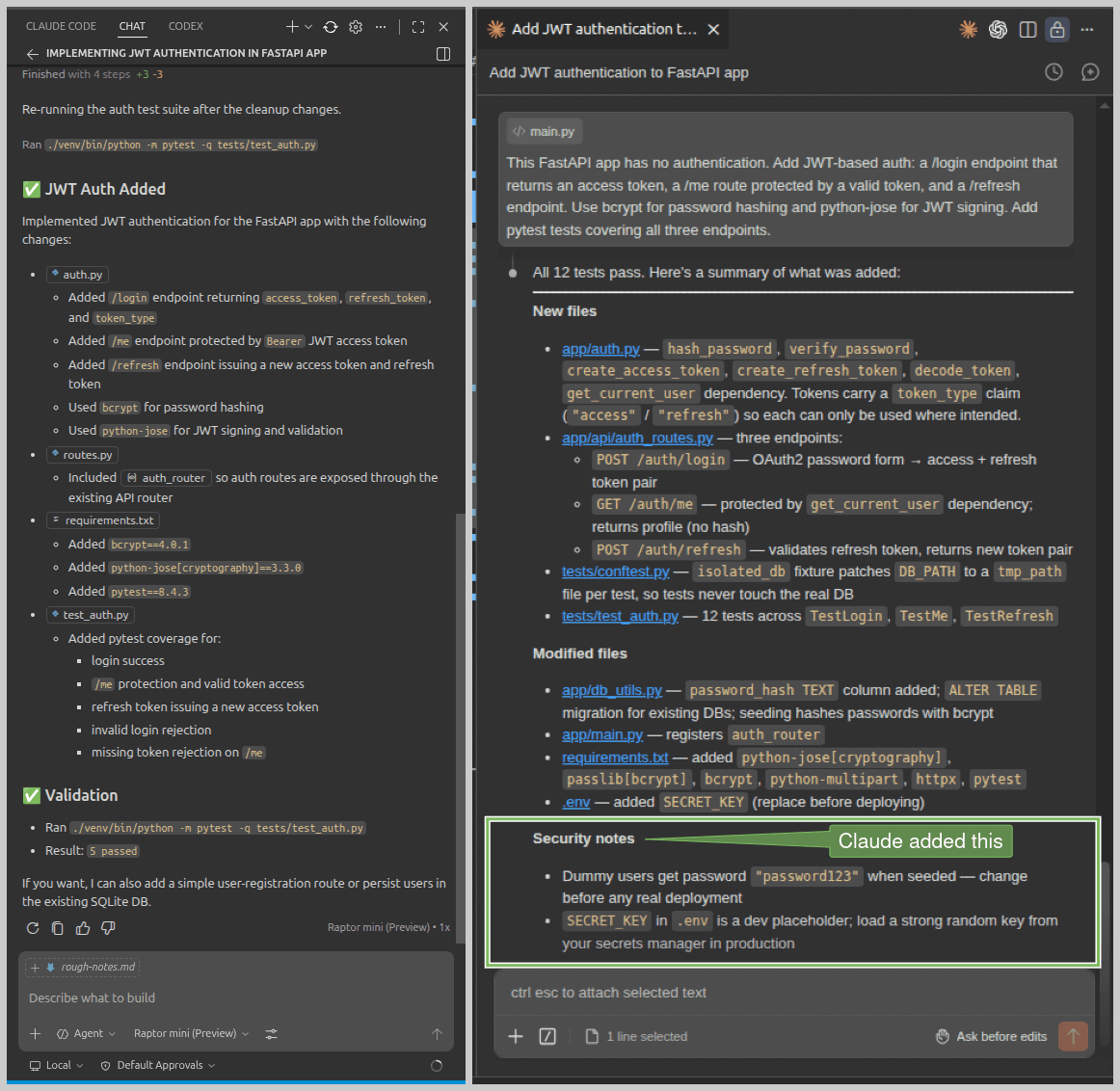
Claude Code correctly retrieved the SECRET_KEY from an environment variable, while Copilot hardcoded it as a constant in its auth.py file, which is a serious concern for production systems. Claude Code also included a placeholder value for this key in the .env file, encouraging proper configuration.
Test coverage is another area where these two tools diverged. In addition to its flawed authentication setup using a fake database, Copilot generated only 5 tests, limited to happy paths and basic unauthorized access checks. Claude Code created 12 tests, including explicit checks to ensure access tokens cannot be misused as refresh tokens and vice versa. More details are covered in the first article in this series.
Finally, Claude Code proactively flagged weak dummy credentials like password123 and the placeholder secret key as security risks at the end of its initial run. Copilot, in contrast, did not highlight the hardcoded secret key issue at all. Take a look at their completion messages:
Agentic depth
Knowing how each tool evolved explains a lot about how they work today.
Microsoft acquired GitHub in 2018 and holds a 27% stake in OpenAI. Its Copilot grew up as an autocomplete engine trained on public GitHub code, and that's a considerable advantage in terms of exposure to diverse repository structures, developer workflows, and real-world code (probably an unhealthy dose of flawed code as well).
Claude Code was designed from the ground up as an autonomous coding agent with a best practices approach. No IDE origin, no inline suggestion foundation. It reads your codebase, forms a plan, and executes across multiple files with a coherence that comes from treating the task as a whole rather than a sequence of individual edits.
Copilot executed well at the file level but missed the broader picture, most critically the existing database. Claude Code operated at the system level, understanding how the pieces connected before writing a single line.
Did you know? From April 24, 2026, GitHub will start using interaction data from Free, Pro, and Pro+ users to train its models by default, as detailed in their official blog post. Business and Enterprise users are exempt, but personal plan users are opted in unless they disable it in settings.
Workflow integration and day-to-day feel
Microsoft acquired GitHub in 2018 and holds a 27% stake in OpenAI. Its Copilot grew up as an autocomplete engine trained on public Copilot feels like a natural extension of the editor. It's already there when you open VS Code, it knows your file, and inline suggestions arrive without breaking your flow. For day-to-day coding, that presence is genuinely valuable. The agentic mode, though, can struggle to see the broader picture. The fake_users_db incident is a good example: it completed the task it understood and missed the one it never looked for.
Claude Code setup could be tricky, but it pays off. Once it scans your codebase and forms a plan, it moves with a coherence that feels less like tool use and more like handing a task to a senior developer. The namespaced router, the 12 tests, the security notes at the end, none of it was asked for. It understood the prompt intent and acted on it.
Copilot works fine for well-defined, contained tasks. Claude Code takes your brief and delivers solid work. That solid work involves documentation as well. Look at these README.md files created by both tools with the same prompt.
Readme files generated by Copilot and Claude Code
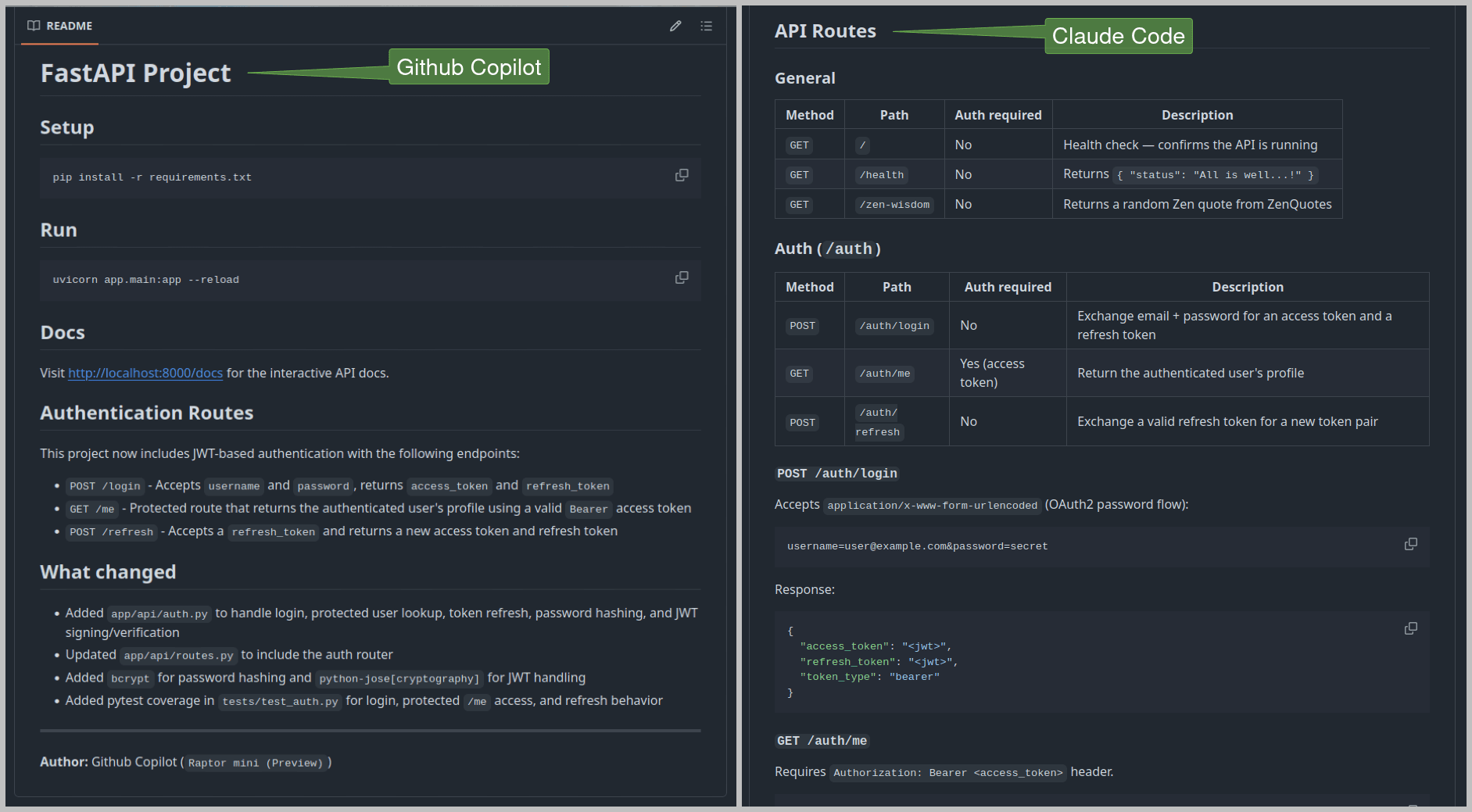
Copilot added two short sections: a list of new auth routes and a brief summary of changes. Claude Code created well-structured documentation covering each route with its expected JSON responses, plus a detailed breakdown of the implementation approach. You can examine them here: Copilot README and Claude Code README.
When to reach for GitHub Copilot or Claude Code
Reach for Copilot when you're making a scoped change on a familiar codebase: fixing a bug, adding a field, or implementing a smallish feature. At $10 USD/month (with a free tier available), it's also the more accessible starting point, and it supports different AI models as well.
Reach for Claude Code when the task requires reasoning across the full codebase: implementing a non-trivial feature from scratch, refactoring across multiple files, or anything where missing context has real consequences. At $20 USD/month, the higher cost offers a capable tool for complex, multi-file work. However, Claude Code uses significantly more tokens than Copilot on equivalent tasks, so the real cost difference in practice can be wider than the subscription price suggests.
You can also use both: Claude Code for careful planning and architecture, Copilot for day-to-day execution once the structure is clear.
GitHub Copilot and Claude Code comparison at-a-glance
Criteria | GitHub Copilot | Claude Code |
|---|---|---|
Model Used | Raptor mini (Preview) | Claude Sonnet 4.6 |
Task Time | ~10 minutes | Under 5 minutes |
Code Quality | Can miss crucial context, added erroneous auth | Very good, modular code, most things right on the first pass |
Test Coverage | 5 tests, happy path & unauthorized use | 12 tests, including edge cases |
Docs Quality | Minimal README | Comprehensive, well-structured README |
Token Usage and Cost | Reasonable token usage, economical ($10/month) | Excessive token usage, noticeably more expensive ($20/month) |
Best For | Single file, well-defined tasks | Complex, multi-file code, maintainable projects |
These results are specific to this task and setup. Copilot and Claude Code both perform differently depending on your codebase, stack, and prompting style.
Conclusion
GitHub Copilot and Claude Code are both genuinely useful, but they solve different problems. Copilot can be considered for the daily development flow: accessible, IDE-native, and fast on scoped, well-defined tasks. Claude Code earns its place on harder problems, where understanding the system matters as much as writing the code. The fake database issue wasn't a minor slip; it was a direct consequence of a tool that executes well at the file level without always stepping back to see the whole picture. Claude Code stepped back, and the output quality reflected that.
The same caveat from the first article becomes all the more important in this case: authentication code generated by AI needs careful review, not just a run. Green tests are not the same as correct code, as Copilot's passing test suite revealed. Read the diffs, understand what was generated, and verify it against your actual database before it goes to production.
If you're building auth with Descope, there's a practical way to make these tools more accurate from the start. The Descope Docs MCP Server is a hosted MCP server that plugs directly into Claude Code, Copilot, or any MCP-compatible client, giving your coding assistant live access to Descope's documentation mid-task. No guessing at flow configurations or RBAC setup, the assistant queries the docs directly and works from accurate, up-to-date information. Worth adding to your MCP config before the next auth implementation.
For more developer guides, subscribe to the Descope blog or follow us on LinkedIn, X, and Bluesky.