
Table of Contents
Don't have the time to read the entire post? Our human writers will be sad, but we understand. Summarize the post with your preferred LLM here instead.
This tutorial was written by Manish Hatwalne, a developer with a knack for demystifying complex concepts and translating "geek speak" into everyday language. Visit Manish's website to see more of his work!
Last March, at a Council on Foreign Relations event, Anthropic CEO Dario Amodei made a bold prediction:
"I think we will be there in three to six months, where AI is writing 90% of the code. And then, in 12 months, we may be in a world where AI is writing essentially all of the code."
A year later, that prediction doesn't look so outrageous. Software development is changing fast. AI coding tools have moved well past simple code snippets. Today's coding agents (tools) can take a plain-language prompt and scaffold an entire project (wire up dependencies, write tests, handle edge cases, and ship production-ready code).
Two AI tools are defining this new era more than any others: OpenAI's Codex and Anthropic's Claude Code.
This article compares both tools using the same repo, the same prompt, and the same acceptance criteria. We’ll ask these tools to "Add JWT auth to a barebones FastAPI app with login, a protected route, token refresh, and a pytest suite."
Each tool is evaluated on setup experience, code quality, security awareness, workflow feel, and how close the output gets to production-ready code. By the end, you'll have a clear picture of when to reach for Codex and when to reach for Claude Code.
Setup and first impressions
Both tools were tested as VS Code extensions. The last Stack Overflow survey shows VS Code is used by 75% of developers worldwide, so it's the natural choice for this comparison. Claude Code ran on Sonnet 4.6 and Codex on GPT 5.3 Codex, both are their respective defaults.
Both OpenAI Codex and Claude Code require a single click to install from the VS Code marketplace. As of April 2026, Claude Code is better when it comes to adoption with 7.7 million installs to Codex's 6.1 million. Setup is easy for both, with one extra step for Claude Code: you need to install its native binary first:
curl -fsSL https://claude.ai/install.sh | bashThe Claude Code VS Code extension is essentially a UI layer over its CLI. All the actual work happens in the binary running in your terminal; the extension just surfaces that experience natively inside your editor, with a sidebar panel, conversation history, tabs, and plan review before accepting changes. You also get inline diffs for a clean side-by-side view of old and new code.
Auth and initial exploration
OpenAI Codex keeps onboarding simple. All you have to do is paste your API key and you're in. Claude Code is a bit more convoluted. Its default modes expect either a subscription or Claude console access. If your organization has given you an API key but not console access, you'll hit a wall that isn't immediately obvious. This is a known issue with a safe workaround if you run into it.
Once you're in, both coding tools open in a right-hand panel in VS Code with a familiar chat interface:
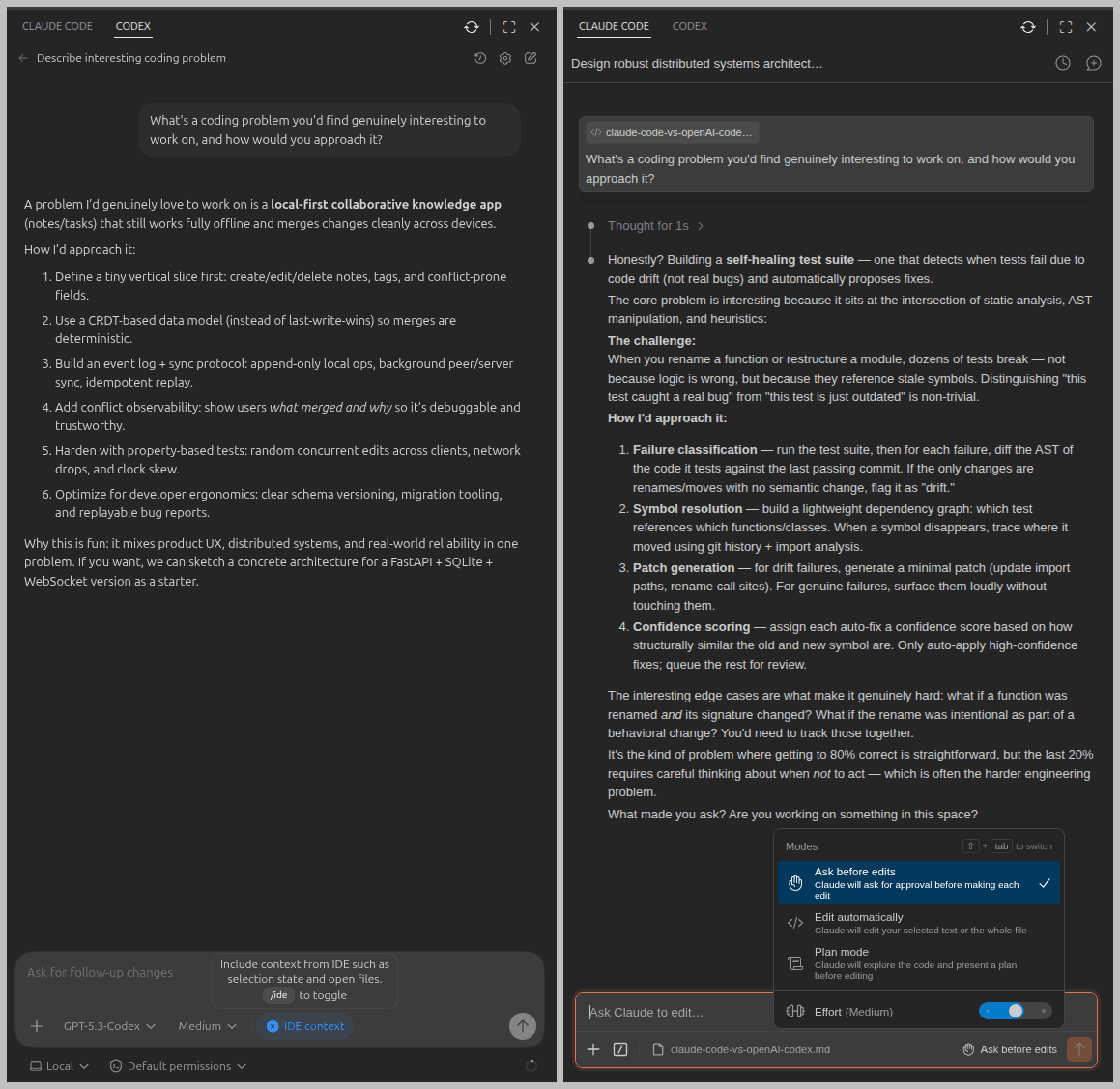
Below the user input area, Codex offers a simple IDE context toggle. Claude Code gives you three modes: Ask before edit (default mode), Edit automatically, and Plan mode, which is a meaningful difference once you're doing anything non-trivial. Claude is introducing auto mode soon.
To get a feel for how each tool thinks, I used this prompt:
Prompt:
-------
What's a coding problem you'd find genuinely interesting to work on, and how would you approach it?
OpenAI Codex immediately suggested a local-first collaborative notes app, and jumped straight into a structured plan with a concrete tech stack. Fast, delivery-oriented, no detours.
Claude Code paused briefly, then proposed a self-healing test suite that detects when tests fail due to code drift rather than real bugs. It went deep on edge cases and tradeoffs, and then asked a question. More like a seasoned developer who wants to understand the problem before solving it.
One thing worth noting about both: neither asked any clarifying questions upfront. This should work fine for simple tasks, but for anything complex, you'll want to front-load context yourself.
Codex vs. Claude Code for JWT auth
Both tools were given the same starting point: a minimal FastAPI app with three dummy users and a SQLite database, but no authentication (hence no password column for users in the database) and no tests. Here's the prompt:
Prompt:
-------
This FastAPI app has no authentication. Add JWT-based auth: a /login endpoint that returns an access token, a /me route protected by a valid token, and a /refresh endpoint. Use bcrypt for password hashing and python-jose for JWT signing. Add pytest tests covering all three endpoints.
This prompt explicitly names the libraries (bcrypt, python-jose) to avoid ambiguity and steer clear of outdated libraries like passlib that carry known issues with modern bcrypt versions.
JWT auth with OpenAI Codex
Codex jumped straight in without asking any clarifying questions. It started by scanning the existing codebase, confirmed there was no auth or tests, and mapped out the three routes it needed to add: /login, /me, and /refresh. Since its default mode allows edits without confirmation, it started modifying files immediately. It's quite communicative throughout, keeping you updated as it works. Here's what the beginning of that session looked like:
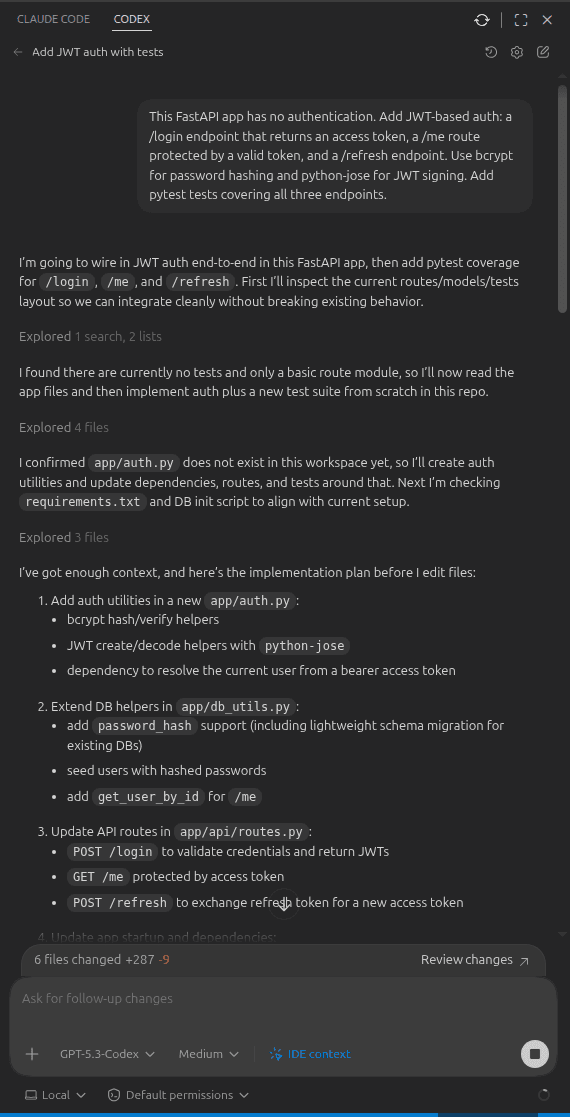
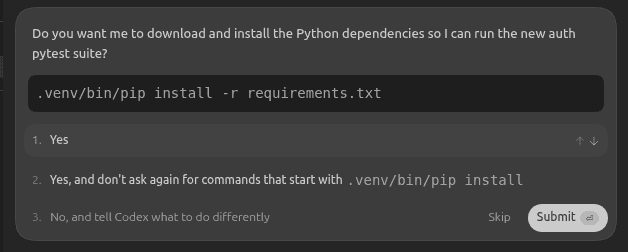
However, when it came to installing new packages for password hashing and JWT, Codex paused and asked for confirmation before installing new dependencies from requirements.txt:
Coding observations and problems
Codex ran into a couple of problems during implementation. First, it used the deprecated @app.on_event("startup") hook instead of the new lifespan context manager. Second, it didn't use async methods properly across routes from the start. Both issues caused the tests to fail, and it did eventually fix them iteratively on its own, but it took around 15 minutes to fix.
When asked about the failing tests, Codex correctly identified a deadlock in the sync test path for timeout, but didn't acknowledge the deprecation issue that it had introduced initially. Here's that explanation:
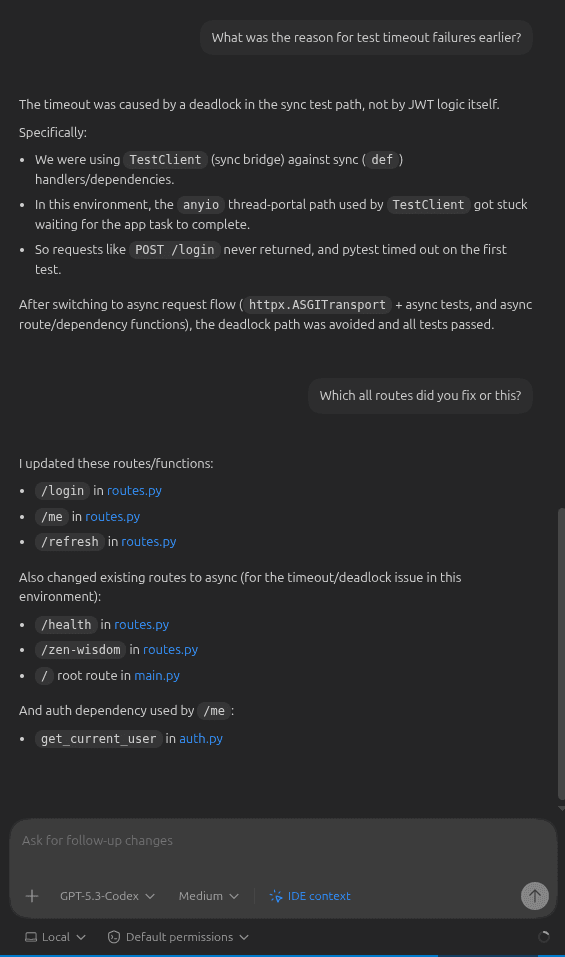
Codex is good at diagnosing symptoms, but it doesn't always generate the right code in the first attempt. This is a signal that its training data is lagging behind current FastAPI conventions.
Test suite
Codex wrote three tests covering login, the protected route, and token refresh. Here's the output of those tests:
(venv) $ pytest -v
========================== test session starts ==========================
collected 3 items

tests/test_auth.py::test_login_returns_access_token[asyncio] PASSED             [ 33%]
tests/test_auth.py::test_me_requires_valid_token[asyncio] PASSED                [ 66%]
tests/test_auth.py::test_refresh_returns_new_access_token[asyncio] PASSED       [100%]

========================== 3 passed in 0.36s ==========================
(venv) $
Manual verification with cURL also confirmed that authentication added by OpenAI Codex works correctly by sending parameters in the JSON format:
$ curl -X POST http://localhost:8000/login \
  -H "Content-Type: application/json" \
  -d '{"email": "manish@example.com", "password": "password123"}'

{"access_token":"eyJhbGci....", "refresh_token":"eyJhbGciO....", "token_type":"bearer"}

$ curl -X GET http://localhost:8000/me \
  -H "Authorization: Bearer eyJhbGci..."

{"id":1,"name":"Manish","email":"manish@example.com","bio":"Loves building stuff and writing."}
JWT auth with Claude Code
Claude Code's default behavior is more cautious than Codex. Rather than jumping straight into edits, it scanned the entire codebase and laid out a plan. For the first file it needed to modify (auth.py), it asked for confirmation and gave the option to either approve that single edit or allow all edits for the session. This is a small but useful option when you're working with files you'd rather not have modified without a second look. It also asked permission before installation from requirements.txt for new dependencies. Here's what that initial session looked like:
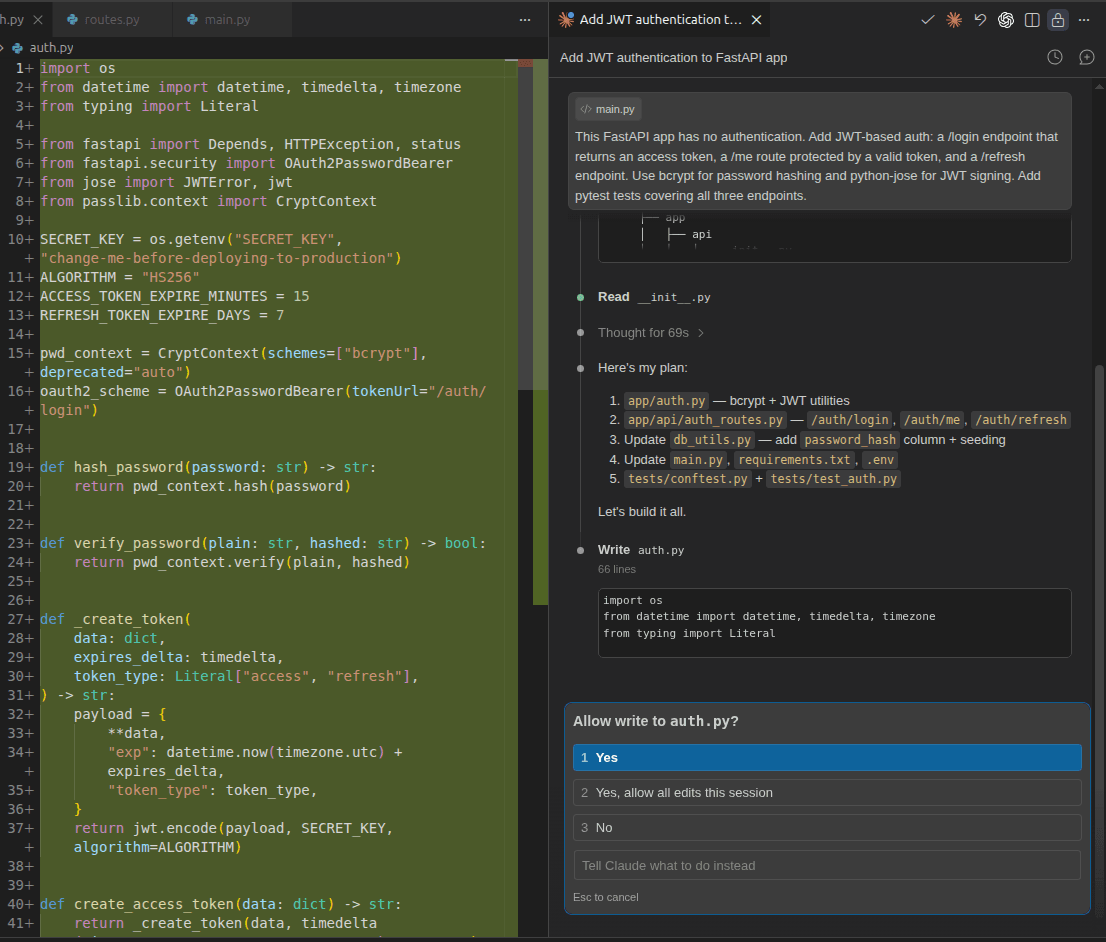
Claude Code keeps you informed as it works, but it's noticeably less verbose than Codex.
Coding observations and issues
Once permissions were granted, Claude Code finished the entire implementation with all tests passing in under five minutes. No deprecated methods, no deadlocks, no iterations needed.
Interestingly, Claude Code introduced a dedicated auth_router for the new routes and registered it with the main app:
app.include_router(auth_router)This design choice means the endpoints are namespaced under /auth, so the routes become /auth/login, /auth/me, and /auth/refresh rather than sitting at the root. It's a cleaner separation of concerns and the right call for any app that's likely to grow, though it may feel like slight over-engineering for a smallish project.
Test suite
Where Codex wrote three tests covering just the happy path, Claude Code wrote 12. It also structured them in a separate conftest.py file using pytest fixtures, keeping shared setup (DB initialization, auth headers, tokens) reusable and clean. Here's its test coverage:
(venv) $ pytest -v
===================================== test session starts ====================================

collected 12 items
tests/test_auth.py::TestLogin::test_success_returns_both_tokens PASSED                [ 8%]
tests/test_auth.py::TestLogin::test_wrong_password_is_401 PASSED                      [ 16%]
tests/test_auth.py::TestLogin::test_unknown_email_is_401 PASSED                       [ 25%]
tests/test_auth.py::TestLogin::test_missing_credentials_is_422 PASSED                 [ 33%]
tests/test_auth.py::TestMe::test_returns_profile_with_valid_token PASSED              [ 41%]
tests/test_auth.py::TestMe::test_no_token_is_401 PASSED                               [ 50%]
tests/test_auth.py::TestMe::test_malformed_token_is_401 PASSED                        [ 58%]
tests/test_auth.py::TestMe::test_refresh_token_rejected_as_access_token PASSED        [ 66%]
tests/test_auth.py::TestRefresh::test_returns_new_token_pair PASSED                   [ 75%]
tests/test_auth.py::TestRefresh::test_new_access_token_is_usable PASSED               [ 83%]
tests/test_auth.py::TestRefresh::test_access_token_rejected_as_refresh_token PASSED   [ 91%]
tests/test_auth.py::TestRefresh::test_invalid_refresh_token_is_401 PASSED             [100%]

===================================== 12 passed in 4.51s =====================================
(venv) $
Notice tests like test_refresh_token_rejected_as_access_token, and test_access_token_rejected_as_refresh_token. These verify that access and refresh tokens are not interchangeable, which is an important security concern that Codex's tests didn't cover at all.
Manual verification with cURL confirmed everything worked correctly, and notably, Claude Code requires credentials as form data rather than JSON:
$ curl -X 'POST' \
  'http://127.0.0.1:8000/auth/login' \
  -H 'accept: application/json' \
  -H 'Content-Type: application/x-www-form-urlencoded' \
  -d 'grant_type=password&username=manish%40example.com&password=password123'

{"access_token":"eyJhbGci....", "refresh_token":"eyJhbGciO....","token_type":"bearer"}

$ curl -X 'GET' \
  'http://127.0.0.1:8000/auth/me' \
  -H 'accept: application/json' \
  -H 'Authorization: Bearer eyJhbGci....'

{"id":1,"name":"Manish","email":"manish@example.com","bio":"Loves building stuff and writing."}
Code quality and security awareness
Here's a deeper look at the code both tools produced, and what it reveals about their correctness and security.
OpenAI Codex code quality
Here's the /login route Codex produced:
class LoginRequest(BaseModel):
    email: str
    password: str

@router.post("/login")
async def login(payload: LoginRequest):
    user = get_user_by_email(payload.email)
    if user is None or not verify_password(payload.password, user["password_hash"]):
        raise HTTPException(
            status_code=status.HTTP_401_UNAUTHORIZED,
            detail="Invalid email or password",
        )
    return {
        "access_token": create_access_token(user_id=user["id"], email=user["email"]),
        "refresh_token": create_refresh_token(user_id=user["id"], email=user["email"]),
        "token_type": "bearer",
    }
This code works, but there's a standards compliance issue worth flagging. Look at payload: LoginRequest; Codex accepts credentials as a JSON body in the /login route. The OAuth2 spec explicitly requires login credentials as form parameters using application/x-www-form-urlencoded, and FastAPI's own docs clarify this:
OAuth2 specifies that when using the "password flow" (that we are using) the client/user must send a username and password fields as form data.
As a result of this coding decision, FastAPI's built-in Swagger UI (typically accessible at: http://localhost:8000/docs) won't work for testing /login or the protected /me endpoint, because its Authorize button strictly follows the OAuth2 spec and sends form data. The app produced by Codex will work fine with cURL (if you send data in the JSON format) or a custom client/UI, but it's out of spec and won't integrate cleanly with standard OAuth2 tooling.
The full codebase is available on GitHub.
Claude Code code quality
Here's the same /login route from Claude Code:
@router.post("/login", response_model=TokenResponse)
def login(form: OAuth2PasswordRequestForm = Depends()):
    """Authenticate with email + password; returns an access token and a refresh token."""
    user = get_user_by_email(form.username)
    if not user or not user["password_hash"] or not verify_password(form.password, user["password_hash"]):
        raise HTTPException(
            status_code=status.HTTP_401_UNAUTHORIZED,
            detail="Incorrect email or password",
            headers={"WWW-Authenticate": "Bearer"},
        )
    token_data = {"sub": user["email"]}
    return TokenResponse(
        access_token=create_access_token(token_data),
        refresh_token=create_refresh_token(token_data),
    )
Three things stand out here:
OAuth2PasswordRequestForm = Depends()is FastAPI's recommended approach for login, accepting credentials as form data as the spec requires.The
WWW-Authenticate: Bearerheader on 401 responses is what the OAuth2 spec calls for, and Codex skipped it.response_model=TokenResponsemeans FastAPI validates and serializes the response shape automatically, rather than returning a raw dict. The code produced by Claude Code is more correct technically.
As a result of this standard-compliant approach, Swagger UI works out of the box for all endpoints, including the Authorize button for protected routes. Beyond auth, Claude Code also handled DB setup and seeding, added meaningful inline comments, and produced a more organized codebase overall.
The full codebase is available on GitHub.
Security awareness
Codex and Claude Code made the same baseline choices: 15-minute access token expiry, 7-day refresh token expiry, and HS256 for JWT signing. These are good defaults for most use cases. However, they handled implementation differently.
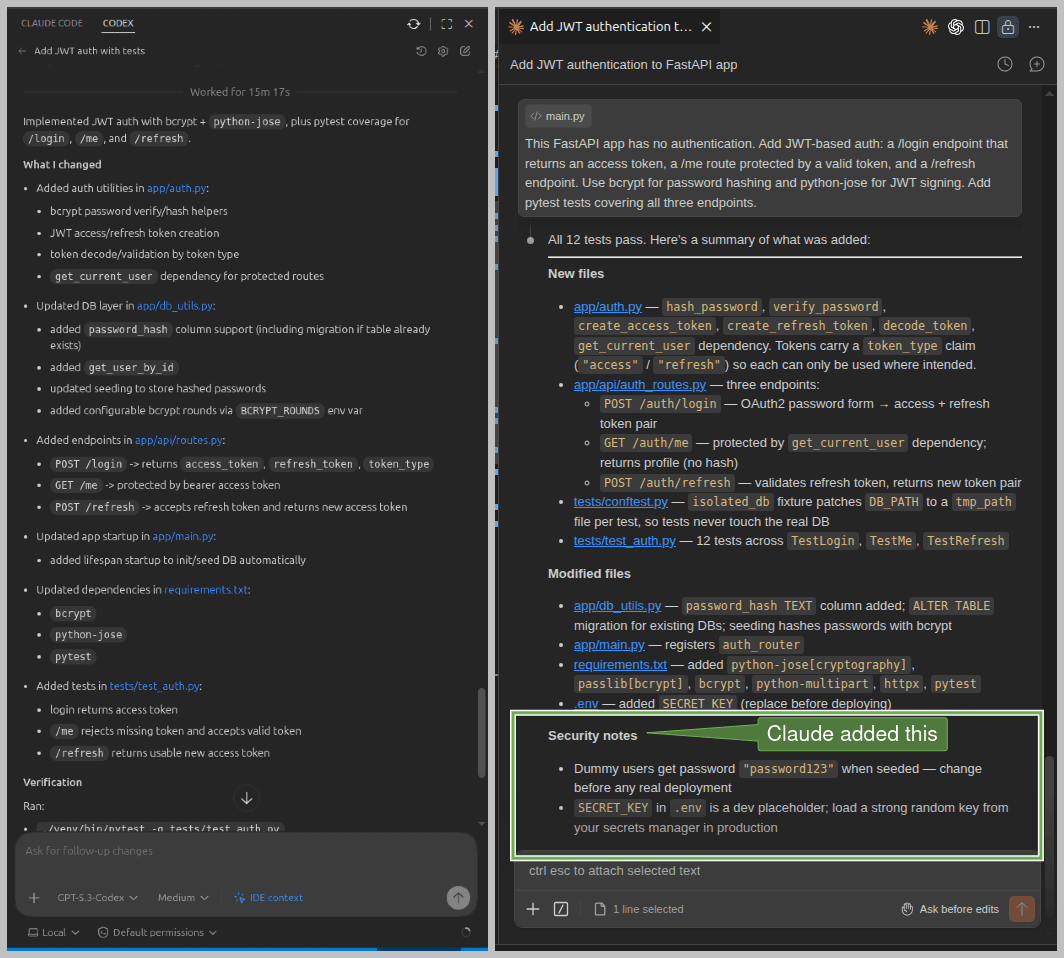
Both correctly obtained SECRET_KEY from the environment. But Claude Code also added this as a placeholder key to the .env file, while Codex skipped it. It's easy to overlook, and a missing or weak secret in production is a serious risk.
On error responses, Claude Code included the WWW-Authenticate: Bearer header on 401s as mentioned above. It's a small detail, but spec-compliant error responses matter for clients that parse headers to handle auth flows correctly.
The most serious concern is test coverage. Codex wrote three tests covering the happy path. Claude Code wrote 12, including explicit checks that access tokens are rejected as refresh tokens and vice versa. If your /refresh endpoint accepts an access token, an attacker who intercepts one can extend their session indefinitely. This is a known vulnerability: Token Type Confusion.
Token rotation and reuse detection are the canonical mitigations. Codex never tested for this. Claude Code did, without being asked explicitly in the prompt.
Finally, at the end of its initial run, Claude Code proactively flagged the weak dummy passwords (password123) and the placeholder secret key as security concerns. Codex said nothing:
Workflow feel and iteration
Working through the same task with both tools reveals a difference in philosophy.
Codex feels like delegation. It executes quickly (the delay during this task was due to a deadlock), communicates clearly, and gets things done, often minimally. It makes assumptions without flagging them, and when something breaks, debugging can be slow and opaque. The @app.on_event("startup") issue is a good example: Codex introduced a deprecated FastAPI pattern, then spent several iterations untangling the fallout, conflating older conventions with newer ones more than once.
Claude Code feels more like pairing with a thoughtful senior developer. It scanned the codebase and came up with a plan, asked for permission before modifying files, flagged security concerns unprompted at the end of its run, and wrote tests covering edge cases the prompt never mentioned. It got more things right on the first pass.
That thoroughness extends to documentation too. Given the same follow-up prompt to update README.md, here's what each produced:
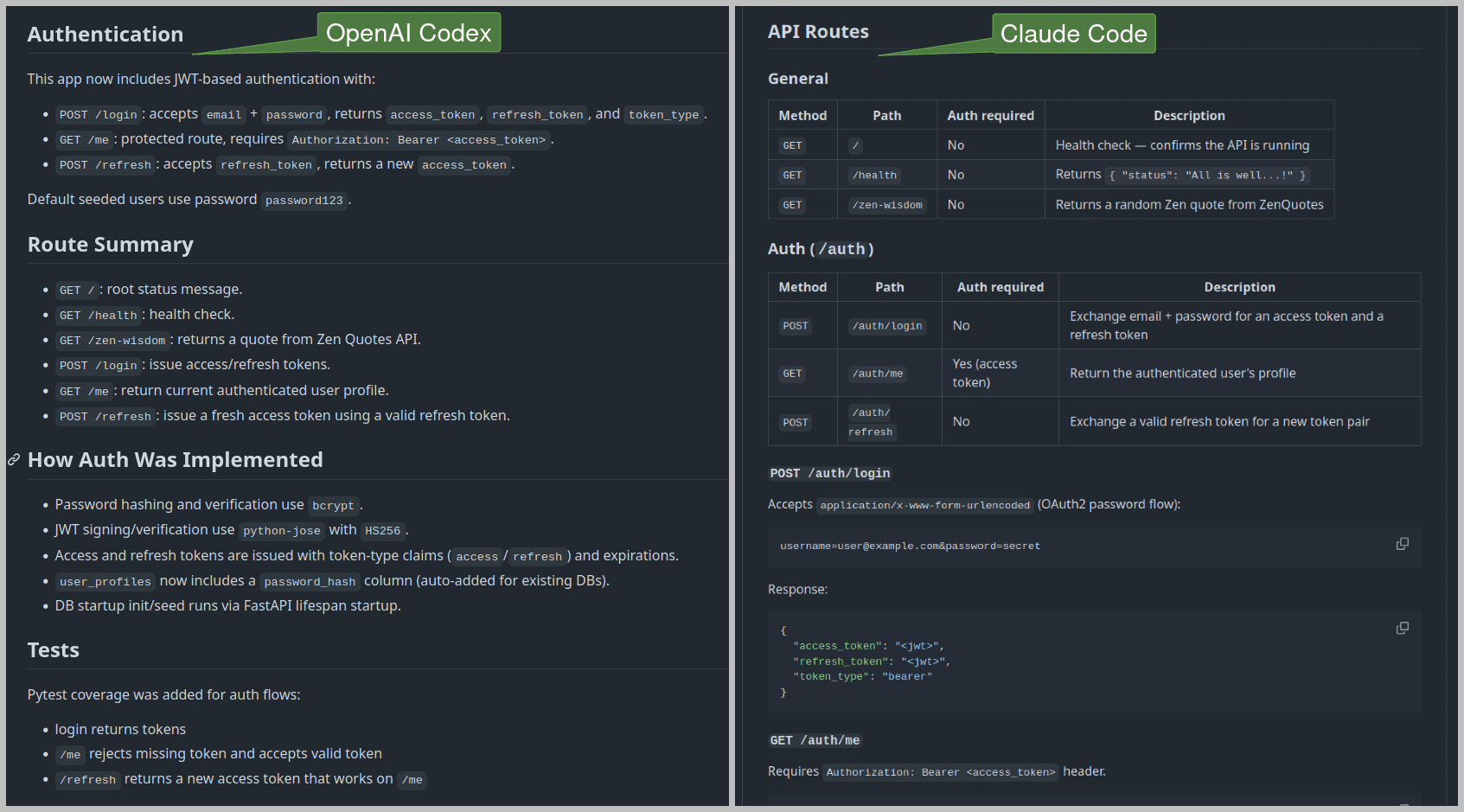
Codex produced a minimal list of routes and a brief implementation summary. Claude Code produced structured, tabular documentation for routes with their JSON responses, and a detailed summary of the implementation. Here's the Codex Readme and Claude Code Readme if you want to look more closely.
Both tools stayed coherent across multiple file changes and follow-up prompts, without drifting or contradicting earlier decisions. However, Claude Code consistently felt more thorough during planning, coding, and even documentation. The key difference was how much each tool brought to the table without being asked.
When to use OpenAI Codex or Claude Code
I can't pick a winner. The right tool depends on what you're actually trying to accomplish.
Reach for OpenAI Codex when you need something done quickly on a well-scoped task (e.g. fixing a single endpoint, adding a field to a schema, or writing a quick prototype you won't maintain long-term). It's fast, communicative, and economical with tokens. For smaller projects where you're in control of the context, that's often all you need.
Reach for Claude Code when you're reasoning through a multi-file implementation from scratch, care about correctness on the first pass, or are building something that needs to be maintained in production. The JWT auth task is a good example. Claude Code handled routing, DB setup, OAuth2 compliance, edge case testing, and security hygiene without being asked for any of it. However, this comes with a cost. Claude Code uses roughly 3x to 4x more tokens than OpenAI Codex on identical tasks due to its reasoning and thoroughness, which adds up quickly on larger sessions.
I know architects who use both: Claude Code for heavy planning and OpenAI Codex for actual implementation of individual modules once the structure is clear. That's a best split if token cost is a constraint.
OpenAI Codex vs. Claude Code at a glance
Criteria | OpenAI Codex | Claude Code |
|---|---|---|
Model Used | GPT 5.3 Codex | Claude Sonnet 4.6 |
Task Time | 15+ minutes | Under 5 minutes |
Code Quality | Acceptable, compact code, needed iterations to get it right | Very good, modular code, most things right on the first pass |
Test Coverage | 3 tests, happy path only | 12 tests, including edge cases |
Docs Quality | Basic README | Comprehensive, well-structured README |
Token Usage and Cost | Reasonable token usage, economical | 3x to 4x more tokens, noticeably more expensive |
Best For | Quick prototypes, small scoped tasks | Larger codebases, maintainable projects |
These results are indicative, not definitive. Your experience will vary depending on your project, tech stack, and how you prompt.
The practical reality of AI coding assistants
Codex and Claude Code are both capable, with distinct personalities. Codex is fast, economical, and delivery-oriented; reach for it when the task is scoped tightly and you know exactly what you want. Claude Code is more deliberate, plans before acting, asks for confirmation before touching files, and brings security awareness and test coverage you'd otherwise have to prompt for. Different tools for different moments.
That said, auth is not a place to accept AI-generated code at face value. Both tools made reasonable baseline choices on this task, but both also had gaps a careful reviewer would want to catch:
Codex shipped a
/loginendpoint that accepted credentials as JSON, quietly breaking OAuth2 compliance and FastAPI's Swagger integration.Claude Code namespaced everything under
/authwithout flagging the decision.Neither wrote tests for refresh token rotation or reuse detection, which is where the real security work lives once a production system is handling long-lived sessions.
Main takeaway: run the tests, read the diffs, and understand what the agent actually produced before it ships.
One thing that tightens the loop on both tools for auth work is giving them accurate product context to reason from. The Descope Docs MCP Server is a hosted MCP server that gives Claude Code and Codex direct access to Descope's documentation from inside your IDE, so the assistant can reference how to configure capabilities like session management, refresh token rotation, or MCP authorization.
Building auth with Descope is already simpler than coding from scratch, and adding the Descope Docs MCP Server only makes it easier. If you're planning on using a coding companion, output quality will improve noticeably when the agent has the right docs in front of it. Sign up for a free Descope account and join our developer community to continue your agentic auth journey.