
Table of Contents
Don't have the time to read the entire post? Our human writers will be sad, but we understand. Summarize the post with your preferred LLM here instead.
This tutorial was written by Artem Oppermann, a research engineer with a focus on artificial intelligence and machine learning. Connect with him on his LinkedIn to see more of his work!
The Model Context Protocol (MCP) has quickly established itself as an open standard that easily connects AI applications to external data sources and tools. It acts as a universal interface that allows language models to access databases, APIs, or file systems in a standardized way. No custom integrations required. However, with thousands of MCP servers now available on dozens of MCP directories, it's hard for developers to find the right MCP server.
To help you choose, this article compares several MCP directories based on six practical criteria: how easy it is to find the right server, how carefully the entries are compiled and documented, how up-to-date and maintained the catalog is, what security and trust signals are available, how smoothly installation and configuration go, and how active the community is.
In our testing approach, we'll simulate realistic developer workflows that begin with identifying a need, continue with assessing the trustworthiness of a server, and culminate in the actual installation and execution in a standard MCP client.
The MCP registries
Several directories have established themselves within the MCP ecosystem, each with a different focus. The most notable are:
GitHub MCP Registry: The focus of this directory is on standardization and authority, not quantitative breadth. It serves as a reference implementation for the entire ecosystem. The registry ensures adherence to metadata standards, but only includes a selective list of official servers (around 65 directories as of January 2026) and offers little insight into the maturity of third-party tools.
Glama: Glama positions itself as a curated seal of approval for MCP servers. A team uses automated scans and manual reviews to ensure that projects have READMEs, valid licenses, and no known vulnerabilities. These stringent inclusion criteria make the catalog significantly more focused on quality than sheer quantity.
PulseMCP: PulseMCP focuses on discoverability and popularity signals. It aggregates several thousand servers and marks entries as "official" or "community." Popularity metrics, such as estimated visitor numbers and rankings, make it a good choice for browsing and prototyping.
MCP Market: MCP Market is operated by a private provider and positions itself as a comprehensive marketplace with the largest number of listed servers. It ranks servers by popularity and recency and categorizes them into topics like "API development".
Discoverability and finding the right server
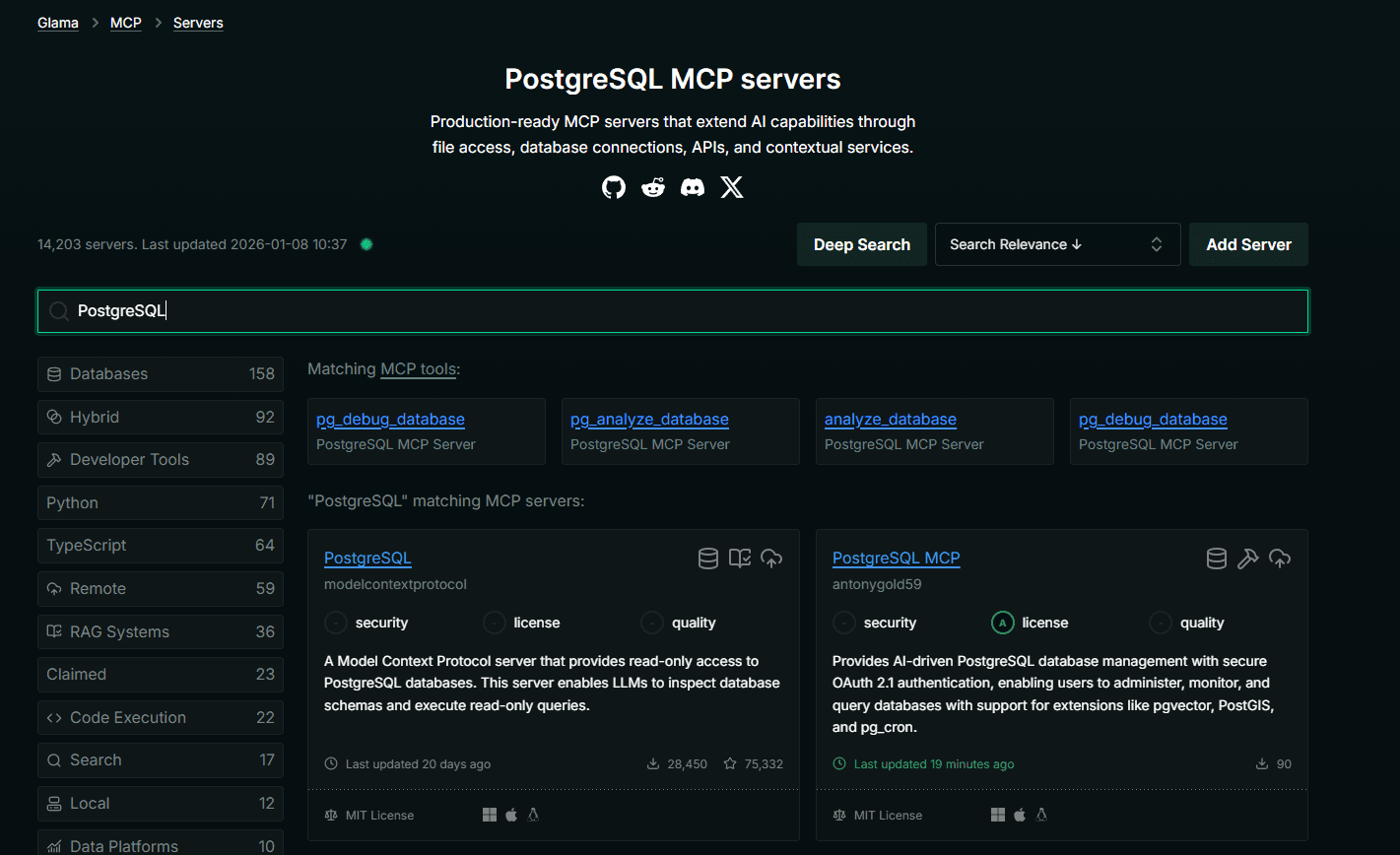
To assess how well the various directories are suited for searching, we searched for an MCP server that allows access to a PostgreSQL database. On each platform, we entered the same search term and then examined how quickly a suitable solution could be found, what filtering options were available, and how detailed the respective descriptions were.
GitHub MCP Registry
The GitHub MCP Registry currently lists 87 servers as of March 2026 with a basic search bar, but no categories or filters. For instance, searching for "PostgreSQL" returns a single result: DBHub, a database server supporting PostgreSQL, MySQL, SQL Server, SQLite, and MariaDB. Each listing includes an install button, a short description, the provider, and the repository’s GitHub star count.
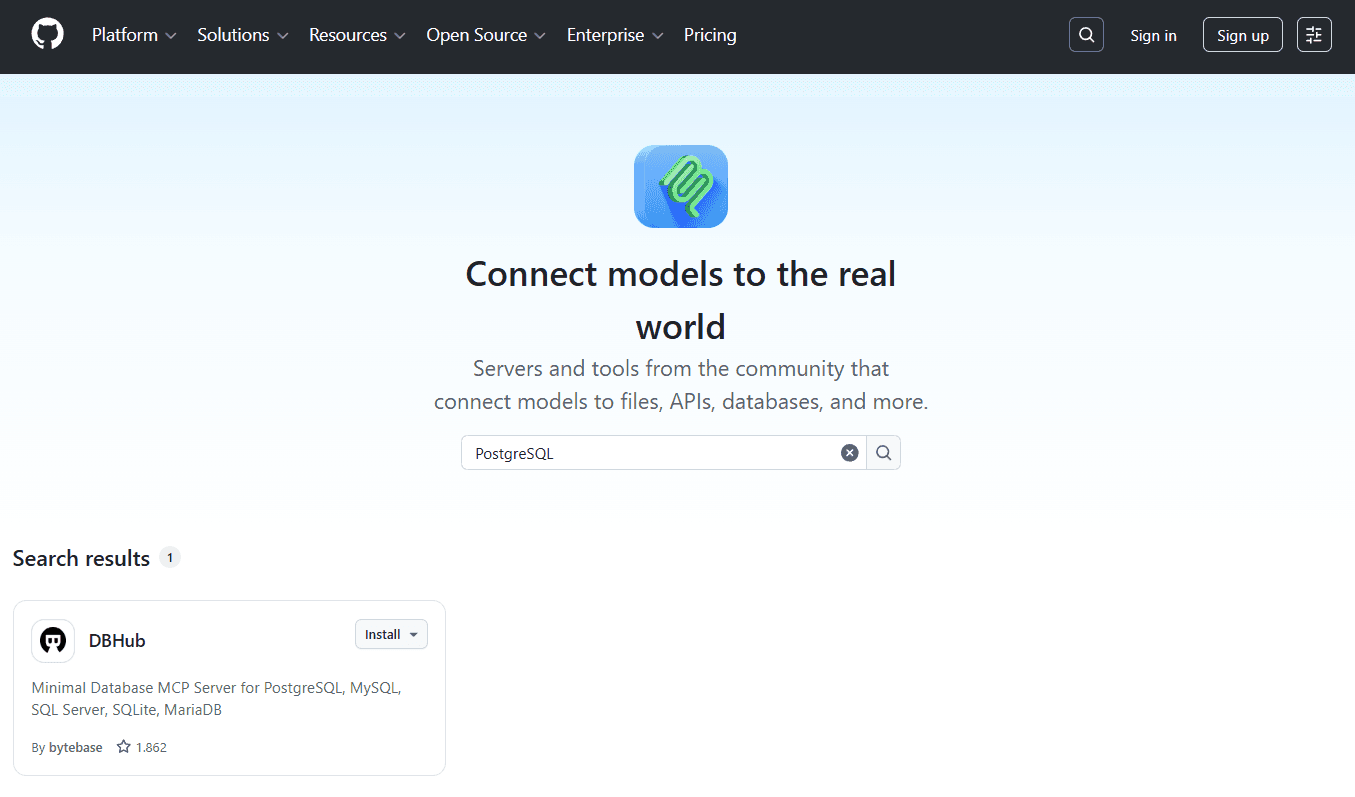
This directory is useful if you know what you are looking for, and offers limited discoverability.
Glama
Glama offers a search field above the server list and enables an advanced search with a single click on "DeepSearch." For instance, entering "PostgreSQL" returns matching MCP tools (for example, pg_debug_database) and actual MCP servers, and selecting one opens a dedicated details page:
PulseMCP
PulseMCP has a central search field with auto-complete and directly displays how many servers are found for the search term. For example, searching for “PostgreSQL”, it lists 100+ results, with the first entry being an Anthropic's reference server, in addition to many other community maintained servers.
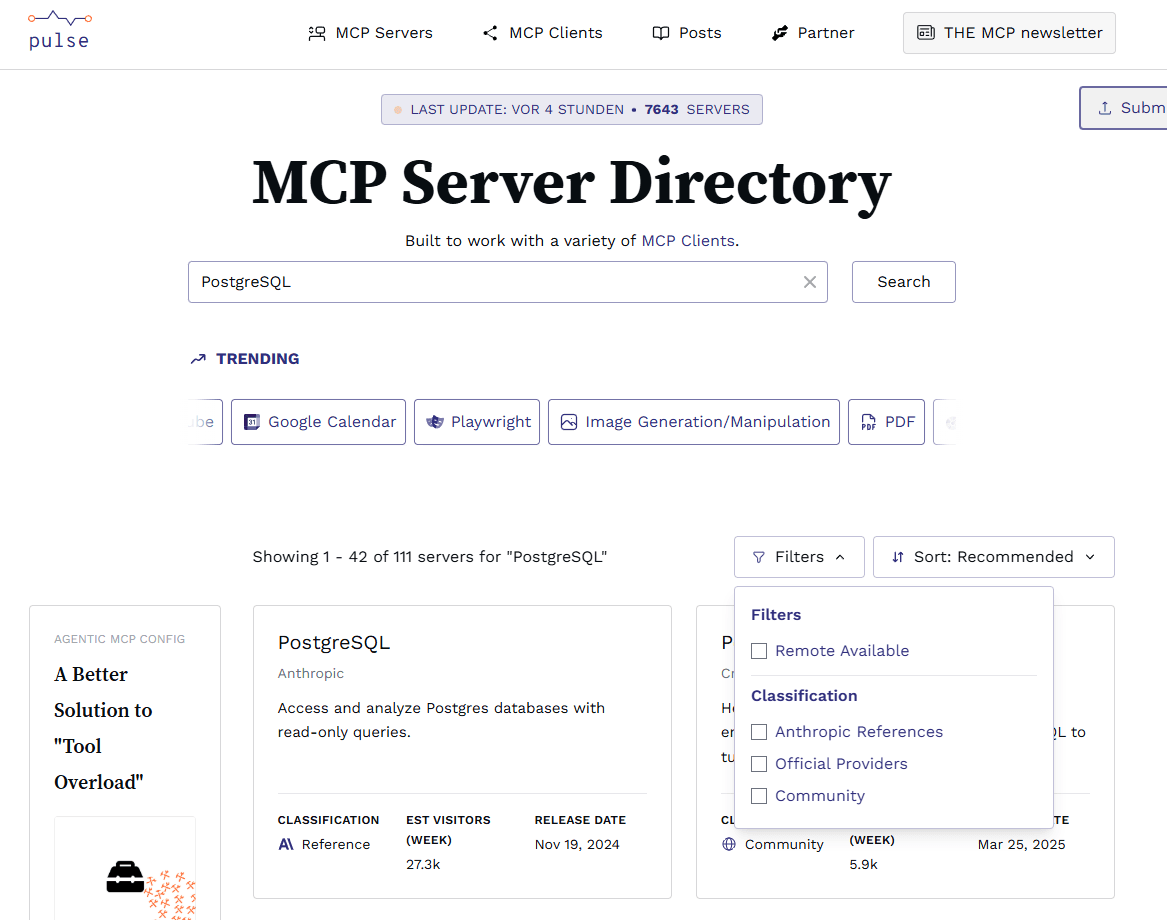
It is well-suited for broad discovery with popularity signals to guide shortlisting.
MCP Market
MCP Market is geared towards discovery through presentation and categorization. This makes the platform attractive to developers who want to see practical applications alongside functionality while browsing. For example, when we searched "PostgreSQL," multiple server maps were displayed, each with a star rating and a brief description. Clicking on a map opens a detailed page with tabs for "About," "README," and "FAQ."
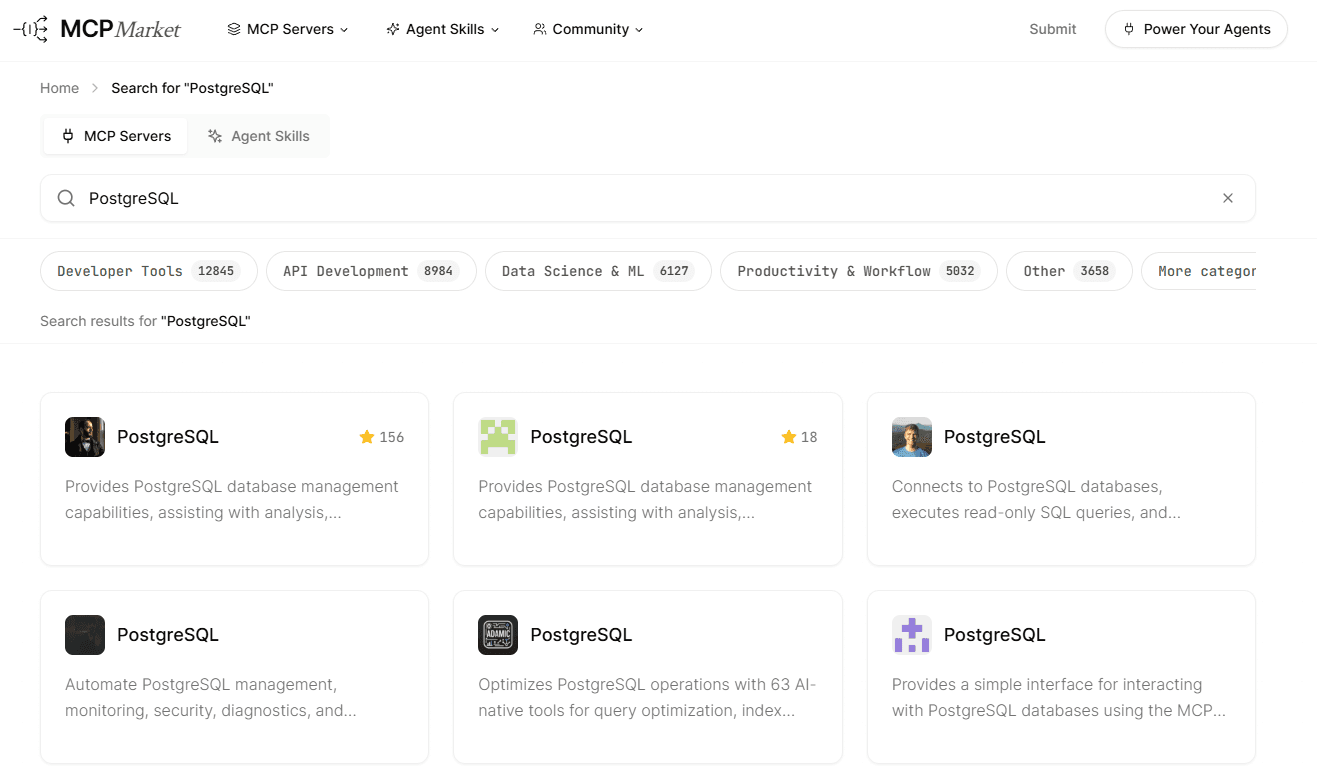
MCP Market works best when you're trying to figure out which server variant actually fits what you're doing.
Comparison
Feature | Github MCP Registry | Glama | PulseMCP | MCP Market |
|---|---|---|---|---|
Search | Basic search, no filters | DeepSearch, category filters | Auto-complete, classification filters, popularity sorting | Use case categories, star ratings |
PostgreSQL results | 1 server | 2 server & tools | 100+ servers | 2+ with use cases listed. |
Detail page | Install button, description, provider, Github stars | Dedicated page with tool and server separation | Provider, visitor metrics, release date and server.json | About, Readme file, FAQ tabs, implementation guides |
Key strength | Official reference | Advanced search | Community servers and ranking signals | Rich contextual details about the server |
PulseMCP offers the strongest discovery experience here. It provides over a hundred results for PostgreSQL with popularity sorting and classification filters to give you a quick path from search to install. MCP Market is a solid runner-up: useful contextual details, but only once you’re on a page. The other two are limited unless you already know what you’re looking for.
Quality standards: curation vs. comprehensiveness
How a directory vets its servers matters as much as what it lists. Our goal is to assess the server's maturity, as well as its documentation, auditing, and user feedback while searching for “GitHub MCP server” on the presented platforms.
GitHub MCP Registry
The GitHub MCP registry performs basic validation for server.json, limited to format and namespace uniqueness, but doesn't evaluate documentation quality or run tests. Users can share feedback by opening GitHub issues against the server’s GitHub repository, but the feedback isn’t directly visible on the server details page. For example, when you search for “GitHub MCP Server”, the details page essentially renders the Readme.md file of the corresponding server repository.
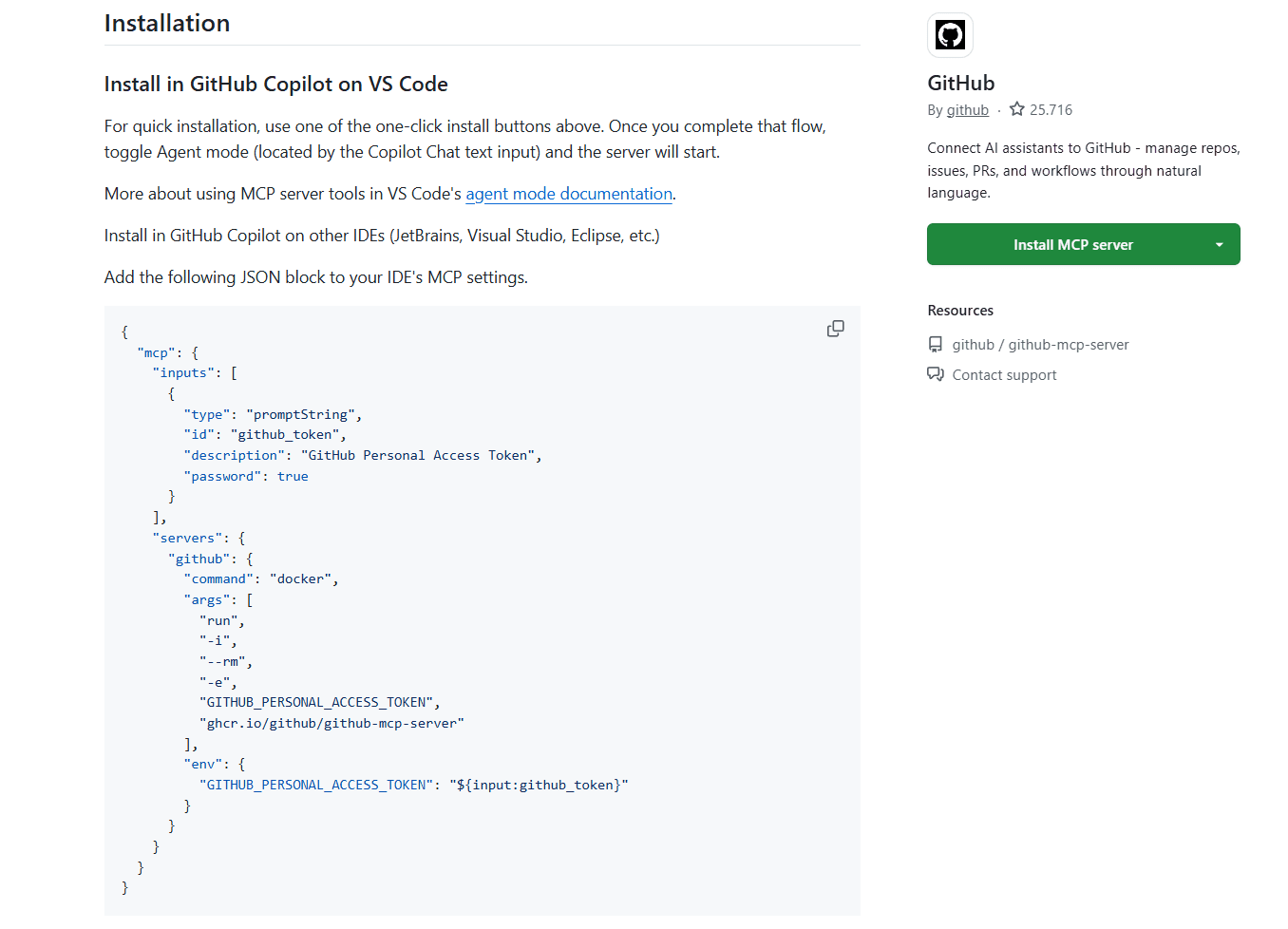
The registry positions itself as an "app store for MCP servers" for clients and deliberately leaves quality assessment to other levels.
Glama
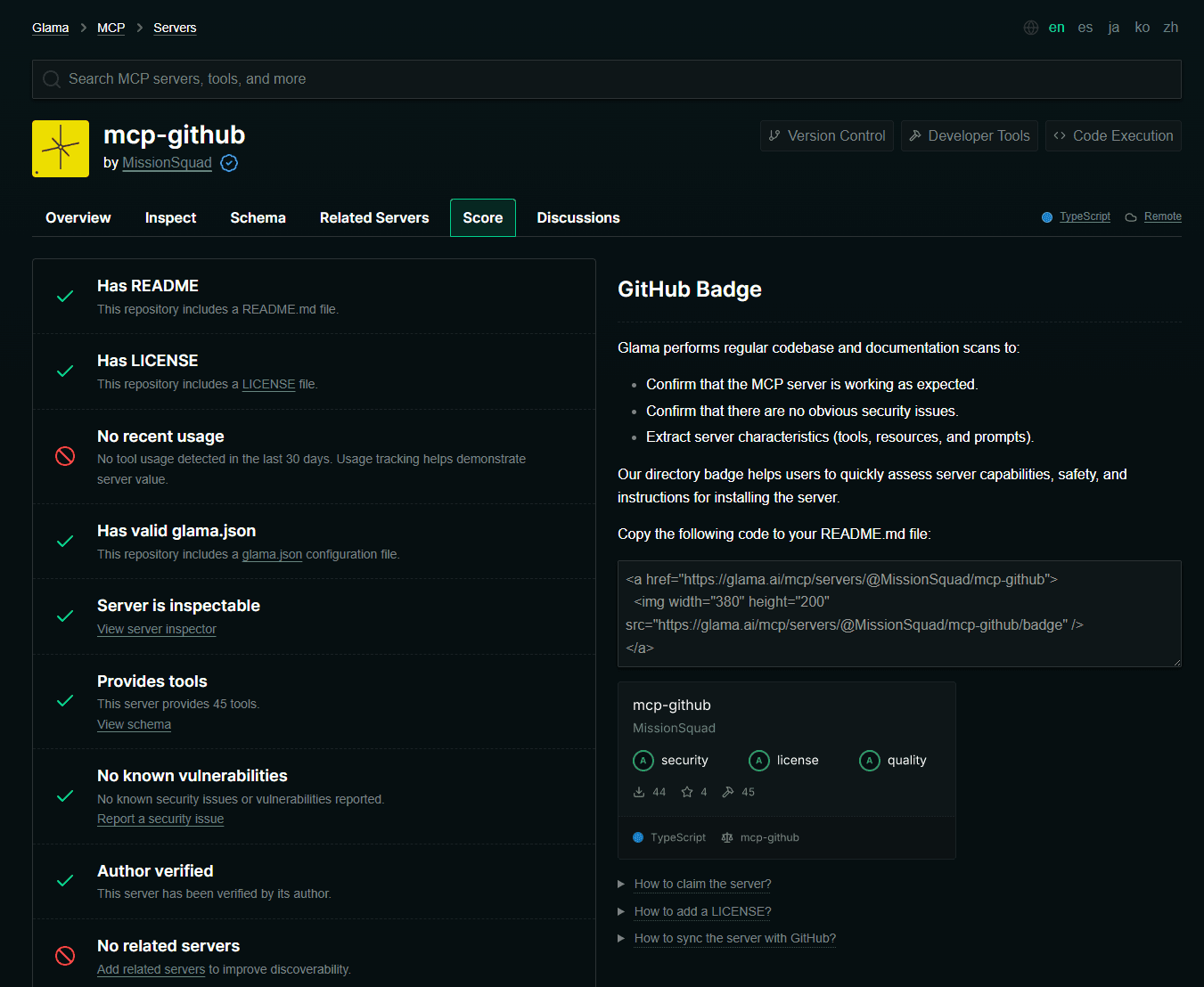
Glama is significantly more curation-oriented than other directories in this test and attempts to answer the question "Is this server mature enough for deployment?" directly within the directory. For example, the GitHub MCP server receives a scorecard with separate ratings for security, license, and quality, including statements such as "no known vulnerabilities" and "Author verified." Its includes criteria in the scores, such as known vulnerabilities, license verification, operability, tool scope, and up-to-dateness.
PulseMCP
PulseMCP shows the provider, official classification, number of visitors, and release date at a glance. For example, with a GitHub MCP server, you immediately notice the provider as GitHub and classification as Official reassuring users about the server’s reliability. PulseMCP also explicitly refers to the server.json file for servers as a "standardized, official file format" and positions it as the source for installation, configuration, and usage guidelines.
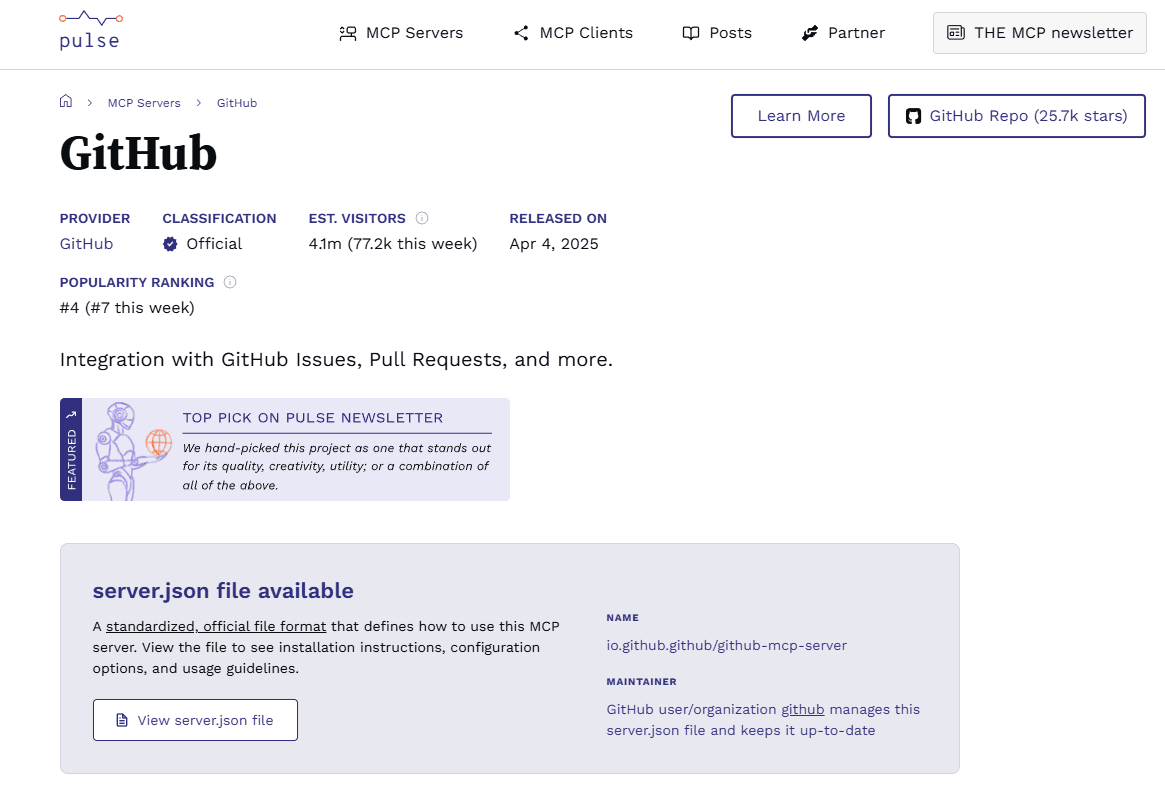
The platform is particularly suitable for developers who want a wide selection but can quickly create a pre-selection based on "official and frequently used" options.
MCP Market
MCP Market focuses on explaining the fit, helping users quickly decide whether it's worth taking a look at the repository. Consequently, documentation requirements and audit procedures are less prominently displayed. Testing or validation in the sense of "guaranteed to work" is not communicated as a core feature. User feedback is conveyed more through marketplace mechanics like rankings and related recommendations than through a comprehensive review system.
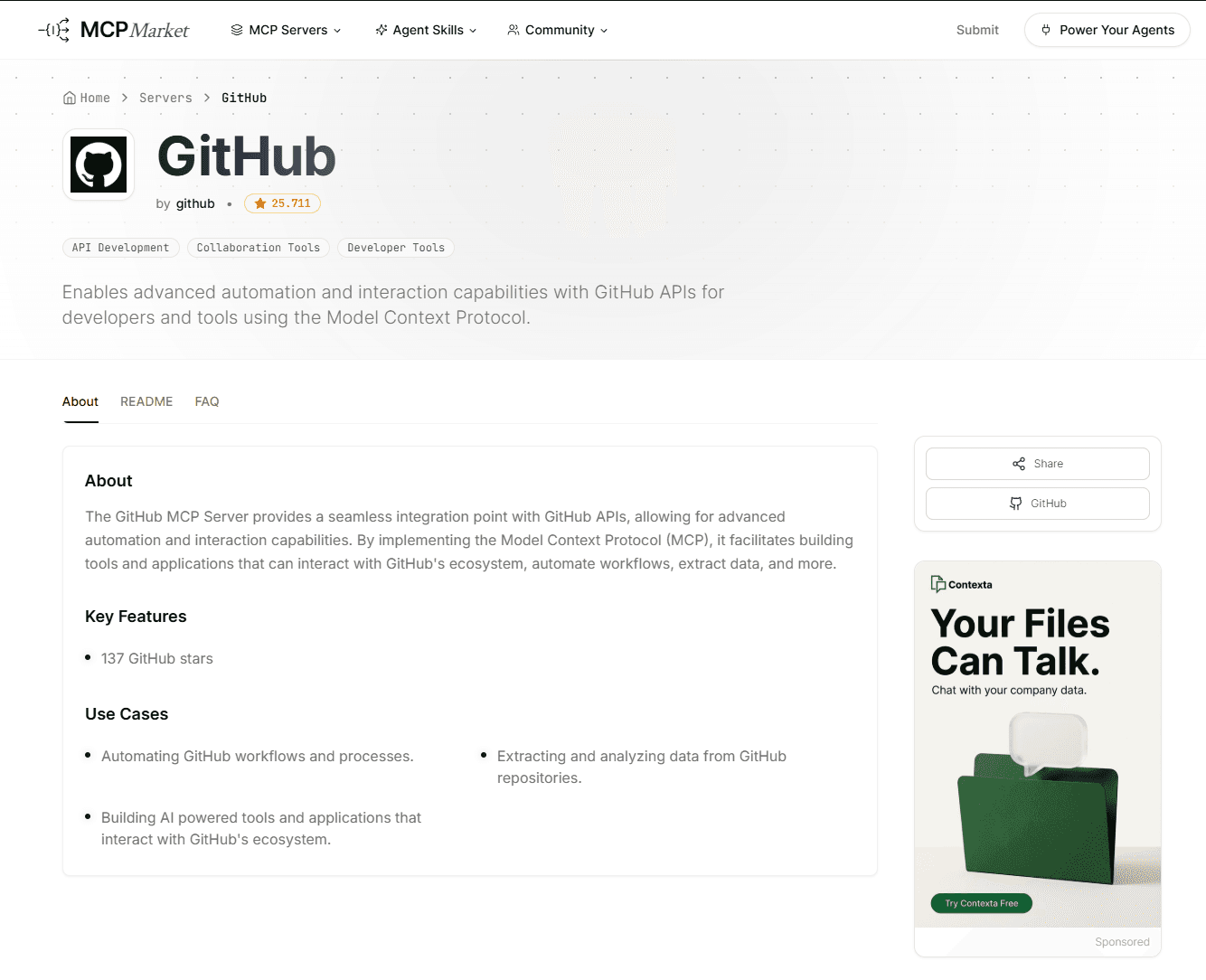
MCP Market primarily caters to the preference for breadth and comfortable browsing.
Comparison
Feature | Github MCP Registry | Glama | PulseMCP | MCP Market |
|---|---|---|---|---|
Curation approach | Format validation only | Comprehensive scorecard | Classification & popularity | Marketplace rankings |
Documentation requirements | None (only format compliance) | Readme needed | server.json and repository link | None |
Quality and user feedback | Github issues | Quality indicators, issue reporting | Shows visitor metrics, but no direct feedback | Rankings |
Glama is the only directory that appears to be taking a hands-on approach to curation. Scorecards, vulnerability checks, and license verification mean you can actually evaluate production readiness without leaving the platform to research yourself. Every other contender puts the quality eval on you.
Security and verification: GitHub server test case
Because MCP servers allow deep access to production systems, you need to choose a trusted directory. Platforms differ significantly in how they inspect code, authenticate maintainers, and flag vulnerabilities. Developers should understand the security features offered and where they need to perform their own checks.
GitHub MCP Registry
The official registry provides metadata but no security assessments. It checks whether the server.json file conforms to the schema and the namespace is unique. If users discover abuse or suspicious servers, they can report them via a GitHub issue. Maintainers can then add entries to a deny list. Beyond that, there are no code reviews, vulnerability scans, or verified maintainer badges.
The registry explicitly described itself as a “metaregistry” that delegates security and compliance to underlying package registries and downstream systems. For organizations, the registry recommends setting up private sub-registries with their own security policies.
Glama
Glama performs the most comprehensive check of MCP servers and displays the results as a scorecard. For instance, for the search of the GitHub MCP server, three categories are evaluated: security, licensing, and quality. The platform reported no known vulnerabilities and confirmed that the server functions as expected.
Glama also shows whether a server is inspectable, when it was last updated, and whether a README and license are available. Maintainers can verify their projects via a GitHub login. Until they do so, the message "Author not verified" appears.
PulseMCP
PulseMCP prioritizes openness and popularity signals. The GitHub MCP server is marked as "official" and the listing clearly identifies the provider (GitHub) and the responsible maintainer as GitHub. Visitor numbers and a popularity ranking serve as trust indicators, but there are no automated code or vulnerability checks.
The platform links to the server.json file, which contains installation and configuration instructions, and displays details such as authentication type (OAuth) and transport protocol (Streamable HTTP). Red flags, such as missing maintainer information or severely outdated servers, are not explicitly highlighted. Therefore, users must consult the GitHub repository and other sources themselves for a security assessment.
MCP Market
MCP Market is primarily aimed at developers who want to browse by use case, for example developer tools, API development, and workflow-oriented categories like browser automation, web scraping, and web app testing. The GitHub MCP server is tagged with categories, a short description, and GitHub stars. However, the directory provides no security checks or dependency information, and maintainer verifications are missing.
In addition, multiple entries with similar names can coexist, which can be confusing without additional checks. Security-relevant information, such as CVE scans (checks against the Common Vulnerabilities and Exposures database for known security issues), dependency lists, or "Report Issue" links, is not included in the listing. Developers must therefore rely on the linked repository and external security tools.
Feature | GitHub MCP Registry | Glama | PulseMCP | MCP Market |
|---|---|---|---|---|
Vulnerability check | None | Automated, with scorecard | None | None |
Verification | None | GitHub login verification | None | None |
Trust signals | GitHub stars only | Security / license / quality scores | Official/community classification, visitor count | GitHub stars, rankings |
Reporting | GitHub issues, deny list | Issue reporting | None | None |
Dependency notation | None | Flagged in scorecard | None | None |
Glama is the clear outlier on security: it’s the only directory running vulnerability scans (automated, but still viable), verifying maintainers, and surfacing dependency info. The rest of our directories leave that assessment up to you. PulseMCP’s official/community classification helps with broad, initial trust signals, but it’s not a meaningful substitute for actual code eval. If you’re looking at servers for production use, Glama’s scorecard saves you a step (depending on your acceptance criteria) that every other directory forces you to do externally.
Maintenance, up-to-dateness, and avoiding dead ends
The MCP landscape is changing quickly. New servers appear daily, while others are decommissioned. Developers need to pay attention to how current the entries in the directories are and whether outdated or broken servers are flagged. The table below shows a quick comparison of MCP server catalog’s freshness across the four registries.
Feature | Github MCP Registry | Glama | PulseMCP | MCP Market |
|---|---|---|---|---|
Total servers | <100 | 14K+ | ~8K | ~20k |
Last catalog update | Not displayed | <24 hours ago | <24 hours ago | <1 hour ago |
Sorting options | None | Date updated | Last updated, recently released | None, but offers latest MCP section |
Installation experience, from discovery to running code
The following sections describe the installation and setup of the DBHub MCP server in a development environment. DBHub is a database MCP server that supports PostgreSQL, MySQL, SQL Server, SQLite, and MariaDB. DBHub also offers a demo mode that spins up a local service with sample data using a single npx command, making it easy to test without configuring databases manually. We tested its installation across the four directories using Claude Code CLI on Mac to compare installation steps and time to first successful query.
Let's start by going through the details page of the DBHub MCP server on each of the four directories to understand how developers can discover and install the server.
Github Registry
The GitHub MCP Registry has a deep link that lets you install the MCP server directly in VS Code and use it with GitHub Copilot. But if you wanted to use it with a different agent (like Codex or Claude), the Registry simply displays the Readme.md file, and developers need to search through the file to understand the installation steps. The Readme.md file has quick start information to install dbhub, but it's not clear how one could use it as a MCP in an agent of your choice. After navigating through the Readme.md, I found a link to the installation guide under the Installation section, which in turn contains a section for installation steps with different agents, including Claude Code.
Glama
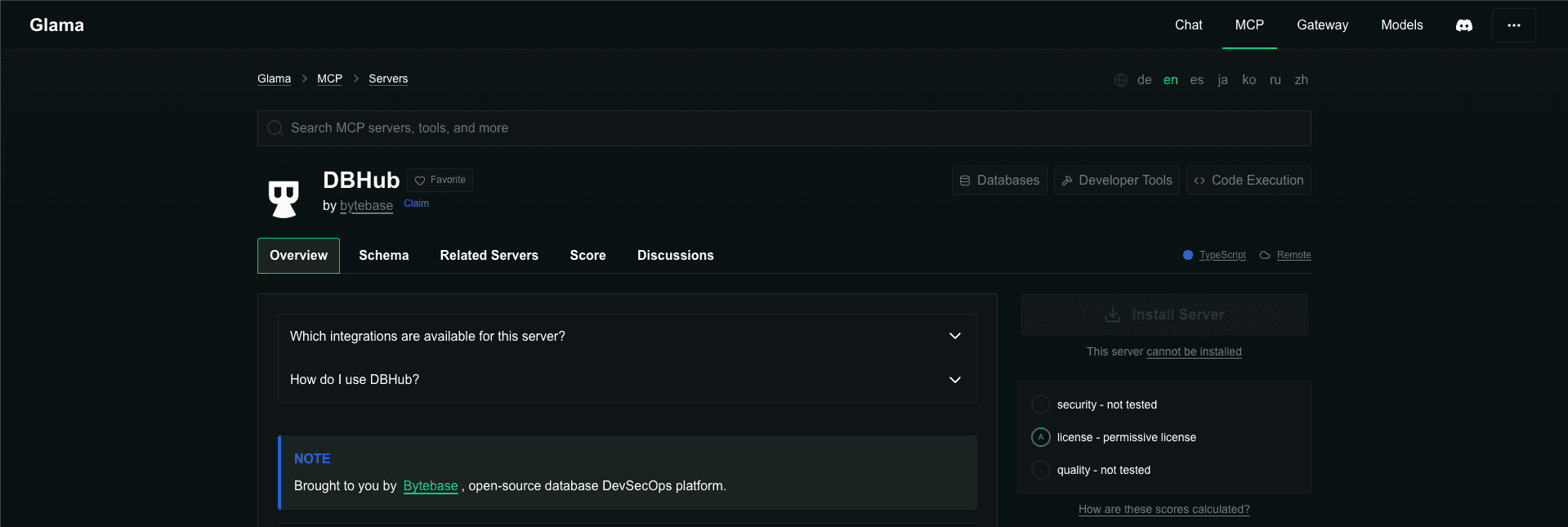
Similar to the GitHub MCP registry, Glama displays the Readme.md file of the MCP server. It also displays the schema for the MCP server, but apart from the server configuration section, DBHub’s schema page mostly contained placeholder text for capabilities, tools, and resources.
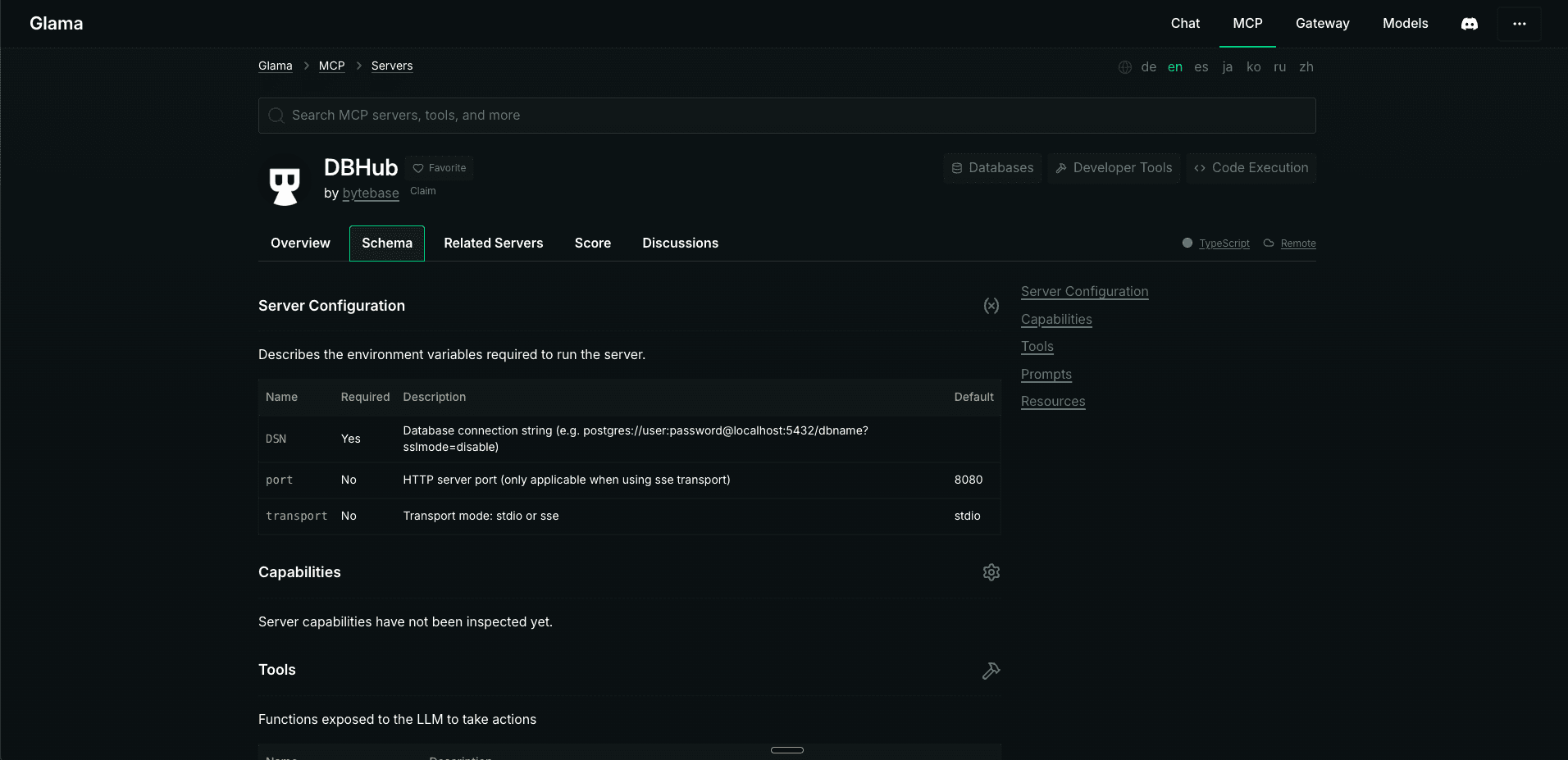
The info on the schema page wouldn’t help the developer install the MCP, and as a result, the developers will need to rely on the Readme file for installation steps.
Note, that the Glama details page for MCP server also has an Install Server button, but that was disabled for DBHub. Additionally, if enabled, the button will install the MCP to Glama’s own web-based agent, not to the agent of your choice.
MCP Market
Similar to other directories, MCP Market displays the server’s Readme page. It also has an FAQ section that mentions that DBHub can be installed via Docker or npm, but it doesn’t specify instructions for installing DBHub’s MCP server. Developers who discover the server in this directory will still need to rely on the server’s Readme for installation steps.
PulseMCP
PulseMCP displays the server.json file for the MCP server and recommends viewing the file to see installation instructions, configuration options, and usage guidelines. The server.json file contains the supported env variables, server identifier, and a link to the schema definition, but it's not immediately clear how to install the MCP server using this information. When I fed the entire JSON to Claude code, it tried installing the MCP server with Claude Desktop by editing the claude_desktop_config.json file, but when I ran the desktop app, it failed to load the MCP server. To install the MCP server, devs would need to click on Learn More from the directory’s detail page and go through the docs to install it with an agent of their choice.
Installing DBHub with Claude Code
To use the MCP, you first need to install DBHub with npm by executing the following command:
npm install -g @bytebase/dbhub@latestAfter installing the package, run the demo server by executing the following command:
dbhub --transport http --port 8080 --demoAlternatively, you can skip installation and use npx to start a demo server for testing:
npx @bytebase/dbhub@latest --transport http --port 8080 --demoOnce you have a demo server running, you can navigate to the code repository where you want to install the DBHub MCP server and fire up Claude CLI:
claudeNext, use the mcp add command to install the MCP server to the project:
claude mcp add --transport http dbhub http://localhost:8080/mcpThe command will add the MCP server to the project by creating or updating the project’s .claude/mcp.json file:
Added HTTP MCP server dbhub with URL: http://localhost:8080/mcp to local config
File modified: /Users/vivekmaskara/.claude.json [project: /Users/vivekmaskara/Documents/Projects.nosync/mdh/mdedit.ai]
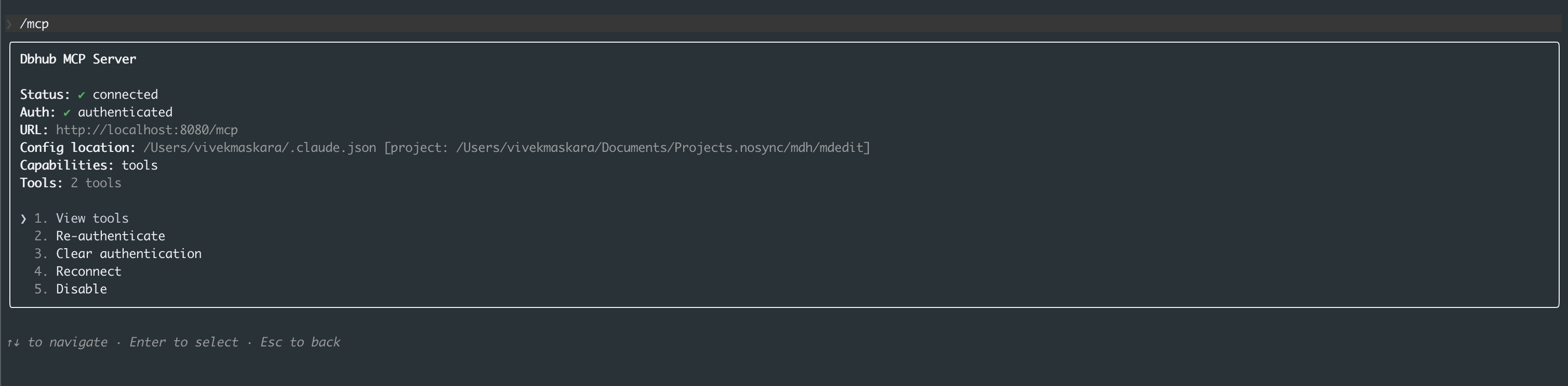
Once the MCP server is added, can run the /mcp command to verify the installation:
/mcpWhen you execute the command, it should show dbhub as one of the installed tools, and you can press Enter to view more details about the server.
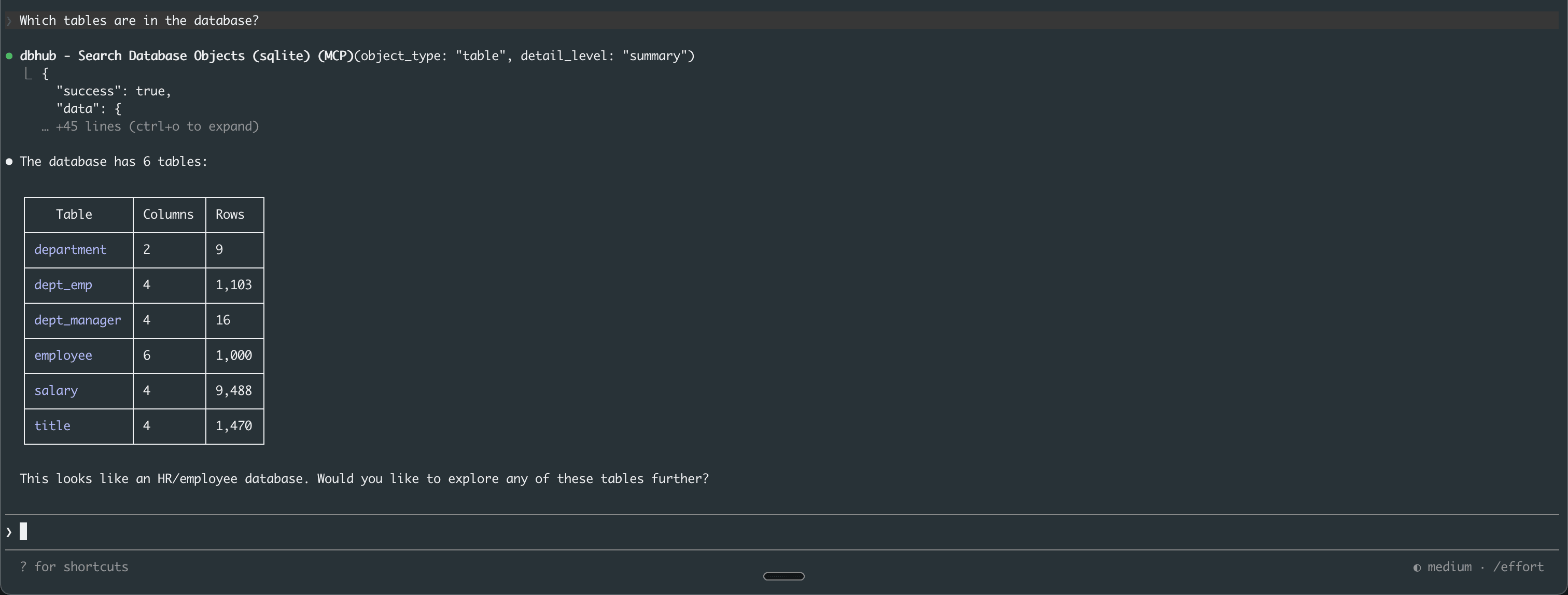
To test the setup, we asked "Which tables are in the database?". Claude Desktop successfully connected to the DBHub MCP server and retrieved a complete list of all tables in the demo database. The response identified six tables: “department”, “dept_emp”, “dept_manager”, “employee”, ”salary” and “title”.
The entire installation, from the initial search to the first successful query, took approximately an hour and 15 minutes, as we initially tried installing the MCP in Claude Desktop. Despite following the official docs, with Claude Desktop, DBHub’s MCP server kept crashing due to npx or node compatibility issues. Additionally, after any MCP configuration, Claude Desktop needs to be fully restarted, not just the conversation window. This isn't immediately obvious and can be confusing if the server connection fails. Claude Desktop finally suggested trying DBHub with Claude Code, and when we tried following the installation steps for Claude Code, we were able to get everything working within 5-10 minutes.
Finally, while the demo mode is good for testing, the documentation could provide more detailed information about which databases are included in the demo, how to switch to production databases, and which connection string formats are used for PostgreSQL, MySQL, SQL Server, and SQLite. If port 8080 is already in use by another application, the npx command will fail with a unique error message indicating which port is being used. In this case, users must manually select an alternative port using a parameter such as port 3000.
Feature | GitHub MCP Registry | Glama | PulseMCP | MCP Market |
|---|---|---|---|---|
Install method | VS Code deep link | Install button (Glama agent only) | server.json reference | README display |
Claude Code support | Not directly; requires README navigation | Not directly; requires README navigation | server.json misled Claude Code into wrong config in our test | Not directly; requires README navigation |
Install guidance | README with link to external install guide | README plus schema page (mostly a placeholder) | server.json with env variables and schema link | README plus FAQ mentioning Docker/npm |
Our test was only able to complete a full end-to-end install from one directory (GitHub MCP Registry), and even that took 75 minutes before a failed Claude Desktop attempt led to a working Claude Code setup in 10. Glama’s install button was disabled for DBHub and only targets its own agent, and PulseMCP’s server.json appears to have misled Claude Code into a broken configuration.
None of these directories function as installation tools for anything beyond their preferred client, if that. Expect to end up in the server’s documentation regardless of where you discover it.
Community and ecosystem
The vitality of an MCP directory depends heavily on its community. How many people are actively involved? How easy is it to submit new servers? Are there support channels? And how vibrant is the overall environment?
GitHub MCP Registry
The registry code is publicly developed on GitHub and now has over 6,200 stars, 73 watchers, and more than 550 forks. For discussions and questions, the registry documentation refers to the official MCP Discord server.
Glama
This directory positions itself as a platform for "Search, compare, and connect to thousands of MCP servers." Currently, 14,274 servers are listed (as of January 9, 2026, last updated 11:08 AM). New servers can be submitted via "Add Server" in the directory. For discussion and support, Glama refers users to its own community channels, particularly Discord and Reddit.
PulseMCP
This directory describes itself as "Everything MCP: servers, clients, use cases, tools, and newsletters." It lists over 7,600 servers and maintains a blog and a weekly newsletter. There is a submission page ("Submit") where new servers can be added via a form. An editorial curation process chooses "Top Picks." PulseMCP's guides refer to the MCP Discord server and advise users to contact the community with any problems. PulseMCP also publishes tutorials/articles on its website, so community interaction mainly takes place via website content, the newsletter, and Discord.
MCP Market
This portal aggregates more than 19,000 servers, presents star ratings and rankings, but makes little mention of community forums. Adding new servers appears to be done primarily via a submission form. The review process is opaque, and there's no clear public statement about its duration. There are no dedicated forums or Discord servers. It seems more like a website workflow plus any linked project pages (e.g., GitHub), if available.
Side-by-side comparison table
The following matrix provides a quick-reference comparison of the four major MCP directories. Use this table to identify which platform best matches your specific needs and priorities:
Criteria | GitHub MCP Registry | Glama | PulseMCP | MCP Market |
|---|---|---|---|---|
Number of Servers (Jan 2026) | ~65 | 14,000+ | 7,640+ | 19,000+ |
Curation Approach | Open | Curated | Open | Open |
Security Verification | None | Comprehensive | Basic | None |
Search Quality | Basic | Excellent | Good | Good |
One-Click Install | Yes | Yes | No | Yes (with compatible clients) |
IDE Integration | Per-server basis | Not specified | Not specified | Not specified |
User Reviews/Ratings | Yes (GitHub star ratings) | Quality indicators | Visitor metrics | Yes (GitHub star ratings) |
Update Frequency | No recency signals | High (timestamped) | High (timestamped) | High (timestamped) |
Community Size | 6,200+ stars, 73 watchers, 550+ forks | Discord & Reddit community | Discord, newsletter | Minimal |
Best For | Official reference, standards compliance | Production deployments, security-conscious teams | Rapid prototyping, popular server discovery | Use-case exploration, comprehensive browsing |
Fragmentation and security challenges
After testing four directories across six criteria, the pattern is consistent: each platform optimizes for a different stage of the developer workflow, and none covers the full end-to-end lifecycle.
The GitHub MCP Registry is the reference canonically
Glama is the only directory doing meaningful security and quality assessments
PulseMCP offers the broadest discovery surface
MCP Market gives you contextual detail for evaluating fit
As far as best practices with what we have today, consider using two or three in combination: start with PulseMCP or MCP Market to find candidates, cross-reference against Glama’s scorecards for production fit, and check the official registry (if it’s on there) for standards adherence.
But the bigger challenge isn’t finding MCP servers. Just to go Reddit’s /r/mcp sub, and you’ll have a dozen dropped on your head before you can even ask. The real problem underlying all these directories is controlling what happens after you connect them.
Every server in this comparison grants AI agents access to sensitive systems, like databases or code repositories. The directories we discussed may tell you whether a server is well-maintained or vulnerability-free, but it’s not going to address what an agent is allowed to do once it’s authenticated, which tools it can invoke, or whether a human needs to approve potentially risky actions.
Simplifying MCP security with Descope
Finding a server from a directory is easy. Installing, based on our experience, maybe requires a little metaknowledge or a dedicated agent. But actually running it in production? For that, you need identity infrastructure that none of these MCP servers ship with.
The Descope Agentic Identity Hub is a dedicated identity provider for AI agents and MCP servers that enables MCP developers to easily connect their internal and external-facing MCP servers with AI agents.
Securely expose MCP servers to MCP clients with OAuth 2.1 and PKCE.
Use a dedicated Python MCP SDK to add auth to any MCP server built in Python.
Validate access to MCP servers with user auth and consent management.
Support context-aware MCP client registration through DCR and CIMD with agent risk assessment flows.
Assign granular per-agent and per-tool scopes to MCP clients.
Manage, monitor, and delete MCP clients connected to MCP servers.
With Descope, access is granted (or denied) at the function level, not API-wide, and policies adapt without touching your codebase. See how Descope secures agentic workflows, or start building the MCP server flow your project needs with a Free Forever account.