
Table of Contents
Don't have the time to read the entire post? Our human writers will be sad, but we understand. Summarize the post with your preferred LLM here instead.
In 2026, WordPress is still one of the most widely used and most important digital ecosystems for developers. As such, secure login and account management through strong approaches like multi-factor authentication (MFA) and single sign-on (SSO) are critical.
Descope offers a pre-built plugin for the WordPress content management system, so WordPress sites of all sizes can utilize secure, frictionless, enterprise-grade authentication capabilities through their Descope Project. Understanding the ins and outs of our plugin unlocks better security and user experience (UX), all of which is easily accessible in low-code workflows.
To help you understand and use our plugin for WordPress, this guide will cover:
Why secure auth is important on WordPress
How the Descope plugin for WordPress works
How to add social login MFA, SSO, and more to WordPress
To learn more about how the plugin works and how you can benefit from it, keep reading. We'll explore why secure authentication is crucial for WordPress sites, dive deeper into the plugin's capabilities, and walk you through practical use cases for adding customer authentication and SSO.
Why WordPress needs secure auth
After nearly two decades in the marketplace, WordPress remains one of the most popular tools for creating and maintaining websites and storefronts. According to W3Techs and Barn2, WordPress powers nearly half (42.6%–43.5%) of all websites. This includes many high-traffic and notable sites like The TED Blog, Reuters, The New Yorker, and Vogue. Its flexibility, ease of use, and scalability have made it the go-to platform for bloggers, businesses, and developers alike.
In a nutshell: The world runs on WordPress. That’s why it needs secure auth.
However, WordPress sites, especially those using default or outdated authentication methods, are vulnerable to common yet dangerous security threats like brute force attacks, account takeover, and phishing. This is why it’s critical to prioritize secure, user-friendly authentication.
This issue becomes especially apparent with scale. As WordPress sites grow, there are more potential points of failure. More user accounts equate to more sensitive information that, if stolen or otherwise hijacked, could lead to serious security incidents for users or the site.
SSO is one way to address growing credential risks at scale, but it can be challenging for developers without a thorough knowledge of identity provider (IdP) dynamics. And, if not implemented carefully, it can lead to further security risks or added user frictions.
The Descope WordPress Plugin enhances auth security with minimal UX interruption.
Introducing the Descope WordPress Plugin
The Descope WordPress Plugin provides a comprehensive suite of authentication tools designed to enhance security and user experience—the benefits of stronger auth without a UX headache.
Here’s what you can achieve with the Descope plugin for WordPress:
SAML or OIDC SSO capabilities for a unified experience across apps
Fast and easy implementation of passwordless auth methods
Phishing-resistant MFA options like passkeys for strong security
Customizable authentication flows to match your users and brand
Protection against account takeover and other credential-based attacks
You can find detailed instructions for the plugin in our documentation (and below), but setup is straightforward. Once installed, any admin can manage and customize all aspects of your auth flows directly from the Descope Console, irrespective of their coding and technological literacy.
Plugin setup overview
Descope makes installing a secure auth plugin for WordPress easy. Similarly, our platform transforms tasks like configuring MFA for WordPress or connecting to your Identity Provider (IdP) from potential points of failure into strengths, streamlining both security and UX simultaneously.
To improve security and UX on your WordPress site, follow these simple steps:
Install the plugin – Go to your WordPress dashboard, choose Plugins > Add New Plugin, and search for "Descope." Click “Install” and then “Activate” to get the plugin ready.
Configure your authentication – Use the Descope Console to configure as many of your preferred authentication methods (e.g., passwordless, MFA, SSO) as you want to install.
Add your project details – Add project details in WordPress’s “Descope Settings” tab.
Embed login flows – Add Descope’s login flows to your WordPress site using simple shortcodes. See below for more specific guidance on how to use which ones where.
After these steps, your WordPress site will have enterprise-grade auth up and running!
As an added precaution, consider configuring your SSO before enabling public login. Aligning your IdP configuration upfront prevents user duplication and identity fragmentation, which are persistent threats that can impact even a secure MFA/SSO setup.
In the next sections, we will use a sample WordPress site to show just how easily you can add features like social login MFA, SAML-based SSO, and protections using our plugin.
Use case: Social login MFA for WordPress
MFA is a tried and true security method, and passwordless MFA options like social login can further reduce operational overhead by leveraging users’ existing, trusted account assets.
For websites focused on customer experience, providing social login options is a great way to reduce the cognitive load on users. The Descope plugin supports social login from platforms like Google, Microsoft, Facebook, and Apple, allowing users to log in to your site with their existing accounts on these platforms. This reduces friction and offers a user-friendly, familiar experience.
Beyond security, the positive UX of social login can be a boon to conversion rates.
All you need to do to get started is add the shortcode with your Descope Flow ID to the WordPress page where you would like your users to log in. Here’s how that can look:
![WordPress admin dashboard showing the login page in edit mode, with a Descope shortcode [descope_wc flow_id="sign-up-or-in"] inserted in the content area to embed a social login and multi-factor authentication flow.](/_next/image?url=https%3A%2F%2Fimages.ctfassets.net%2Fxqb1f63q68s1%2F4kdBw8S2upgslouwK1rQ4O%2Fe95102175432510de8e4116f02d3082b%2FWP_Login_Page_Shortcode__1_.png&w=3840&q=75)
This shortcode runs the “Sign Up Or In” flow, as follows:
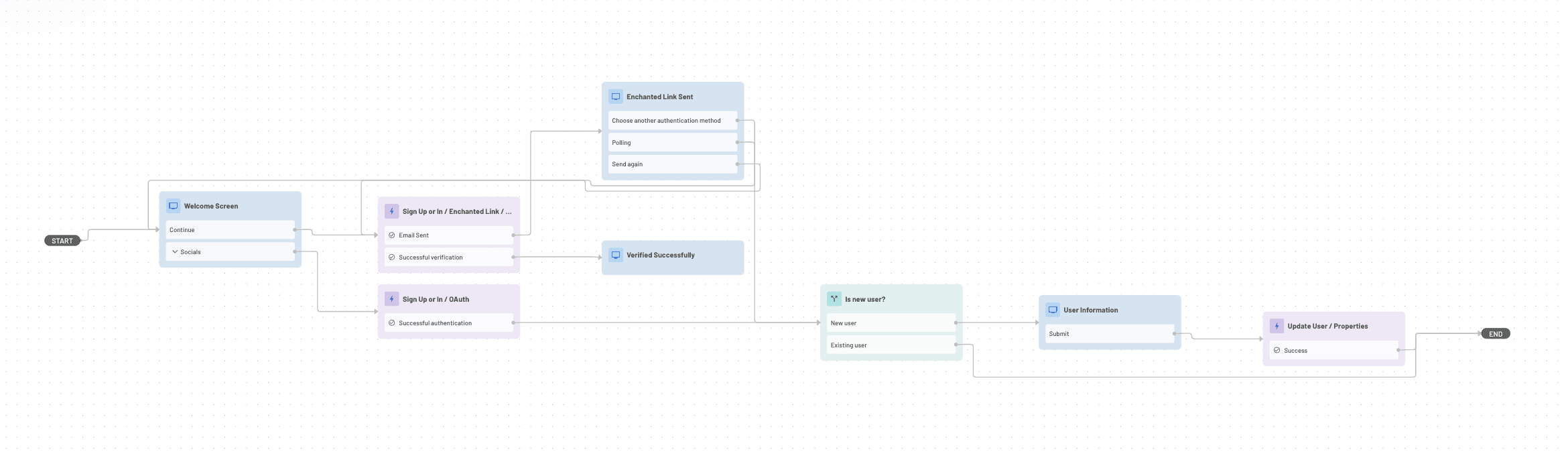
This flow shows end users a natively embedded login form aligned with your brand, like:
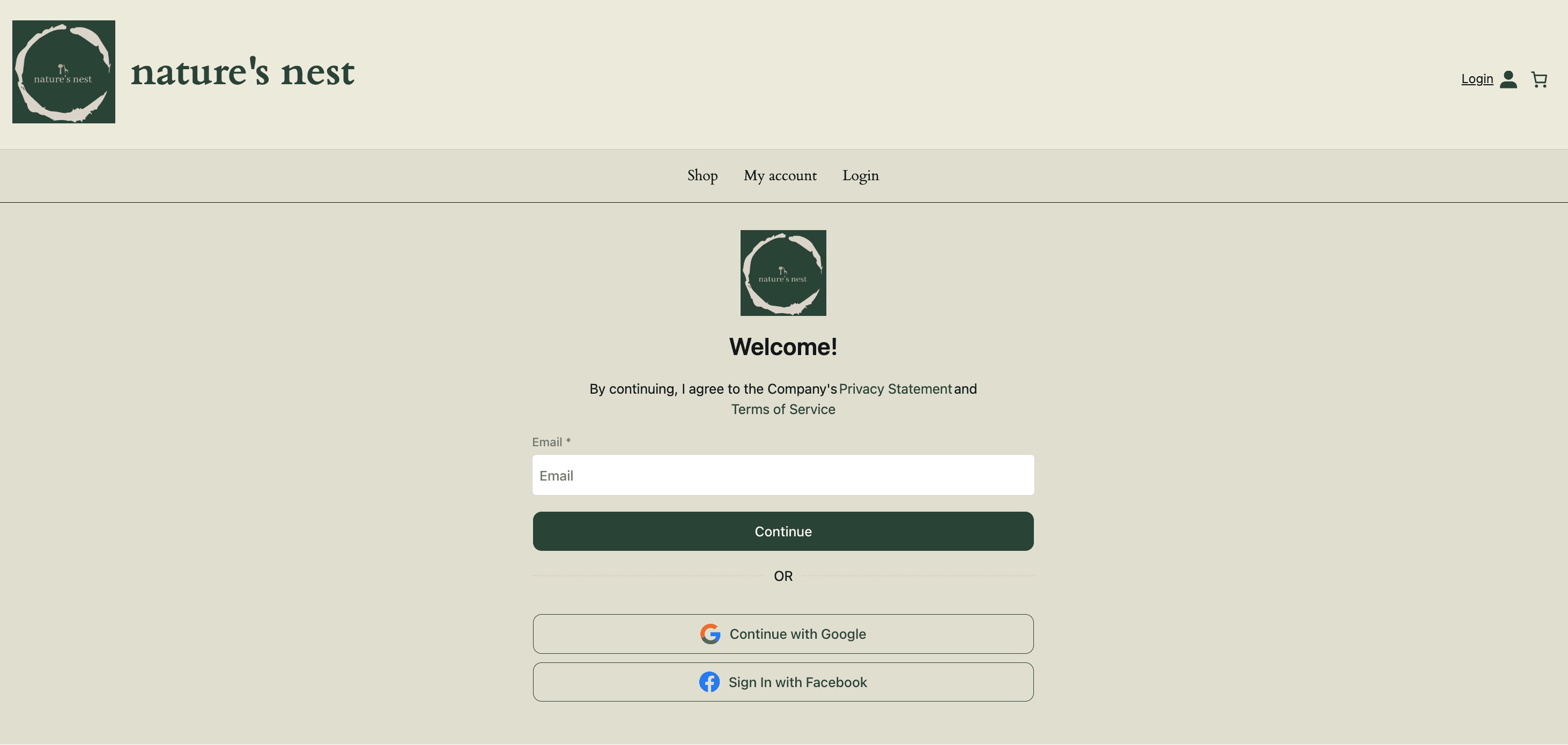
In addition to social login, Descope supports other passwordless auth methods, including magic links, one-time passwords (OTP), passkeys, and SAML SSO (see below). You can easily configure multiple methods within the Descope Console, giving your users flexibility in how they log in.
Use case: SAML single sign-on for WordPress
Organizations with multiple web presences or integrated systems often require SSO to improve user experience and streamline access management. SSO, particularly using SAML, helps secure a site while improving UX by reducing password reset overhead, which can improve retention.
For example, SaaS companies often have multiple digital interfaces for clients in different industries, but one WordPress for documentation or other needs. An enterprise customer portal provider might host its corporate site on a different platform but maintain a WordPress blog.
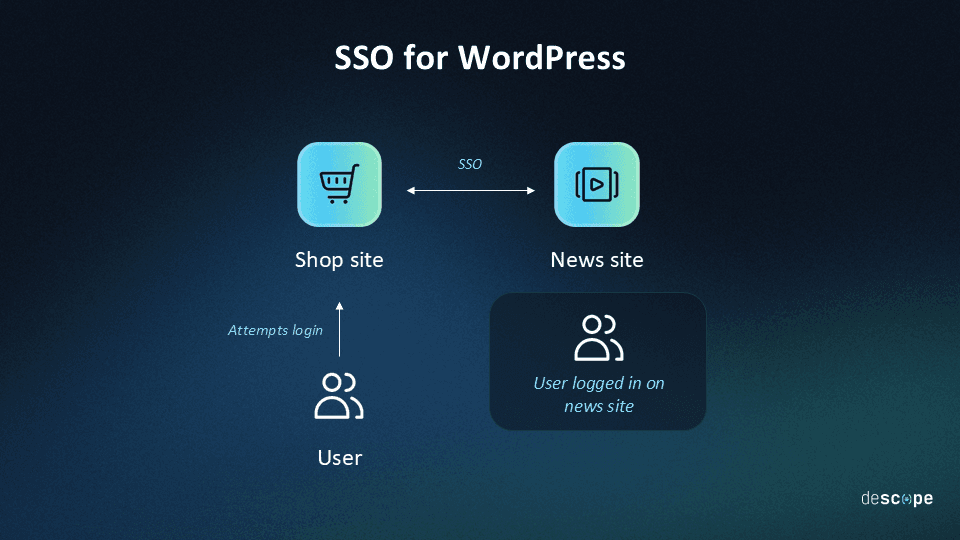
With SAML SSO from Descope, login for various sites can be integrated so that your users only need to authenticate once to gain access to both their targeted site and your WordPress site.
Here’s how login options for WordPress stack up in terms of auth methods supported:
| Default WordPress Login (“Native”) | Basic (non-Descope) WordPress Plugin | The Descope WordPress Plugin |
|---|---|---|---|
Passwords | Yes | Yes | Yes |
SAML/OIDC | No | Sometimes | Yes |
MFA | No | Sometimes | Yes |
Passwordless | No | Sometimes | Yes |
Multi-suite SSO | No | Sometimes | Yes |
To set up SAML SSO on your WordPress site, you must first set up an SSO application in your Descope Console. This is how you define your Identity Provider. Then, you can set up connection details in the Descope Configuration page of your WordPress Admin Console, as shown below:
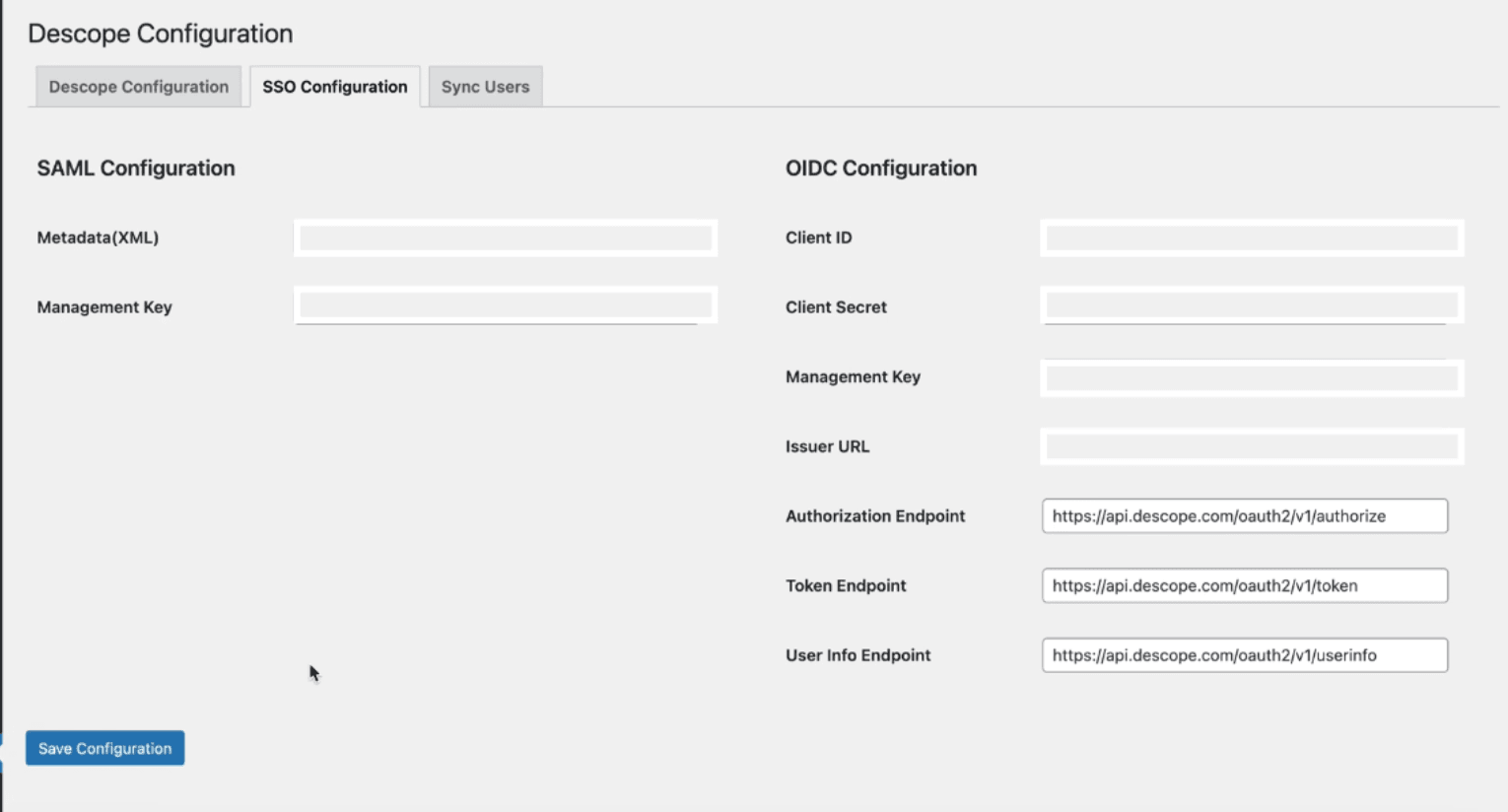
Then, to add SSO, add the saml_login_form shortcode to your main page, as follows:

If your user is logged in to another application with the same Identity Provider as your WordPress site, they will be able to access the WordPress site without having to enter their credentials again. Moreover, if the user is already logged in to the WordPress site, they will be able to access the other application without having to re-enter their credentials there.
Use case: Protect WordPress pages from unauthenticated users
Not all pages on a WordPress site should be publicly accessible. Some content—premium articles, member-only resources, internal documentation, or gated community forums—should only be available to authenticated users. With the Descope WordPress Plugin, you can restrict access to pages based on authentication status using the [protected_page] shortcode.
When the [protected_page] shortcode is added to a page, only authenticated users will be able to access the content within it. Unauthenticated users will be redirected to a specified redirect URL. For example, to redirect unauthenticated users to your login page, simply add [protected_page redirect_page_path="<login-page-path>"] to your page.
Why choose Descope as your SSO plugin for WordPress?
In 2026, the world still runs on WordPress. But too often, sites are relying solely on WordPress’s default login options, which can be less than ideal. Adding more advanced auth methods like MFA and SSO helps to improve the security of your WordPress site without compromising UX.
Many WordPress plugins offer one or two authentication features, but Descope consolidates several capabilities into one powerful, easy-to-use tool. Descope provides a complete solution that can be dropped directly onto your WordPress site. It’s designed to be flexible and customizable for developers, yet simple enough for non-technical users to manage.
Sign up for a Free Forever account with Descope and download the Descope WordPress Plugin to start building secure, scalable auth flows today. Have questions? Book time with our experts