
Table of Contents
Don't have the time to read the entire post? Our human writers will be sad, but we understand. Summarize the post with your preferred LLM here instead.
Azure AI Foundry is Microsoft's managed platform for building and operating agents, with a session-isolated runtime and publishing to Teams and Microsoft 365 Copilot. Microsoft Entra Agent ID gives every Foundry agent a first-class identity in your directory, automatically registered, governed by Conditional Access, and extendable to third-party agents through federation. It's the strongest native agent identity story of any cloud.
But look at what that identity governs. Entra's authorization is granted ahead of time: an admin consents an app to a scope or assigns an app role, and every token after that carries what was granted. Whether a specific user invoking a specific agent should hold a scope on a specific request is a question your API answers after the token exists. And Entra has no CIBA grant for out-of-band approval and no Dynamic Client Registration for self-registering MCP clients.
Bottom line: Entra Agent ID tells you what your agents are and what they've been granted. Deciding per request what each agent may do, for whom, is the layer you still own.
Descope provides that layer: cloud-neutral agent identity management, issuance-time policy, a credential vault that works across every runtime, and an authorization server that covers what Entra External ID doesn't.
What Descope adds to Azure AI Foundry
The Descope Agentic Identity Hub provides several capabilities (Policies, Connections, cloud-neutral agent directory) that address specific gaps in AI Foundry’s native identity capabilities.
Cloud-neutral agent directory
Entra Agent ID has a powerful directory: every Foundry and Copilot Studio agent registers automatically, Conditional Access applies to agents like people, and third-party agents can federate in. What the directory entry carries is the question. An Entra entry governs directory standing and granted access: whether the agent may sign in, what it's been consented or assigned. It does not evaluate, per request, whether this user invoking this agent should yield a token carrying this scope against your API.
The Descope Agentic Identity Hub is a single directory for every agent in your fleet: the Foundry agent, the Bedrock AgentCore agent, the Vertex AI agent, the LangGraph prototype. Each entry carries issuance-time policy and a credential vault, and the integration point with any runtime is standard OAuth.
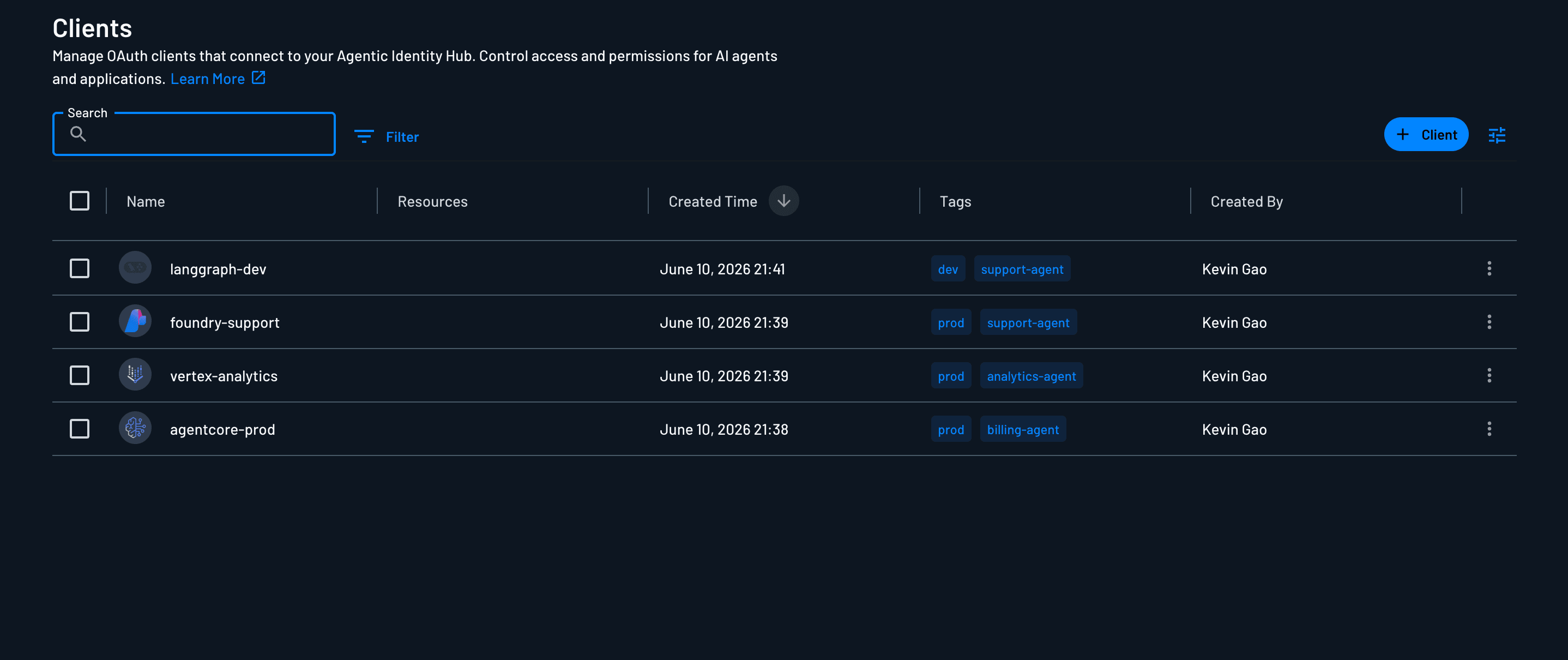
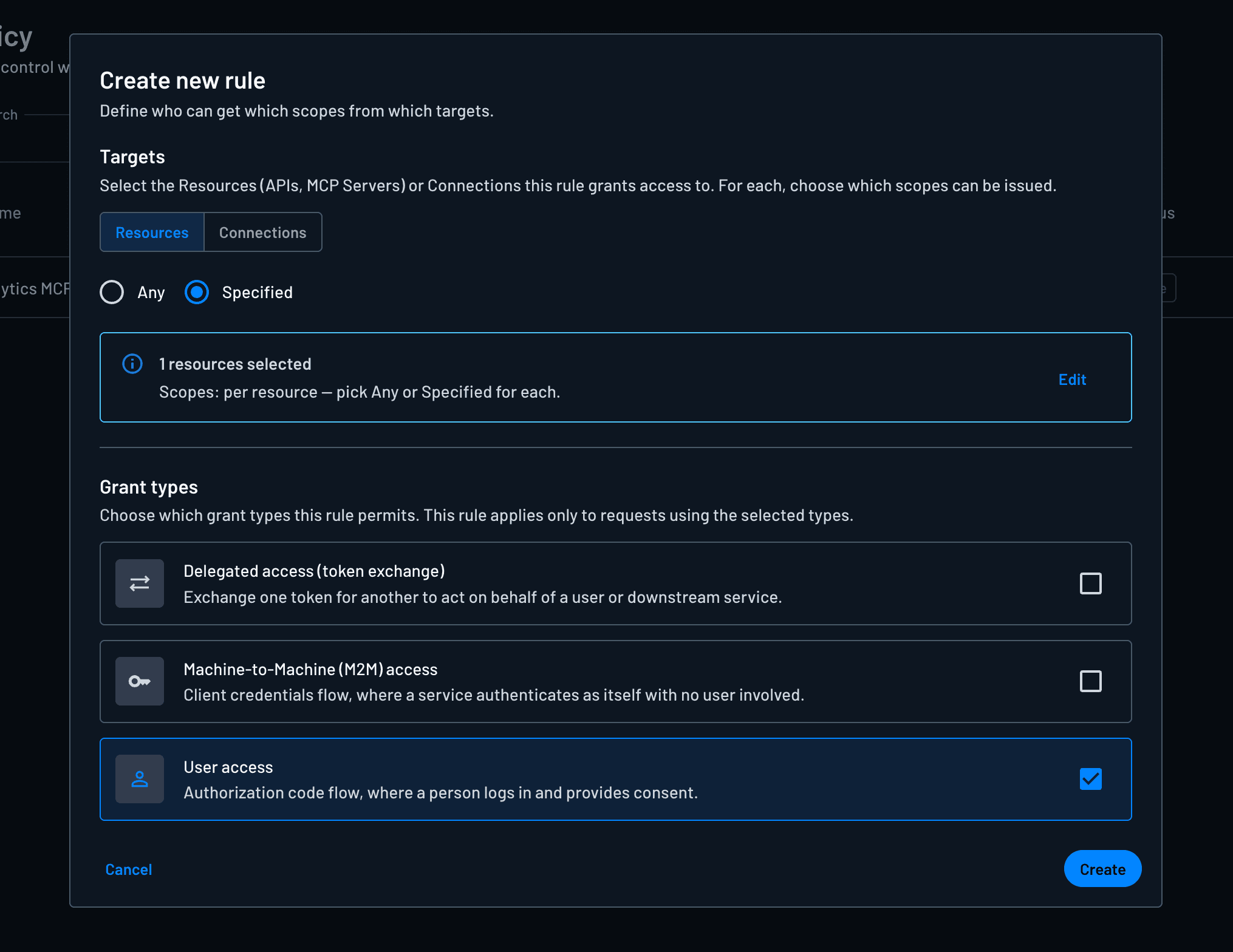
Descope Policies handle agent token requests by evaluating the directory entry, the invoking user’s roles and tenant, and the requested scopes. Policies decide token contents at issuance, before the token exists. An agent can’t escalate by asking, and users can’t delegate what they don’t hold. The unit of permission is scope, not the directory group; your Entra groups feed the decision as inputs rather than acting as grants. One model pushes per-user enforcement into every API you own; the other centralizes it where the token is born.
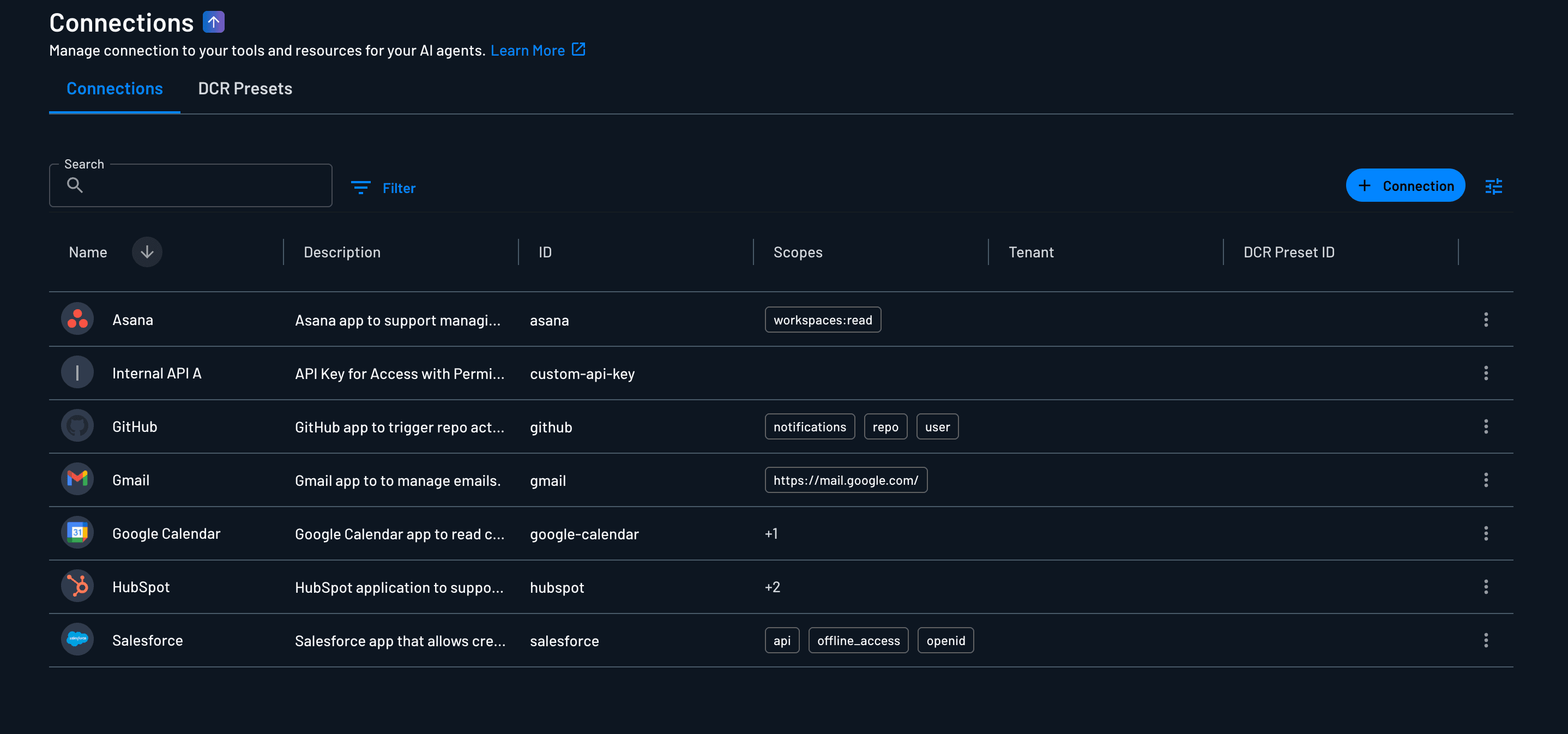
One credential manager
Descope Connections vaults OAuth tokens for third-party services and static API keys for internal systems. The Entra Agent ID integration gets your agent Entra tokens for Microsoft Graph and Entra-registered APIs, which is exactly what it's for; it does not vault the agent's Salesforce token or internal API keys.
Connections does this, for any agent in the fleet, through the same token exchange and governed by the same policy. The agent retrieves a scoped credential at call time. Nothing long-lived sits in any agent's environment, and the raw secret never enters a model's context.
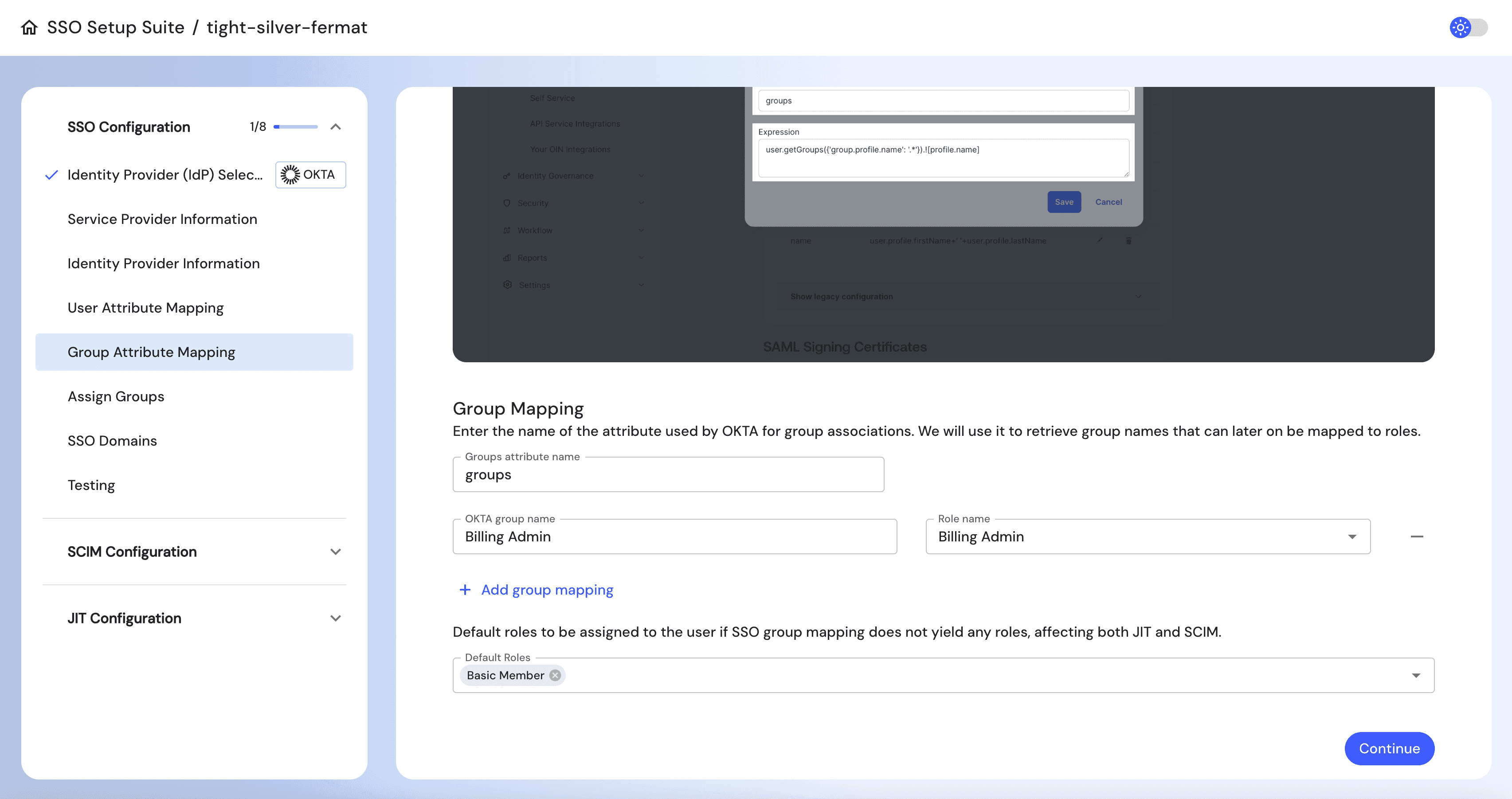
Descope also handles authentication for users: federate Entra through SSO, and agent access dies with the directory account when someone leaves. Passkeys, magic links, one-time passwords (OTP), and social login are available for customer-facing agents. The agent Security Token Service (STS) issues short-lived, delegated tokens carrying user context without user credentials, and Descope Flows handle the consent screens, step-up multi-factor authentication (MFA), and CIBA out-of-band approvals for headless agents.
Resource authorization beyond Entra External ID
Your MCP servers and backend APIs need an authorization server, and for customer- and external-facing auth Microsoft's answer is Entra External ID. It has no CIBA grant, so no out-of-band approval primitive for headless agents. It has no Dynamic Client Registration, so every MCP client reaching your server is a manual app registration. And its policy surface governs sign-ins, not per-user, per-agent scope ceilings on your application's tokens.
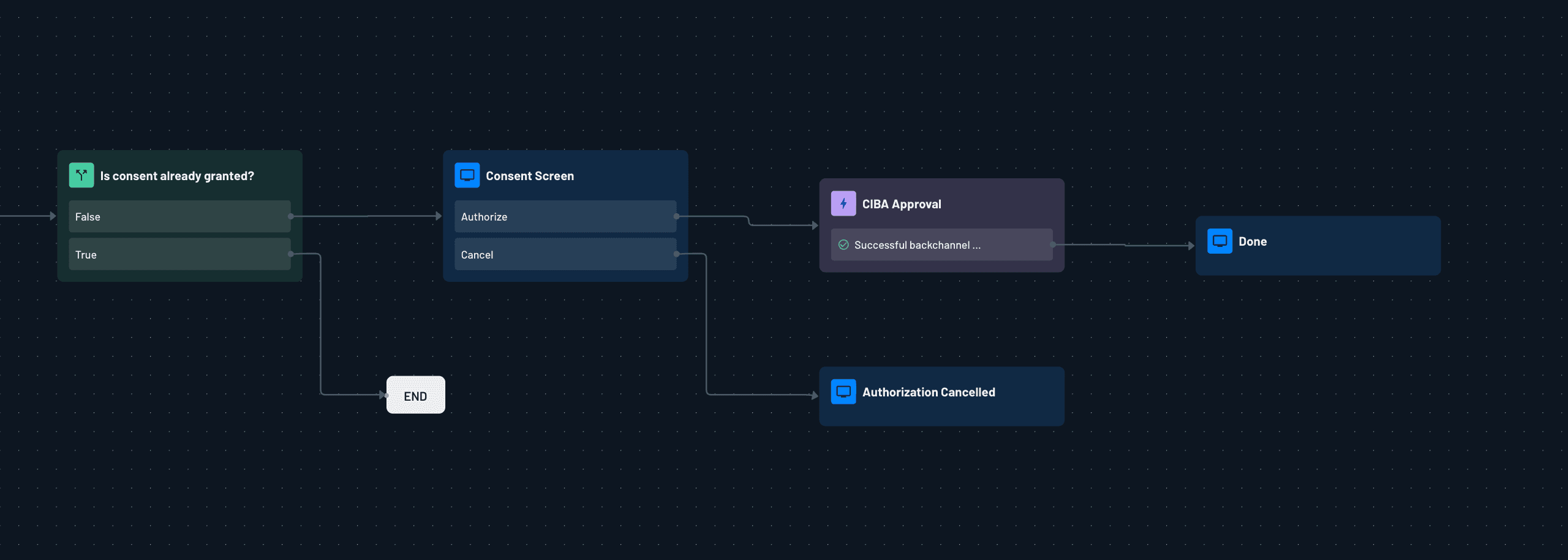
Descope MCP Auth implements the MCP authorization spec with OAuth 2.1, including DCR and Client ID Metadata Documents (CIMD), which allows off-the-shelf clients like Claude Desktop to register themselves. The same project protects backend APIs with resource-level access control, CIBA for async approval, and per-tenant SSO that customers configure themselves.
Why use both Entra Agent ID and Descope
Descope augments the Microsoft stack by adding per-request authorization, fleet-wide credential management, and resource auth that External ID doesn't cover. Entra Agent ID keeps doing what it alone can do.
There are a couple of things no external platform can replicate. Only Microsoft can register an agent in your Entra directory the moment Foundry creates it, because Microsoft runs the platform creating it. The agent identity blueprint supports federated identity credentials with managed identities, so an agent authenticating to Azure resources holds no client secret anywhere: no secret-zero problem inside Azure. And only Entra issues the tokens that get an agent into Azure and Microsoft 365; if your agent's tools are SharePoint and Graph, that path is Entra end to end.
In a model using both Descope and Entra, Entra Agent ID is the directory of what your agents are and what they've been granted in the Microsoft world. Descope is the directory of what your agents may do per request, decided at issuance, plus the vault for every credential Entra doesn't issue. The agent keeps its Entra identity for everything Microsoft and carries Descope-issued tokens for everything yours.
The same division applies to auditing. Entra's sign-in and audit logs cover every agent sign-in with Conditional Access outcomes attached, the same governance trail your human identities get; that layer stays. What they can't record is the decision about token contents, because scopes are granted at consent and assignment time and stamped onto every token afterwards. So, the per-user judgment (can this analyst, through this agent, write to the CRM) happens downstream in your API, outside any identity audit trail.
Descope re-makes that decision at every issuance and logs it with its inputs (user, roles, tenant, agent, scopes granted and refused), so a denied scope is a structured event rather than an absence in your API logs, and a CIBA approval links the approver and the action to the token it produced, in one schema across the whole fleet.
Integrating Descope and Azure AI Foundry
The full flow has three phases: the user authenticates and consents in the browser, the app invokes the agent and forwards the resulting token to the agent's tools, and the tools fetch scoped credentials as they work. We'll take them one at a time.
Getting started
To get started building with Descope and Azure AI Foundry:
Create a Descope project. Sign up and copy your Project ID from Settings > Project.
Connect Microsoft Entra as your IdP. In the console, select your tenant under Tenants, then navigate to the SSO Setup Suite Configurations and generate a link for the SSO Setup Suite. Go to that link, and follow the setup guide for Entra within the SSO Setup Suite to configure SSO and the user and group attributes so IdP groups map to Descope roles.
Create an Agentic Client. Go to Clients, click + Add Client, and name it. Open the app's Connection Information section and copy three system-generated values you'll use below: Client ID, Client Secret, and Discovery URL. You can tag each by runtime if you want to as well.
Define your Resources. Go to Resources, click + Resource, and choose API or MCP Server. Set the Resource identifier (for example
https://crm.internal.example.com), define its OAuth scopes (crm:read,crm:write), and use Role association to map each scope to the Descope roles allowed to hold it. This mapping is the policy the control plane enforces at token issuance.Configure Connections for third-party and internal services. Go to Connections, click + Connections, and pick from the library (for example Google Calendar) or create a custom connection for an internal API key. Note the Connection ID in Connection Details; it's set at creation and not editable afterward, and it's the
app_idyour agent code passes when fetching credentials.Front your MCP servers with Descope MCP Auth and connect them to your Foundry agent as MCP tools (steps below).
Forward the user's Descope access token on each agent run as the MCP tool's Authorization header, and replace any hardcoded credentials in tool implementations with Connections token fetching or Resource token exchange (code below).
The docs for MCP Auth, Resources, and Connections cover this configuration in more depth.
User authentication and agent invocation
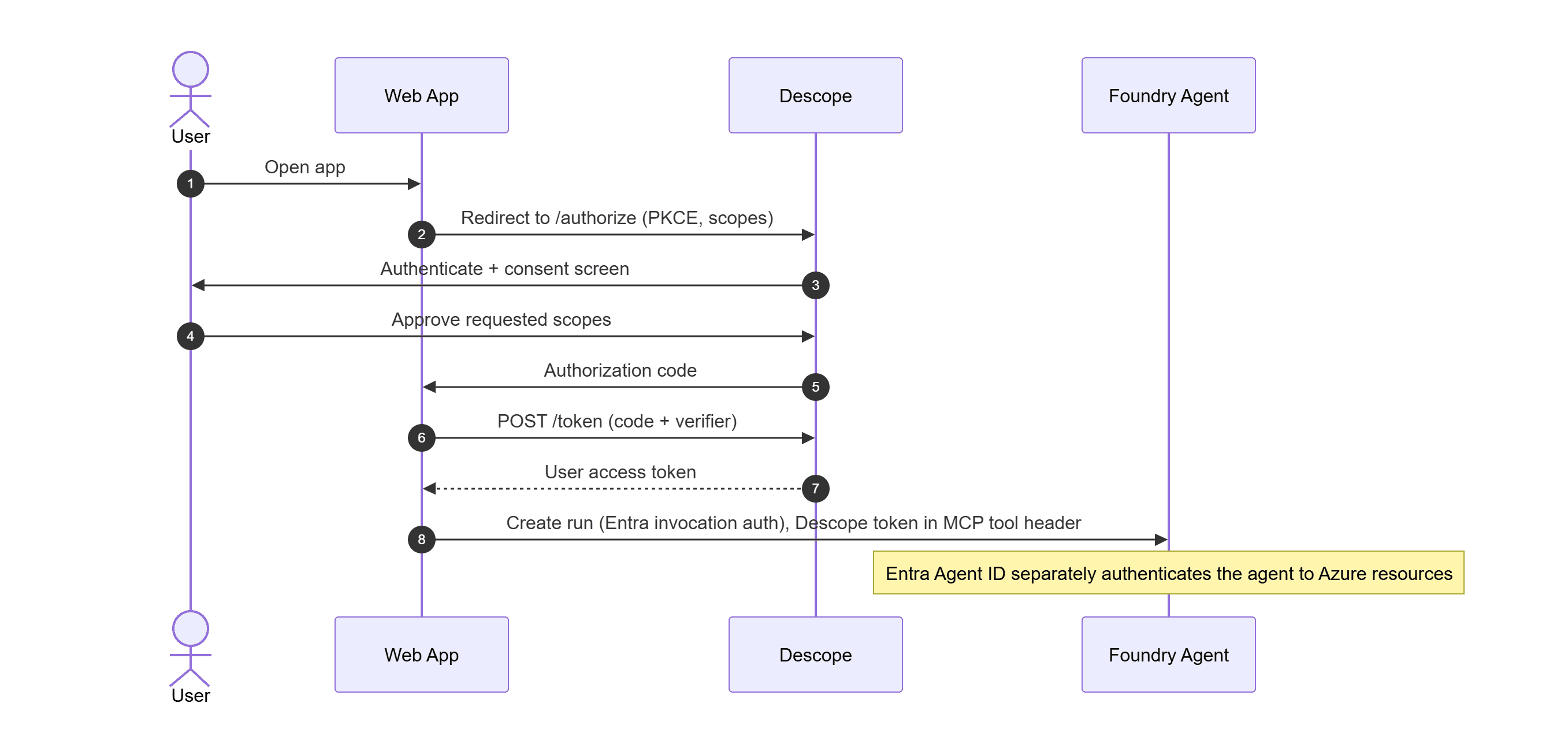
Your app runs a standard OIDC authorization code flow with Descope as the provider. The user authenticates and consents in the browser before invocation; the Using Inbound Apps guide walks through the authorization code flow step by step, with the Authorization Server reference covering the endpoints. For browserless clients, the device code flow fills the same role. CIBA handles scenarios where the agent needs mid-session approval that no prior consent covers.
The Foundry-specific part is what you do with the resulting access token. Foundry's own invocation auth stays Entra (your app authenticates to the project endpoint with Azure credentials), and the Descope token rides along to the agent's MCP tools as a per-run Authorization header.
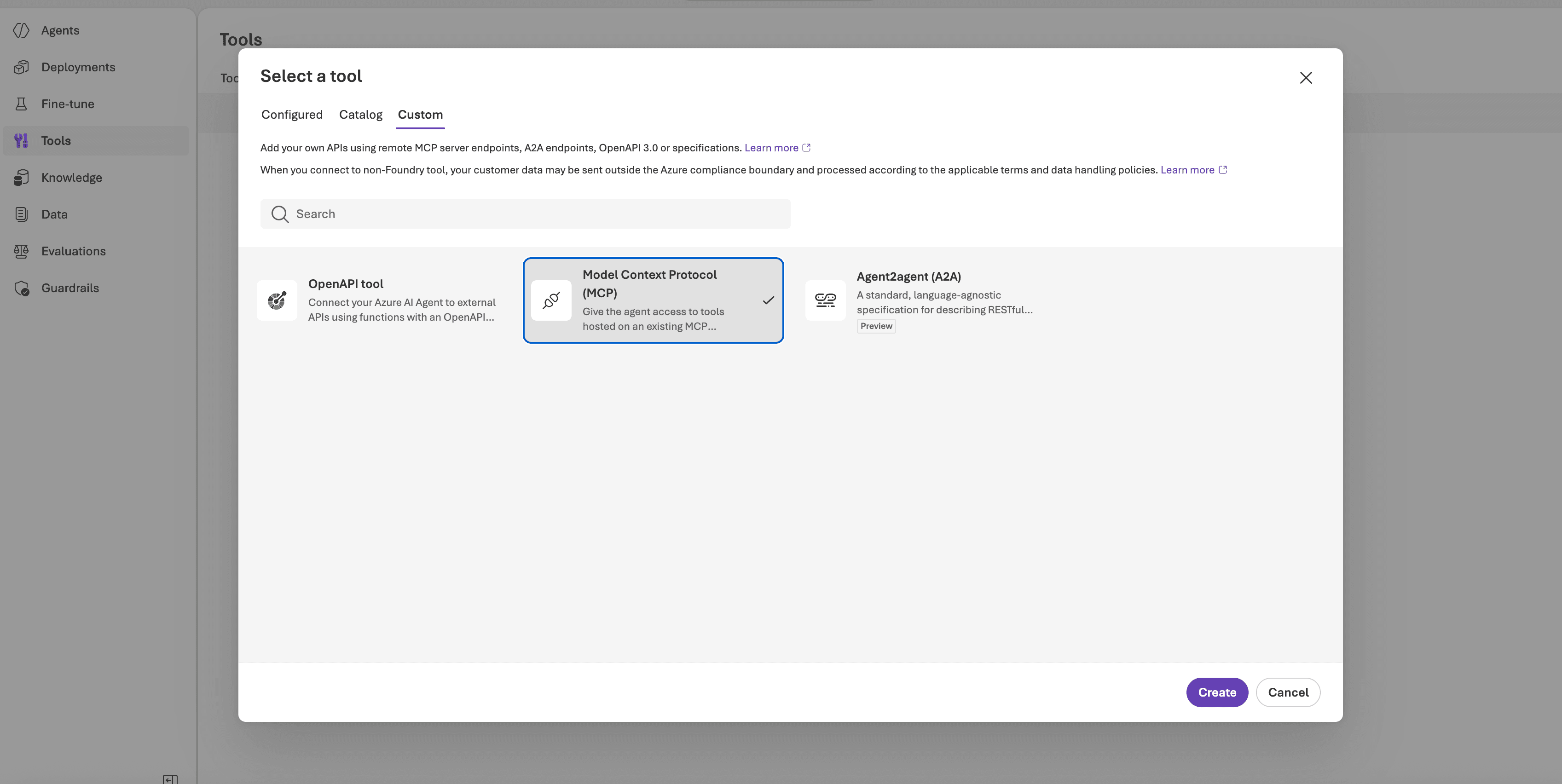
First, connect your Descope-protected MCP server as a tool in the Foundry portal:
Go to ai.azure.com and open your project.
Select Agents in the left navigation, then select your agent (or create one).
In the agent's Setup pane, scroll to Actions and click + Add.
Choose Model Context Protocol as the action type.
Enter a Name for the server (for example
internal_tools) and your MCP server's URL, then save. In the SDK and REST API, this name field corresponds to theserver_labelparameter.
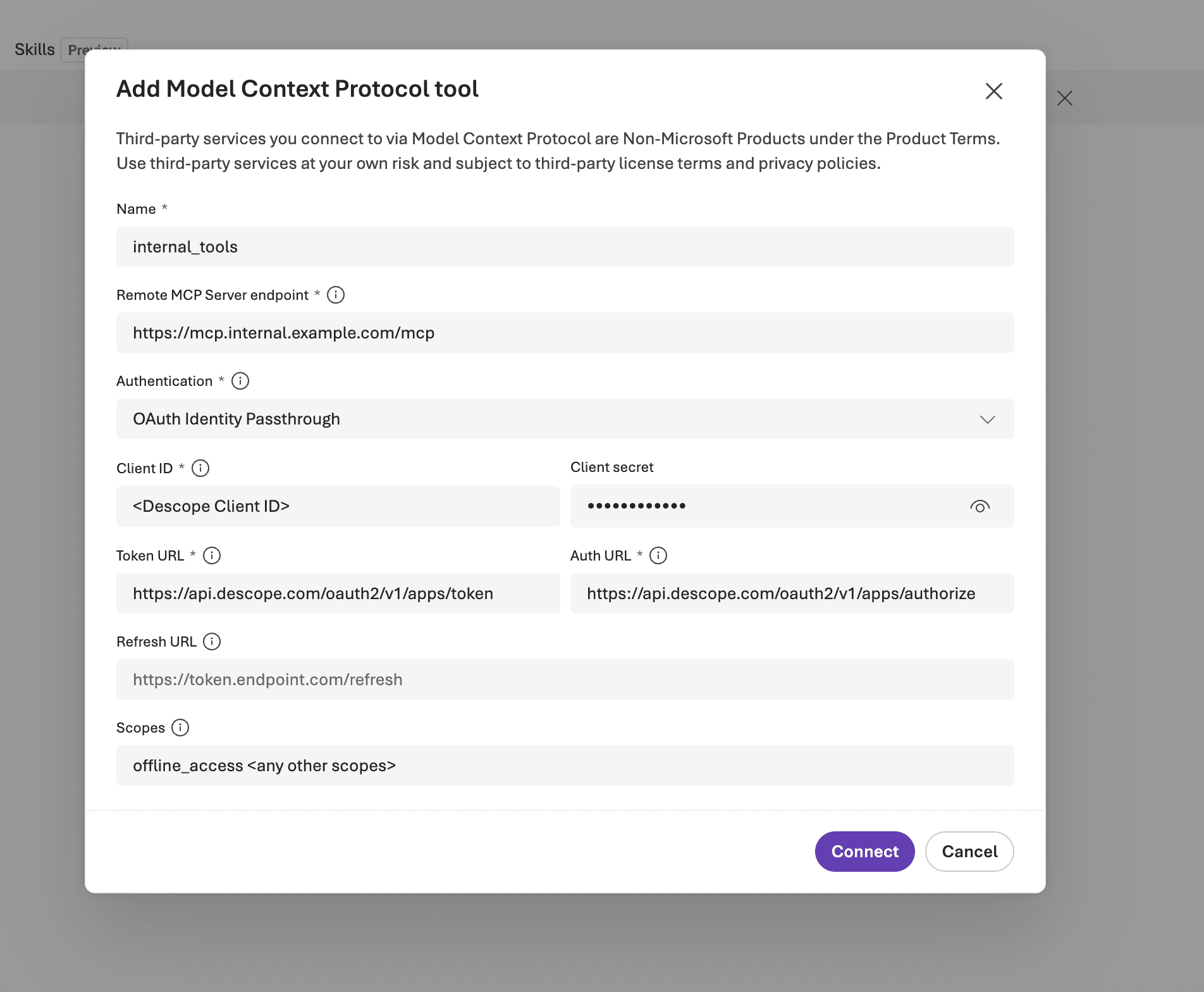
The same configuration is available programmatically:
from azure.ai.projects import AIProjectClient
from azure.identity import DefaultAzureCredential
project = AIProjectClient(
    endpoint=os.getenv("FOUNDRY_PROJECT_ENDPOINT"),
    credential=DefaultAzureCredential(),  # Entra: the invocation path stays Microsoft
)
agent = project.agents.create_agent(
    model="gpt-4.1",
    name="ops-assistant",
    instructions="You help employees with tickets, CRM lookups, and reports.",
    tools=[{
        "type": "mcp",
        "server_label": "internal_tools",
        "server_url": "https://mcp.internal.example.com/mcp",
    }],
)
Then decide how the agent authenticates to the server. Foundry supports three auth modes for MCP tools, with credentials stored in a project connection rather than your code: key-based (an API key or static bearer), Microsoft Entra (the agent or project managed identity), and OAuth identity passthrough, where Foundry prompts the user to sign in, surfaces a consent link, and caches and refreshes the resulting token (add offline_access to the scopes for auto-refresh). With a connection configured, the SDK references it directly:
from azure.ai.projects.models import MCPTool

tool = MCPTool(
    server_label="internal_tools",
    server_url="https://mcp.internal.example.com/mcp",
    require_approval="always",
    project_connection_id="my-internal-tools-connection",
)
Then forward the user's Descope token on each run. The MCP tool accepts per-run headers, which is where the user's access token travels; your Descope-protected MCP server validates it like any bearer.
run = project.agents.create_run(
    thread_id=thread.id,
    agent_id=agent.id,
    tool_resources={"mcp": [{
        "server_label": "internal_tools",
        "headers": {"Authorization": f"Bearer {descope_access_token}"},
    }]},
)
Making the agent's Descope identity primary is important. Forwarding the user token alone would leave the agent itself invisible to Descope, so wire the agent identity in explicitly.
Run the authorization code flow through the Agentic Client you registered for this agent: the resulting user token carries that client in its azp claim, so every downstream validation and policy decision sees the agent and the user together. And every credential operation below authenticates with the agent's client credentials, so Descope records the agent as the actor on each exchange.
Federate agent identity into Descope
You can go one step further and drop the client secret entirely by federating the agent's Entra identity into Descope. Here's the full setup:
Here’s what to do on the Azure side:
In the Microsoft Entra admin center, copy your Tenant ID from the Overview page. Your issuer URL is
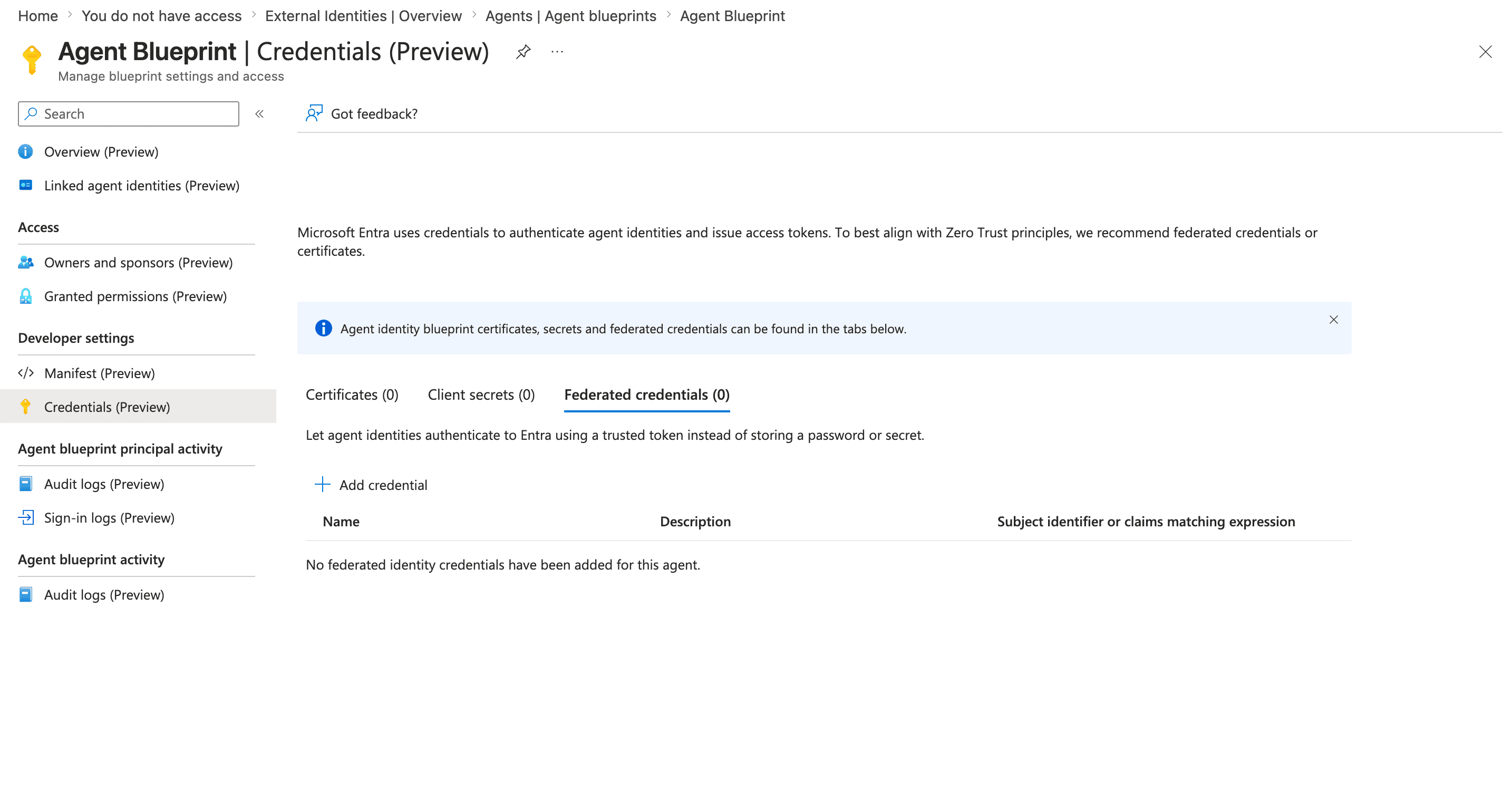
https://login.microsoftonline.com/{tenant-id}/v2.0.Go to Entra ID > Agents > Agent identities and find your agent (create one here if your platform hasn't auto-provisioned it; auto-creation is rolling out per platform during the preview). Note its Object ID. Agent identities deliberately carry no credentials of their own.
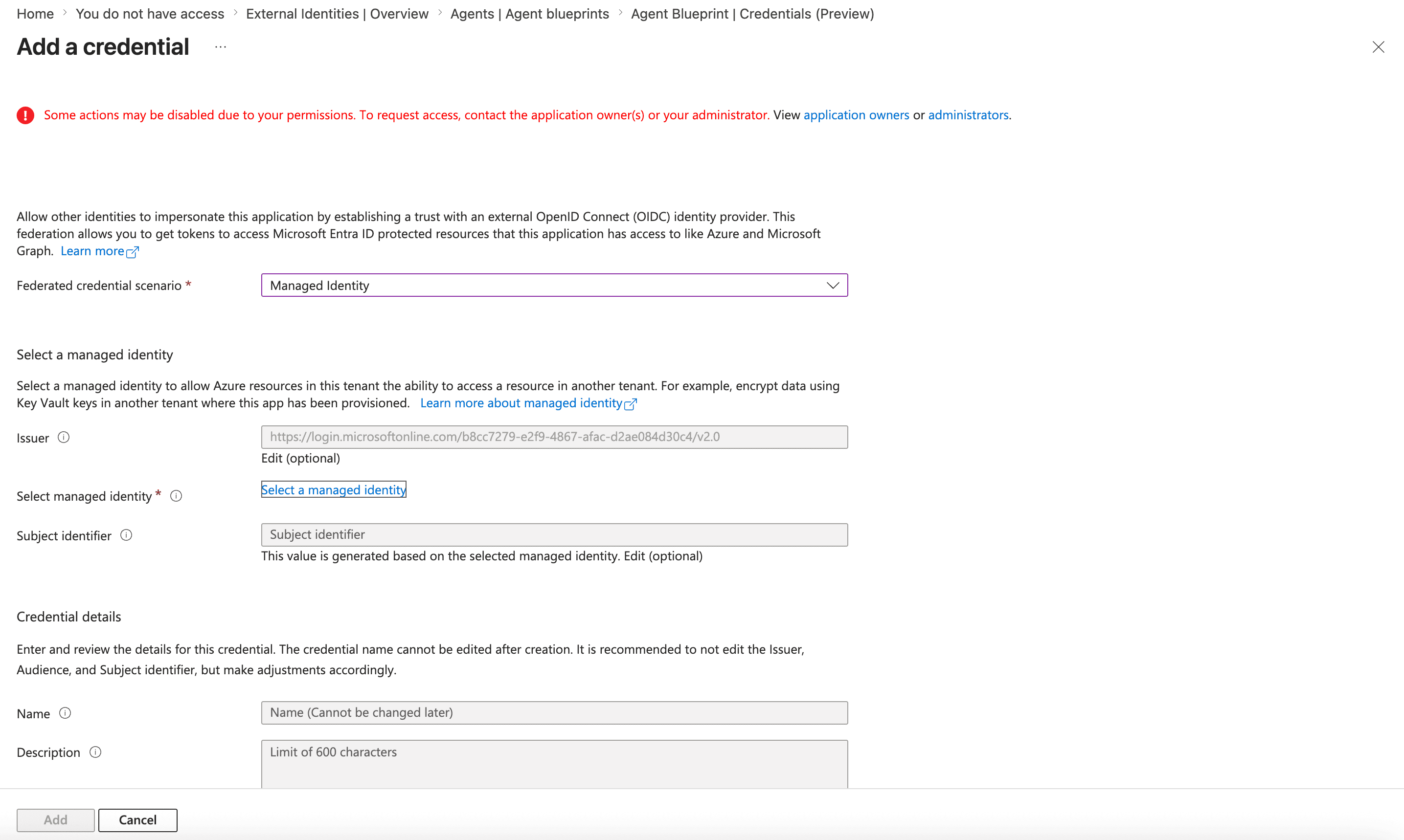
The credentials live on the blueprint. Go to Entra ID > Agents > Agent blueprints (or follow the parent blueprint link from the agent's detail page), open the blueprint, and copy its Blueprint Application ID. Under Developer settings > Credentials, add a federated identity credential (the no-secret option) or a client secret for development.
Here’s what to do on the Descope side:
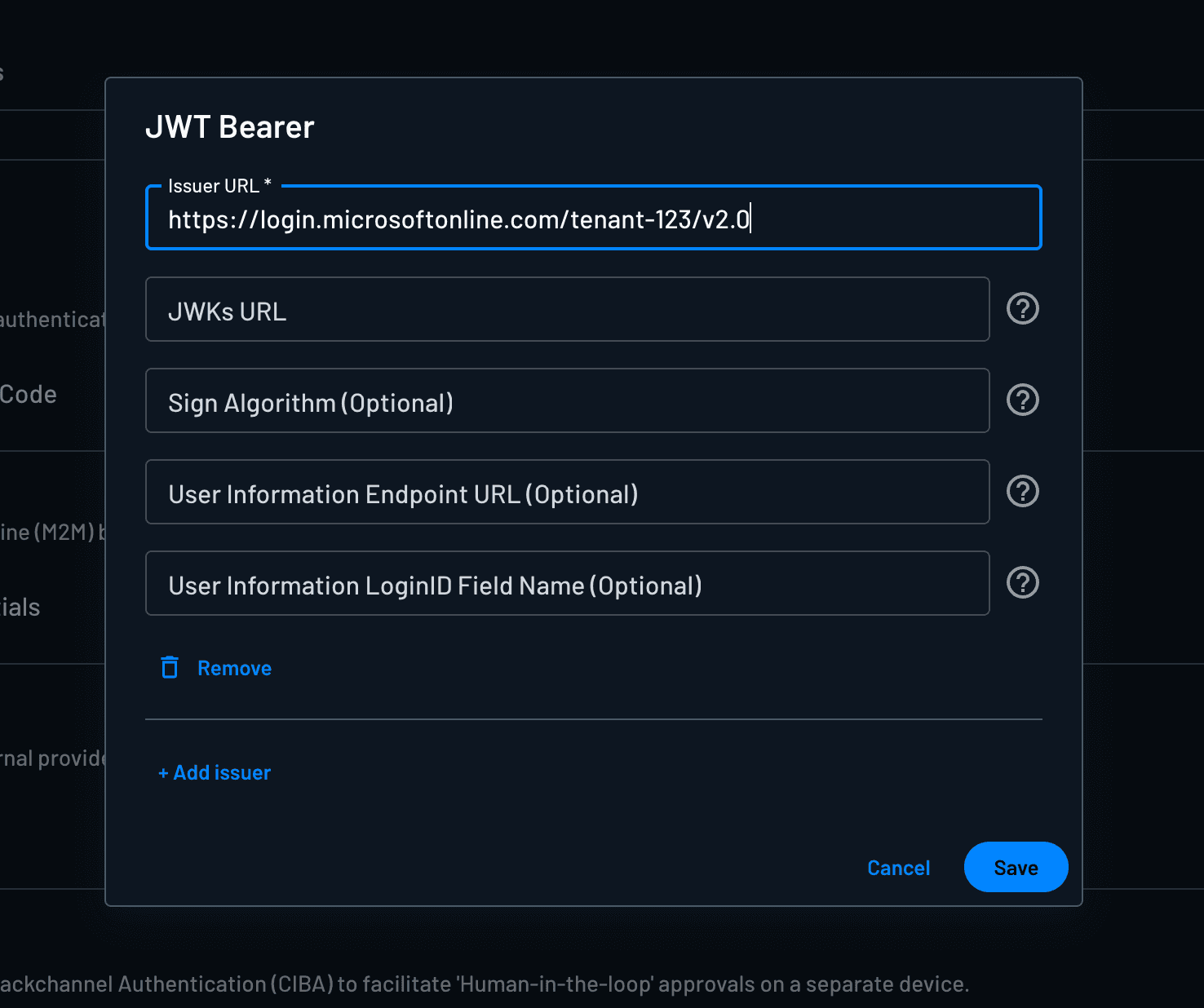
Go to Clients, open the agent's client, and under Grant Types enable JWT Bearer.
Click Manage next to JWT Bearer, then click on + Add issuer, and set Issuer URL to:
https://login.microsoftonline.com/{tenant-id}/v2.0. Descope derives the JWKS URL from the issuer automatically.Save and copy the client's Client ID for the exchange below.
At runtime, the agent acquires an Entra token for its agent identity using MSAL or the Microsoft Entra Auth SDK, then presents it to Descope as a JWT Bearer assertion:
resp = requests.post("https://api.descope.com/oauth2/v1/apps/token", data={
    "grant_type": "urn:ietf:params:oauth:grant-type:jwt-bearer",
    "client_id": os.getenv("DESCOPE_CLIENT_ID"),   # the agent's Descope client
    "assertion": entra_agent_token,                # token minted by the Entra Agent ID
})
resp.raise_for_status()
descope_agent_token = resp.json()["access_token"]
Entra keeps doing what only it can do (attest the agent, since Microsoft runs the platform creating it), and Descope becomes the agent's authority and audit plane, bootstrapped from that attestation with no stored Descope secret anywhere.
The result is one identity chain rather than two parallel ones. Invocations and Azure resource access stay in Entra's logs, where that infrastructure layer belongs, while every authorization decision, denial, consent, and approval lands in Descope, for this agent and the rest of the fleet.
Fetching credentials inside tools
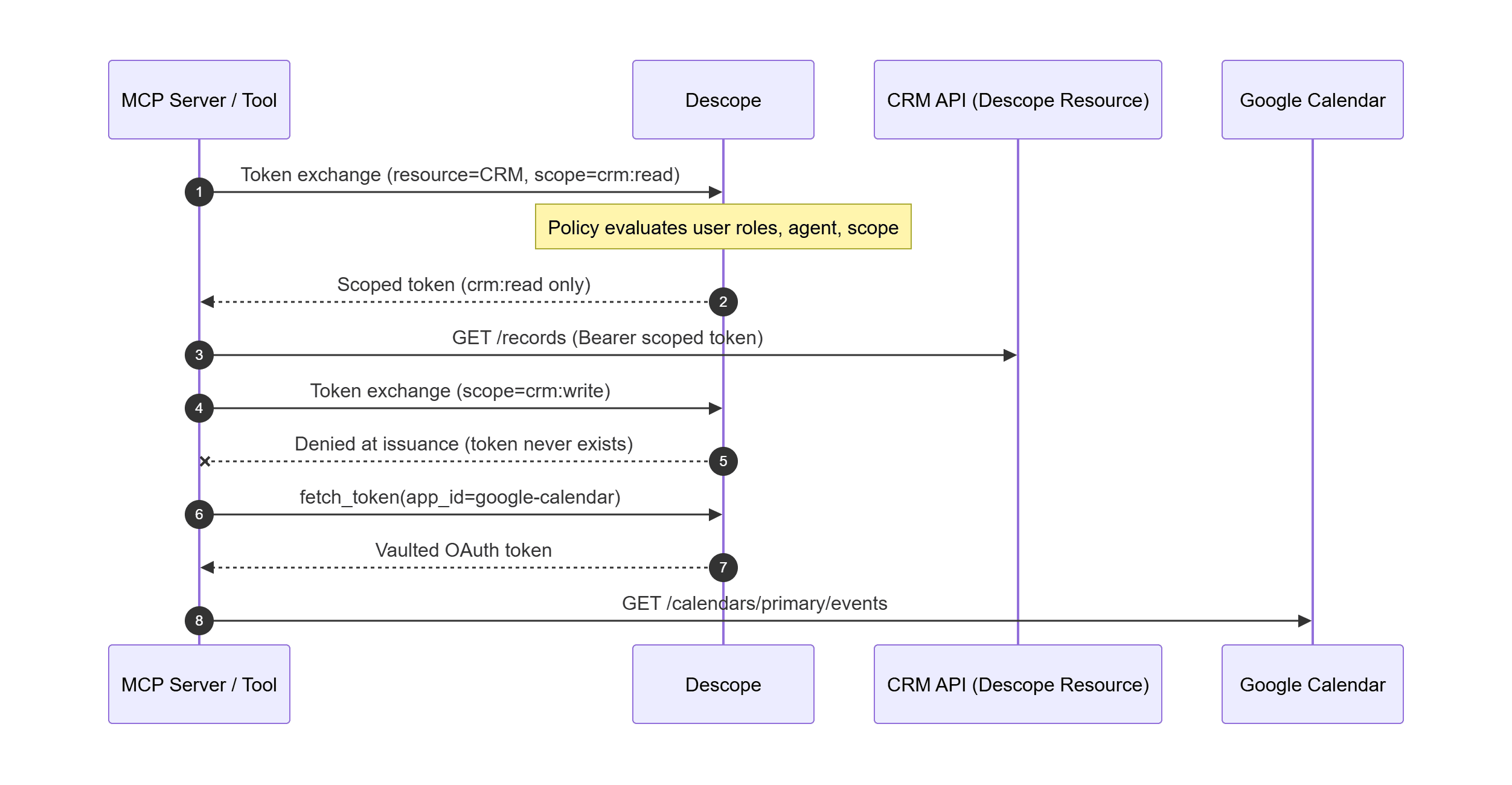
Inside agent tools, credential retrieval depends on the target. For Descope-protected resources, the agent performs OAuth Token Exchange. Policies checks the user, agent, and requested scope; a refused scope never becomes a token.
DESCOPE_TOKEN_URL = "https://api.descope.com/oauth2/v1/apps/token"

def exchange_for_resource_token(user_access_token: str, resource: str, scopes: list[str]) -> str:
    """RFC 8693: trade the user's access token for a scoped access token
    targeting a Descope-protected resource. Policy is applied at issuance."""
    resp = requests.post(DESCOPE_TOKEN_URL, data={
        "grant_type": "urn:ietf:params:oauth:grant-type:token-exchange",
        "client_id": os.getenv("DESCOPE_CLIENT_ID"),
        "client_secret": os.getenv("DESCOPE_CLIENT_SECRET"),
        "subject_token": user_access_token,
        "subject_token_type": "urn:ietf:params:oauth:token-type:access_token",
        "resource": resource,  # Resource identifier from the console (RFC 8707)
        "scope": " ".join(scopes),
    })
    resp.raise_for_status()
    return resp.json()["access_token"]

def query_crm(user_access_token: str) -> dict:
    crm_token = exchange_for_resource_token(
        user_access_token, "https://crm.internal.example.com", ["crm:read"]
    )
    headers = {"Authorization": f"Bearer {crm_token}"}
    return requests.get(f"{os.getenv('CRM_API')}/records", headers=headers).json()
For third-party services, OAuth tokens, or static API keys, the tool fetches from the Connections vault with the outbound application SDK.
from descope import DescopeClient
descope_client = DescopeClient(project_id=os.getenv("DESCOPE_PROJECT_ID"))

def get_calendar_information(user_access_token: str) -> dict:
    """Third-party OAuth: fetch the user's vaulted Google Calendar token from Connections."""
    user = descope_client.validate_session(session_token=user_access_token)
    vaulted = descope_client.mgmt.outbound_application.fetch_token(
        app_id="google-calendar",  # Outbound App ID from the console
        user_id=user["sub"],
    )
    headers = {"Authorization": f"Bearer {vaulted['accessToken']}"}
    return requests.get(
        "https://www.googleapis.com/calendar/v3/calendars/primary/events",
        headers=headers, params={"maxResults": 10, "orderBy": "startTime", "singleEvents": True},
    ).json()

def call_internal_api(user_access_token: str) -> dict:
    """Static API key: same vault, same fetch, API-key connection."""
    user = descope_client.validate_session(session_token=user_access_token)
    vaulted = descope_client.mgmt.outbound_application.fetch_token(
        app_id="internal-reporting-api",
        user_id=user["sub"],
    )
    headers = {"X-API-Key": vaulted["accessToken"]}
    return requests.get(f"{os.getenv('INTERNAL_API_URL')}/reports", headers=headers).json()
Gating sensitive actions with CIBA
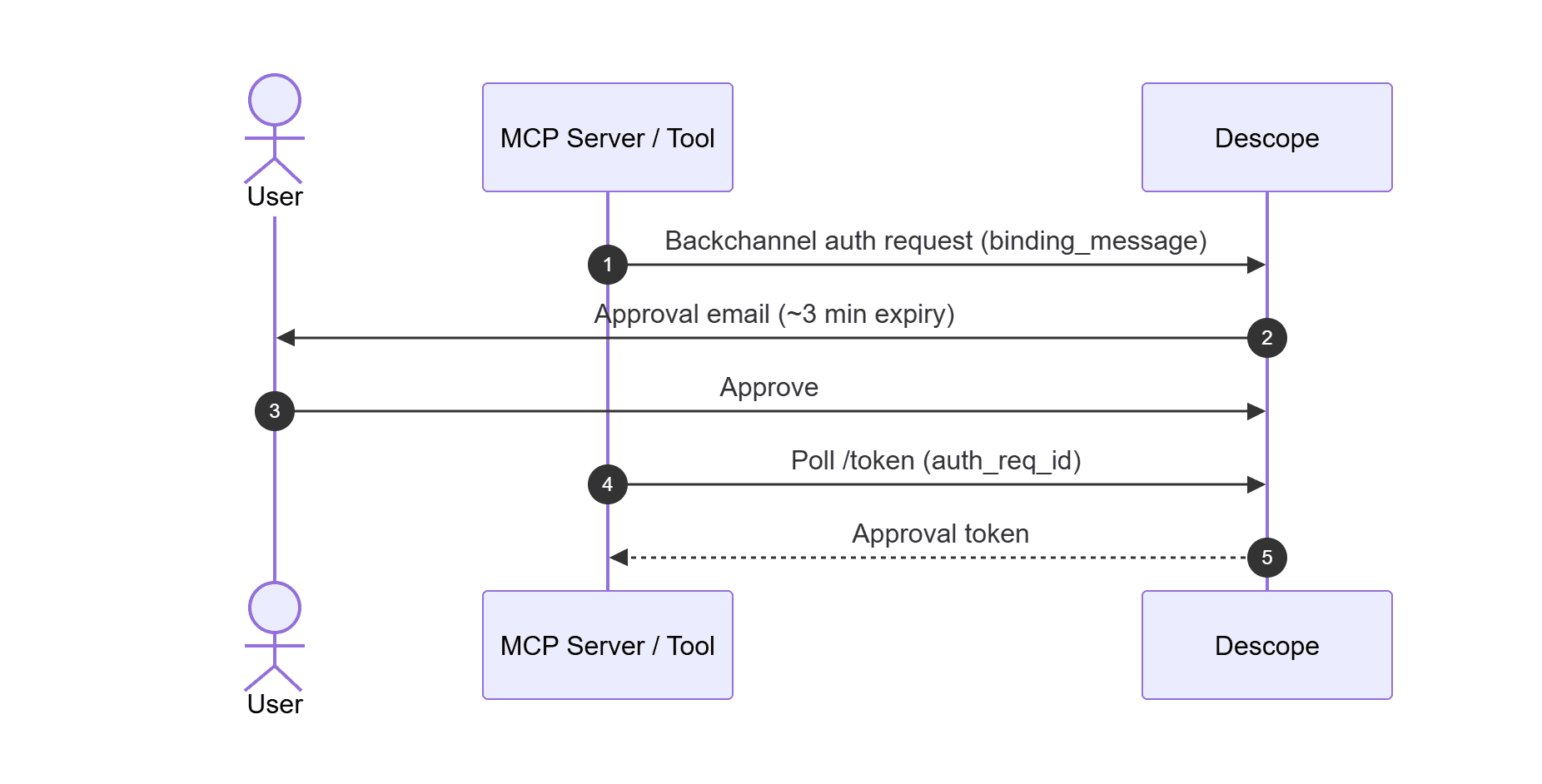
For sensitive actions, CIBA provides out-of-band human approval. This runs inside the tool: when the agent decides an elevated operation is needed (an account reset, a payment), the tool blocks until a human approves. Entra has no equivalent grant, so on the native stack you would build this with a notification service, an approvals table, and polling logic. Descope delivers the approval as an email link with a roughly three-minute expiration. The initiation endpoint is published in your Inbound App's discovery document as backchannel_authentication_endpoint.
def request_step_up(login_hint: str, binding_message: str) -> dict:
    """CIBA: out-of-band human approval for a sensitive action."""
    init = requests.post(BACKCHANNEL_AUTH_URL, data={
        "client_id": os.getenv("DESCOPE_CLIENT_ID"),
        "client_secret": os.getenv("DESCOPE_CLIENT_SECRET"),
        "login_hint": login_hint,
        "binding_message": binding_message,  # shown to the user with the approval request
        "scope": "openid",
    }).json()

    for _ in range(18):  # approval links expire after ~3 minutes
        time.sleep(10)
        poll = requests.post(DESCOPE_TOKEN_URL, data={
            "grant_type": "urn:openid:params:grant-type:ciba",
            "client_id": os.getenv("DESCOPE_CLIENT_ID"),
            "client_secret": os.getenv("DESCOPE_CLIENT_SECRET"),
            "auth_req_id": init["auth_req_id"],
        })
        if poll.status_code == 200:
            return {"status": "approved", "token": poll.json()["access_token"]}
        if poll.json().get("error") not in ("authorization_pending", "slow_down"):
            return {"status": "denied"}
    return {"status": "timeout"}
Start building with Descope and Azure AI Foundry
Foundry gives your agents a production runtime and a home in Teams. Entra Agent ID gives them a directory identity and a path to Microsoft resources. Descope gives them one identity layer across every cloud they touch, with policy evaluated at token issuance. Together, they separate what an agent is from what it's allowed to do.
Sign up and explore the docs for Agentic Identity, MCP Auth, Connections, and Resources. Running agents on more than one cloud and want a unified directory for all of them? Reach out to our team or connect with us on our dev community, AuthTown.