
Table of Contents
Don't have the time to read the entire post? Our human writers will be sad, but we understand. Summarize the post with your preferred LLM here instead.
Retail authentication is no longer limited to just one browser session. Customers now switch between online stores, mobile apps, loyalty programs, in-store kiosks, customer support, and connected devices, sometimes all in one shopping trip. In fact, research shows that 73% of consumers shop across several channels during their buying journey, which shows how retail now blends digital and physical experiences.
What’s more, is this challenge extends beyond traditional retail apps and websites. Authentication needs to work across shared or keyboard-limited devices, such as self-checkout kiosks, airline in-flight entertainment systems, Smart TV apps, and IoT devices like thermostats or connected displays. In these environments, typing passwords is cumbersome or impractical, making cross-device authentication with a trusted mobile device far more effective.
Adding to the challenge, retailers face growing pressure to reduce login and checkout friction while defending against fraud, fake accounts, and account takeover attacks. Traditional authentication systems were designed around static login pages, not dynamic omnichannel customer journeys that must adapt in real time based on device, channel, and risk level.
What is omnichannel retail authentication?
Omnichannel retail authentication means giving customers a secure and consistent way to prove their identity as they move between devices, apps, and store touchpoints. Rather than seeing authentication as just one login, it supports the customer through their whole journey.
Today’s retail customers might start browsing on their phone, keep shopping on a computer, use rewards in a store, or interact with kiosks and Smart TVs—all as part of one experience. Authentication should work smoothly at every step, without making things harder for the customer.
To do this, authentication must adjust in real time based on several factors, such as:
The device being used
User behavior and session activity
Risk signals and fraud indicators
The retail context of the interaction
For example, if a trusted customer uses a device they often use, they might get a quick, password-free login. But if someone tries to check out from a new device or an unusual place, the system might ask for extra steps like multi-factor authentication.
This is important because customers expect things to be easy, and any hassle during authentication can hurt sales and customer loyalty. Still, retailers need to keep accounts safe from fraud and abuse.
Modern retail authentication is about finding the right balance by making things easy for trusted users, but adding security when there’s more risk.
Omnichannel authentication with Descope Flows
Modern retail authentication requires more than a collection of login methods. Retailers need the ability to orchestrate identity journeys that adapt dynamically across channels, devices, and risk levels while maintaining a seamless customer experience. This is where Descope Flows become powerful.
Descope Flows provide a visual identity orchestration layer for building and managing authentication journeys without hardcoding identity logic across applications. Instead of embedding authentication rules separately into web apps, mobile apps, kiosks, and backend systems, retailers can centralize authentication workflows in a single configurable layer.
Using Flows, teams can orchestrate passwordless login, one-tap authentication, social login, adaptive MFA, device authentication, fraud and risk integrations, and cross-channel session continuity. Authentication journeys can dynamically adapt based on device trust, user behavior, and real-time risk signals.
For example, a returning customer on a trusted mobile device may move seamlessly into checkout using one-tap login, while a suspicious login attempt from an unfamiliar device may trigger MFA or additional verification. Shared-device experiences like kiosks or Smart TV apps can use device authentication flows that allow customers to securely authenticate with their phone instead of typing passwords on a public or keyboard-limited device.
This approach allows authentication logic to live inside configurable workflows instead of scattered application code, making it easier for teams to optimize and evolve customer identity journeys without rebuilding frontend experiences.
Use case: Self-checkout with second-device authentication
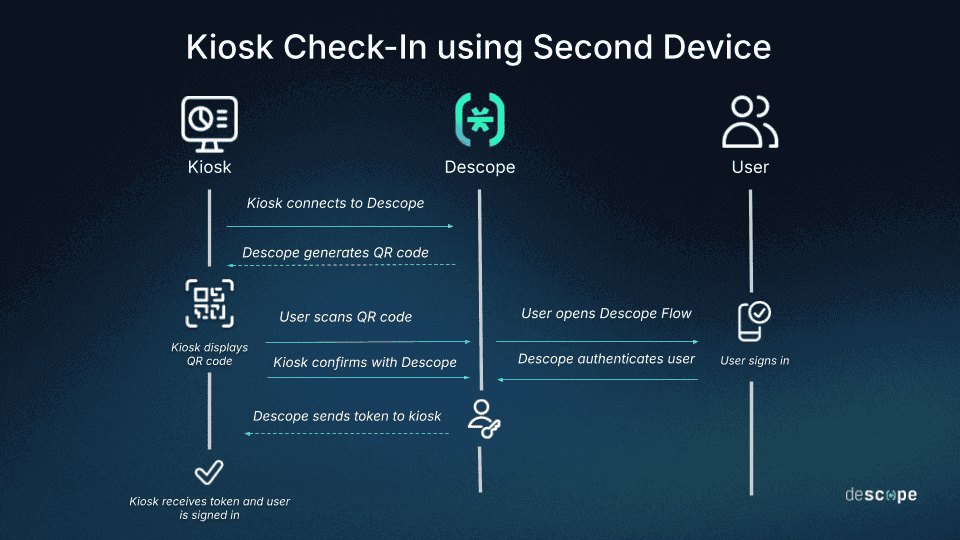
One emerging use case in retail authentication is self-checkout powered by a second device, where shoppers scan a QR code at a shared kiosk, authenticate securely on their trusted mobile device, and instantly connect their account, loyalty status, subscriptions, rewards, and personalized experiences to the in-store session. This creates a more secure, personalized, and frictionless omnichannel retail journey.
Step 1: Customer scans QR code at the kiosk
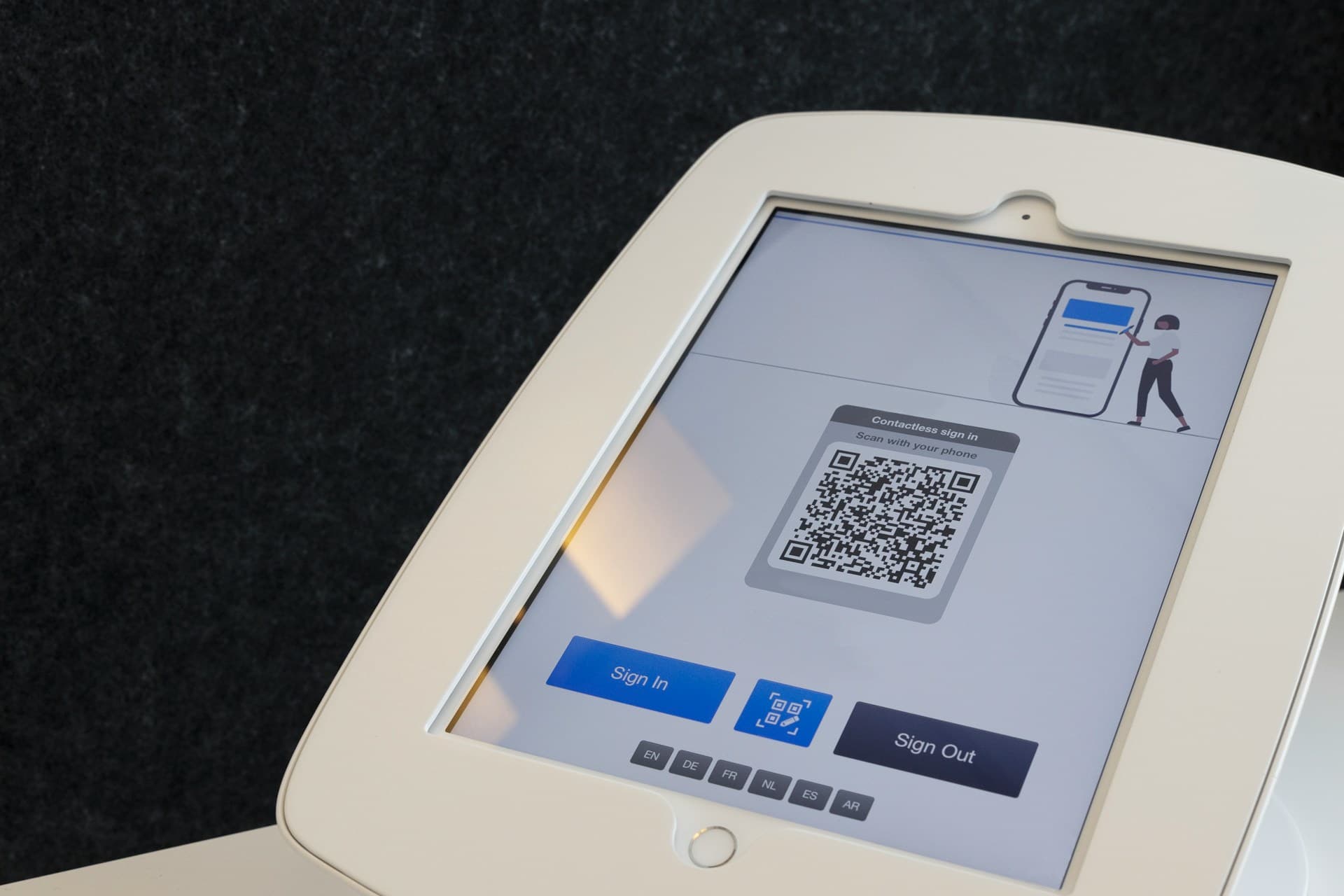
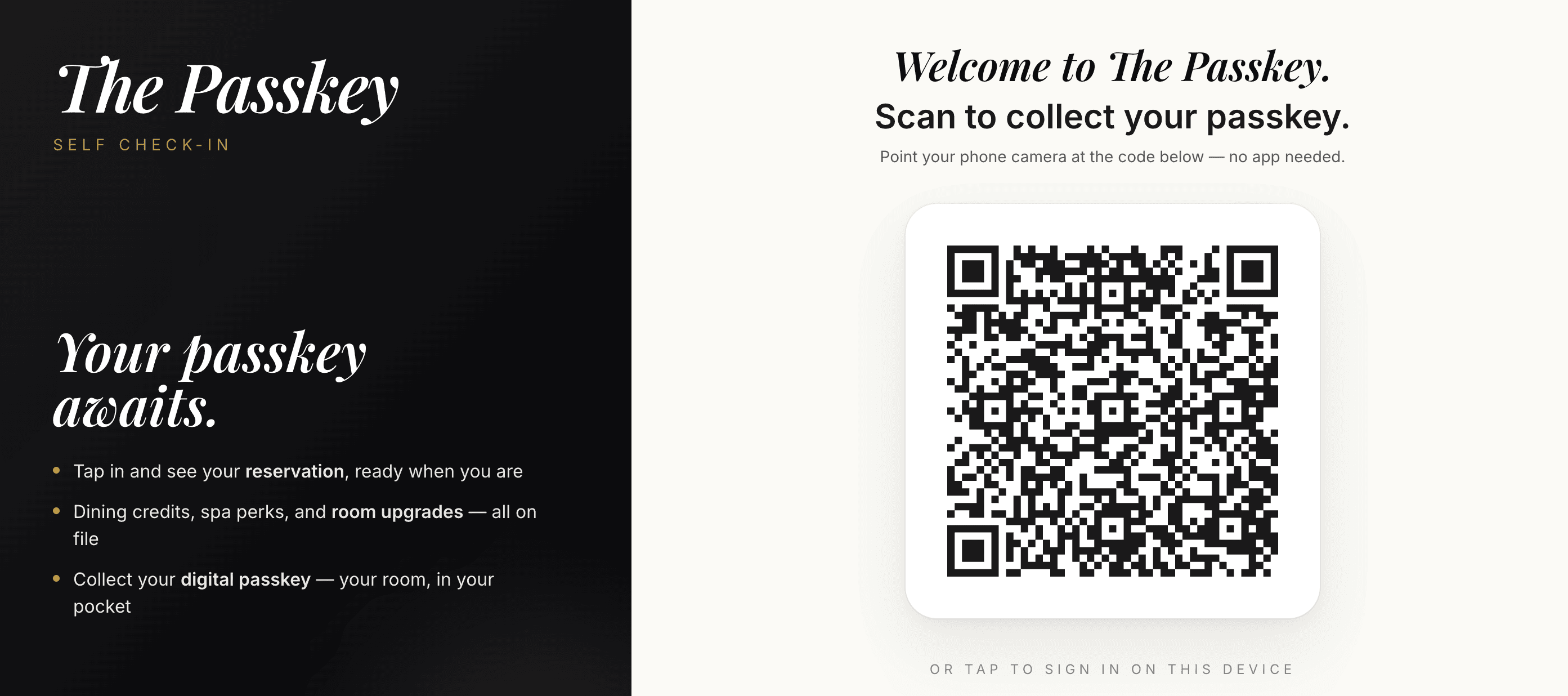
The customer approaches a self-checkout kiosk or in-store terminal and begins checkout. Instead of entering credentials on a public device, the kiosk displays a QR code tied to a secure authentication session. The kiosk itself acts as a federated OIDC application connected to the retailer’s identity platform.
Step 2: Authentication flow executes with session approval
After scanning the QR code, the customer launches a Descope Flow on their trusted mobile device. Using Descope’s visual workflow builder, retailers can configure authentication journeys that support methods such as:
Passkeys
Social login
Email OTP
Passwordless authentication
MFA when needed
The flow handles the entire authentication and approval process, including login, session validation, and device authorization. Once authenticated, the customer confirms they want to log into the kiosk session, while the kiosk continuously checks for session approval in the background. After approval, the kiosk receives the authenticated session along with the appropriate ID and access tokens, creating a seamless cross-device login experience.
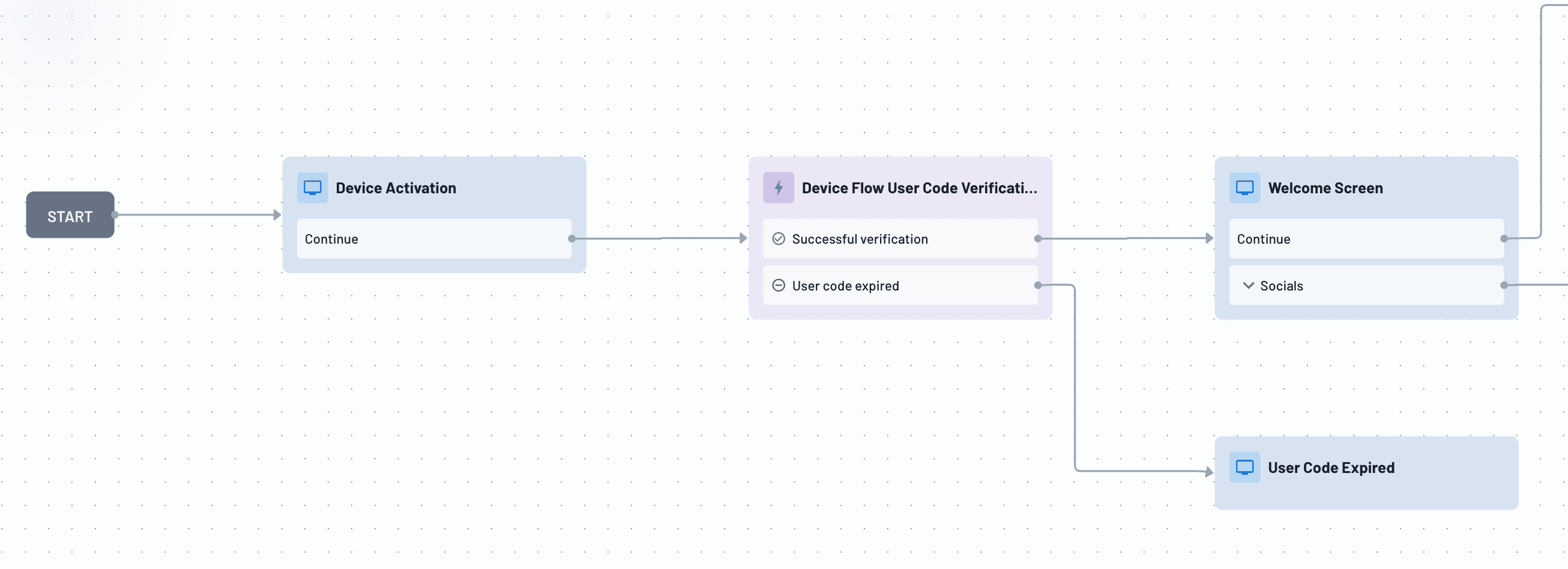
Get started today by using the Device authentication Flow Template, available directly in the Descope Console.
Step 3: Personalized checkout experience is activated
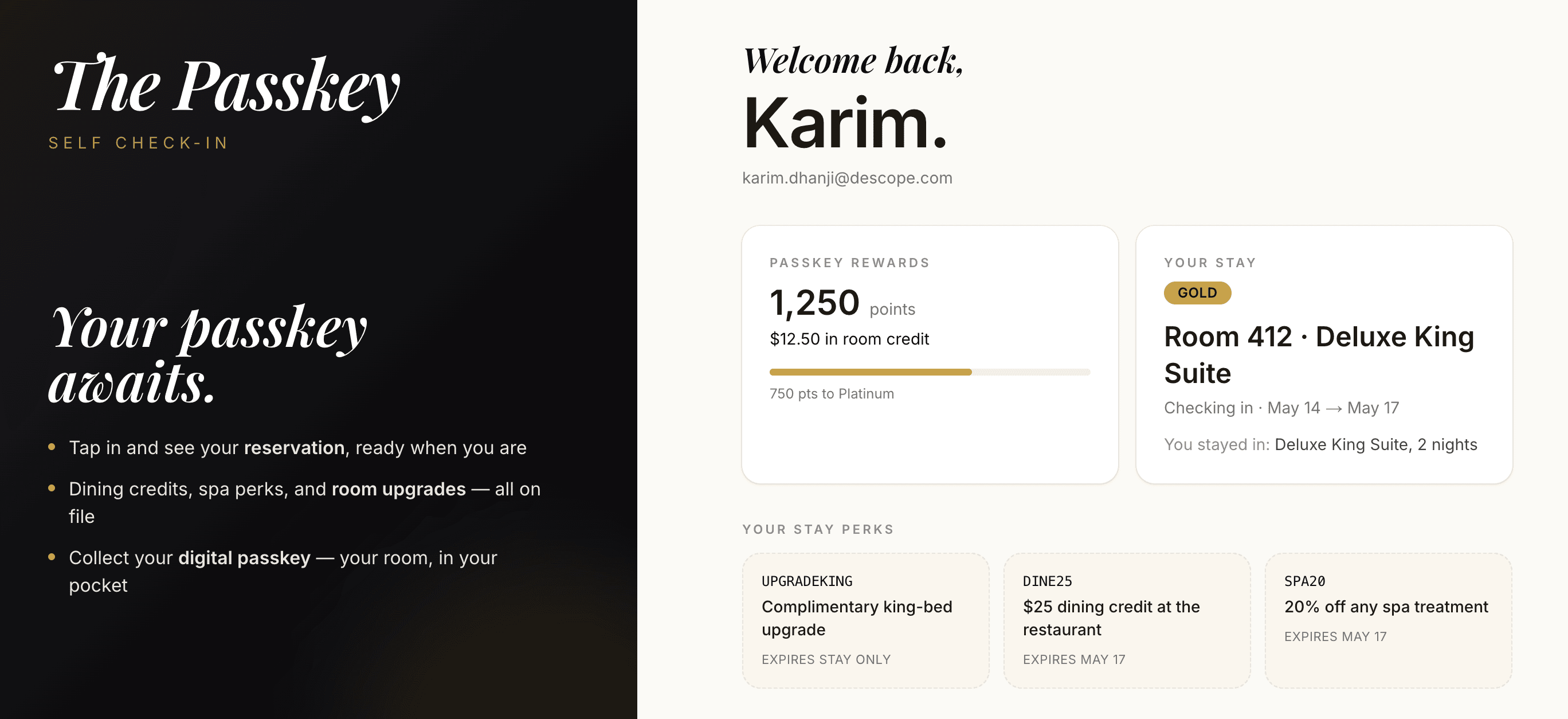
Once authenticated, the kiosk can immediately personalize the checkout experience using identity claims and customer attributes embedded in the token. Examples include:
Loyalty tier (Gold, Silver, Bronze)
Rewards eligibility
Membership status
Digital coupons
Preferred store settings
Personalized offers and recommendations
Retailers can also integrate payment providers such as Stripe, Square, or Plaid to securely retrieve and process saved payment methods associated with the customer account. Payment data itself remains managed by the payment provider, while identity orchestration connects the authenticated session to the appropriate payment workflow.
The result is a fast, low-friction checkout experience that connects ecommerce identity directly to in-store retail interactions. Here's a video demo of the flow we just walked through:
Step 4: Retailers gain a unified omnichannel customer view
Because the in-store kiosk session is connected to the customer’s authenticated identity, retailers can unify digital and physical retail interactions into a single customer journey.
This enables:
Cross-channel loyalty tracking
Real-time personalization
Shopping behavior insights
Cart completion reminders
Membership upgrades
Context-aware promotions
Consistent customer profiles across ecommerce, mobile, and in-store experiences
Instead of treating self-checkout as an isolated transaction, retailers can turn it into a connected omnichannel engagement channel powered by identity orchestration.
Additional Descope capabilities for ecommerce
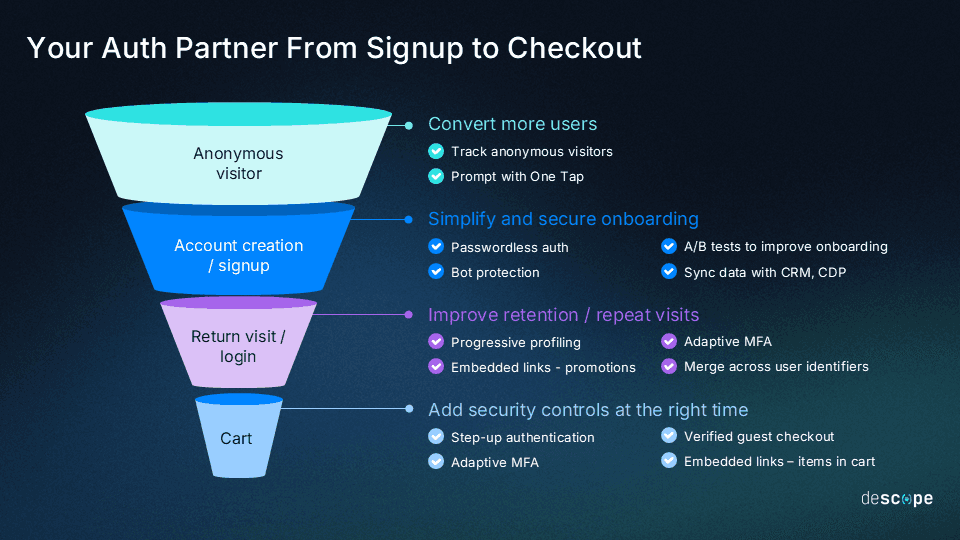
Self-checkout authentication is just one example of how modern identity orchestration can connect digital and physical retail experiences. The same workflow-driven approach can also help retailers improve fraud prevention, optimize conversion, reduce onboarding friction, and continuously refine customer authentication journeys across ecommerce, mobile, and in-store channels.
Modern retail identity experiences go far beyond simple login screens. Retailers increasingly need authentication journeys that balance security, conversion, personalization, and customer experience across every customer touchpoint. Here are some other ways Descope supports identity management for ecommerce:
Adaptive authentication for retail fraud prevention: Retailers can adjust authentication requirements in real time based on device signals, user behavior, transaction risk, or location. Low-risk customers experience minimal friction at checkout, while higher-risk activity prompts MFA, step-up authentication, or fraud prevention measures to reduce account takeover and promo abuse.
Step-up authentication for sensitive retail actions: Actions such as high-value purchases, updating payment methods, or redeeming loyalty rewards should require additional verification. Step-up authentication provides extra protection at critical moments without adding friction to routine browsing or shopping.
Progressive profiling for faster customer onboarding: Lengthy registration forms and excessive data collection can increase abandonment during signup and checkout. Progressive profiling allows retailers to collect only essential information at first, then gather more data over time through future interactions and loyalty programs.
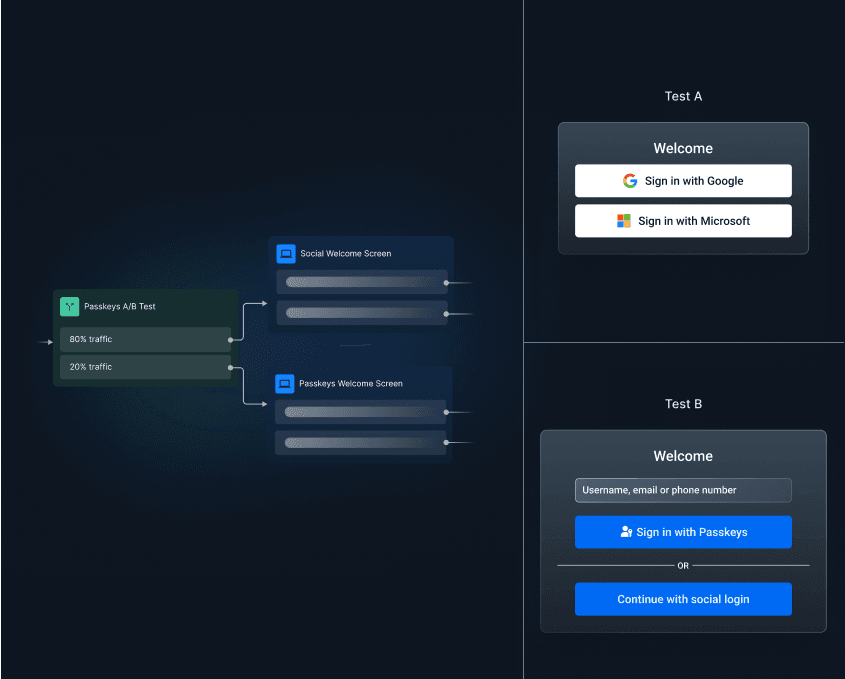
A/B testing authentication journeys: Authentication flows should be optimized like any conversion funnel. Retailers can test login methods, MFA timing, onboarding flows, and messaging to improve conversion rates, reduce drop-offs, and enhance the customer experience without redeploying applications.
From isolated logins to orchestrated retail journeys
Modern retail authentication requires more than a standalone login page. Customers now move constantly between ecommerce sites, mobile apps, kiosks, loyalty experiences, and connected devices, all while expecting seamless and secure interactions across every touchpoint.
Descope Flows help retailers unify passwordless authentication, device authentication, adaptive MFA, fraud prevention, and cross-channel session continuity into a single configurable workflow layer. By orchestrating authentication dynamically based on device, user behavior, and risk level, retailers can reduce friction for trusted users while strengthening protection against fraud and account takeover attacks.
As omnichannel retail experiences continue to evolve, authentication must evolve with them. With Descope Flows, teams can continuously optimize customer identity journeys without rebuilding frontend experiences or hardcoding authentication logic across applications.
If you’re ready to get started, explore Descope’s connector ecosystem. If you'd like a demo, meet with our auth experts. Also, if you want to try Descope yourself, sign up for a Free Forever Account and start building modern omnichannel authentication journeys today!