
Table of Contents
Don't have the time to read the entire post? Our human writers will be sad, but we understand. Summarize the post with your preferred LLM here instead.
Supporting a handful of enterprise customers is very different from building identity that can scale across hundreds.
Early on, enterprise authentication is relatively straightforward. You connect a few identity providers, enable SAML SSO, and onboard your first enterprise customers. As adoption grows, however, identity requirements become more complex, with each customer bringing unique onboarding, security, and administration needs.
Enterprise customers now look for self-service SSO and SCIM onboarding, tenant-specific roles and permissions, delegated admin controls, flexible authentication options, and stronger security policies. They also want these features to work across different organizations without needing engineering help each time. Meeting these needs is key to scaling your enterprise growth efficiently.
To grow your B2B SaaS business, your identity platform needs to do more than just handle SAML connections. It should support multi-tenancy, make enterprise onboarding easier, offer flexible workflows, bring authentication and authorization together, and let you adapt as customer needs change.
In this blog, we compare Descope and WorkOS based on these enterprise identity needs. If you are looking at enterprise SSO solutions or want to know if your identity platform can support your next stage of B2B growth, read on to see how these two platforms stack up.
Also Read: A Complete Comparison of Descope and WorkOS
Auth and SSO requirements for B2B SaaS apps
As outlined in our enterprise readiness guidance, supporting B2B growth is not just about adding SAML. It is about building identity infrastructure that scales with enterprise complexity.
Tenant-first architecture - To be ready for enterprise customers, start with real multi-tenancy. Each customer should have a separate tenant with its own users, roles, policies, and SSO settings. If you add tenancy later, scaling will be more difficult and complex.
Delegated administration - Enterprise customers want to manage their own users, roles, and permissions without needing help from your team. With delegated administration, tenant admins can add users, set up roles, assign permissions, and control access within their company, all within the limits you set.
Enterprise SSO built for scale - Winning larger customers requires seamless SAML and OIDC support for each tenant. SSO should not need custom work for every new enterprise. It should be easy to set up, configure, and manage as you grow.
Self-service enterprise onboarding - Enterprise buyers expect autonomy. Providing tenant-level admin portals and self-service SSO setup reduces engineering involvement, accelerates onboarding, and shortens time-to-revenue.
Automated lifecycle management - SCIM provisioning and deprovisioning are table stakes for enterprise accounts. Manual user management does not scale and introduces security risk. Identity must automatically stay in sync with the customer’s source of truth.
Tenant-aware authorization - Enterprise customers require flexible, context-aware access control. Users often belong to multiple organizations with different permissions. Your authorization model should handle this clearly and automatically.
Configurable security posture per tenant - Enterprise readiness means supporting different security requirements across customers. Adaptive MFA, step-up authentication, and risk-based policies should be configurable at the tenant level without requiring application logic changes.
Enterprise compliance and deployment flexibility - Enterprise customers often require regional data residency and regulatory compliance. Your identity platform should support multi-region deployments, and standards like FedRAMP High, without additional infrastructure.
Support for AI agents and MCP - As customers adopt AI agents, identity should extend beyond human users to securely authenticate agents, issue tenant-aware tokens and scopes, enforce authorization policies, and provide complete audit trails for agent activity.
If you build these features into your platform from the start, growing your enterprise business becomes much easier. Without them, identity can slow down your B2B growth.
Multi-tenancy: Complete tenant management vs organization APIs
Descope
Descope uses a tenant-first approach to identity. Multi-tenancy is central to the platform, so organizations, users, roles, and authentication policies can be managed separately for each customer. This helps support enterprise SaaS applications as customer needs grow more complex.
Multi-tenant architecture built for B2B SaaS
Create and manage tenants using the Console or Management SDK
Tenant-aware roles and permissions built directly into the identity model
Set up SAML SSO, SCIM provisioning, and security policies for each tenant
Support multiple identity providers for one enterprise tenant
Descope treats every customer as a first-class tenant. This makes it easier to plan for enterprise growth and reduces the need for developers to build custom identity infrastructure.
WorkOS
WorkOS mainly supports enterprise organizations as containers for SSO connections and directory sync. This makes onboarding easier, but other multi-tenant needs like tenant lifecycle management, delegated administration, tenant-specific roles, and business logic are usually handled by the application itself.
Organization model optimized for enterprise SSO and Directory Sync
Advanced tenant lifecycle workflows require application-level implementation
Tenant-specific roles and permissions managed outside the platform
Billing, onboarding, and tenant policies are typically implemented in application code
WorkOS provides a strong foundation for enterprise SSO, but growing B2B SaaS platforms often need additional engineering to support more advanced multi-tenant identity requirements.
Bottom Line: WorkOS simplifies enterprise SSO through its organization model, but broader multi-tenant SaaS capabilities remain largely application responsibilities. Descope builds multi-tenancy into the identity platform itself, making it easier to scale enterprise customers without continually expanding custom identity logic.
Also Read: A Primer on B2B Authentication With Descope
SSO provisioning: Self-service vs developer-assisted setup
Descope
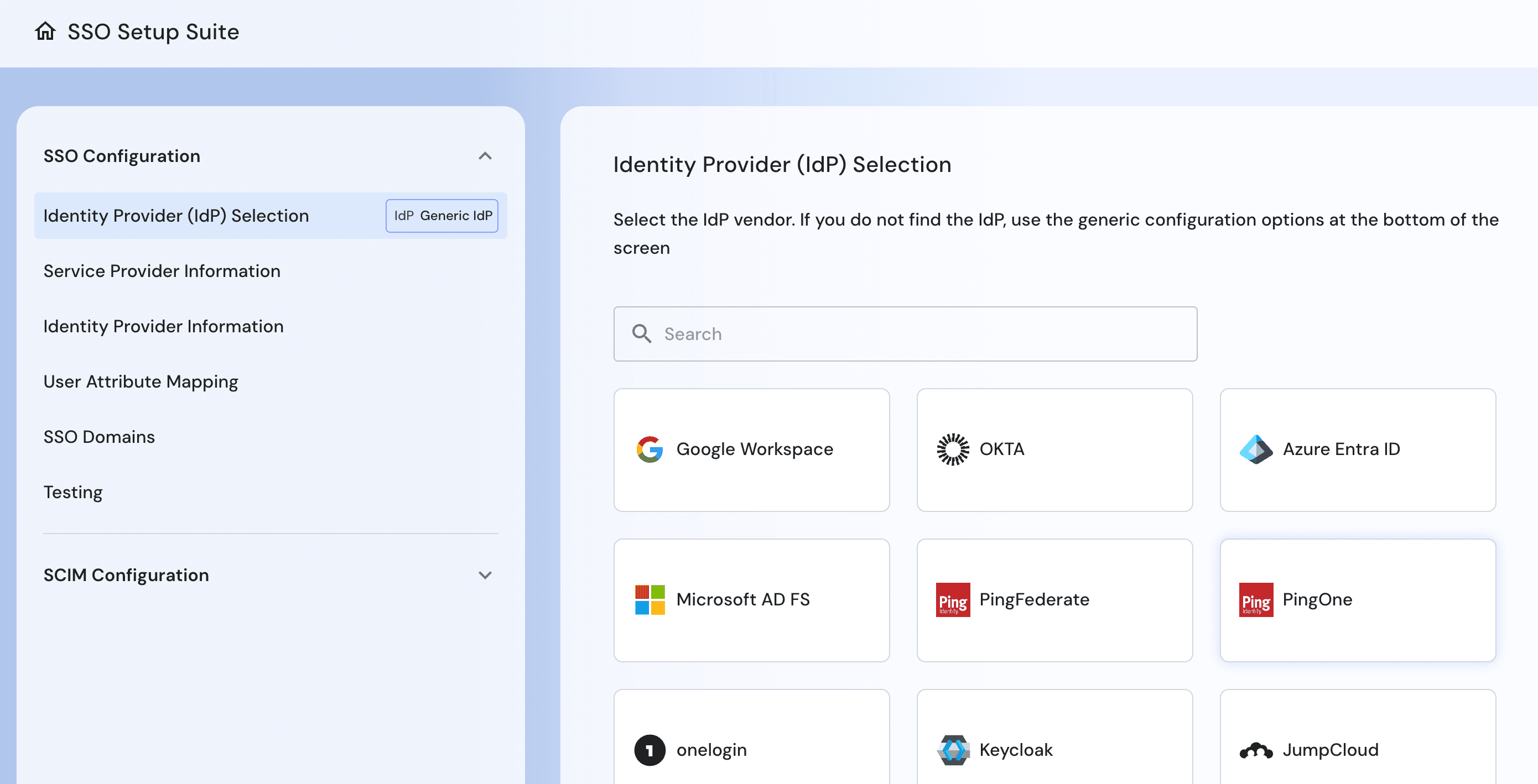
Descope's SSO Setup Suite is designed to make enterprise onboarding a self-service experience. Tenant administrators can configure both SSO and SCIM directly through guided setup flows, reducing engineering involvement while helping enterprise customers onboard more quickly. Built-in validation and testing tools also make it easier to ensure integrations work correctly before going live.
Self-service SSO and SCIM setup for enterprise tenant administrators
Guided, IdP-specific configuration with step-by-step instructions
Validate SAML metadata, attribute mappings, and domain settings during setup
Test SSO and SCIM connections before deployment
Support automated user provisioning and deprovisioning per tenant
Descope transforms enterprise onboarding into a repeatable product capability, allowing engineering teams to spend less time configuring identity integrations for every new customer.
WorkOS
WorkOS provides enterprise SSO and Directory Sync through a streamlined Admin Portal, making it easier to establish SAML, OIDC, and SCIM connections. While this accelerates initial integration, customers and developers are still responsible for handling many IdP-specific variations, attribute mappings, and onboarding workflows within their own applications.
Admin Portal for managing enterprise SSO and Directory Sync
Supports SCIM provisioning and automated user lifecycle management
Attribute mapping and IdP-specific configuration require additional setup
Tenant onboarding workflows typically implemented within the application
Testing and deployment processes vary depending on the customer's identity provider
WorkOS simplifies enterprise identity integration, but creating a fully self-service provisioning experience often requires additional engineering around the core platform.
Bottom Line: WorkOS streamlines enterprise SSO and SCIM integration through a consistent API and Admin Portal. Descope goes further by providing a guided, self-service provisioning experience that helps enterprise customers configure, validate, and manage their own identity integrations with minimal engineering involvement.
Also Read: How Notch Achieved Enterprise SSO In One Day With Descope
User journeys: Visual workflows vs application code
Descope
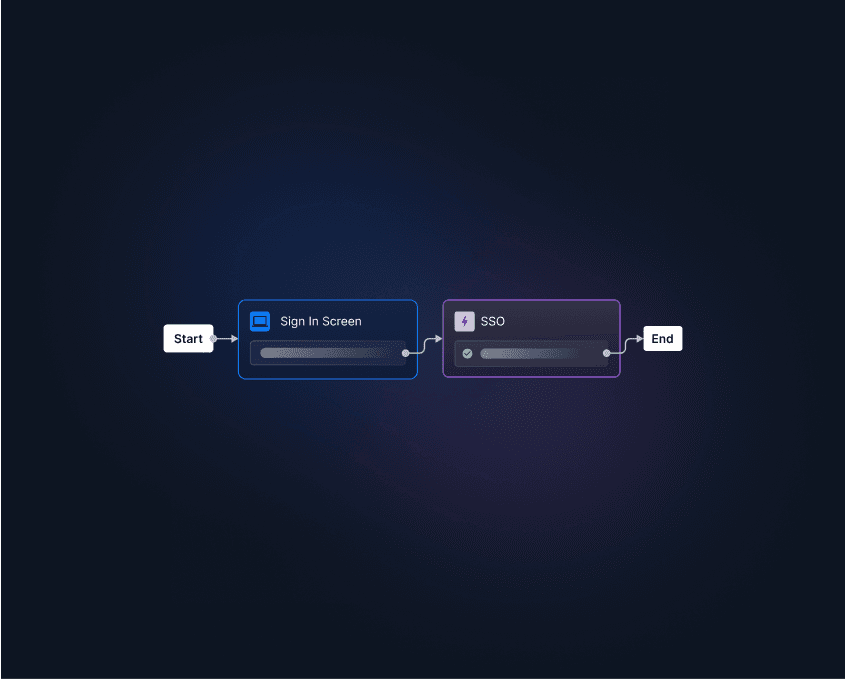
Descope handles authentication as a configurable workflow instead of hardcoded application logic. With its visual workflow builder, developers and product teams can design, change, and expand authentication journeys without writing backend code. As enterprise needs change, new steps and business logic can be added without redeploying the app.
No-code visual workflows for authentication and onboarding
Customize user invites, step-up authentication, and account recovery
Add conditional branching based on user, tenant, or risk context
Orchestrate identity verification, consent, and user lifecycle flows
Modify authentication journeys without redeploying the application
Descope keeps identity logic flexible instead of hardcoding it, so it’s easier to adjust authentication as customer needs change.
WorkOS
WorkOS AuthKit provides prebuilt authentication components that help developers add login experiences more quickly. However, authentication journeys, conditional logic, and custom onboarding experiences are implemented within the application rather than orchestrated through a visual workflow engine.
AuthKit provides prebuilt authentication components
Custom authentication flows implemented through application code
Conditional logic maintained by developers
No visual workflow orchestration for identity journeys
WorkOS accelerates authentication development, but evolving user journeys typically requires engineering changes rather than workflow configuration.
Bottom Line: WorkOS simplifies authentication with developer-friendly components, while Descope provides visual workflows that make authentication journeys easier to customize, maintain, and evolve over time.
Risk-based MFA: Workflow-driven security vs individual risk signals
Descope
Descope integrates adaptive MFA directly into its workflow builder, enabling organizations to evaluate risk signals and enforce different authentication policies for each login attempt. This makes it easy to balance security and user experience while adapting policies for different enterprise customers.
Native risk signals, including new device, impossible traveler, and VPN detection
Branch authentication flows based on real-time risk conditions
Integrate third-party fraud services like reCAPTCHA, Darwinium, and Forter
Configure tenant-specific MFA and step-up authentication policies
Update security policies without modifying application code
Descope lets organizations set up adaptive authentication policies through configuration, so it’s easier to improve security as threats and business needs change.
WorkOS
WorkOS Radar provides security signals, such as IP reputation and bot detection, to help identify potentially risky authentication attempts. While these signals can be incorporated into authentication decisions, implementing adaptive policies and complex MFA orchestration remains the application's responsibility.
Radar provides IP reputation and bot detection signals
Security events available for authentication decisions
Adaptive MFA logic implemented within application code
Complex authentication policies require additional development
WorkOS offers useful security signals, but organizations must decide how those signals affect authentication experiences.
Bottom Line: WorkOS helps spot authentication risks with Radar. Descope combines adaptive risk detection and configurable workflows to make enterprise security simpler.
Also Read: How Navan Augmented Auth0 With Descope Magic Link MFA
Authorization: Unified identity vs separate authorization services
Descope
Descope brings authentication and authorization together in one identity platform. You can manage tenant-aware roles, detailed permissions, and dynamic access policies in one place, making it easier to keep authorization consistent across your apps.
Built-in RBAC, ABAC, and ReBAC authorization models
Tenant-aware roles and permissions
Assign roles dynamically through authentication workflows
High-performance FGA Cache for low-latency authorization decisions
Custom JWT claims for application authorization
Centralized identity and authorization management
Descope links authentication and authorization, which reduces complexity and supports advanced enterprise access control.
WorkOS
WorkOS offers FGA, which was added to the platform through an acquisition rather than being part of its original authentication architecture. It provides Zanzibar-style relationship-based access control, but operates as a separate authorization service with its own data model, schema, and integration alongside WorkOS AuthKit and enterprise SSO.
Fine-Grained Authorization added as a separate platform capability
Zanzibar-inspired relationship-based authorization model
Separate authorization service with its own data model
Independent schema design and relationship management
Additional integration alongside authentication and enterprise SSO
WorkOS offers flexible authorization, but organizations have to manage and integrate it separately from authentication.
Bottom Line: WorkOS offers FGA as a standalone service. Descope unifies authentication, authorization, and tenant management within a single identity platform
Identity delegation: Complete tenant administration vs individual management components
Descope
Descope provides a hosted, tenant-aware Admin Portal as well as embeddable widgets that allow enterprise customers to manage their own identities directly within your application.The portal gives tenant administrators everything they need to manage users, roles, access keys, profiles, and audit activity while maintaining your application's branding and access controls.
Hosted Admin Portal for delegated tenant administration
Embeddable widgets for user, role, audit, and access key management
Support custom user attributes, branding, and navigation
Tenant administrators independently manage users and permissions
Reduce engineering and support involvement in day-to-day identity administration
Descope includes delegated administration as a built-in feature, so enterprise customers can manage their own environments and reduce operational overhead.
WorkOS
WorkOS offers user management features that make basic identity administration easier. But for more advanced delegated admin tasks, like tenant-specific role management or full admin portals, extra development is needed or these features are still being developed.
User management components for identity administration
Limited delegated administration capabilities
Role management requires additional implementation
Custom tenant administration experiences built by developers
WorkOS provides foundational administration capabilities, but many enterprise self-service experiences remain the responsibility of the applications.
Bottom Line: WorkOS has helpful user management features, but Descope offers a more complete delegated admin experience, so you don’t need to build custom tenant management tools.
Enterprise readiness: Global deployment and compliance vs limited deployment flexibility
Descope
Descope helps organizations meet the deployment, compliance, and operational needs of global enterprises. Its multi-region data residency, FedRAMP High authorization, and tenant-aware administration let teams support customers in regulated industries and international markets without needing separate identity systems.
Multi-region data residency across the US, Canada, EU, and Australia
FedRAMP High Authorized for government and regulated workloads
Tenant-aware delegated administration with granular role management
Regional deployment options to support data sovereignty requirements
Enterprise-ready platform for global B2B SaaS deployments
Descope supports enterprise procurement and compliance needs and gives organizations the flexibility to grow into new markets as their business expands.
Also Read: Enterprise Identity Features That Unlock Upmarket Deals
WorkOS
WorkOS offers enterprise SSO and identity infrastructure for modern SaaS apps. However, organizations with regional deployment or strict compliance needs may need extra architecture or controls beyond the platform. Multi-region data residency and FedRAMP High support are not available.
Single-region deployment model
Does not support multi-region data residency
Not FedRAMP High Authorized
Meeting enterprise compliance requirements may need extra infrastructure
How flexible global deployment is will depend on your application’s architecture
WorkOS makes it easy to integrate enterprise identity, but organizations in regulated industries or working in several regions may need extra solutions to meet customer compliance needs.
Bottom Line: WorkOS provides modern enterprise identity infrastructure, while Descope extends enterprise readiness with multi-region data residency, FedRAMP High authorization, and deployment options for regulated and global organizations.
Future-proofing: Unified identity platform vs enterprise SSO platform
Descope
Descope provides a unified identity platform that supports authentication requirements as products evolve. Organizations can manage B2B and B2C identities, enterprise SSO, authorization, workflows, and emerging AI identity use cases from a single platform without introducing additional identity systems.
Unified platform for B2B, B2C, enterprise, and AI identity
Workflow-driven architecture simplifies future changes
Authentication, authorization, and SSO managed together
Support for AI agents and MCP
Extend identity capabilities without replacing existing infrastructure
Descope helps organizations future-proof their identity systems with a flexible platform that grows as application and business needs change.
WorkOS
WorkOS is built to make enterprise SSO and directory integrations easier. But as organizations need broader customer identity, advanced authorization, authentication workflows, or AI identity features, they often have to add more products or custom services.
Strong platform for enterprise SSO and directory integrations
Focused primarily on enterprise authentication infrastructure
Broader identity capabilities typically require additional systems
Custom engineering increases as identity requirements expand
WorkOS is a strong base for enterprise SSO, but organizations with bigger identity needs may eventually need a more complete identity platform.
Bottom Line: WorkOS is great for enterprise SSO, while Descope offers a unified identity platform that helps organizations handle changing authentication, authorization, onboarding, and AI identity needs without making things more complex.
Descope vs WorkOS for B2B SSO: At-a-Glance
Capability | Descope | WorkOS |
|---|---|---|
Multi-tenancy | Tenant-first architecture built for B2B SaaS | Organization model centered on enterprise SSO |
Enterprise SSO | SAML, OIDC, multiple IdPs, identity federation | Enterprise SSO abstraction with SAML and OIDC |
User journeys | Visual workflow builder for authentication and onboarding | AuthKit components with application-level logic |
Risk-based MFA | Native adaptive MFA plus workflow orchestration | Radar security signals with custom implementation |
Authorization | Unified RBAC, ABAC, ReBAC, tenant-aware authorization | Separate FGA service requiring additional integration |
Identity delegation | Complete delegated admin widgets | Partial delegated administration components |
Global enterprise readiness | FedRAMP High and multi-region data residency | Single-region deployment with limited compliance capabilities; no FedRAMP |
Future-proofing | Unified platform for B2B, B2C, enterprise SSO, AI agents, and MCP | Primarily focused on enterprise SSO and directory integrations |
Customer stories: B2B teams that chose Descope for enterprise identity
Enterprise identity challenges go beyond establishing SAML connections. As B2B SaaS companies grow, they need scalable onboarding, flexible identity workflows, and secure access controls that can support increasingly complex enterprise requirements. Here are three organizations that chose Descope to modernize enterprise identity and accelerate customer onboarding.
Notch
Notch helps businesses streamline procurement and finance operations for enterprise customers. As demand for enterprise SSO increased, the team needed a way to onboard customers quickly without making engineering responsible for configuring every new identity provider.
Descope's SSO Setup Suite enabled Notch to deliver self-service enterprise SSO and SCIM onboarding, allowing tenant administrators to configure their own identity providers while reducing implementation time for the engineering team. Notch launched enterprise SSO in just one day, helping accelerate customer onboarding while reducing operational overhead.
Read more: Notch: Enterprise SSO in One Day
You.com
You.com delivers AI-powered search and productivity tools to organizations with diverse enterprise identity requirements. Supporting multiple identity providers, enforcing enterprise authentication policies, and providing a consistent login experience across applications became increasingly important as enterprise adoption grew.
You.com used Descope to bring together consumer authentication, enterprise SSO with self-service onboarding, and MCP authentication into one identity platform. This made it easier for the team to support both individual users and enterprise customers, and helped them get ready for new AI and MCP use cases.
Read more: You.com: User & MCP Auth Under One Roof
SmithRx
SmithRx is a modern pharmacy benefits manager operating in a highly regulated healthcare environment where security, compliance, and enterprise access management are critical. As the company expanded its enterprise customer base, it needed authentication that could support stronger security policies without increasing engineering complexity.
Descope enabled SmithRx to implement scalable enterprise authentication with tenant-aware access controls, adaptive security, and flexible authentication workflows. By moving identity logic into configurable workflows, the team strengthened security while allowing authentication to evolve alongside customer and compliance requirements.
Read more: SmithRx: Enhanced Security, Seamless Access
Migration: Moving from WorkOS to Descope with AI assistance
Migrating from WorkOS does not have to mean manually rewriting every authentication touchpoint or rebuilding enterprise onboarding from scratch. Descope provides a WorkOS migration skill for Claude Code and other coding agents that helps developers analyze an existing application, map WorkOS concepts to Descope equivalents, and generate a practical migration plan before making changes.
The migration skill can scan your codebase and identify how WorkOS is being used across authentication, organizations, SSO setup, user management, RBAC, and related business logic. From there, it asks clarifying questions about migration scope, user and organization migration, features in use, and Descope project setup.
The skill then generates a detailed migration plan that includes files to update, user impact, engineering effort, SDK changes, environment variable updates, user migration steps, risk analysis, and a step-by-step execution path. It can also flag non-obvious mappings, such as replacing WorkOS entitlements with Descope tenant custom attributes and JWT claims when needed.
Instead of approaching migration as a risky, open-ended rewrite, Descope’s WorkOS migration skill helps developers move methodically from WorkOS to Descope while preserving the core identity experiences their users and enterprise customers depend on.
Conclusion
WorkOS is an excellent platform for quickly adding enterprise SSO and directory integrations to modern applications. For many teams, its developer-friendly APIs make it much easier to support enterprise identity providers without building SAML or SCIM integrations from scratch.
As B2B SaaS products mature, however, identity requirements often expand well beyond enterprise SSO. Enterprise customers expect self-service onboarding, tenant-aware authorization, delegated administration, flexible authentication workflows, adaptive security, and identity infrastructure that can evolve alongside their business.
Descope is built to support these requirements from the start. Multi-tenancy, enterprise SSO, workflow-driven authentication, authorization, delegated administration, and identity federation are unified within a single platform, helping engineering teams reduce custom identity code while delivering enterprise-ready experiences.
If you're evaluating WorkOS for enterprise SSO or wondering whether your current identity platform can support long-term B2B growth, now is a great time to explore Descope. If you'd like a demo, meet with our auth experts. Also, if you want to try Descope yourself, sign up for a Free Forever Account and start building enterprise-ready SSO today!