

Table of Contents
Don't have the time to read the entire post? Our human writers will be sad, but we understand. Summarize the post with your preferred LLM here instead.
When building secure web and mobile applications, authentication and authorization are two pillars you can’t ignore. Developers often encounter two common terms in this space: JSON Web Tokens (JWT) and Open Authorization (OAuth). While they’re sometimes mentioned in the same breath, they serve different purposes. JWT is a token format, while OAuth is a framework for granting access without sharing passwords. They can be used separately or combined, depending on your goals. So when the “JWT vs OAuth” question comes up, the honest answer is that it’s rarely a choice between rivals: it’s a question of which layer of the problem you’re solving. But all developers need to know the relationship between them.
This guide unpacks JWT’s key differences, common use cases, and how they can work together so you can choose the right approach for your application’s security and user experience.
Below, we’ll cover:
A JWT vs OAuth overview
Definitions for JWT and OAUth
A deep comparison of JWT vs OAuth
When to use JWT, OAuth, or both
Quick facts
What a JWT is | A compact, self-contained token format defined by RFC 7519 |
What OAuth is | An open authorization framework, defined by RFC 6749, for granting access without sharing passwords |
Core difference | JWT is a token format; OAuth is a framework for obtaining and using tokens |
How they relate | OAuth often issues its access and ID tokens in JWT format |
Do they compete | No; they solve different problems and are commonly used together |
JWT vs. OAuth at a glance
The biggest differences between JWT and OAuth stem from their nature. JWT is a compact, self-contained token format, while OAuth is an authorization framework that lets an app access resources on a user’s behalf. They solve different problems and are often used together, with a JWT frequently serving as the token inside an OAuth flow.
Here is how each tool stacks up across some of the most important categories for developers:
| JWT | OAuth |
|---|---|---|
What it is | A compact, URL-safe token format for securely transmitting claims between parties | A delegated authorization framework for granting controlled access without sharing credentials |
Primary purpose | Transport and verification of claims (identity, permissions, etc.) | Securely grant and manage access to resources or APIs |
Scope | Defines the structure and signing of the token | Defines the process for obtaining and using tokens |
Use cases | Stateless authentication, API access, ID tokens in OpenID Connect | Third-party API access, social login, multi-service access control |
Token format | Always a JWT | Can be JWT or opaque token |
State management | Typically stateless and self-contained | Can be stateless (JWT) or stateful (opaque token) |
Revocation | Harder to revoke before expiration without a denylist | Easier with token introspection and refresh tokens |
Common pairing | Often used for ID and access tokens in OAuth/OIDC flows | Often issues tokens in JWT format |
What is JWT?
JWTs use JavaScript Object Notation (JSON) to transmit claims securely between parties in a compact, URL-safe format defined by RFC 7519. As an open standard, JWT is widely used for authentication and authorization because it can carry identity information and permissions in a self-contained way, removing the need for repeated database lookups.
A JWT consists of three parts:
Header – Identifies the token type and the signing algorithm (e.g., HS256, RS256).
Payload – Contains claims such as iss (issuer), sub (subject), exp (expiration), along with optional custom claims like user roles or permissions.
Signature – Created by combining the header and payload with a secret or private key to verify the token’s integrity and authenticity.
In terms of utility, JWTs are often used for ID tokens in OpenID Connect (OIDC) and access tokens in OAuth-protected APIs. If you’ve ever called an OAuth API and needed to prove which user and which scopes were behind the request, there’s a good chance a JWT was doing that work under the hood.
The "self-contained" part is what makes JWTs useful at scale. Picture an API with a dozen backend services, each of which needs to know who’s calling and what they’re allowed to do. With a traditional session token, every one of those services would need to check in with a central session store on every request. With a JWT, each service can verify the signature locally and read the claims directly, without needing a round trip to a shared database. That’s a meaningful difference when a single user action might touch several services in the time it takes to load one page.
JWTs are lightweight and work well in stateless systems, which are key advantages. However, there are also some potential disadvantages to using JWTs in any system. They can be harder to revoke before expiration, may become large if overloaded with claims, and are vulnerable if keys are weak, algorithms are misconfigured, or claims aren’t validated.
Read more: The Developer's Guide to JWT Storage
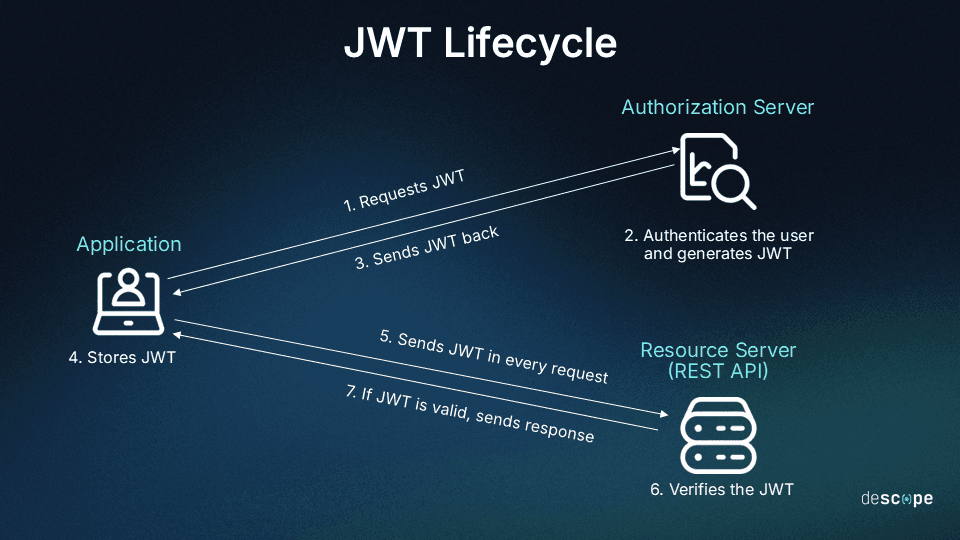
In a typical JWT auth flow, a user logs in, the server verifies their credentials, issues a signed JWT, and the client stores it (often in an HTTP-only cookie). On future requests, the client sends the JWT so the server can verify its signature and claims before granting access.
Read more: Basic vs. JWT-Based Authentication: What’s the Difference?
What is OAuth?
OAuth is an open authorization framework, defined by RFC 6749, that lets an application access resources on a user’s behalf without ever handling the user’s password. As an open protocol, OAuth has become the default way modern applications delegate access to one another. Instead of handing over a password, users grant an application permission to act on their behalf by issuing access tokens. These tokens can be in various formats, including JWT.
OAuth exists to solve a specific problem: before it became widely adopted, the only way for one app to access data on another service was for the user to hand over their actual username and password, sometimes called the “password anti-pattern.” That approach gave the requesting app full access to the account rather than just the specific data it needed, with no easy way to revoke access without changing the password everywhere else it was used. OAuth replaces that shared secret with a scoped, revocable token instead.
OAuth relies on four key roles:
Resource owner: The user who grants permission for an application to access their data.
Client: The application requesting access to the protected resources.
Resource server: The server hosting the data or API being accessed.
Authorization server: The server that authenticates the user and issues access tokens.
A familiar example is when a project management app connects to a user’s cloud storage service, such as Google Drive or Dropbox, to access files on their behalf without the user sharing their password. OAuth handles the secure permission grant and token exchange that makes this possible.
How does OAuth work?
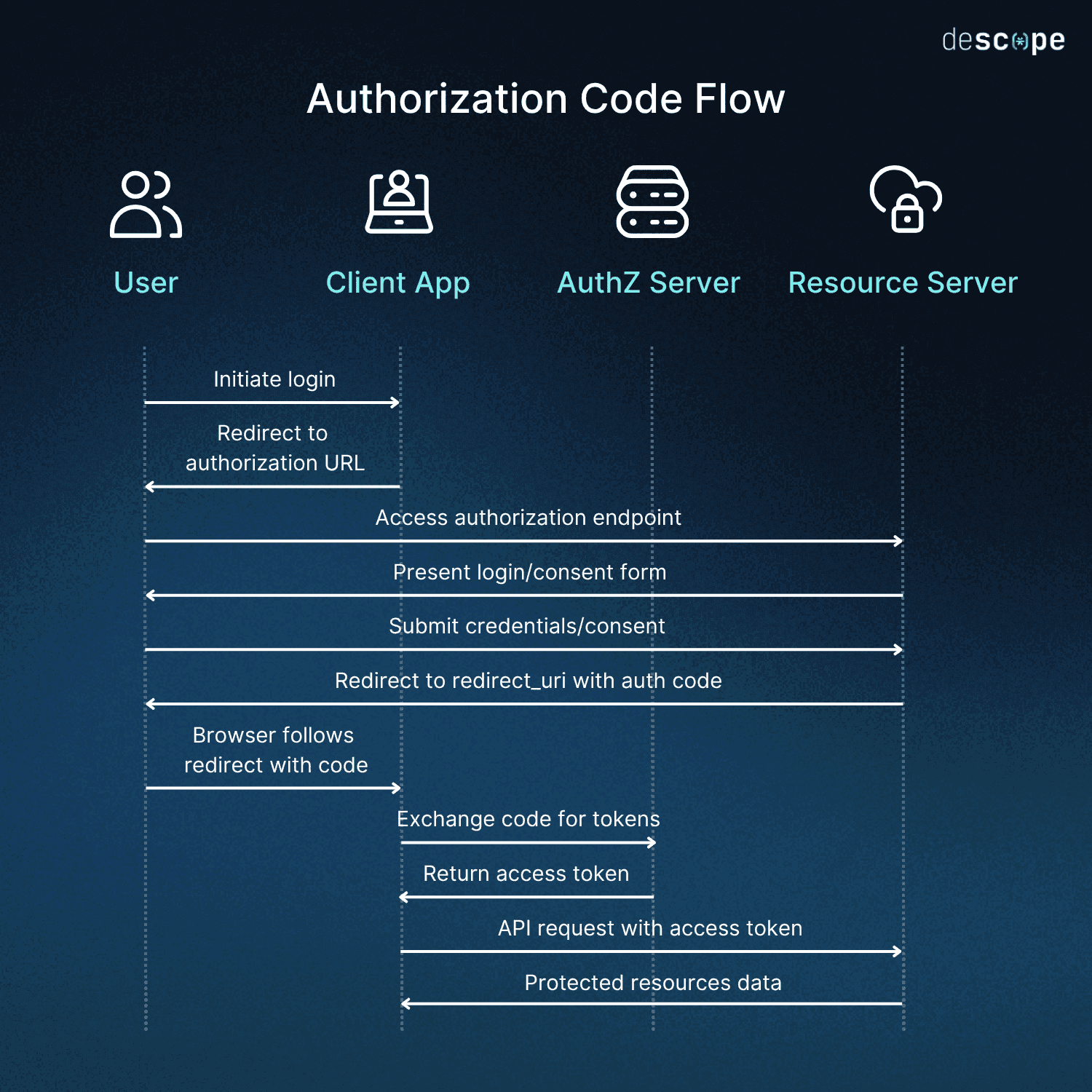
OAuth works by redirecting the user to an authorization server to approve access, then handing the requesting app a token it can use to call the resource server on the user’s behalf, without ever exposing the user’s password to that app. The most common version of this, the authorization code flow, runs in five steps:
The user is redirected to the authorization server to log in.
The user approves the access the application is requesting.
The authorization server returns an authorization code to the application.
The application exchanges that code for an access token.
The application uses the access token to call the resource server on the user’s behalf.
Applied to the earlier cloud storage example: the project management app redirects you to Google’s login and consent screen, you approve access to just your files (not your whole account), Google returns a code to the app, the app exchanges that code for an access token behind the scenes, and from then on the app uses that token to read your files without ever seeing your Google password. If you revoke access later, Google can invalidate the token without you having to change your password at all.
Common OAuth flows
Common OAuth flows include:
Implicit: Now deprecated in favor of more secure alternatives like Authorization Code with PKCE, since it returned tokens directly in the URL fragment. This is easier for an attacker to intercept rather than an authorization code that gets exchanged server-side.
Authorization Code with PKCE: Recommended for browser-based and mobile apps, replacing the implicit flow for better security. PKCE adds a one-time secret that only the original app instance knows, so even if the authorization code is intercepted in transit, an attacker can’t exchange it for a token without also having that secret.
Client Credentials: Used for server-to-server communication without user interaction, since there’s no human present to redirect or ask for consent. The application authenticates directly with its own credentials, which is common for backend jobs and service-to-service API calls.
Device Code: Designed for browserless or input-constrained devices like smart TVs, allowing the user to authorize access on a separate device (typically a phone) that can actually display a login screen and keyboard.
OAuth’s benefits include flexibility, fine-grained access control through scopes, and the ability to revoke or refresh tokens as needed. However, improper implementation can lead to OAuth issues like token theft or redirect manipulation, which can be mitigated with best practices such as strict redirect URI validation, short-lived access tokens, secure storage, and multi-factor authentication (MFA).
Read more: Access Token vs Refresh Token: A Breakdown
OAuth vs. JWT comparison
While JWT and OAuth are often mentioned together, they serve different purposes. JWT is a token format, while OAuth is a framework for delegated authorization. In practice, OAuth can use JWTs as access or ID tokens, but JWTs can also be used outside of OAuth.
Key differences
Purpose – JWT defines how to structure and sign tokens that carry claims. OAuth defines how applications can obtain and use access tokens to act on behalf of a user or service.
Use case – JWTs are used to securely transmit claims, often for authentication or authorization. OAuth is used to grant controlled access to resources without sharing passwords.
Relationship – OAuth can issue tokens in JWT format, but JWT itself is not an alternative to OAuth.
State management – JWTs are typically self-contained and stateless. OAuth can be implemented with either self-contained tokens (JWT) or stateful, opaque tokens.
Revocation – JWTs are harder to revoke mid-lifecycle unless short expirations or deny lists are used. OAuth with opaque tokens can support real-time revocation via token introspection.
Taken together, these differences explain why the comparison confuses so many developers in the first place: JWT and OAuth aren’t rival solutions to the same problem, so there’s no clean “winner” to point to. Asking whether to use JWT or OAuth is a bit like asking whether to use envelopes or the postal service; one is a container, the other is a delivery system, and in most real deployments you need both working together.
In short, JWT is the envelope that can carry information, and OAuth is the process for securely granting and managing access. Many modern systems use them together—for example, OAuth 2.0 with OIDC often issues ID and access tokens as JWTs.
When to use JWT, OAuth, or both
Choosing between JWT, OAuth, or both depends on your application’s needs. OAuth is a bigger, more comprehensive system that offers greater security. JWTs offer greater ease of access and are usable in more contexts—however, they require caution.
It’s important to remember that JWT and OAuth are not mutually exclusive. In fact, they are often used together. OAuth 2.0 defines how an application obtains access tokens, which are often formatted as JWTs. For example, in an OAuth flow with OIDC, the authorization server might issue an ID token (always a JWT in OIDC) and an access token (often a JWT) to the client.
Conversely, it’s also worth noting that JWTs can be used without OAuth, and OAuth does not require JWTs—opaque tokens are a common alternative. Below are the best use cases for each.
When to use JWT
Dev teams typically turn to JWT when their need for speed and accessibility outweighs security concerns. For example, if your app needs a lightweight, self-contained token format that can be validated without a database lookup, then JWT auth is probably best. Other use cases include:
Your application benefits from stateless authentication.
You can accept limited mid-lifecycle revocation and rotate short-lived tokens.
In these instances, using just JWT and not OAuth might be most beneficial.
When to use OAuth
Developers most often opt for OAuth, with or without JWT, when there is a pressing functionality or security need. OAuth simply does more, even if it is more burdensome to use.
Some scenarios where OAuth makes more sense than JWT include:
You need delegated access to APIs without sharing passwords.
Your application requires fine-grained access control using scopes.
You want the ability to revoke and refresh tokens easily.
You’re enabling social login or multi-service access (typically via OAuth + OIDC)
In these cases, it probably makes more sense to use OAuth and not JWT.
When to use JWT and OAuth together
JWT and OAuth are far from mutually exclusive. They’re often used together, and they arguably work better this way, combining the best of both worlds and covering gaps.
Here are some of the biggest reasons to use JWT and OAuth together:
You want OAuth’s security combined with JWT’s portability and self-contained claims.
You’re implementing OIDC, which uses OAuth 2.0 flows and issues JWT ID tokens.
You need scalable login and authorization flows across multiple applications or services.
Using JWT and OAuth together combines their strengths: OAuth’s delegated access model and JWT’s compact structure. However, this requires considering the security requirements of each. JWTs need short expiration times, strong signing keys, and validated claims; OAuth deployments should enforce strict redirect URI checks, scope-based access control, and secure token storage.
This is exactly the pattern behind OpenID Connect (OIDC), which is built directly on top of OAuth 2.0. OIDC adds a standardized identity layer to OAuth’s authorization model: alongside the access token that OAuth already issues, the authorization server also issues an ID token, which is always formatted as a JWT. That ID token carries verified claims about who the user is, such as their name and email, so the application doesn’t need to make a separate call back to the identity provider just to confirm identity. This is why so many “Sign in with Google” or “Sign in with Microsoft” buttons are, under the hood, running an OAuth 2.0 flow with OIDC layered on top, using JWTs to carry the actual identity data.
In practice, most teams building a modern login system aren’t choosing JWT instead of OAuth or OAuth instead of JWT. They’re choosing an OAuth 2.0 (often paired with OIDC) flow to handle the delegation and consent, with JWTs as the token format that flow issues along the way. Treating the decision as an either/or misses how the two standards are designed to complement each other.
Implement JWT and/or OAuth easily with Descope
Implementing JWT and/or OAuth correctly requires more than just choosing the right standard; it means configuring each step for security, scalability, and ease of use. Descope, a customer identity and access management (CIAM) platform, makes this easier by providing no-code and low-code tools to build auth flows that leverage JWT, OAuth, and other protocols securely.
With Descope, you can deliver frictionless login experiences across all your apps in just a few lines of code. Sign up for a Free Forever account or book a demo with our experts.