
Table of Contents
Don't have the time to read the entire post? Our human writers will be sad, but we understand. Summarize the post with your preferred LLM here instead.
SAML (Security Assertion Markup Language, pronounced "SAM-el") extends a login from an identity provider (IdP) to an application as a SAMLResponse. This is a Base64-encoded message that arrives as an unreadable block of characters. Requests and logout messages sent over the HTTP-Redirect binding are also DEFLATE-compressed before encoding. A SAML decoder reverses the encoding, and any compression, to return the XML that was actually sent.
Decoding that XML makes it readable again, and it’s the first step in diagnosing single sign-on (SSO) failures. When an SSO login breaks, the application often shows a generic error but not the underlying cause. The root of the problem is in the XML response: its status, assertion, and the conditions attached to it. However, decoding simply makes the XML human-readable. It doesn’t diagnose whether they’re valid, which is why debugging takes several more steps.
This guide uses Descope’s SAML Guru, a free browser-based SAML decoder, to read a response from end to end. We’ll work through the fields where SSO most often breaks, and briefly cover the most common fixes for each.
The guide also assumes you’re already familiar with SAML, what it’s intended to do, and how it differs from other approaches like OpenID Connect (OIDC). You can easily refresh your understanding by reading our dedicated guides: How the SAML Protocol Works, OIDC vs. SAML, and Descope’s docs on setting up SSO with a SAML tenant.
At a glance
A SAML decoder turns an encoded
SAMLResponseorSAMLRequestinto readable XML, so you can see exactly what the IdP sent.Login responses arrive over HTTP-POST and are Base64 only. Requests and logout messages sent over HTTP-Redirect are DEFLATE-compressed first, so a plain Base64 decode leaves them unreadable until they're inflated.
Decoding shows you the message; it does not validate the signature or the assertion. Readable is not the same as trusted.
Most SSO failures come down to a few fields:
Status,Audience, theConditionstime window,Recipient, andInResponseTo.SAML Guru runs entirely in your browser, so the message never leaves your machine.
How to decode a SAML message
Reading a response takes two steps: capture the encoded value, then decode it. The output from SAML Guru is the XML we’ll debug in later sections.
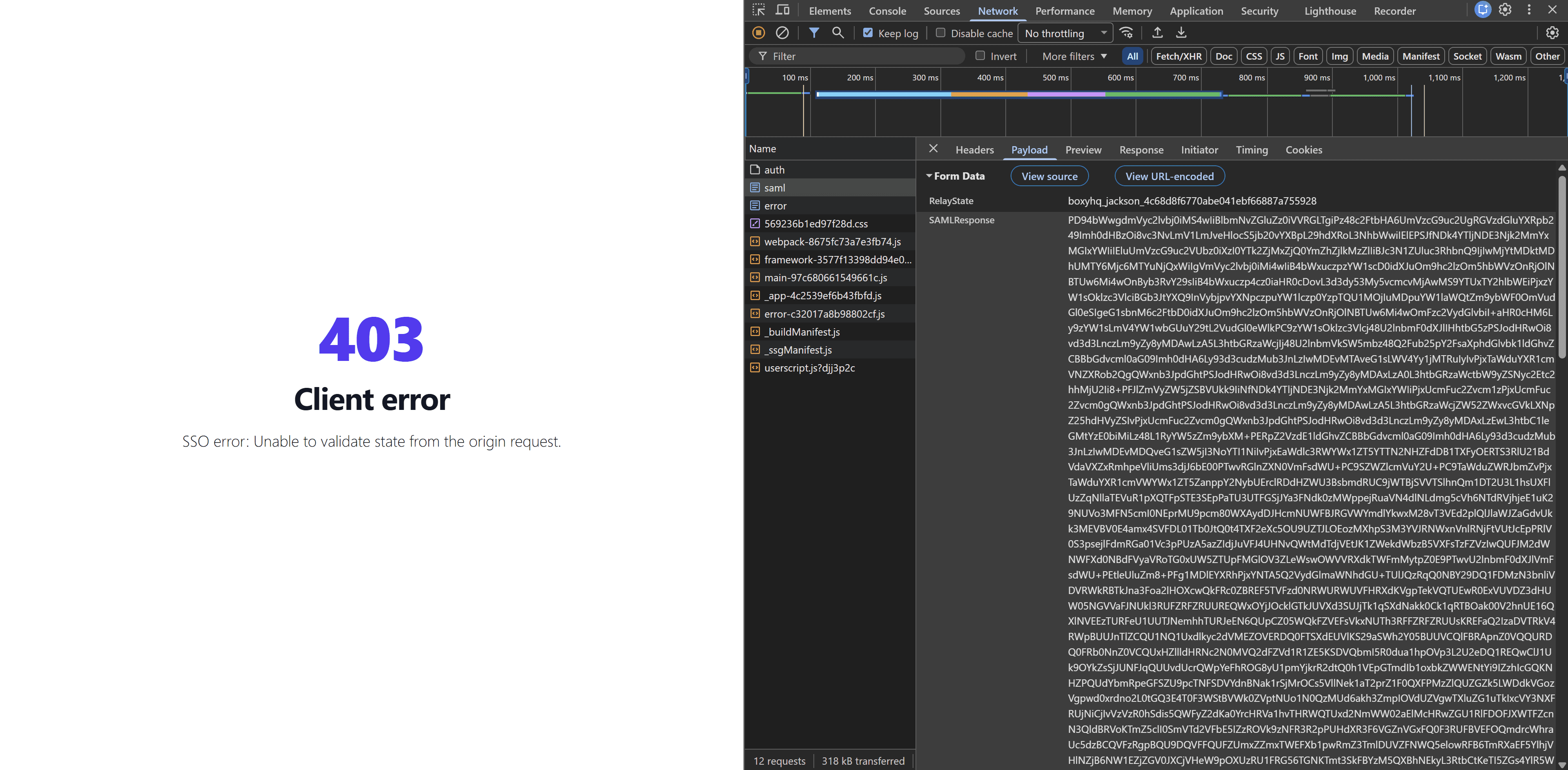
First, capture the value using your browser to log in with SSO. The message is a single parameter. A login response arrives over the HTTP-POST binding as a hidden form field named SAMLResponse. An AuthnRequest, and often a logout message, travels over the HTTP-Redirect binding instead, in the URL query string as SAMLRequest= (or SAMLResponse= for a logout response).
Most popular browsers (Chrome, Firefox, Safari) have a built-in developer mode that exposes documents like SAML messages. Open the developer console (or equivalent) in your browser, select the Network tab (or equivalent), and enable the option to preserve logs; this prevents the console from being wiped out when redirected or refreshed.
Repeat the SSO login you’re troubleshooting, and you should see a SAML document appear in your developer UI. Copy the value of the payload only, not the parameter name or the surrounding markup.
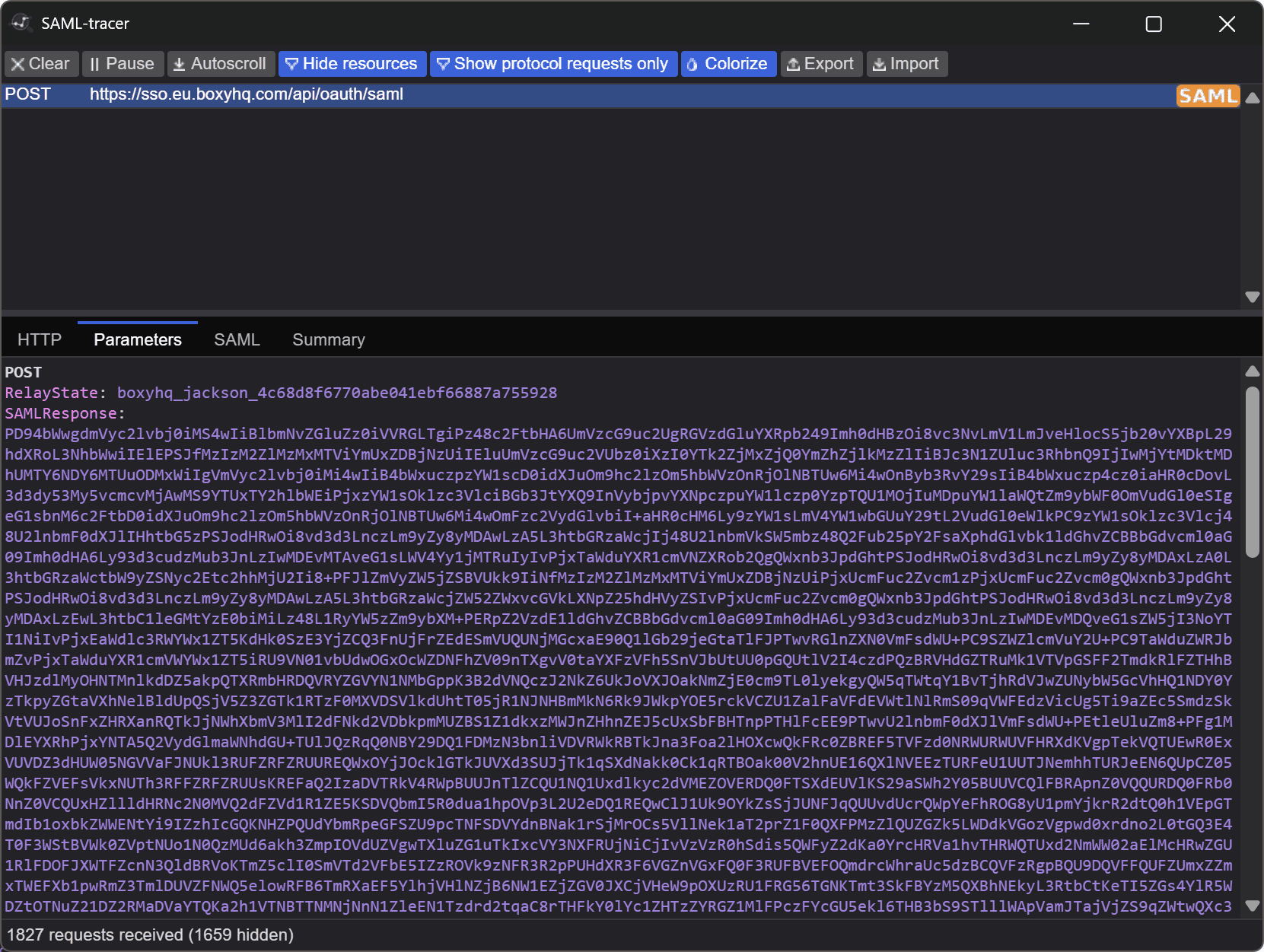
You may also choose to install a plugin or extension to capture and decode the SAML message all in one window. However, most browser addons do not allow you to paste and decode existing SAML messages, which will often be what you’re working with when troubleshooting an end-user login failure.
Now, decode the SAML response. Paste the value of SAMLResponse into SAML Guru, which will resolve the encoding and print the XML. If your message is DEFLATE-compressed, SAML Guru will automatically inflate it before decoding.
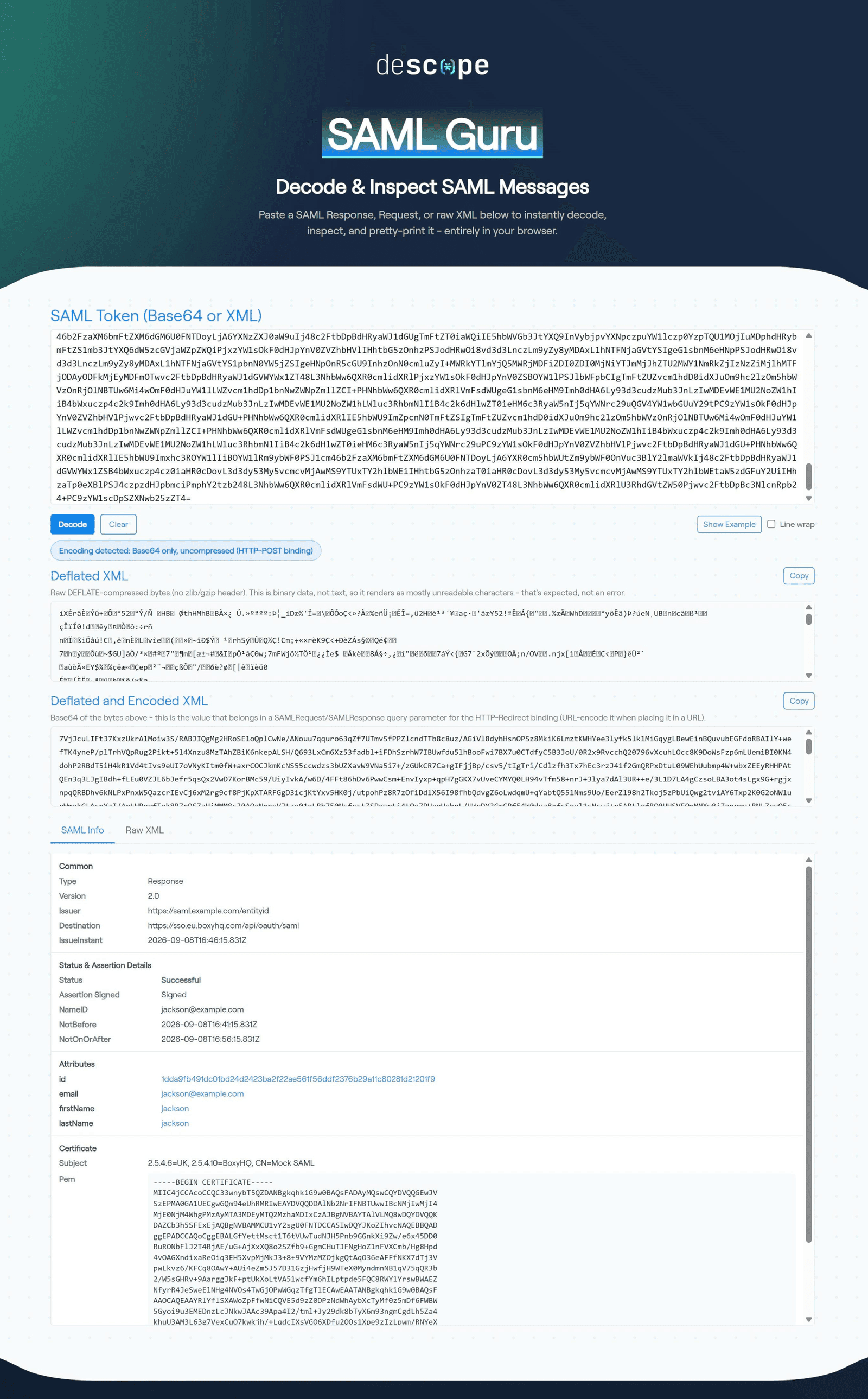
Once decoded, read the summary (SAML Info) first to orient yourself with the basics, then switch to the raw XML view to begin the diagnostic process. The rest of this guide assumes you’re working with a properly decoded SAML response, so make sure the raw XML tab shows actual values rather than unreadable characters.
What does a SAML response contain?
A SAMLResponse has two layers: the response envelope, which carries transport-level status and addressing, and the assertion inside it, which carries the user's identity and the conditions on trusting it. Both are defined in the SAML 2.0 core specification, and Descope's SAML explainer covers the wider protocol.
The table below describes each field, which you’ll compare against your own decoded output, with this serving as a legend:
Field | What’s in it | Decoded example |
|---|---|---|
Destination | The exact URL the IdP addressed the message to | https://api.descope.com/v1/auth/saml/acs?tenantId=T2exampleTenant00000000000 |
Issuer | The entityID identifying the IdP that issued the message | https://idp.example.com/saml/metadata |
Status | The overall result of the authentication attempt, expressed as a status-code URI | urn:oasis:names:tc:SAML:2.0:status:Success |
Signature | The IdP's cryptographic signature over the response, the assertion, or both | On the assertion: RSA-SHA256 with an embedded X509 certificate |
Subject | The user identity with which the SAML assertions are associated | See NameID, Recipient, InResponseTo, and Bearer NotOnOrAfter below |
NameID | The identifier for the authenticated user, and the Format that identifier is expressed in | jane.doe@example.com (emailAddress format) |
Recipient | The endpoint permitted to receive this assertion | Same URL as Destination |
InResponseTo | The ID of the specific request this response answers | _req00000000-0000-4000-8000-000000000000 |
Bearer NotOnOrAfter | The moment after which the assertion can no longer be presented | 2026-01-15T11:00:00.000Z |
Conditions | The window in which the assertion is valid, bounded by NotBefore and NotOnOrAfter | NotBefore 2026-01-15T09:55:00.000Z, NotOnOrAfter 2026-01-15T11:00:00.000Z |
Audience | The service provider the assertion is intended for | T2exampleTenant00000000000-P2exampleProject0000000000 |
AttributeStatement | The user attributes the SP maps to profile fields, roles, and groups | email, name, department, groups (Engineering, Admins, Everyone), roles (viewer, editor) |
AuthnStatement | Records how and when the user authenticated, and identifies the session for a single logout | 2026-01-15T09:58:00.000Z, urn:oasis:names:tc:SAML:2.0:ac:classes:PasswordProtectedTransport, _e5f6a7b8-0000-4000-8000-000000000002 |
How to debug a SAML response
Work down the decoded message roughly in the order it appears. Not every field is worth exploring as a failure point; either they’re extremely unlikely to be the cause, or they’re set in stone by the spec. <AuthnStatement>, for example, records how and when the user authenticated, and it’s highly unlikely to break a login.
Read the decoded message from the top. The response header, Issuer, and Status sit in the response envelope; everything from Signature down lives in the assertion. Each section below covers what the field and its contents are, what correct and broken look like, and the fix. Code blocks in this section include sample fields, as they might appear in a complete SAML response. These are illustrative, and yours may look significantly different depending on the field’s possible parameters.
Response header
The opening <samlp:Response> element carries the envelope attributes: ID, Version, IssueInstant, Destination, and InResponseTo. ID, Version (always 2.0), and IssueInstant are effectively never the cause of a failure. InResponseTo also appears in the assertion and is covered under subject confirmation below. The one that can actually fail here is Destination: the exact URL the IdP addressed the message to, which must equal your assertion consumer service (ACS) URL.
<samlp:Response xmlns:samlp="urn:oasis:names:tc:SAML:2.0:protocol" ID="_a1b2c3d4-0000-4000-8000-000000000001" Version="2.0" IssueInstant="2026-01-15T10:00:00.000Z" Destination="https://api.descope.com/v1/auth/saml/acs?tenantId=T2exampleTenant00000000000" InResponseTo="_req00000000-0000-4000-8000-000000000000">Correct:
Destinationmatches your ACS URL in full, scheme, host, path, and query string included.Fails when: the decoded
Destinationdiffers from your ACS URL, so the SP rejects a message addressed elsewhere. Usually the IdP app holds the wrong ACS URL, or a proxy rewrote the host in front of the SP.Fix: correct the ACS URL in the IdP app; if it looks right, check for a proxy changing host or scheme (http versus https).
Recipientin the assertion must match this same URL.
Issuer
<Issuer> follows the header, and repeats inside the assertion. It holds the entityID of the IdP that issued the message, the IdP's unique identifier from its metadata.
<Issuer xmlns="urn:oasis:names:tc:SAML:2.0:assertion">https://idp.example.com/saml/metadata</Issuer>Correct: matches the entityID the SP has on file for the connection, exactly (
https://idp.example.com/saml/metadatain the example).Fails when: the value does not match, so the SP rejects the message as an unknown issuer or routes it to the wrong connection. Common right after an IdP migration changes the entityID while the SP still holds the old one.
Fix: re-import the IdP metadata on the SAML connection, or correct the entityID by hand. With several connections, confirm the login maps to the right one. The signing certificate ships in that same metadata, so a stale issuer and a stale cert usually re-import together.
Status
<samlp:Status> reports the outcome. Success appears as <samlp:StatusCode Value="urn:oasis:names:tc:SAML:2.0:status:Success"/>; that full URI, not the bare word "Success," is the value in the message. Anything else is a failure, and the response carries no assertion below it.
<samlp:Status>
   <samlp:StatusCode Value="urn:oasis:names:tc:SAML:2.0:status:Success"/>
 </samlp:Status>
Correct: a single top-level
StatusCodewhoseValueends in:Success.Fails when: the top-level
Valueends in:Requester(fault in the SP's request),:Responder(the IdP could not process it), or:VersionMismatch. A nested second-levelStatusCodegives the reason, and an optional<samlp:StatusMessage>often states it in plain text. Common second-level codes::AuthnFailedmeans the user failed to authenticate:InvalidNameIDPolicymeans the SP asked for a NameID format the IdP will not issue:RequestDeniedmeans the IdP could process the request but refused it:NoPassivemeans the request asked for no user interaction, but the user was not already signed in
Fix: follow the code.
:Requestermeans fix your side (ACS URL,NameIDPolicy, binding);:Responderusually means the user is not assigned to the app or an IdP policy blocked them. Nothing below this field in the SAML message matters until the status actually reads Success.
Signature and certificates
<ds:Signature> sits right after a repeat of Issuer (which is the same value you checked above). It may sign the response, the assertion, or both (the example signs the assertion). SignatureMethod gives the algorithm (RSA-SHA256), DigestValue binds it to specific content, and <X509Certificate> is the IdP's signing certificate. There’s not much you can do with the signature, even decoded. Validation is the SP's job, against the certificate it trusts.
<Signature xmlns="http://www.w3.org/2000/09/xmldsig#">
  <SignedInfo>
    <CanonicalizationMethod Algorithm="http://www.w3.org/2001/10/xml-exc-c14n#"/>
    <SignatureMethod Algorithm="http://www.w3.org/2001/04/xmldsig-more#rsa-sha256"/>
    <Reference URI="#_e5f6a7b8-0000-4000-8000-000000000002">
      <Transforms>
        <Transform Algorithm="http://www.w3.org/2000/09/xmldsig#enveloped-signature"/>
        <Transform Algorithm="http://www.w3.org/2001/10/xml-exc-c14n#"/>
      </Transforms>
      <DigestMethod Algorithm="http://www.w3.org/2001/04/xmlenc#sha256"/>
      <DigestValue>ZXhhbXBsZURpZ2VzdFZhbHVlMDAwMDAwMDAwMDA9</DigestValue>
    </Reference>
  </SignedInfo>
  <SignatureValue>ZXhhbXBsZVNpZ25hdHVyZVZhbHVlLXRoaXMtaXMtYS1kZW1vLXNhbXBsZS1ub3QtYS1yZWFsLXNpZ25hdHVyZS1wYWRkaW5nLXRvLWxvb2stcmVhbGlzdGljLTAwMDAwMDAwMDAwMDAwMDAwMDAwPQ==</SignatureValue>
  <KeyInfo>
    <X509Data>
      <X509Certificate>MIIDRzCCAi+gAwIBAgIUVIjNBEBr0Lwq9eUkDqJbkQ7D79kwDQYJKoZIhvcNAQELBQAwMzEYMBYGA1UEAwwPaWRwLmV4YW1wbGUuY29tMRcwFQYDVQQKDA5TQU1MIEd1cnUgRGVtbzAeFw0yNjA4MzAxOTAwMzBaFw0zNjA4MjcxOTAwMzBaMDMxGDAWBgNVBAMMD2lkcC5leGFtcGxlLmNvbTEXMBUGA1UECgwOU0FNTCBHdXJ1IERlbW8wggEiMA0GCSqGSIb3DQEBAQUAA4IBDwAwggEKAoIBAQDXjm5gaK/WnVmjcEgDPyMn6KgWnSGqGyFl8KfelmrMiR7AJ3QZwLzVG7UZPitteLm+NEBQNiSKocYLyTb+Kqtom3immlxVg1PNQHxjlDx06Ikf437RP4DFW79OLshE43c5QtJ98Vrp5nqL64dkfqRyXjSYKBFidtjEkj7ZiCkradg7jbWHRrkO6gyahYWGWRas5ftXwLG+FLTBigrXMQTApeXhLdMYU+P3fI6mZ2EBNc4/eQRfPYUYuYcye1X5hc2ZToWfMtOwhj8Knxz161G5+OAFvanwhS29THLtsJDurJqyF7mOcO6aaqrpevAJamb6kdgWh7aD80/quMsmvbq9AgMBAAGjUzBRMB0GA1UdDgQWBBRM9h5boXhlH6ueEEdofSNUP0K7HDAfBgNVHSMEGDAWgBRM9h5boXhlH6ueEEdofSNUP0K7HDAPBgNVHRMBAf8EBTADAQH/MA0GCSqGSIb3DQEBCwUAA4IBAQB8kRu6jnHyg/5Y9MYKjFfyiVF3wp5rmFIF+DZStoiOD3uc6yhPfDU2LafVk1EzvgQ+l03rMn5p8P18I879AsZX5XY9PcFnJEt2eMp8ZuBeukcAN/VQxi6J5cKdH3+r5G21IOhUWBh3Swb/4xEddjcrVuvZF++ecLmzZYW3s4So4J0NHcZC+iCxZvpm4ZS+Cl4+Yf97acCq+9RtvS6dmdFTjHNt0UO8cuSgEIlHfCuqvzMXP5SSeY0nauEAgopO75DiFCs77lb2TJugHfy78A7Rdi+eUWBQIOTSDjOqyxyf61zrTb6sJKWSFvdWHU6Vme3qm2Th83YbcvRjDmnv7Bns</X509Certificate>
    </X509Data>
  </KeyInfo>
</Signature>
Correct: a signature present where the SP requires it, with an accepted algorithm, a matching digest, and a trusted certificate.
Fails when: a message that passes every readable check is still rejected. The failure is validation, not content, in a few buckets:
the SP's stored certificate no longer matches the IdP's, after a rollover or expiry (by far the most common)
the digest does not match because something altered the bytes in transit, so canonicalization (the normalizing step before hashing) no longer reproduces it
the SP requires a signature the message does not carry, such as a signed response when only the assertion is signed
Fix: re-import the IdP's current signing certificate from metadata and enable metadata refresh so rollovers do not break silently. On Descope, a bad or stale certificate reads as
E062604orE062606. For a digest mismatch, find what is mutating the message in transit. Monitor certificate expiry ahead of the date.
NameID
In the assertion's <Subject>, <NameID> is the identifier the SP keys the user on, and its Format attribute is as load-bearing as the value.
<Subject>
  <NameID Format="urn:oasis:names:tc:SAML:1.1:nameid-format:emailAddress">jane.doe@example.com</NameID>
Correct: a stable value with a
Formatthe SP expects, the same for a given user every login (jane.doe@example.com,Formatending inemailAddress, in the example).Fails when:
a new user is created every login, or an existing one never matches, because the IdP sends a changing value, often a
transientformat where the SP expects a stable onethe login fails with a format complaint, because the SP's
NameIDPolicyasks for a format the IdP will not issue
Fix: point the IdP at a stable attribute (email or a persistent directory ID) and set
Formatto match what the SP keys on. Keep both constant; changing either later splits one user into two accounts.
Subject confirmation
The <SubjectConfirmationData> (bearer method) ties the assertion to this login and recipient. Recipient must equal your ACS URL, the same value as Destination. NotOnOrAfter here is a bearer deadline, separate from Conditions. InResponseTo turns on login direction: SP-initiated logins send a request first, so it is present and must match the outstanding request ID; IdP-initiated logins have none, so it must be absent.
<SubjectConfirmation Method="urn:oasis:names:tc:SAML:2.0:cm:bearer">
  <SubjectConfirmationData InResponseTo="_req00000000-0000-4000-8000-000000000000" NotOnOrAfter="2026-01-15T11:00:00.000Z" Recipient="https://api.descope.com/v1/auth/saml/acs?tenantId=T2exampleTenant00000000000"/>
</SubjectConfirmation>
Correct:
Recipientmatches the ACS URL;InResponseTomatches the request, or is absent for an IdP-initiated login; the bearer deadline has not passed.Fails when: an
InResponseTomatching no outstanding request, or present on an IdP-initiated login, is rejected as unsolicited or a replay. The usual cause is the SP losing request state (a dropped session, or a load-balanced node that did not share it), not an attack. ARecipientmismatch behaves like aDestinationmismatch.Fix: match config to the real login direction: IdP-initiated needs the SP to accept unsolicited responses, SP-initiated needs request state to survive across nodes. Fix
RecipientlikeDestination; an expired deadline is a timing problem, next.
Conditions
<Conditions> bounds validity with NotBefore and NotOnOrAfter; the SP checks the current time against that window.
<Conditions NotBefore="2026-01-15T09:55:00.000Z" NotOnOrAfter="2026-01-15T11:00:00.000Z">Correct: validation falls between the two timestamps (the example allows five minutes either side of issuance). Window lengths vary by IdP; what matters is that the SP's clock reads a time inside it.
Fails when: a login that just happened is rejected as expired or not-yet-valid. That almost always means clock skew, the IdP and SP clocks disagreeing by more than the window's slack. A genuinely expired assertion, from a stalled redirect, is rarer.
Fix: sync both clocks to NTP. For unavoidable drift, allow a minute or two of skew tolerance on the SP rather than widening the window at the IdP.
Audience
Inside <Conditions>, <AudienceRestriction><Audience> names the one SP the assertion is for, written as that SP's entityID (T2exampleTenant00000000000-P2exampleProject0000000000 for Descope; elsewhere a URI like https://sp.example.com/metadata).
<AudienceRestriction>
  <Audience>T2exampleTenant00000000000-P2exampleProject0000000000</Audience>
</AudienceRestriction>
Correct: matches the SP's entityID as an exact string. A trailing slash or an http/https difference is a different audience.
Fails when: a fully successful, in-window assertion is still rejected. When everything else checks out and the login fails anyway, read
<Audience>: it will not match the SP's entityID, and the SP error usually says "audience" or "not intended for this service provider."Fix: set the IdP's audience (labeled Audience URI, Audience Restriction, or SP Entity ID) to the SP's exact entityID. On Descope, copy it from the tenant's SAML configuration rather than retyping.
AttributeStatement
<AttributeStatement> holds the user attributes the SP maps to profile fields, roles, and groups. Each <Attribute> has a Name and one or more <AttributeValue> (the example sends email, name, department, multi-valued groups, and multi-valued roles).
<AttributeStatement>
  <Attribute Name="email">
    <AttributeValue>jane.doe@example.com</AttributeValue>
  </Attribute>
  <Attribute Name="name">
    <AttributeValue>Jane Doe</AttributeValue>
  </Attribute>
  <Attribute Name="department">
    <AttributeValue>Engineering</AttributeValue>
  </Attribute>
  <Attribute Name="groups">
    <AttributeValue>Engineering</AttributeValue>
    <AttributeValue>Admins</AttributeValue>
    <AttributeValue>Everyone</AttributeValue>
  </Attribute>
  <Attribute Name="roles">
    <AttributeValue>viewer</AttributeValue>
    <AttributeValue>editor</AttributeValue>
  </Attribute>
</AttributeStatement>
Correct: attribute names match what the SP maps against; multi-valued attributes arrive as repeated
<AttributeValue>elements, not one delimited string.Fails when: login succeeds but the profile is empty or roles and groups do not apply, from a name mismatch (
groupversusgroups, or a display name where the SP wants an ID). On Descope, when Groups are configured as a mandatory attribute, the SSO Setup Suite connection test returnsE062028when the assertion carries no groups at all, separating "misnamed" from "never sent."Fix: align names on both sides and confirm multi-valued release. For group-to-role on Descope, set the group mapping with the Groups Attribute Name the IdP uses, then map each group to a role. Confirm the IdP releases the attribute before chasing names.
Simplifying SAML SSO setup and debugging with Descope
A SAML decoder answers one question quickly: what did the IdP actually send? Reading the response top to bottom turns a generic login failure into a specific field to fix, and most of those fixes are a corrected URL, a synced clock, or an aligned attribute name. Bookmark SAML Guru for the next time an SSO login breaks. Help your end user capture the SAML message, then paste it into the tool for debugging.
If you would rather catch these problems before a user hits them, Descope lets you add SAML SSO without building the federation yourself, with self-service setup and connection testing for your customers' admins. Sign up for a Free Forever account or book time with our team.