
Table of Contents
Don't have the time to read the entire post? Our human writers will be sad, but we understand. Summarize the post with your preferred LLM here instead.
Written by Kumar Harsh, a software developer and devrel enthusiast who loves writing about the latest web technology. Visit Kumar's website to see more of his work!
AI-enabled code editors are now the default way many developers write and maintain software. In the past year, these tools have moved past just autocomplete. The current shift is toward agents that can plan, write, and modify code across an entire project from a single prompt. Instead of working line by line, you can now describe an outcome and let the editor handle large parts of the implementation.
Cursor and Windsurf both fall in this new category, but they take different approaches to how that agent fits into your workflow. Cursor integrates agentic capabilities into a familiar, review-driven development loop, while Windsurf puts a persistent agent at the center of the editing experience. This difference shows up in how tasks are executed, how much control you retain, and how work moves from idea to code.
In this article, we’ll compare how each tool handles agentic coding, including task execution, context awareness, and day-to-day usability, to understand where each one fits best.
Design philosophy and core approach
Both Cursor and Windsurf support agentic coding. The difference is how that agency is structured, how much autonomy it has, and how it fits into your development loop.
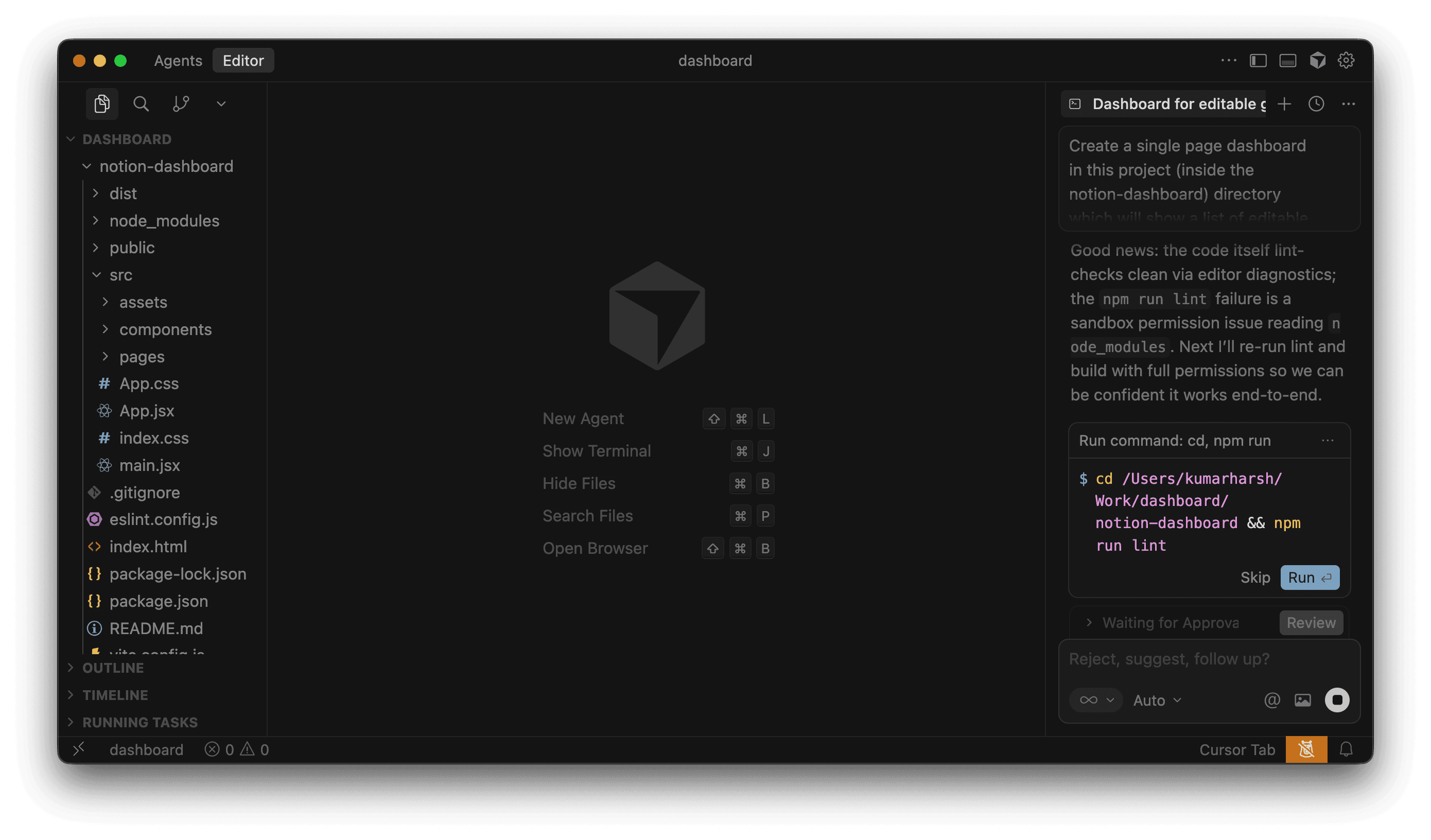
Cursor keeps the workflow grounded in the familiar developer experience of VS Code while extending it with agent capabilities. Its Composer can take a high-level request, analyze the codebase, and generate coordinated changes across multiple files. It’s capable of planning and executing non-trivial tasks end-to-end, including refactors and new feature scaffolding.
Everything routes through a review layer, where you inspect diffs, accept edits, and stay in control of what gets applied. Cursor also supports running multiple agents and shifting work between local and cloud environments, but the interaction model still centers around inspection and deliberate application of changes.
Windsurf structures the experience differently. Its Cascade agent is the primary interface. You give it an objective, and it plans the steps, navigates the codebase, edits files, and can run commands in the terminal as part of the workflow. It operates with a stronger sense of continuity during a session, tracking what you’ve done, maintaining context, and progressing tasks with fewer explicit checkpoints. Features like plan and execution modes, checkpoints, and terminal integration reinforce this model of an always-active agent working alongside you.
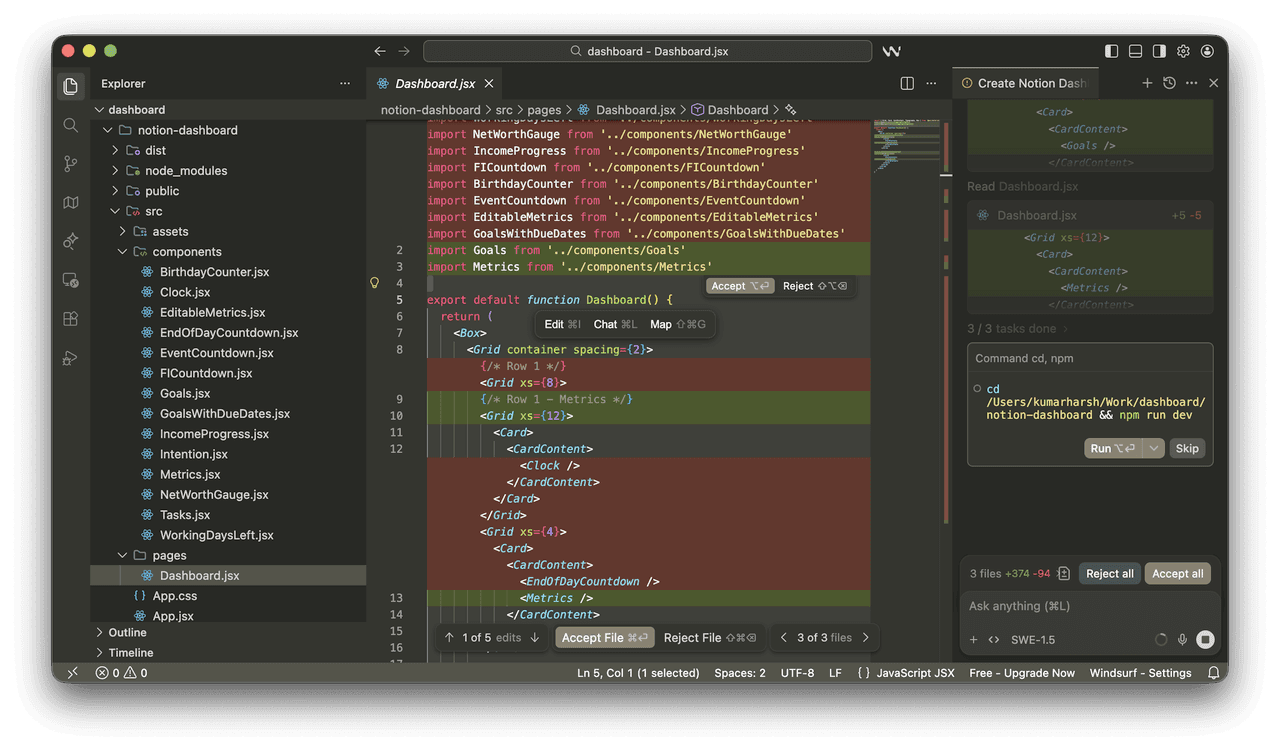
With Cursor, the agent is powerful but bounded by a clear review loop, so you stay involved in shaping and approving changes. With Windsurf, the agent takes on more of the execution flow itself, reducing the number of decisions you need to make along the way. Choosing between them comes down to how much of the development process you want to actively steer versus how much you’re comfortable handing off.
Agentic capabilities: hands-on testing
In the comparison below, Cursor v2.6.22 and Windsurf v1.9577.43 have been used. It's important to keep this in mind because these tools have been changing fast (new releases are shipped almost every week).
To make this comparison concrete, I gave both tools the same task on an existing app:
“Add a real-time collaborative task board to this app. Users should be able to create, assign, and move tasks between columns (To Do, In Progress, Done). Changes should sync live across all open browser tabs without requiring a page refresh.”
This is the kind of feature that forces an agent to make decisions across UI, state management, and data syncing. And there are a lot of grey areas, including drag-and-drop vs. regular UI, single-browser tab sync vs. tab sync across user sessions on multiple devices, etc.
The plans
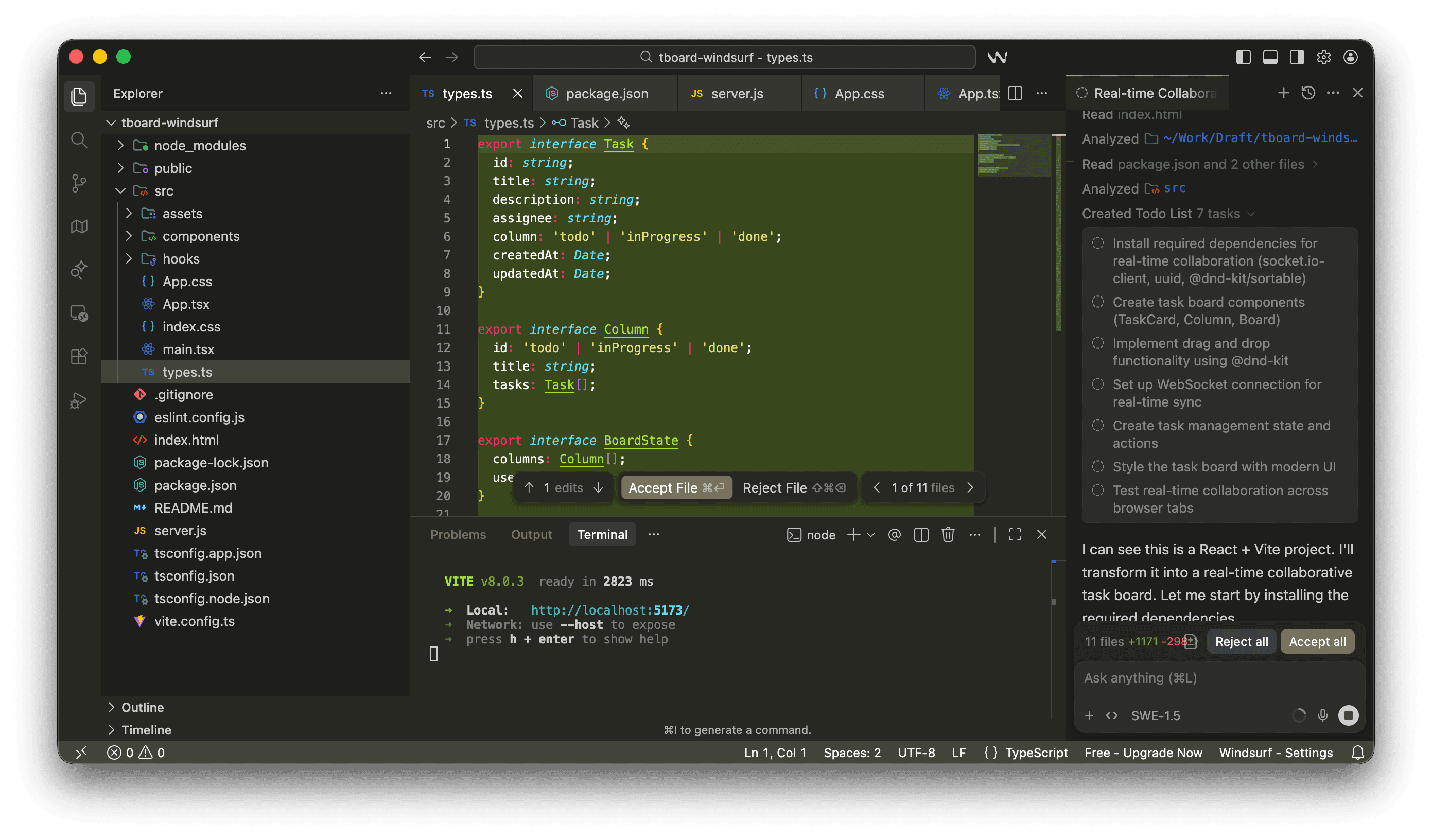
Windsurf opened with a plan: Seven steps, clearly laid out, before touching a single file. You get a moment to read it, tweak it, or stop it entirely. That alone changes how you approach the tool.
Cursor, in agent mode, didn’t show anything upfront. It just started editing files. You’re essentially watching diffs appear without knowing what’s coming next.
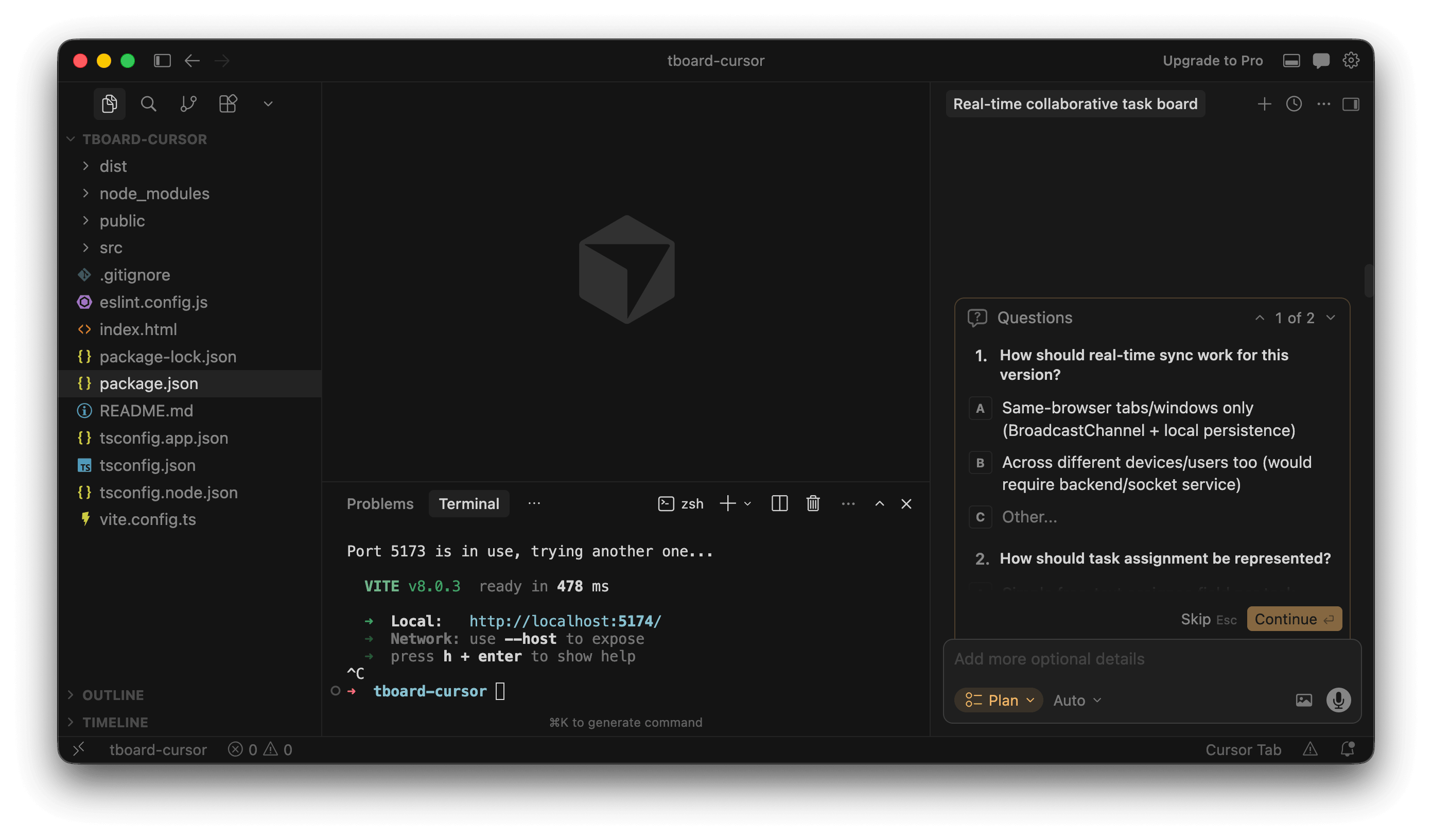
There is, however, a Plan mode in Cursor, and it’s actually quite good. It asked two useful questions first (sync strategy and assignment model), then produced a tighter, more technical plan that included validation steps like linting and multi-tab testing. But it’s tucked away. If you don’t go looking for it, you won’t use it.
The plans themselves also felt different in tone.
Windsurf’s plan was easier to scan and understand quickly, but a bit hand-wavy in places
Cursor’s plan (when you force it to make one) was more precise, almost like reading a senior engineer’s checklist
The most notable difference at this stage is the default behaviour. Windsurf gives you a chance to steer before anything happens by showing you what it's planning to do. Cursor’s default experience skips that entirely.
Autonomy and intervention
Windsurf paused a few times during execution, mostly at natural boundaries (trying to install dependencies step-by-step, or running the app to see if it throws any errors). Each pause came with a short explanation of what it was about to do next.
You could step away for a bit, but not completely. It still expects occasional confirmation, especially when decisions affect multiple files or introduce new dependencies.
Cursor didn’t pause in any meaningful way. Once it started, it kept going until the feature was “done.” Only at the end did it ask to run and review the running app, but it did offer an in-built browser in the IDE to test out the app:
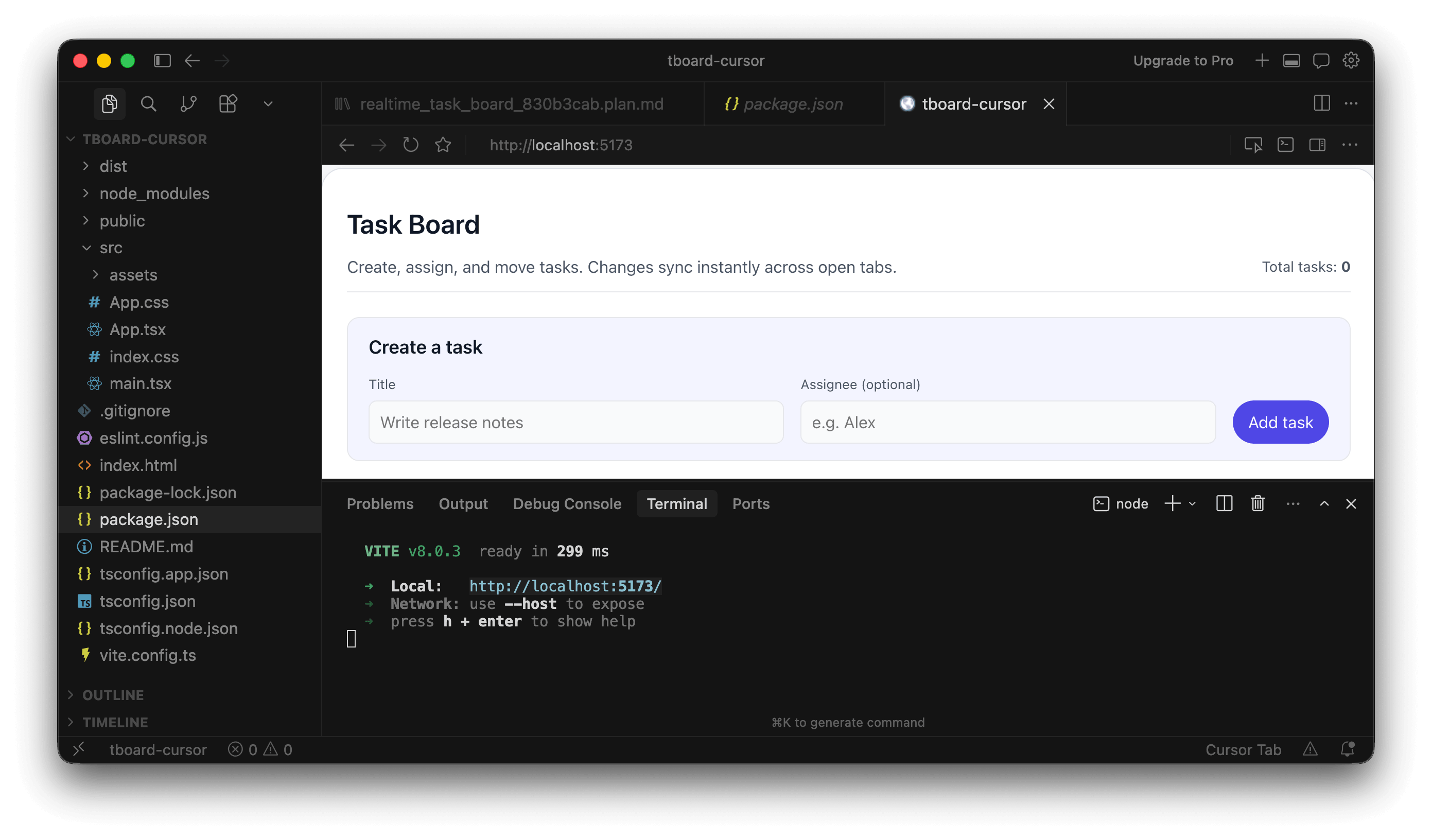
The uninterrupted flow makes Cursor faster, but also harder to supervise. You’re either watching closely or reviewing everything after the fact. Files are changing, logic is being added, and you’re piecing together intent from the diffs rather than from a clear outline.
If you like staying in the loop, Windsurf feels more collaborative. If you’re okay reviewing after the fact, Cursor’s flow is quicker but more opaque.
The generated UI
The generated UI is where things got interesting.
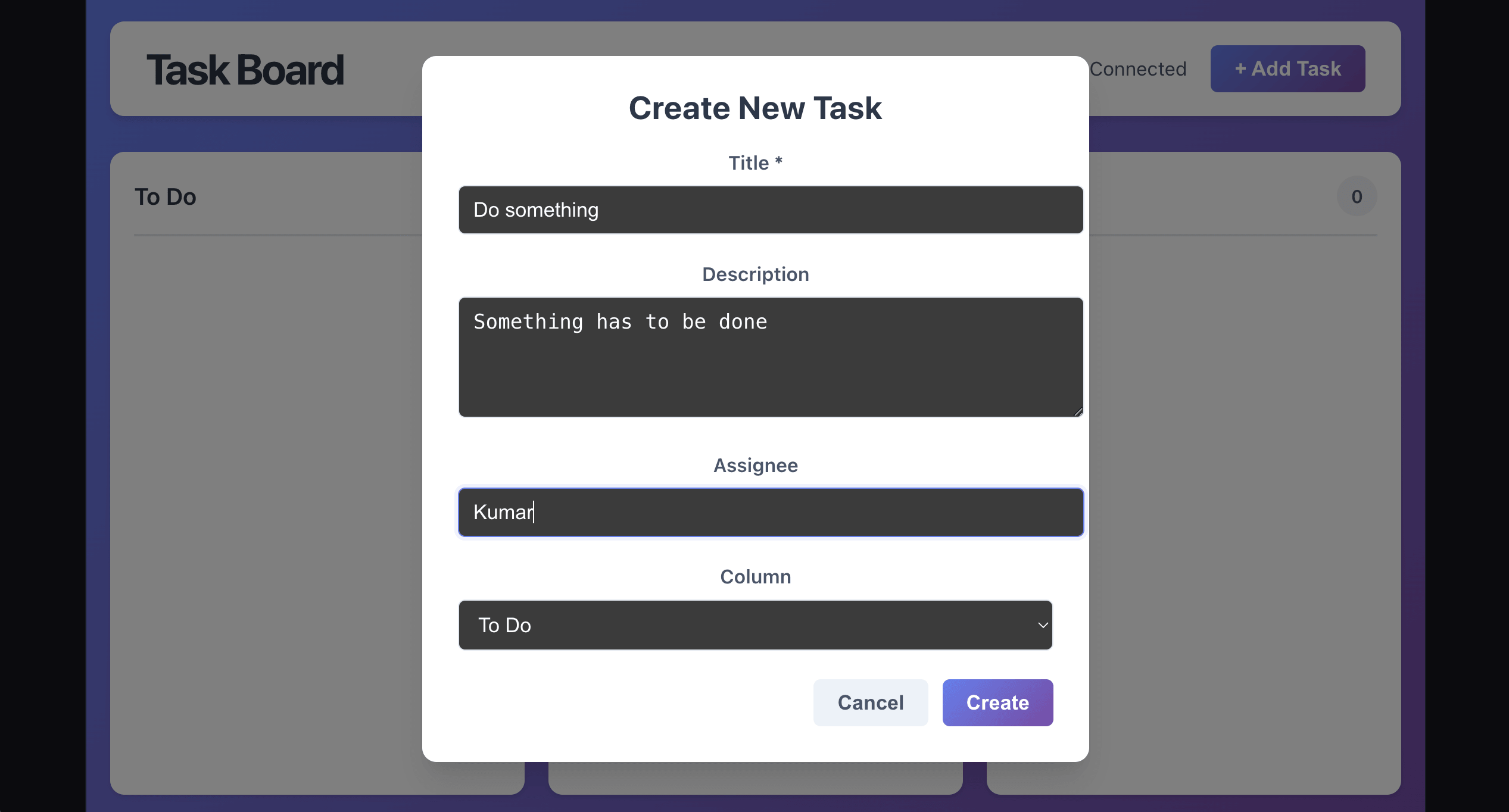
Windsurf implemented drag-and-drop using dnd-kit. That matches what most people would expect from a “task board,” even though the prompt never explicitly said “drag and drop.”
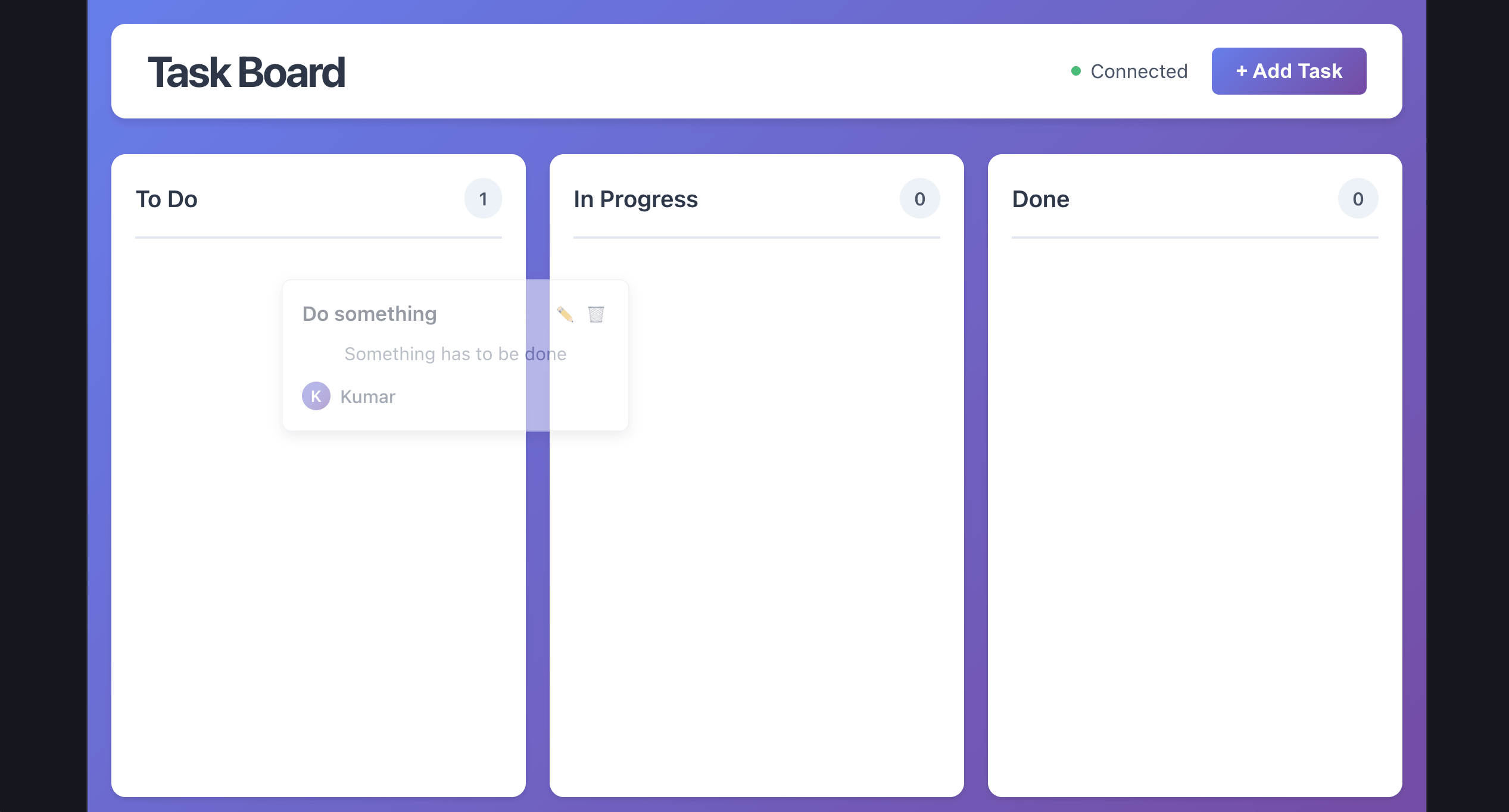
However, the input form seemed to be off in terms of styling:
With Cursor, tasks could move between columns, but using buttons instead of drag-and-drop. It worked, but felt like a stripped-down version of the feature.
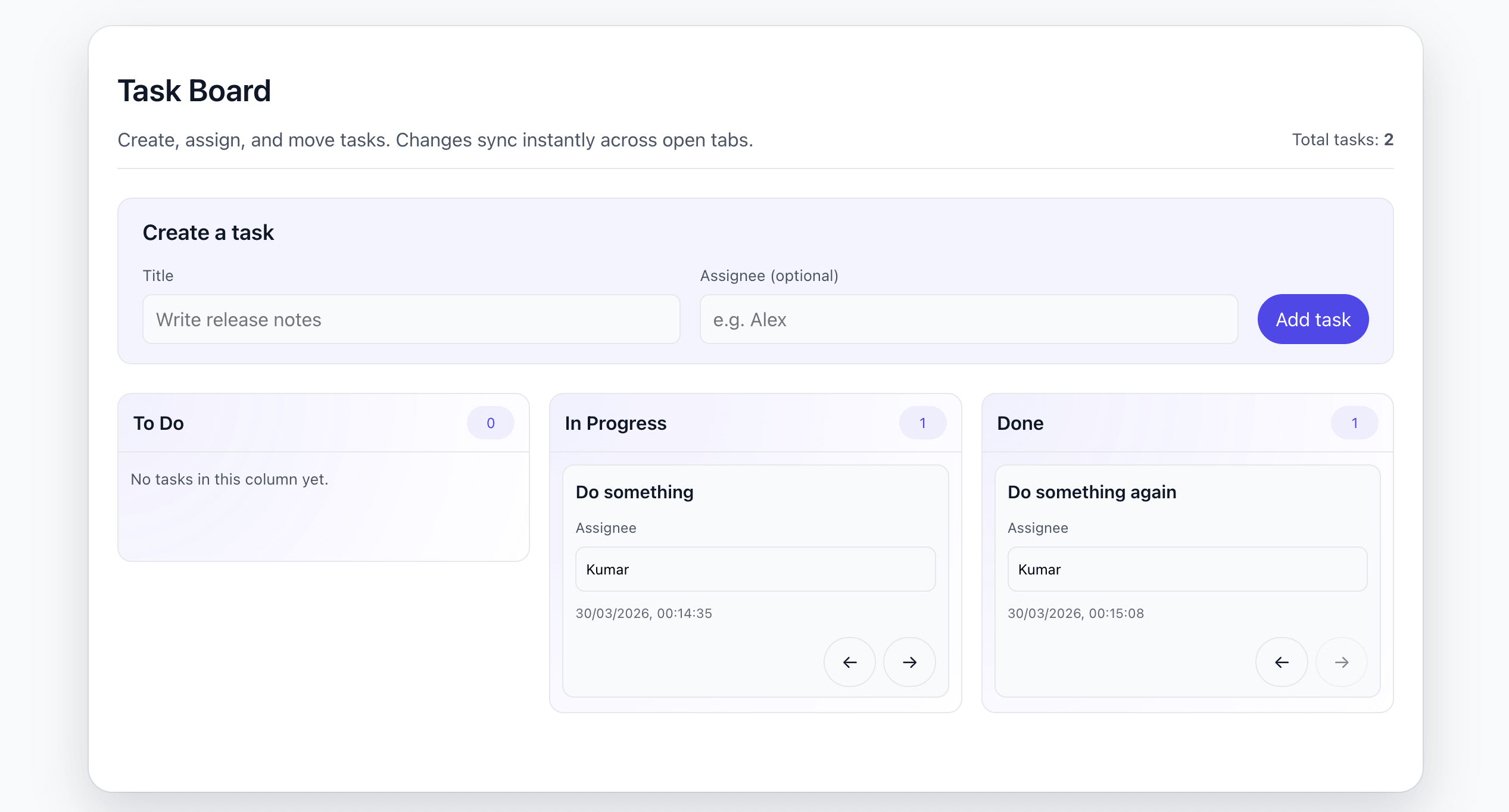
What stood out is that Cursor had already asked two follow-up questions earlier, but never clarified the interaction model for moving tasks. It missed something that was implied in the original prompt.
Windsurf made more assumptions overall, but landed closer to the intended experience.
In terms of visual consistency, both were acceptable but not perfect. Windsurf’s UI leaned toward a generic “component library” look that didn’t fully match the existing app. Cursor’s version blended slightly better, mostly because it was simpler and reused more of the existing structure.
Code quality and volume
The two solutions diverged quite a bit here.
Windsurf went heavy:
Introduced
socket.iofor real-time syncPulled in drag-and-drop libraries
Assumed a server-backed architecture
It works, but it’s more than what the problem really needed, especially since the requirement was limited to syncing across tabs on the same device.
Cursor went in the opposite direction:
Used
BroadcastChannelwith alocalStoragefallbackNo backend dependency
Minimal additional libraries
In my opinion, that was a clean, pragmatic call given the scope. Still, the follow-up questions should have asked if a drag-and-drop UI was required.
Neither is “wrong,” but they fail in different ways. Windsurf overbuilt but Cursor underdelivered. If I had to choose, I'd choose Cursor's solution over Windsurf's; it used simpler logic and only needs a nudge to get the UI right. However, I’m sure Windsurf would perform well if the prompt were a bit more detailed.
In terms of code itself:
Windsurf’s code was generally solid, but bulkier and slightly harder to trace because of the added layers
Cursor’s code was easier to read and review, but you’d still need to go back and add missing behavior
A reasonable review pass for Cursor’s output would take less time. Windsurf’s would take longer, mostly because you’re also evaluating architecture decisions due to the addition of a backend.
Context awareness and intelligence
For AI coding tools, raw generation quality matters less than how well they understand your codebase.
Cursor takes a fairly explicit approach to context. You can reference files using @ mentions, include specific snippets, or rely on its indexing to pull in relevant parts of the workspace. This gives you a lot of control over what the model sees. In smaller projects, this feels seamless. In larger codebases, it becomes a deliberate process; you guide the model toward the right context to avoid hallucinations or irrelevant suggestions.
Windsurf leans more heavily on implicit understanding. The Cascade agent attempts to explore and reason about the codebase on its own before making changes. When you assign a task, it traverses dependencies, reads related modules, and builds a working understanding of the system. When it works well, this reduces the need for manual context stitching entirely.
The difference becomes more noticeable as the project size grows. In Cursor, accuracy often depends on how well you scope the problem. If you point it to the right files, it performs reliably. If you don’t, it can miss important connections. Windsurf tries to handle that discovery phase for you, which can feel more powerful, but also introduces variability depending on how well the agent interprets the codebase.
Pricing
Pricing is easier to compare if you separate individual plans from team and enterprise plans.
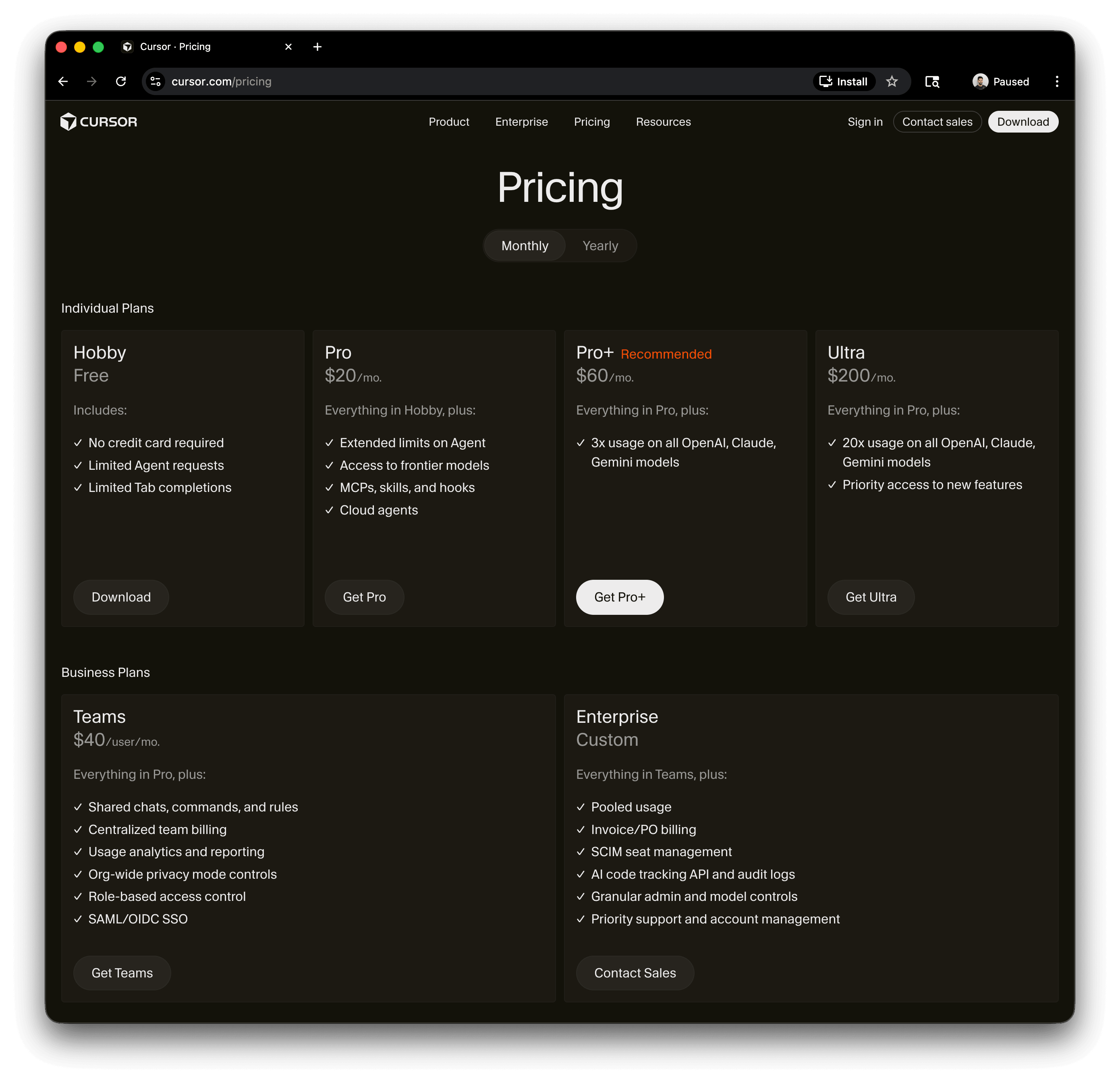
Cursor’s individual plans start with a free tier that includes limited Agent requests and limited Tab completions. Its paid individual tiers add extended Agent limits, frontier model access, MCPs, skills, hooks, and cloud agents. Higher individual tiers mainly increase usage on OpenAI, Claude, and Gemini models, with the top tier also adding priority access to new features. Cursor recommends its middle paid tier for daily agent users and its highest self-serve tier for agent power users.
Windsurf’s value is tied more closely to how much you lean into its agent capabilities. If you’re using it for large, multi-file tasks, the perceived value can be high because of how the pricing is structured. At the same time, that abstraction can make it harder to reason about cost at a granular level, especially if the agent is doing more work behind the scenes. It tends to make more sense when you’re fully bought into the workflow rather than using it occasionally.
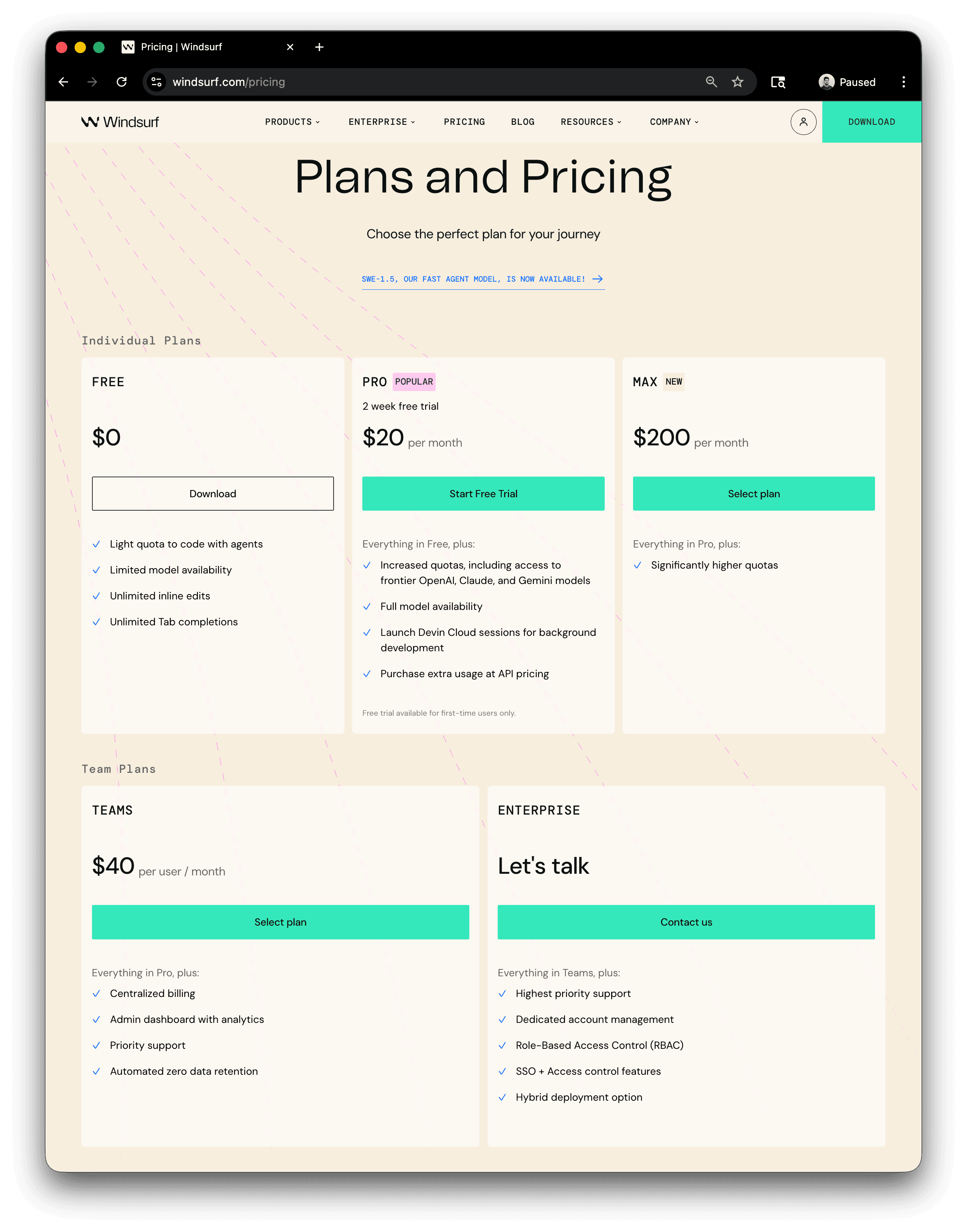
Windsurf’s individual plans follow a similar ladder: Free, Pro, and Max. The pricing page frames these around Cascade usage allowances, with Free offering “Light” usage, Pro offering “Standard” usage, and Max offering “Heavy” usage. Windsurf also lists unlimited Tab across these tiers, with premium models, Fast Context, SWE-1.5, previews, deploys, and extra usage as the key feature areas to compare.
The practical difference is that Cursor’s self-serve pricing is more model-usage oriented, while Windsurf’s is more Cascade-usage oriented. Cursor’s higher tiers mostly buy you more usage across major frontier models. Windsurf’s higher tiers mostly buy you more room to use Cascade heavily, alongside broader access to Windsurf-specific features.
For teams, both tools have dedicated business plans. Cursor Teams adds shared chats, commands, and rules, centralized billing, usage analytics and reporting, org-wide privacy controls, RBAC, and SAML/OIDC SSO. Cursor Enterprise adds pooled usage, invoice and PO billing, SCIM seat management, AI code tracking APIs and audit logs, granular admin and model controls, priority support, and account management.
Windsurf Teams adds centralized billing, an admin dashboard with analytics, priority support, and automated zero data retention. Windsurf Enterprise adds dedicated account management, RBAC, SSO, and access-control features, and a hybrid deployment option.
Learning curve
The learning curve reflects how each tool expects you to work, and it’s largely independent of pricing or enterprise fit.
Cursor has the easier entry point for teams coming from a VS Code-style workflow. Even with its agent capabilities, the core interaction model remains grounded in familiar patterns like diffs, staged edits, and explicit review. Most developers can adopt it incrementally without changing how they think about writing and shipping code.
Windsurf requires a shift in how you approach development. Cascade is designed to take on broader tasks, which means you’re not just writing code but delegating work, guiding execution, and reviewing outcomes. That introduces some upfront friction, especially around prompting and supervision, but it can pay off once you’re comfortable letting the agent handle larger parts of the workflow.
Enterprise readiness
Both Cursor and Windsurf support the baseline features expected in enterprise environments. This includes identity and access management through SSO and SCIM, role-based access controls, audit logging, and administrative visibility into usage.
Cursor’s enterprise positioning leans toward governance within a managed development environment. It provides centralized control over usage, model access, and integrations, along with auditability and identity lifecycle management. This makes it easier to standardize how AI is used across teams and enforce policies around cost, security, and compliance.
Windsurf approaches enterprise readiness with more emphasis on deployment flexibility and operational control. In addition to standard identity and access features, it highlights capabilities like hybrid deployment options, enterprise-level analytics, and control over how agent activity is logged and stored. This can matter in environments where data locality, audit requirements, or internal infrastructure constraints are a priority.
At this level, the distinction is less about which tool “supports enterprise” and more about how each one fits into an existing organizational model. Cursor aligns well with teams that want strong governance within a centralized platform. Windsurf is a better fit where teams want deeper control over execution, deployment, and how agent-driven workflows integrate with their infrastructure.
IDE support and integrations
Cursor and Windsurf are both built on top of VS Code, so they share the same foundation. That means full access to the VS Code extension marketplace, themes, keybindings, language servers, and existing workflows. From a compatibility standpoint, there’s no real difference; your current setup will work in both without modification.
The difference shows up in how that ecosystem is used. Cursor stays very close to the traditional VS Code loop. You install extensions, run tools, debug, and manage your workflow manually, with AI assisting when needed.
Windsurf uses the same underlying capabilities but encourages a different interaction model. The agent is supposed to be the driver of the developer experience. You’re still able to use tools directly, but the tool nudges you toward letting the agent orchestrate more of the process.
Community and ecosystem
Cursor has broader documentation coverage across product, enterprise, and API surfaces, including public docs for agents, enterprise controls, APIs, and a detailed public changelog. Its changelog is especially useful because updates are broken down into concrete features, fixes, and enterprise-specific controls rather than broad product announcements. Cursor also publishes llms.txt and multilingual documentation paths, which improve accessibility not just for human readers but also for agent-based tooling and documentation ingestion workflows
Windsurf’s documentation goes deep on Cascade behavior, context awareness, memories and rules, MCP, plugins, and model usage, which makes them especially relevant if you want to understand how the agent works end to end. Windsurf also exposes machine-readable documentation through llms-full.txt and provides explicit docs-search features such as @docs, which matters for both human lookup and agent-assisted retrieval.
At a high level, Cursor currently does a better job of making its ecosystem easy to discover from the open web and easy to track through detailed release communication, while Windsurf does a better job of documenting the internals of its agent workflow, especially around context, memory, and planning behavior.
How to decide between Cursor and Windsurf
At this point, you probably already understand that the choice isn’t really about raw capability. Both tools can plan and execute meaningful changes across a codebase. The choice comes down to how you prefer to work and how much responsibility you’re willing to hand over to an AI system.
Control vs. delegation
If you like to stay close to the code, make decisions step by step, and guide the AI with precision, Cursor is the better choice. It behaves like an extension of your editor rather than a replacement for your workflow.
If you’re comfortable thinking in terms of outcomes instead of edits, Windsurf starts to feel more compelling. You describe what you want done, and the agent takes on the responsibility of figuring out how to get there.
How predictable do you want the system to be?
Cursor tends to be more deterministic because you control the inputs more explicitly. When something goes wrong, it’s usually easier to trace back to missing context or an unclear prompt. Windsurf feels more dynamic. The agent explores the codebase, makes assumptions, and moves forward. When it works well, it saves time. When it doesn’t, you may need to spend more effort understanding its reasoning.
How often do you expect to use AI for larger tasks?
If most of your usage is inline edits, small refactors, or occasional multi-file changes, Cursor gives you a clean experience without asking you to rethink your workflow. If you regularly find yourself implementing features that touch many parts of the system, Windsurf’s agent-first approach can compress that work into fewer interactions once you’re comfortable with it.
Quick decision guide
Choose Cursor if:
You want tight, predictable control over changes
You prefer explicit context and guided AI interactions
You’re already comfortable in the VS Code workflow
You want to adopt AI incrementally without changing how you work
Choose Windsurf if:
You’re comfortable delegating larger tasks to an agent
You often work on features that span multiple files and layers
You’re willing to trade some predictability for speed and automation
You’re interested in exploring a more agent-driven development model
Cursor vs. Windsurf at a glance
Dimension | Cursor | Windsurf |
|---|---|---|
Design Philosophy | AI layered into a traditional editor workflow | Agent-first, task-oriented development |
Agentic Approach | Fast, execution-first (often skips planning unless explicitly enabled) | Plan-first, with visible steps before execution |
Context Handling | Explicit (file references, manual scoping) | Implicit (agent explores and builds context) |
Model Options | Multiple model integrations including OpenAI, Claude, and Gemini. Users can switch models freely | Abstracted behind agent experience |
Pricing (Free/Pro tiers) | Free tier with usage limits, plus Pro ($20/mo) and Pro+ ($60/mo) for higher limits and better model access | Free plan for individuals, with a Pro (~$15/mo) tier; pricing is more tied to agent usage and less granular than Cursor |
Learning Curve | Low, but advanced modes (like planning) are less discoverable | Slightly higher upfront investment to learn agent behaviour |
Enterprise Features | SSO, RBAC, SCIM, audit logs, admin/model controls, pooled usage | SSO, SCIM, RBAC, admin analytics, zero data retention, hybrid deployment |
IDE Support | Feels native to VS Code, minimal workflow disruption | Same VS Code foundation |
Community | Larger, more distributed across platforms | Smaller, more centralized and focused |
Best For | Developers who want control and familiarity | Developers who want speed through delegation |
Conclusion
Cursor and Windsurf are both pushing toward the same end state, where AI is deeply embedded into how we write and maintain software. Where they differ is in how quickly they expect you to get there.
Cursor keeps you grounded in a familiar editing loop, adding intelligence exactly where you need it. Windsurf takes a bigger step, asking you to think less in terms of edits and more in terms of outcomes.
There is no correct choice here. The easiest way to decide is to try both on something real. Take a feature from your current project, something that touches multiple files, and see how each tool approaches it. You’ll quickly get a sense of which one matches your instincts as a developer.
For more developer guides, subscribe to the Descope blog or follow us on LinkedIn, X, and Bluesky.