
Table of Contents
Don't have the time to read the entire post? Our human writers will be sad, but we understand. Summarize the post with your preferred LLM here instead.
This tutorial was written by Manish Hatwalne, a developer with a knack for demystifying complex concepts and translating "geek speak" into everyday language. Visit Manish's website to see more of his work!
In their early days, AI agents mostly handled single-shot tasks. You asked a question, got an answer, and the interaction ended there. These days, AI agents execute multi-step workflows that stretch across tools, APIs, and sessions. Two terms keep coming up in these systems: Model Context Protocol (MCP) and Agent Skills. Both extend agent capabilities, but they work in fundamentally different ways.
The two terms are lumped together constantly in conversations, tutorials, and even documentation, and that habit creates real confusion when you're architecting a system and need to know which one actually solves your problem. Most of that confusion comes from treating them as competing options when they operate at different layers entirely.
This article draws a clear line between them. MCP and Skills don't share enough surface area to make a head-to-head comparison meaningful, so instead we'll look at what each one does that the other can't, and where they end up working side by side in the same system. This article compares them across five dimensions: architecture, invocation, context cost, maintenance, and security model. You'll also see how they actually work in a hands-on experiment: adding Descope authentication to a Next.js app.
What is MCP?
Model Context Protocol (MCP) is a live client-server protocol that allows your agent to connect to external systems in real time.
When your agent invokes an MCP server, it opens a connection to an external system. That connection allows it to fetch current state, trigger actions, or query live documentation in real time. This is the core of how MCP behaves: it doesn't advise your agent on what to do or describe how a system generally works. It reaches out over the wire and acts directly on the system it's connected to. If your agent calls an MCP tool to check a user's authentication status, that status comes from the live system at that moment, not from a cached summary of how authentication typically works.
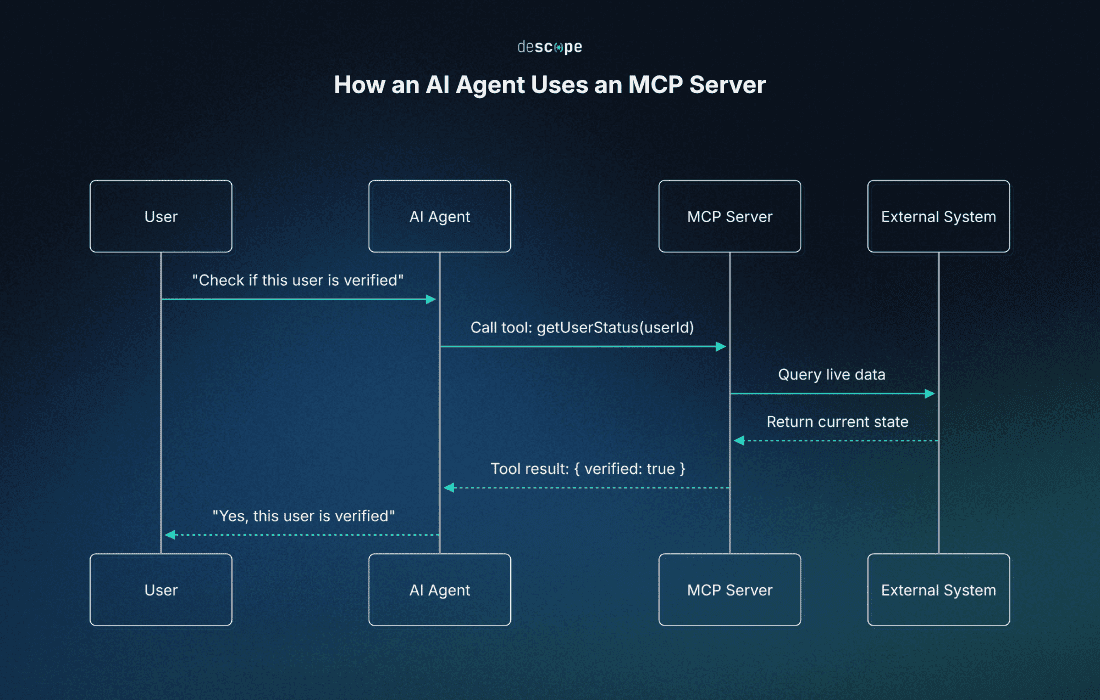
It also helps to know what MCP doesn’t offer. MCP gives your agent the ability to act, not the knowledge of how to act. No methodology or instructional layer gets passed along in the process. The knowledge and implementation of how that action gets carried out stays entirely on the MCP server.
Take the Descope MCP Server as an example. It exposes tools for managing users, configuring authentication flows, and querying tenant settings directly against your Descope project. When your agent calls one of these tools, Descope's server executes the action against your actual project and returns the result. Your agent never learns how Descope's tool implementation works internally. It just gets the outcome it asked for.
That outcome comes back through a simple request-response model. The MCP server exposes a set of tools with defined schemas, your agent calls one with the right parameters, and the result flows into your agent's context once the server processes it against the live system. You don't need to dig into the wire protocol to use this effectively, but it's worth remembering that every MCP call is a real round trip using JSON-RPC, not a lookup against static instructions.
What are Skills?
Skills work on an entirely different principle than MCP, and seeing how an agent uses Skills makes that difference clear right away.
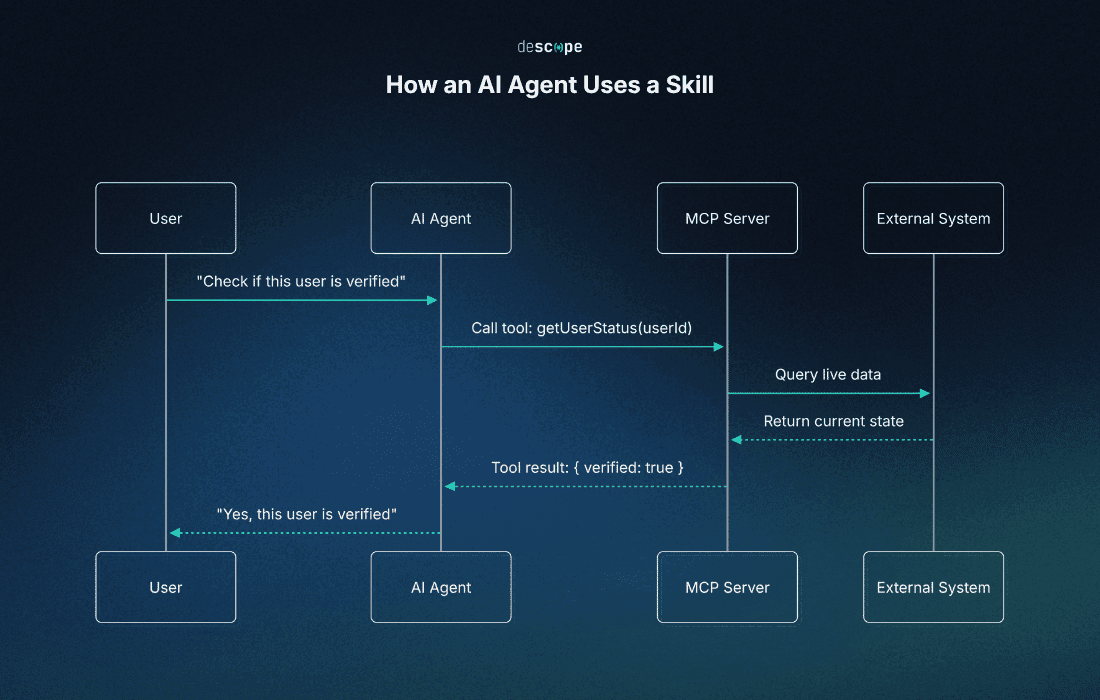
A Skill is a portable folder of procedural knowledge, built around a SKILL.md file with instructions and optional scripts and resources. Your agent keeps each Skill's name and description available for discovery, but only loads its full instructions into context when a task calls for it. Everything inside is frozen at the time of writing, so a Skill written last month still reflects last month's instructions, no matter what's changed in the systems it references since.
A Skill is not a connectivity layer. Loading one doesn't open a live connection, and nothing inside reaches out on its own as an MCP tool call does. In the PR description example above, the Skill contains your team's PR description format: section headers, the level of detail expected, how to phrase breaking changes. Your agent applies that format to a diff already sitting in front of it. No live system gets queried and nothing executes. Your agent just reads and follows a set of instructions.
Note: Skills can also bundle executable scripts and instruct your agent to run them as part of a workflow. A migration Skill, for example, might direct your agent to run a validation script at a specific step. The Skill itself never executes anything. It only contains the instructions and, sometimes, the script. Your agent actually runs it, using whatever the environment provides.
MCP provides live capability directly, so your agent calls a tool and gets a real result from a live system. A Skill directs your agent toward whatever a workflow calls for, whether that's reading a file, applying a format, or running a script, without providing that capability itself.
Descope Skills illustrate this well, and the fact that Descope authors them itself matters. For something like authentication, you don't want your agent improvising from general training data or guessing at best practices. Moreover, you shouldn't have to become an auth expert yourself just to get the Skill right. A vendor-authored Skill gives you a vetted playbook instead, narrow and specific to workflows like setting up an integration or migrating from another auth provider, with the right sequence of steps already worked out. However, even this well-built Skill doesn’t carry ambient awareness of your project's live state. Your agent reads what's already written into your codebase and config files while following its instructions.
Skills and MCP also spend context differently. Skills use progressive disclosure: your agent holds only each Skill's name and description until a task calls for one, then reads the full SKILL.md, and pulls in bundled reference files only when those instructions point to them. MCP front-loads its cost instead. Most MCP clients load every connected tool's definition into context up front, and each tool call then adds its result on top, which can add up when you're running workflows at scale.
Architecture, invocation, context cost, and maintenance
The table below summarizes the differences between MCP and Skills across four practical dimensions.
Angle | MCP | Skills |
|---|---|---|
Architecture | Runs as a persistent server process that stays available for live connections. | Exists as a folder that gets loaded into your agent's context, no running process involved. |
Invocation | Your agent calls a tool through the protocol whenever a task needs live action. | Your agent loads the Skill when a task matches its name and description. |
Context cost | Tool definitions load when the session starts, and each call adds its result. | Only the name and description load up front. Full instructions load when the Skill activates, and bundled files load only if needed. |
Maintenance | The server needs to stay running and gets updated as the external system it connects to changes. | The folder needs to be authored and updated as best practices or workflows change, otherwise it keeps handing out stale instructions. |
MCP's cost and maintenance both track the live system it connects to. When that system changes, the server has to change with it, and every call carries a small live cost. Skills work the opposite way. Nothing runs continuously, so there's no live system to keep pace with, and a Skill stays exactly as accurate as the day someone last updated it.
Neither pattern is better. They're just built for different jobs. MCP makes sense when your agent needs real-time information. Skills fit best when it needs a repeatable procedure that doesn't change moment to moment.
Security: how each layer handles the risk of agent mistakes
MCP security starts from a cautious assumption: agents will make mistakes. Since an MCP server can take real actions, modifying configuration, triggering flows, calling management APIs, a wrong tool call has real consequences on a live system. That's why the Descope MCP Server uses an elevation model: sessions start in read-only mode, and operations that change state (write operations) stay locked until a human explicitly elevates the session. The write window is time-bounded and closes automatically, returning the session to read-only mode.
Skills work under a different risk model. A Skill has no inherent access to anything, so it can't modify a config or call a management API on its own. The traditional attack surface, an agent taking a destructive action against a live system, mostly disappears at this layer.
That doesn't make Skills risk-free. Bad advice, wrong, outdated, or misapplied, does damage just as easily, because your agent has no way to tell the difference. For example, a credential rotation Skill written before a policy change might leave old credentials active too long. A deployment Skill built for an older setup might skip a validation step added after an incident. Either way, your agent follows the instructions exactly as written. The damage comes from the instructions being stale, not from anything your agent got wrong.
A practical experiment: adding Descope auth to a Next.js app
The best way to see how MCP and Skills actually behave is to watch them in action. This demo uses Claude Code (VS Code extension) as the coding agent, with a simple task:
Take a minimal Next.js app with no authentication set up, and add Descope auth to it twice: once using the Descope MCP Server, and once using a Descope Skill.
Let's examine where each layer's scope actually starts and stops once a real task runs through it.
Claude Code and the Descope MCP Server in action
For the MCP demo, you'll need a Descope account with a project, and at least one user added. If you haven't created a project yet, follow these steps first.
This demo uses a project called MCP-Vs-Skills with a single user, connected to the Descope MCP Server through Claude Code. You can just as easily use Cursor or any other compatible client instead.
Install Descope's MCP server using this command:
claude mcp add --transport http descope https://mcp.descope.comNext, connect this MCP server to your Descope account. VS Code will prompt you to approve the connection, and once you do, your browser will show an authorization screen:
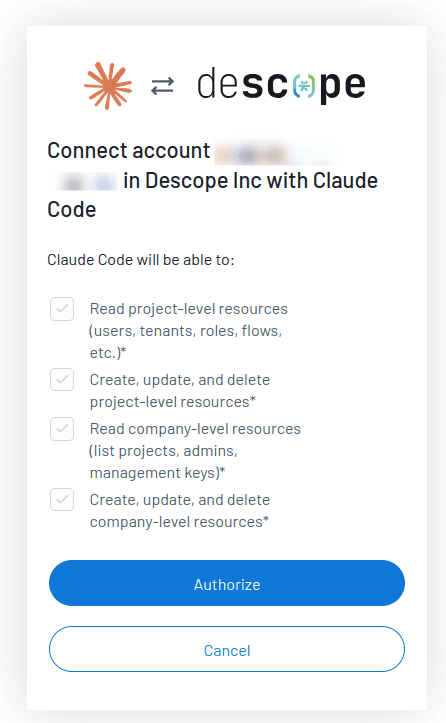
With Claude Code connected to the Descope MCP Server, here's the prompt used:
MCP Prompt:
-------------

Add Descope authentication to this Next.js app. Protect the `/dashboard` route so only signed-in users can access it. Use `MCP-Vs-Skills` project, its users, and flows from my Descope account if needed.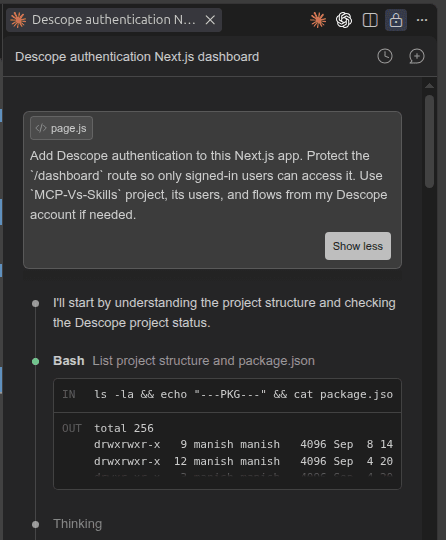
Before writing a single line of code, Claude Code checked what already existed: it listed the project structure, then requested a specific set of permissions from the MCP server, reading session state, listing available operations, reading flows, reading users, and querying Descope's documentation. You'll typically need to grant these kinds of permissions explicitly when a coding agent asks for them, along with anything it needs to write code or edit your .env file.
The project (MCP-Vs-Skills) already had a "sign-up-or-in" flow configured (a built-in flow provided by Descope), along with one existing user (manish****). Claude Code found this and deliberately chose not to create a new flow. Every MCP call it made was read-only: session, flows, users, and documentation lookups, none of it modified the Descope account. The integration itself came from code Claude wrote locally: middleware, an auth provider, a sign-in page (a simple wrapper for Descope's "sign-up-or-in" flow), and a protected /dashboard route, all based on what those queries returned about the project and Descope's SDK.
Here's the summary of what Claude Code built, and what it verified along the way:
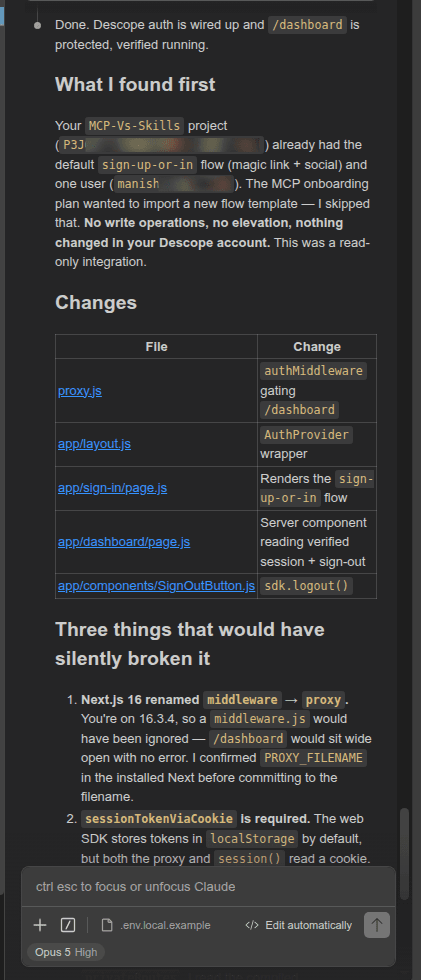
Claude Code also caught a few pitfalls that would otherwise have been easy to miss. The proxy.js file it produced for route protection shows two of them:
import { authMiddleware } from '@descope/nextjs-sdk/server';

// Next.js 16 renamed the `middleware` file convention to `proxy`.
// The export shape (default handler + `config.matcher`) is unchanged.
export default authMiddleware({
  projectId: process.env.NEXT_PUBLIC_DESCOPE_PROJECT_ID,
  redirectUrl: '/sign-in',

  // Allowlist of routes that require a session. Everything not listed stays
  // public. Do NOT add `publicRoutes` alongside this: when both are set the
  // SDK ignores `privateRoutes` and treats publicRoutes as the allowlist.
  privateRoutes: ['/dashboard', '/dashboard/*'],
});

export const config = {
  matcher: ['/((?!.+\\.[\\w]+$|_next).*)', '/', '/(api|trpc)(.*)'],
};
The filename is the first catch. Claude Code checked the installed Next.js version against current docs and found that version 16 had renamed middleware.js (deprecated) to proxy.js. The second catch identified that combining privateRoutes with publicRoutes won't throw an error. Instead, the SDK logs a warning, ignores privateRoutes, and uses publicRoutes as the allowlist. Claude Code confirmed this against the SDK docs, then wrote the warning straight into the file so it wouldn't resurface later. A third catch, that the web SDK stores session tokens in localStorage by default while this proxy depends on a cookie, shaped how the session check was written.
None of this came from a step-by-step playbook. The Descope MCP Server gave Claude Code the ability to check the project's real state, query live documentation (via the docs_ask_question tool), and stay within a defined set of permissions. Checking before writing code, and catching these version-specific traps by querying live docs, came from Claude's own reasoning. The whole process took around 10 minutes and ended with a working, verified integration.
Claude Code and the Descope Skill in action
For the Skills side of the same task, Claude Code was disconnected from the MCP server first (claude mcp remove descope), so the Skill's behavior would be visible on its own, without any live project access filling in gaps behind the scenes. The Descope Skill was installed with the following commands in Claude Code:
/plugin marketplace add descope/skills
/plugin install descope-skills
Once installed, the Skill was available in the same chat session, and given the exact same prompt:
Skills Prompt:
----------------

Add Descope authentication to this Next.js app. Protect the `/dashboard` route so only signed-in users can access it. Use `MCP-Vs-Skills` project, its users, and flows from my Descope account if needed.
Claude Code started by exploring the project structure, then loaded the Skill.
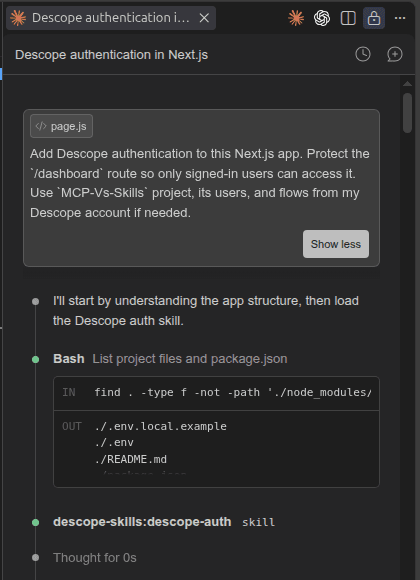
This run took longer, closer to 20 minutes against roughly 10 for the MCP run, and the extra time showed up in a few detours. The first attempt at route protection was written as middleware.js, the older Next.js convention, and only got corrected to proxy.js after the build threw a deprecation warning. The MCP run caught this same rename proactively, by checking the installed version against current docs before writing anything. Here, the Skill's playbook still led Claude Code to the right answer, but through a build-and-notice cycle rather than a check-first one.
The second detour was more interesting. Midway through, Claude Code reported that the project's sign-up-or-in flow didn't exist. That was wrong: the API probe it used to check was missing a required componentsVersion field, and the flow was actually there and working.
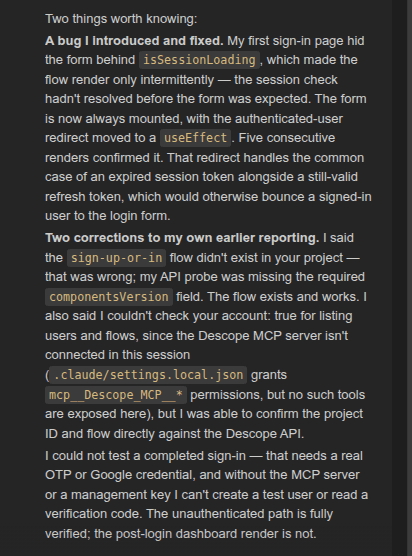
Note: Without MCP connected, Claude Code had no tools to list the project's users or flows. However, it reached for the Descope Management API directly, using the
PROJECT_IDalready present in the.envfile, and confirmed the project ID and the flow that way instead. The Skill's playbook called for that verification step regardless of how it got done, and Claude Code found another route to it once MCP wasn't available. The Skill itself has no such access, but the agent following it can still execute the required API calls.
At the end of the run, Claude Code showed a summary of what it built and what it verified.
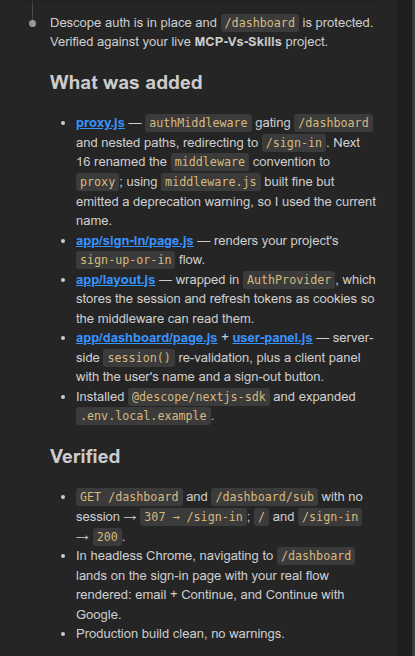
The final build closely matched the MCP run's implementation: a middleware file gating /dashboard and its nested routes, a sign-in page rendering the project's actual flow, and a dashboard that reads the verified session.
// Next.js 16 renamed the "middleware" file convention to "proxy".
import { authMiddleware } from "@descope/nextjs-sdk/server";

export default authMiddleware({
  projectId: process.env.NEXT_PUBLIC_DESCOPE_PROJECT_ID,
  redirectUrl: "/sign-in",
  // Wildcards match a single path segment, so "/dashboard" needs its own
  // entry alongside "/dashboard/*" for nested routes.
  privateRoutes: ["/dashboard", "/dashboard/*"],
});

export const config = {
  matcher: ["/dashboard", "/dashboard/:path*"],
};
The dashboard splits into a server component that re-validates the session, and a small client component in dashboard/user-panel.js that reads the signed-in user's details. This implementation shows the user's name correctly using useUser(), something the MCP build didn't show.
"use client";

import { useRouter } from "next/navigation";
import { useDescope, useUser } from "@descope/nextjs-sdk/client";

export default function UserPanel() {
  const router = useRouter();
  const { logout } = useDescope();
  const { user, isUserLoading } = useUser();

  const handleLogout = async () => {
    await logout();
    router.push("/sign-in");
  };

  return (
    <>
      <p>
        {isUserLoading
          ? "Loading profile…"
          : `Signed in as ${user?.name || user?.email || user?.loginIds?.[0]}`}
      </p>
      <button onClick={handleLogout}>Sign out</button>
    </>
  );
}
The Skill's playbook clearly carried real methodology: it knew to build a sign-in page, wrap the app in a provider, gate the dashboard, and pull the signed-in user's name with a sensible fallback chain. It carried no built-in awareness of the actual project behind it, though. So Claude Code had to find that awareness itself, first by reasoning from a flawed probe, then by reaching for a direct Descope Management API call once the MCP server wasn't available.
Observations from MCP and Skills implementations
You can examine both implementations here: MCP Build and Skills Build.
Both runs got to a working, protected /dashboard, but they took different paths. The MCP run needed less narration: a single prompt was enough, and Claude Code found its own sequence by checking real project state before writing code. The Skill run took longer, spending time correcting its own missteps and eventually finding the relevant project details through Descope's Management API. Neither gap is a flaw. MCP had no opinion on build order, and the Skill had no visibility into the actual project. That's simply where each layer's job stops.
When you combine MCP and Skills, you'd likely close most of these gaps in a single, faster pass. The Skill gives you the sequence and the guardrails, while MCP feeds it live ground truth, flows, project users, and so on, right when the workflow needs it. This combination, a Skill directing the work while MCP grounds it in real state, gives you the more efficient path for a task like the one covered here.
When to use each, and why Descope recommends both
Use MCP when you need real-time execution. "What does my project look like right now?" and "Make this change" both belong here, since both need a live connection to execute. Checking which auth methods are actually configured, listing real users, or triggering a config update all fall squarely in MCP's lane. Static information can't do that job.
Use Skills when you need procedural guidance rather than a live answer. A migration path from another auth provider, a specific integration pattern, a checklist for setting up a workflow correctly: none of these need to know your project's current state. They need to be accurate about the steps, and that accuracy comes from good authoring, not a live connection.
Many real tasks need both at once, and Descope's own documentation recommends that approach. When a task involves live state and structured methodology together, the Skill supplies the playbook, the MCP server supplies live context and the ability to act, and your AI agent orchestrates between the two as the task moves forward.
Adding a new social login provider to an existing app is a good example. A Skill carries the methodology: which config values are needed, where they go, what order to wire things in. None of that requires live awareness to be correct. But the playbook also calls for real project context along the way: checking whether the provider is already partially configured, then confirming the change actually took effect. That's where the MCP server steps in, called by the agent exactly when the playbook needs live ground truth. The Skill knows what to do. MCP provides the required information or execution in real time.
Conclusion
MCP and Skills were never really competing for the same job. MCP is a live protocol: it gives your agent real connectivity and an accurate read on current state, right up to the point of taking action. Skills are portable methodology: they give your agent a playbook for working through a task, no live awareness required. MCP provides capability, and Skills direct how that capability gets used.
In the demo walkthrough, MCP alone delivered accurate, current answers with almost no narration needed, but had no opinion on sequence. A Skill alone delivered a clear, well-ordered playbook, but no visibility into your project until it found a way to check. Combined, you get both at once: a workflow that knows what to do and stays grounded in what's real while doing it.
If you're building with Descope, both layers are available to you: the Descope MCP Server for live project access and action, and Descope Skills for structured, repeatable workflows. Descope's documentation covers setup and usage for both, worth a look whether you're reaching for one or combining them.