
Table of Contents
Don't have the time to read the entire post? Our human writers will be sad, but we understand. Summarize the post with your preferred LLM here instead.
This tutorial was written by Manish Hatwalne, a developer with a knack for demystifying complex concepts and translating "geek speak" into everyday language. Visit Manish's website to see more of his work!
APIs are the connective tissue of modern software. Every time an app talks to a payment processor, pulls weather data, or syncs a calendar, it's calling an API, usually over HTTP with JSON payloads. The model has lasted because it's simple: define an endpoint, send a request, and get a response.
In discussions of AI agents, MCP (Model Context Protocol) now comes up alongside APIs. MCP is a protocol that lets AI models discover and call tools at runtime. An agent pulls the list of tools an MCP server offers, then calls whichever one it needs, without a developer hardcoding which endpoint to hit. That has led to an "MCP vs. API" framing, as if choosing one rules out the other.
The comparison doesn't quite hold, because the two solve different problems. An API is how two systems exchange data. MCP is how AI agents use external tools and services. This article covers where each sits in the stack, how they complement each other, and a demo that runs the same Descope task both ways.
MCP and APIs: What each layer is for
A REST API is a contract between a service, such as a payment processor or a weather service, and the code that calls it. That contract gets resolved when the code is written: a developer reads the docs, picks the right endpoint, and bakes that decision in before it ships. It's deterministic, documented, and versioned. If the API changes, you find out through a changelog, not a runtime surprise.
MCP flips that around. It gives an AI model a standard way to discover tools at runtime with tools/list (the MCP method that returns a server's tool catalog) and invoke them with tools/call (the method that runs a specific tool with arguments). When an MCP client such as Cursor, Claude Desktop, or your own agent connects to an MCP server, it asks what's available and receives a list of tools. The model then picks the tool that fits the task based on the tool descriptions, at the moment it's needed.
The clearer way to compare them is to ask who the consumer on the other end of the call is. A REST API is written for a developer building deterministic systems. MCP is written for an AI model selecting actions at runtime. Seen that way, the "vs." stops making sense. An MCP server often wraps existing APIs, though some are built as standalone implementations. Either way, it gives an AI model the same access a developer already has, resolved at runtime instead of write time.
The diagram below shows both paths for Descope. An AI agent reaches the Descope Management API through an MCP server, while your code can still call that same API directly. Both paths land on the same backend.
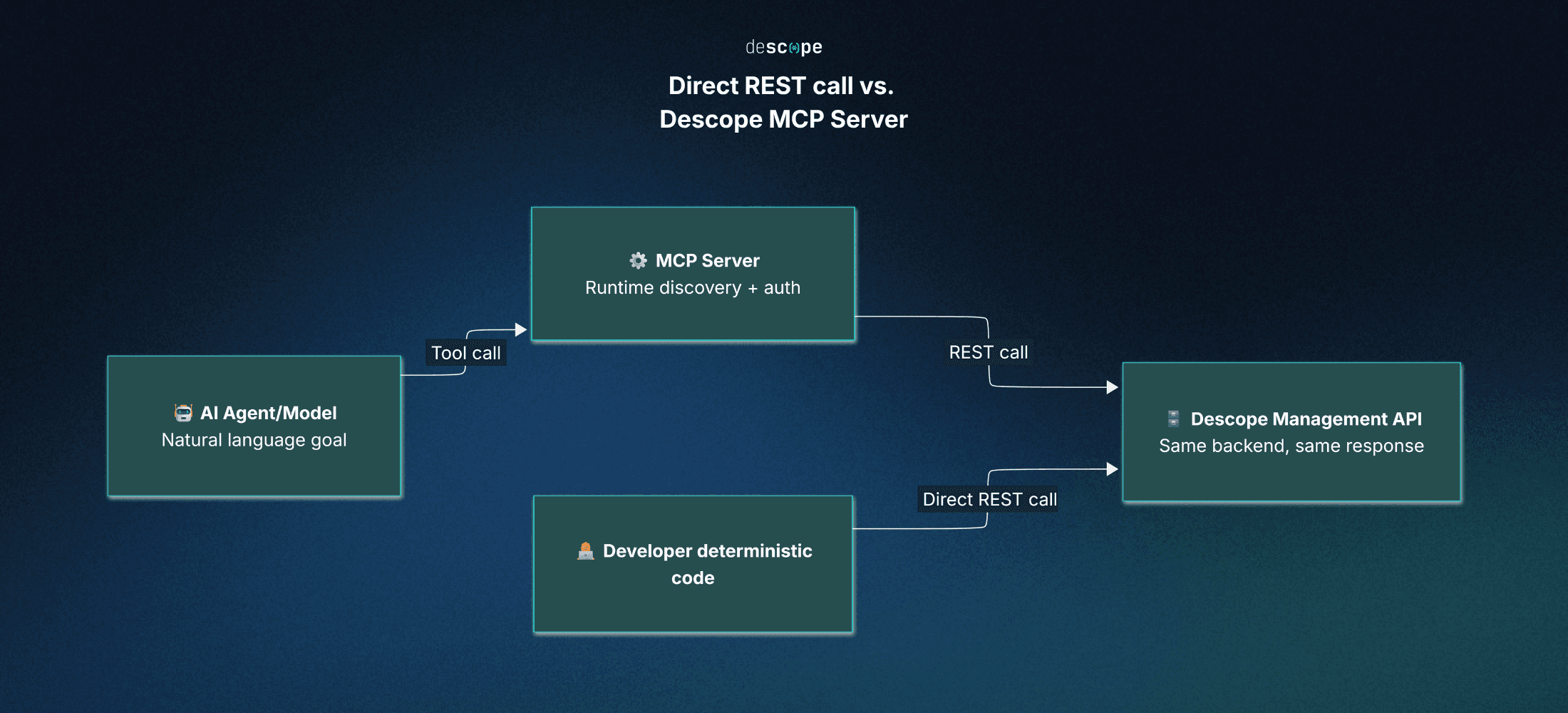
Four dimensions where MCP and APIs differ
The consumer framing explains why MCP and APIs coexist. If you're building or evaluating either one, the differences show up in four places: discovery, authentication, invocation, and determinism.
Discovery
With a REST API, discovery happens before you write any code. You read the documentation or the OpenAPI specification to learn which endpoints exist, what parameters they take, and what they return. That knowledge is baked into your code by the time it ships.
MCP moves that step to runtime. When a client connects to an MCP server, it sends a tools/list request and gets back a manifest of every tool the server exposes, including what each one does and which inputs it expects. The model reads that manifest fresh each session. If a new tool is added to the server, the model discovers it on the next connection without any code changes.
Authentication
Traditional APIs put authentication on the developer. You obtain an API key or OAuth token and attach it to every request, typically as a bearer token in the Authorization header (the standard HTTP header for credentials). When the token expires, your code has to refresh it, and calling five APIs means managing five sets of credentials.
MCP moves most of that work out of the developer's code. The MCP specification bases authorization for remote servers on OAuth 2.1, and the authorization flow runs once, when the client first connects. From then on, the MCP client attaches the token to its requests automatically, and the model never handles it. On the other side of the connection, the MCP server holds whatever credentials it needs for downstream APIs and exposes only the actions its scopes allow.
Invocation
Calling a REST API is explicit by design. You pick the HTTP method, set the path, build the headers, and write the body. If the request is malformed, the server won't guess your intent. It returns an error.
MCP invocation starts from a goal instead. A user tells an agent what they want, such as "What's the weather today?", and the model works backward from the tools it discovered to find the one that applies. It then constructs a structured tools/call request with the right parameters. That path from intent to action is assembled in real time rather than hardcoded.
Determinism
Determinism is the sum of the other three dimensions. A REST API call does exactly what the code says: same input, same endpoint, same output. You can test and trace it knowing exactly what will run.
MCP trades some of that certainty for flexibility. The model chooses which tool to call and how, so the same request can resolve to different tool calls depending on context or phrasing. That flexibility suits open-ended tasks, and it's also why MCP deployments need guardrails, such as scoped permissions and human-in-the-loop approval for sensitive actions. The Descope MCP Server, for example, starts every session in read-only mode. Write operations require the user to explicitly elevate the session, and the write window closes automatically after a limited time.
Demo: Running the same task through a REST API and MCP
The clearest way to see the difference is to run one task both ways. The demo below searches for users in a Descope project, once with a direct Management API call and once through the Descope MCP Server, then compares what each approach requires.
Prerequisites and setup
You'll need a Descope account with a project and at least one user added to it. If you haven't created a project yet, follow the project creation steps first.
This demo uses a project called MCP-Vs-API, with manish@example.com added as a user. It connects to the Descope MCP Server from VS Code, but the server also works with Cursor, Claude Desktop, and other MCP-compatible clients.
Follow the VS Code setup in the Descope MCP Server documentation. It adds this .vscode/mcp.json file (VS Code's workspace-level MCP configuration) to your project root:
{
  "servers": {
    "descope": {
      "type": "http",
      "url": "https://mcp.descope.com"
    }
  }
}
That URL is the US endpoint. If your Descope projects are hosted in the EU region, use the EU server URL instead.
Next, connect the MCP server to your Descope account. VS Code prompts you to approve the connection, and once you do, your browser shows a confirmation screen:
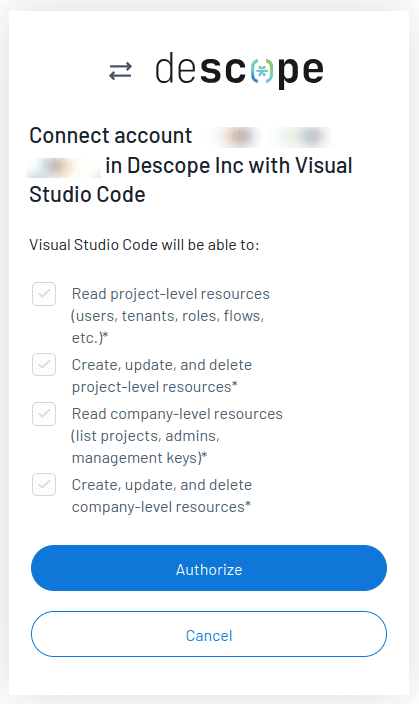
You only need to authorize once. After that, VS Code manages the session and token, so later requests run without you supplying credentials.
Using the Descope Management API
Before running the API call, you'll need two values: your Project ID, found on the Project Settings page of the Descope Console, and a Management Key, created under Company Settings. The Descope Management documentation explains how to generate one. Together they form the <ProjectID>:<ManagementKey> pair that authenticates every Management API call.
With a REST API, you need to know the endpoint, its parameters, and how to authenticate before you write the call. Here's the user search as a cURL request against the search endpoint:
curl -X POST "https://api.descope.com/v2/mgmt/user/search" \
  -H "Content-Type: application/json" \
  -H "Authorization: Bearer <ProjectID>:<ManagementKey>" \
  -d '{
    "limit": 100,
    "page": 0
  }'
The endpoint, /v2/mgmt/user/search, came from the Search Users reference in the Descope docs. Nothing in the request discovers it for you. The project isn't a body parameter either. It's implied by the Project ID and Management Key in the Authorization header. The body sets limit (the maximum number of results per page) and page (the zero-based page number). Both are optional, and limit defaults to 100, but this request sets them explicitly so it lines up with the MCP run later.
The API returns raw JSON:
{
  "users": [
    {
      "loginIds": [
        "manish@example.com"
      ],
      "userId": "U3Ha<redacted>...",
      "name": "Manish Hatwalne",
      "email": "manish@example.com",
      "phone": "",
      "verifiedEmail": true,
      "verifiedPhone": false,
      "roleNames": [],
      "userTenants": [],
      "status": "invited",
      "externalIds": [
        "manish@example.com"
      ],
      "picture": "",
      .
      .
      .
    }
  ],
  "total": 1
}
Using the Descope MCP Server
With the Descope MCP Server connected, you can use it directly from GitHub Copilot in VS Code.
Note: Using the Descope MCP Server in VS Code requires a recent version of VS Code with GitHub Copilot or another MCP-aware extension active.
Next, give Copilot the task in plain English:
Task prompt:
-------------

Please show me users from "MCP-Vs-API" project in my Descope account.
The prompt specifies no endpoint, no parameters, and no credentials.
From there, Copilot worked out what the request required. It confirmed the active Descope session, listed the available projects, and selected MCP-Vs-API with the selectProject action, which belongs to the server's session tool (the tool that manages project context):
{
  "action": "selectProject",
  "args": {
    "projectId": "P3Ha<redacted>..."
  }
}
On its first attempt at the search, Copilot passed an unsupported parameter, pageSize. It recovered by calling list_operations (the tool that returns the server's operation catalog and input schemas) to check the SearchUsers schema, then retried with {"limit": 100, "page": 0}. Those are the same parameters you sent to the API endpoint explicitly. The model worked them out from the schema:
{
  "operation": "SearchUsers",
  "args": {
    "limit": 100,
    "page": 0
  }
}
The MCP server ran that operation against the Management API and returned the user record for manish@example.com, including name, status, and user ID.
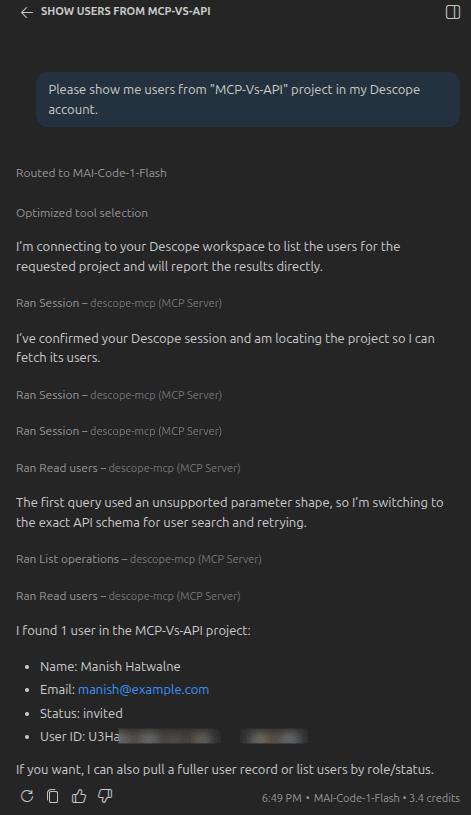
Copilot then summarized the record in natural language instead of raw JSON:
Copilot response:
-------------------

I found 1 user in the MCP-Vs-API project:

Name: Manish Hatwalne
Email: manish@example.com
Status: invited
User ID: U3Ha<redacted>...
If you want, I can also pull a fuller user record or list users by role/status.
Compare that with the REST call. The developer never looked up which endpoint handles user search, built the request parameters, or put a Management Key in a header. The model and the MCP server handled all of it.
Behind the scenes, the Descope MCP Server exposes a set of tools, each grouping related Management API operations. The agent picks the tool that fits the request based on its description. The SearchUsers operation used above, for instance, belongs to the users_read tool. The full list is in the Descope MCP Server tools reference.
Tip: The Descope MCP Server also includes docs_ask_question, a tool that answers natural-language questions about Descope with responses grounded in the official documentation. That means you can ask Copilot, or any other MCP-compatible coding assistant in your IDE, how a Descope feature works without leaving your editor, which helps when you're debugging.
Comparing the two approaches
The API call involved no session check, no project lookup, and no trial and error on parameter names. Everything was decided in advance, which is what you want from a deterministic system. The trade-off is that it required prior knowledge of the API, and the developer owned the credential, supplying a Management Key in the Authorization header on every call.
The MCP route started from a prompt. Copilot used the tool descriptions and schemas to work out the exact request, correcting itself along the way.
Put the two responses side by side and they describe the same user: same userId (the user's unique Descope identifier), same status, same backend. What changed is how the record was reached, not what came back. For Descope, MCP is a runtime front end that still calls the same Management API a developer would call directly. That's why it's best understood as a consumption layer on top of the API rather than a competing way to reach your data.
REST API and MCP at a glance
Here's the same comparison as a quick-reference table.
Dimension | REST API | MCP |
|---|---|---|
Consumer | A developer writing deterministic code | An AI model selecting actions at runtime |
Discovery | Learned in advance from API docs | Queried at runtime with tools/list, fresh each session |
Authentication | Credentials attached to every request by the developer, usually in an HTTP header | Authorized once at connection time; the client and server handle tokens from then on |
Invocation | Explicit: method, endpoint, headers, and body set by hand | Model-driven: the model maps a goal to a tool and sends a structured tools/call request |
Determinism | Same input always produces the same call | Same request can resolve to different tool calls depending on context |
Setup required per call | Know the endpoint, parameters, and response shape beforehand | The model reads tool descriptions and schemas and infers the parameters |
Error handling | Server returns an error on a malformed request | The model can often retry with a corrected call in the same session |
What it returns | Raw JSON, shaped exactly as the API defines | The same underlying data, often summarized in natural language |
Every row points the same way: MCP and REST are built for different consumers, not different tasks.
When to use REST API vs MCP
The choice mostly comes down to who, or what, is making the call.
When a REST API makes sense
Use a direct API call when the workflow is known in advance and won't change based on context. A billing service charging a card through a payment processor doesn't need to decide anything. The endpoint and parameters are fixed, so a direct call is faster and easier to test than routing it through an AI model. The same goes for latency-sensitive calls, like loading a user profile on every page view, and for CI/CD pipelines running scheduled migrations. If you already know exactly which call needs to happen, a direct API call is the simpler choice.
When MCP makes sense
Use MCP when the right tool isn't known until runtime, which usually means an AI agent has to figure it out. A coding assistant asked to "check if this user's account is verified" doesn't know in advance which API applies, so MCP lets it discover and call the right one. The same logic applies to an AI support agent that might need to look up a user, issue a refund, or check a subscription, depending on what the customer asks. If you can't answer "What will this call need to do?" until the moment it happens, that's MCP's territory.
Why production systems usually run both
Most real architectures use both, each where it fits.
Consider a SaaS company using Descope for identity. Its web and mobile apps call Descope's authentication APIs and SDKs directly for deterministic, high-volume work like signup, login, and session validation, and its backend calls the Management API for tasks like provisioning users. The same company might run an internal support tool where a support rep types a question such as "Was this user's email ever verified, and when did they last log in?" into an AI chat interface. That tool can connect to the Descope MCP Server and let the model figure out which tools answer the question. Engineers can use the same MCP server from their IDE to debug user issues without leaving the editor.
Match the layer to the consumer
The demo makes the relationship concrete: same user, same backend, two consumption layers. What separates MCP and REST APIs is the consumer on the other end of the call: how it discovers what's available, how it authenticates and invokes an action, and whether the outcome is fixed in code or decided at runtime. A REST API is built for a developer who already knows what they need. MCP is built for an AI model that has to figure that out.
Deterministic, high-frequency, well-understood workflows belong on direct API calls. Anything that requires an AI agent to reason about which tool fits the request belongs on MCP. Most production systems, like the support tool example above, run both.
If you're building on Descope, the Descope documentation covers both layers: the Management API for deterministic, code-driven integrations, and the Descope MCP Server for AI agents that need to discover and act on the same data at runtime. And if you're putting an MCP server in front of your own API, the Descope MCP documentation covers adding OAuth 2.1 authorization to it.