
Table of Contents
Don't have the time to read the entire post? Our human writers will be sad, but we understand. Summarize the post with your preferred LLM here instead.
When a backend service receives a JSON Web Token (JWT), it faces a trust problem. The token claims the user is authenticated and carries their permissions, but the service needs to verify that the token was actually issued by a trusted source and hasn’t been altered in transit. It needs a tamper-detection mechanism: something that can prove the token’s contents are exactly what the issuer produced, and that no one has modified them along the way.
That mechanism is a cryptographic signature. When an authentication provider like Descope issues a JWT, it signs the token using a private key that only Descope holds. Any service that receives the token can then verify that signature using the corresponding public key, which is a separate, non-secret key that can confirm the signature is legitimate without being able to forge one.
This post explains how the validating service gets the issuer’s public key, what the data structures look like, and how JWKS fits into different integration patterns.
For more context on the tokens themselves, see our guides to JWT storage, access tokens, and ID tokens.
JWKs, JWKS, and endpoints
If you’re familiar with how passkeys work, the underlying asymmetric primitive here is shared: a private key signs, a public key verifies, and the two never need to be in the same place. But while passkeys use challenge-response authentication, JWKS is about distributing public keys for token signature verification.
A JSON Web Key (JWK) is a single cryptographic key represented in JSON format. Rather than distributing key files, the issuer wraps the key material in a self-describing JSON object that includes metadata, including: a unique identifier (kid, or key ID), the key type (RSA, Elliptic Curve [EC], Octet Key Pair [OKP]), the signing algorithm, and the cryptographic values a verifier needs to check signatures.
A JSON Web Key Set (JWKS) is a JSON object containing an array of JWKs under a keys member. It’s a set rather than a single key because issuers rotate their signing keys periodically (more on why below), and during a rotation window both the old and new keys need to be available. Each JWT carries a kid in its header that tells the verifier which key in the set to use.
Identity providers and auth solutions publish JWKS endpoints so that any service in your stack can fetch the keys it needs on demand. Your backend fetches the key set, matches the right key, checks the signature, and either trusts the token or rejects it.
Here is a simplified JWKS from a Descope project during a key rotation, containing two simulated keys:
{
  "keys": [
    {
      "kty": "RSA",
      "kid": "descope-key-2025-01",
      "use": "sig",
      "alg": "RS256",
      "n": "0vx7agoebGcQSuuPiLJXZpt...",
      "e": "AQAB"
    },
    {
      "kty": "RSA",
      "kid": "descope-key-2025-07",
      "use": "sig",
      "alg": "RS256",
      "n": "3pZd0n8eFGhN0kRsWpe7u1...",
      "e": "AQAB"
    }
  ]
}
The individual field values (n, e, alg) matter at implementation time, but the more important concept is simpler: kid is how a verifier knows which key to pick, and the JWKS is where it goes to find it.
A JWKS endpoint is the URL where this document lives. It’s publicly accessible, read-only, served over HTTPS, and is commonly hosted at the path of /.well-known/jwks.json. In most setups, you don’t hardcode this URL. Instead, OpenID Connect (OIDC) discovery documents include a jwks_uri field that points to the endpoint, so any OIDC-compliant library can locate the keys automatically.
This discoverability is part of what makes OAuth and OIDC interoperable across platforms: the keys are programmatically locatable, not baked into application code.
How JWKS validation works
The swimlane diagram below shows how a backend service validates a Descope-issued JWT using the JWKS endpoint.
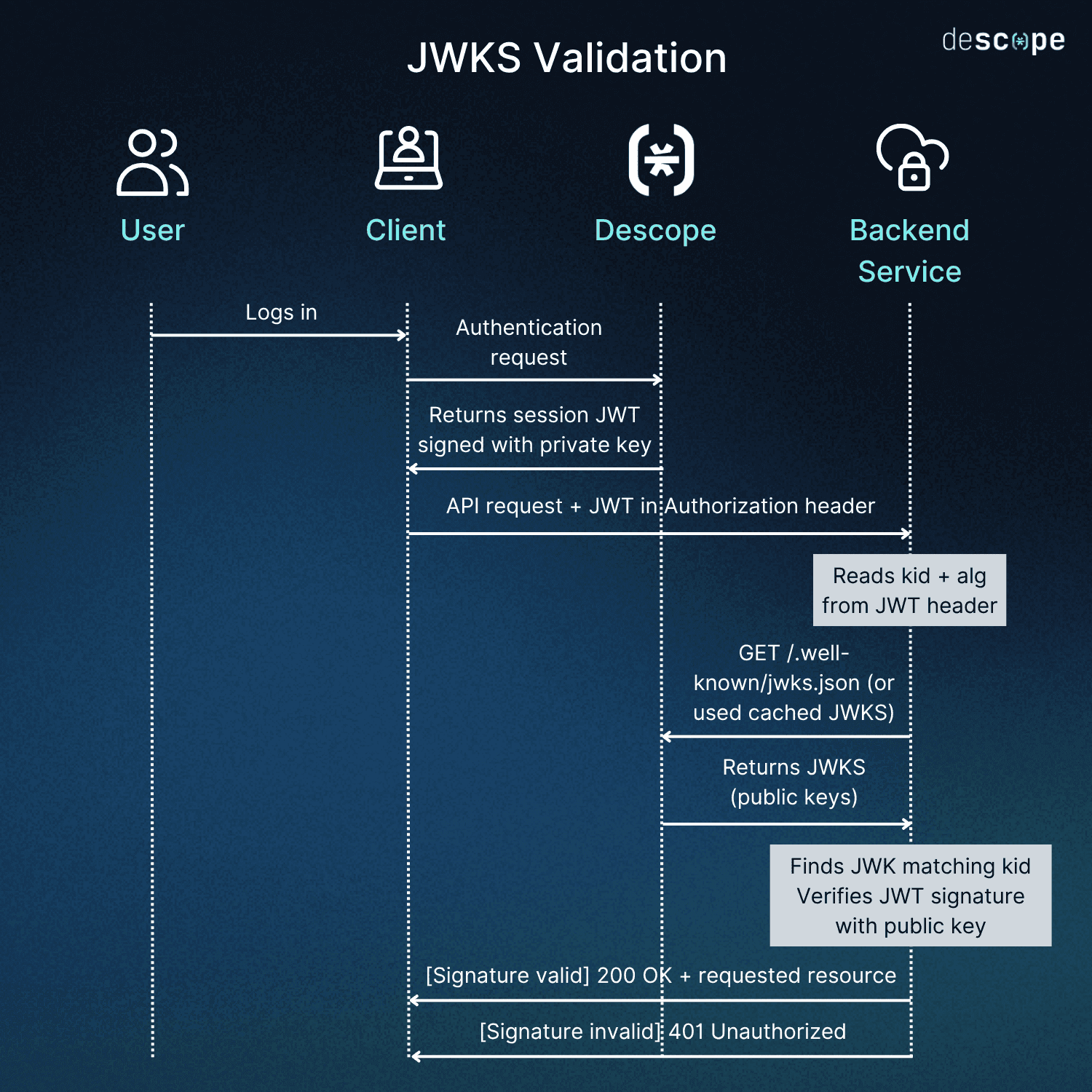
Here’s the sequence, step by step:
A user authenticates through Descope and receives session JWT, signed with Descope’s private key
The client includes that JWT in the Authorization header when calling a backend service
The backend reads the
kidfrom the JWT header to identify which key signed the token.The backend fetches the JWKS from Descope’s endpoint (or uses a cached copy).
It finds the JWK whose
kidmatches, then verifies the signature using that public key.It checks standard claims: expiration (
exp), issuer (iss), audience (aud).If everything checks out, the request proceeds. If not, the backend returns
401 Unauthorized.
Here’s what makes the pattern stateless: your backend doesn’t need a live connection to Descope (or any issuer) on every request. It only needs the public keys, which are cached locally and refreshed as needed.
Understanding key rotation
Signing keys don’t last forever. Rotating them periodically limits the blast radius if a private key is ever compromised, and in regulated industries this is often a compliance requirement. JWKS makes rotation straightforward because the set can hold multiple keys simultaneously.
The lifecycle looks like this:
The auth solution generates a new key pair and publishes the new public key in the JWKS with a new
kid.New tokens are signed with the new private key.
The old public key stays in the JWKS during a grace period. Tokens signed with the previous key haven’t all expired yet, and verifiers still need to be able to validate them by matching on
kid.Once all tokens signed with the old key have expired, the old JWK is removed from the set.
If you query a JWKS endpoint and see multiple keys, that’s normal. It means a rotation is in progress and both keys are valid for their respective tokens.
Caching is the complement to rotation, which means the JWKS is temporarily stored locally rather than fetching it on every request. The common approach is to refresh when you encounter an unrecognized kid (which usually means a rotation has happened) and to cap the refresh rate at a minimum interval of five to ten minutes to prevent abuse. Most JWT validation libraries and vendor SDKs handle this automatically.
How your app interacts with JWKS in the real world
The conceptual model discussed above is universal; how you directly engage with JWKS, however, depends on your integration pattern of choice. Not every developer needs to think about endpoints and kid matching. In many configurations, it’s handled for you entirely.
The mechanism is the same regardless of your integration pattern, but your exposure to JWKS configuration varies significantly:
Integration pattern | What you configure | What handles JWKS | When to use it |
|---|---|---|---|
Vendor backend SDK (e.g., Descope’s Node, Python, Go, Java, or Ruby SDKs) | Project ID at initialization | The SDK fetches, caches, and rotates keys automatically | The default for most apps. Handles validation, session management, and key rotation with minimal code Start here unless you have a specific reason not to. |
API gateway JWT authorizer (e.g., Apigee, AWS API Gateway, GCP API Gateway) | Issuer URL and audience claim in the gateway’s authorizer config, pointed at the JWKS endpoint | The gateway fetches and JWKS and validates tokens at the edge before requests reach your backend | You already have a gateway in front of your services and want to reject invalid tokens before they hit application code. Typically used in addition to SDK validation, not instead of it. |
Third-party JWT library (e.g., jose, PyJWKClient, nimbus-jose-jwt) | The JWKS endpoint URL, plus issuer and audience for claim validation | The library handles fetch and cache; you plug it directly into your middleware | You’re working in a language or framework where a vendor SDK isn’t available, or you need fine-grained control over the complete validation pipeline. More setup and maintenance. |
Offline or air-gapped validation | A static public key retrieved once from the vendor’s key endpoint, passed to the SDK at initialization | Nothing fetches dynamically; the key is bundled at deploy time | Your environment has no outbound internet access (on-prem, classified network, etc.). Requires manual updates when the issuer rotates. |
In all four scenarios, the underlying JWKS process is the same. The only difference is how much of it you see.
Where JWKS shows up across authentication approaches
JWKS isn’t really a feature you opt in or out of. It’s infrastructure that sits beneath several architectural patterns developers already use:
Token-based authentication in backend services: Any backend that receives a JWT and needs to validate it is relying on JWKS, whether or not the developer is aware of it. If you’re using a vendor SDK, the JWKS fetch is invisible. If you’re using a JWT library directly, you’re pointing it at the JWKS endpoint yourself.
OAuth and OIDC flows: Resource servers validate access tokens and ID tokens by fetching the public keys from the JWKS endpoint referenced in the OIDC discovery document. This is how token validation works in most OAuth-based architectures.
Single sign-on (SSO) and federated authentication: When multiple applications trust a shared identity provider, each relying party validates tokens independently using the JWKS. There’s no need to distribute shared secrets between services. This scales to enterprise SSO scenarios where dozens of applications trust the same issuer.
Microservices: Each service validates tokens using the same JWKS endpoint. That means no service-to-service secret sharing, single point of failure, or centralized validation bottleneck.
Vendor JWKS example using Descope
Descope exposes a JWKS endpoint for every project:
https://api.descope.com/<ProjectID>/.well-known/jwks.jsonWith a custom domain configured, the same endpoint is available here:
https://<your-domain>/<ProjectID>/.well-known/jwks.jsonIt provides the public keys for validating all Descope-issued session JWTs and access key JWTs, and it’s referenced in Descope’s OIDC discovery for automatic resolution by any compliant client.
In the SDK path (the most common integration pattern), developers initialize with a project ID and call validateSession or validateJwt. The SDK handles fetching, caching, and key rotation transparently. In the API gateway path, the gateway’s JWT authorizer is configured with the JWKS endpoint, issuer, and audience. In the offline pattern, the public key is retrieved here:
https://api.descope.com/v2/keys/<ProjectID>Then it’s passed to the SDK at initialization. If you need to customize what goes into your tokens rather than how they’re validated, JWT Templates let you configure custom claims while the JWKS infrastructure handles signing and key management behind the scenes.
Getting started with JSON Web Key Sets
JWKS is one of those core pieces of auth infrastructure that does its job best when you don’t have to think about it. The main concept is straightforward: an issuer signs tokens with a private key, publishes the corresponding public keys at a well-known URL, and any service in your stack can fetch those keys to validate tokens independently.
Key rotation, caching, and discovery are all built into the standard, and in most integration patterns, your SDK or gateway handles them automatically. The result is token validation that scales across services, works across OAuth and OIDC, and doesn’t require shared secrets or live calls to the issuer on every request.
If your application issues or validates JWTs, JWKS is the mechanism that makes validation trustworthy and scalable. To see how Descope handles JWKS, create a Free Forever account, join the AuthTown dev community, or browse the docs.