
Table of Contents
Don't have the time to read the entire post? Our human writers will be sad, but we understand. Summarize the post with your preferred LLM here instead.
When Meta’s personal AI agent, Muse, reaches a login page, it does what a person would do: asks the customer for their password, then for the one-time code the site just texted them. The site sees a normal login, and from then on, it can’t tell the agent apart from the customer.
This is impersonation: the agent acts as the customer instead of on the customer's behalf. If an impersonating agent orders the wrong item or trips fraud rules that lock the real customer out, the logs blame the customer. The alternative is delegation. The agent gets its own sign-in path, identifies itself, asks the customer for permission, and the customer's answer becomes a token the backend checks on every request.
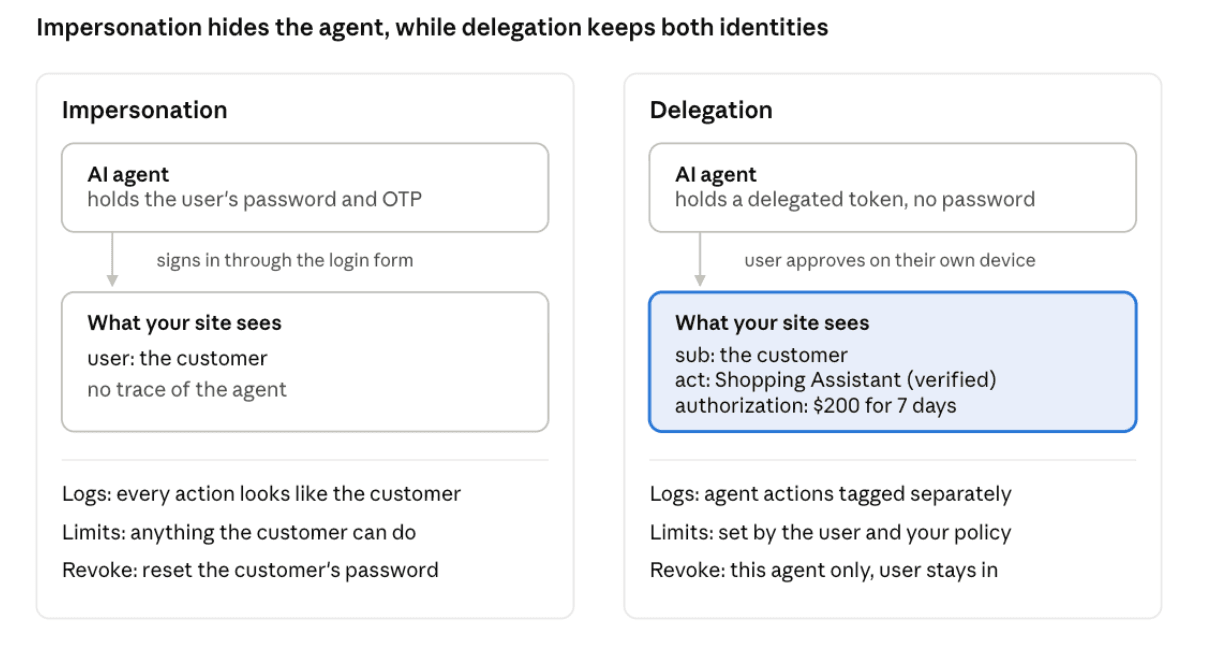
Muse is among the first in a new breed of messaging-based personal agents that work through a chat thread, the same way users already text friends and family. Using an agent is now much more accessible, but many new users are sending them to B2C sites and handing over credentials without a second thought. Everyday users will ask for something and expect it to work, which leaves it to the site to make the delegated path the one their agent takes.
This post shows what it takes to build agent delegation, using Northbound, a sample outdoor gear store running live with Descope as its OAuth authorization server. You can point your own agent at it, or read the Northbound and Agent Edge source on GitHub.
At a glance
Computer-use agents like Muse or Instinct sign in with the customer’s own password, so sites can’t tell the human customer from the agent.
Because agents and their protocols already speak OAuth, an OAuth authorization server recognizes the agent, signs the customer in with the site's existing login, and issues the token.
With that token, the site can tell the agent apart from the customer and act on the difference: ask the customer to approve a purchase, keep the agent off payment pages, and record which orders it placed.
Device code and CIBA cover agents that can’t open a browser, with a second approval set up for purchases.
Northbound is a live sample store running this entire pattern, set up with only two small changes to the store’s code.
Delegated agent access in action
The video above follows one run from the first sign-in to a placed order. You don't need an account to try it yourself, since Northbound creates one the first time you approve an agent. To demo it firsthand, ask your agent (e.g., Muse or Instinct) to work through the steps below in order. Each step covers what you'll see and what Northbound is doing behind it.
The architecture of the Northbound demo site
Northbound started with only its own email-and-password login, like a typical B2C site. Three components now handle the agent side:
The edge integration sits in front of northbound.camp, recognizes agents, and steers them away from the password form.
The front door, an agent page at agents.northbound.camp, is where an agent gets the customer's approval through Descope.
Descope, the authorization server, runs the sign-in flows, shows the consent screen, and issues tokens that name the customer in
sub(the subject claim) and the agent inact(the actor claim).
Northbound runs the first two as Cloudflare Workers from the Agent Edge repo, but either can live in your own backend. The store’s own code changed in only two places: it accepts a Descope token from a cookie alongside its own session, and it redirects agents to step-up for approval at checkout.
Step 1: Shop as a guest
Tell your agent, “Go to northbound.camp and buy me a nice jacket.” Your agent can browse as a guest. Once it needs your account, the edge integration redirects it from the login page to the agent page, which explains what you'd be approving. Agents that don't sign their requests still get through, marked as unverified.
Step 2: Approve the agent
The agent page either gives your agent a link to share, using the device code flow (the same flow behind signing in to Netflix on a TV), or asks for your email and sends you an approval request through CIBA (Client-Initiated Backchannel Authentication). Northbound defaults to the link, because the customer only receives something they asked for, and uses CIBA for agents that won't pass one on, which included Muse in my tests.
Either way, you sign in through Descope on your own device, see which agent is asking and what it wants, and approve orders:read. Your agent can now see your cart and orders on your behalf, but it can't buy anything yet. Meta's connector guidelines for Muse push in the same direction, asking connectors to offer read-only access.
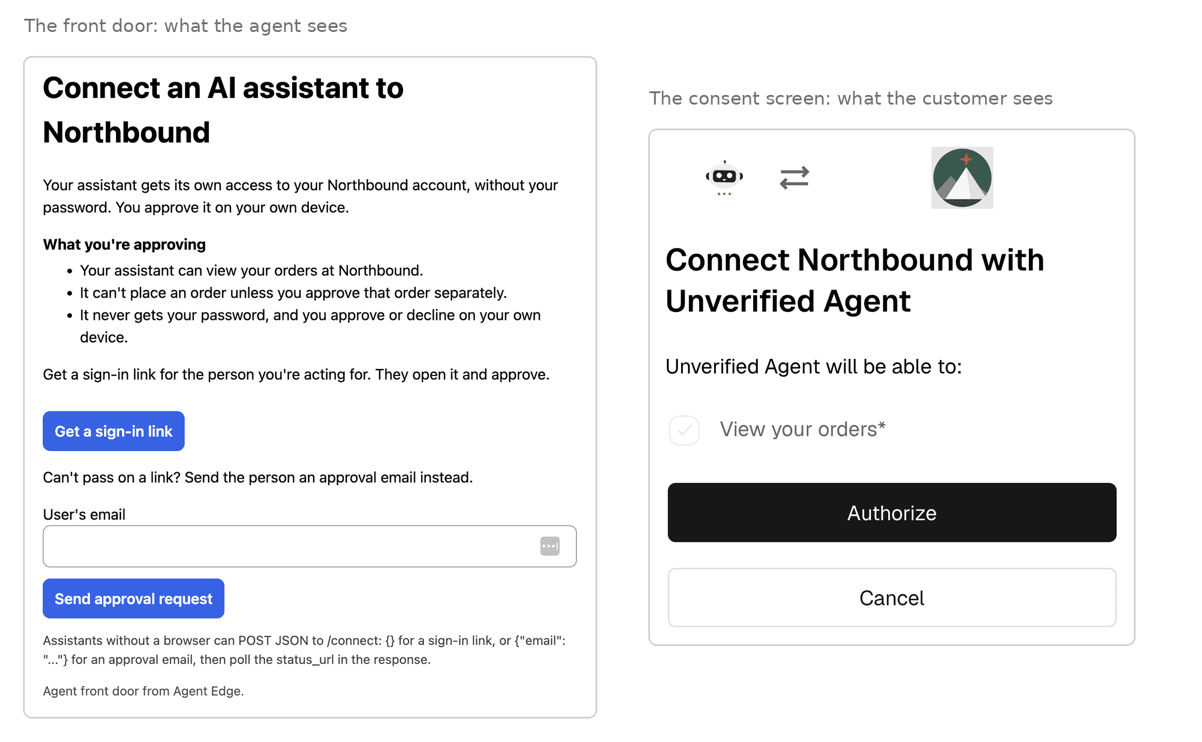
The front door then sets the token as a cookie on northbound.camp, so the agent's browser sends it with every request. Northbound checks its signature, issuer, email, act, sub, and scopes, and the agent is signed in without ever holding your password.
In my run, Instinct sent a sign-in link with a code as a backup. I signed in with Google, and before touching anything, Instinct found the hardshell I'd left in my cart, along with the shipping address saved on my account.
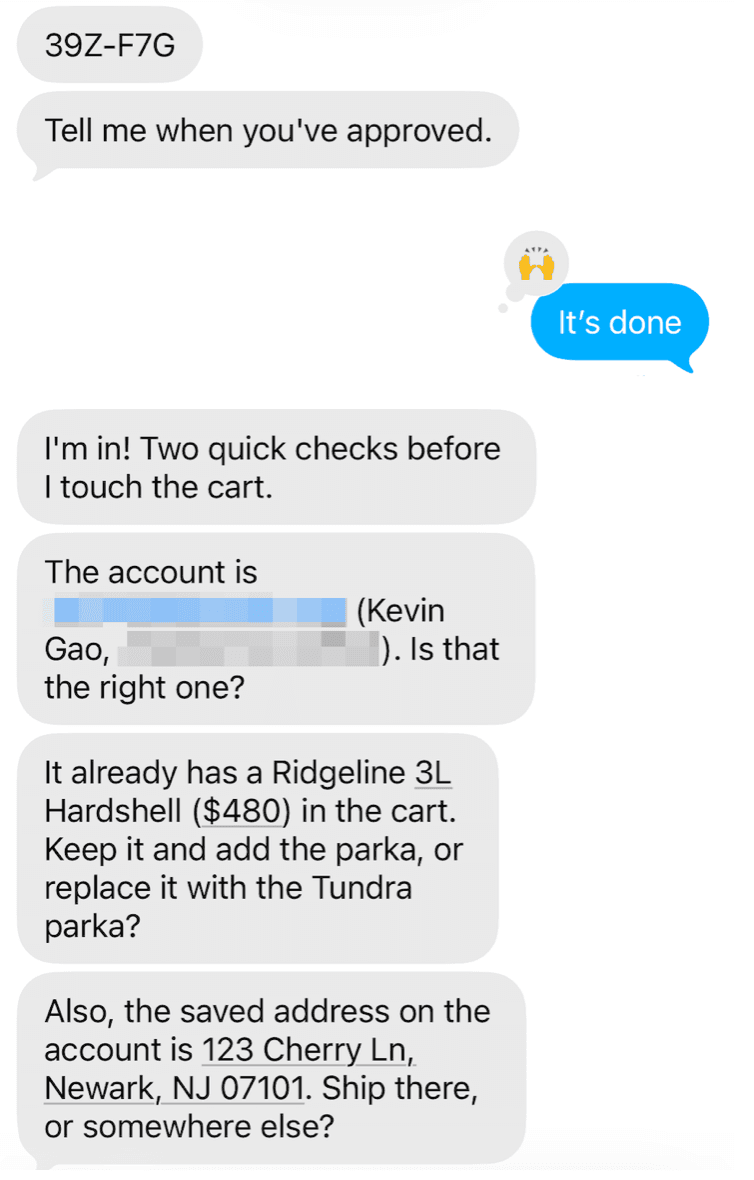
Step 3: Approve the purchase
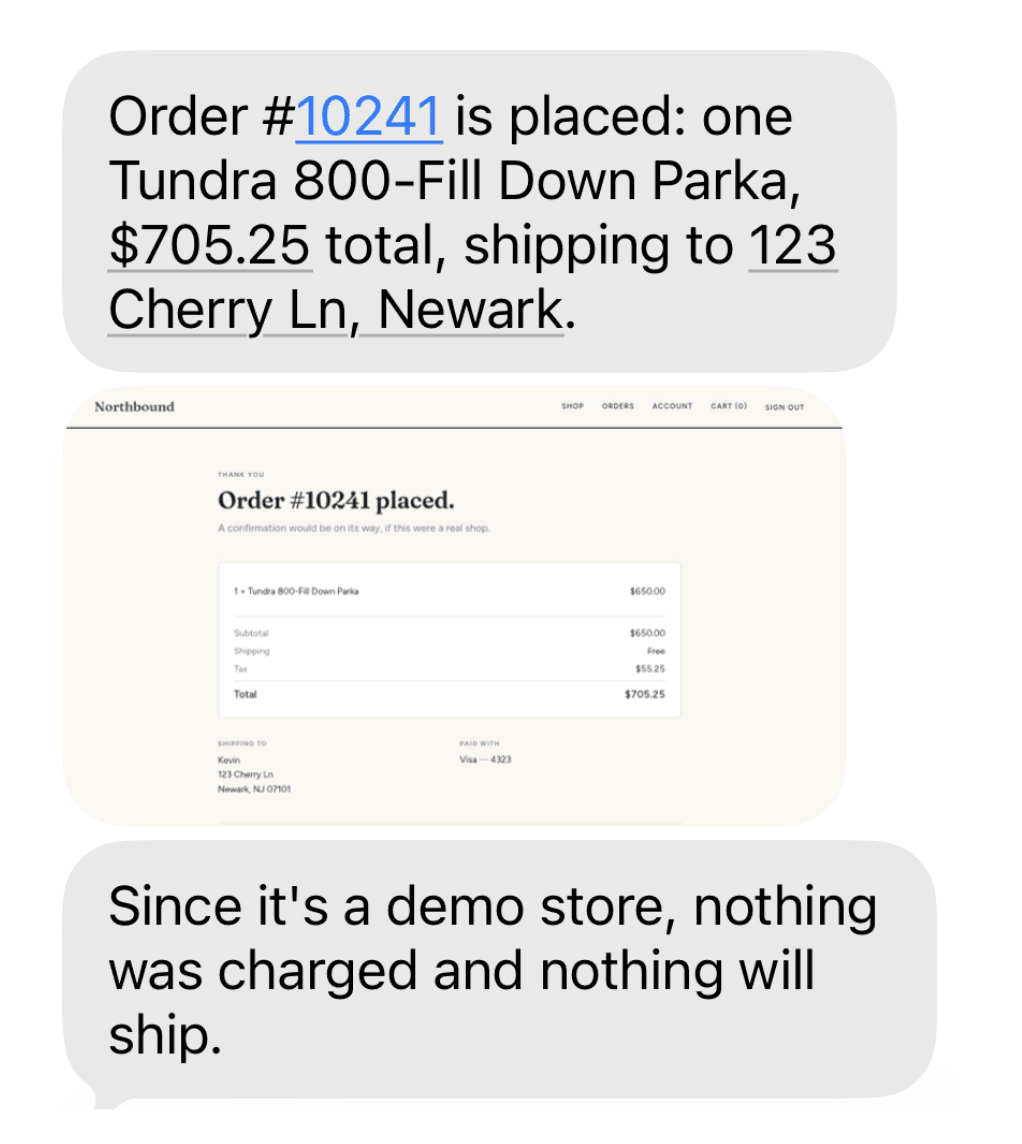
Without orders:write, checkout redirects your agent to the agent page's /step-up page, carrying the order signed by the store so the agent can't change what you see. Descope emails you a request that names the order and its total, with a short code your agent also shows you. If the codes match, approve it. The agent page swaps in a short-lived orders:write token, and the agent places the order.
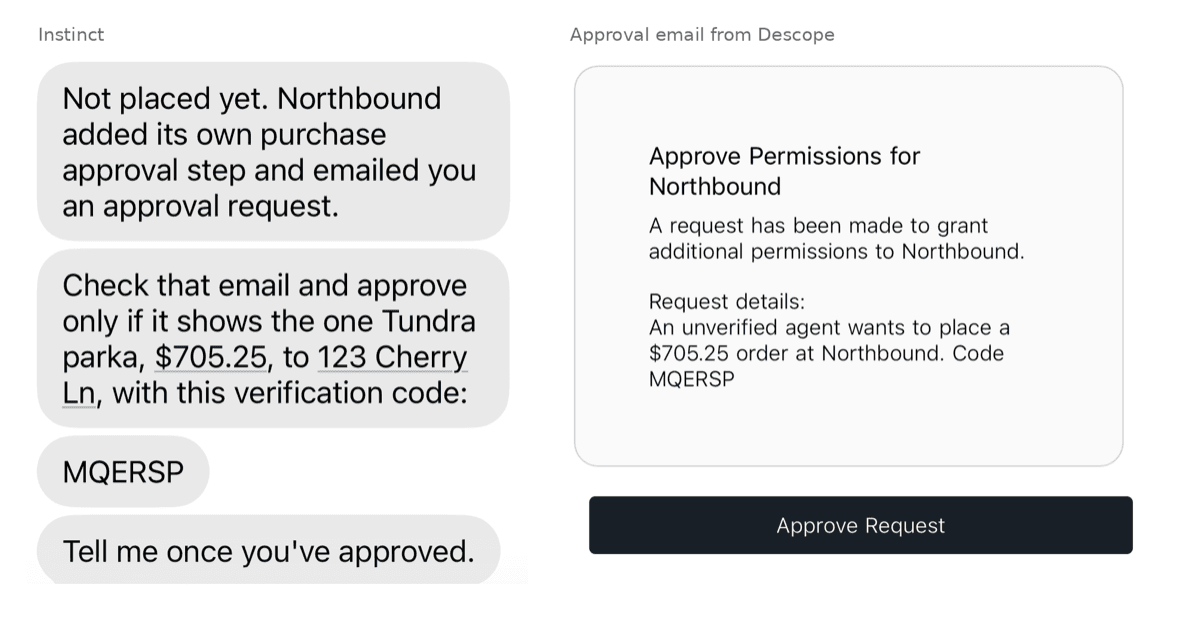
I had Instinct swap the hardshell for a parka. The approval email for the $705.25 order showed the same code Instinct did, so I approved it, and Instinct came back with an order number.
Step 4: Test a boundary
Tell your agent, "Update my saved payment method." The edge integration returns a 403 on payment and password pages for any agent, regardless of what you approved. If your agent asks for your Northbound password instead, point it to Connect an assistant on the sign-in page.
That run worked because Northbound recognized an agent, gave it a sanctioned way in, and enforced what the customer approved. The rest of this post covers why that way in runs through the browser rather than an API, then each piece in turn: identifying agents, getting them onto the delegated path, and enforcing the grant.
Does every site need an API or MCP server for agents?
Most of the talk about agents over the past year assumed businesses would build something for them first, like a Model Context Protocol (MCP) server, support for the Universal Commerce Protocol (UCP) or the Agentic Commerce Protocol (ACP), or Meta’s connector program for Muse. A new agent protocol seems to debut every few weeks, and every one of those protocols still needs an authorization server that can sign the customer in and issue a scoped, delegated token. Few B2C sites can build connectors for all of them, or can guess which will last, and most simply have a working login and no public API.
But Muse and Instinct don't actually need any of those protocols or APIs. Customers use them from a chat thread with no setup, and when someone asks one to buy something, it opens the store's website and clicks through it the way the customer would. The site sees what looks like a normal login, and from then on, it has no way to tell the agent apart from the customer. Computer-use agents will keep reaching B2C sites through the browser, where they'll sign in as the customer, unless the site gives them a delegated path.
The Northbound demo store works the way an average B2C site might work: homegrown login and a backend that doesn’t implement any AI protocols. Descope bolts onto the existing site without replacing anything, acting as its OAuth authorization server. Customers keep signing in the way they always have, and Descope handles the agent's approval, the consent screen, and the token. A site that wants customers to approve agents with their existing login can hand that step back to it with Descope's External Authentication action.
What the identity layer needs
To offer a proper front door for agents, the identity layer requires three key components: the ability to identify an agent, a mechanism to get it onto the delegated path, and backend enforcement to keep them out of risky areas.
Identifying the agent
A user-agent string is a label the client writes about itself, so any script can call itself Chrome or Muse. Web Bot Auth addresses that by having the agent sign each request with a key it publishes, which the site verifies. Cloudflare and Vercel both support it, and Northbound checks it in the edge integration. In my tests, neither Muse nor Instinct signed its requests, and most consumer agents don't yet. A site can't require Web Bot Auth, but it can give signed agents more access and treat the rest as unverified instead of blocking them. That gives agent platforms a reason to adopt it.
Agents that talk to the authorization server directly, like MCP clients, can identify themselves with Client ID Metadata Documents (CIMD) instead. The agent's client ID is a URL it controls, and the authorization server reads the agent's name and redirect URIs from it. That's how an authorization server can recognize agents nobody registered in advance.
Getting agents onto the delegated path
Browser agents follow what’s on the page, so Northbound’s login page shows a visible box, “Using an AI assistant? Connect an assistant,” that links to the agent page. In my tests, Muse found it every time. Instinct first offered to text me a link for my password, then found the box when I asked whether there was another way.
Agents that speak OAuth look for Protected Resource Metadata instead: a JSON document at a well-known URL that names the site’s authorization server. A request without a token gets a 401 whose WWW-Authenticate header points to it. The edge integration adds that header to existing 401s, so the API doesn’t change, and an MCP server added later can reuse the same sign-in.
Which flow an agent gets depends on what it can show the customer. Computer-use agents run their browser in the cloud, and messaging agents have none, so neither can send the customer to a sign-in page:
Agent type | Flow |
|---|---|
Can open a browser (MCP clients, desktop agents) | Authorization code |
Can show the user a link or code (messaging agents) | Device code |
Can't or won't show a link | CIBA |
Any agent, for a high-risk action | CIBA, or re-consent for MCP clients |
In Descope, the front door is registered as an Agentic Client, the OAuth client configuration that sets which of these flows, consent screen, and scopes it can use.
Since CIBA starts from an email address, anyone could send an approval request to any customer. Northbound limits email requests to 3 per address and 10 per IP each minute, and makes the customer sign in before the consent screen appears. The binding message should name the platform Web Bot Auth verified, as in "An agent verified as Acme Agent wants to place a $160 order," or say plainly that the agent is unverified, rather than repeat a name the agent chose. API clients that need more than their grant get a 403 with error="insufficient_scope", which sends the customer back through the connect flow.
Enforcing the grant in the backend
Muse asks the customer before every purchase, but the business never sees that prompt. The token is how the customer's decision reaches the business. A site accepts Descope tokens alongside its own sessions, from a cookie for browser agents or a bearer header for API clients, validates them like any JWT, and maps each claim to a decision:
emailidentifies the customer, so Northbound loads their account with the same lookup it uses for a human session.actidentifies the agent acting for the customer. Northbound tags every write with the agent ID and blocks password and payment changes.expsets when the token expires, so access ends on time. The agent page refreshes the token, or the agent reconnects.scopeholdsorders:read, ororders:writeafter step-up. Withoutorders:write, checkout sends the agent to step-up before a purchase.
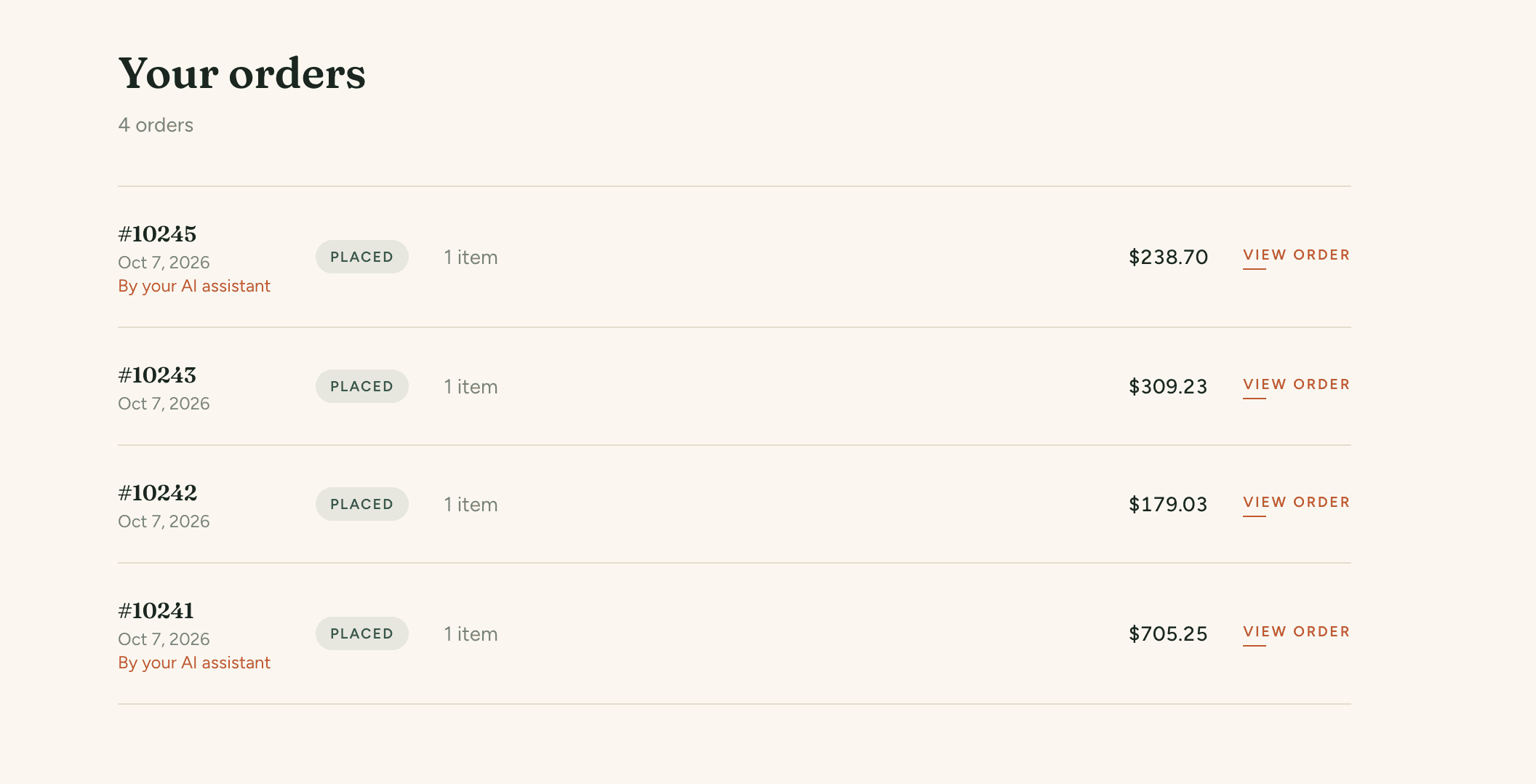
Because Northbound tags every write with the agent’s ID, its order history can show which orders an agent placed and which ones the customer placed directly.
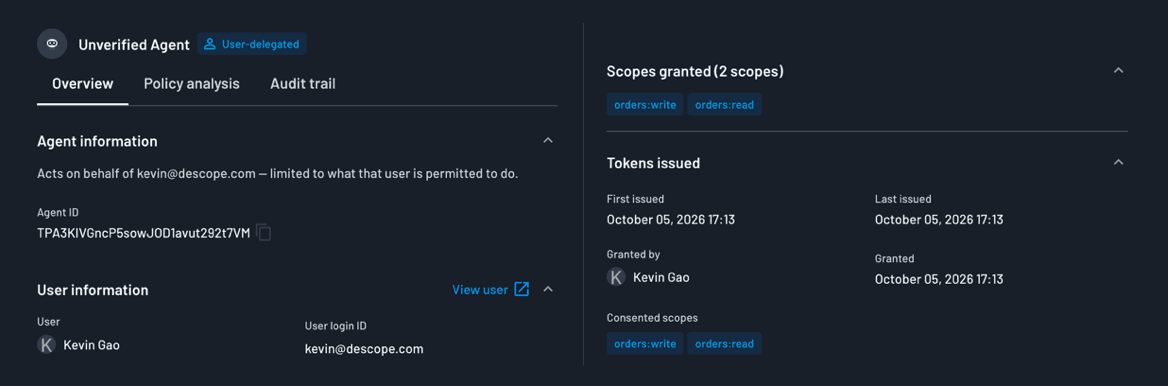
These checks are ordinary application code, so the team can change which pages agents can use, or when they need approval, without touching the login flow. Descope keeps the same record on its side. Every connected agent appears on the Agentic Identity page with the customer it acts for, the scopes it holds, and when its tokens were issued, and the business can revoke an agent there without signing the customer out.
Make the delegated path the easy one
Much of the machinery around the behavior of customer-user agents still hinges on their platforms. Most agents don't sign their requests yet, and an agent can still skip the agent page and type the customer's password. A site can't currently force agents onto the delegated path, but it can make that path easier than the password form and give the agents that take it more access.
To see the customer's side, point your own agent at the live demo. Agent Edge has a Deploy to Cloudflare button and starts by only logging agents, so you can see your own agent traffic before changing anything. To build on Descope, start with a Free Forever account or bring your questions to our dev community, AuthTown.