
Table of Contents
Don't have the time to read the entire post? Our human writers will be sad, but we understand. Summarize the post with your preferred LLM here instead.
This tutorial was written by Manish Hatwalne, a developer with a knack for demystifying complex concepts and translating "geek speak" into everyday language. Visit Manish's website to see more of his work!
Every request to your API suddenly returns HTTP 401, and the only clue in the logs is signature verification failed.
Your auth provider signs each JSON Web Token (JWT) with a private key and publishes the matching public keys at a JSON Web Key Set (JWKS) endpoint. Each token header carries a kid (key ID) that names the signing key. Your service looks up that key in the JWKS, usually from a local cache, verifies the signature, and only then checks claims such as exp (the expiry time) and iss (the issuer).
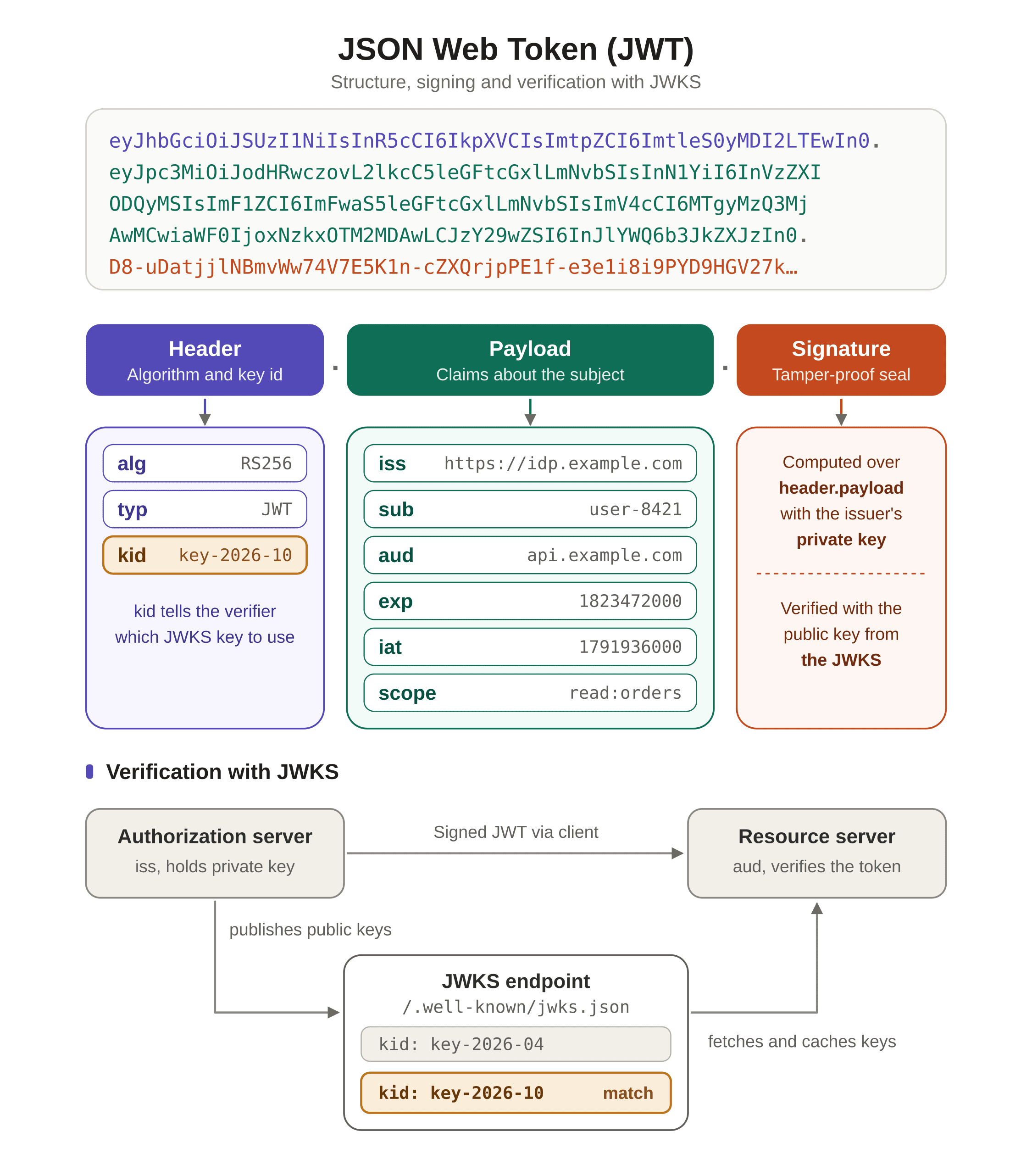
Any step can fail, and JWT libraries report most failures the same way, so the real cause hides in caching, configuration, or network behavior. Under pressure, someone will suggest accepting any algorithm or skipping the signature check just for now. The HTTP 401 errors stop, but the API may now accept forged tokens, which turns an outage into a security vulnerability.
This guide covers seven common JWKS failures, each with the error strings you'll see, the root cause, and a fix that keeps verification intact. Entries are symptom-first, so jump to the error string that matches yours. All examples use Python with PyJWT.
At a glance
Most JWKS failures surface as the same generic verification error, so the specific error string and how failures spread across instances are the fastest route to the cause.
A token signed with a newly rotated key fails until the verifier's cached key set refreshes, which a bounded cache lifetime plus a rate-limited refresh on unknown key IDs resolves.
Failures on every token from the first request that survive a restart usually point to a JWKS URL or issuer that doesn't match the token.
A verifier that accepts whatever algorithm a token's header names can be tricked into verifying forged tokens with the issuer's public key, so the accepted algorithms must come from the verifier's own config.
Network failures, such as blocked outbound traffic or a missing certificate bundle in a slim container image, need to be tested from inside the same network as the failing service.
None of the fixes require disabling or weakening signature verification, even temporarily.
1. Unable to find a signing key that matches (key rotation race)
Error strings you'll see
jwt.exceptions.PyJWKClientError: Unable to find a signing key that matches: "{kid}"(PyJWT)no matching key found in JWKSorkid not found in key set(common variants in other libraries)
Why it happens
Auth providers rotate their signing keys on a schedule. After a rotation, the provider adds the new key to its JWKS and signs new tokens with it. If your service cached the JWKS a few minutes earlier, its copy only knows the old key, so a token with the new kid finds no match and the library raises an exception.
The token and its signature are valid here, and your cached key list is simply out of date. That makes this a timing problem rather than a configuration problem, so check cache age before you check config. Two symptoms usually confirm it:
Failures arrive in a short burst after a rotation.
Failures hit some instances but not others, because each cache has a different age.
A restart clears the failures because it empties the cache.
How to confirm it
Paste a failing token into JWT Guru, Descope's in-browser JWT decoder, and copy the kid from the decoded header. Then check whether that kid exists in the live JWKS:
curl -s https://api.descope.com/<PROJECT_ID>/.well-known/jwks.json | jq '.keys[].kid'If the kid appears in the live JWKS but your service still rejects the token, your cache is stale. If the kid is missing from the live JWKS too, your issuer never published the key that signed the token, so skip to entry 3 (missing or unrecognized kid) or entry 4 (wrong JWKS URL).
The fix
PyJWT 2.15.1 already handles most of what a safe JWKS cache needs, so you mainly configure the client. PyJWKClient caches the key set, refetches once when it sees an unknown kid, and limits those refetches with a cooldown. Set the values explicitly, and add jitter (a small random variation added to a timer) so instances don't all refresh at the same instant. Create the client once at startup:
import logging
import random

import jwt
from jwt import PyJWKClient
from jwt.exceptions import PyJWKClientConnectionError, PyJWKClientError

logger = logging.getLogger(__name__)
JWKS_URL = "https://api.descope.com/<PROJECT_ID>/.well-known/jwks.json"
ALLOWED_ALGS = ["RS256"]  # from your config, never from the token

def with_jitter(seconds):
    # Spread each value by +/-10% so instances don't refresh at the same time
    return seconds * random.uniform(0.9, 1.1)

jwks_client = PyJWKClient(
    JWKS_URL,
    headers={"User-Agent": "YourAppName/1.0"},  # replace with your app
    lifespan=with_jitter(300),          # bounded TTL, about 5 minutes
    cooldown_duration=with_jitter(30),  # minimum gap between forced refetches
    timeout=5,                          # fail fast if the endpoint hangs
    cache_keys=False,                   # no per-key cache that never expires
)
Each setting has a job:
lifespansets the TTL (time to live: how long a cached copy stays valid before a refetch) and defaults to 300 seconds. A bounded TTL caps how stale your keys can get without a fetch on every request.cooldown_duration(the minimum wait between forced refetches) defaults to 30 seconds. It stops a flood of tokens with randomkidvalues from hammering your issuer's endpoint. Every successful fetch starts the cooldown, so a key rotated just after a fetch can fail for up to 30 seconds. Never set it to0in production, since that removes the limit.with_jitter()covers the gap left by PyJWT, which has no jitter option. It randomizes both timers once at startup, so instances that start together end up with different timers and drift apart.timeoutdefaults to 30 seconds, which can hold a request thread for a long time when the endpoint hangs. A 5-second timeout lets the request fail quickly instead.cache_keysshould stay off, which is the default. This per-key cache never expires by time, so a key your issuer removed could stay trusted for as long as the process runs.
Then verify each token through the shared client, logging both kinds of lookup failure:
def verify_token(token):
    try:
        signing_key = jwks_client.get_signing_key_from_jwt(token)
        return jwt.decode(
            token,
            signing_key,              # the PyJWK object returned by the client
            algorithms=ALLOWED_ALGS,  # keep the allowlist explicit
            issuer="<ISSUER>",        # must match the token's iss claim
            audience="<AUDIENCE>",    # must match the token's aud claim
        )
    except PyJWKClientConnectionError:
        logger.exception("JWKS endpoint unreachable")  # see entry 6
        raise
    except PyJWKClientError as err:
        kid = jwt.get_unverified_header(token).get("kid")
        logger.warning("JWKS lookup failed", extra={"kid": kid, "error": str(err)})
        raise
A connection error is logged with its traceback and re-raised, since a failed fetch belongs to entry 6 (network and TLS failures). Since PyJWT 2.13.0, a failed refetch also leaves the cached key set in place, so tokens signed with already-cached keys keep verifying until that cache expires. Earlier versions cleared the cache, so one bad JWKS response could turn a blip into a full outage. The same fix resolves entry 2 (caching misconfiguration), which is listed next.
Keeping it from recurring
Prevention works best on the issuer side. Rotate with an overlap window (a period when old and new keys are published together). Publish the new key at least one TTL before signing with it, so every cache picks it up through normal expiry and the cooldown never matters. Keep the old key published until every token signed with it has expired, meaning at least your longest token lifetime after it stops signing.
On the client side, watch JWKS misses. A lone miss right after a rotation is normal. A miss that persists after a refresh points to another problem, usually entry 3 (missing or unrecognized kid). The logger.warning call above is your starting point, so monitor that event and alert on sustained misses.
2. Constant HTTP 429 from the JWKS endpoint, or tokens failing right after a rotation (caching misconfiguration)
Error strings you'll see
HTTP 429: Too Many Requestsfrom the JWKS server (rate limiting: the host rejecting callers that send too many requests)jwt.exceptions.PyJWKClientConnectionError(raised when the JWKS fetch fails, for example on a 429 from the host)Slow requests across the whole API, because each verification waits on a network call to the JWKS host
The same
Unable to find a signing key that matches: "{kid}"message from entry 1 (key rotation race), but lasting minutes or hours instead of seconds
Why it happens
Both failures come from a cache lifetime that doesn't match how often the keys change. Keys change rarely, so a good cache lives long enough to skip most fetches and short enough to catch the next rotation.
With no caching, every request fetches the JWKS. Latency rises first, and the issuer's host starts returning HTTP 429 as traffic grows. Common culprits include a PyJWKClient created inside the request handler (it starts with an empty cache each time) and cache_jwk_set=False.
A cache that never expires keeps the first key list your service saw, so rotations go unnoticed. A hand-rolled cache loaded once at startup behaves this way, and so does a very large lifespan combined with a very large cooldown_duration. A restart clears the failures, which points straight to the cache. A long-lived cache can also keep trusting a key after the issuer removes it. With cache_keys=True, a removed key stays trusted until the cache hits its size limit and evicts it. Both patterns look like this in code:
# Fetches the JWKS on every call, since the client starts with an empty cache
def verify_token(token):
    client = PyJWKClient(JWKS_URL)
    ...

# Per-key cache with no time-based expiry
client = PyJWKClient(JWKS_URL, cache_keys=True)
The fix
Apply the same fix as entry 1 (key rotation race): a bounded TTL, a refresh on an unknown kid limited by a cooldown, and jitter. Create the PyJWKClient once at startup and reuse it for every request. Node's jose library ships a similar setup by default. Its createRemoteJWKSet caches for 10 minutes and refetches on an unknown kid no more often than every 30 seconds.
Keeping it from recurring
Watch the cache hit ratio (the share of key lookups answered from the cache instead of the network) as a leading indicator. A sudden drop points to a rotation or an endpoint change, and it shows up before HTTP 401 or HTTP 429 errors do.
3. Missing or unrecognized kid in the token header (kid mismatch)
Error strings you'll see
jwt.exceptions.PyJWKClientError(PyJWT, raised when no key in the JWKS matches the token'skid)JWKSMultipleMatchingKeys: multiple matching keys found in the JSON Web Key Set(jose, when a keyless token fits several keys)"kid" claim missingortoken has no "kid" claim(variants in other libraries)jwt.exceptions.InvalidSignatureError(PyJWT, raised when a token's signature doesn't match), which can appear when a library silently falls back to the wrong key
Why it happens
A verifier uses kid to know which key in the JWKS signed the token. Two situations remove that clue:
The issuer leaves
kidout of the token header. Homegrown issuers sometimes skip it, and some put it in the payload (the claims section of the token), where no verifier looks. Paste a failing token into JWT Guru and check the decoded header. Ifkidis missing there, this entry applies.The JWKS holds more than one key. The overlap window from entry 1 (key rotation race) publishes two keys at once, and without a
kidthe verifier can't tell which one signed the token.
Some libraries hide this problem for a while. When the JWKS has a single key, they skip the kid check and use that key for every token. The first rotation adds a second key, and keyless tokens start failing. PyJWT's PyJWKClient works differently. get_signing_key_from_jwt() reads the kid from the token header and looks that key up, so a keyless token gives it nothing to search for. A JWKS entry without a kid also goes unused, because get_signing_keys() returns only keys that have one.
The fix
Fix it at the issuer when you can. Set kid in the header of every token and make it match the kid published in the JWKS:
token = jwt.encode(payload, private_key, algorithm="RS256", headers={"kid": "<kid>"})If you can't change the issuer, try each candidate key instead. Candidates are the signing keys in your cached JWKS that use an algorithm from your allowlist (the fixed list of algorithms you accept):
from jwt.exceptions import InvalidSignatureError

def verify_keyless_token(token):
    candidates = [
        key for key in jwks_client.get_signing_keys()
        if key.algorithm_name in ALLOWED_ALGS
    ]
    for key in candidates:
        try:
            return jwt.decode(
                token,
                key,  # the PyJWK object
                algorithms=ALLOWED_ALGS,
                issuer="<ISSUER>",
                audience="<AUDIENCE>",
            )
        except InvalidSignatureError:
            continue  # wrong key, try the next one
    raise InvalidSignatureError("No key in the JWKS verified this token")
The allowlist only narrows the candidates, and each one must still verify the signature. Only a signature failure moves the loop to the next key. Any other error, such as an expired token or a wrong audience, stops it immediately. Passing the PyJWK object also binds the token's alg header to that key's algorithm, so the allowlist can't be bypassed. The fallback reads the cached key set, so a newly rotated key becomes a candidate only after the TTL expires. Node's jose takes a similar approach: it throws an error when several keys fit and tries them all only if you opt in.
Avoid two shortcuts:
Using the first key in the set breaks valid tokens after the next rotation.
Picking a key by the token's
algheader lets the sender influence how you verify, which creates the risk covered in entry 5 (algorithm confusion). PyJWT's docs also warn against building thealgorithmslist from the token'salgheader.
Each keyless token costs one signature check per candidate, so reserve this path for legacy issuers and log every use.
Keeping it from recurring
Require kid on every signed token, even when the JWKS has only one active key. Treat a keyless token against a multi-key JWKS as a configuration bug and fix it at the issuer. The fallback above is meant for a transition period only, so reject keyless tokens by default and alert whenever the fallback runs.
4. Verification fails for every token, immediately, with no rotation in sight (wrong JWKS URL)
Error strings you'll see
jwt.exceptions.PyJWKClientError(PyJWT, raised when no key in the JWKS matches the token'skid), on every request instead of a short burstjwt.exceptions.InvalidSignatureError(PyJWT), when the wrong JWKS happens to use the samekidvalues as the right onejwt.exceptions.InvalidIssuerError(PyJWT, raised when the token'sissdoesn't match theissueryou pass tojwt.decode)jwt.exceptions.PyJWKClientConnectionErrororThe JWKS endpoint did not return a JSON object(PyJWT), depending on how the host answers a URL that doesn't existjwt.exceptions.PyJWKClientConnectionErrorwhen the configured URL redirects (anhttp://URL or an outdated path, for example), since PyJWT 2.14.0 and later refuse to follow redirects when fetching a JWKS
Why it happens
Every token fails from the first request on every instance, and a restart changes nothing. Entry 1 (key rotation race) behaves the opposite way, with a short burst of failures that a restart clears. This is the most common failure in practice and quick to fix once you suspect it, but it's easy to overlook because it feels too obvious.
Three mistakes usually cause it:
Staging keys are checked against production tokens, or the reverse. The production deploy still carries the staging JWKS URL, often because a config file was copied between environments.
The JWKS URL carries the wrong tenant or project ID (the identifier that tells the provider whose keys to return). The ID may be one character off or belong to another project in the same account.
The token's
issclaim doesn't match your configured issuer. The format varies by provider and by token configuration. Descope session tokens carry the bare project ID as
issby default, while a project using an OpenID Connect (OIDC)-compliant JWT template issues
https://api.descope.com/<PROJECT_ID>instead. Amazon Cognito useshttps://cognito-idp.<REGION>.amazonaws.com/<USER_POOL_ID>. Config written for one format fails against another.
The fix
Check the JWKS URL and issuer against the token before anything else:
Paste a failing token into JWT Guru and read its
iss.Confirm that
issmatches the issuer in your config exactly.Confirm that the project ID in the JWKS URL matches the ID inside
iss.Confirm that the token's
kidexists in the JWKS at that URL, using thecurlcommand from entry 1 (key rotation race).
Steps 2 and 3 are easy to script. The check below takes the iss value you read in step 1, so the script never has to read the token's claims without verifying them:
from urllib.parse import urlparse

JWKS_URL = "https://api.descope.com/<PROJECT_ID>/.well-known/jwks.json"
CONFIGURED_ISSUER = "<ISSUER>"  # the value you pass to jwt.decode

def check_jwks_config(token_iss):
    # token_iss is the iss value you copied from JWT Guru in step 1
    project_id = urlparse(JWKS_URL).path.split("/")[1]  # Descope URL layout

    print("token iss:        ", token_iss)
    print("configured issuer:", CONFIGURED_ISSUER,
          "->", "match" if token_iss == CONFIGURED_ISSUER else "MISMATCH")
    print("JWKS project ID:  ", project_id,
          "->", "found in iss" if project_id in token_iss else "MISMATCH")
For other providers, compare the host or tenant segment of the JWKS URL with the same part of iss. Never build the JWKS URL from the token's own iss at runtime. A forged token can claim any issuer, and a verifier that fetches keys from wherever the token points would end up trusting the attacker's keys.
Keeping it from recurring
Validate the config for each environment at startup or deploy time, and fail fast (stop immediately instead of running with a bad setting). Keep the expected project ID in a per-environment config that's reviewed with the code, and build JWKS_URL from it so the two can't drift apart:
import os
from urllib.parse import urlparse

EXPECTED_PROJECT_IDS = {
    "production": "<PROD_PROJECT_ID>",
    "staging": "<STAGING_PROJECT_ID>",
}

def validate_jwks_config():
    env = os.environ["APP_ENV"]
    configured = urlparse(JWKS_URL).path.split("/")[1]
    if configured != EXPECTED_PROJECT_IDS[env]:
        raise RuntimeError(
            f"JWKS URL uses project {configured}, but {env} expects "
            f"{EXPECTED_PROJECT_IDS[env]}"
        )
    jwks_client.get_signing_keys()  # raises if the fetch fails or no signing keys come back
Run the same check in your deploy pipeline so a mismatch stops the release before users hit failed logins.
5. Verification fails or (worse) unexpectedly succeeds (algorithm mismatch and algorithm confusion)
Error strings you'll see
jwt.exceptions.InvalidAlgorithmError(PyJWT, raised for an algorithm the verifier won't accept)JsonWebTokenError: invalid algorithm(jsonwebtokenfor Node), orinvalid algorithm(variants in other libraries)No error at all, which is the most dangerous case, since forged tokens verify successfully
Why it happens
Two situations produce these symptoms. They look alike in code but differ hugely in severity:
The config names the wrong algorithm, which causes an outage. The verifier expects RS256, but the issuer signs with something else, such as ES256 or RS384. Every token fails from the first request, and the error points at the algorithm. The
algheader (the field in the token header that names the signing algorithm) must also match the key's own algorithm, which PyJWT 2.13.0 and later check when you pass thePyJWKobject. Nothing gets exposed here, and a config change fixes it.The verifier accepts an algorithm the key was never meant for, which is a vulnerability. This is algorithm confusion, and it matters more than every other entry in this guide. The others break logins, while this one lets attackers in.
A typical attack works like this. Your service verifies RS256 tokens with the issuer's public key, which is public by design because it sits in the JWKS. An attacker crafts a token with the header alg: HS256. HS256 uses a Hash-based Message Authentication Code (HMAC), a symmetric algorithm where the same shared secret signs and verifies, so the attacker signs the token using the public key's bytes as the secret. A verifier that takes its algorithm from the header switches to HS256 and uses that same public key as the secret. The signature matches, the forged token passes, and nothing is logged. Anyone who can download your JWKS can then mint tokens that claim to be an admin.
The none algorithm (an unsigned token) adds a related risk, since a verifier that allows it accepts tokens with no signature at all. Recent PyJWT releases also refuse to use public-key material as an HMAC secret, but treat that as a backstop rather than the fix.
The fix
Allowlist the expected algorithms in your own config, and never take them from the alg header. The same rule applies to every value the token supplies, and entry 4 (wrong JWKS URL) applies it to iss. PyJWT's docs warn against building the algorithms list from the token's own alg header, in line with RFC 8725 §2.1:
# Wrong: the token chooses its own algorithm
alg = jwt.get_unverified_header(token)["alg"]
jwt.decode(token, signing_key, algorithms=[alg])

# Right: the algorithm comes from your config
ALLOWED_ALGS = ["RS256"]
jwt.decode(token, signing_key, algorithms=ALLOWED_ALGS)
Keep the list to the algorithms your issuer uses, and never mix HS* (symmetric) and RS* (asymmetric) algorithms in one list, because the two families interpret the key differently. To find the right value, check the alg listed for each key in the JWKS:
curl -s https://api.descope.com/<PROJECT_ID>/.well-known/jwks.json | jq '.keys[] | {kid, alg}'Use one shared ALLOWED_ALGS constant in every verification path, including verify_token in entry 1 (key rotation race) and the keyless fallback in entry 3 (missing or unrecognized kid).
Keeping it from recurring
Treat the allowlist as required, tested config so a failing test catches a regression. Import the same constant your verifier uses, so a change to one can't silently skip the other:
import jwt
import pytest
from cryptography.hazmat.primitives.asymmetric import rsa
from jwt.exceptions import InvalidTokenError

from myapp.auth import ALLOWED_ALGS  # the constant your verifier uses

private_key = rsa.generate_private_key(public_exponent=65537, key_size=2048)
public_key = private_key.public_key()

def decode(token):
    return jwt.decode(token, public_key, algorithms=ALLOWED_ALGS)

def test_accepts_expected_algorithm():
    token = jwt.encode({"sub": "u1"}, private_key, algorithm="RS256")
    assert decode(token)["sub"] == "u1"

def test_rejects_hs256_token():
    token = jwt.encode({"sub": "u1"}, "x" * 32, algorithm="HS256")
    with pytest.raises(InvalidTokenError):
        decode(token)

def test_rejects_unsigned_token():
    token = jwt.encode({"sub": "u1"}, key=None, algorithm="none")
    with pytest.raises(InvalidTokenError):
        decode(token)
The first test proves a valid token still passes, so the two rejections can't pass for the wrong reason.
6. Verifier can't reach the JWKS endpoint at all (network and TLS failures)
Error strings you'll see
jwt.exceptions.PyJWKClientConnectionError(PyJWT, raised when the request to the JWKS endpoint fails)[SSL: CERTIFICATE_VERIFY_FAILED] certificate verify failed: unable to get local issuer certificate(Python'ssslmodule, when the system doesn't trust the certificate chain), or the same error ending inself-signed certificate in certificate chain[Errno -2] Name or service not knownor[Errno -3] Temporary failure in name resolution(Python on glibc-based images, when the JWKS host name can't be resolved)timed out(Python) orcurl: (28) Connection timed out(curl), when the connection hangs until the timeout
PyJWT reports a failed request as one exception class, so you need to find the cause behind it.
Why it happens
The JWKS fetch fails before any key lookup or token check happens, so the verifier never sees a key set. Cached keys keep working until the TTL expires, so a running instance can fail minutes after a network outage begins. A freshly started instance has an empty cache and fails on its first request. Often one environment or network segment fails while the others work.
Three causes cover most cases:
Egress rules (controls on outbound traffic leaving your network) block the call. A firewall, security group, or Kubernetes network policy allows traffic to your database but not to the JWKS host. Domain Name System (DNS) lookups can be blocked too. A rule that silently drops packets makes connections hang until the timeout, while a rule that rejects them fails right away.
A corporate proxy intercepts Transport Layer Security (TLS) traffic, decrypting HTTPS and re-signing it with its own certificate. The container sees the proxy's certificate instead of the JWKS host's, so it fails with
certificate verify failedunless the proxy's root certificate authority (CA) is trusted.The CA bundle (the list of certificate authorities the system trusts) is missing or stale in a minimal image. A bare Debian slim or
scratchimage ships without one, and an old image can carry a bundle that predates the root CA behind the host's current certificate. The certificate is fine in both cases, but the container can't verify it.
The fix
Test reachability and certificate trust from the same network context as your service. A test from your laptop says nothing about a locked-down container, so run these commands inside the failing container or pod, for example with kubectl exec or docker exec:
# 1. DNS: does the host name resolve?
getent hosts api.descope.com

# 2. TLS: is the certificate chain trusted?
openssl s_client -connect api.descope.com:443 -servername api.descope.com </dev/null | grep "Verify return code"

# 3. HTTPS: does the full request work?
curl -sS -o /dev/null -w "%{http_code}\n" --max-time 5 https://api.descope.com/<PROJECT_ID>/.well-known/jwks.json
If the container image has no curl or openssl, make the same request with Python's standard library, which the PyJWT client also uses:
python -c "import urllib.request as u; req = u.Request('https://api.descope.com/<PROJECT_ID>/.well-known/jwks.json', headers={'User-Agent': 'curl/8.0.0'}); print(u.urlopen(req, timeout=5).status)"The results point to the cause:
curl: (6) Could not resolve host, or an empty result fromgetent, means DNS is blocked or misconfigured.curl: (28) Connection timed outmeans an egress rule is dropping the traffic.Verify return code: 20 (unable to get local issuer certificate)orcurl: (60) SSL certificate problemmeans the CA bundle is missing or stale, or a proxy is re-signing the traffic.
Fix certificate trust in the image, so every service built from it benefits:
FROM python:<VERSION>-slim

# Installs the CA bundle (a no-op on images that already include it)
RUN apt-get update \
 && apt-get install -y --no-install-recommends ca-certificates \
 && rm -rf /var/lib/apt/lists/*

# Behind a TLS-intercepting proxy? Trust its root CA too
COPY corp-root-ca.crt /usr/local/share/ca-certificates/corp-root-ca.crt
RUN update-ca-certificates
Rebuild on a current base image regularly so the bundle doesn't go stale.
Avoid patching around this problem in application code. PyJWKClient accepts an ssl_context, and passing one with certificate checks turned off is tempting, but that removes your protection against a fake JWKS host. Anyone who can intercept the connection could serve their own keys and sign tokens your service accepts.
Keeping it from recurring
Add a check that confirms your service can fetch the JWKS, and run it during deployments and on a regular schedule. The check below forces a fresh fetch, so it tests the network path instead of your cache:
from jwt.exceptions import PyJWTError

def jwks_reachable():
    try:
        jwks_client.get_signing_keys(refresh=True)  # bypasses the cache
        return True
    except PyJWTError:
        return False
The validate_jwks_config() function from entry 4 (wrong JWKS URL) makes a similar call at startup, so a bad network path stops the deploy. Run this recurring version on a modest interval rather than on every health probe, since a fetch on every probe would bring back the HTTP 429 responses from entry 2 (caching misconfiguration). Run it from inside the same network as your service, or it can pass while the service stays blocked.
7. Tokens rejected as expired or not-yet-valid when they shouldn't be (clock skew)
This failure sits just outside JWKS. The JWKS fetch and key lookup both succeed, but the exp or nbf check (not before: the earliest time the token is valid) fails because the verifying host's clock has drifted. It belongs in this guide because it also returns HTTP 401.
Error strings you'll see
jwt.exceptions.ExpiredSignatureError(PyJWT, raised when a token'sexpclaim indicates it has expired)jwt.exceptions.ImmatureSignatureError(PyJWT, raised when a token'snbfclaim lies in the future)TokenExpiredError: jwt expiredorNotBeforeError: jwt not active(jsonwebtokenfor Node)
The same token often passes on one host and fails on another. Fresh tokens can also fail for a few seconds after login, then start passing.
Why it happens
PyJWT compares exp and nbf with the machine's current UTC time, so clock skew (a difference between two machines' clocks) changes the result. A fast clock makes tokens look expired early. A slow clock makes a fresh token with an nbf look not yet valid. Drift is common on virtual machines (VMs) and hosts without Network Time Protocol (NTP) sync. Containers read the host's clock, so fix it on the host or VM.
To confirm, compare the host's clock with the server's. A gap of more than a few seconds means drift:
date -u
curl -sI https://api.descope.com/<PROJECT_ID>/.well-known/jwks.json | grep -i '^date:'
The fix
Add leeway (seconds of tolerance for the exp and nbf checks) to your jwt.decode call:
return jwt.decode(
    token,
    signing_key,
    algorithms=ALLOWED_ALGS,
    issuer="<ISSUER>",
    audience="<AUDIENCE>",
    leeway=30,  # seconds of tolerance for the exp and nbf checks
)
The JWT specification allows for leeway of "usually no more than a few minutes," so start around 30 seconds.
Then fix the clock itself by enabling NTP or your cloud provider's time service. Keep leeway small, since every extra second keeps an expired token valid longer.
Why every fix here keeps verification on
From the outside, every JWKS failure looks alike, with a generic verification error and HTTP 401 responses. Underneath, a short list of causes explains most of them: missed key rotations, badly tuned caches, wrong URLs, algorithm mismatches, network or TLS problems, and clock drift. When you recognize the error string and the pattern around it, you have most of the diagnosis.
Every fix in this guide keeps signature verification enabled, since disabling it removes the check that proves a token came from your issuer. As entry 5 (algorithm confusion) shows, a verifier that accepts whatever algorithm the token names lets attackers forge tokens without raising any error. Loosening that check to silence an outage is a security decision, not just a debugging step.
If you'd rather not maintain this logic yourself, Descope's backend SDKs handle JWKS fetching, caching, and key rotation behind a single session validation call, and they can validate JWTs offline with a public key you provide when a server can't reach the internet. For custom setups like the ones above, each project publishes its JWKS at https://api.descope.com/<PROJECT_ID>/.well-known/jwks.json. You still own your network and clock, but the caching and rotation logic can stay out of your code.
Sign up for a Free Forever Descope account to try it with your own project. Have questions along the way? Join AuthTown, our open user community for developers, or book time with our auth experts.