
Table of Contents
Don't have the time to read the entire post? Our human writers will be sad, but we understand. Summarize the post with your preferred LLM here instead.
Most modern apps require several ways for users to sign in. For instance, one product might need simple logins for individuals, enterprise SSO and SCIM for business customers, adaptive MFA to stop account takeovers, and a secure way to keep each tenant’s roles and data separate. Creating all of this from the ground up is a major task.
Frontegg is a well-known choice for teams that want developer-friendly authentication tools. It offers solid SDKs and APIs for B2B authentication, managing multiple tenants, and enterprise SSO. But Frontegg takes a component-based approach. You get the building blocks, and your engineers put them together, connect them to your tenant and authorization systems, and update them as your needs evolve.
Descope takes a different approach. Instead of giving you separate parts to connect and maintain, Descope provides a no-code or low-code workflow layer that combines multi-tenancy, SSO, SCIM provisioning, and authorization in one platform. This lets your team set up authentication once and make updates through configuration, without needing to redeploy.
In this post, we’ll compare Descope and Frontegg in the areas that matter most as your B2B product grows: multi-tenancy, enterprise SSO, SCIM provisioning, and the user experience for your customers. If WorkOS is also on your shortlist, see how it compares in Descope vs WorkOS for B2B Auth and SSO.
Also Read: A Complete Comparison of Descope and Frontegg
What to look for in a modern B2B identity platform
Whether you serve enterprise customers, individual users, or both, a few key features make the difference between a platform that grows with you and one that becomes hard to maintain:
Real multi-tenancy for B2B - tenant-aware roles, tenant isolation, and delegated admin so enterprise customers can manage themselves without extra engineering work.
Standards-based SSO - strict SAML/OIDC compliance so integrations behave consistently across identity providers and switching providers later doesn't require a rebuild.
Self-service SSO and SCIM provisioning - tenant admins configure their own connections and provisioning without opening an engineering ticket.
Visual workflow orchestration - the ability to change login methods, MFA logic, and onboarding steps through configuration, not a code change and a deploy.
Support different login form factors - embedded, hosted, and native mobile flows, so login and signup can match whatever experience your product needs.
Full passkey support with fallback logic - day-one passkey support with graceful fallback for users or devices that don't support it.
Adaptive, risk-based MFA - step-up authentication driven by real risk signals and pluggable fraud connectors, not just static rules.
Unified authorization - RBAC, ABAC, or ReBAC living in the same platform as authentication, not a bolt-on service with its own data model.
Native AI agent and MCP authorization - Oauth 2.1-protected MCP servers with per-agent scopes, consent, and enterprise-managed authorization.
Platforms that check these boxes let you spend engineering time on your product instead of your auth stack. Here's how Descope and Frontegg stack up against each one.
Descope vs Frontegg: At-a-glance
Capability | Descope | Frontegg |
|---|---|---|
Multi-tenancy | Multi-tenant by design; tenant-isolated users; MSSP/white-label support | Organization-based multi-tenancy; added customization for complex tenant relationships |
Enterprise SSO | Standards-based SAML/OIDC, broad IdP coverage, flexible role/NameID mapping | SAML/OIDC supported; standards adherence inconsistent; limited IdP coverage |
SSO & SCIM provisioning | Self-service via the SSO Setup Suite | Supported, but managing multiple connections adds complexity |
User experience | Embedded, native journeys + hosted login, brandable | SDK/API-based with pre-built components; custom code for complex journeys |
User journeys | No-code visual workflows + A/B testing | SDK/API-led; custom code for iteration |
Passkeys | Native, day-one, with fallback logic | WebAuthn via SDK, limited fallback |
MFA & fraud | Adaptive MFA + fraud connectors, all plans | Configurable MFA, no adaptive/fraud connectors OOTB |
Third-party integrations | Open connector framework; bring-your-own vendors, including email | Fewer than 10 native integrations; no bring-your-own email |
Authorization | Unified RBAC/ABAC/ReBAC, tenant-aware | RBAC + entitlements; custom logic for granular models |
Agentic identity & MCP auth | OAuth 2.1/PKCE-native MCP resources, per-server registration, unified credential vault | Policy verdicts via Agen.co; no published per-server OAuth model or credential vault |
Multi-tenancy: Native architecture vs. an organization-based add-on
Descope
Descope is multi-tenant by design, with tenant management built into the core platform architecture. This foundation gives it the flexibility to support complex B2B2X tenant relationships, such as nested reseller hierarchies, as standard capabilities.
Create and manage tenants directly from the console or the Management SDK
Native support for MSSP and white-label reseller models with tenant isolated users, where sub-tenants roll up to a parent account
Tenant isolation enforced at the data layer
Also Read: Tenant User Isolation in Descope
Frontegg
Frontegg's approach to multi-tenancy is based on organizations, a setup that works well for standard B2B SaaS environments but was not designed to handle more unusual tenant relationships without your team having to put in additional engineering work.
Tenant-level roles, permissions, and configuration supported out of the box
Users who belong to multiple organizations require custom handling
No native support for reseller or MSSP-style nested tenant hierarchies
Bottom line: Frontegg's multi-tenancy works for straightforward org structures, but complex relationships mean more custom work as you scale. Descope treats advanced multi-tenancy, including MSSP and white-label models, as core to the platform rather than an edge case.
Enterprise SSO: Standards-based implementation vs. inconsistent adherence
Descope
A key differentiator in enterprise SSO is not just support for SAML and OIDC, since almost every platform offers that. What matters is how closely each one follows the standards. Descope follows both standards closely, so if you set up an integration with one identity provider, it will work the same way with another. If a tenant changes providers later, you don't need to redo the integration.
Identity federation across apps with broad IdP coverage, including less common providers
Flexible role mapping and support for advanced attributes like NameID during onboarding
Multiple identity providers can be configured per enterprise tenant
Frontegg
Frontegg also supports SAML and OIDC, but its implementation doesn't always follow the spec closely. In practice, that shows up as small inconsistencies between identity providers that only surface when a tenant onboards a new IdP or migrates off an old one.
Identity federation available, but IdP coverage is narrower for less common providers
Onboarding relies on a fixed group-to-role mapping
Advanced identity attributes like NameID aren't well supported
Bottom line: Both platforms support SAML and OIDC, but Frontegg's inconsistent standards adherence and narrower IdP coverage add friction to onboarding and migrations. Descope's strict standards compliance keeps SSO integrations predictable regardless of which IdP a tenant uses.
SSO & SCIM provisioning: Self-service setup vs. added complexity
Descope
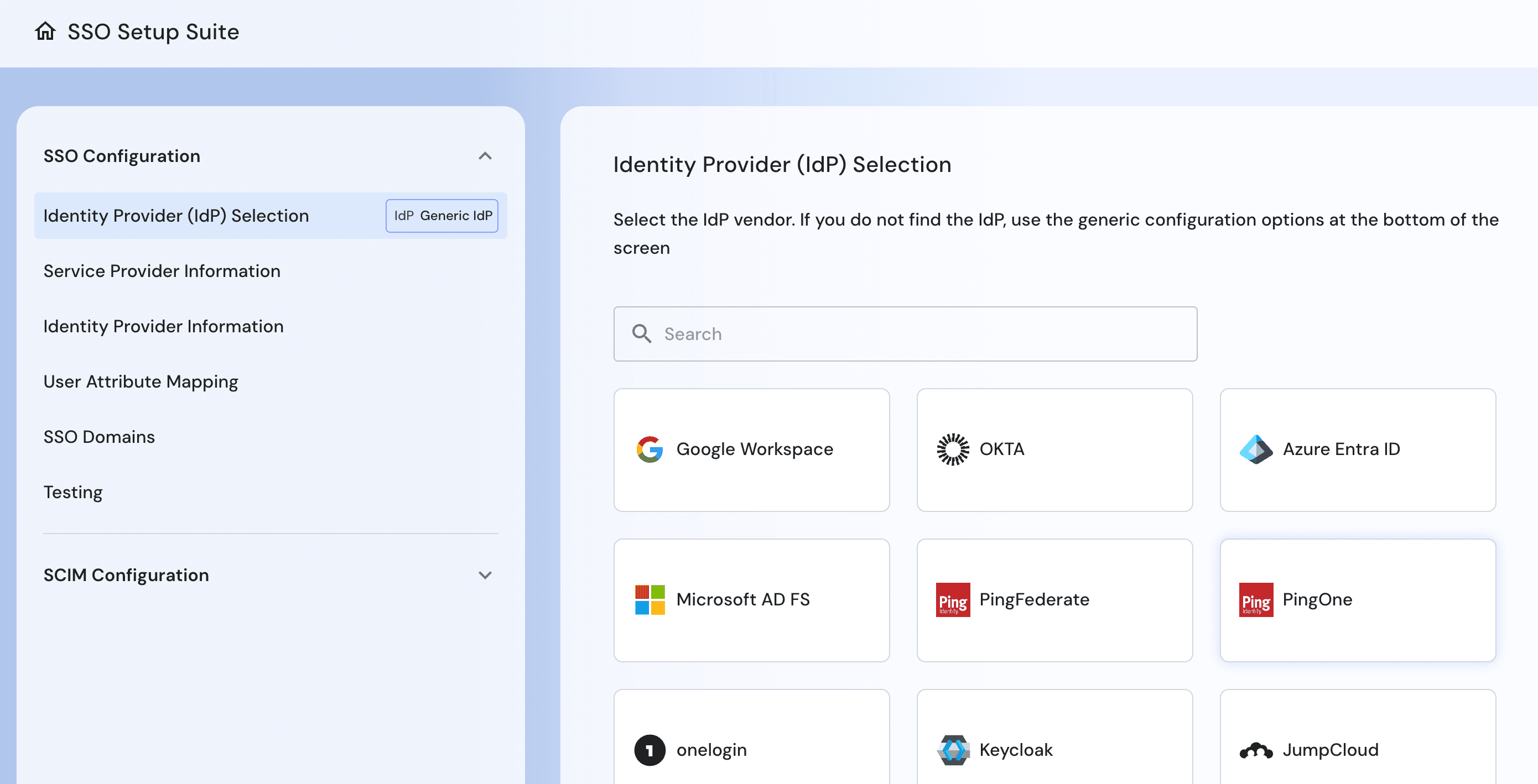
For SSO and SCIM, the key difference is who does the configuration. With Descope's SSO Setup Suite, enterprise customers can set up and test their own connections. Your engineering team does not need to be involved in provisioning.
Tenant admins connect their own IdP and run their own test flows
SCIM provisioning configured alongside SSO instead of as a separate follow-up step
No engineering ticket required to onboard a new enterprise tenant
Also Read: Introducing the Descope SSO Setup Suite
Frontegg
Frontegg supports self-service SSO and SCIM setup, but the experience is limited. Tenant admins can access the configuration screens, but there is little guidance, so mistakes often turn into support tickets.
Tenant admins can set up SSO and SCIM on their own.
Embedded configuration guidance is limited
Managing multiple SSO connections per tenant adds ongoing overhead
Bottom line: Both platforms hand SSO and SCIM setup to tenant admins. Descope gives them a guided path instead of a blank configuration screen.
User experience: Flexible journeys vs. SDK-led components
Descope
The main difference in user experience is where the journey happens. With Descope, screens appear right inside your app, so users stay on your domain and avoid redirects. If you want a separate login page, you can switch to a hosted option without having to rebuild your flow.
On mobile, Descope uses an enhanced web view to give users a near-native experience on both iOS and Android.
You can fully brand the screens to match your product’s style.
Both embedded and hosted modes use the same flow, so you can switch between them without starting from scratch.
Also Read: Embedded vs Hosted Login in Descope
Frontegg
With Frontegg, you build the experience using SDKs and pre-built UI components instead of following a single set journey. This gives developers more control, but your team will handle most of the integration and maintenance work.
Pre-built login components speed up initial setup
Hosted and embedded modes are both available
Deeper customization or non-standard flows require frontend code changes
Bottom line: Frontegg gives you a fast starting point with pre-built components. Descope gives you the same speed and flexibility, plus a way to keep customizing without added engineering work.
User journeys & workflows: No/low-code orchestration vs. SDK/API-led development
Descope
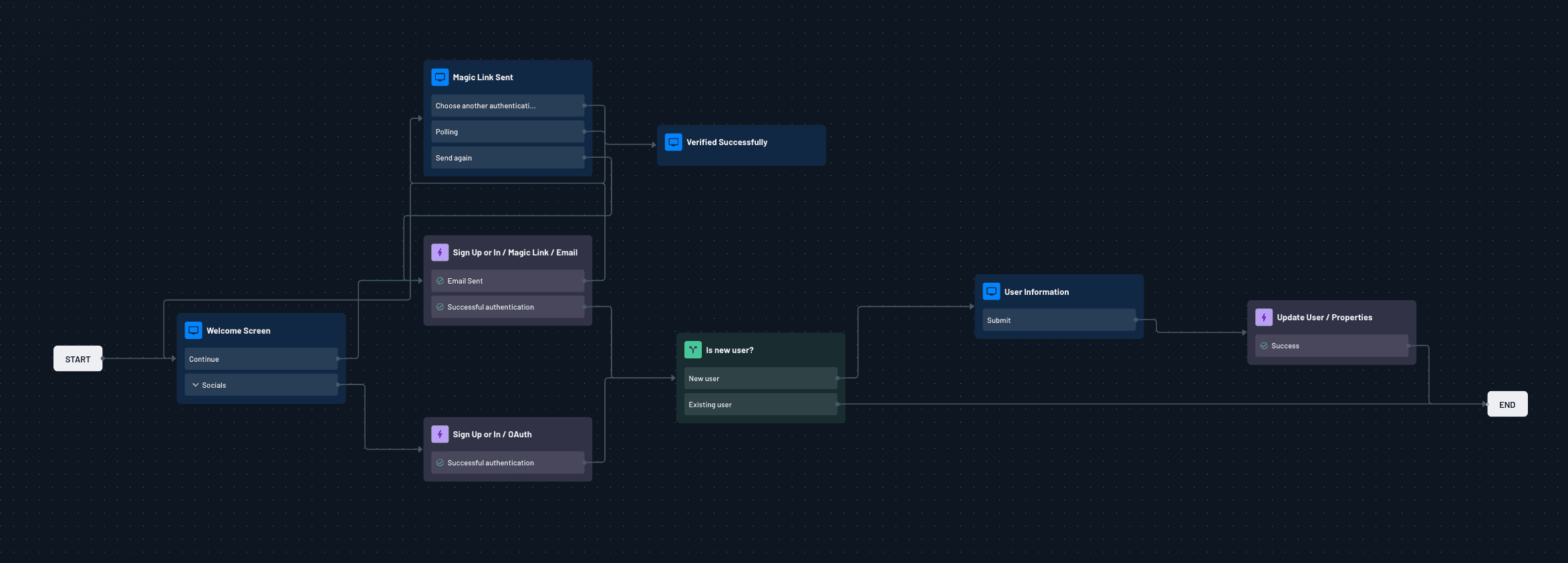
You notice the real difference here the first time you need to make a change to your auth flows. With Descope's visual Flows builder, the whole user journey is treated as configuration. This means you can add a new onboarding step or set up an A/B test yourself, without needing to ask engineering for help.
Add conditional branching based on device, tenant, or real-time risk signals
Test entire onboarding paths against each other
Push a workflow change live without redeploying the application
Frontegg
Frontegg provides SDKs and APIs to create a journey, but the journey exists in your codebase. This means any change requires an engineering task by default.
Journeys are defined in code against Frontegg's SDKs and APIs
Testing a new flow variant typically means shipping a new code path
Engineering effort scales with how often journeys need to change
Bottom line: Frontegg's SDK/API-led model means every journey change is an engineering task. Descope's workflow builder turns the same change into configuration.
Passkeys: Day-one native support vs. WebAuthn with limited fallback
Descope
Most platforms now support passkeys, but the main difference is how each system helps when passkeys fail. Descope includes fallback options as part of the passkey process and automatically guides users to another method if their device does not work.
Passkey and autofill support from day one
Use passkeys as a first or second factor alongside any other method
A/B test passkey rollout to measure adoption before a full switch
Frontegg
Frontegg uses standard WebAuthn for passkey support, which handles the main authentication steps. However, if you want to combine passkeys with other methods, you will need to set that up yourself.
Core WebAuthn-based passkey authentication
Combining passkeys with other methods requires extra configuration
Fallback for incompatible devices is limited by default
Bottom line: Descope treats fallback handling and rollout testing as first-class features. With Frontegg, the development team has to build more of that logic.
MFA & fraud prevention: Adaptive, connector-driven vs. configurable-only
Descope
Descope’s adaptive MFA plugs into fraud connectors through no / low-code workflows. Authentication requirements shift automatically based on visible signals like device reputation or IP risk.
MFA is included on every plan, including phishing-resistant factors like magic links and passkeys
Connectors for reCAPTCHA, AbuseIPDB, Forter, and Fingerprint plug directly into MFA logic
Adjusting MFA rules happens in the same workflow builder used for the rest of the journey
Frontegg
Frontegg triggers MFA challenges based on risk using static rules to decide when a user should be stepped up. It does not publish which vendors or mechanisms generate that risk score, leaving security teams unable to evaluate or tune the logic behind their challenges.
Static rules determine when a user is challenged with MFA
Underlying risk-scoring vendors and mechanisms aren't disclosed
Opacity makes false positives hard to diagnose or tune
Bottom line: Frontegg's risk rules are a black box. You cannot see what scores the risk or why a user got flagged. Descope's named connectors keep that logic visible and tunable.
Third-party integrations: Open connector options vs. closed vendor list
Descope
The main advantage of Descope’s integrations is flexibility. Its open connector framework offers prebuilt fraud, identity, and CRM connectors, plus generic HTTP, audit, and SMTP connectors. This lets you keep using your current vendors instead of switching to new ones to fit the platform.
Descope offers prebuilt connectors for fraud, identity, localization, CRM, and audit logging
Generic HTTP, audit, and SMTP connectors cover vendors without a dedicated integration
Bring your own email provider instead of using a platform default
Frontegg
Frontegg's integrations are limited to what ships natively with the platform. Extending it means choosing from a short, fixed vendor list instead of connecting the tools already in your stack.
Fewer than ten native integrations available
No bring-your-own email provider; customers pick from Frontegg's pre-integrated list
No generic HTTP or webhook connector to fill gaps outside that list
Bottom line: Frontegg limits you to its native vendor list. Descope's open connectors, including generic HTTP and SMTP, let you keep the tools you use.
Authorization: Unified, tenant-aware models vs. RBAC and entitlements
Descope
Descope’s main advantage in authorization is that RBAC, ABAC, and ReBAC models are built into the same platform as authentication. This lets you assign roles or check permissions within the same workflow that handles login without needing a separate service.
Define custom roles per B2B tenant
Use custom JWT claims to carry access decisions into your app
Assign roles and permissions dynamically based on workflow conditions
Frontegg
Frontegg’s RBAC and entitlement management handle standard access control. For more detailed or dynamic models, you need to add them separately outside the main platform.
RBAC and entitlement management for standard access control
Dynamic or fine-grained models require additional configuration and custom logic
Authorization logic is largely decoupled from the authentication workflow
Bottom line: Frontegg provides authorization primitives; Descope ties fine-grained, tenant-aware authorization directly into the same workflows that handle login and provisioning.
Agentic identity & MCP auth: Native OAuth resources vs. a policy layer on top
Descope
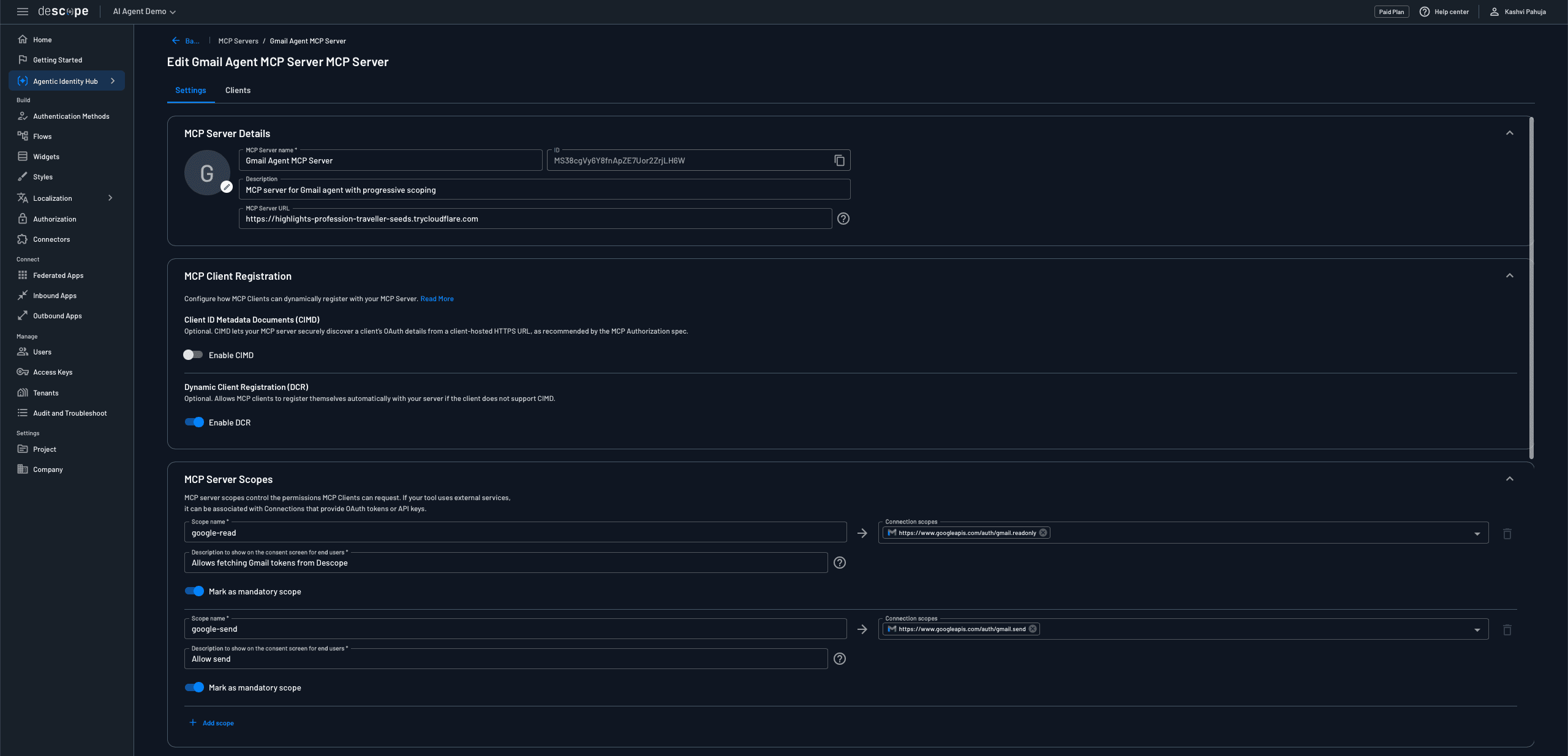
For agentic AI, Descope treats each MCP server as its own OAuth-protected resource. This means it offers dedicated client registration, scopes, consent, and enterprise-managed authorization for each server.
Per-server client registration, with scopes tied to roles and connection tokens
One credential vault manages OAuth tokens and API keys, with automatic refresh
Just-in-time consent only when an agent requests a new scope
Full OAuth 2.1 and PKCE compliance, with DCR and CIMD support
Cross-App Access (XAA) support for AI agents accessing your MCP server, enabling customers to use their existing workforce IdPs
Also Read: Identity Provider for AI Agents and MCP Servers
Frontegg
Frontegg's agentic product, promoted via Agen.co and Frontegg.ai, enforces policies for agent traffic rather than using a native per-server identity model. As a result, it seems more like a governance layer than an OAuth authorization server for MCP.
Agen.co issues per-action policy verdicts, not per-server OAuth scopes
No published per-server client registration or scope-to-role mapping
No published credential vault or token lifecycle management
Frontegg.ai offers MCP scaffolding and connectors for building agents
Bottom line: Frontegg's Agen.co and Frontegg.ai focus on policy enforcement, not a native OAuth identity model for MCP servers. Descope extends the same tenant and authorization model used for human users to AI agents.
Customer story: Why Token Security chose Descope
Token Security enables organizations to discover, manage, and control non-human identities such as AI agents, service accounts, API keys, and machine credentials in cloud environments, on-premises systems, and hybrid setups. For Token Security, the identity layer goes beyond being merely infrastructure; it is at the heart of their product.
As Token Security moved into the enterprise B2B market and added a customer-facing MCP server, they needed a platform that could handle three things at once:
Protocol-compliant OAuth 2.1 authorization for the MCP server
Tenant-based role-based access control that matched what customers already used for human users
Self-service SSO/SCIM to keep enterprise onboarding smooth.
For multi-tenancy and single sign-on, Token Security now uses the same tenant-specific role-based access control for both human users and AI clients. They built their B2B authentication solution with Descope Flows, adding enterprise single sign-on, TOTP-based two-factor authentication, magic links, passkeys, and social login. The SSO Setup Suite lets enterprise teams set up single sign-on and SCIM themselves. Now, SCIM provisioning, which used to take up to a month per customer, is set up at the same time as single sign-on.
Descope’s Agentic Identity Hub also acts as the OAuth 2.1 authorization server for Token Security’s MCP server. This gives them a central view of all connected agents, users, and tool-level scopes within the same tenant and role model.
The result: one platform governs both human authentication and AI agent access, with consistent multi-tenant access models across both paths, deployed without application code changes.
Read the full story: Token Security Customer Story
Conclusion
Frontegg is a reasonable choice for teams that want fast access to pre-built B2B auth components and are comfortable writing custom code as tenant and SSO requirements get more complex.
But as B2B products mature, enterprise customers expect self-service SSO and SCIM without a support ticket, and tenant models get harder to fit into fixed group-to-role mappings. Stitching all of that together on top of Frontegg's SDKs can turn into a lot of custom code and ongoing maintenance.
Descope is built to handle it from one platform: multi-tenancy as a first-class primitive, standards-based SSO, and self-service SCIM provisioning, all driven by the same no/low-code workflow engine used for the rest of your authentication.
If you're evaluating Frontegg or hitting the limits of a piecemeal, SDK-led setup, now's a good time to look at Descope. Book a demo with our auth experts, or sign up for a Free Forever account and start building today.