
Table of Contents
Don't have the time to read the entire post? Our human writers will be sad, but we understand. Summarize the post with your preferred LLM here instead.
As your consumer app grows, authentication involves more than just adding login screens.
At first, setting up customer authentication is pretty simple. You add username-password, support a few social logins, and maybe offer one-time passwords. These features help users get started quickly. But as your user base grows, authentication becomes a much bigger part of your product.
Today’s consumer apps need more than just reliable sign-in. They should offer smooth onboarding, built-in authentication, flexible passwordless options, and adaptive multi-factor authentication that can change as users’ needs change. Product teams also want to test onboarding flows, make signup easier, and boost security without making every change a big engineering task.
In this blog, we’ll compare Descope and WorkOS AuthKit using these modern consumer identity needs. If you’re looking at authentication platforms for your consumer app or want to know if your current solution can keep up with your plans, keep reading to see how these two options stack up.
Also Read: A Complete Comparison of Descope and WorkOS
Requirements for Modern B2C Authentication
The 2025 Gartner® Innovation Insight for Customer & Partner IAM notes that modern customer identity is about more than just login and signup. As consumer apps grow, authentication becomes central to the product experience, balancing ease of use, security, and the ability to adapt to new business needs.
When you look at customer identity platforms, check if they offer these features:
Native mobile authentication - Authentication should support embedded native login experiences for iOS and Android applications, avoiding browser redirects while providing secure, app-native signup, login, MFA, and passwordless authentication flows.
Omnichannel authentication - Authentication should provide a consistent identity experience across web applications, mobile apps, customer portals, partner portals, kiosks, and other customer touchpoints, allowing users to move seamlessly between channels without managing separate accounts or sessions.
Flexible authentication orchestration - Teams should be able to easily update onboarding, authentication, MFA, and account recovery steps without having to rewrite their app each time business needs change.
Modern passwordless authentication - Support for passkeys, magic links, one-time passwords, social login, and flexible backup options help make sign-in easier and accounts more secure.
Adaptive security - Authentication should adjust to the situation, using step-up authentication, risk-based MFA, fraud detection, and extra checks only when necessary.
Continuous optimization - Product teams should be able to test different signup flows, authentication methods, and onboarding experiences to boost conversion without requiring significant engineering effort.
Unified identity architecture - As applications expand into enterprise customers, partner portals, or B2B2C cases, your identity platform should support both consumer and business users without needing separate authentication systems.
Identity for AI-powered experiences - As consumer applications add AI assistants and autonomous agents, identity platforms should securely authenticate both users and AI agents, enforce fine-grained authorization, issue scoped tokens, and maintain complete audit trails for AI-driven actions.
These features help you offer secure, smooth authentication and cut down on the engineering work needed as your customer identity needs change. Next, we’ll look at how Descope and WorkOS AuthKit meet these requirements in terms of user experience, flexibility, security, and long-term growth.
User experience: Embedded authentication vs component-based login
Descope
Descope gives developers the flexibility to deliver authentication experiences that match their application's needs. Teams can embed login, signup, MFA, and account recovery directly into web and mobile applications for a fully branded experience, or use hosted login pages when they want faster implementation or centralized authentication management. Because authentication journeys are managed through visual workflows, teams can customize either approach without rebuilding frontend logic as requirements evolve.
Choose between embedded authentication or hosted login experiences
Native SDKs support web, iOS, Android, React Native, and Flutter applications
Keep authentication fully branded or use hosted pages for faster deployment
Visual workflows customize authentication experiences without rebuilding the frontend
Descope treats authentication as a configurable part of the product experience rather than forcing a single implementation model. This gives teams the flexibility to choose the right user experience today and adapt it as product requirements change.
WorkOS
WorkOS AuthKit gives developers ready-made authentication components, so you can add modern login and signup features quickly. These components are a good starting point, but if your team needs custom onboarding, embedded user flows, or advanced branding, you may need to add more frontend code to fit your app’s needs.
Prebuilt authentication components accelerate initial implementation
Social login, passwordless authentication, and passkeys supported out of the box
Advanced branding and user experience customization require frontend development
Authentication experiences are assembled through application code rather than visual orchestration
WorkOS makes it easy to add modern authentication to your app. However, if you want a highly customized experience, your developers will usually need to handle more of the frontend work as your product grows.
Bottom Line: WorkOS AuthKit provides authentication components that developers customize within their applications. Descope gives teams the flexibility to choose embedded or hosted authentication while using visual workflows to evolve customer experiences without continually expanding frontend code. Authentication journeys: Visual workflows vs developer-built authentication logic
Descope
Descope treats authentication as configurable infrastructure instead of something built into your application code. With its visual workflow builder, teams can design and change login, signup, MFA, account recovery, and onboarding journeys without adding authentication logic to the app itself. As customer needs change, teams can quickly update user experiences, add new authentication methods, or include extra verification steps without having to redeploy the application.
Design authentication journeys using a visual no-code workflow builder
Customize signup, login, MFA, onboarding, and recovery flows without writing custom orchestration
Add conditional logic, branching paths, and third-party integrations directly within workflows
A/B test authentication methods, onboarding experiences, and user journeys to improve conversion
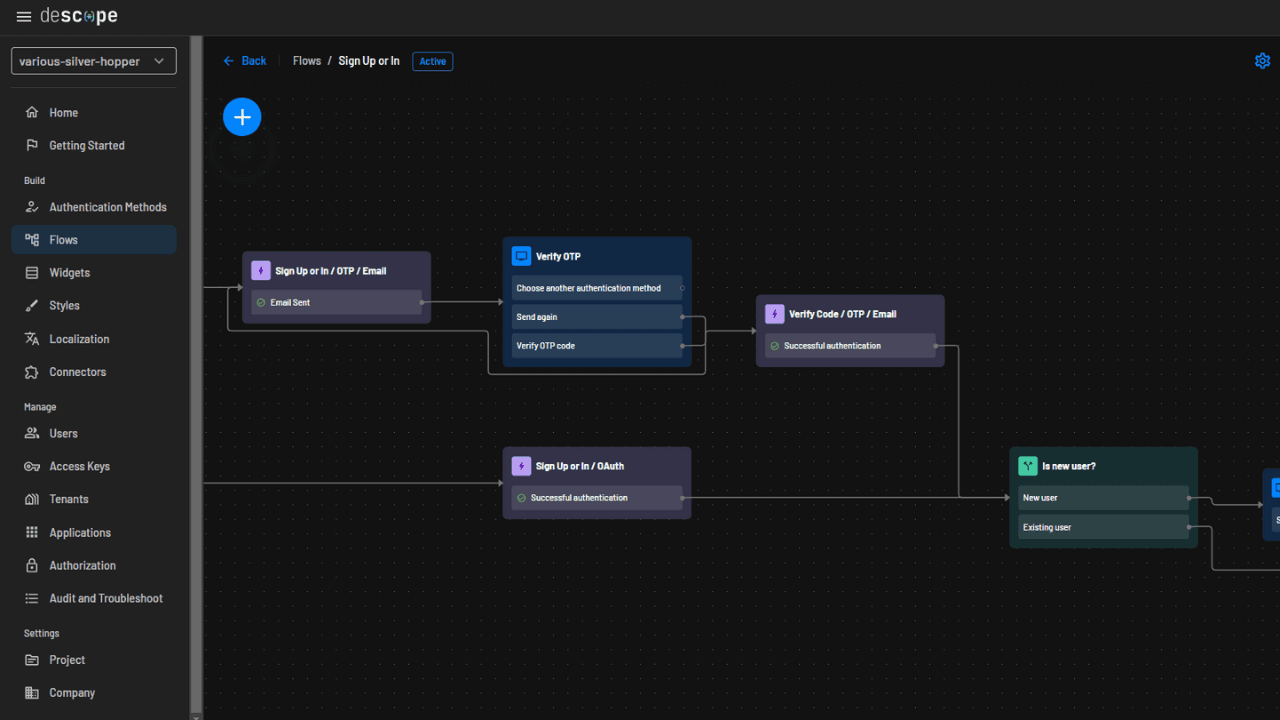
By keeping identity logic separate from application code, Descope lets developers and product teams keep improving authentication experiences and reduce long-term engineering work.
WorkOS
WorkOS AuthKit offers modular authentication components that developers use to build customer authentication experiences. This setup is flexible for standard login and signup, but more advanced onboarding, conditional logic, and custom user journeys usually need to be built into the application. As products grow, developers take on more responsibility for managing authentication orchestration.
Modular authentication components support common login and signup experiences
Advanced onboarding and authentication logic are handled through application code
No visual workflow builder for designing or managing authentication journeys
Making changes to authentication flows usually means doing frontend development, testing, and deployment
WorkOS gives developers the tools to build customer authentication, but more complex user journeys are put together and managed in code as business needs grow.
Bottom Line: WorkOS AuthKit provides developers with flexibility through reusable authentication components, but authentication orchestration remains the application's responsibility. Descope provides a visual workflow engine that makes it easier to build, modify, and optimize customer authentication journeys without continually expanding custom code.
Also Read: 4 Ways to Improve Conversion With User Journey A/B Testing
Passkeys: Flexible passwordless authentication vs standard implementation
Descope
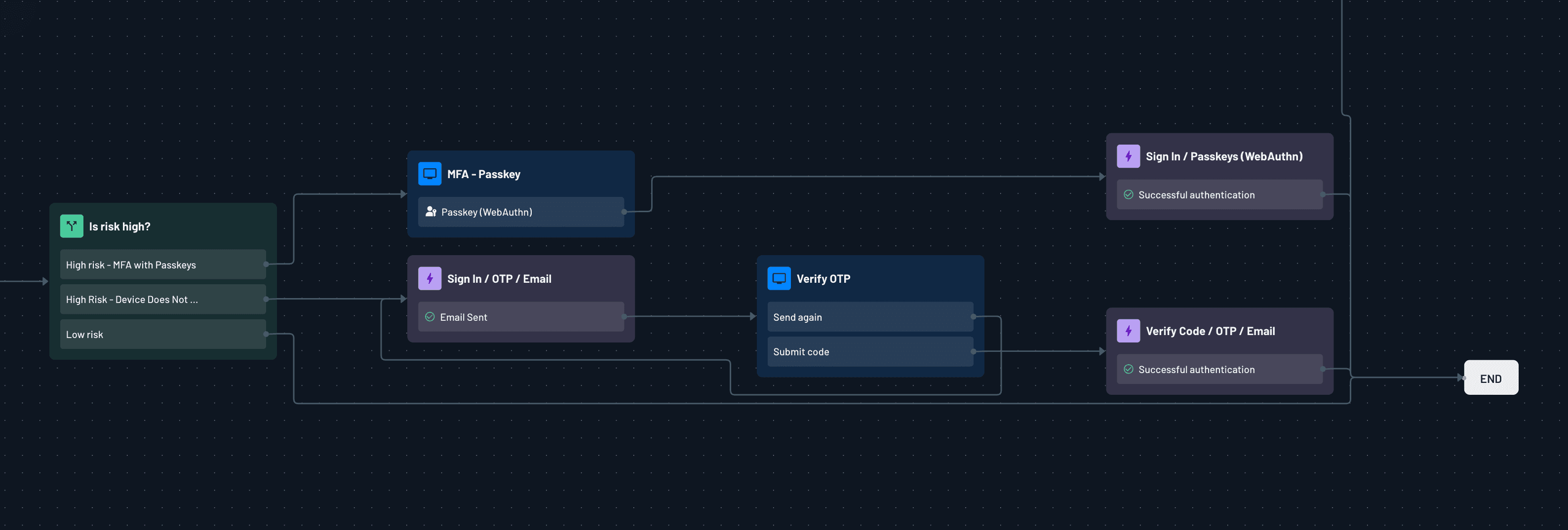
Descope integrates passkeys within a comprehensive authentication strategy, rather than as a standalone login method. Teams can add passkeys to visual authentication workflows, combine them with other factors, A/B test them in a phased rollout, and configure fallback options for users without compatible devices. This approach increases passkey adoption while ensuring a consistent user experience across devices and platforms.
Enable passkeys as a primary or secondary authentication factor
Configure fallback authentication methods for users lacking passkey-compatible devices
Design varied onboarding journeys to test and optimize passkey adoption
Integrate passkeys with magic links, one-time passwords, social login, and other authentication methods using visual workflows
By incorporating passkeys into configurable authentication journeys, Descope enables teams to enhance security and tailor login experiences for diverse users and devices.
WorkOS
WorkOS AuthKit offers passkey support within its passwordless authentication features, allowing developers to easily add modern authentication methods to their applications. As requirements grow more complex, recovery, fallback authentication, and advanced orchestration are generally handled within the application, not by the platform.
Built-in support for passkey authentication through AuthKit
Passwordless authentication integrated alongside other login methods
Recovery and fallback experiences are typically managed through application logic
Advanced passkey orchestration and cross-platform user experiences require further engineering
WorkOS delivers modern passkey support for customer authentication, but developers must build many supporting user journeys as authentication scenarios increase in complexity.
Bottom Line: Both Descope and WorkOS AuthKit support passkeys, but their implementation approaches differ. WorkOS offers authentication capabilities, while Descope integrates passkeys into configurable workflows that streamline recovery, fallback authentication, and ongoing optimization.
Also Read: 2026 FIDO Report: Passkeys at Global Scale
MFA: Adaptive authentication vs traditional multi-factor authentication
Descope
With Descope, you can include multi-factor authentication as part of the main sign-in process instead of treating it as just an extra step. Teams can choose from a range of authentication options, which can be combined, and MFA can be enabled only when certain risks are detected. Because MFA policies are managed through visual workflows, organizations can continue improving security without adding extra steps for trusted users.
MFA available across all Descope plans
Support passkeys, magic links, one-time passwords, authenticator apps, email, and SMS
Risk-based MFA based on native risk scores and third-party integrations with services like Fingerprint, Forter, reCAPTCHA, and AbuseIPDB
Modify authentication policies and step-up authentication through visual workflows without rebuilding application logic
Descope combines flexible authentication methods and adaptive security policies to help organizations protect accounts while maintaining a smooth customer experience.
WorkOS
WorkOS AuthKit supports popular multi-factor authentication methods like TOTP and SMS verification, so developers can make customer accounts more secure. When organizations need more advanced security features, such as contextual authentication, adaptive policies, or risk-based step-up authentication, most of the extra logic is handled in the application or by outside security services, not by the platform itself.
Support for common MFA factors, including TOTP and SMS verification
Passwordless authentication options available alongside traditional MFA
Adaptive authentication policies require additional application logic or external integrations
Context-aware step-up authentication implemented outside the core authentication flow
WorkOS gives you the main tools for multi-factor authentication, but the development team is responsible for setting up more advanced security features.
Bottom Line: Both Descope and WorkOS AuthKit offer modern MFA options, but they handle changing security needs differently. WorkOS gives you the basic authentication factors, while Descope adds adaptive security, risk signals, and workflow tools to make it easier to adjust MFA as your security needs change.
Future-Proofing: Unified identity platform vs authentication toolkit
Descope
Descope helps your applications keep up with changing authentication needs as they grow. Instead of treating identity as separate features, Descope gives you one platform for consumer, B2B, and enterprise authentication. You can update authentication flows, security rules, and user experiences with configurable workflows. This makes it easy to add new authentication options, support enterprise customers, or launch new products without rebuilding your identity system.
Change authentication journeys using visual workflows without redeploying applications
Handle both B2C and B2B authentication from one identity platform
Add new authentication methods, security policies, and onboarding experiences as your business needs evolve
Grow from consumer authentication to enterprise identity without needing separate identity systems.
Since authentication stays configurable instead of hard-coded, Descope lets organizations adapt quickly and avoid the technical debt that can build up as identity needs get more complex.
WorkOS
WorkOS AuthKit gives customer applications a modern authentication foundation and works well with the platform’s enterprise SSO features. As organizations take on more advanced consumer identity needs, things like authentication workflows, onboarding, authorization logic, and tenant-specific features are usually built into the application itself. This approach is flexible, but it means development teams end up managing more identity logic over time.
Provides a strong base for modern authentication and enterprise SSO
Supports common authentication standards and passwordless authentication
Advanced customer identity orchestration typically implemented through application code
Expanding into wider B2C and B2B identity scenarios often needs extra engineering
WorkOS lets developers create flexible authentication experiences, but long-term changes to identity mostly depend on the application layer instead of the platform itself.
Bottom Line: WorkOS AuthKit provides a solid authentication foundation, but many advanced identity capabilities are built within the application as requirements grow. Descope provides a unified identity platform that makes it easier to evolve authentication, support new business models, and manage both B2C and B2B identity from one place.
Connectors: Built-in integrations vs custom implementation
Descope
Descope has a growing set of prebuilt connectors that let authentication workflows connect directly to external services. Teams can add fraud detection, identity verification, CRM, analytics, localization, and custom APIs to authentication journeys without building extra integration layers. You can also use several connectors in one workflow to help automate complex authentication and onboarding tasks.
Descope includes prebuilt connectors for fraud detection, identity verification, analytics, CRM, and localization.
You can link multiple connectors together within authentication workflows
Descope lets you integrate with platforms like Supabase, Firebase, and custom backends while keeping your existing token formats
You can extend authentication journeys without needing to build custom orchestration services
Descope embeds integrations directly into authentication workflows. This reduces engineering effort and makes it easier to adapt identity processes as business needs change.
WorkOS
WorkOS mainly focuses on authentication, enterprise SSO, and directory integrations, rather than offering a wide range of workflow integrations. Developers can add external fraud detection, analytics, verification services, and business applications, but these are usually handled within the application or through custom backend services, not by the platform itself.
WorkOS offers strong support for enterprise identity providers and directory integrations
External fraud detection and identity verification integrations implemented through application code
Authentication workflows are extended using custom APIs and backend services
Developers are responsible for managing broader business system integrations.
WorkOS supplies the core authentication infrastructure. Organizations build and maintain the extra integration logic needed for more advanced customer identity workflows.
Bottom Line: WorkOS excels at connecting enterprise identity providers, but broader authentication integrations usually require custom development. Descope combines authentication with a workflow-driven connector ecosystem, making it easier to integrate external services and automate customer identity journeys without additional orchestration code.
Descope vs WorkOS AuthKit for B2C Auth: At-a-Glance
Trait | Descope | WorkOS AuthKit |
|---|---|---|
User experience | Embedded authentication with native web and mobile experiences, configurable through visual workflows | Prebuilt authentication components that developers customize through frontend code |
User journeys | Visual no-code workflows for login, signup, MFA, onboarding, and account recovery | Modular authentication components with journey orchestration implemented in application code |
Passkeys | Flexible passkey orchestration with fallback authentication, A/B testing, and configurable user journeys | Built-in passkey support with advanced recovery and orchestration handled by the application |
Google One Tap & Social Login | Native Google One Tap support with configurable post-authentication workflows, progressive profiling, and verification | Social login providers supported, with additional onboarding and One Tap experiences implemented through frontend code |
Multi-factor authentication | Workflow-driven MFA with adaptive authentication, risk-based policies, and third-party security connectors | Common MFA factors supported, with adaptive authentication and contextual policies implemented through application logic |
Future-proofing | Unified platform for B2C, B2B, and enterprise identity with workflow-based customization | Modern authentication foundation that relies on application-layer development as identity requirements expand |
Connectors ecosystem | Prebuilt connectors for fraud prevention, identity verification, analytics, CRM, localization, and custom APIs integrated into workflows | Strong enterprise identity integrations with external services connected through custom application code |
Customer stories: Consumer applications that needed auth built for growth
GoodRx
GoodRx helps millions of consumers find affordable prescription pricing and healthcare savings across the United States. Because users access the platform from multiple devices and channels, authentication needs to deliver both strong security and a seamless customer experience.
As GoodRx continued to grow, the company needed an identity platform that could support large-scale consumer authentication while keeping login friction low. Authentication also needed to evolve alongside changing security requirements without disrupting the customer experience.
With Descope, GoodRx implemented a flexible authentication platform that supports secure, low-friction login experiences for tens of millions of users while giving developers the flexibility to adapt authentication as the platform grows.
Read more: GoodRx: Agile, Omnichannel Authentication for Tens of Millions of Users
Linktree
Linktree powers one of the world's largest creator platforms, serving millions of users across web and mobile applications. As the company expanded globally, authentication became a critical part of both user acquisition and long-term engagement.
Linktree needed an authentication platform that could support rapid growth while allowing teams to continuously improve signup and onboarding experiences. Rather than embedding identity logic throughout the application, they wanted the flexibility to evolve authentication workflows as product requirements changed.
With Descope, Linktree built a customer identity platform that enables developers and product teams to iterate on authentication journeys more quickly, reduce engineering overhead, and deliver a smoother onboarding experience as the platform continues to scale.
Read more: Linktree: Modernizing Customer Auth at ScaleModernizing
Migration: Moving from WorkOS to Descope with AI assistance
Migrating from WorkOS does not have to mean manually rewriting every authentication touchpoint or rebuilding enterprise onboarding from scratch. Descope provides a WorkOS migration skill for Claude Code and other coding agents that helps developers analyze an existing application, map WorkOS concepts to Descope equivalents, and generate a practical migration plan before making changes.
The migration skill can scan your codebase and identify how WorkOS is being used across authentication, organizations, SSO setup, user management, RBAC, and related business logic. From there, it asks clarifying questions about migration scope, user and organization migration, features in use, and Descope project setup. The skill then generates a detailed migration plan that includes files to update, user impact, engineering effort, SDK changes, environment variable updates, user migration steps, risk analysis, and a step-by-step execution path.
Instead of approaching migration as a risky, open-ended rewrite, Descope’s WorkOS migration skill helps developers move methodically from WorkOS to Descope while preserving the core identity experiences their users and enterprise customers depend on.
Conclusion
WorkOS AuthKit provides a modern authentication toolkit that helps developers quickly add login, signup, passwordless authentication, and social sign-in to consumer applications. Its developer-friendly APIs and reusable components make it a strong choice for teams looking to launch authentication without building everything from scratch.
As consumer applications grow, however, authentication becomes much more than verifying a user's identity. Product teams need to continuously improve onboarding, experiment with authentication methods, strengthen security with adaptive MFA, integrate external services, and support both consumer and business users from a single platform. As these requirements become more sophisticated, organizations often find themselves implementing more authentication logic, user journeys, and integrations within their own applications.
Descope takes a different approach by treating authentication as configurable infrastructure instead of application code. With embedded authentication experiences, visual workflows, modern passwordless authentication, adaptive security, and a unified platform for B2C, B2B, and agentic identity, teams can evolve customer authentication without continually expanding custom engineering.
If you're evaluating customer identity platforms, it's worth considering not only how quickly you can implement authentication today, but also how easily your platform can adapt as your application, users, and business requirements grow. If you'd like to learn more, meet with our auth experts. Also, if you want to try Descope yourself, sign up for a Free Forever Account and start building enterprise-ready SSO today!