
Table of Contents
Don't have the time to read the entire post? Our human writers will be sad, but we understand. Summarize the post with your preferred LLM here instead.
WebAuthn is the web-based API that lets browsers and apps register and verify passkeys or security keys, while FIDO2 is the broader standard made up of WebAuthn plus the Client to Authenticator Protocol (CTAP). WebAuthn is a part of FIDO2, not a competing alternative to it, which is the main thing to understand about how these two terms relate.
One of the biggest recent advancements in authentication, authorization, and user account management across all virtual platforms has been the shift toward passwordless authentication. Over a third of all organizations worldwide plan to adopt or continue using passwordless authentication in the next one to three years, according to Statista. And two of the top options available to them are WebAuthn and FIDO2.
Below, we’ll provide an overview of these two authentication protocols, dive into their similarities and differences, explore the benefits of using one or both, and explain how to implement them.
At a glance
WebAuthn is a component of FIDO2: FIDO2 is made up of the WebAuthn API and the Client to Authenticator Protocol, or CTAP.
WebAuthn is the web API, standardized by the W3C, that lets a browser or app register and verify a passkey or security key.
FIDO2, from the FIDO Alliance, is the full passwordless standard that combines WebAuthn for the web side with CTAP for the device side.
They work together for passwordless login: WebAuthn talks to the app, CTAP talks to the authenticator, and a passkey is the credential they exchange.
For most web apps, implementing WebAuthn is implementing the web-facing part of FIDO2, so developers rarely choose one over the other.
Quick facts
What WebAuthn is | A W3C web standard and API that lets browsers and apps authenticate users with passkeys or security keys |
What FIDO2 is | The full passwordless standard from the FIDO Alliance, combining WebAuthn and CTAP |
How they relate | WebAuthn is one of FIDO2’s two required components, not a separate or competing standard |
Who standardizes each | WebAuthn is standardized by the W3C; FIDO2 as a whole is published by the FIDO Alliance |
Key takeaway | You can’t have FIDO2 without WebAuthn, though WebAuthn can be discussed and used on its own |
What is WebAuthn?
Web Authentication API, better known as WebAuthn, is an open standard for user authentication on web applications published by the World Wide Web Consortium (W3C). It relies on public-key cryptography, a highly secure framework involving key pairs, to authenticate users across services without a password. To learn more about how the WebAuthn registration and login flows work in detail, see our full guide to WebAuthn.
The history of WebAuthn dates back to 2013, when it was proposed because of rising concerns about password security. Level 1 was published as an official W3C recommendation in 2019, Level 2 followed in 2021, and Level 3 reached full W3C Recommendation status in August 2026. Work on Level 4 has begun, though no draft has been published at the time of writing.
Reaching full Recommendation status matters because it means the spec’s behavior is stable enough for browser vendors and platform makers to build against with confidence. For teams evaluating WebAuthn today, that stability is one more reason the earlier “wait and see” posture toward the spec no longer applies.
Along with Client to Authenticator Protocol (CTAP), it's one of the two components of FIDO2, which we’ll discuss shortly.
Today, WebAuthn is supported by essentially every major browser, covering about 96% of global browser traffic, and both Google and Apple have shipped full support across their platforms and browsers. Android supports passkeys through the Credential Manager API, which replaced the older FIDO2 API for most use cases, though that API is still used for physical security keys and non-discoverable credentials. Apple has built WebAuthn-based passkeys directly into iOS, iPadOS, and macOS, syncing them through iCloud Keychain.
WebAuthn works by associating a user with something they are or possess, such as biometrics or a hardware security key, though the most common application is via a mobile device that can combine both factors. Once the association is made, a passkey is generated which is then used for any future login attempts.
This process ensures security by focusing on inherence and possession factors rather than knowledge factors (passwords) that can be stolen or cracked. At the same time, it maximizes the user experience (UX) and minimizes friction.
What is FIDO2?
FIDO2 is an open authentication standard comprising two components, CTAP and WebAuthn, published by the Fast Identity Online (FIDO) Alliance. As its name implies, FIDO2 is an updated version of the original FIDO specification, enabl passwordless authentication across web and mobile applications. For the full breakdown of FIDO2, how it differs from the earlier FIDO U2F and UAF standards, and how FIDO authentication works step by step, see our dedicated FIDO2 guide.
The FIDO Alliance, which launched in February 2013, has grown substantially, presently including several hundred member companies dedicated to streamlining secure authorization. It was formed by Lenovo, Nok Nok Labs, PayPal, and Validity Sensors, with Google and Microsoft joining later that year. The roster has since expanded to cover most major platform, browser, and device makers, including Descope.
The other main component of FIDO2 is the Client-to-Authenticator Protocol (CTAP), which provides a uniform standard for communication between the client (i.e., a website or app) and roaming authenticators (e.g., a smartphone). Combining this with the cryptographic authentication of WebAuthn, FIDO2 enables secure passwordless authentication across a wide variety of applications with minimal friction for the user.
WebAuthn vs FIDO2: key differences
Given the interconnectedness of FIDO2 and WebAuthn, they’re often referred to interchangeably. However, there are key differences between them:
FIDO2 is the broader term and standard that covers the entire passwordless authentication system (WebAuthn + CTAP).
WebAuthn specifically refers to the web API part of FIDO2 that developers use to enable browser-based (or Android-native) passwordless authentication.
Simply put, it’s impossible to have FIDO2 without WebAuthn.
Aspect | WebAuthn | FIDO2 |
|---|---|---|
What it is | A web API for registering and verifying passkeys or security keys | A full passwordless authentication standard |
Scope | Covers the browser/app-to-authenticator handshake on the web side | Covers WebAuthn plus device-to-authenticator communication (CTAP) |
Standardized by | W3C | FIDO Alliance (incorporating the W3C’s WebAuthn spec) |
Covers the device side | No; relies on CTAP for external authenticators | Yes, through CTAP |
Relationship | A required component of FIDO2 | The complete standard; cannot exist without WebAuthn |
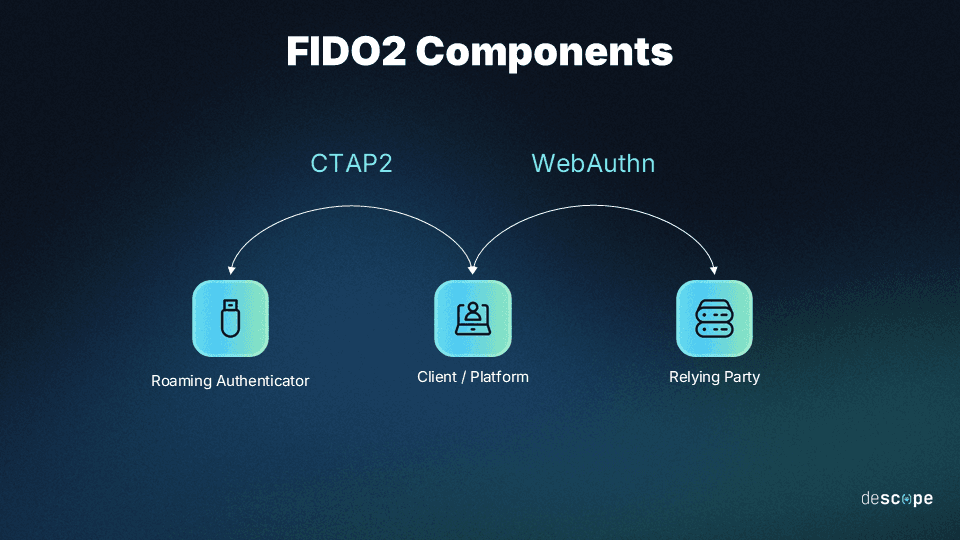
How WebAuthn and FIDO2 work together for passwordless login
WebAuthn and CTAP hand off a login request between the browser and the authenticator, with a passkey as the credential that ties the exchange together. In practice, this handoff runs in four steps:
The web app calls the WebAuthn API in the browser to start a registration or login request.
WebAuthn passes that request to the authenticator. If the authenticator is external, such as a phone or a security key, this hop uses CTAP to communicate with it.
The authenticator creates or unlocks a passkey, confirmed with a local gesture like a fingerprint scan, face scan, or device PIN.
The authenticator signs the challenge and sends the response back through WebAuthn to the app, which verifies it and completes the login.
This division of labor, WebAuthn on the web side and CTAP on the device side, is what lets an authenticator that isn't built into the browser take part in a login at all. Passkeys move between a user's devices separately, either by syncing through a provider like iCloud Keychain or Google Password Manager, or through CTAP's hybrid transport, which lets a user sign in on one device with a passkey held on another. It’s also why passkeys are often described as the user-facing product of FIDO2: the standard defines the mechanics, and the passkey is the credential a person actually sees and uses.
However, it’s worth considering how WebAuthn and FIDO compare to other common solutions.
Use cases for WebAuthn and FIDO2
Choosing between various authentication protocols often comes down to the specific use cases and needs in a target deployment. For example, SCIM and SAML are most apt for identity management or single sign-on (SSO), respectively. Likewise, whether to use OIDC or SAML depends on whether target systems are more web/mobile based (OIDC) or utilize more legacy software (SAML).
Choosing between a full FIDO2 implementation and WebAuthn is similar, with one key difference: imbalance.
Using FIDO2 requires WebAuthn, but it is possible to use CTAP with a platform-specific API rather than generic WebAuthn. Some major platforms implement CTAP in this way, like Microsoft’s Win32 WebAuthn API or Google’s FIDO2 API for Android. As the names of these APIs suggest, they are compliant with the WebAuthn and FIDO2 specifications, but they offer extra integration with their specific platforms.
Regardless, all FIDO2 use cases are WebAuthn use cases by default. And it’s a boon, as most environments using contemporary and emerging technologies will favor the greater security and assurance that come with FIDO2’s combination of WebAuthn and CTAP.
However, mature organizations that depend heavily on legacy software may have no choice but to use WebAuthn with the older FIDO 1.0 Universal Authentication Framework (UAF) or Universal Second Factor (U2F), which our FIDO2 guide covers in more depth.
A few common deployment patterns illustrate where each fits in practice.
A consumer web app that only needs users to sign in from a browser, on a laptop or phone they already own, typically only needs WebAuthn. The browser’s built-in platform authenticator (Face ID, Windows Hello, or a fingerprint sensor) handles the biometric or PIN check, and no external hardware or CTAP handoff is involved.
An enterprise rolling out hardware security keys to employees, on the other hand, needs the full FIDO2 stack. WebAuthn to talk to the browser and CTAP to talk to the physical key over USB, NFC, or Bluetooth.
A native mobile app that wants to let a user sign in with a security key they’ve already registered on their laptop needs CTAP specifically, since that’s the protocol that lets an external authenticator participate outside the browser context WebAuthn was originally built for.
The biggest benefits of WebAuthn and FIDO2
WebAuthn and FIDO2 are more similar than different, and this becomes much more apparent through the benefits they provide. Both streamline login, account management, and overall authentication processes.
This all starts from favoring passwordless authentication methods over traditional password-centric ones, which are susceptible to credential theft and weak or mismanaged credentials. Well-intentioned users could create weak passwords or fail to update them due to fatigue from the abundance of accounts. And simply having credentials to steal makes users prime targets for cybercrime.
In addition, both platforms make account management significantly easier for users, which improves overall UX and cuts down resource costs for IT helpdesk calls and other support. Password resets are a leading driver of helpdesk tickets at most organizations, and removing the password removes that ticket category almost entirely.
Another major benefit of both WebAuthn and FIDO2 is their widespread adoption. About 96% of global browser traffic now runs on browsers that support WebAuthn according to caniuse.com, and that number keeps climbing as platforms add or increase their support. Adoption at scale isn't new, either: Discord rolled out security key support to all users in December 2023, giving more than 500 million accounts a FIDO2-based option well before passkeys became mainstream. Major consumer platforms have since followed at larger scale. Amazon reports over 175 million customers signing in with passkeys, and Microsoft recorded a 987% increase in passkey use in late 2024 after redesigning its sign-in experience to default to passkeys where available. Together, these examples show adoption compounding across nearly every category of consumer platform, from gaming and social apps to e-commerce and productivity software.
Which should developers implement, WebAuthn or FIDO2?
For a typical web app, developers implement WebAuthn, which is the web-facing part of FIDO2, so the choice is rarely one versus the other in practice. Calling the WebAuthn API from your app already gets you the FIDO2 security model for anything that authenticates directly in the browser.
FIDO2 as a whole, and CTAP specifically, become relevant when you need to support external roaming authenticators, like a USB security key connecting to a device over a protocol WebAuthn alone doesn’t handle, or when you’re building native mobile or desktop experiences alongside the web. In those cases, you’re still building on WebAuthn; you’re just also accounting for the CTAP layer that lets an external authenticator participate.
In practice, most teams don’t implement either specification’s raw API by hand. A platform or SDK like Descope handles the registration and authentication ceremonies, the CTAP handoff to external authenticators, and the edge cases around device loss and account recovery, which is considerably less work than building and maintaining that logic in-house.
Implementing WebAuthn and FIDO2 in applications
For developers, WebAuthn and FIDO2 can be installed in nearly any software project. And for adopters, beyond simply adding the functionality, there are also issues of inventory and staff training to account for, along with compatibility scanning to ensure consistent interoperability across devices.
Setting up passkey authentication with WebAuthn and/or FIDO2 is as simple as:
Installing or importing and then initializing the software development kit (SDK).
Enabling users to sign up through information channels to and from target browsers.
Implementing user sign-in through a single call between the platform and browser.
Adding user device intake and update functionality to allow for new biometric signifiers.
Enabling session validation (i.e., granular session management) for long-term security.
Most teams reach for an SDK or platform rather than the raw WebAuthn API precisely because of this: it collapses several ceremonies’ worth of cryptographic handling into a few function calls. Developers can streamline implementation further with Descope flows (see below), and our passkeys and FIDO2 guides go deeper on the underlying mechanics if you want to understand what’s happening under the hood.
Some challenges that dev teams and adopters can face when implementing WebAuthn or FIDO2 involve the sheer scope of user, device, and key registration. The process is relatively complex compared to traditional password setups, and a high volume and diversity of users, devices, and accounts can lead to high resource demand. There are also issues with support in legacy-heavy tech stacks, particularly with FIDO2, where migration adds more potential costs for IT teams.
Account recovery is another practical concern that teams underestimate early on. A password can be reset by email, but a lost or replaced device means a user has lost the authenticator that held their passkey or credential. Any production rollout needs a documented recovery path, whether that’s a backup authenticator registered in advance, an admin-assisted recovery flow, or a fallback method like a one-time code sent through a separate, already-verified channel. Teams that skip this step tend to find out it’s needed the first time a user shows up with a new phone and no way in.
How Descope simplifies WebAuthn and FIDO2 integration
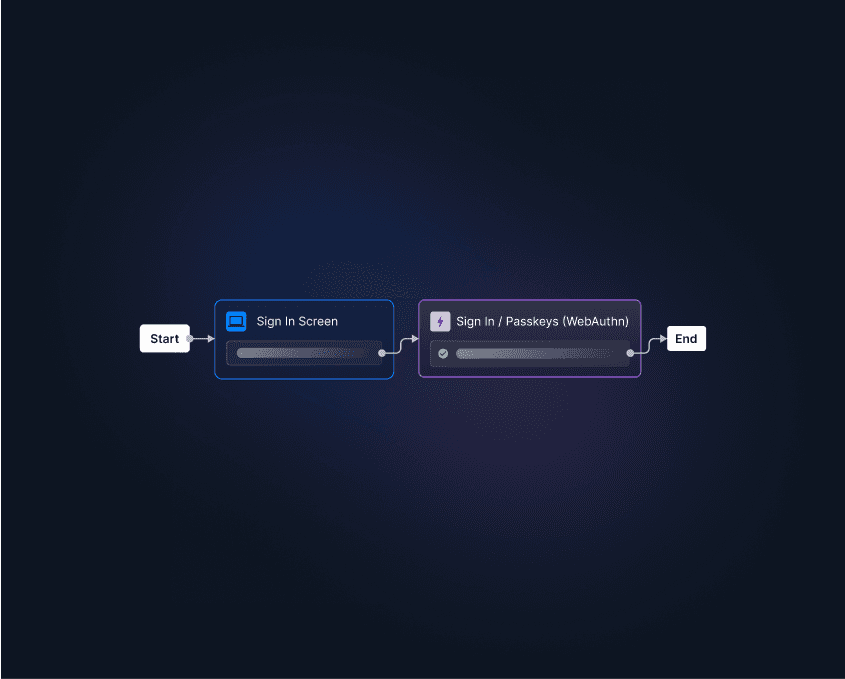
Descope adds passkeys, WebAuthn, and FIDO2-based login to any app through SDKs and visual flows, so your team doesn’t have to build WebAuthn ceremonies or CTAP handling by hand. Descope Flows let you add these authentication methods with a no-code, drag-and-drop process, selecting the specifications you’d like to implement and placing them directly into your project.
Sign up for a Free Forever account with Descope to simplify your auth with WebAuthn, FIDO2, or any other protocol you need. Have questions about our platform? Book a demo with our auth experts.