
Table of Contents
Don't have the time to read the entire post? Our human writers will be sad, but we understand. Summarize the post with your preferred LLM here instead.
Personal Agent Protocol (PAP), nicknamed Poppy, is a draft open standard that gives personal agents their own way in while still acting on behalf of the user. Developed by Sierra and Meta, PAP defines how an agent finds out how to work with a business, how it identifies itself, how it gets the user's approval, and how it interacts with the company's own AI agent, website, or APIs.
This guide covers what PAP is, how it works, and where it lives in the broader agentic ecosystem. The PAP pattern will look familiar to anyone who knows OAuth and the Model Context Protocol (MCP), with a session layer and a format for agent-to-agent conversations added on top.
At a glance
PAP gives agents an alternative to the password form: the agent identifies itself and works within the access the user approved.
Users decide what access their agent gets, and companies decide what agents can do.
It's built almost entirely on OAuth, and agents identify themselves the same way MCP clients do.
One session covers the company's website, its APIs, and conversations with its own AI agent.
Draft 0.1 arrived in October 2026. Design partners include OpenAI, Walmart, and United Airlines, and payments, push notifications, and attachments are still open topics.
What is PAP, and why does it matter?
PAP is an open protocol that lets personal agents sign in to a user's account safely, limiting what they can do there to what the user and the company hosting the account agree to. PAP fills in the space between the extremes of blocking all agents and letting agents sign in as users. An insurer, for example, could let any agent compare quotes, let a signed-in agent with read access view the user's policy, and allow coverage changes only for agents the user granted write access to. The user, in turn, could approve read access and nothing more.
The reason PAP is especially meaningful now is the rise of personal agents like Instinct and Meta's Muse, which allow people to send their AI assistant to book flights, schedule appointments, and shop for car insurance. On most sites, those agents get access in the same way a person would, asking the customer for a password and a one-time code and logging in as that customer. The site sees an ordinary login and has no way to tell the agent from the person it works for. This approach is counter to generally agreed-upon agent credential best practices, which favor short-lived, scoped tokens over shared passwords.
Before personal agents like Instinct and Muse arrived, much of the thinking assumed businesses would build for agents first, with an MCP server, UCP or ACP support, or a connector for each agent platform. Few B2C businesses can build and maintain all of those, and many have a working login but no public API. Because every PAP channel is optional, a business can start with its website and existing login (with an OAuth authorization server in front of it) and still give agents an identified, delegated way in.
PAP uses MCP as one of its API types; what it's positioned to replace is the password form. Adopting it takes work from both agent builders and businesses:
Agent builders add PAP support to their agents once, and it then works with any company that publishes a discovery document.
Businesses publish a discovery document, connect their existing OAuth authorization server, and choose which channels to open. That means updating their authorization server for PAP (CIMD clients, DPoP, and sessions) rather than building an MCP server or a connector for each agent platform.
How PAP works
Nearly every piece of PAP is an existing OAuth or MCP building block:
PAP component | Built on |
|---|---|
Discovery document | OAuth authorization server metadata |
Agent identity | Client ID Metadata Document, as used by MCP |
Session Token | OAuth access token, bound to the agent's key with DPoP |
Account Token | OAuth refresh token |
Direct Sign-In | Authorization code flow with PKCE |
Device Sign-In | Device authorization grant |
Mediated Sign-In | None; PAP defines its own credential exchange |
Company APIs | OpenAPI or a remote MCP server |
Discovery and agent identity
A company that supports PAP publishes a discovery document at /.well-known/poppy.json listing its OAuth issuer, the sign-in types and scopes it offers, and the channels agents can use. So that one domain can't claim another company's issuer, the issuer's OAuth authorization server metadata lists
Agents identify themselves the way MCP clients do, with a Client ID Metadata Document (CIMD). The client ID is an HTTPS URL serving the agent's name, logo, redirect URIs, and public signing keys, so no pre-registration is needed. Companies can still require registration, keep allowlists, and revoke an agent that misuses the protocol.
Sessions and sign-in
Everything an agent does at a company happens in a session, so a question asked as a guest and an order change made after sign-in count as one visit. Sessions start signed out: the company knows which agent is asking and can recognize a returning user through a per-company User ID, but not who that user is. Because the agent gives each user a different ID at every company and never derives it from personal data, companies can't match records to find a shared customer.
When a task needs the user's account, the user signs in once, through one of three types the company can offer:
Direct Sign-In: The user signs in on the company’s own page and approves the requested access, using the OAuth authorization code flow with PKCE.
Device Sign-In: The agent shows the user a short code and link, and the user approves on any device, using the OAuth device authorization grant.
Mediated Sign-In: The agent submits credentials the user gave it. It's the only type that isn't an OAuth flow, and the agent still handles the user's password. Unlike a plain login, though, the request carries the agent's Session Token, so the company knows an agent is signing in and can limit what this type of sign-in grants.
The user grants read access (poppy:read), write access (poppy:write), or narrower scopes the company defines. The resulting Account Token lets later sessions start signed in until the user signs out or disconnects the agent from their account settings.
Session Tokens are bound to a key the agent holds through DPoP, so a copied token is useless on its own. Tokens for MCP servers are the exception: because MCP uses bearer tokens, each one is restricted to a single MCP server.
The same session carries across the company’s website, APIs, and conversations with its AI agent. That means a cart that began in the browser is still there when the agent switches to the API, and access the user approved still applies on that channel. In a conversation, either side (user or company) can bring in a person: the user’s personal agent can ask for a human at the company, and the company can request the user by adding a user_requested event to the conversation.
The PAP flow
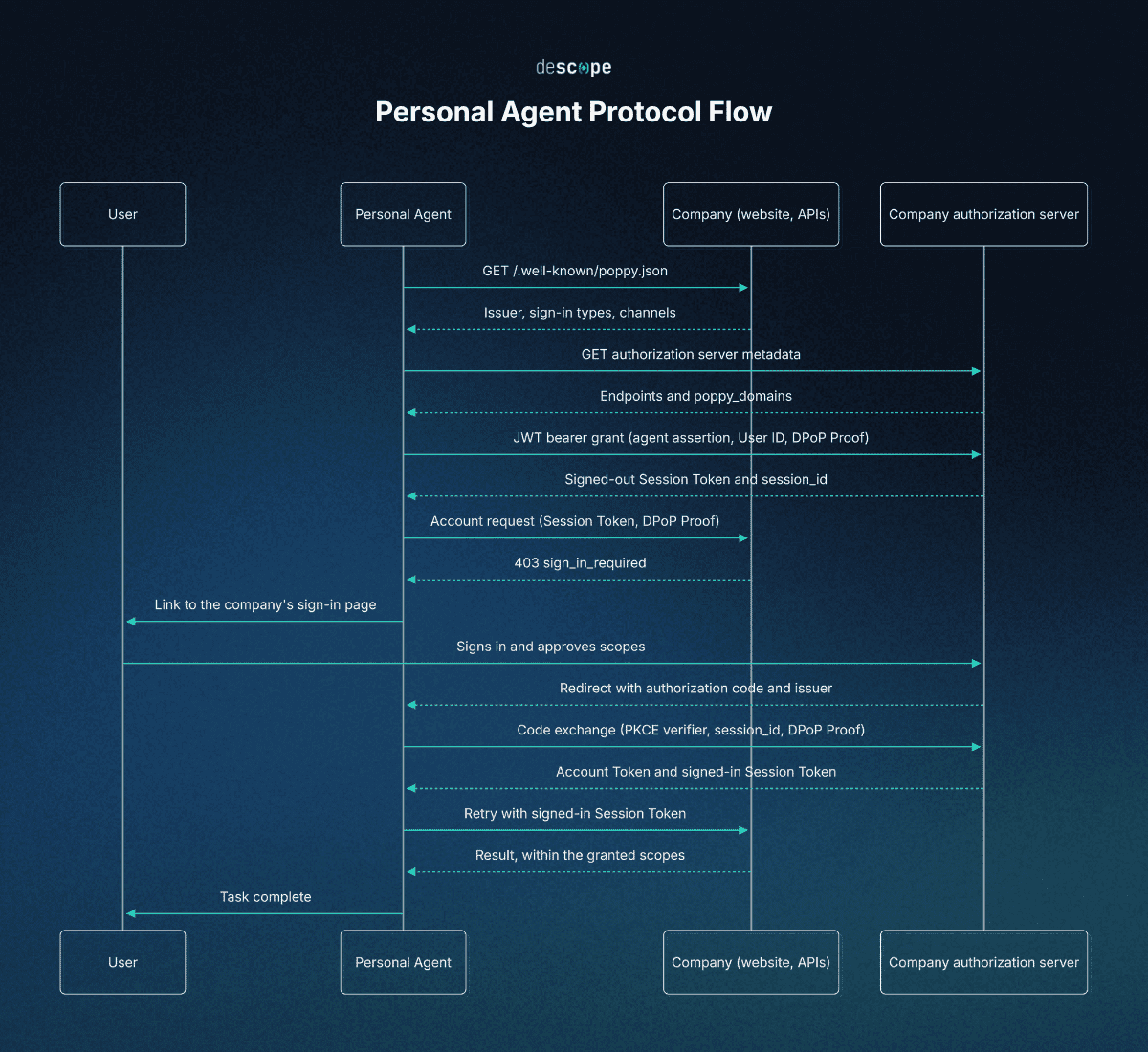
A typical interaction with PAP runs through six steps:
Discovery: The agent fetches the company's
poppy.jsonand its OAuth authorization server metadata, and confirms that the issuer lists the company's domain.Session start: The agent requests a Session Token from the token endpoint with a signed assertion naming itself and the user's per-company User ID. The company returns a signed-out Session Token.
Signed-out work: The agent browses, calls APIs, or messages the company’s agent, sending the Session Token and a DPoP Proof with every request.
Sign-in: When a request needs the user's account, the company asks for sign-in, and the user signs in through Direct, Device, or Mediated Sign-In.
Signed-in work: The company returns an Account Token and a signed-in Session Token for the same session, then enforces the granted scopes on every channel.
Sign-out: The agent revokes the Account Token, and the session continues signed out.
PAP vs. MCP, PACT, and other agent protocols
PAP is one of several recent efforts to standardize how agents identify themselves and act for users, alongside MCP, Decagon's PACT, and Visa's Trusted Agent Protocol.
Protocol | Built on | Focus |
|---|---|---|
PAP (Sierra and Meta) | OAuth, CIMD, DPoP, OpenAPI, and MCP | Discovery, sign-in, and one session across a company's website, APIs, and agent |
MCP | JSON-RPC, with OAuth-based authorization | How an agent calls tools and data on a server |
PACT (Decagon) | Agent2Agent (A2A) and OAuth 2.0 | Proving whom an agent represents and what the customer authorized, through the business's agent |
Trusted Agent Protocol (Visa) | HTTP Message Signatures, aligned with Web Bot Auth | Cryptographic agent identity so merchants can tell legitimate agents from bots |
PAP and MCP work at different layers:
MCP defines how an agent calls a company’s tools and data
PAP lists a remote MCP server as one of two API types a company can offer
A company’s MCP server can accept PAP Session Tokens, while MCP clients that don’t support PAP can still sign in through MCP’s own authorization flow.
PACT overlaps with PAP the most because both use OAuth to show a business who a personal agent represents and what the customer approved. PACT, however, routes that exchange through the business’s own agent over Google’s Agent2Agent (A2A) protocol.
PAP is more comprehensive, covering the company’s website and APIs. Decagon, which created PACT, has also joined the PAP working group. In similar fashion, while Visa leads the Trust Agent Protocol, it is also listed as a PAP design partner.
Checkout is where PAP’s coverage ends, for now. Commerce protocols like UCP and ACP handle checkout and payment, while PAP’s spec lists payments, including how PAP would work with existing payment protocols, as an open (and unresolved) topic.
Keeping up with agent protocols
New agent protocols are arriving every few weeks, but each one still needs an authorization server that can recognize the agent, sign in the customer, and issue a scoped, delegated token. Descope's Agentic Identity Hub provides that layer, with support for CIMD, the device authorization flow, and CIBA, so teams can keep up with new agents and protocols without building the scaffolding themselves.
The B2C Developer's Guide to Delegated Agent Access shows the pattern on a typical B2C site. To get started, create a Free Forever account or join AuthTown, Descope's developer community, to talk through MCP, PAP, and whatever comes next.