
Table of Contents
Don't have the time to read the entire post? Our human writers will be sad, but we understand. Summarize the post with your preferred LLM here instead.
For years, Email Magic Links (EML) have provided an innovative way to ensure secure and easy logins, with many tech and security professionals singing the praises of magic links. Why, then, aren’t magic link emails used more widely as a default login option?
To some extent, their relatively low usage may itself be a barrier to entry. However, with the right setup and magic link email templates in place, this option can be just as easy to implement as it is for users to navigate.
We won’t rehash how magic links work — instead, this post focuses on how to design and write great email templates for different use cases. We’ll cover:
What features define an optimal magic link email
Tried-and-true magic link email templates
Best practices for any magic link email use case
How powerful auth platforms facilitate magic links
What makes a great magic link email
Using magic links for authentication is an effective approach, and it offers several advantages over traditional, password-based auth. However, not all magic link emails are created equal.
Some work better than others because they incorporate features, like:
A clear call-to-action (CTA) (e.g., “Sign in securely” rather than just “Click here”)
A short expiration timeframe and a visible expiry note to avoid any confusion
Personalization in the form of a warm greeting (ideally by name or email)
A mobile-friendly layout and accessible design that transcends platforms
A clear, accessible security footer (e.g., “If this wasn’t you, ignore this email”)
Optional design elements like animation, brand color splash or an AI generated logo for memorability.
These features can serve as a quality assurance checklist as you build out magic link email templates.
Another consideration, though, is that different use cases will call for slight variations. It’s best to prepare unique templates for various user bases.
Magic link email templates to consider
Magic links take the underlying principles of passwordless authentication and make them easily accessible for users, regardless of their technological literacy. To work most effectively, however, magic links need to reach users, communicate clearly, and facilitate their understanding.
Templates can help developers meet users where they are. While the most important parts of the magic link email template will be the same across all use cases, the packaging around it and the way it engages the recipient can and should change based on expectations and intentions.
Minimalist login magic link email template
The most fundamental magic link email template should serve as a perfect boilerplate to adapt to other use cases. It should also be usable as-is for high-frequency logins in productivity apps or developer tools, where a solution like single sign-on (SSO) is often employed. The idea is to strip down the email to just its bare essentials, avoiding anything that gets in the way of clear communication.
For example, the email copy itself may read as follows:
Hi [USER],

Please follow the link below to log in to [APP]:

(LOG IN NOW)

This link will expire in [X] minutes.

If you did not request this login, please ignore this email.
Magic link email messaging can be enhanced with minimal design elements like a brand logo, but should ultimately be kept as simple as possible. Another element to consider is a disclaimer about when and how the request was generated (e.g., what platform), ideally after the body text.
Friendly consumer magic link email template
For dev teams working in a customer-facing environment, a bit more finesse might be required to ensure a positive user experience (UX). As such, a friendlier, welcoming magic link email template is ideal for business-to-consumer (B2C) products or authentication in ecommerce.
These templates might dress up the bare-bones language above with a longer or more personalized greeting. They might include more information or graphics about the app or company, showing an openness to customers’ curiosity. Additionally, there might be other footer links with language like “Want to learn more?” or other prompts to encourage engagement.
For example, the email copy may read as follows:
Hi [USER],

We’re happy to see you again! Click below to securely log in to your [APP] account — no password required.

[Log In Now]

This link will expire in [X] minutes for your security.

If you didn’t request this login, no worries — simply ignore this message.

Warm regards,
The [APP] Team

P.S. Need help or want to learn more about your account? Visit [Support Link].
Too often, security and UX are at odds. However, it’s important to remember that UX is a key part of security, especially when it comes to auth—people need to use it to be protected.
Security-focused magic link email template
Magic links are one of the best solutions for external user authentication. This makes them ideal for a wide variety of sensitive data environments, such as fintech apps or programs with heavy compliance burdens. If security is a key reason magic links are being used, it doesn’t hurt to pull back the curtain and tell users within the email exactly how their safety is being prioritized.
These templates may start like the minimalist version above, with added language calling out features like session security, activity monitoring, expiration, and device protection.
When introducing security features, consider phrasing such as “For your protection,” as well as short, easily accessible summaries of the underlying features. Additionally, consider including links to longer-form explanations, ideally hosted on the app’s or company’s website.
For example, the email copy may read as follows:
Hi [USER],

You requested to log in to your [APP] account.
Click below to continue — your magic link is protected with session security and device verification.

[Secure Log In Now]

For your protection:

This link will expire in [X] minutes
Each login is tied to your device and IP
Activity is continuously monitored for unusual behavior

If you didn’t request this login, please ignore this email.

The [APP] Security Team

P.S. Want to learn how we keep your data safe? Visit our [Security Center].
Even in this more technical-focused template, UX should always be top of mind. To that end, limit the total text users see to ensure that it serves its primary login purpose effectively.
Magic link email best practices
As noted above, not all magic link emails are created equal. Aside from developing and mobilizing effective templates, there are other higher-order efforts you can make to optimize your magic links.
Here are some best practices to consider when implementing magic link emails for auth:
Use short durations – Have magic links expire after a relatively short duration (e.g., 10 minutes). This allows users enough time to access what they need, but it limits attackers’ ability to hijack the link and break authentication, leading to other major consequences.
Conduct A/B testing – Create different templates and test them across your user base, measuring how effective each is at engaging recipients. Use the versions that saw better uptake, and consider attaching a survey to better understand users’ responses.
Integrate seamlessly – When using a powerful auth solution, you can add magic link email templates directly to your app with a dedicated connection. This allows for faster templatization and easier management, including adjustments to emerging US issues.
Balancing directness, UX, and security will help foster maximum utility.
How Descope simplifies magic links
Employing a powerful, flexible auth platform makes magic links even more effective. In particular, these platforms make it easy to implement, templatize, monitor, and adjust magic links over time. They can also help magic links and other authentication methods work together seamlessly, benefiting everyone involved.
With Descope, developers can easily implement magic link authentication through no-code and low-code flows, with software development kits (SDKs) and built-in templates that confirm user identity. You can customize subject lines, branding, and expiration in minutes. Email sending can be managed through connectors with services such as SendGrid, Mandrill, MailerSend, Postmark, as well as generic SMTP and email gateway implementations.
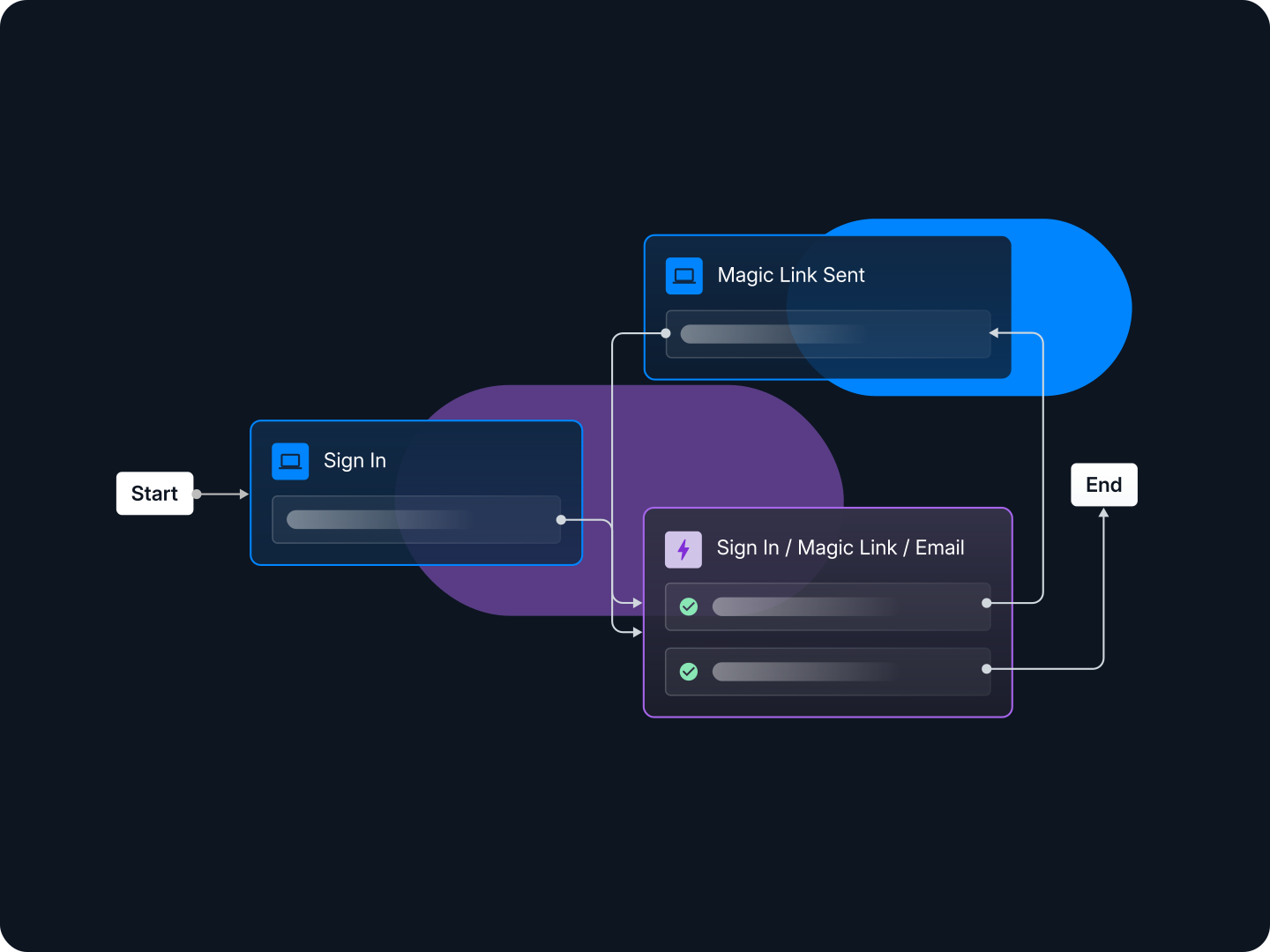
Descope also allows for seamless risk-based multi-factor authentication (MFA). Your magic link system can be set up to prompt a step-up authentication request when a new device is added.
Additionally, Descope allows developers and other professionals to preview the magic link flow before it’s deployed. This enables last-minute tinkering to get the message exactly right, and it can be done by a wide variety of team members, irrespective of their tech savvy.
Implement magic link emails today
Magic link emails are an excellent authentication alternative for organizations looking to phase out passwords. They keep logins secure by eliminating credentials and utilizing users’ trusted secondary accounts. By the same token, they foster a smoother UX that doesn’t require any long-term password memorization or management.
Descope makes it easy for any developer team to reap the benefits of magic link emails with seamless integration, built-in templates, and coordination across other login and account management tools. Best of all, it’s all available in just a few lines of code.
Sign up for a Free Forever account with Descope and start building secure, scalable auth flows today. Have questions about magic link email templates? Book time with our experts.