
Table of Contents
Don't have the time to read the entire post? Our human writers will be sad, but we understand. Summarize the post with your preferred LLM here instead.
AI agents can browse stores, build carts, and complete purchases without a user touching a keyboard. Most of these agent-driven shopping flows share a structural gap: the agent doesn't know who the user is. It can fill a cart, but it can't apply a loyalty discount, retrieve past orders, or send a receipt to the right address. Every session starts from zero.
Identity linking solves this. This post covers what Universal Commerce Protocol (UCP) is, why identity matters, and what you can build once an agent's session is connected to a verified user. We’ll walk through the server code from Peek-A-Box, a working ecommerce UCP implementation built with FastMCP and Descope.
Why use UCP in ecommerce?
Ecommerce has spent decades optimizing for frictionless purchase flows. One-click checkout, saved addresses, guest checkout, passkeys replacing passwords. The UX bar is high, and customers have learned to expect it.
The core issue with employing agents in ecommerce is identity linking. When an agent creates a checkout session without a linked user identity, it's acting anonymously. The merchant knows an agent made a request with a valid token, but not on whose behalf. This creates concrete problems across the transaction:
No buyer data. The checkout session has no name, no email, no shipping address. The agent has to ask the user for this information through conversation, replicating work the user already did when they created an account.
No history. The merchant can't associate completed purchases with a user account. Order history, returns, and reorder flows don't work without a persistent identity.
No personalization. Member pricing, loyalty credits, saved payment methods, and preferred shipping addresses all live on a user record. An anonymous agent can't access any of them.
No authorization trail. A merchant taking payment from an anonymous agent has no cryptographic proof that a real user authorized the transaction. For high-value purchases, that's an audit and dispute problem.
An agent asking "what's your email address?" is a worse experience than a web storefront with autofill, and omnichannel retail auth is already a solved problem on the web side. A user’s identity, preferences, and saved data can follow them across touchpoints.
Agentic commerce needs the same continuity. The missing piece is a standard way for agents to connect to merchant infrastructure and link to a verified user identity, and that’s what UCP provides.
What is UCP?
UCP is an open protocol that gives agents a standardized way to interact with ecommerce infrastructure, and it’s a native mechanism for connecting agent sessions to verified user identities. Without it, every agent-to-store integration is custom: the agent learns one store's API, another store uses different endpoints and data shapes, and nothing transfers.
UCP defines a shared vocabulary for catalog browsing, checkout management, order retrieval, and payment. A compliant agent can shop at any compliant merchant without custom glue code on either side, and user identity claims follow along through a standard OAuth flow rather than being re-collected at every step.
Read more: The Developer's Guide to Agentic Commerce
The protocol sits on top of MCP (Model Context Protocol), so agents interact with a UCP server the same way they call any other MCP tool, via JSON-RPC over HTTP. The UCP layer adds a discovery document, a standard set of capabilities, and structured response envelopes that agents can parse without merchant-specific logic.
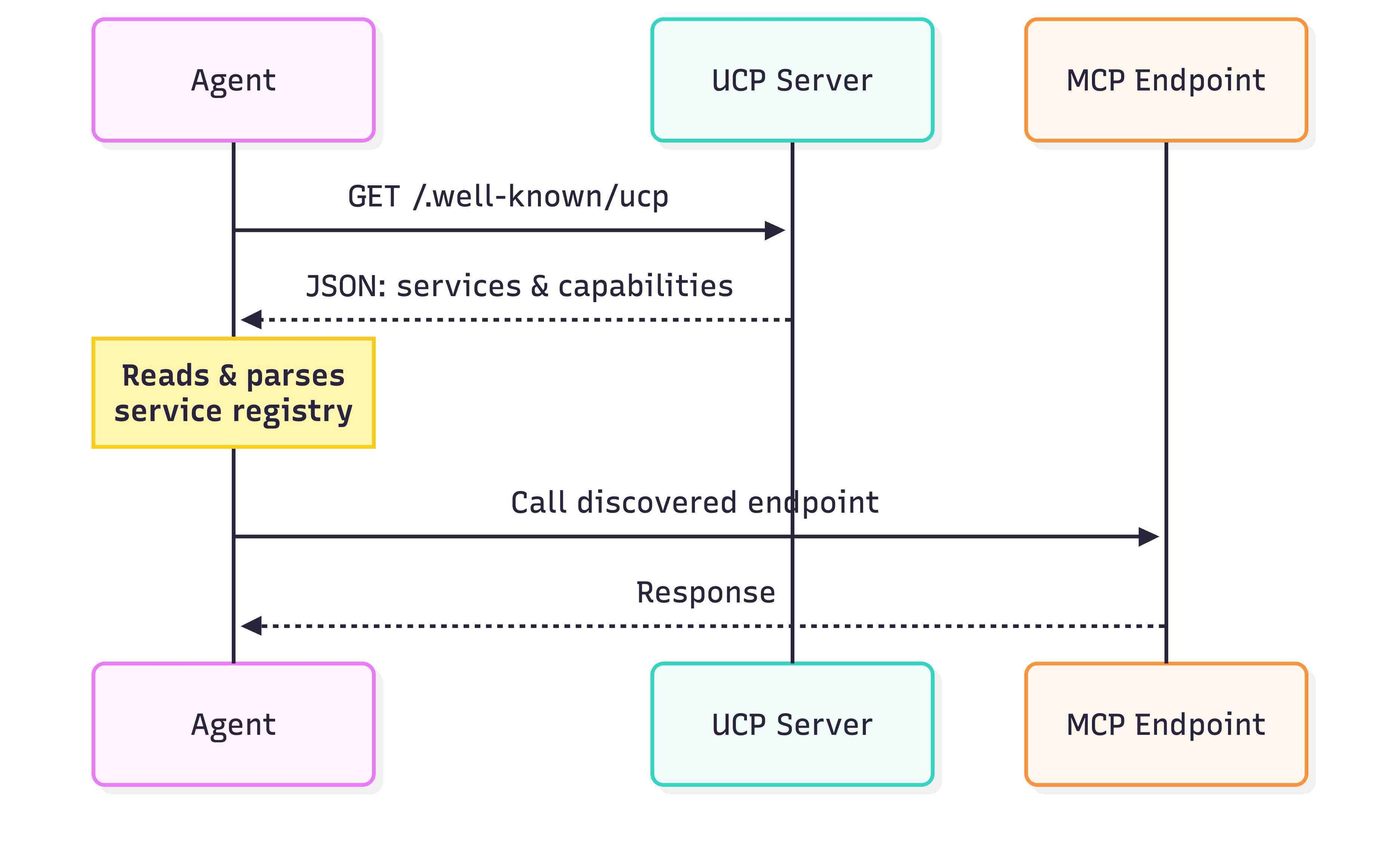
How does UCP discovery work?
Every UCP server publishes a document at /.well-known/ucp. An agent fetches this before doing anything else and learns which capabilities the store supports, where the MCP endpoint is, which OAuth scopes exist, what payment handlers are available, and basic business metadata.
A well-structured discovery document means an agent can onboard onto a new store in a single HTTP request:
The
servicesblock tells the agent where to send MCP requests.The
capabilitiesblock declares what the server supports and, foridentity_linking, which scopes are available and what each one grants.The
payment_handlersblock declares accepted payment instruments so the agent knows how to structure a payment object at checkout.
The authorization server endpoints come from a separate RFC 8414 discovery document (/.well-known/oauth-authorization-server). UCP doesn't embed them in the capability document, which keeps the protocol decoupled from the specific auth infrastructure each merchant uses.
Here's what Peek-A-Box publishes:
// app/.well-known/ucp/route.ts
const profile = {
  ucp: {
    version: UCP_VERSION,
    services: {
      "dev.ucp.shopping": [{
        version: UCP_VERSION,
        transport: "mcp",
        endpoint: `${base}/mcp`,
        schema: `https://ucp.dev/${UCP_VERSION}/services/shopping/mcp.openrpc.json`,
      }],
    },
    capabilities: {
      "dev.ucp.shopping.checkout": [{ version: UCP_VERSION, spec: `...` }],
      "dev.ucp.shopping.catalog":  [{ version: UCP_VERSION, spec: `...` }],
      "dev.ucp.shopping.order":    [{ version: UCP_VERSION, spec: `...` }],
      "dev.ucp.common.identity_linking": [{
        version: UCP_VERSION,
        config: {
          scopes: {
            openid:  {},
            profile: { description: { plain: "Pre-fill buyer name from your profile" } },
            email:   { description: { plain: "Pre-fill buyer email address" } },
            "dev.ucp.shopping.order:read": {
              description: { plain: "View your past orders and order history" },
            },
            "dev.ucp.shopping.checkout:manage": {
              description: { plain: "Create, update, complete, and cancel checkout sessions on your behalf" },
            },
          },
        },
      }],
    },
    payment_handlers: {
      "com.stripe.payment": [{
        version: UCP_VERSION,
        available_instruments: [{
          type: "tokenized_card",
          display: { plain: "Pay with card via Stripe" },
          credential: {
            payment_method: {
              description: { plain: "A Stripe PaymentMethod or token id (e.g. 'pm_card_visa')" },
            },
          },
        }],
      }],
    },
    business: {
      name: "Peek-A-Box",
      description: "Mystery box retail store",
      links: [
        { type: "privacy_policy",  url: `${base}/privacy` },
        { type: "terms_of_service", url: `${base}/terms` },
      ],
    },
  },
}
What capabilities does UCP define?
The core UCP shopping capabilities cover three domains:
Catalog (dev.ucp.shopping.catalog): search and browse products. Agents can explore a store's inventory without authentication, the same way a user lands on a homepage.
Checkout (dev.ucp.shopping.checkout): create, update, complete, and cancel checkout sessions. Checkout tools require authorization because they create financial commitments.
Orders (dev.ucp.shopping.order): read past orders and order history. This is user-specific data and requires the agent to act on behalf of a specific person.
An agent can browse freely, but the moment it tries to buy something or look up order history, the protocol requires the agent to establish who it's acting for.
How UCP handles identity linking
UCP's identity linking mechanism is a standard OAuth 2.0 Authorization Code flow with PKCE. The agent acts as the OAuth client, the user's identity provider acts as the authorization server, and the merchant's MCP server acts as the protected resource.
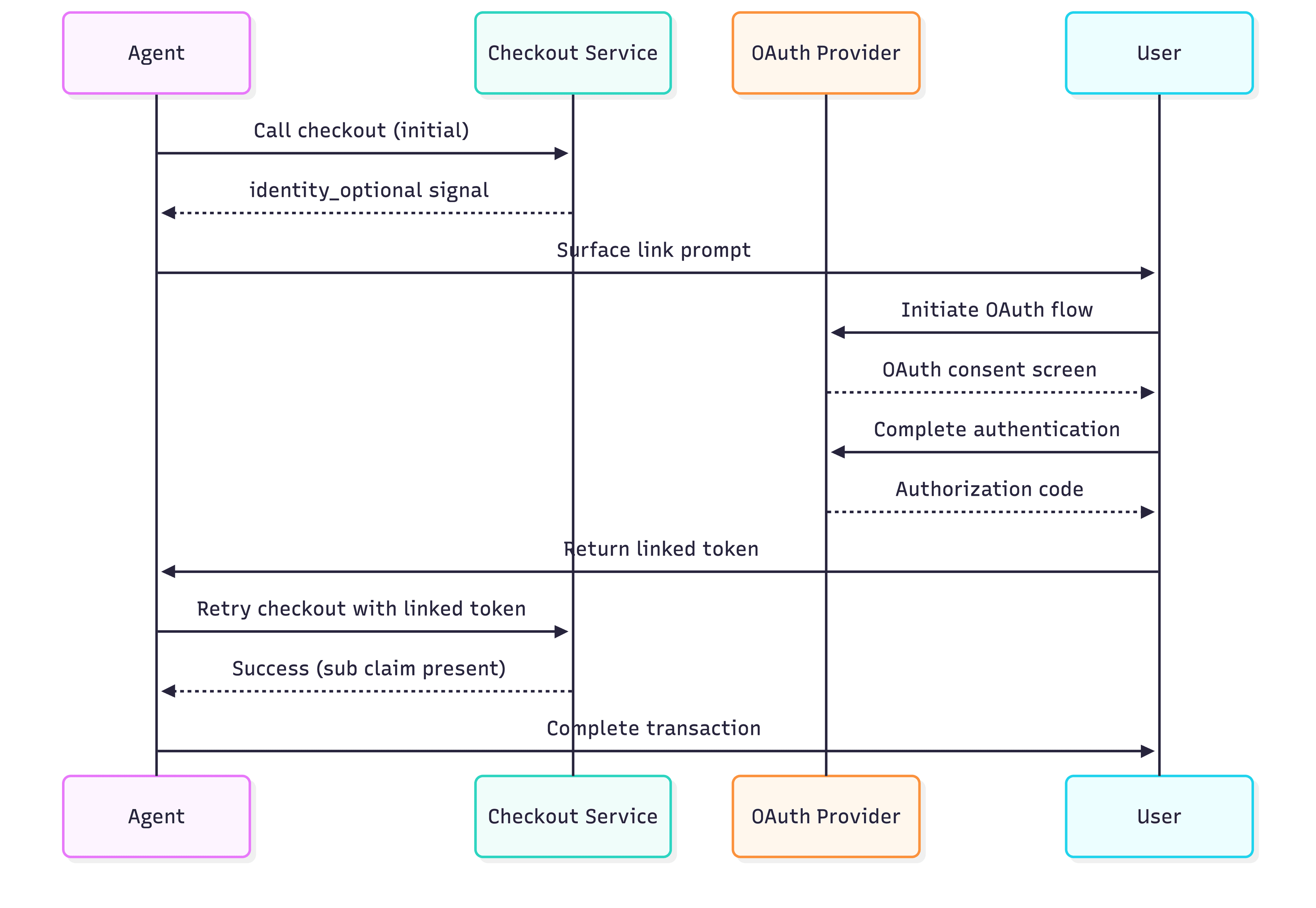
The agent uses the scope definitions from the discovery document to request exactly the permissions it needs. A shopping assistant that only needs to browse and buy asks for checkout:manage. One that also surfaces order history asks for order:read too. The user sees a consent screen describing what the agent will be able to do.
After the user consents, the agent receives an access token carrying the approved scopes and the user's identity claims (sub, email, name). Every subsequent MCP call includes this token in the Authorization header. The merchant's server validates it, reads the claims, and knows who the agent is acting for.
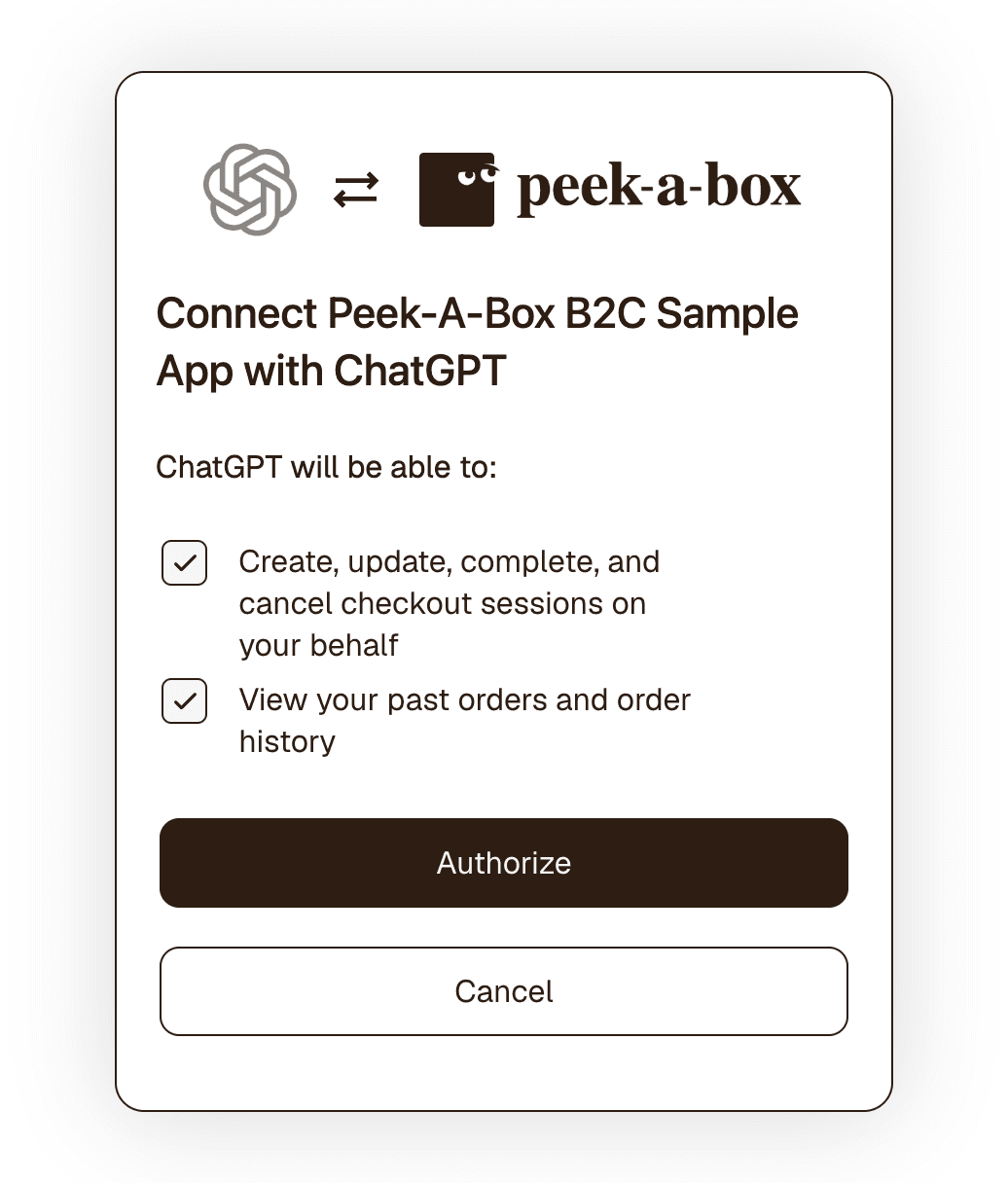
What is the identity_optional signal?
UCP lets merchants surface the linking prompt without blocking the transaction. A server can issue a checkout session to an unlinked agent and include a message with code identity_optional in the response:
{
  "type": "info",
  "code": "identity_optional",
  "content": "Link user identity to pre-fill saved addresses, apply member pricing, and access order history."
}
In the Peek-A-Box server, this message is appended to the checkout response whenever the token has no sub claim. This means the agent has authenticated, but no user has linked their identity yet:
# Only suggest identity linking when the agent hasn't done it yet.
# sub is present in any user-authenticated token — use it as the signal.
if not user_sub:
    messages.append({
        "type": "info",
        "code": "identity_optional",
        "content": (
            "Link user identity to pre-fill saved addresses, apply member pricing, and access order history."
        ),
    })
An agent that parses this can present the user with a choice: link your account to unlock these features, or continue anonymously. The user controls whether to link. The merchant communicates the value without forcing a gate.
Protecting a UCP server with Descope
Descope's Agentic Identity Hub acts as the OAuth 2.1 authorization server for your MCP server, issues tokens with the right claims and scopes, and publishes the OAuth protected resource metadata that MCP clients use during discovery.
Registering your MCP server in Descope
Before writing any code, register your server as a protected resource in the Descope console. This is what creates the OAuth authorization server and the discovery URLs your MCP clients need.
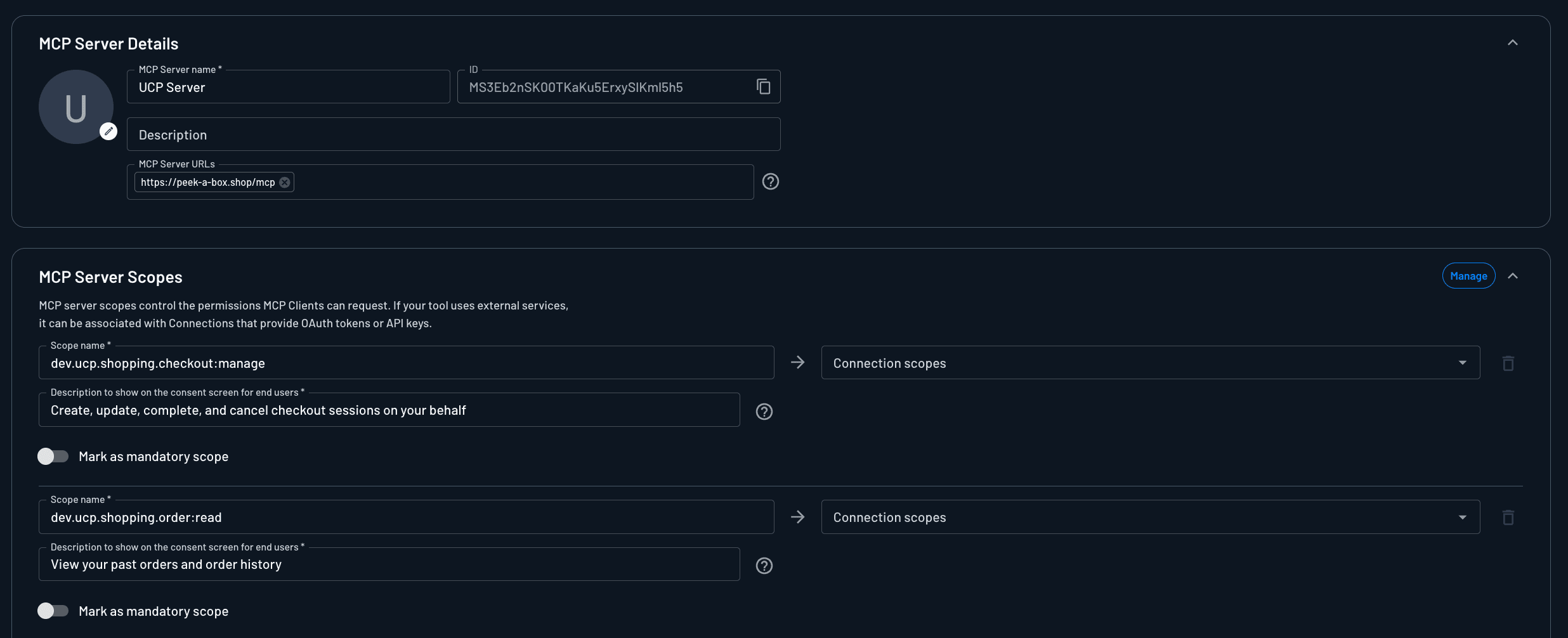
1. Create the MCP server resource. In the Descope Console, go to Agentic Identity Hub → MCP Servers and create a new MCP server. Set the server URL to your MCP endpoint's base URL. For Peek-A-Box, this is https://peek-a-box.shop/mcp. Descope uses this URL as the token audience (aud claim), so it must match what your server validates against.
2. Define your scopes. Under the MCP server's scope settings, add the UCP-specific scopes your tools enforce:
dev.ucp.shopping.checkout:manage: create, update, complete, and cancel checkout sessionsdev.ucp.shopping.order:read: read past orders
These are the same scope strings you'll reference in the _TOOL_REQUIRED_SCOPES map and in the UCP discovery document.
3. Copy the config URL. Once the server is created, Descope generates a .well-known OpenID configuration URL specific to this MCP server. It follows the format:
https://api.descope.com/v1/apps/agentic/<Project ID>/<MCP Server ID>/.well-known/openid-configuration
Copy this URL. It becomes your DESCOPE_CONFIG_URL environment variable, that the FastMCP DescopeProvider uses to validate tokens and publish protected resource metadata.
Connecting FastMCP to Descope
With the resource registered and DESCOPE_CONFIG_URL set, connecting FastMCP takes a few lines. In this example, we'll use FastMCP's built-in Descope Auth Provider:
from fastmcp.server.auth.providers.descope import DescopeProvider

auth = DescopeProvider(
    config_url=os.environ["DESCOPE_CONFIG_URL"],
    base_url=os.environ.get("MCP_BASE_URL", "http://localhost:8000"),
)

mcp = FastMCP(
    name="peek-a-box-ucp",
    instructions=(
        "You are connected to the Peek-A-Box mystery box store. "
        "Use the catalog tools to search products and the checkout tools "
        "to create and manage checkout sessions on behalf of users."
    ),
    auth=auth,
)
Descope verifies JWTs on every incoming request. Requests without a valid token get a 401. The provider also publishes /.well-known/oauth-protected-resource automatically, so MCP clients can discover the authorization server without manual configuration.
Descope also tracks a durable agentic identity for each authorized session: which agent, acting on whose behalf, under which scopes. This record persists across token refreshes and produces audit trails you can query later for debugging, compliance, and fraud review.
Scope enforcement
A valid token isn't enough on its own. It also needs to carry permission for the specific tool being called. Descope handles the JWT verification; the scope middleware handles the per-tool permission check.
At the transport layer, a custom ASGI middleware intercepts each tools/call request before FastMCP runs it. It buffers the request body, reads the tool name from the JSON-RPC payload, and checks whether the token carries the required scope:
_TOOL_REQUIRED_SCOPES: dict[str, str] = {
    "create_checkout":   "dev.ucp.shopping.checkout:manage",
    "get_checkout":      "dev.ucp.shopping.checkout:manage",
    "update_checkout":   "dev.ucp.shopping.checkout:manage",
    "complete_checkout": "dev.ucp.shopping.checkout:manage",
    "cancel_checkout":   "dev.ucp.shopping.checkout:manage",
    "get_orders":        "dev.ucp.shopping.order:read",
}

class _OAuthScopeMiddleware:
    async def __call__(self, scope, receive, send):
        if scope["type"] != "http" or scope.get("method") != "POST":
            await self.app(scope, receive, send)
            return

        # Buffer the body so we can peek at the tool name and replay it.
        body = await self._read_body(receive)
        tool_name = self._extract_tool_name(body)
        required = _TOOL_REQUIRED_SCOPES.get(tool_name or "")

        if required:
            authorization = self._get_auth_header(scope)

            if not authorization:
                await self._send_error(send, 401, "identity_required", required,
                                       "User identity is required; link an account to continue.")
                return

            if required not in _scopes_from_bearer(authorization):
                await self._send_error(send, 403, "insufficient_scope", required,
                                       f"The '{required}' scope is required for this action.")
                return

        await self.app(scope, replay_receive, send)
When the scope check fails, the middleware returns a structured UCP error envelope alongside the HTTP error code:
async def _send_error(self, send, status, ucp_code, required_scope, description):
    body = json.dumps({
        "ucp": {"version": UCP_VERSION, "status": "error"},
        "messages": [{
            "type": "error",
            "code": ucp_code,       # "identity_required" or "insufficient_scope"
            "content": description,
            "severity": "unrecoverable",
        }],
    }).encode()

    www_auth = f'Bearer error="{ucp_code}", scope="{required_scope}", resource_metadata="{self.resource_metadata_url}"'

    await send({
        "type": "http.response.start",
        "status": status,
        "headers": [
            (b"content-type",   b"application/json"),
            (b"www-authenticate", www_auth.encode()),
        ],
    })
    await send({"type": "http.response.body", "body": body})
The WWW-Authenticate header tells the agent exactly what scope it's missing and where to find the resource metadata to start the linking flow. Catalog tools have no entry in _TOOL_REQUIRED_SCOPES, so they pass through without any scope check. The tools double-check scope internally as well via a _require_scope() helper.
Step-up scoping
Per the MCP authorization spec, when a client receives a 403 with insufficient_scope, it should initiate a new OAuth flow requesting the missing scope. The user consents, the agent receives a token covering that scope, then retries the call. This is known as step-up or progressive scoping.
Read more: The Power of Descope Flows: MCP Identity Orchestration
An agent can open a session with only openid, browse the catalog without any scope check, and request dev.ucp.shopping.checkout:manage only when creating a checkout session. If the user then asks for order history, the agent requests dev.ucp.shopping.order:read at that point. Each scope arrives when the task actually needs it.
Issuing ephemeral, scoped credentials per task makes it easier to audit agent actions, and exposes less surface area if a token is compromised. Agents that step up incrementally hold only what the current task requires, and Descope's authorization server handles the step-up flow without any custom logic on the server side.
What does identity linking unlock?
Once an agent carries a user-linked token, the server can read verified identity claims on every call. Here's what changes.
Reading claims from the token
The DescopeProvider verifies the JWT signature before any tool runs. After that, reading claims from the payload is safe:
def _decode_jwt_claims(token: str) -> dict:
    """Decode claims from a JWT payload without re-running signature verification.
    The token has already been verified by DescopeProvider before any tool is invoked.
    """
    try:
        payload_b64 = token.split(".")[1]
        payload_b64 += "=" * (4 - len(payload_b64) % 4)
        return json.loads(base64.urlsafe_b64decode(payload_b64))
    except Exception:
        return {}

def _current_user_sub() -> Optional[str]:
    """Return the sub (user id) from the current access token, if identity is linked."""
    try:
        access_token = get_access_token()
        if access_token and access_token.token:
            return _decode_jwt_claims(access_token.token).get("sub") or None
    except Exception:
        pass
    return None
get_access_token() is a FastMCP dependency that retrieves the token from the current request context. _current_user_sub() returns None for anonymous agent tokens and the user's stable identifier once identity is linked.
Verified buyer information
With identity linking, the agent doesn't collect the user's name and email through conversation. Those come from the verified identity claims in the JWT, and create_checkout populates the buyer object automatically:
@mcp.tool()
def create_checkout(
    line_items: list[dict],
    currency: str = "USD",
    buyer: Optional[dict] = None,
    fulfillment: Optional[dict] = None,
) -> dict:
    # Read identity claims from the verified token
    access_token = get_access_token()
    user_claims = _decode_jwt_claims(access_token.token) if access_token else {}

    user_sub   = user_claims.get("sub") or None
    user_email = user_claims.get("email") or None
    user_name  = user_claims.get("name") or user_claims.get("given_name") or None

    # Auto-populate buyer from identity claims when not already provided
    if not buyer and (user_email or user_name):
        buyer = {}
        if user_email:
            buyer["email"] = user_email
        if user_name:
            buyer["name"] = user_name

    # ... build and save checkout ...

    # Suggest identity linking only when the agent hasn't done it yet
    if not user_sub:
        messages.append({
            "type": "info",
            "code": "identity_optional",
            "content": "Link user identity to pre-fill saved addresses, apply member pricing, and access order history.",
        })
Buyer information from an OIDC token has been verified by the identity provider. Information typed into a chat window has not. Beyond the convenience, the data quality is better.
Persistent order history
Without a user identity, there's no account to attach a completed order to. With identity linking, complete_checkout stores the order under the user's sub claim, and get_orders retrieves them:
@mcp.tool()
def get_orders() -> dict:
    """List the authenticated user's past orders (most recent first)."""
    if err := _require_scope(_ORDER_READ_SCOPE):
        return err

    sub = _current_user_sub()
    orders = _load_orders(sub) if sub else []
    return {"ucp": _ucp_envelope(), "orders": orders, "total": len(orders)}
sub is a stable identifier that survives across sessions and devices. Orders persist to Postgres keyed by sub, so an agent with the order:read scope can retrieve the full purchase history for any linked user, whether the purchase was created by a human or an agent.
Personalized pricing and member benefits
Member pricing, loyalty credits, and subscription discounts require knowing who the user is. Once identity is linked, the server can check the user's account, confirm their membership status, and apply the right pricing. The same applies to saved payment methods and preferred shipping addresses. The user who saved these to their account shouldn't have to re-enter them through a chat interface.
Trusted transactions and downstream services
When an agent completes a checkout with a user-linked token, the merchant has proof that the user consented to that agent acting on their behalf, for those specific scopes, at that point in time. The OAuth consent flow is the authorization record. Disputes are easier to resolve because the authorization is auditable and timestamped.
A linked identity also gives the merchant a verified email for downstream services. In Peek-A-Box, complete_checkout pulls receipt_email from the buyer's verified claims before charging Stripe:
buyer_email = (checkout.get("buyer") or {}).get("email")
create_params = {
    "amount": amount,
    "currency": currency,
    "payment_method": token,
    "confirm": True,
    "off_session": True,
    "metadata": {"checkout_id": checkout["id"], "source": "ucp"},
}
if buyer_email:
    create_params["receipt_email"] = buyer_email
The email on the Stripe charge comes from the verified identity, not from what the agent typed in conversation. The same verified identity flows into fulfillment, CRM, and loyalty programs, so every downstream system attaches the transaction to a real user record.
Get started with your own UCP server
The Peek-A-Box demo is live at peek-a-box.shop/mcp and the full source is on GitHub if you want to see a complete UCP server implementation with identity linking end-to-end.
Ready to add identity linking to your own MCP server? Reach out to our team to talk through your use case. Want to start building now? Sign up for a free Descope account and have your first protected MCP endpoint running in minutes.