
Table of Contents
Don't have the time to read the entire post? Our human writers will be sad, but we understand. Summarize the post with your preferred LLM here instead.
Multi-factor authentication (MFA) has become one of the most widely used mechanisms to strengthen traditional, password-based authentication. Its security and user experience (UX) benefits stem from the simple fact of requiring more than one factor rather than relying solely on passwords to safeguard sensitive information. By requiring another knowledge, possession, or inherence factor, the MFA process makes logins more secure without compromising UX.
MFA has seen increases in adoption in recent years. In fact, some reports estimate a doubling in use since 2020, despite some highly regulated industries and large organizations lagging behind.
Despite the inherent benefits of the MFA process, it’s not without its weaknesses, especially when implemented carelessly. Implementing MFA intentionally unlocks its full potential.
This guide will walk through the benefits of MFA, covering its impact on:
Enhanced security
Streamlined compliance
Remote accessibility
Scalability and adaptability
User convenience
Enhanced security
The topmost benefit of MFA is that it offers greater security assurance than traditional auth methods because it provides one or more additional layers of security beyond passwords.
By minimizing the role of passwords, MFA prevents or mitigates:
Phishing attacks
Fraud and identity theft
Weak passwords
Credential leaks
MFA means that even if an attacker gets to a user's password through phishing or other means, they cannot access the system without the other factors. These alternative factors are often based on possession or inherence (“something the user is or has”), such as a biometric fingerprint scan, a hardware token, or a one-time code sent to the user’s mobile device.
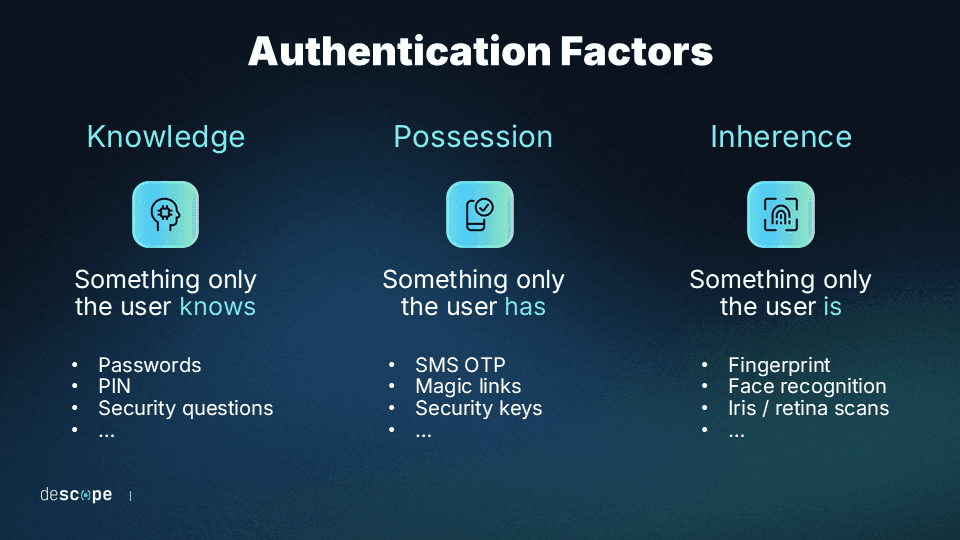
While many baseline MFA deployments are susceptible to social engineering, deploying an adaptive, phishing-resistant approach to MFA is the best way to maximize this benefit.
What is the security impact of the MFA process?
In terms of practical, tangible security impacts, the MFA process directly prevents and mitigates potential damage from some of the most common kinds of attacks. Layering factors make it harder for attacks like credential stuffing, phishing, and account takeover to materialize.
What this looks like in practice differs depending on the business using MFA. It could be:
A SaaS dashboard with admin privileges
A fintech app protecting high-value transactions
An eCommerce checkout with saved payment methods
The important thing is that MFA maintains strong UX while preventing common attacks.
Our 2025 customer auth survey found that a huge majority of organizations (82%) have suffered tangible business impacts from customer auth issues. MFA on its own is not a failsafe, either. Over a third of our respondents (39%) were impacted specifically by weak or missing MFA. In terms of impact, around the same share (37%) reported having to delay their projects to address auth gaps.
The underlying issue is credential abuse—which MFA, properly implemented, can help solve.
According to Verizon’s 2025 Data Breach Investigations Report (DBIR), credential abuse was the leading initial attack vector for 2024-2025. The Snowflake breach illustrates this risk: attackers used previously exposed credentials to access customer accounts that did not have MFA enabled. In that incident, roughly 80% of the compromised accounts had credentials that had already appeared in prior breaches. Requiring MFA significantly reduces the effectiveness of these credential-based attacks.
Also Read: How Navan Added Phishing-Resistant Magic Link MFA With Descope
Streamlined compliance
MFA also helps organizations meet the security and privacy needs of regulatory frameworks. Implementing MFA helps organizations manage security risks effectively and creates an auditable trail to demonstrate compliance during potential audits. Depending on industry or location, many regulations might apply to you, and MFA can help meet their requirements.
Some of the most widely applicable regulatory frameworks include:
General Data Protection Regulation GDPR – Focuses on the protection of personal data and privacy in the European Union, including data collection by non-EU-based firms. The GDPR doesn’t explicitly require MFA, but it can help to meet the GDPR’s core standards.
Payment Card Industry Data Security Standard (PCI DSS) – For eCommerce, retail and businesses that process card payments and cardholder data (CHD), the PCI DSS requires strict protections. These include MFA for access to CHD and the CHD environment (CDE).
Health Insurance Portability and Accountability Act (HIPAA) – For covered entities in healthcare and business associates, HIPAA mandates safeguards for protected health information (PHI) related to patients’ health, treatments, and payment. While MFA isn’t explicitly required, it is an efficient way to meet the HIPAA Security Rule requirements.
Financial Regulations – The Sarbanes-Oxley Act (SOX) imposes stringent internal access controls over financial reporting in publicly traded companies. Similarly, the Federal Financial Institutions Examination Council (FFIEC) Guidance strongly recommends MFA specifically for financial institutions, like banks, to protect their customers’ information.
In many cases, multiple overlapping frameworks will apply simultaneously.
MFA is an explicit or de facto requirement in many regulatory frameworks. Failure to meet a given regulation’s requirements for MFA or access control more broadly can lead to direct financial and other penalties. For example, HIPAA non-compliance fines for 2026 range from $145 to $2,190,294 per violation, and criminal charges may be applied in the worst cases.
Even when not required, MFA is one of the best auth methods for strengthening compliance enforcement for your software, its adopters, its end users, and all other stakeholders.
Also Read: UAE Central Bank Bans SMS & Email OTP
Remote accessibility
While MFA is common in scenarios where remote access is the only option (like B2C applications), it has become increasingly important as organizations support remote and hybrid work. When employees access systems from outside the corporate network, traditional perimeter defenses like firewalls and network filtering are less effective.
MFA helps ensure that users accessing internal systems are legitimate, even when logging in from remote locations or personal networks. For example, an engineering team may need to access an internal admin portal from multiple devices, such as a laptop or phone, while working remotely.
To support remote access securely without creating unnecessary friction, MFA deployments often include:
Device binding and risk scoring to ensure that secondary assets can be trusted
A trust system to avoid prompting MFA on every login, thereby reducing fatigue
A step-up MFA process to increase the authentication burden for unknown devices
These controls allow organizations to authenticate users regardless of network location. In many modern architectures, identity-based controls such as MFA complement or partially replace traditional network-based access controls like VPNs. VPNs are often used by organizations as a sort of "second factor" to grant network-level access. They're typically scoped to internal corporate infrastructure, which means they don't extend well to external users like contractors, distributors, or B2B customers who need to access a specific application without any relationship to the company's internal network.
MFA provides an alternative. For example, healthcare logistics organization Owens & Minor uses Descope to help external distributors securely access internal data. Owens & Minor’s OMFreight+ users are carriers and distributors logging into a portal from their own devices, meaning no corporate IT or managed network. In this scenario, one-time passwords (OTPs) sent by email are doing the work a VPN simply can't.
As a result, organizations can maintain strong security even when employees access systems from outside the corporate network.
Scalability and adaptability
One under-appreciated aspect of MFA is that it is almost infinitely customizable and scalable. With cyber threats constantly evolving, organizations need identity and access management (IAM) that can adapt to new risks. Modern MFA solutions offer a range of authentication methods, allowing companies to upgrade or change methods as security needs grow.
This flexibility is particularly valuable in high-risk industries like finance and healthcare, where security requirements often tighten over time—an adaptive MFA process is especially useful.
MFA can be tailored to fit specific organizational needs and risk profiles, with features such as step-up authentication that account for sensitivity and risk profiles for different users. The way this works in practice is that a user tries to log in and is met with one basic auth process, then may experience a higher burden of auth when they access a more sensitive piece of data or high-stakes activity, such as viewing medical records or making a financial transaction.
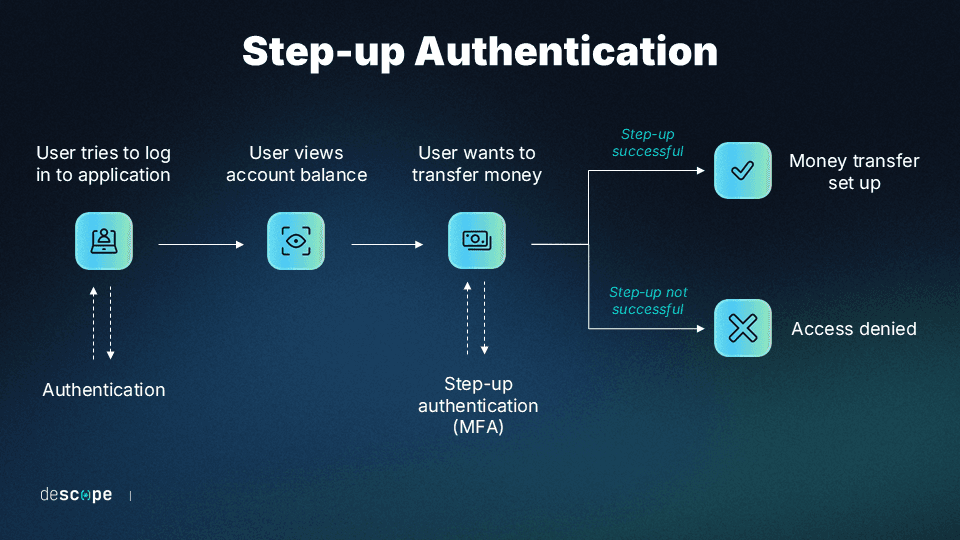
When compared to basic MFA, adaptive MFA is the same in cases where there is less apparent risk and only different when it needs to be. Any UX frictions are only added when necessary.
MFA has the capacity to scale with organizational growth and evolving security requirements across thousands of users, devices, and applications, providing robust security without the need for extensive individual configuration. A simple yet intentional setup supercharges scalability.
User convenience
One of the most easily recognizable benefits of MFA is the convenience it provides for the users of your app or website. Despite initial perceptions of added complexity, MFA streamlines the authentication process, offering a smoother user experience alongside better security.
In contrast, traditional security measures, like passwords, can be cumbersome and lead to user frustration. This is especially true when additional security measures are taken to improve on passwords’ inherent weaknesses, like requiring frequent password changes. Since MFA doesn’t rely solely on passwords, it reduces the burden on users to remember complex combinations.
Opting for passwordless MFA also reduces the burden of password management for IT staff.
Of course, convenience does often come at a cost. MFA deployments that are too simple or complicated run the risk of MFA fatigue, a condition and an attack that can lead to broken auth.
That’s why it’s imperative to balance UX features against robust security measures. One way to do this is through risk-based or adaptive authentication measures that take the user behavior into account before presenting an MFA flow. This means that, in practice, returning legitimate users do not have to go through the MFA process every single time they log in, improving their experience. At the same time, risky or suspicious logins are always put through an MFA flow.
Also Read: How Branch Insurance Reduced Auth Tickets By 50% With Passkey MFA
How the MFA process works in modern applications
To better appreciate the benefits of MFA done right, it can be helpful to understand exactly what doing it right looks like—how a sound, efficient MFA process works in modern apps.
To that effect, here is what an effective MFA process flow looks like at login:
First, a user submits a primary authenticating factor to log in to a system
Then, background risk evaluation weighs the sensitivity of the login attempt
The system determines that a step-up is necessary, so it prompts for a secondary factor
The user presents the second factor (e.g., a face scan) and has their Identity confirmed
The system issues a session token that allows finite access to a select set of resources
In this process, there is minimal friction added to the UX because of some sensitivity or risk factor identified by the system. However, the user is still able to log in relatively seamlessly.
There are also many different variations of the MFA process. No two organizations’ needs or security environments are the same, and MFA is flexible enough to account for a wide range of circumstances. Staying away from baseline configurations helps to maximize MFA benefits.
Some of the best ways to implement the MFA process include:
TOTP-based MFA using time-based one-time passwords for granular security control
Push-based MFA that sends SMS or email messages to a trusted device or account
WebAuthn or passkey-based MFA leveraging the technology of a user’s device
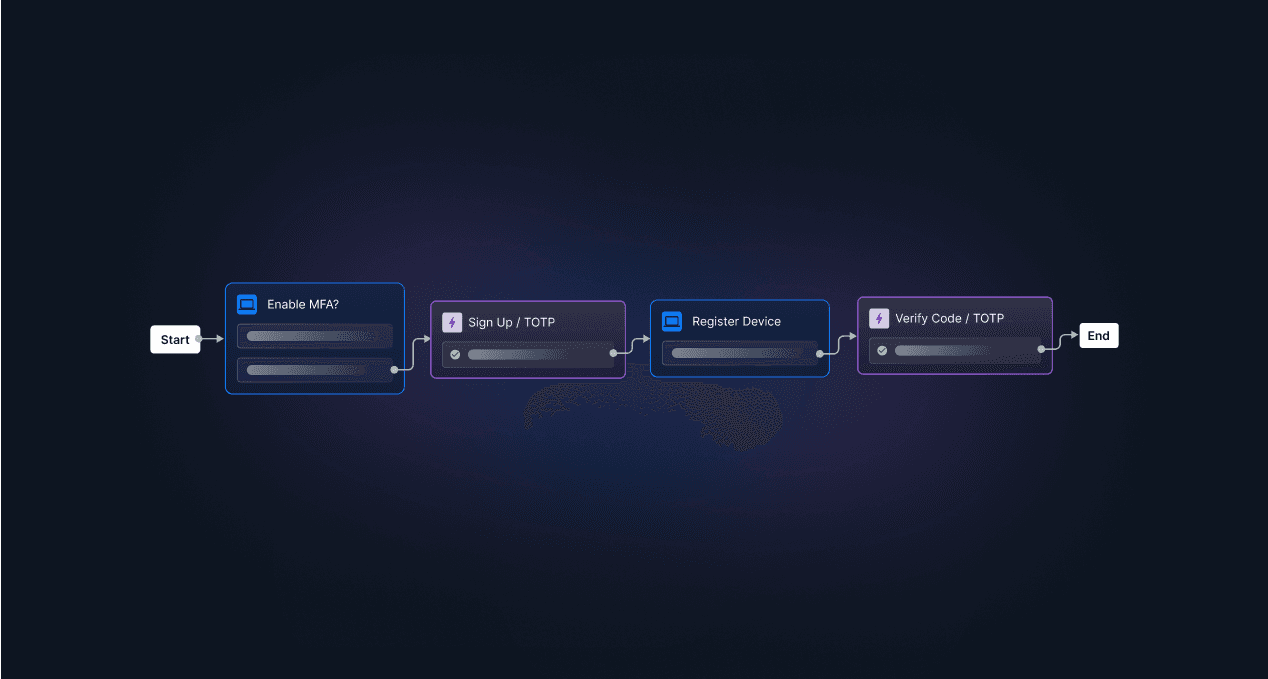
Risk-based, step-up MFA that triggers more burdensome auth only when needed
The best way to deploy any of these MFA variations and reap the full benefits of MFA is to utilize a robust, flexible auth platform that streamlines authentication alongside all elements of IAM.
Reap the benefits of MFA with Descope
Ultimately, MFA is one of the most widely used auth methods for a reason. When done right with adaptive and anti-phishing measures, it makes logins and IAM easier and more secure.
Descope helps developers and IT teams easily add MFA to their apps using no-code workflows. Admins can pick from a wide variety of methods (passworded or passwordless) and create risk-based MFA flows in a visual editor to ensure that MFA is only enforced for risky sessions.
Descope also integrates with specialized risk services such as Google reCAPTCHA Enterprise, Arkose Labs, Forter, and Have I Been Pwned to ingest granular risk scores and create branching user journey paths based on the risk of the login attempt.
Sign up for a Descope Free Forever account to implement MFA for your project in minutes. Have questions about our platform? Book time with our auth experts to learn more.