
Table of Contents
Don't have the time to read the entire post? Our human writers will be sad, but we understand. Summarize the post with your preferred LLM here instead.
Most fraud detection tools try to stop criminals after the damage is done, such as catching a stolen card at checkout or flagging a suspicious transfer. Many instances of fraud, however, start at the login screen. According to Verizon's 2026 Data Breach Investigations Report, credentials are involved in 39% of breaches, more than any other method. Credentials also account for 52% of the data compromised in attacks on basic web applications.
If you manage security, fraud, or identity at an AI, fintech, or healthtech company, you have likely noticed more account takeover and credential stuffing attempts. You’re simultaneously dealing with auditors wanting to know how you handle risk at login, while also working with a product team that may resist adding extra steps for users.
Detecting fraud at authentication helps mitigate these pain points. Instead of waiting for a fraudulent transaction and investigating later, it uses identity signals like behavioral patterns, device details, credentials, and third-party data to assess risk as soon as someone logs in.
This article covers which identity signals matter for fraud prevention, how they work together, and what a layered approach looks like in real situations.
At a glance
Fraud detection at login uses identity signals (behavioral, credential, device, and third-party) to catch fraud before it reaches authentication, rather than after a fraudulent transaction has occurred.
Login fraud and payments fraud are related but distinct problems, with different attack patterns, signals, and owners.
No single signal stops every attack. A defense-in-depth strategy layers multiple signals to cover everything from high-volume bot attacks to sophisticated, targeted account takeover.
Phishing-resistant authentication methods like passkeys and magic links remove the phishable secrets that most fraud techniques depend on.
Descope lets teams orchestrate fraud signals, phishing-resistant login methods, and conditional logic into visual user journeys without custom code.
What is fraud detection in authentication?
Fraud detection in authentication means checking for risk signals when someone logs in and, increasingly, during sensitive actions after login. Instead of just using a username and password, it treats authentication as a continuous risk decision. Each login attempt has context, such as its origin, the device used, or whether the credentials were exposed before. These details are checked to decide whether to allow access.
This approach differs from the old way, where authentication was a simple pass or fail and fraud detection occurred only after problems began. Today, fraud detection at login is proactive. It uses tools like behavioral analytics, credential intelligence, device fingerprinting, and external fraud data to distinguish between a real user who might be using a new phone or in a new city and an attacker using stolen credentials.
When done right, this approach enhances security without impacting user or developer experience. Risk-based methods add extra checks only when needed, so most people log in as usual while only risky attempts are challenged or blocked.
What is the difference between login fraud and payments fraud?
People often discuss login fraud and payments fraud together because they can occur in the same attack. For example, an attacker might take over an account at login and then use it to commit payments fraud later. However, these are separate problems with different attack methods, warning signs, and usually different teams handling them within a company.
Login fraud occurs during authentication. This includes credential stuffing, account takeover, creating fake accounts, and bypassing multi-factor authentication to access an account without permission.
Payments fraud happens after access is gained, when that access is used to move money or make purchases. Examples include using stolen cards, chargeback fraud, or fake identities to open credit lines.
Catching login fraud early, before an attacker can make transactions, is one of the best ways to prevent payments fraud later.
Trait | Login fraud | Payments fraud |
|---|---|---|
Where it occurs | At authentication (signup, login, session/MFA) | At transaction time (checkout, transfer, withdrawal) |
Typical attack methods | Credential stuffing, password spraying, account takeover, bot-driven fake account creation, MFA bypass | Stolen card use, chargeback abuse, synthetic identity, transaction laundering |
Signals used to detect it | Breached credentials, device fingerprint, behavioral / geo signals, bot detection | Transaction velocity, card / BIN data, shipping/billing mismatches, purchase behavior |
Typical owner | Identity / security or platform engineering team | Risk, payments, or fraud operations team |
When it's caught | Before access is granted | After access is used to transact |
Which identity signals detect fraud at login?
No single method catches all types of fraud at login. Attackers range from basic bots trying stolen credentials to skilled adversaries targeting specific accounts. If your defenses stop only one type, others can slip through. That’s why using several identity signals together works better than relying on just one.
The types of signals below address most attack scenarios:
Unusual behavior
Behavioral signals spot login attempts that don't match a user's usual patterns. For example, logging in from New York and then Singapore twenty minutes later, from a blocked or risky location, or from a new IP address. These signs alone don't prove fraud (a user could be traveling or using a VPN), but together they strongly indicate a possible account takeover.
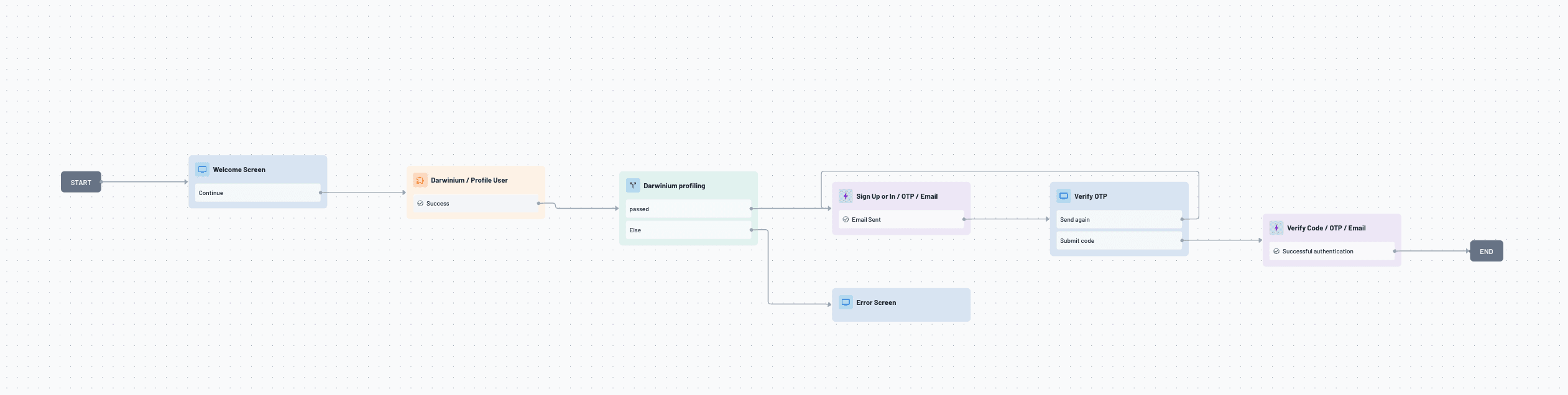
Descope checks these behavioral signals within its no-code Flows. This lets teams add extra steps (like requesting another authentication method) as soon as a geo-velocity or IP-reputation check raises a flag without writing custom risk-scoring code.
Teams can also connect dedicated risk providers directly into these Flows. For example, the Darwinium connector surfaces behavioral and velocity anomalies tied to account takeover, and the Bitsight connector enriches logins from unfamiliar or high-risk IP addresses with threat intelligence, triggering step-up verification when an IP is linked to known malicious activity.
Breached credentials
Breached credential checks look for passwords known from public data breaches. This isn’t about stolen sessions or devices but about passwords that are no longer safe. Attackers assume that people reuse credentials across sites (which they often do), and use methods like credential stuffing and password spraying to log in with exposed username and password pairs on different sites.
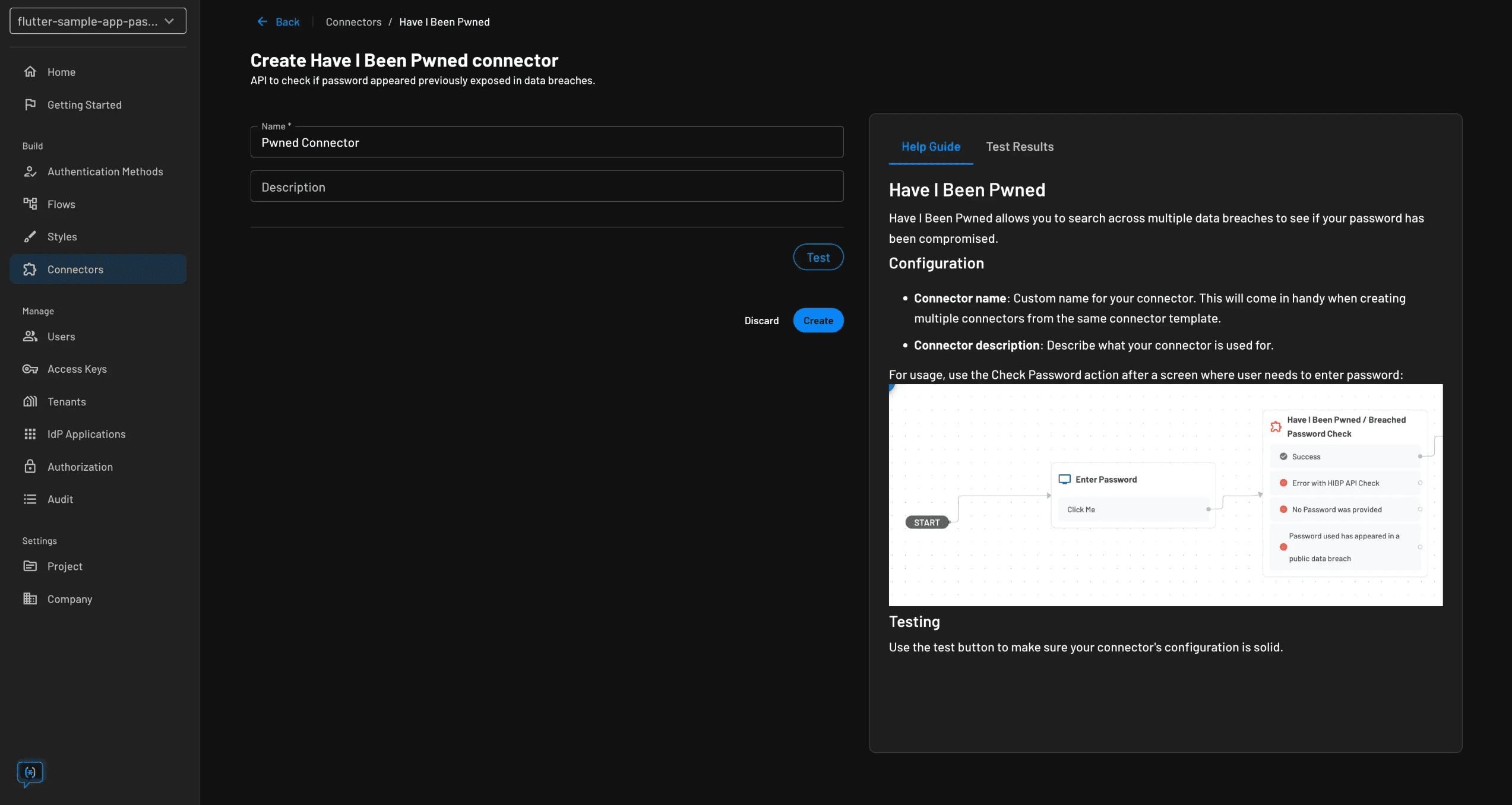
Descope’s connector with Have I Been Pwned checks credentials against known breach data during signup and login. If there’s a match, the system can require a password reset, request another authentication factor, or block the login. This helps stop compromised credentials before they cause an account takeover.
Device fingerprint
Device fingerprinting builds a profile of the hardware, browser, and configuration details behind a login attempt, so the system can distinguish a trusted, previously-seen device from one it's never encountered before. An unrecognized device isn't automatically malicious, but it's a meaningful signal, especially when it shows up alongside other risk factors like a new location or a breached credential.
Descope's fingerprinting capabilities let teams mark devices as trusted or untrusted and factor that trust level into flow logic. Teams can extend this with dedicated connectors. For example, the Fingerprint connector adds device intelligence signals like persistent visitor IDs, virtual machine detection, and bot indicators, while the Incode connector adds biometric identity checks, facial matching and liveness detection as step-up options when a device or session looks untrusted.
Bots
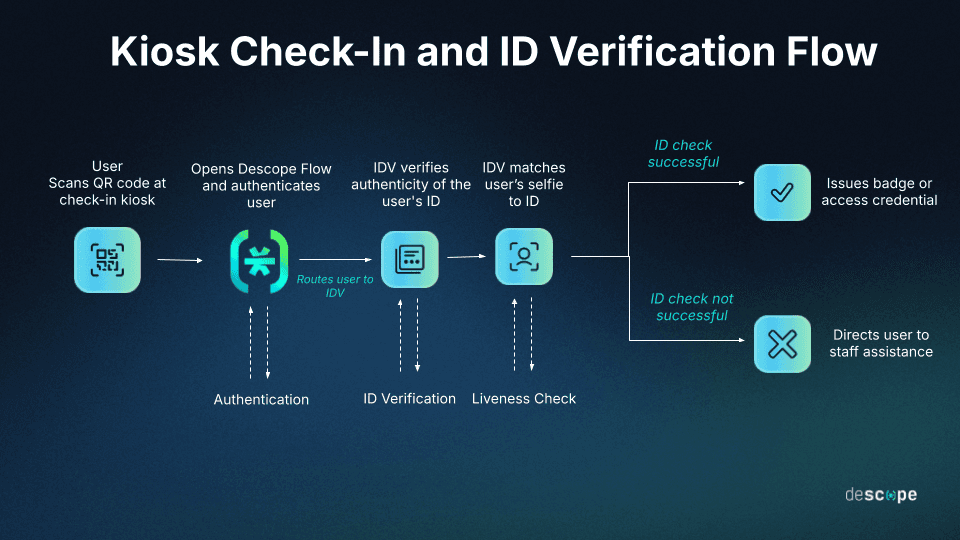
Login or signup attempts are not always made by human users. Many bots, especially those used for credential stuffing or creating fake accounts, target authentication endpoints and fill every field they see, whether a person is present or not. Stopping bot attacks early, before it reaches password checks or account creation, helps prevent much login fraud from the start.
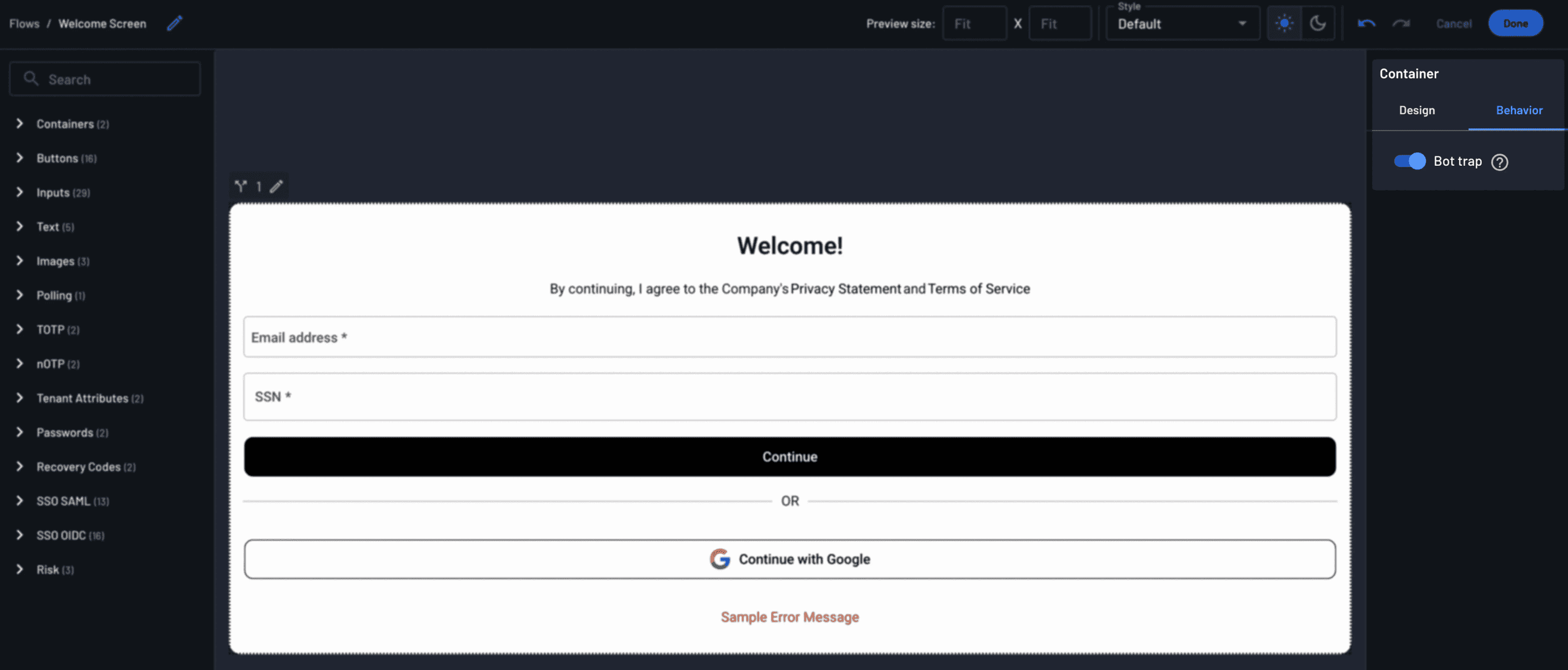
Descope's Bot Trap stops these bots by adding a hidden honeypot field to the Flow. Real users do not see this field and leave it empty. Bots that fill every field end up filling it in and revealing themselves. When this happens, Descope gives the login or signup attempt the highest risk score. Teams can then use this score to block the attempt or require extra verification without showing CAPTCHAs or making things harder for real users.
Orchestrating third-party signals
No identity platform catches every threat, so many teams add fraud intelligence from specialized third-party providers. These tools spot bot traffic, fake identities, or fraud patterns in transactions. Vendors such as Forter and Arkose Labs offer these services. While these signals aren’t always about authentication, they are important for risk decisions at login.
Descope integrates third-party fraud signals directly into its login flows through its connector ecosystem. Instead of adding fraud vendors as separate systems, teams pull third-party risk scores into the same conditional logic that governs the login journey. This ensures that every signal, native or third-party, feeds into a single risk decision.
Identity signal | What it catches / surfaces | How it is used |
|---|---|---|
Unusual behavior | Impossible traveler patterns, geo-blocked locations, unfamiliar or high-risk IP addresses | Triggers step-up authentication or blocks the attempt when behavior deviates from a user's normal pattern |
Breached credentials | Credentials that already appear in public data breaches (credential stuffing risk) | Forces a password reset, adds a factor, or blocks login when a match is found (e.g., via Have I Been Pwned) |
Device fingerprint | Trusted vs. untrusted devices based on hardware/browser configuration | Allows frictionless access from known devices; requires additional verification from new or unrecognized ones |
Bot score | High-volume, unsophisticated bots hitting login and signup endpoints | Honeypot field in Flows sets risk score to maximum on detection, triggering a block or extra verification |
Orchestrating third-party signals | Bot traffic, synthetic identities, and other fraud patterns surfaced by specialized fraud vendors | Feeds third-party risk scores into the same conditional login logic as native signals for a unified risk decision |
How phishing-resistant auth impacts fraud
Many fraud techniques work because passwords and one-time SMS codes can be stolen, guessed, or socially engineered from users. Once an attacker has these credentials, systems without defense in depth cannot tell if it is the real user or an impostor. Phishing-resistant methods like passkeys and biometrics solve this by removing the secret that can be stolen.
Passkeys use public-key cryptography and are tied to the app or website where they were created. A passkey made for a real app will not work on a fake phishing site, even if it looks convincing. The private key stays on the user's device and cannot be exported, so attackers have nothing to steal. This stops most account takeover attacks.
This is especially important when fraud is likely, such as during sensitive actions like external transfers or changing account recovery settings. Asking for a passkey or biometric check then means that even if an attacker has valid session access, they cannot finish the action from an unregistered device.
Also Read: Using Passkeys to Prevent Fraud
How fraud detection works at login: example flow
To show how these signals work together, imagine a mid-sized e-commerce company using Descope to create a layered fraud-detection login process. They use reCAPTCHA and Have I Been Pwned as connectors.
The flow might work like this:
Bot Trap at the front door. Before checking credentials, a bot-detection tool like Descope's Bot Trap, sometimes used with reCAPTCHA Enterprise, blocks most automated traffic. This stops credential-stuffing bots and fake signup attempts before they reach the authentication system.
Phishing-resistant methods as the default path. Most users receive magic links or passkeys as their main login method. This removes the risk of password-based phishing for most login attempts.
Conditional branches for risk factors. The login flow uses conditional logic to check things like whether the credential appears in the Have I Been Pwned database, whether the device is recognized, or if the location or IP address seems unusual. Each check can allow, challenge, or block the login based on the result.
Escalation only when needed. If a user logs in from a known device with safe credentials, they get in without extra steps. If their credentials are found in a breach or they log in from a new device or location, they must complete a step-up challenge (e.g. passkey step-up, contact support).
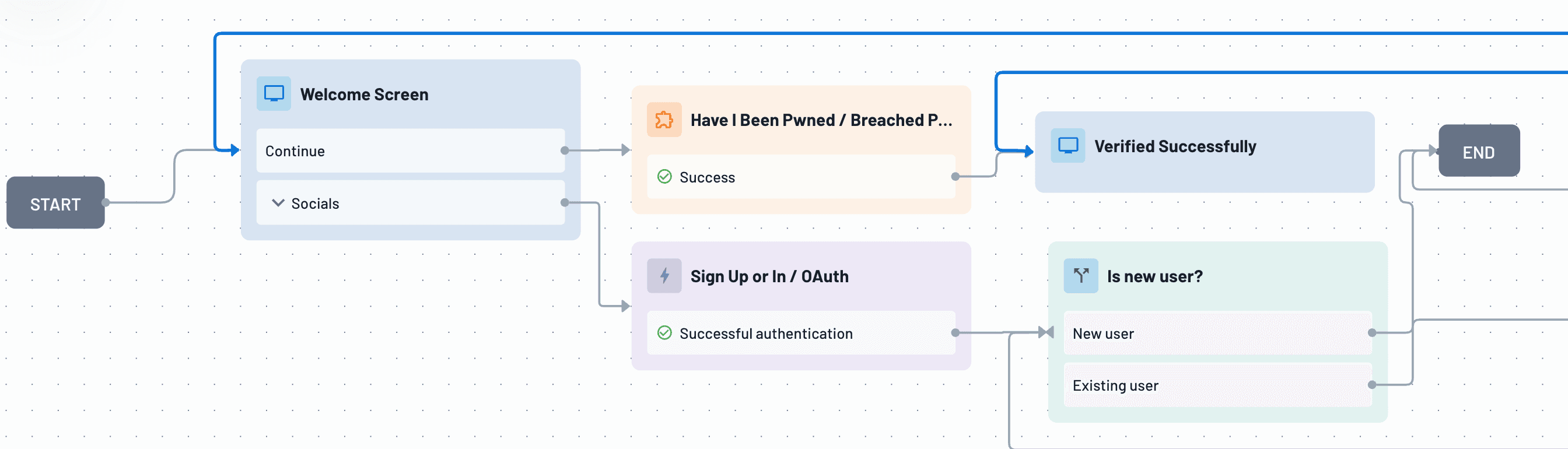
All of this logic is managed in Descope's visual, no-code Flow builder. This lets the team adjust thresholds, add connectors, or change conditional branches as fraud patterns change without updating authentication code.
Also Read: Fraud and ATO Prevention for Your App
Industries that benefit from fraud detection at login
High-scale apps
Consumer platforms with tens of millions of users face fraud mainly as a problem of scale. They deal with bots abusing signups, credential stuffing across many accounts, and account takeover attempts that can appear as normal user activity unless carefully detected. These apps must keep signup and login smooth because even small delays can cause user loss.
GoodRx needed flexible and secure authentication to support tens of millions of users on web and mobile without slowing their engineering team. They use Descope for auth and MFA across their web, mobile, and partner apps.
Linktree updated its customer authentication to handle growth, replacing older, hard-to-maintain systems with a platform designed to scale with its users. They use Descope for customer auth, alongside connectors like Arkose Labs to mitigate fraud attempts.
Also Read: The Best Authentication Solutions for High Scale Apps
Fintech and banking
In fintech and banking, identity is a key part of the product. Account access, transaction approval, and identity checks are essential for revenue, trust, and compliance with rules like KYC and AML, as well as oversight from FINRA, FinCEN, and the SEC. Weak authentication causes many breaches in this sector.
As a result, companies are adopting phishing-resistant options like passkeys and biometrics, adaptive authentication based on location and device, and add extra checks like OTPs or magic links, for sensitive actions. The goal is to keep the process streamlined while protecting conversion and revenue.
GoFundMe’s homegrown authentication system caused issues like password fatigue and forgotten credentials, impacting user onboarding experience and causing engineering backlogs. Descope helped them add passwordless options like Google and Apple OAuth, One Tap, native mobile SDKs, and no-code Flows for user journeys. As their Senior Engineering Manager said, "our developers' time would be better spent on developing new GoFundMe features rather than identity maintenance."
The5ers, a trading firm, built its trader identity system using Amazon Cognito with extra authentication. This setup created ongoing work for engineers and did not differentiate their trading programs. They switched to Descope for no-code Flows to build and update trader login journeys, plus built-in passwordless authentication and MFA to protect accounts worldwide.
Healthcare
Healthcare apps must protect sensitive health information and follow HIPAA rules, like other consumer platforms facing account takeover risks. Patients trust organizations that keep their medical and prescription data safe. Strong identity checks at login are essential for compliance and security.
Many of these apps connect directly to EHR systems like Epic and Cerner using SMART on FHIR, a healthcare-specific extension of OAuth that controls how apps authenticate users and request access to patient data. Strong login security is even more important in this setup because a compromised login could allow unauthorized access to real patient records through a standard integration.
Descope helps teams building SMART on FHIR-compatible apps by managing user authentication and consent. The EHR system remains the main source for FHIR access tokens.
SmithRx relies on Descope to secure access to sensitive pharmacy benefit data across its platform.
Collabrios Health uses Descope to protect patient access while keeping the care experience smooth and easy.
Owens & Minor chose Descope to update and improve identity management throughout its healthcare logistics and services business.
Also Read: Healthcare Identity and Access Management Best Practices
What are the most common mistakes in login fraud detection?
Using only passwords. Passwords are easiest to steal, often reused, and most likely breached. Relying on them alone lets attackers use credential stuffing to take over accounts.
Using methods like SMS one-time codes. These codes can be intercepted, SIM-swapped, or phished, so SMS OTP often provides less protection than expected.
Applying more friction than necessary. Blanket friction (CAPTCHAs, extra verification steps, or mandatory MFA for every login regardless of risk) frustrates legitimate users and hurts conversion without meaningfully improving fraud outcomes if it isn't targeted at actual risk signals.
Not having layered defenses. Trusting any single layer (a single fraud vendor, a single behavioral check, a single MFA factor) to stop all fraud leaves gaps that a defense-in-depth strategy is specifically designed to close.
How Descope helps detect and stop fraud at the login layer
Descope combines fraud detection and phishing-resistant authentication in one developer-friendly platform. Built-in connectors for Have I Been Pwned, reCAPTCHA Enterprise, Sardine, and many others work directly in the same visual Flow builder used for login and signup, so all fraud signals and identity logic are managed together.
Descope makes it easy to use phishing-resistant methods like passkeys, magic links, and biometrics as the standard login experience. Teams can add adaptive, risk-based checks and extra authentication for sensitive actions. This creates a login process that adds friction only when needed, with an auditable, flexible flow that security and product teams can adjust together.
Want to see how it works? You can sign up for a free Descope account or request a demo to find out how layered fraud detection can fit into your login flows.